eSentire is a leader in Controlled Autonomy SecOps, protecting thousands of organizations across 35+ industries around the world. Founded in 2001, the company’s Controlled Autonomy SecOps operating model pairs agentic AI operatives with engineered human-judgment controls, delivering expert-depth security outcomes at machine speed without ceding accountability to opaque automation.
We provide sophisticated cybersecurity solutions for Managed Security Service Providers (MSSPs), Managed Service Providers (MSPs), and Value-Added Resellers (VARs). Find out why you should partner with eSentire, the Authority in Managed Detection and Response, today.
HomeResourcesBlogeSentire Launches Atlas MCP, Bringing Atlas to the AI Assistants Your Teams Already Use
Blog
eSentire Launches Atlas MCP, Bringing Atlas to the AI Assistants Your Teams Already Use
Atlas MCP is now generally available. It gives AI assistants direct access to the Atlas Platform, so security teams can work findings, vulnerabilities, assets and tickets in plain language.
eSentire Launches Atlas MCP, Bringing Atlas to the AI Assistants Your Teams Already Use
Atlas MCP is now generally available. It gives AI assistants direct access to the Atlas Platform, so security teams can work findings, vulnerabilities, assets and tickets in plain language.
Starting today, Atlas MCP is available to eSentire Atlas customers. It connects the AI assistants your team already uses to live Atlas data through the Model Context Protocol (MCP), with the access controls a security team expects.
Attackers are using AI to scout targets, build exploits, and run campaigns with fewer hands-on keyboard effort. They don't stop to copy and paste.
Security teams are moving more of their own work into AI assistants and agents. However, an assistant is only as useful as what it can reach. Ask a general-purpose model which of your assets carry critical vulnerabilities, and it has nothing to work with. So, analysts copy data out of one console, paste it into another tool, and lose minutes at each step.
There's a second problem. Every new connection into your security data is a new target. Tokens sitting in config files, local proxies on laptops, and shared credentials all give attackers something to exploit.
What's available today
Atlas MCP is a hosted MCP server that gives AI assistants standardized, permission-aware access to eSentire Atlas. Sign in, and your assistant can answer questions about your environment using live Atlas data.
15 tools across your Atlas environment
These tools are standardized across six areas of the platform:
Findings: list findings, pull details and update them
Signals: pull the full signal data behind a finding
Vulnerabilities: list CVEs and view details
Patches: see which patches are missing
Assets: list assets and retrieve details
Tickets: list, view, create, update, and comment on tickets with eSentire
The data is live and matches what you see in the Atlas console. A typical findings query returns in under a second.
Act on Atlas Insight
Atlas MCP goes beyond lookups. With write permission enabled, your assistant can update a finding, open a ticket with eSentire, add a comment or update a ticket from the same conversation where the analysis happened. Analysts act on what they find without retyping it into another screen.
Everyone detects. eSentire closes the loop. Now you can do it from your AI assistant.
Built with the attacker in mind
Look at Atlas MCP the way an attacker would and there isn't much to exploit:
Nothing on the endpoint. eSentire hosts the server. There's no local MCP process, proxy or package to install, patch or exploit.
No secret on the client. The recommended OAuth sign-in runs through Okta with your Atlas credentials. There's no API key to store, rotate or leak.
Identity the client can't fake. Your identity and organization are resolved on eSentire's side from your credential. The client can't set them, and every query stays scoped to your organization.
Permission on every call. Every tool is gated on the read or write permission your credential carries. A credential without write permission can't create or update anything, whatever the prompt asks for.
An off switch for admins. Atlas administrators can turn off MCP access for any user from the same Application Access settings that control the Atlas console and Mobile App.
This is Controlled Autonomy SecOps applied to your AI tools. The assistant does the legwork. You set the boundaries.
Connects to the assistants you already use
Atlas MCP is enabled by default for every Atlas user, and there's nothing to install. It's listed in the Claude connector directory. Select Connect, sign in with your Atlas credentials and the tools appear within seconds. A Claude Owner or Admin can also add Atlas MCP once for the entire organization.
Atlas MCP works with:
Claude on web, desktop, and Claude Code, with OAuth
VS Code with GitHub Copilot, with OAuth or an Atlas API token
GitHub Copilot CLI, Cursor, Codex, and any remote MCP client that supports Streamable HTTP with custom headers, with an Atlas API token
Microsoft 365 Copilot, supported via admin-led setup with your Technical Account Manager
* ChatGPT support is in progress.
Figure 1: Atlas MCP in the Claude connector directory.
How teams are using Atlas MCP
Atlas MCP started with a design partner, a Claude-first security team that wanted to triage findings and work tickets from Claude Code without opening the Atlas portal. Early use falls into three patterns.
1. Triage and investigation in one thread
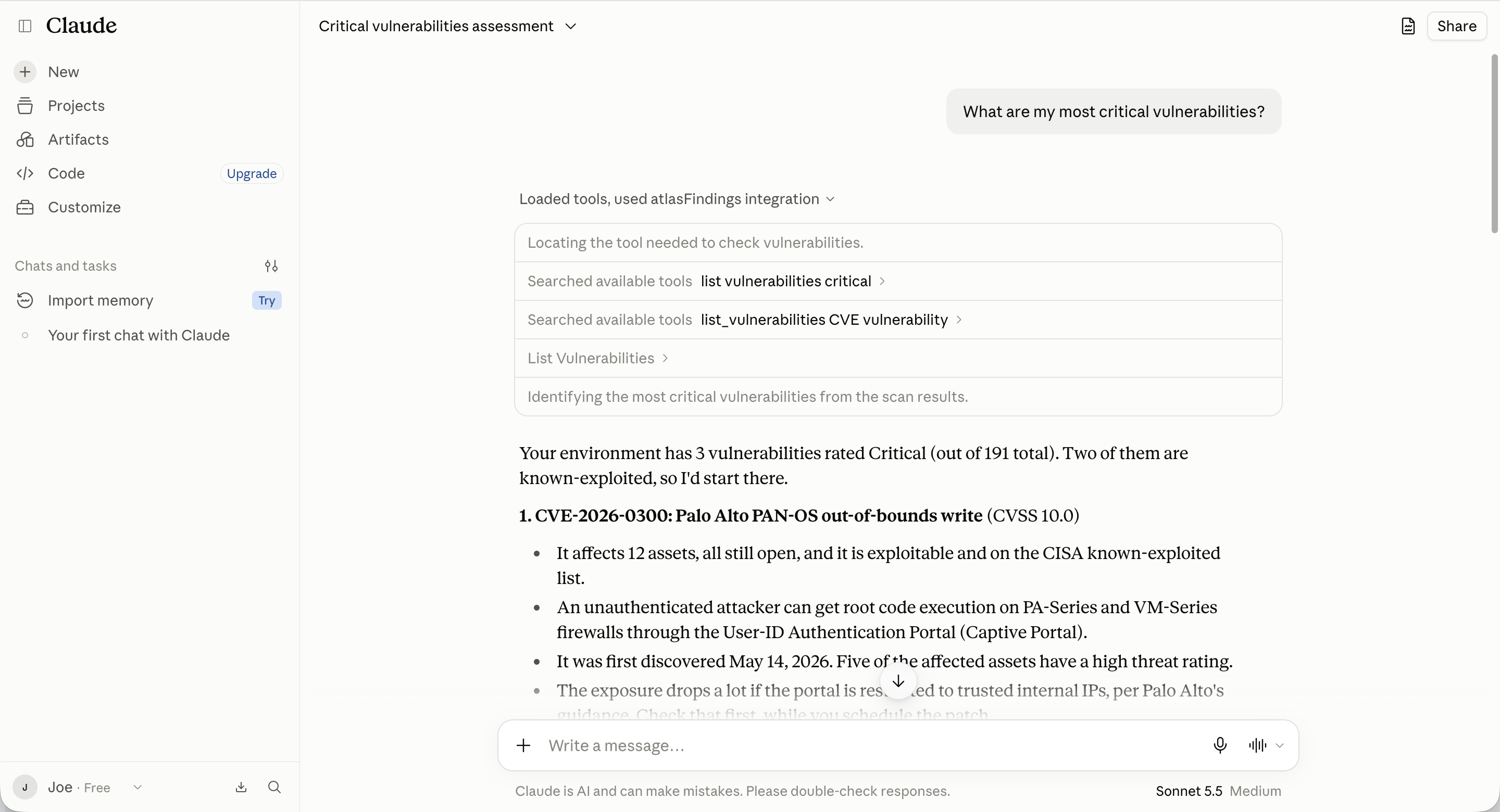
Analysts start with a question like "Show me all critical findings from the last 7 days." They pick the finding that matters, pull its details and signal data, and have the assistant walk through what happened. With write access, they update the finding or open an eSentire ticket before leaving the conversation. Detection, investigation, and follow-through happen in the same place.
Figure 2: A triage query in Claude returning critical findings from the last seven days.
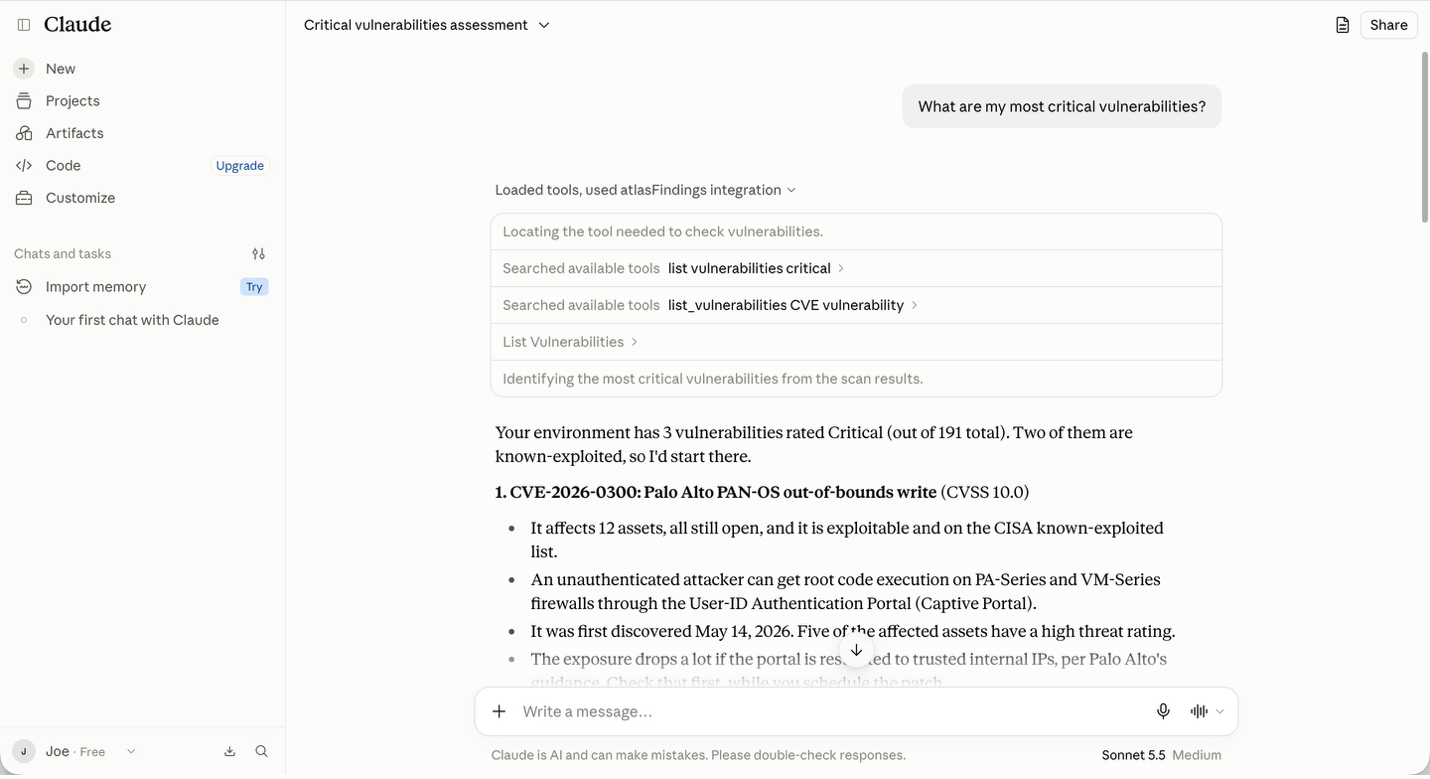
2. Exposure and patch prioritization
"List assets with critical vulnerabilities" gives the assistant the exposure picture. A follow-up on missing patches turns it into a remediation list. Two questions replace a manual cross-reference between vulnerability and patch data, so the fixes that matter most reach the right team faster.
3. Reporting for leadership
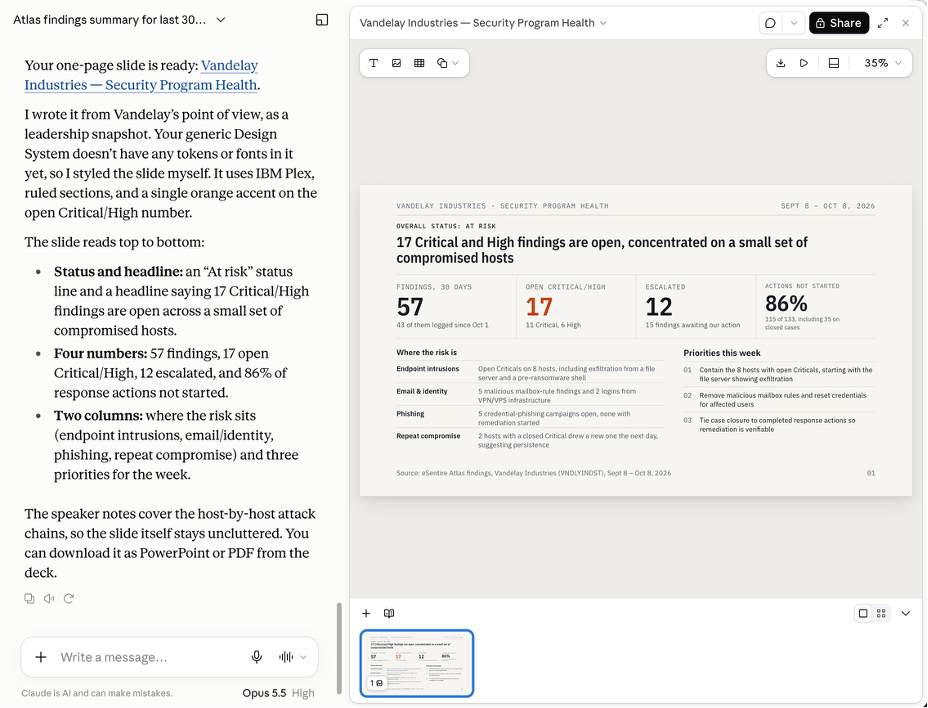
Teams ask questions like "How many findings were resolved this month?" and roll the answers into weekly and monthly readouts on findings, vulnerabilities, and ticket status. Analysts spend less time assembling reports, and every number traces back to live Atlas data.
Figure 3: A monthly findings summary for leadership, built in Claude with Atlas MCP.
Beyond the SOC
Partner organizations with the Super Admin role get organization-tree tools to navigate child accounts and scope a query to a single client. That makes it simple to build a client-specific investigation summary without touching anyone else's data.
Engineering teams can work the same data from VS Code, Cursor, Codex or Claude Code, so security context shows up where code gets written.
What's next
Atlas MCP is the first step in bringing Atlas to wherever security work happens. ChatGPT support is in progress, and we'll keep adding tools as the platform grows.
The principle behind all of it stays the same. AI should move at attacker speed, and your team should decide what it's allowed to touch.
Getting started
If you're an eSentire Atlas customer, Atlas MCP is already on. Connect from the Claude connector directory, or follow the Atlas MCP setup guide for VS Code, GitHub Copilot CLI, Cursor, Codex, and other clients. Your Technical Account Manager can confirm access, help with Microsoft 365 Copilot and let you know when ChatGPT support lands.
Not an eSentire customer yet? Book a demo to try Atlas MCP live.
Frequently asked questions
What is Atlas MCP?
Atlas MCP is a hosted Model Context Protocol server that connects AI assistants to eSentire Atlas. Your team can query findings, signals, vulnerabilities, patches, assets, and tickets in plain language, using live Atlas data.
Which AI assistants work with Atlas MCP?
Claude (web, desktop, and Claude Code), VS Code with GitHub Copilot, GitHub Copilot CLI, Cursor, Codex, and any remote MCP client that supports Streamable HTTP with custom headers. Microsoft 365 Copilot is supported through an admin-led setup. ChatGPT support is in progress.
Do I need to install or host anything?
No. eSentire hosts the server. You connect your assistant and sign in.
Is Atlas MCP included in my subscription?
Yes. Atlas MCP is included with Atlas and enabled by default for every Atlas user.
How does authentication work?
OAuth is the recommended option. You sign in with your Atlas credentials through Okta, access is bound to your identity and no secret is stored on the client. For clients that don't support OAuth yet, you can generate an Atlas API token as read-only or read-write. Either way, enforcement is identical.
Can Atlas MCP make changes in Atlas?
Only when your credential allows it. Three of the 15 tools can write, covering updates to findings and tickets. Every tool checks for read or write permission, so a credential without write permission can't create or update anything.
Does eSentire see my prompts or conversations?
No. Atlas MCP receives only the tool calls your assistant makes and the parameters it sends, such as a date range or a ticket comment. Your conversation with the assistant never reaches eSentire.
How do administrators control access?
Atlas administrators can turn off Atlas MCP for any user under Settings → User Management → Application Access. In Claude, an Owner or Admin can add Atlas MCP as a custom connector so every member of the organization sees it. If your organization enforces an MCP registry allowlist, Atlas MCP needs to be approved under that policy.
Does Atlas MCP support partner organizations?
Yes. Partner organizations with the Super Admin role get organization-tree tools to navigate child accounts and can scope a query to a single child account.
Can I use Atlas MCP alongside other MCP servers?
Yes. Your assistant can connect to Atlas MCP alongside the other MCP servers your team already uses.
I connected Atlas MCP but don't see any tools. What should I check?
Fully quit and reopen your assistant. In VS Code, make sure Copilot Chat is in Agent mode. If you can sign in but access is denied, ask your Atlas administrator to confirm MCP access is turned on for your user. The Atlas MCP setup guide covers other common fixes, and your Technical Account Manager can help.
To learn how eSentire can help you find exposures and defend your organization, connect with an eSentire Security Specialist now.
Justin Bailey is Senior Director of Product Marketing at eSentire, where he leads go-to-market strategy for eSentire's portfolio spanning MDR, offensive security, and threat intelligence. With deep experience across multiple security disciplines, and intelligence-driven security programs, Justin specializes in translating complex security capabilities into impactful and easy to understand narratives. He works at the intersection of product, marketing, and sales to drive growth through go-to-market activities.