eSentire is a leader in Controlled Autonomy SecOps, protecting thousands of organizations across 35+ industries around the world. Founded in 2001, the company’s Controlled Autonomy SecOps operating model pairs agentic AI operatives with engineered human-judgment controls, delivering expert-depth security outcomes at machine speed without ceding accountability to opaque automation.
We provide sophisticated cybersecurity solutions for Managed Security Service Providers (MSSPs), Managed Service Providers (MSPs), and Value-Added Resellers (VARs). Find out why you should partner with eSentire, the Authority in Managed Detection and Response, today.
Atlas Email Security, powered by Sublime, is an email detection and response add-on for the eSentire Atlas platform, now available for Microsoft 365. It connects over API with no MX record or gateway changes and inspects every message as it arrives. Each flagged message carries an Attack Score and the detection logic behind it. eSentire’s 24/7 SOC investigates each alert alongside endpoint, identity, network and cloud activity, then removes the threat from every mailbox it reached, within response rules the customer sets. User Reported Phishing is included, and the add-on works with any Atlas Package.
Starting today, Atlas Email Security, powered by Sublime, is available as an add-on to any Atlas Package. It brings email detection and response into the same platform, and the same SOC, that already watches your endpoints, identities, network, and cloud.
In the Phishing-as-a-Service activity eSentire tracked, the gap between a stolen credential and exploitation averaged just 14 minutes.1,2 Inboxes are taking more of the pressure too. In the 2026 eSentire Threat Report, email bombing and IT impersonation rose 1,450% year over year, and account compromise rose 389%.1,2
Most teams protect email in one tool and everything else in another. The email tool logs the message, and by the time that log reaches the SOC, the message may already have been opened and the link clicked.
There's a second problem. Employees do the right thing and hit the report button, and the email lands in an abuse mailbox with everything else people reported. Someone addresses it when they can.
What's available today
Atlas Email Security is email detection and response that runs inside Atlas. It connects to Microsoft 365 over API and inspects every message as it arrives. Each alert goes to Atlas AI and our 24/7 SOC. For the full picture, see our new email detection and response page.
A native Sublime engine reads intent and sender behavior along with links, attachments, images, and QR codes. That matters for attacks with nothing obvious to scan, like a business email compromise request that is just a polite paragraph. Credential phishing and malware delivery are covered, along with the newer lures, from callback phishing and QR codes that open fake login pages to calendar invite phishing and email bombing.
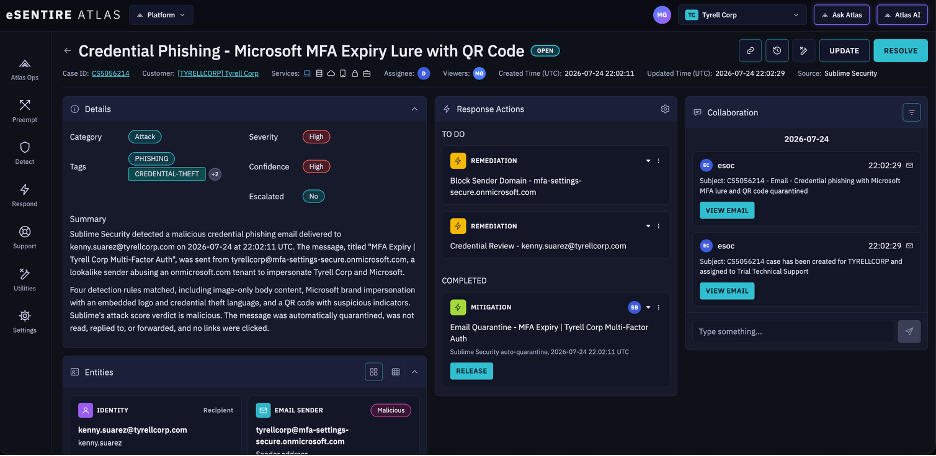
Clear threats are handled the moment they land, whether that means quarantine, a move to spam, the trash, or a warning banner, under the configuration we agree with you at onboarding. The example Finding below shows it in action. A credential phishing email with a Microsoft MFA expiry lure and a QR code was quarantined on delivery, before anyone interacted with it and with no links clicked.
Every flagged message carries an Attack Score and the detection logic behind it, so you see the same evidence our analysts see. In this Finding, four detection rules matched, including Microsoft brand impersonation with an embedded logo and a QR code with suspicious indicators, and the verdict came back malicious. A verdict you can inspect is one your team can challenge and tune. A verdict you have to take on faith is just a notification.
From there, Atlas AI and our analysts investigate the alert alongside your endpoint, identity, network, and cloud activity. The message and the sign-in that followed it sit together in one Atlas Finding. In this one, the quarantine is already marked complete, and the sender domain block and credential review are queued as next steps. That's the difference between just deleting an email and actually stopping an attack.
Figure 1. An example Atlas Finding for an auto-quarantined credential phishing email, showing the detection summary, response actions, and SOC collaboration in one view.
When a malicious email does land in a mailbox, or turns out to be part of a larger campaign, the Atlas SOC can pull it back: quarantining or trashing the message, taking down the entire campaign, and removing malicious calendar invites, all within the response rules you set during onboarding. And because the investigation runs in Atlas, analysts see what happened next, including who clicked and whether a suspicious login followed, not just what landed.
Built around the stack you already run
Nothing about your mail flow has to change, and you stay in control of what happens next.
No MX or gateway changes. It connects over API and runs alongside your gateway or the protection built into Microsoft 365. If you would rather retire one of them, it can replace it too.
Defender for Office 365. Atlas Email Security augments it with a team that watches it around the clock.
Response on your terms. Removal runs through APIs from Atlas, and our analysts never sign in to your mailboxes. Actions follow your Response Orchestration settings and are recorded in the Finding.
Admins in charge. Your team keeps allow and block lists, exclusions, quarantine release, and the review queue. You call eSentire for support instead of the vendor.
Your email stays put. Content stays in your Sublime tenant and isn't stored on the Atlas platform.
DATA SHEET / SOLUTION BRIEF
Atlas Email Security
The datasheet walks through all five steps, from connection to cleanup.
Take the message that gets through. Picture a convincing invoice that lands in dozens of inboxes, and one person clicks. The SOC sees the click and the sign-in that followed in the same Finding and pulls the message from every mailbox. Nobody hunts for copies one inbox at a time.
Then there's the report button. The SOC investigates what employees report and either closes it or removes the threat, and the employee hears back. User Reported Phishing is included, and it works with the Microsoft 365 and Proofpoint report buttons today, with Google Mail and Mimecast to follow.
And there's the overnight gap. Defender for Office 365 or a secure email gateway can be running well and still have nobody looking at its alerts after hours. Atlas Email Security puts a 24/7 SOC on those alerts and the cleanup that follows.
What's next
Atlas Email Security starts with Microsoft 365. Google Workspace is coming soon. Email belongs in the same investigation as everything else, and each addition moves it closer.
Getting started
Atlas Email Security is an add-on to any Atlas Package, with no minimum package, and User Reported Phishing is included. eSentire provides the Sublime license, so you don't need one of your own.
Onboarding typically takes about two weeks and about 16 hours of effort. We connect to your mail platform first. Then we tune VIP protections and exclusions with you and agree on which threats get removed automatically.
Not an eSentire customer yet? Talk to an expert about your mail setup. Already a customer? Your account team can confirm what your package includes and get onboarding started.
As Senior Content Marketing Manager, Nadine Abdulkarim leads content and social media strategy at eSentire, contributing to the development of security-focused content across marketing channels. She has over a decade of experience in marketing, communications, content, and technical translation, with several years specializing in cybersecurity. Nadine holds a Master of Arts in French Studies and an Honors Bachelor of Arts in French Language and Literature, both from Western University in London, Ontario.