eSentire is a leader in Controlled Autonomy SecOps, protecting thousands of organizations across 35+ industries around the world. Founded in 2001, the company’s Controlled Autonomy SecOps operating model pairs agentic AI operatives with engineered human-judgment controls, delivering expert-depth security outcomes at machine speed without ceding accountability to opaque automation.
We provide sophisticated cybersecurity solutions for Managed Security Service Providers (MSSPs), Managed Service Providers (MSPs), and Value-Added Resellers (VARs). Find out why you should partner with eSentire, the Authority in Managed Detection and Response, today.
In early November 2026, eSentire's Threat Response Unit (TRU) investigated an intrusion that began with a redirection to a fake snipping tool site, snipp.codes-team[.]com, resulting in a Microsoft-signed store installer named Snipping-Tool.exe being downloaded. Running it led to the installation of "Setup Assistant", an Electron-based application published in the Microsoft Store by "ETPS Ltd".
TRU's analysis found that Setup Assistant was not a benign utility. The application was heavily obfuscated, maintained communication with C2 infrastructure, monitored the victim's Downloads folder, and supported execution of C2-supplied PowerShell and JavaScript. This access was used to launch a malicious PowerShell stager, establish persistence through a scheduled task, and retrieve a previously undocumented PowerShell-based RAT tracked by TRU as "Vinci RAT", named for the recurring "vinci" string found across the attack chain.
Vinci RAT is a feature-rich PowerShell-based RAT with capabilities that include host fingerprinting, security tool discovery, remote and reverse shell access, file delivery, file-based and fileless EXE execution, DLL execution, in-memory shellcode execution, and file-based and fileless PowerShell execution. The campaign highlights how attackers are combining search-engine redirection, fake software download pages, obfuscated Electron applications, and trusted software distribution channels to gain persistent access to victim environments.
Attack Chain Overview
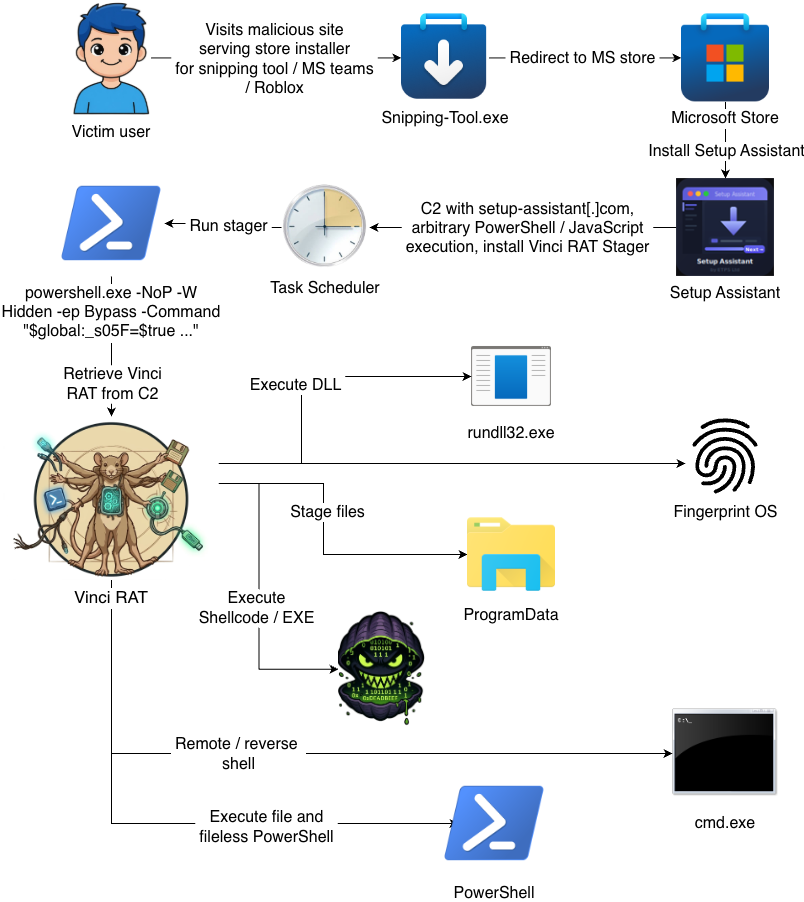
The victim downloaded a Microsoft-signed store installer masquerading as a snipping tool and was redirected to the Microsoft Store to install an application named Setup Assistant. Once installed, Setup Assistant executed embedded, obfuscated JavaScript that allowed the C2 server at setup-assistant[.]com to supply and run arbitrary PowerShell / JavaScript. The C2 then delivered a command to execute the Vinci RAT stager, which retrieved Vinci RAT from its C2 infrastructure and gave the threat actors extensive control over the system, including remote and reverse shell access, file staging, and DLL, EXE, PowerShell, and shellcode execution.
Figure 1 - Attack diagram
Initial Access
Initial access began when the victim searched for a snipping tool and was redirected to a fake installation site, snipp.codes-team[.]com, which downloaded a Microsoft-signed store installer named Snipping-Tool.exe. Execution of this package led to the installation of Setup Assistant from the Microsoft Store.
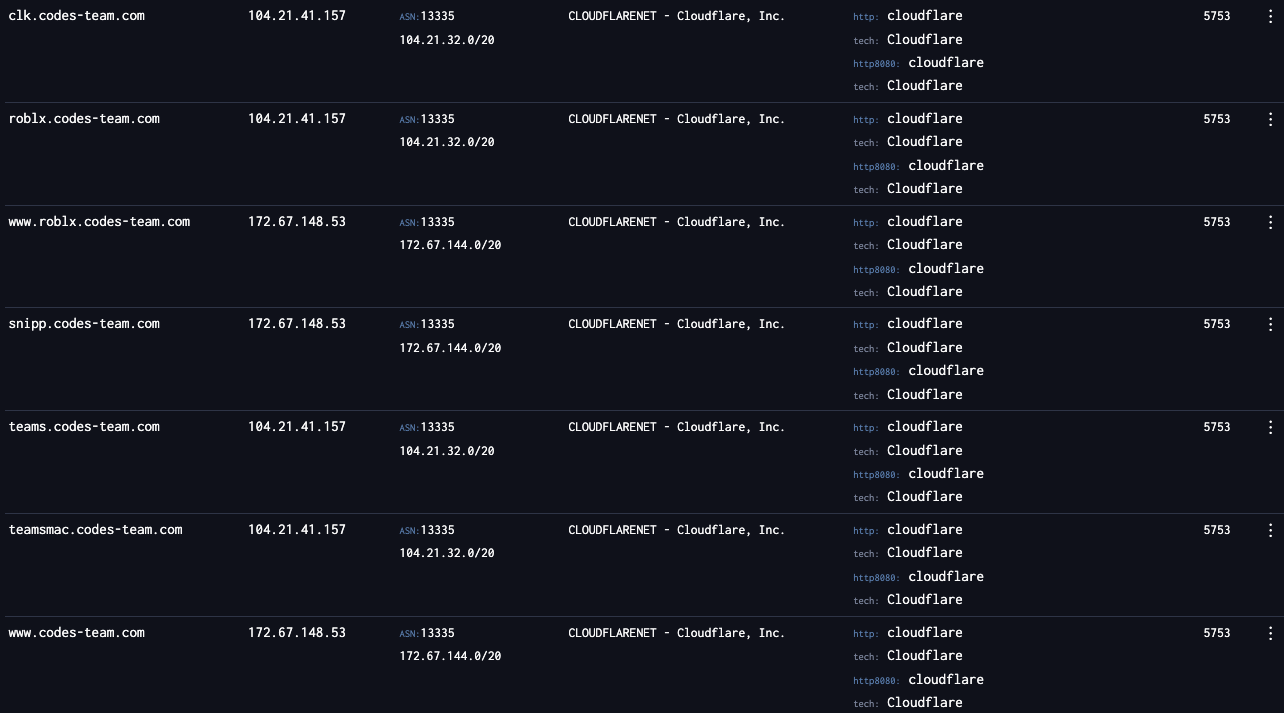
The root domain codes-team[.]com has DNS records for additional subdomains that suggest the threat actors are impersonating legitimate software download pages for applications such as Microsoft Teams and Roblox, including examples like teams.codes-team[.]com. The root domain itself was registered on March 21, 2026, while the Microsoft Store package indicates it was released on June 1, 2026, suggesting it has remained available in the store for at least five months without detection.
Figure 2 - Subdomains targeting Teams and Roblox users
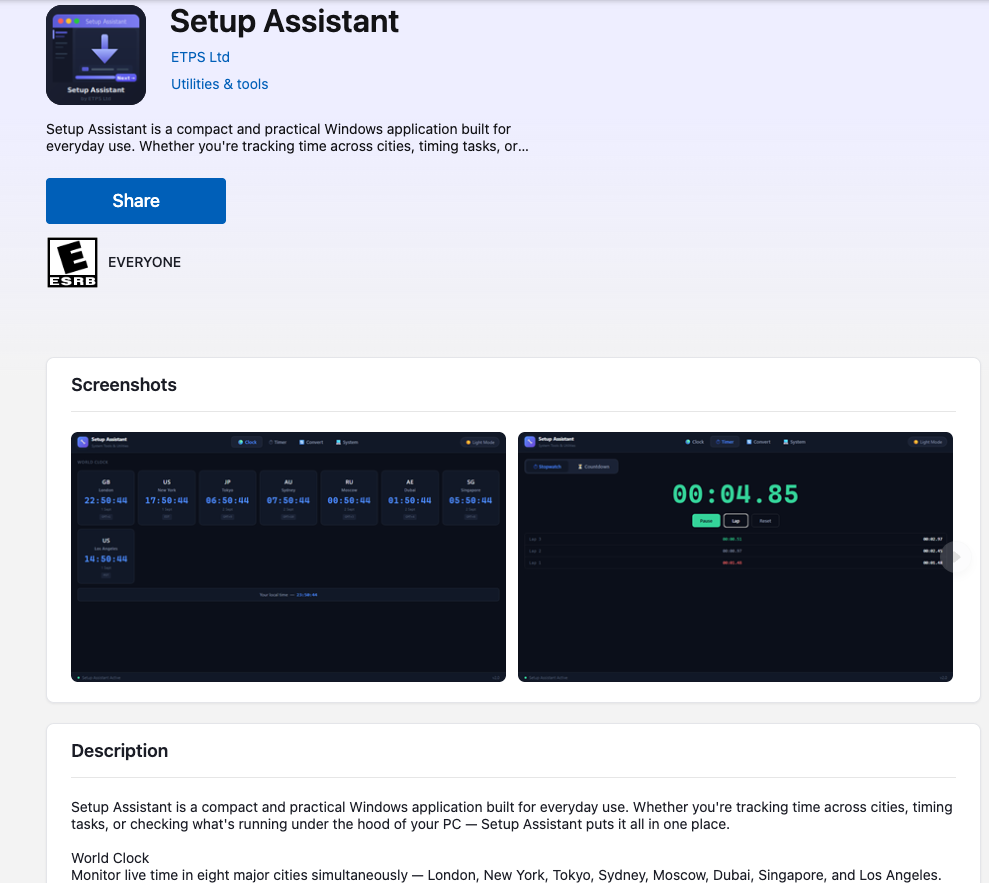
The figure below shows the Setup Assistant application listed in the Microsoft Store. The application description contains repeated use of the em dash character (—), which likely indicates that the description was generated by an LLM.
Figure 3 - Setup Assistant app in Microsoft Store
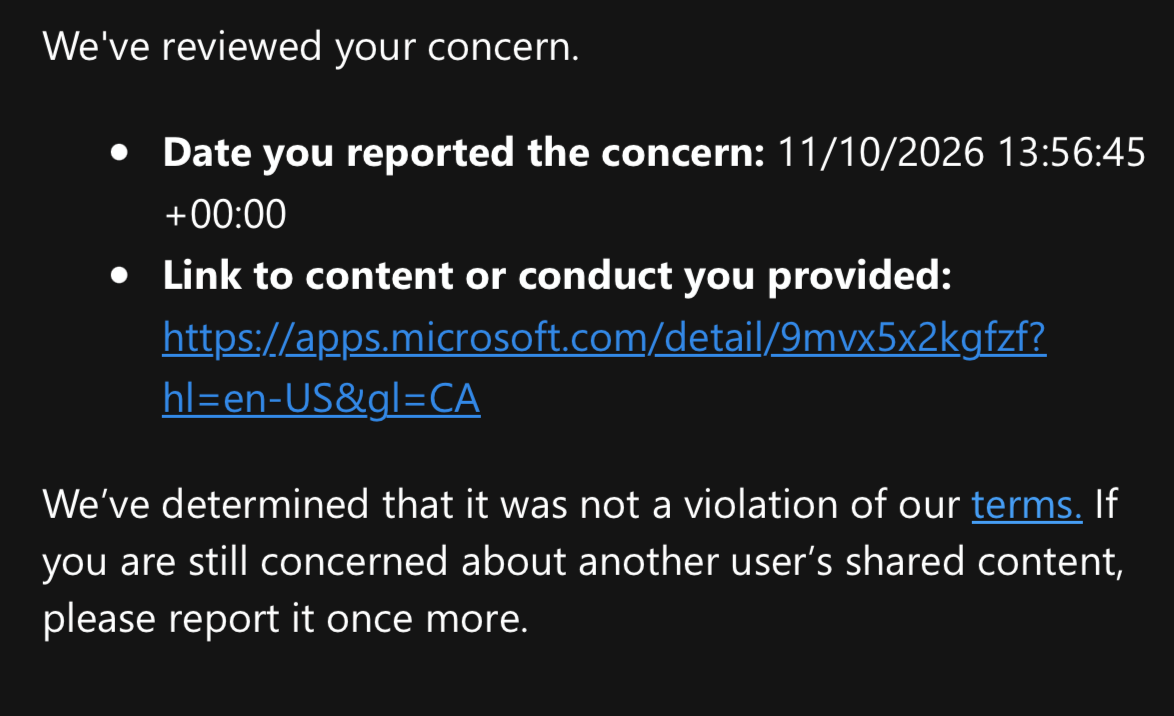
TRU received the response below from Microsoft after reporting the application through the Microsoft Store's abuse form. Microsoft stated that the application did not violate their terms; however, as described in the next section, the malware is clearly obfuscated and functions as a backdoor, meeting the criteria outlined in Microsoft's article, How Microsoft identifies malware and potentially unwanted applications.
Figure 4 - Rejection email response after reporting malicious application in Microsoft Store
Analysis of Setup Assistant (Vinci Backdoor)
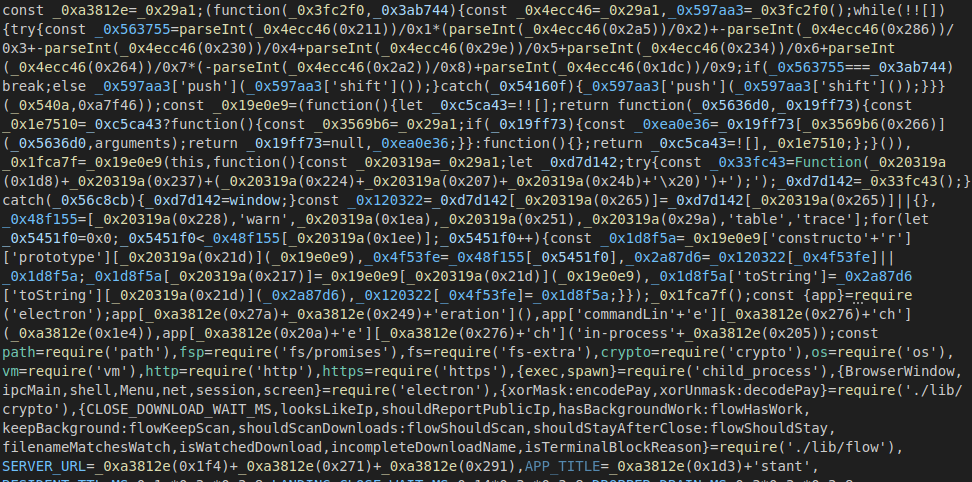
The application is Electron-based. After unpacking it, we found that the main.js entry-point script was obfuscated with Obfuscator.io, a legitimate, free JavaScript obfuscation service that has been observed across numerous incidents involving a wide range of threat actors. The application functions as a backdoor, with core capabilities that enable persistent communication with the C2 and execution of C2-supplied PowerShell and JavaScript.
Figure 5 - Obfuscator.io-obfuscated main.js in Setup Assistant application
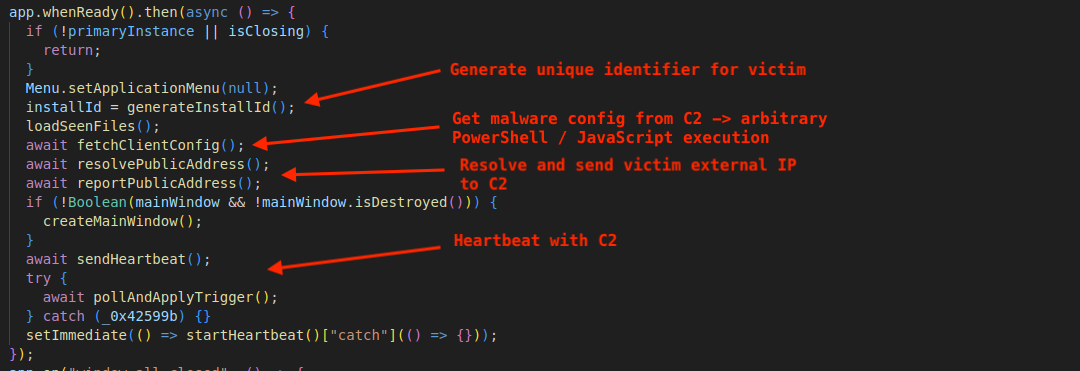
Using the free and open-source tool ben-sb's Obfuscator.io Deobfuscator, we deobfuscated the script. The figure below outlines the script methods invoked after the Electron app completes initialization. These include victim ID generation, malware configuration retrieval from the C2 server, reporting of the victim's external IP address, and maintaining a persistent heartbeat connection with the C2.
Figure 6 - Entrypoint into obfuscated script
Victim Identifier Generation
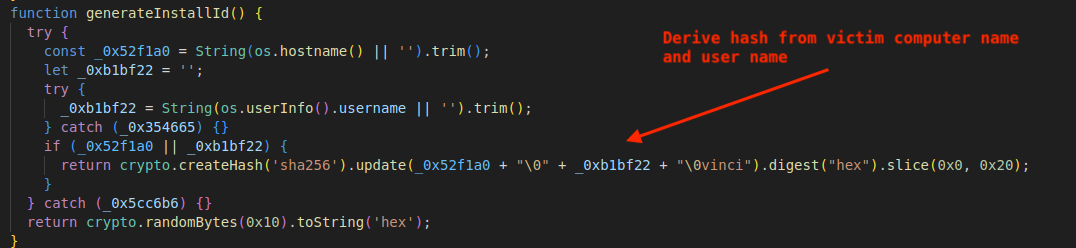
The figure below shows the method responsible for deriving a victim identifier from the victim's computer name and username. The value is SHA-256 hashed using the following format: SHA256(COMPUTER_NAME + "\0" + USERNAME + "\0vinci").
Figure 7 - Method that derives victim identifier
Fetching the Malware Configuration
The malware sends an HTTP request to retrieve its JSON-based malware configuration from the URL: hxxps://setup-assistant[.]com/api/config.
Figure 8 - Method that fetches the malware configuration
The malware configuration returned at the time of our analysis is as follows:
Each field of the malware configuration is described in the following table:
Field
Description
cloakingEnabled
Unhandled
cloakingUrl
Unhandled
watchNames
File names to monitor for in the victim's Downloads directory. If a match is found, an HTTP POST request is sent to the C2 URL: hxxps://setup-assistant[.]com/api/telemetry and the response from the C2 is handled by running C2-supplied JavaScript or PowerShell
landingWatch
Coordinates watched downloads
needsCloak
Boolean indicating whether a C2-supplied URL should be opened in the victim's default web browser, retrieved via URL: hxxps://setup-assistant[.]com/api/content?device=<victim_id>
backgroundMode
Controls whether the malware continues sending a heartbeat to the C2 URL via HTTP POST: hxxps://setup-assistant[.]com/api/collect
checkIpFromApp
Controls whether the malware captures and reports the victim's external IP via hxxps://api.ipify[.]org/?format=json to the C2 server URL: hxxps://setup-assistant[.]com/api/telemetry
C2-Driven Code Execution
There are two execution paths that can trigger arbitrary PowerShell or JavaScript execution. The first occurs when a download name matches an entry in the malware configuration's watchNames list from the malware's configuration. The second occurs when the C2 server initiates an update action via the URL: hxxps://setup-assistant[.]com/api/update-status?device=<victim_id>".
PowerShell commands are executed using one of the following commands, with the first command reading the PowerShell payload from standard input, while JavaScript execution is performed using the built-in Node.js method vm.runInNewContext.
Figure 9 - Method that executes arbitrary C2-supplied JavaScript
Analysis of Vinci RAT Stager
TRU observed the Vinci RAT stager on the victim's machine configured to run a PowerShell command via scheduled task. The command performs the following functions:
Disables AMSI by replacing the ScanContent method handle's Value property with its own.
Hides its window via GetConsoleWindow/ShowWindow APIs.
Generates a victim identifier derived from the last 16 hexadecimal characters of the victim's HKLM\SOFTWARE\Microsoft\Cryptography\MachineGuid registry value.
Establishes communication with the C2 at http://monkeysholder[.]info/api.php via the WinHttp.WinHttpRequest.5.1 COM object using user agent: Mozilla/5.0 (Windows NT 10.0; Win64; x64 AppleWebKit/537.36 (KHTML, like Gecko) Chrome/131.0.0.0 Safari/537.36.
Creates a scheduled task for persistence. When the task runs, its PowerShell code sets a global variable at the beginning, after which Vinci RAT is retrieved from the C2 by sending a special request with the Request-Id header set to 1.
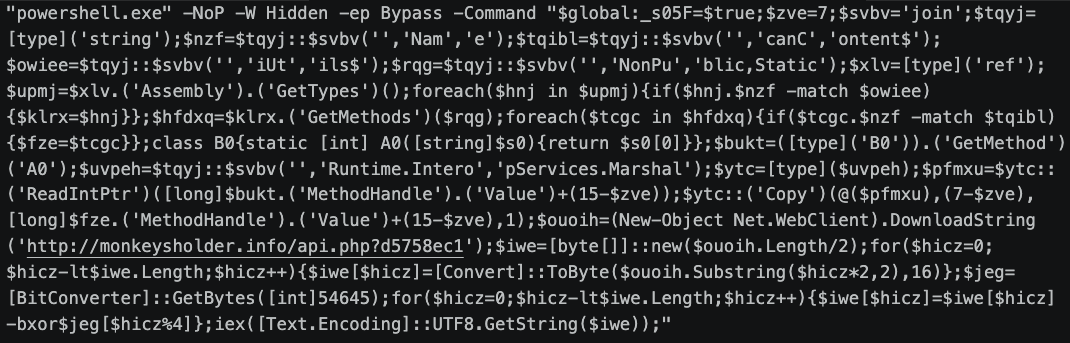
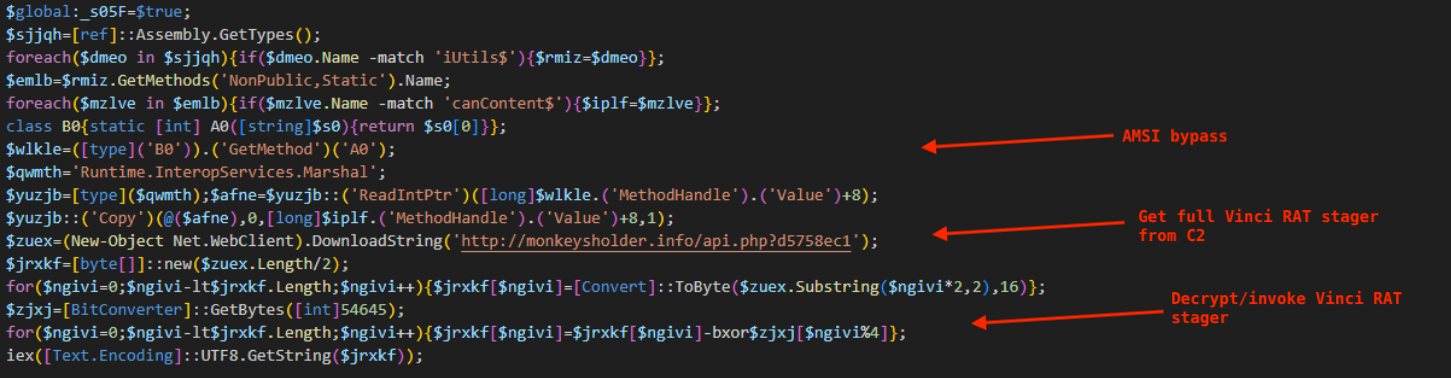
The figure below displays the lightly obfuscated stager code that TRU discovered in the incident.
Figure 10 - Lightly obfuscated PowerShell stager from scheduled task
The deobfuscated stager script is shown in the next figure and is responsible for disabling AMSI and retrieving the full Vinci RAT stager from hxxp://monkeysholder[.]info/api.php?d5758ec1. The response is converted from hexadecimal format and decrypted using a randomly generated 4-byte XOR key, by deriving it from an integer, in this case 54645, converting it to bytes (75d50000 in hex), before being invoked via Invoke-Expression (iex).
Figure 11 - Deobfuscated PowerShell stager from scheduled task
C2 Communication
The stager establishes C2 communication to retrieve Vinci RAT by using the WinHttp.WinHttpRequest.5.1 COM object and sends HTTP GET requests to hxxp://monkeysholder[.]info/api.php. The api.php endpoint is used specifically for stager requests, while index.php handles requests from Vinci RAT. These requests include the custom headers described in the table below. The stager's C2 communication pattern closely resembles the protocol used by Vinci RAT, though there are notable differences, which we cover in the Vinci RAT section.
Header
Description
Client-Id
Unique identifier of the victim machine derived from the MachineGuid registry value
Client-Version
A zero-padded version string, e.g. 01010000 is 1.1.0.0
Request-Id
51 for first run which returns the same Vinci RAT stager and 1 if the stager ran from a persisted scheduled task (global variable _s05F was set)
Trace-Session
Random 8-character lowercase hexadecimal string
Trace-Unique
Binary string, e.g. 00000001
Trace-Id
Random 8-character lowercase hexadecimal string used to derive the transport XOR key. Both the C2 and client convert this value to a 32-bit little-endian integer, then format it as an 8-character hexadecimal string used for encryption and decryption.
User-Agent
Malformed user agent string: Mozilla/5.0 (Windows NT 10.0; Win64; x64 AppleWebKit/537.36 (KHTML, like Gecko) Chrome/131.0.0.0 Safari/537.36
Accept
*/*
Accept-Language
en-US,en;q=0.9
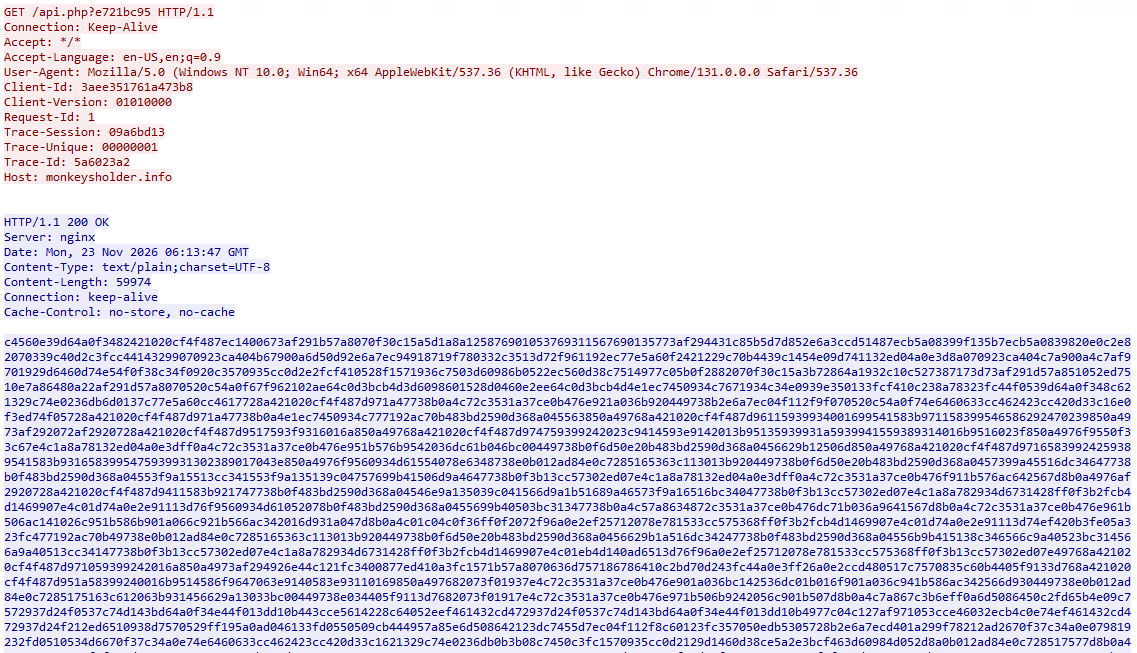
The figure below shows a PCAP capture of the C2 request used to retrieve Vinci RAT. The C2 response is hex-formatted and XOR-encrypted using a key derived from the Trace-Id header value, as described in the table above.
Figure 12 - PCAP capture of stager requesting Vinci RAT
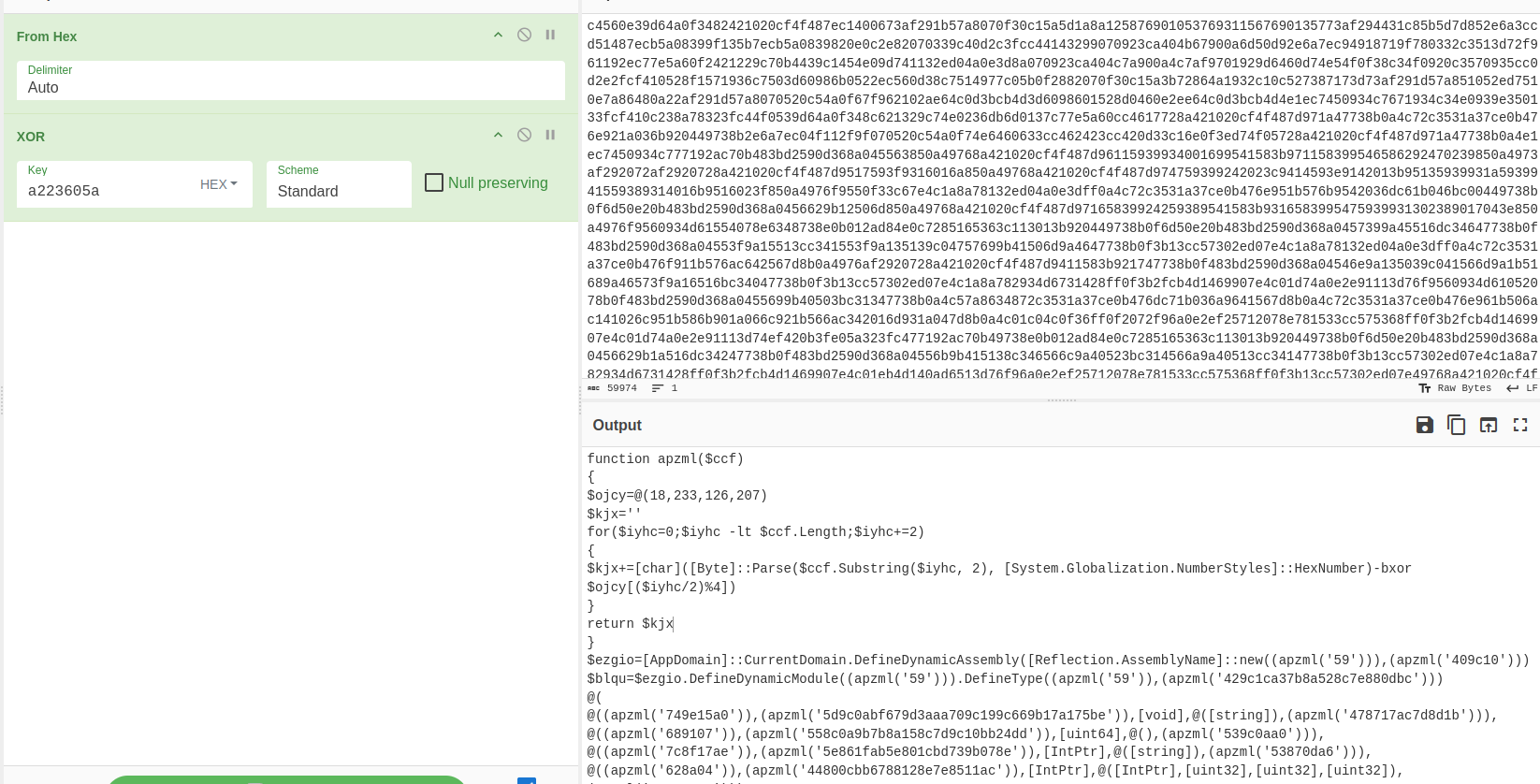
The following Python code derives the XOR key from the Trace-Id header value, 5a6023a2, shown in the previous figure. Using the derived XOR key, a223605a, to decrypt the C2 response in CyberChef reveals the Vinci RAT PowerShell payload.
On first execution, the Vinci RAT stager establishes persistence by creating and starting a scheduled task. The task action launches a process containing the previously described lightly obfuscated stager code, which then downloads, decrypts, and invokes the Vinci RAT PowerShell payload.
Figure 14 - Scheduled task with stager command
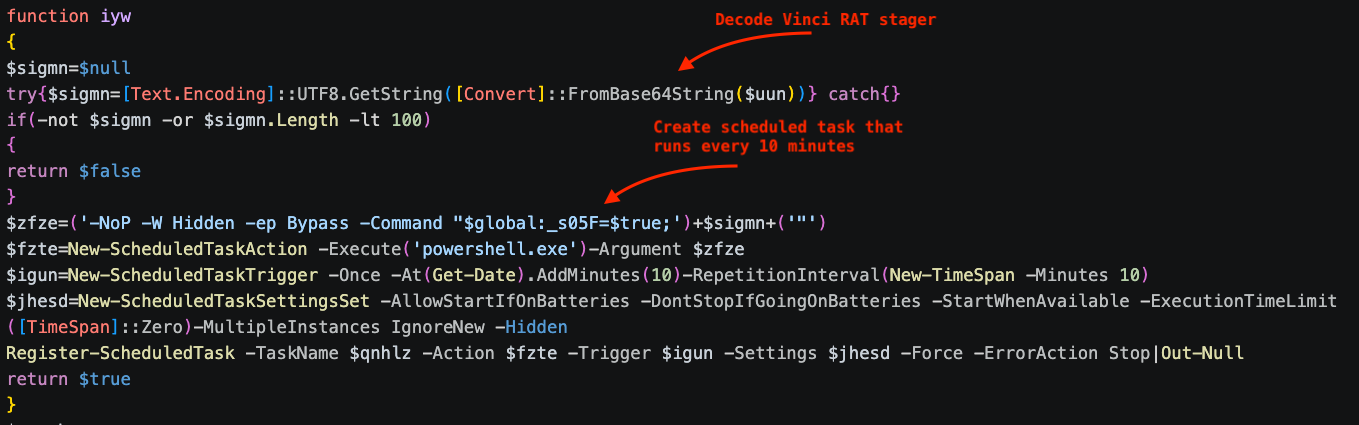
The method responsible for creating the stager scheduled task is shown in the next figure, which decodes the stager PowerShell from Base64 and configures the scheduled task trigger to run every 10 minutes.
Figure 15 - Decode Vinci RAT stager, create scheduled task for persistence
AMSI Bypass via Method Handle Pointer Swapping
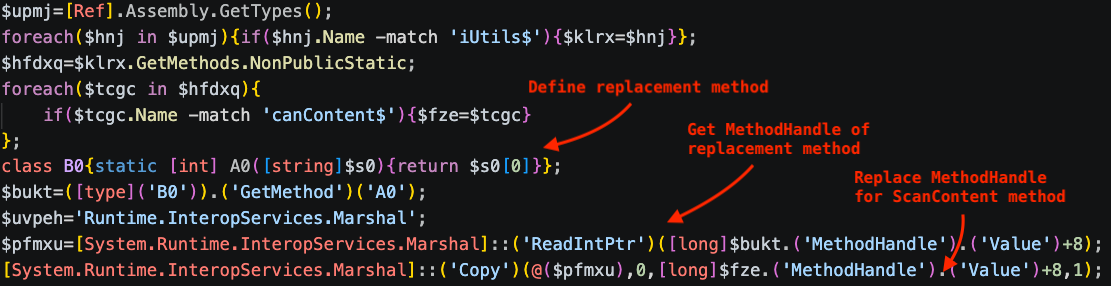
Throughout the PowerShell script, the malware uses a known AMSI bypass technique that replaces AMSI's ScanContent method's internal runtime handle pointer with its own, effectively disabling AMSI scanning within the process.
It begins by enumerating all types in the current assembly and matches the System.Management.Automation.AmsiUtils type using the regex pattern "iUtils$". It uses the regex pattern "canContent$" to identify the "ScanContent" method in that type, then defines a replacement method named "A0" inside a class named "B0". It retrieves the Value property from the replacement method's method handle and uses System.Runtime.InteropServices.Marshal::Copy to overwrite the Value property of ScanContent's method handle.
Figure 16 - AMSI bypass by swapping ScanContent method handle's Value property
Analysis of Vinci RAT
Vinci RAT is around 800 lines of PowerShell and has the following capabilities:
Fingerprinting: Collects computer name, username, Windows version, OS/process architecture, locale, time zone, uptime, installed security tooling, and active directory domain.
Privilege check: Checks whether it can create and delete a registry value under HKLM\Software.
Victim ID generation: Derives a victim identifier from the machine's MachineGuid (last 16 hexadecimal characters).
Remote shell: Runs C2-supplied commands through cmd.exe and relays standard output back to the C2.
Payload staging: Saves C2-supplied files under ProgramData by default.
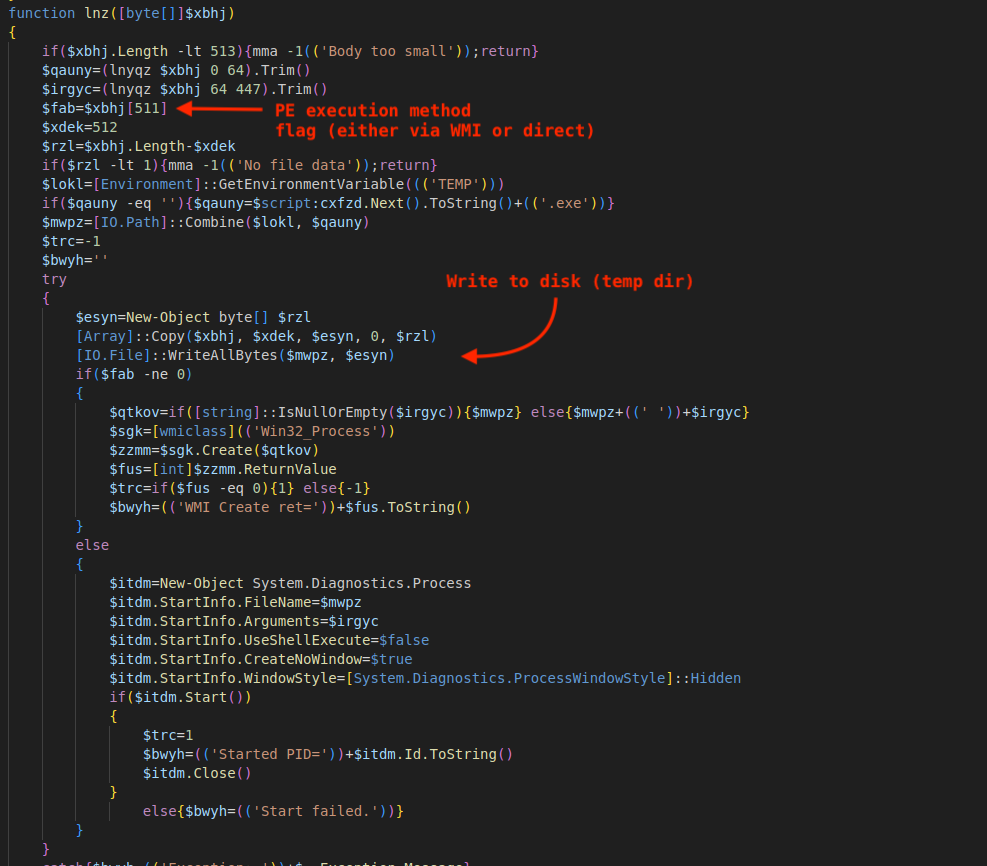
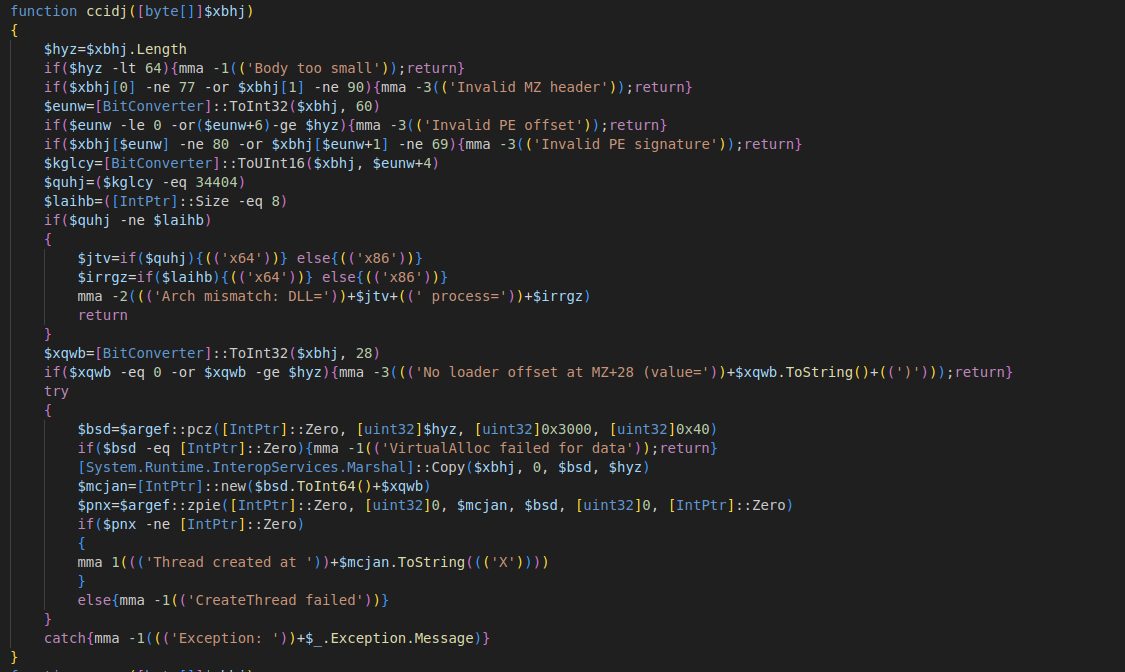
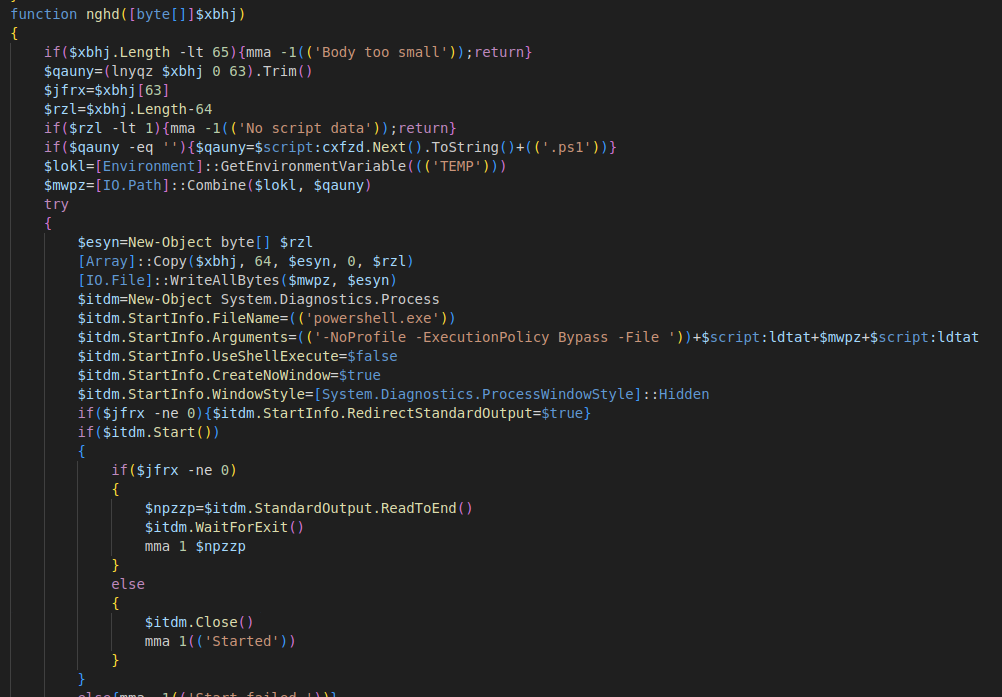
EXE execution: Depending on operator-specified flags, Vinci RAT can execute C2-supplied payloads using multiple methods: writing the payload to %TEMP% and launching it directly, launching it through WMI, or executing it in memory by allocating memory, writing the payload into that region, parsing the PE entry-point, and transferring execution to it via CreateThread.
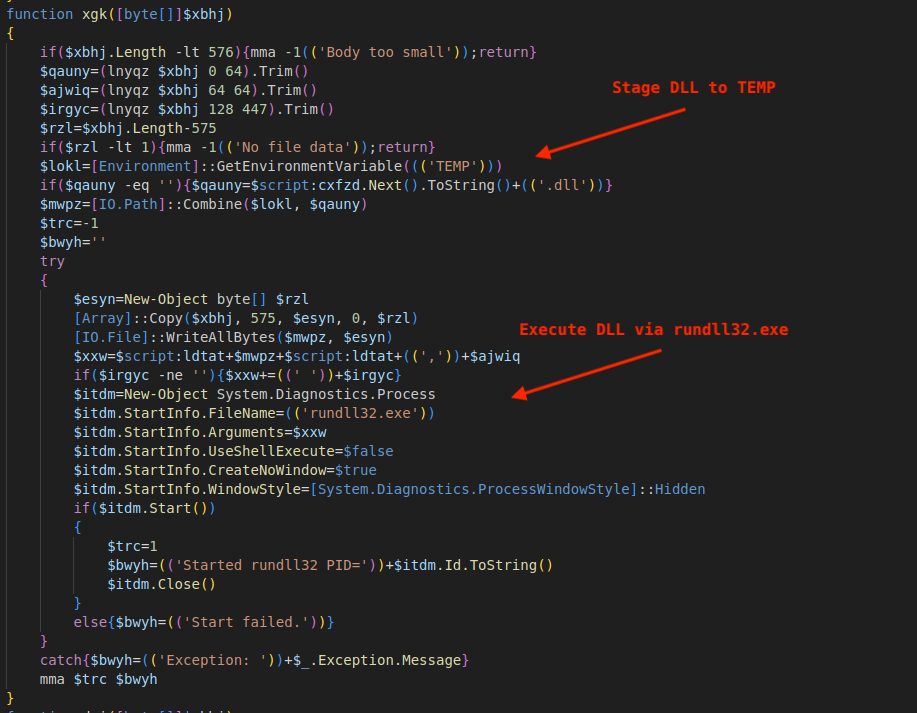
DLL execution: Runs DLLs via rundll32.exe or loads DLLs directly into the PowerShell process using LoadLibraryA.
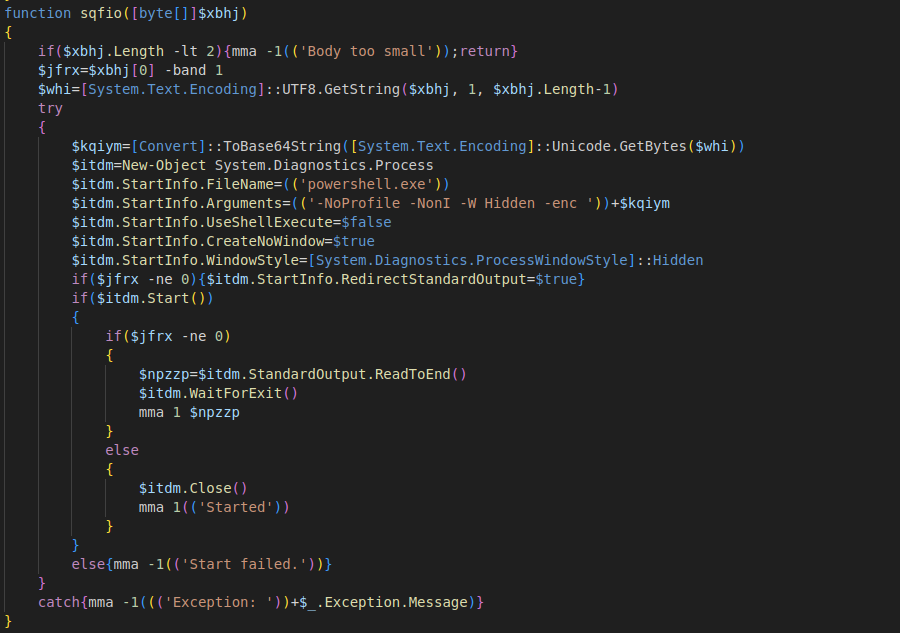
PowerShell execution: Runs C2-supplied scripts from disk or as Base64-encoded commands, with hidden windows and standard output capture.
Shellcode execution: Allocates PAGE_READWRITE memory, copies a C2-supplied shellcode byte array to it, changes protections of the memory to PAGE_EXECUTE_READWRITE, and executes the shellcode inside of a new thread within the current process context.
Reverse shell: Connects to an attacker-specified TCP address and binds stdin/stdout.
C2 Communication
The malware communicates over HTTP POST with the C2 endpoint hxxp://monkeysholder[.]info/index.php?<random-string> for registration, command retrieval, and result submission.
Instructs the C2 to terminate the session immediately after the current HTTP transaction
Security Software Discovery
Vinci RAT checks for the following security tools in sequence by looking for their installation directories. The exceptions are Microsoft Defender, which is identified through the DisableAntiSpyware registry value, and Microsoft Defender for ATP, which is identified through the Windows Advanced Threat Protection\Status registry path.
Microsoft Defender
Kaspersky
ESET
Avast
AVG
Bitdefender
McAfee
Trend Micro
Sophos
Norton
CrowdStrike
SentinelOne
Carbon Black
Cylance
Panda
F-Secure
Dr.Web
Microsoft Defender for Endpoint
EXE Execution
Depending on operator-specified flags, Vinci RAT can execute C2-supplied payloads using multiple methods: writing the payload to %TEMP% and launching it directly, launching it through WMI, or executing it in memory by allocating PAGE_EXECUTE_READWRITE memory, writing the payload into that region, parsing the payload for the offset stored in the DOS header at MZ + 28 (IMAGE_DOS_HEADER.e_res), and transferring execution to the resolved entry-point via CreateThread.
C2-supplied DLLs are staged in the victim's TEMP directory and executed using either rundll32.exe or LoadLibraryA. The figure below shows the routine responsible for the former.
Figure 19 - DLL execution (file-based)
PowerShell Execution
Vinci RAT supports execution of C2-supplied fileless and file-based PowerShell using the two command lines shown below:
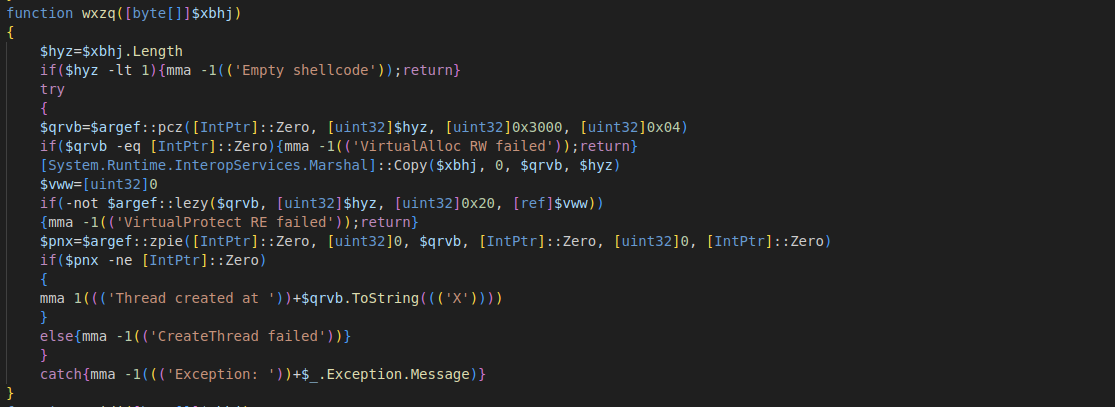
Vinci RAT executes shellcode by allocating a PAGE_READWRITE buffer via VirtualAlloc, copying the shellcode byte array into that buffer, changing the buffer protections to PAGE_EXECUTE_READ with VirtualProtect, and then calling CreateThread to transfer execution to the shellcode.
Figure 22 - Shellcode execution via CreateThread
Reverse Shell
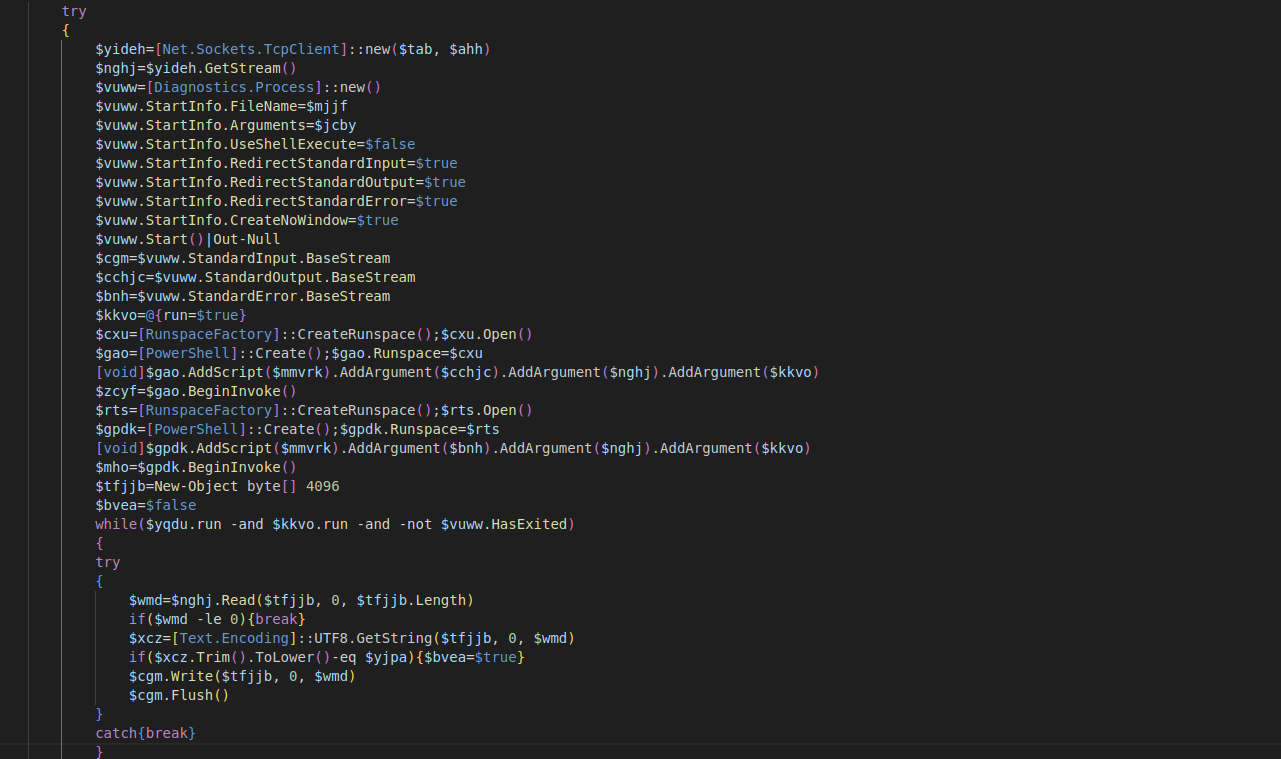
The reverse shell connects to a C2-specified host and port, launches cmd.exe /K chcp 65001 to configure the shell to use the UTF-8 character encoding, and redirects standard input and output over the connection, allowing threat actors to execute system commands interactively.
Figure 23 - Truncated view of reverse shell method
What did we do?
Our team of 24/7 SOC Cyber Analysts proactively isolated the affected host to contain the infection on the customer's behalf.
We communicated the details of the incident to the customer and assisted with remediation.
Despite Microsoft's malware review process, a malicious application named "Setup Assistant" was published in the Microsoft Store. The app is an obfuscated Electron-based backdoor that enabled C2-supplied PowerShell execution and led to the deployment of Vinci RAT, a PowerShell-based RAT capable of remote and reverse shell access, as well as file-based and fileless PowerShell, shellcode, DLL, and EXE execution.
AMSI bypasses continue to be used in PowerShell-based intrusions. Method handle pointer swapping against ScanContent is a strong behavioral signal that PowerShell activity is malicious, especially when observed alongside suspicious PowerShell command lines such as powershell.exe -NoProfile -NonInteractive -Command -, powershell.exe -NoProfile -NonInteractive -EncodedCommand, powershell.exe -NoProfile -ExecutionPolicy Bypass -File, or powershell.exe -NoProfile -NonI -W Hidden -enc.
Additional signals include scheduled tasks that run encoded or obfuscated PowerShell, C2 requests to paths such as /api.php, /index.php, /api/config, /api/update-status, and /api/telemetry, and custom HTTP headers such as Client-Id, Client-Version, Request-Id, Trace-Id, Trace-Session, and Trace-Unique.
Recommendations from the Threat Response Unit (TRU)
Microsoft Store availability should not be treated as proof that an app is safe. Enterprises should restrict Microsoft Store app installation through GPO, AppLocker, WDAC, or Intune, and require security review before approving unknown, low-adoption, or low-reputation apps.
Partner with a 24/7 multi-signal Managed Detection and Response (MDR) services provider for total attack surface visibility, 24/7 threat hunting and disruption, and rapid threat response to prevent attackers from spreading laterally through your environment.
The eSentire Threat Response Unit (TRU) is an industry-leading threat research team committed to helping your organization become more resilient. TRU is an elite team of threat hunters and researchers that supports our 24/7 Security Operations Centers (SOCs), builds threat detection models across the eSentire XDR Cloud Platform, and works as an extension of your security team to continuously improve our Managed Detection and Response service. By providing complete visibility across your attack surface and performing global threat sweeps and proactive hypothesis-driven threat hunts augmented by original threat research, we are laser-focused on defending your organization against known and unknown threats.