eSentire is a leader in Controlled Autonomy SecOps, protecting thousands of organizations across 35+ industries around the world. Founded in 2001, the company’s Controlled Autonomy SecOps operating model pairs agentic AI operatives with engineered human-judgment controls, delivering expert-depth security outcomes at machine speed without ceding accountability to opaque automation.
We provide sophisticated cybersecurity solutions for Managed Security Service Providers (MSSPs), Managed Service Providers (MSPs), and Value-Added Resellers (VARs). Find out why you should partner with eSentire, the Authority in Managed Detection and Response, today.
In late August 2026, eSentire's Threat Response Unit (TRU) identified an active device code phishing campaign distributed through web contact forms. In the campaign, threat actors posed as a procurement officer of a legitimate business. TRU is tracking the device code phishing kit used in the campaign as "GhostCode". The name reflects two characteristics observed during analysis: "Ghost" refers to GHOSTnet ASN activity observed during device enrollment and the hidden, obfuscated code within the HTML lure; "Code" refers to the kit's abuse of Microsoft device code authorization.
Device code phishing kits abuse the OAuth 2.0 device authorization grant flow to gain access to Microsoft accounts. Unlike traditional phishing kits, they require minimal effort to replicate the sign-in process. Victims are directed to Microsoft's legitimate sign-in page and prompted to enter an attacker-supplied user code, allowing the attacker to obtain authentication tokens for the victim's account.
Attack Chain Overview
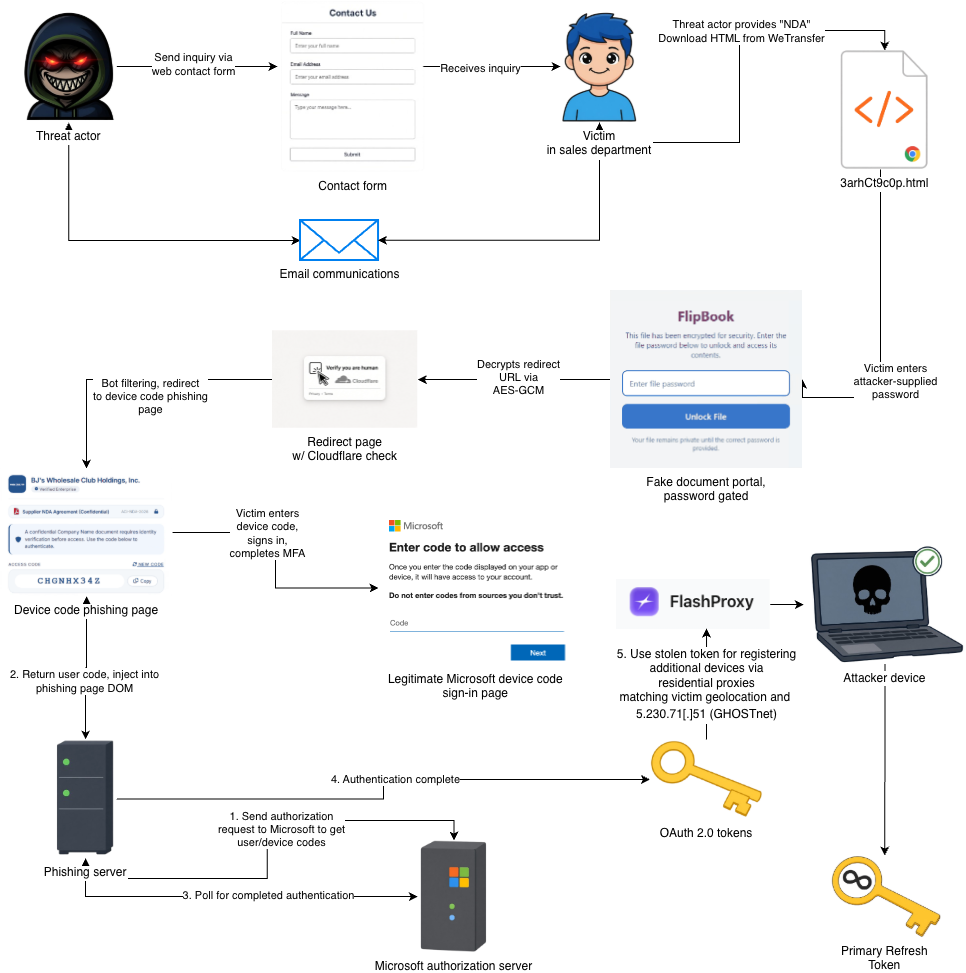
Threat actors initiated the attack by submitting a seemingly innocuous inquiry through Salesforce. After the sales team followed up, the threat actors replied that a subsequent email would be sent to "sign an NDA". The follow-up email contained a WeTransfer link to a password-gated HTML attachment.
When opened, the HTML file launched in the victim's browser and redirected to the device code phishing page. The page instructed the victim to copy a code and enter it into Microsoft's legitimate sign-in page for "authentication". After the victim signed in and completed MFA, the threat actors obtained authentication tokens and delivered a decoy NDA document to complete the loop. They then registered several devices, acquired long-living tokens, and harvested emails.
Figure 1 – GhostCode attack chain diagram
Contact Form Engagement
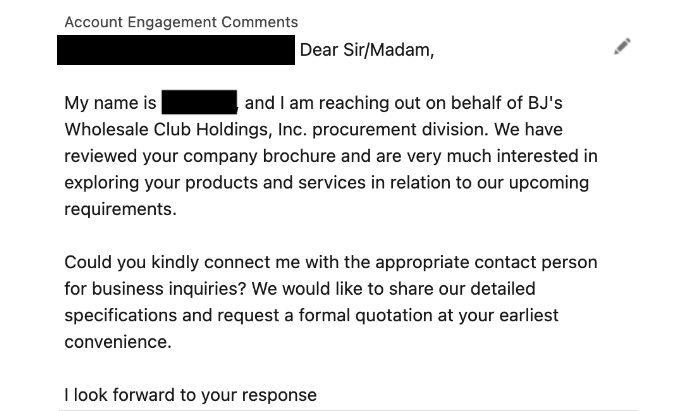
Threat actors posed as a procurement officer for BJ's Wholesale Club and initiated contact via a web sales contact form with a generic, benign message to establish a pretext for further communication.
Figure 2 – Threat Actor message to sales platform
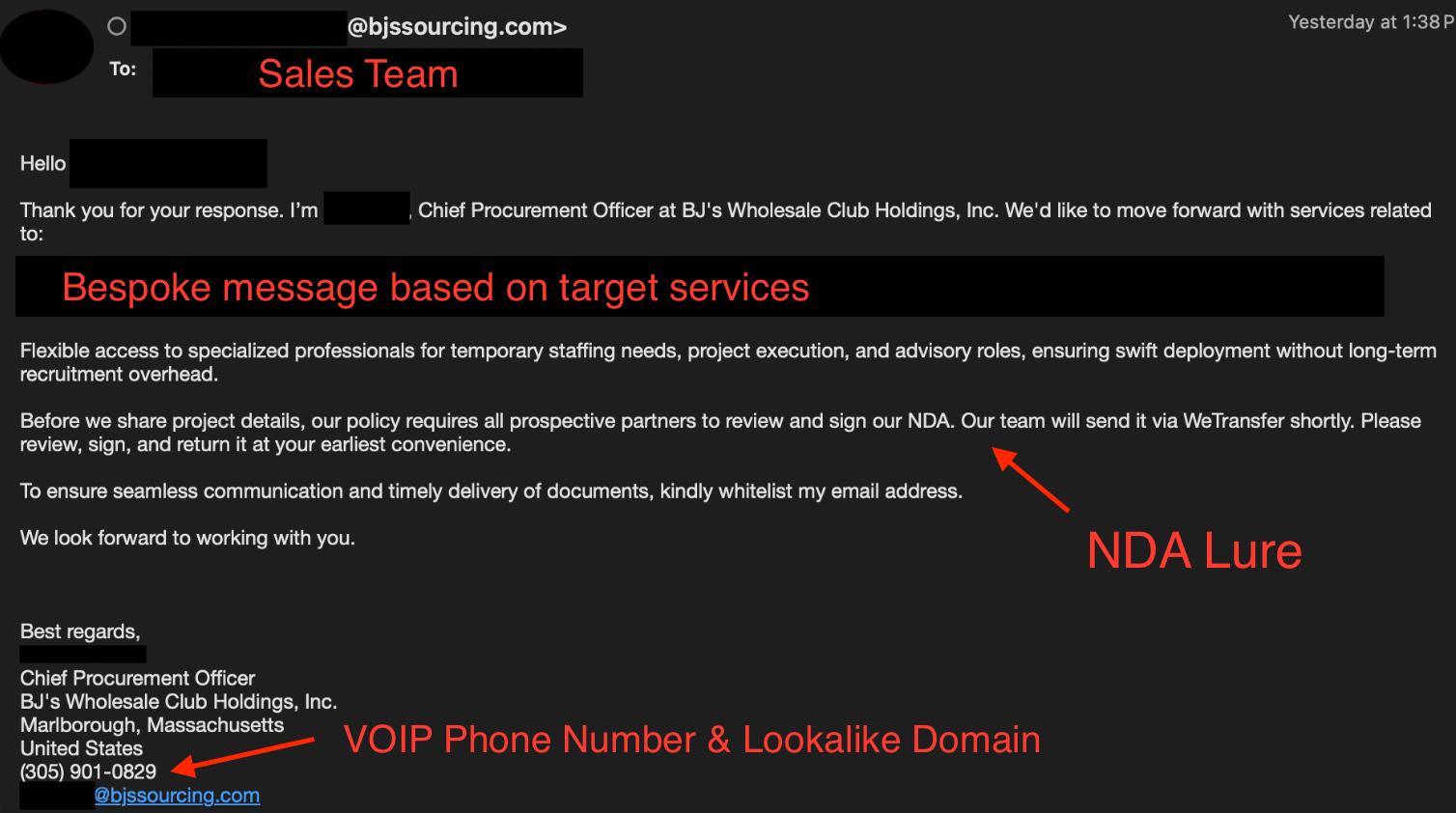
The lookalike domain, bjssourcing[.]com was registered 15 days prior to the outreach. TRU identified over 30 similar domains impersonating US-based distributors, manufacturers, warehousing, and other companies registered in August 2026, suggesting a possible broader ongoing campaign targeting service providers.
Example comparison of the sender domain observed in this case and similar impersonation target:
Field
bjssourcing[.]com
greenlightdlstribution[.]com
Impersonation Target
BJ's Wholesale Club
Green Light Distribution (wholesale alcohol distributor)
Registered
2026-08-17
2026-08-12
Registrar
PDR Ltd. d/b/a PublicDomainRegistry.com
PDR Ltd. d/b/a PublicDomainRegistry.com
MX
Zoho Mail (US region)
Zoho Mail (US region)
Notes
Mail only, no website
Mail only, no website
Note, the disposable email "jeremyarcher@voewo[.]com", used to register "greenlightdlstribution[.]com", is also tied to several other lookalike domains registered in August 2026. This pattern was observed under several other voewo[.]com personas as well. See the Indicators of Compromise section below for more information.
NDA-as-a-Lure
Following initial outreach, subsequent replies to the sales team utilized specific wording for the target organization (likely auto-generated) along with a Non-Disclosure Agreement lure.
Figure 3 – NDA Lure Pretext
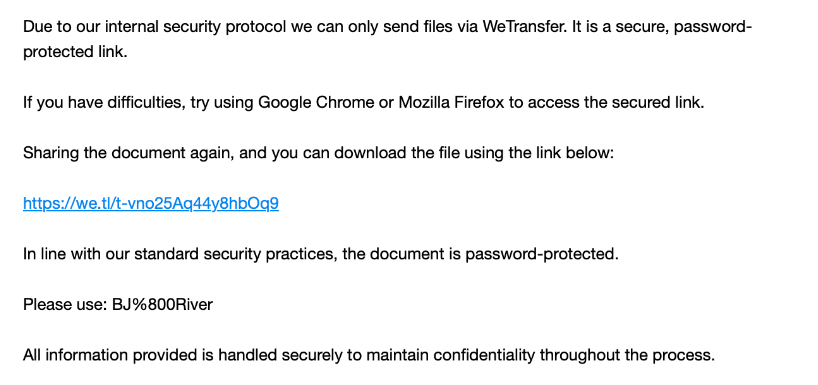
Finally, the victim received an email containing a WeTransfer link to a password-protected HTML file, along with the password needed to open it. The file is analyzed in the sections that follow.
Figure 4 – WeTransfer link to HTML file
GhostCode HTML Attachment Analysis
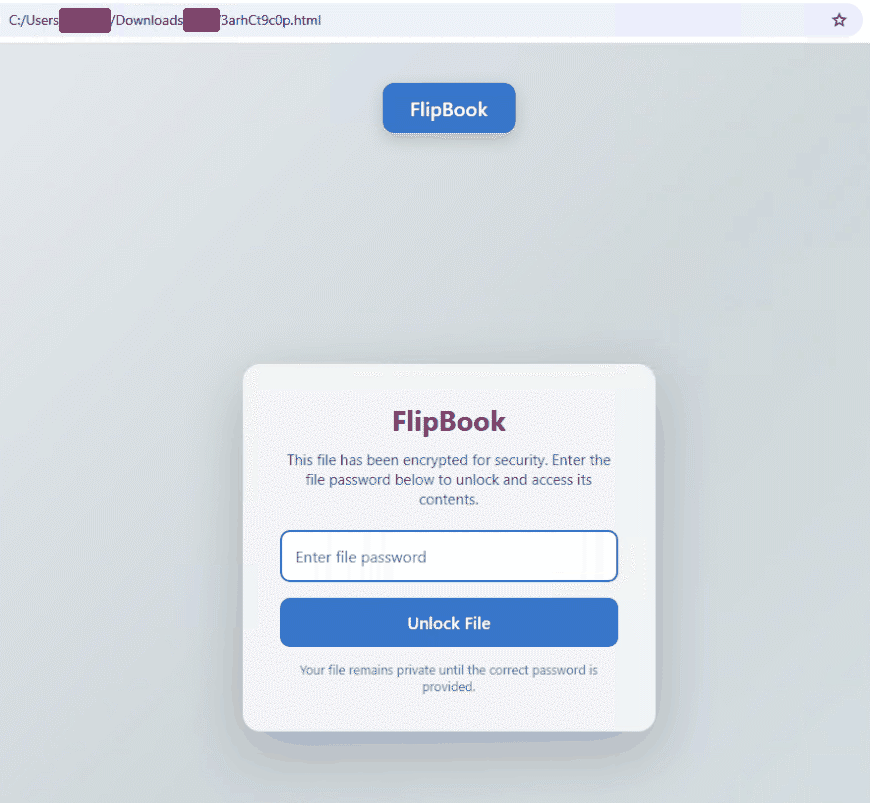
The HTML file, "3arhCt9c0p.html", is password-gated and masquerades as a document-sharing service named "FlipBook". What makes this lure interesting is not the social engineering element, but the use of three independent evasion layers, discussed further in depth in the sections that follow.
Figure 5 – The password-gated FlipBook HTML lure rendered in a web browser
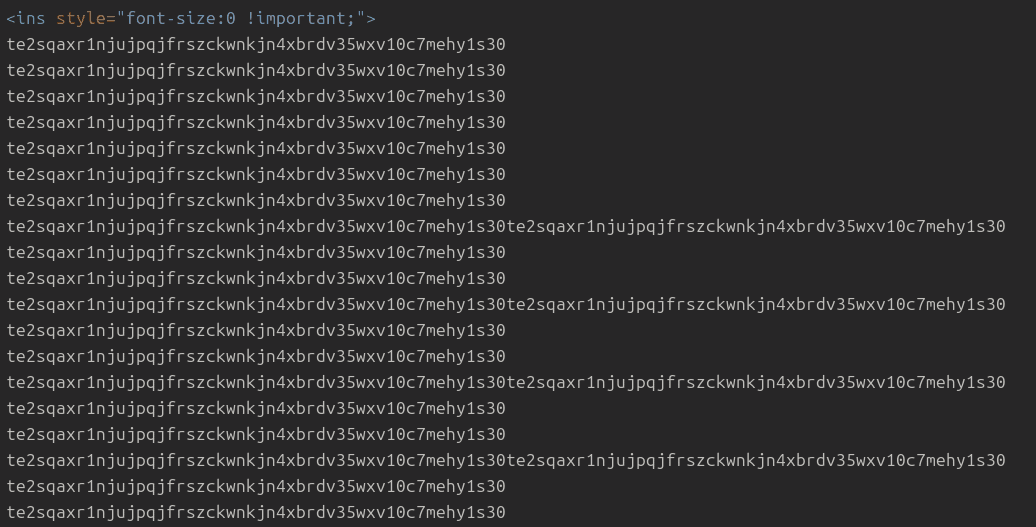
Layer 1: Junk Padding
The HTML file is 177 lines. Roughly 90 of those are real HTML. The rest - appearing before and after the visible markup - are junk padding. The same 50-character string repeats thousands of times throughout the HTML, serving to inflate the file size to slow scanning pipelines, pollute similarity hashing (every new campaign variant changes this string to get a unique hash), and bury the real content far from the start of the file.
Figure 6 – HTML junk padding obfuscation layer
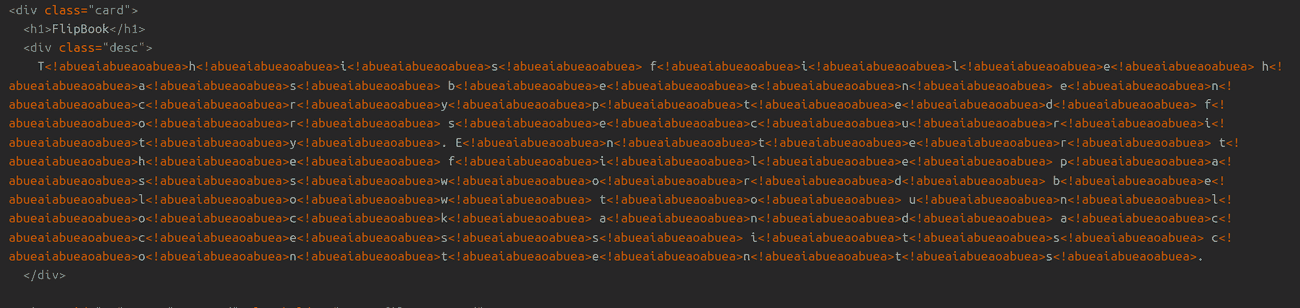
Layer 2: Character-Level HTML Comment Injection
Every visible character in the HTML content - headings, body copy, button labels - has HTML comments injected between individual characters. The rendered output in a browser is normal text, the raw HTML is simply garbled noise. This defeats regex-based phishing classifiers, NLP classifiers trained on extracted text, and automated screenshot-plus-OCR pipelines that re-serialize the DOM. The comment value (abueaiabueaoabuea) is long enough to be distinctive but contains no meaningful content.
Figure 7 – HTML comment obfuscation layer
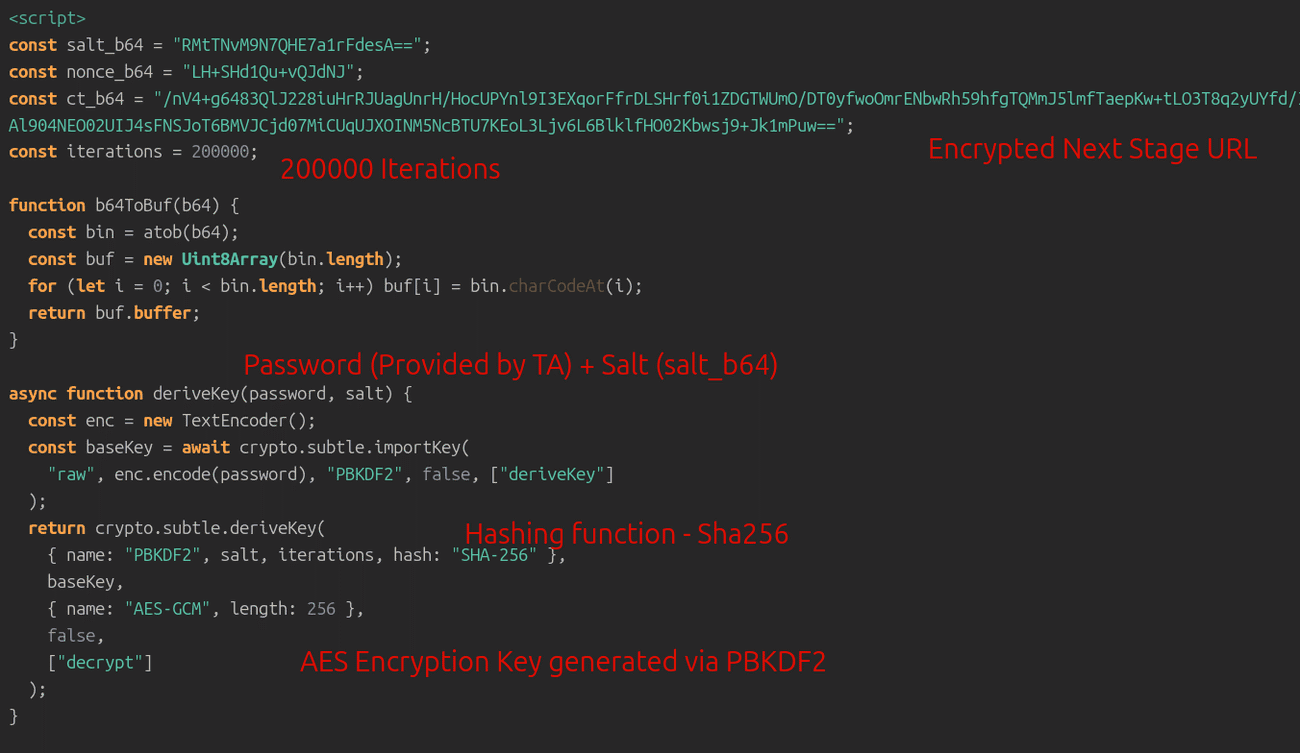
Layer 3: AES-256-GCM Encrypted Redirect URL
The actual payload - the redirect URL - is never present in plaintext anywhere in the file. It is decrypted via AES-256-GCM with the threat actor supplied password. This technique has also been observed in the EvilTokens phishing kit. In this case, however, the AES key is not generated server-side. Instead, it is derived client-side from a hard-coded salt and the threat actor-supplied password using PBKDF2-HMAC-SHA256. Until the correct password is entered by the victim, the next-stage phishing relay URL remains encrypted, no redirect occurs, and the destination is not exposed through DNS resolution, proxy logs, or sandbox telemetry.
Figure 8 – Derive key via hard-coded salt, attacker-supplied password, decrypt ciphertext via AES-256-GCM with hard-coded Nonce
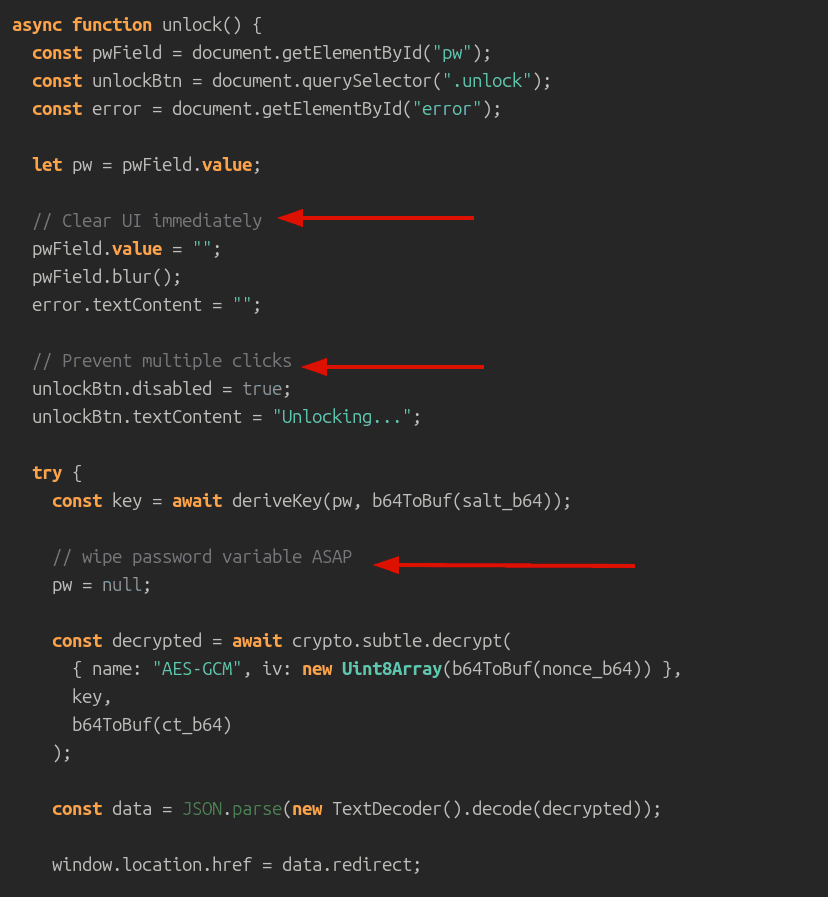
Decryption of the next stage redirect URL occurs entirely client-side in the browser using the Web Crypto API (crypto.subtle). The figure below shows the top-level function that derives the AES-256-GCM key, decrypts the ciphertext using a hard-coded nonce, and redirects the victim to the next-stage URL.
Figure 9 – Top-level function for key derivation, decryption, and redirection
The code snippet below shows the decrypted redirect URL. The redirect URL's path, "/scanna/<32-hex>/<64-hex>", resembles what appear to be MD5-length and SHA256-length hex digests - likely hashes of campaign parameters, e.g. victim email, campaign ID, timestamp, etc. This structure enables per-campaign tracking. Notably, a second distinct campaign URL path, "/scanna/file001//" was also observed, confirming the operator may have run multiple concurrent campaigns from the same infrastructure.
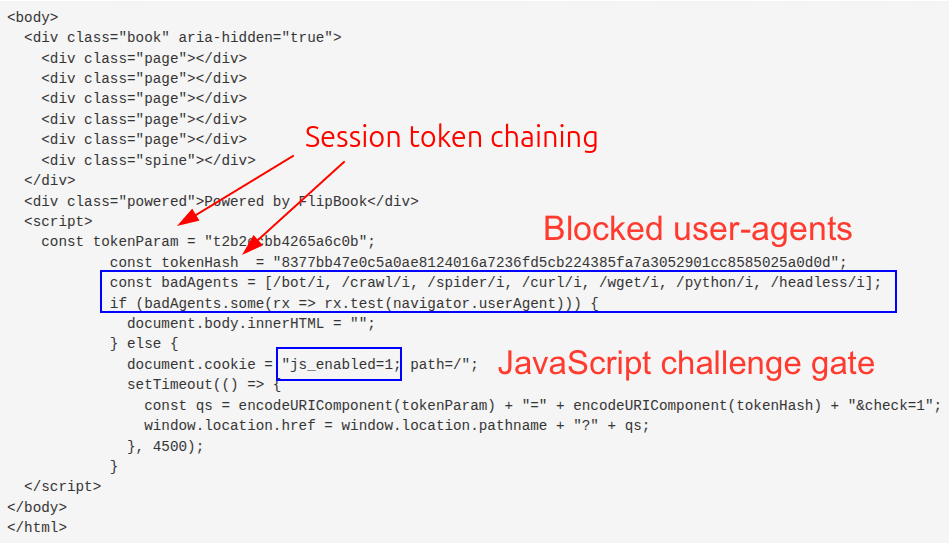
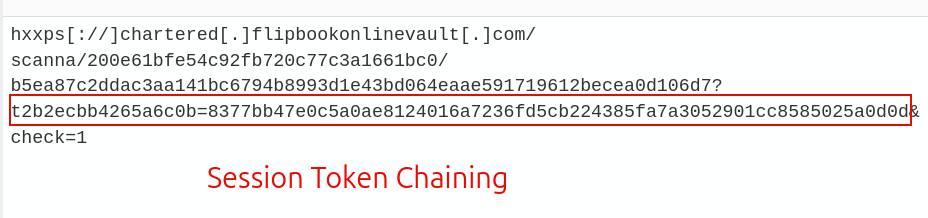
The decrypted redirect URL functions as a relay, bot-filtering layer, and campaign-tracking mechanism. On the first visit, it serves a JavaScript challenge that computes a hash of browser-observable state and redirects back to the same URL with an additional parameter. Headless browsers and basic HTTP crawlers that do not execute JavaScript are unable to generate the challenge token and are silently blocked.
Figure 10 – Code responsible for bot filtering via user-agent and JavaScriptFigure 11 – Session token set after passing bot checks
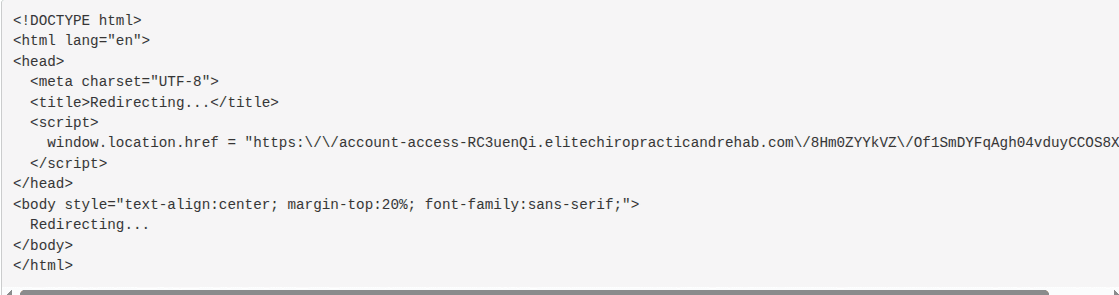
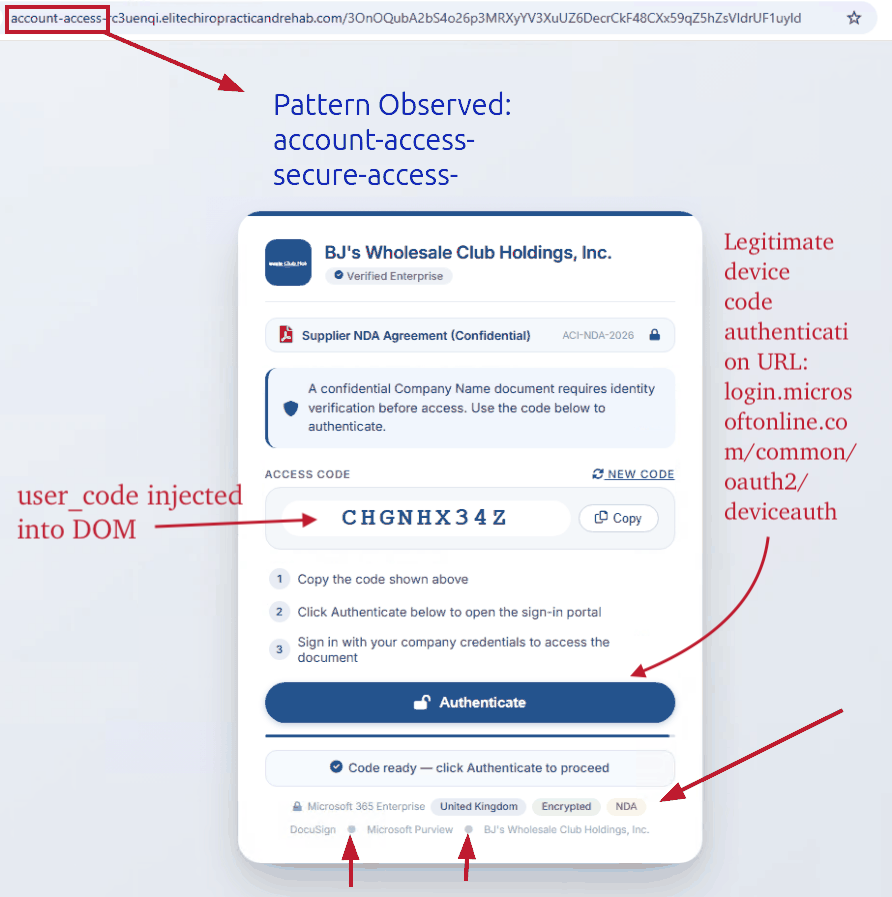
After the relay and JavaScript challenge, the victim is redirected to the core device code phishing server at "account-access-rc3uenqi.elitechiropracticandrehab[.]com" and is presented with a Cloudflare Turnstile challenge. The root domain appears to belong to a legitimate chiropractic clinic, suggesting the site's infrastructure was likely compromised. TRU uncovered additional OSINT evidence suggesting GhostCode operators may search breach dumps for site-owner credentials, which they then use in credential-stuffing attacks. Notably, the phishing kit was deployed under the subdomain, "account-access-rc3uenqi", to masquerade as an account access portal. All sub-domains in observed campaigns follow the format: *-access-[a-z0-9]{8}.compromised-site.com.
Figure 12 – Redirect to device code phishing page
Cloudflare Turnstile Gate
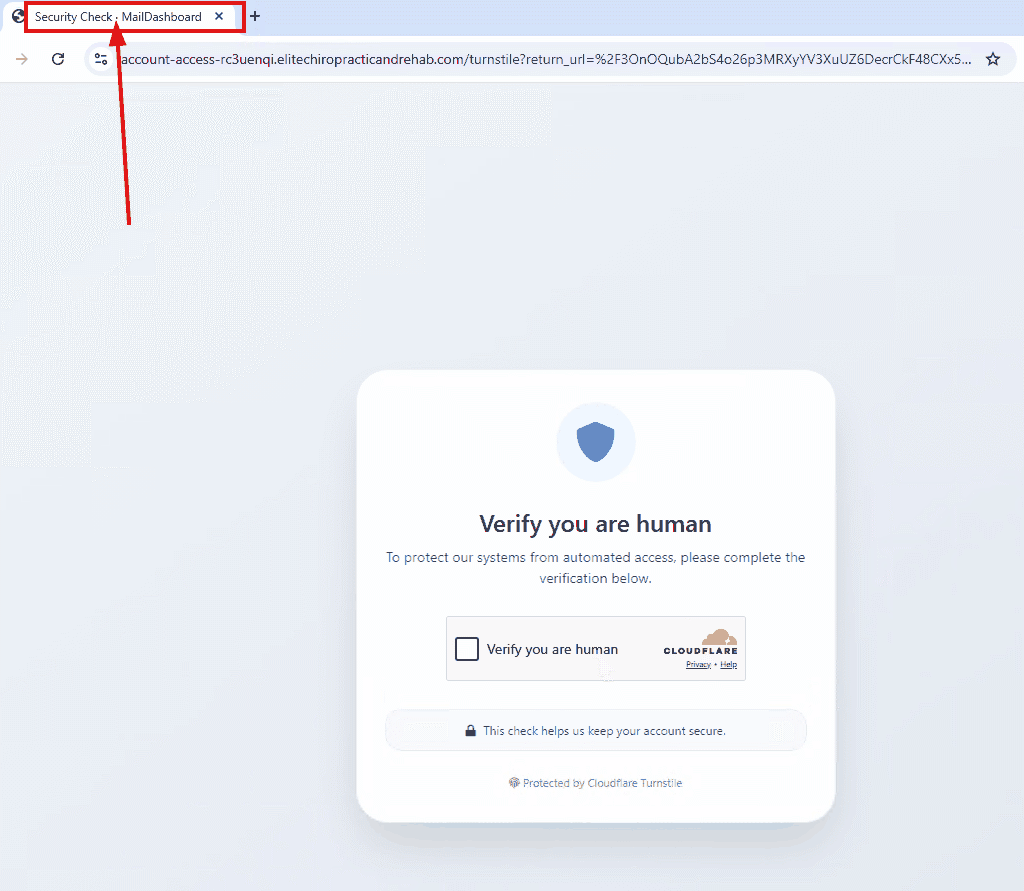
Before the victim reaches the device code phishing page, the session is routed through a Cloudflare Turnstile check at the following path. The page title is "Security Check · MailDashboard" rather than "elitechiropracticandrehab", giving the page a more legitimate appearance. The Turnstile widget itself is served by legitimate Cloudflare infrastructure.
This gate serves a dual purpose: filters automated crawlers, URL scanners, and headless browsers that might analyze the phishing page, and adds a trust signal for victims by presenting a familiar Cloudflare security check.
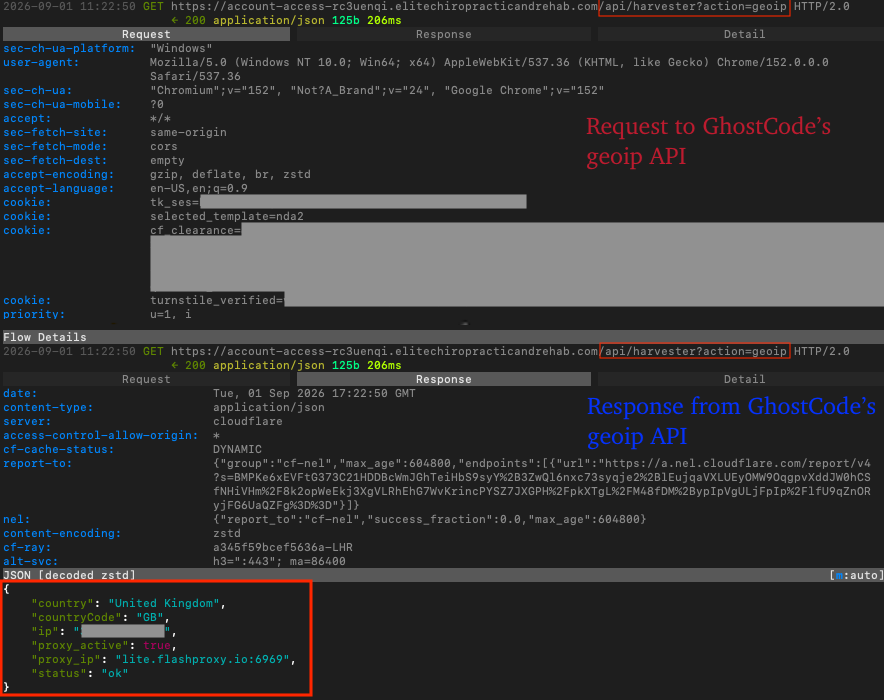
Beyond Turnstile, the phishing kit performs server-side filtering via the action=geoip API parameter to evaluate the victim's IP address and user-agent before deciding whether to proceed. Observed in the network flow - and consistent with common phishing kit patterns - a user-agent blocklist was enforced server-side, rejecting requests from user-agents containing the strings: bot, crawl, curl, python, headless, selenium, wget, scrapy, phantomjs, and go-http-client.
Figure 13 – Cloudflare Turnstile security gate served before the device code phishing page
Device Code Phishing Page
After passing the Turnstile challenge, the victim is redirected to a polished "document portal" that functions as the device code phishing page. The page appears to have been built with AI-assisted tooling, based on its use of common AI-generated UI patterns: the Inter font, Font Awesome icons, a standard Material Design blue color, centered flexbox layout, rounded corners, drop shadows, and SaaS-style footer labels separated by middle dots.
How the Phishing Page Works
Microsoft's documentation describes how RFC 8628 is implemented in Microsoft device code flows in their article, Microsoft identity platform and the OAuth 2.0 device authorization grant flow. This flow, also known as "OAuth 2.0 Device Authorization Grant", was designed for legitimate scenarios where a device cannot easily support a full browser-based login flow, such as smart TVs. In legitimate use cases, a device displays a user_code that the user enters on a separate browser-capable device to complete authentication.
GhostCode abuses this flow by acting as the OAuth client, such as a Smart TV, and tricking the victim into completing the authentication process on the attacker's behalf:
1. The victim's browser sends a request to the phishing backend to perform a GeoIP lookup. The phishing kit exposes the API query parameter /api/harvester?action=geoip to look up the victim's external location and activate a proxy through FlashProxy[.]io, a residential/rotating proxy provider. This allows attacker traffic to appear geographically aligned with the victim during subsequent Microsoft API interactions.
Figure 14 – GeoIP API request to phishing server to create phishing proxy matching geolocation
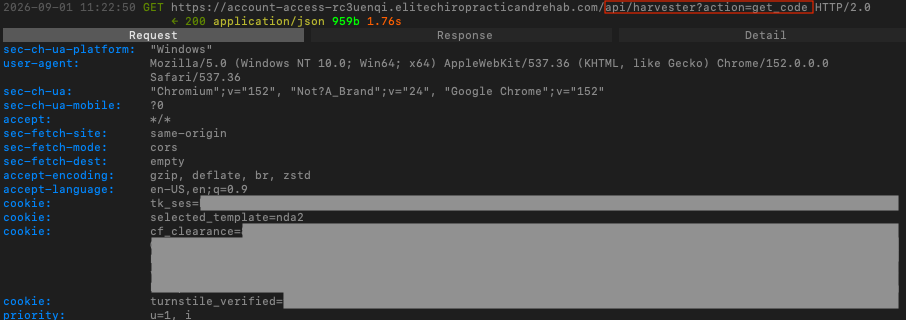
2. The victim's browser initiates the phishing process. The victim browser then sends an API request to the phishing server's backend via API query parameter: /api/harvester?action=get_code to instruct the phishing server to send the device authorization request.
Figure 15 – Request to phishing server to get the user_code for DOM injection
3. The phishing server now acts as an OAuth client by sending the device authorization request, and notably, uses the specific App ID, 29d9ed98-a469-4536-ade2-f981bc1d605e (Microsoft Authentication Broker App) in this request:
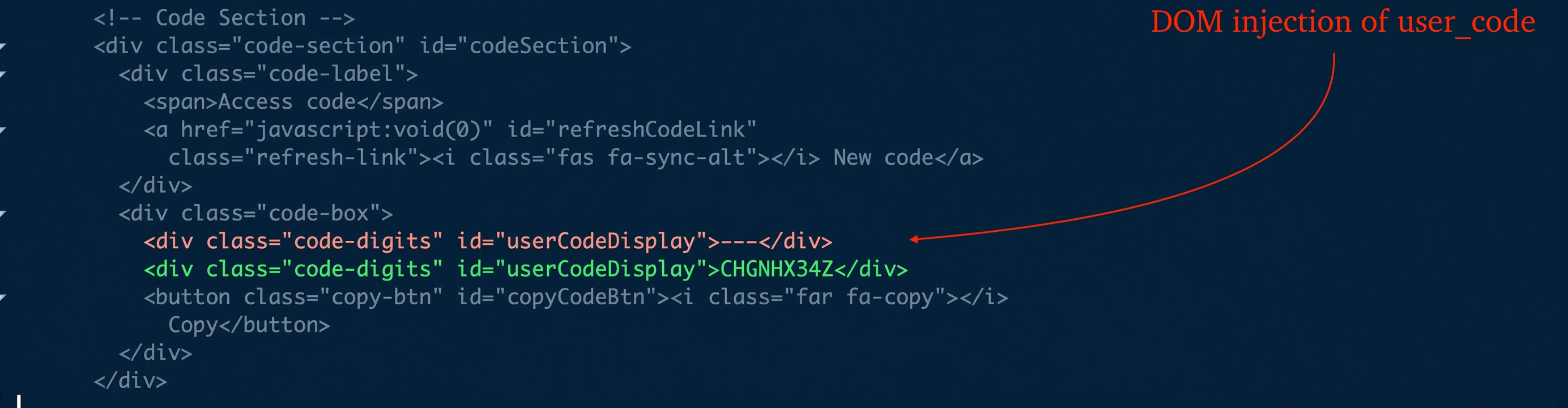
4. The phishing server parses Microsoft's authorization response and injects the user_code into the DOM. Microsoft's authorization server returns both a user_code and a device_code. The phishing kit injects the user_code into the device codephishing page for the victim to enter during device authentication; in this example, that code is CHGNHX34Z. The device_code is retained for later use in subsequent polling to check whether authentication has completed.
Figure 16 – DOM injection of user_codeFigure 17 – AI-generated device code phishing page with injected user_code
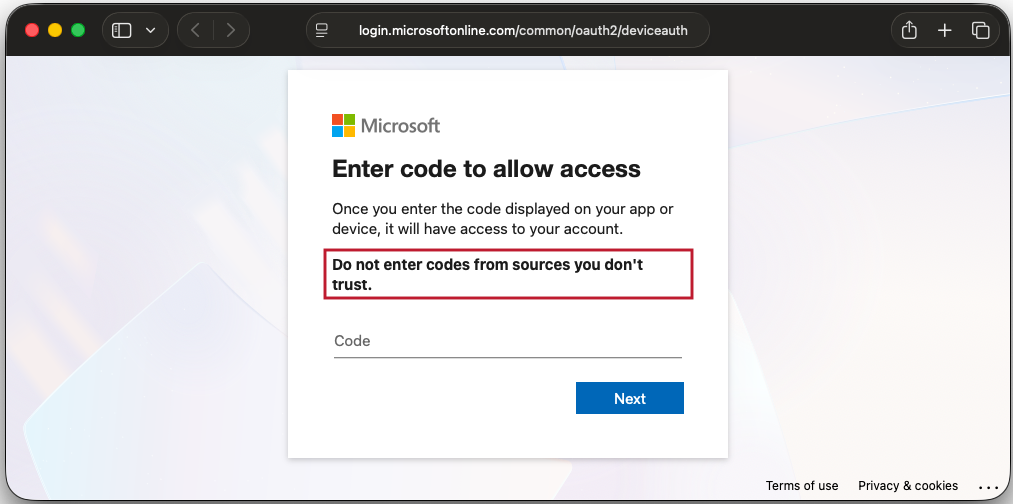
5. The victim clicks the "Authenticate" button in the device code phishing page, causing their browser to redirect to the legitimate Microsoft sign-in page for device code authorization. The victim enters the phishing-server-supplied user_code and goes through the normal sign-in process, including MFA.
Figure 18 – Redirect to legitimate device code sign-in page
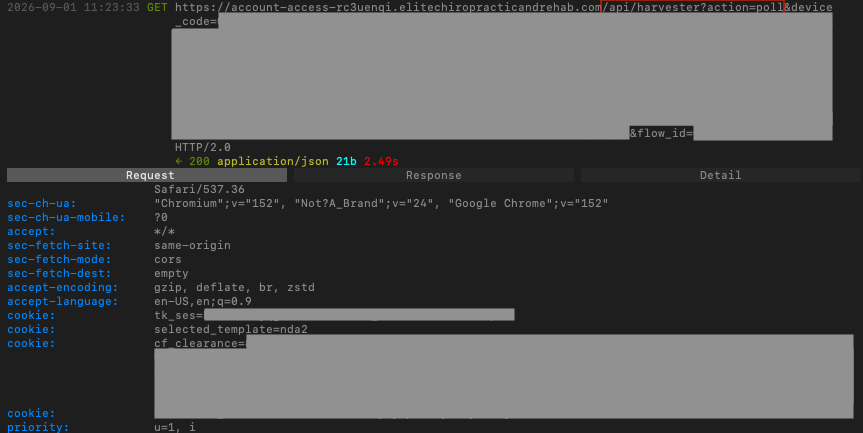
6. The victim's browser instructs the phishing server to poll and hands it the device_code. The victim's browser continuously sends requests to the phishing server for polling purposes via API parameter: /api/harvester?action=poll, which instructs the phishing server's backend to check whether device enrollment has succeeded. The phishing server's backend returns a status in JSON format, e.g. {"status": "pending"} for a pending enrollment.
Figure 19 – Browser sending a poll request for phishing server backend to check authentication status
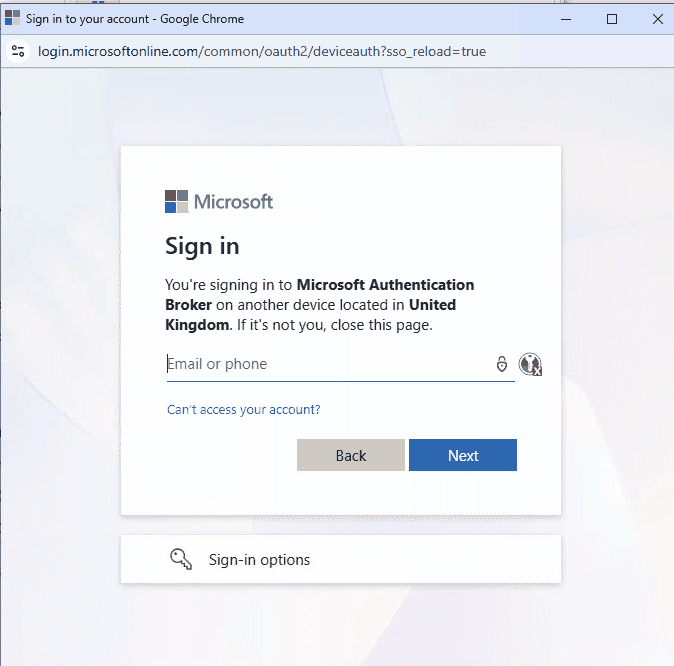
7. The victim hands over the keys. In the sign-in process, the victim is shown the form below, with matching geographic location, and goes through the normal sign-in process, including MFA completion.
Figure 20 – Microsoft Authentication Broker consent prompt after MFA completion
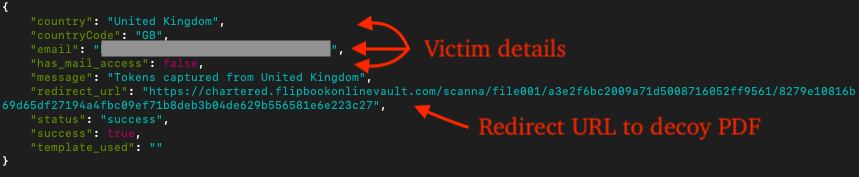
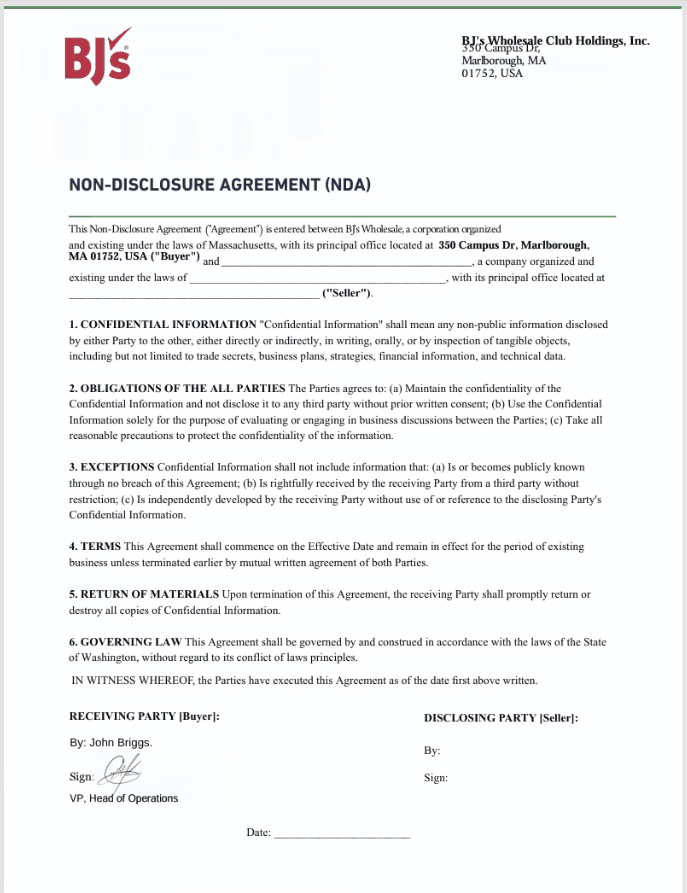
8. Serving the decoy NDA document. After enrollment completes, the phishing server returns details about the compromised account and a redirect URL that sends the victim to a decoy NDA document, reducing suspicion that the interaction was a phishing attempt.
Figure 21 – Response from the phishing server after authentication completesFigure 22 – BJ's Wholesale NDA decoy PDF after authentication completes. The document is a convincingly formatted NDA on BJ's Wholesale letterhead, pre-signed by an attacker-fabricated signatory.
Post-Compromise Activity
Token abuse began at 17:25:57Z - five seconds after successful device code authentication.
Immediate Token Use (17:25:57Z - 17:27:10Z)
Threat actors issued nine successful API calls using the stolen token across a 78-second period. The first request used the spoofed user-agent, "Microsoft Office/16.0 (Windows NT 10.0; Microsoft Outlook 16.0.17425; Pro". All subsequent requests used python-requests/2.34.2.
Resource
Resource ID
Purpose
Microsoft Intune Enrollment
d4ebce55-015a-49b5-a083-c84d1797ae8c
MDM enrollment - succeeded
Device Registration Service
01cb2876-7ebd-4aa4-9cc9-d28bd4d359a9
Azure AD device registration - 3 devices
Windows Azure Active Directory
00000002-0000-0000-c000-000000000000
Directory access
Microsoft Graph
00000003-0000-0000-c000-000000000000
Data access via Primary Refresh Token
Three Devices Registered in 78 Seconds
The table below describes three distinct device registrations completed between 17:26:06Z and 17:27:09Z - all automated and all via the stolen device code token.
Device ID
Registered at
Resource
4e537622-2514-48b8-84ed-0139549cfab0
17:26:20Z
Windows Azure Active Directory
6c290bcc-62d3-40bd-a774-816109af6729
17:26:45Z
Windows Azure Active Directory
5e83a216-f67e-43b8-a129-f67666a001dd
17:27:09Z
Windows Azure Active Directory + Intune Enrollment
Each device was registered via a Device Registration Service "unbound" call, then immediately used in a "bound" call to acquire tokens for Azure AD and Microsoft Graph. Registering three devices from a single stolen token maximizes persistence options - disabling one does not revoke the others.
The following device names were identified in Entra audit logs for each of the three devices. Note, a1123aab is the first eight characters of the victim's tenant ID and the -p01/-p02 suffix are an incrementing retry counter. For example:
At 17:26:24Z, just 32 seconds after the initial device code authentication success, a sign-in to Microsoft Graph was recorded with Incoming token type: primaryRefreshToken. The attacker obtained a Primary Refresh Token (PRT) for the victim's account.
A PRT is one of the most powerful credentials in a Microsoft identity environment. It enables Single Sign-On to any resource in the tenant without re-authentication, persists for up to 14 days by default, and is normally bound to a device. Obtaining a PRT via device code abuse gives the threat actors essentially SSO-equivalent access to the victim's entire M365 environment for the PRT's lifetime - including any service not explicitly protected by a Conditional Access policy requiring a compliant device.
Sub-Minute Attack Timeline
The table below lists the complete attack timeline, from device code authentication to the final device being registered. The final Intune enrollment at T+78s completed successfully before containment began.
Elapsed
Time (UTC)
Event
Device ID
T+0s
17:25:52Z
Device code auth success; token issued
-
T+5s
17:25:57Z
First token use: Intune Enrollment (UA: Microsoft Office/16.0)
-
T+14s
17:26:06Z
Device Registration Service call #1
-
T+28s
17:26:20Z
Device #1 registered (4e537622)
4e537622
T+32s
17:26:24Z
Microsoft Graph via Primary Refresh Token
4e537622
T+36s
17:26:28Z
Device Registration Service call #2
-
T+53s
17:26:45Z
Device #2 registered (6c290bcc)
6c290bcc
T+60s
17:26:52Z
Device Registration Service call #3
-
T+77s
17:27:09Z
Device #3 registered (5e83a216)
5e83a216
T+78s
17:27:10Z
Intune enrollment of 5e83a216 - Success
5e83a216
Residential Proxy Rotation
Every successful request rotated to a fresh IP address (likely via FlashProxy[.]io) matching the victim's geolocation. Eight of the nine came from UK residential ISPs; the final Intune enrollment of 5e83a216 came from Frankfurt, Germany (ASN 12586, GHOSTnet GmbH):
Time
IP
Location
ASN
ISP
17:25:57Z
82.33.39[.]74
Thatto Heath, St Helens
5089
Virgin Media
17:26:06Z
151.225.227[.]193
Enfield, Greater London
5607
BT/EE
17:26:20Z
176.253.248[.]175
Woodley, Stockport
5607
BT/EE
17:26:24Z
94.9.97[.]142
Carluke, South Lanarkshire
5607
BT/EE
17:26:28Z
86.132.13[.]219
Carlton-In-Lindrick, Nottinghamshire
2856
BT plc
17:26:45Z
81.96.174[.]54
Flitwick, Central Bedfordshire
5089
Virgin Media
17:26:52Z
90.215.55[.]70
Kilsyth, North Lanarkshire
5607
BT/EE
17:27:09Z
92.40.47[.]84
London, Greater London
206067
Hyperoptic
17:27:10Z
5.230.71[.]51
Frankfurt Am Main, DE
12586
GHOSTnet GmbH
Post-revocation retry IPs (all failures, errors 50173/135011) expanded to additional UK residential ISPs: Zen Internet (ASN 5378), Mailbox Internet (ASN 5482), and residential blocks in Stoke-On-Trent, Walsall, Coventry, Brierley Hill, Greenham, and Ballymoney - spanning England, Scotland, and Northern Ireland.
This is deliberate on two levels. First, the Microsoft deviceauth page explicitly discloses the device code request's origin to the victim: the page shown to the victim read "You're signing into Microsoft Authentication Broker on another device located in United Kingdom." By routing the device code request through a UK IP, the attacker ensured this geolocation matched the victim's own country, adding a legitimacy signal at exactly the moment the victim might have doubted. Second, UK exit nodes blend with the victim's legitimate sign-in geography, defeating Conditional Access policies that flag impossible travel or unfamiliar countries. Each request coming from a different IP also prevents IP-reputation-based blocking from affecting the session.
What did we do?
eSentire's TRU identified the campaign through anomalous Entra non-interactive sign-in log analysis, which surfaced python-requests/2.34.2 calls against Microsoft resources within seconds of a device code authentication event. Upon confirmation of compromise, we:
Revoked the compromised token grant.
Reset the victim account credentials.
Disabled all three attacker-enrolled devices from the Entra device management portal.
Developed detection coverage including the KQL hunting query below.
Notified the customer organization and provided a full timeline of attacker activity.
What can you learn from this TRU Positive?
MFA does not protect against device code phishing. The token carries the MFA claim forward. Every subsequent attacker API call - across 9 successful non-interactive sign-in events - passed MFA checks without re-authentication. Organizations that have deployed MFA and consider themselves protected against token theft are specifically the intended victims.
The attack window is narrow. GhostCode completed three device registrations and obtained a Primary Refresh Token in 78 seconds. Organizations relying on manual detection will likely respond after persistence is established.
GhostCode is undocumented. It shares post-auth objectives with Storm-2372 and uses AES-GCM gated HTML attachments as seen in EvilTokens, but the PBKDF2 password-derived key, three-layer obfuscation stack, python-requests user agent, and targeted BEC delivery are not documented in any public reporting.
Intune enrollment outlives token revocation. The enrolled device record persists in the tenant until explicitly removed, regardless of token status.
Recommendations from the Threat Response Unit (TRU)
Restrict device code authentication flow via Conditional Access. Create a policy that blocks deviceCode authentication for all users except those who genuinely require it (specific Azure DevOps service accounts, IoT provisioning workflows). For most organizations, device code auth should be disabled entirely for end users.
Monitor Device Registration Service activity. Alert on multiple device registrations originating from the same non-interactive sign-in session, or any device registration associated with a python-requests user-agent. Three device registrations in 78 seconds is not a legitimate provisioning workflow.
Audit Entra enrolled devices for the kit naming pattern. Query the Entra device management portal for devices matching the pattern [firstname]-[lastname]-[companydomain]-[hexstring]. Devices registered in a short burst from the same session are candidates for attacker enrollment.
Deploy the following KQL hunting query against Entra SigninLogs:
let DeviceCodeAuths = SigninLogs
| where TimeGenerated > ago(1d)
| where AuthenticationProtocol == "deviceCode"
| where ResultType == 0
| project DeviceCodeTime=TimeGenerated, UPN=UserPrincipalName, DeviceCodeIP=IPAddress;

let PythonRequests = SigninLogs
| where TimeGenerated > ago(1d)
| where UserAgent contains "python-requests"
| project PyTime=TimeGenerated, UPN=UserPrincipalName, PyIP=IPAddress,Resource=ResourceDisplayName, Status=ResultDescription;

DeviceCodeAuths
| join kind=inner PythonRequests on UPN
| where abs(datetime_diff('minute', DeviceCodeTime, PyTime)) <= 10
| project DeviceCodeTime, PyTime, UPN, DeviceCodeIP, PyIP, Resource, Status
| order by DeviceCodeTime desc
The eSentire Threat Response Unit (TRU) is an industry-leading threat research team committed to helping your organization become more resilient. TRU is an elite team of threat hunters and researchers that supports our 24/7 Security Operations Centers (SOCs), builds threat detection models across the eSentire XDR Cloud Platform, and works as an extension of your security team to continuously improve our Managed Detection and Response service. By providing complete visibility across your attack surface and performing global threat sweeps and proactive hypothesis-driven threat hunts augmented by original threat research, we are laser-focused on defending your organization against known and unknown threats.